

A lead fills in your enquiry form on Friday evening. Someone’s meant to call on Monday. Monday turns out to be chaos, nobody calls, and by Wednesday that lead has booked a demo with a competitor who replied in ten minutes.
That’s the quiet cost of running customer conversations through spreadsheets, WhatsApp threads and good intentions. Even decent customer relationship management software only holds what people remember to type in. AI CRM software changes the deal: it captures activity on its own, flags the leads worth chasing and reminds reps about the follow-up they were about to forget.
No surprise, then, that businesses are looking hard at it. Salesforce’s State of Sales 2026 report found that sales teams named AI and AI agents their top growth tactic for the year.
This guide explains how these systems work, which features matter, what the benefits look like in practice, how six popular platforms compare, and how to choose and set one up without creating a mess.
Table of Contents
What Is AI CRM Software?
AI CRM software is a customer relationship management (CRM) platform with artificial intelligence built in. It stores customer data like any CRM, then uses machine learning and language models to capture activity automatically, score leads, predict deal outcomes and suggest what to do next.
Think of it as a regular CRM that finally does some of its own paperwork. An AI-powered CRM reads emails, call notes and website behaviour, tidies the records and spots patterns no rep has time to find by hand. Then it turns those patterns into decisions: which deal is slipping, which customer’s about to go quiet, who deserves a call before lunch.
Collecting comes first: every email, form fill, ticket and meeting lands in one customer record. Analysis comes second. Better decisions are the point.
AI CRM software is a CRM platform that uses machine learning, natural language processing and predictive models to capture customer data automatically, score leads and suggest next actions. The main difference from a traditional CRM is how much work it does on its own instead of waiting for someone to type it in.
How Does It Differ From Traditional CRM?
A traditional CRM is a filing cabinet with good search. The AI version is the same cabinet with an assistant tapping you on the shoulder.
| Traditional CRM | AI-enabled CRM |
| Manual data entry | Automated data capture |
| Basic reporting | Predictive insights |
| Manual follow-ups | Intelligent follow-up suggestions |
| Fixed workflows | Adaptive automation |
| Manual lead prioritisation | AI-assisted lead prioritisation |
None of this makes the older approach useless. A five-person team with twenty live deals can run happily on a plain CRM.
How Does It Work Behind the Scenes?
Five layers do the heavy lifting, and each feeds the next.
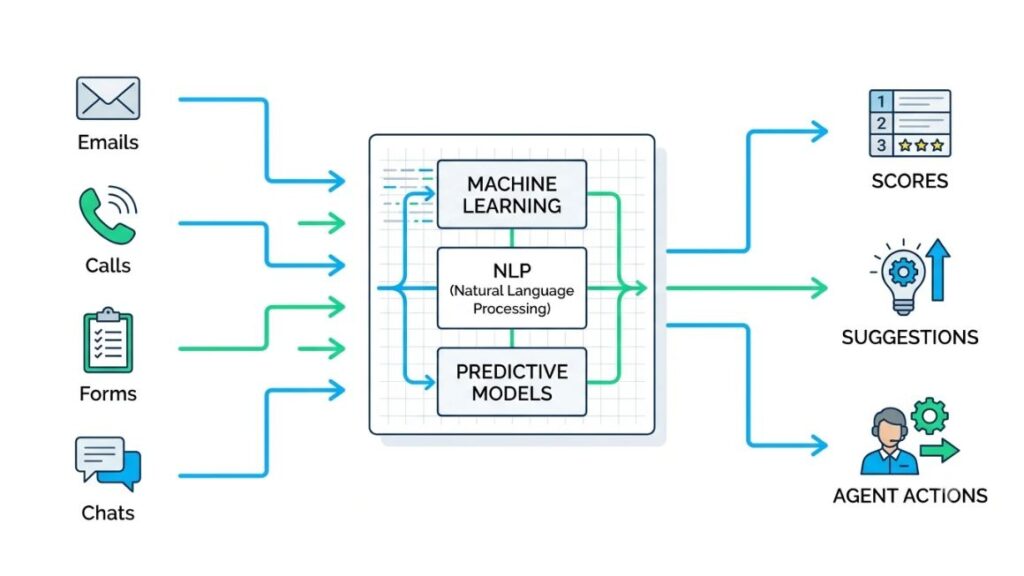
- Data collection. Emails, calls, web visits and chats flow into the customer record through connected inboxes and integrations. Nobody retypes a thing.
- Machine learning. The system studies past deals and learns what a won one looked like: how fast the buyer replied, which pages they read, who joined the call.
- Natural language processing (NLP), the part that lets software read human text, summarises calls, pulls action items from emails and judges whether a message sounds pleased or annoyed.
- Predictive models apply those patterns to live deals and produce a win probability or a churn risk. That’s predictive analytics in CRM, minus the jargon.
- AI agents don’t just suggest a task, they do it, such as qualifying an enquiry or updating a record, inside permissions you set.
Key Features Every Business Should Look For
Seven features separate useful AI CRM software from the decorated kind: automated lead management, lead scoring, forecasting, follow-up suggestions, sentiment analysis, chatbots and readable reporting. If a platform handles those well, everything else is a bonus.
Automated Lead Management
Leads arrive from forms, ads, WhatsApp, calls and portals. Good software pulls them into one place, removes duplicates and routes each to the right rep by territory, product or workload. That’s CRM automation doing the boring part. Siemens is the extreme case: per Salesforce’s customer story, two Agentforce agents respond to roughly 2,500 in-scope inbound leads a month, cutting response time from days to minutes.
Intelligent Lead Scoring
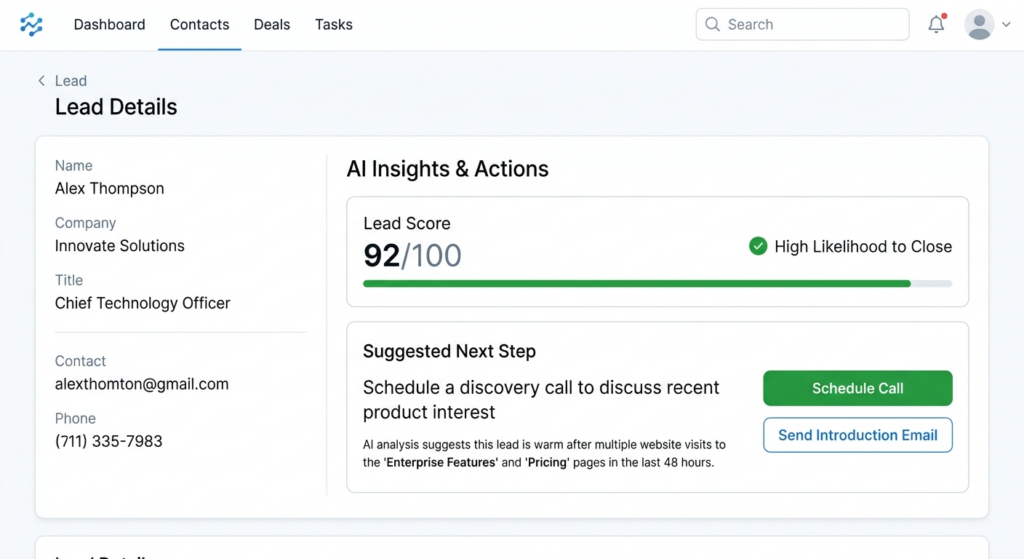
AI lead scoring ranks leads by likelihood to buy, mixing behaviour (pricing page visits, email replies, demo requests) with fit (role, company size, industry). Scores shift as behaviour does. A lead who ignored you for a month, then opened three emails in an hour, jumps the queue. Treat it as a hint, not a verdict.
Sales Forecasting and Performance Analysis
Forecasting tools compare your live pipeline with historical win rates, deal age and stage movement to estimate what closes this quarter, and show where individual reps tend to stall. The catch: a pipeline full of zombie deals produces a confident, wrong number.
Automated Email and Follow-Up Suggestions
An AI sales assistant drafts a reply from the deal history and nudges the rep when a conversation goes quiet. It gets you to a sendable draft, not a finished one. Sellers surveyed for Salesforce’s 2026 report expect agents to cut email drafting time by 36% once fully rolled out.
Customer Sentiment Analysis
Sentiment analysis reads emails, chats, transcripts and survey comments to gauge mood. A run of curt replies, or the word “cancel” in a ticket, gets flagged before the renewal call. It can stumble on sarcasm and mixed-language messages, so test it on your own conversations.
AI Chatbots and Virtual Assistants
Bots answer common questions at 2 a.m., book appointments and ask first qualifying questions: budget, timeline, need. Qualified chats go to a human with the conversation attached. The weak spot is the handoff. A bot that traps people in a loop does more damage than no bot.
Reporting and Business Insights
Instead of building a dashboard, you ask why conversions dropped in October, and the system answers in plain language and points at a likely cause. Prefer reports that show their working. If you can’t see where a number came from, you can’t defend it in a meeting.
Major Benefits for Businesses
The average seller spends just 40% of their time selling, according to Salesforce’s State of Sales 2026 report. The rest disappears into admin, research and chasing records. The main benefits of AI CRM software come down to giving some of that time back and pointing it somewhere useful.
Saves Time on Repetitive Tasks
Logging calls, updating deal stages, hunting for the last email in a thread. Automation takes most of it. Sellers in the Salesforce survey expect fully implemented agents to trim prospect research time by 34%. That’s an expectation, not a guarantee, but it shows where the hours are hiding.
Improves Customer Experience
Customers don’t care which tool you use. They care that someone replied quickly and remembered the last conversation. When the record shows past orders, open tickets and the mood of the last chat, replies stop feeling generic. Done properly, automated customer engagement feels relevant rather than robotic.
Helps Sales Teams Focus on Better Opportunities
With scoring and deal alerts, reps spend Tuesday morning on the five accounts most likely to move, not the first five on the list. Salesforce found that top performers are 1.7 times more likely than struggling teams to use AI agents. Correlation isn’t causation, but it’s a signal worth noticing.
Supports Better Business Decisions
Patterns that stay invisible in a spreadsheet show up fast: which lead source brings customers who stay, which segment churns after month three. Budget, hiring and pricing calls get easier to defend when the evidence sits right there.
Improves Team Productivity
Sales sees what marketing sent. Support sees what sales promised. Everyone reads the same customer record, so fewer handovers go wrong. That shared view, more than any single feature, is where AI sales automation tends to pay for itself.
Best AI CRM Software Platforms to Consider in 2026
No single platform suits every business. HubSpot fits teams wanting connected marketing, sales and service. Salesforce fits large, complex sales operations. Zoho CRM suits growing businesses wanting breadth, Dynamics 365 suits Microsoft shops, Pipedrive suits small sales teams and Freshsales suits sales-focused growth teams.
These AI CRM tools change quickly, so treat the prices and features below as a November 2026 snapshot and check each vendor’s own page before you buy.
HubSpot CRM
Best for: businesses that want marketing, sales and customer service tools working off one customer record.
HubSpot’s AI layer is Breeze. Breeze Assistant, formerly Copilot, handles meeting prep, summaries and record lookups, and it’s available even on the free CRM. Breeze Agents, such as the Customer Agent and Prospecting Agent, run on HubSpot Credits, with a monthly allowance by plan. The free CRM allows unlimited users, but capable agents and automation sit on paid tiers.
Salesforce
Best for: larger organisations with complex sales operations.
Einstein is the long-running prediction layer for scoring and forecasting; Agentforce is the newer agent platform. On 3 September 2026 Salesforce introduced Core, Advanced and Max editions at $195, $395 and $550 per user per month, billed annually, with AI usage credits bundled in. Existing customers keep legacy pricing. Deeply customisable, but neither cheap nor quick to implement.
Zoho CRM
Best for: growing businesses that want a broad set of connected business apps.
Zia is Zoho’s AI assistant, covering predictions, lead scoring and sales insights, and Zia Agent Studio lets teams build their own agents. There’s a free edition for up to three users, and paid editions run roughly $14 to $52 per user per month billed annually, with the fuller Zia assistant starting around the Enterprise tier. Zoho is headquartered in Chennai.
Microsoft Dynamics 365
Best for: organisations already living inside Outlook, Teams and Microsoft 365.
Copilot sits inside Dynamics 365 Sales to summarise, draft and suggest, and Microsoft has been adding prebuilt sales agents through 2026. The big strengths are Microsoft 365 integration and enterprise data management. Licensing is the maze: Sales Professional, Enterprise and Premium tiers, with some agent usage metered through Copilot Credits. Get a written quote.
Pipedrive
Best for: small sales teams that prefer straightforward pipeline management.
The pitch is simplicity. A visual pipeline, every deal in a stage, nothing hidden. Its Sales Assistant flags stalled deals and suggests next steps, and higher tiers add email drafting. There’s no permanent free plan, only a 14-day trial, and the AI is narrower than HubSpot’s or Salesforce’s. For a six-person team, that narrowness is the appeal.
Freshsales
Best for: businesses that want sales-focused features and accessible automation.
Freddy is Freshworks’ AI layer, covering contact scoring, deal insights and assistance, alongside contact management and built-in email and phone. Freshworks bills Freddy AI Agent usage by session in some products, so ask exactly how sessions are counted before you roll anything out to customers.

Quick Comparison of the Platforms
| Platform | Best suited for | AI capabilities | Important consideration |
| HubSpot | Growing businesses | Breeze | Advanced features may require higher tiers |
| Salesforce | Enterprises | Einstein and Agentforce | Implementation complexity and cost |
| Zoho CRM | Small and mid-sized businesses | Zia | Feature availability varies by plan |
| Dynamics 365 | Microsoft users | Copilot | Licensing and platform requirements |
| Pipedrive | Sales teams | Sales Assistant | Sales-focused functionality |
| Freshsales | Growing sales teams | Freddy AI | AI availability and usage costs |
The best AI CRM software depends on team size, budget and existing tools rather than the number of AI features. HubSpot, Salesforce, Zoho CRM, Microsoft Dynamics 365, Pipedrive and Freshsales all offer AI layers, but each prices and limits them differently, so confirm plan details with the vendor.
How Different Industries Can Use It
Any business with repeat enquiries, follow-ups and customer history can benefit. What changes is the use case.
E-commerce Businesses
Purchase history drives everything here. The system spots a customer who bought moisturiser eight weeks ago and nudges a refill, recommends products based on past baskets and triggers abandoned-cart messages. Indian skincare brand Dot & Key reports a 40%+ rise in repeat purchases after adopting the WebEngage platform, according to WebEngage’s own case study. Vendor-reported, so read it as a direction, not a promise.
Real Estate Businesses
Enquiries arrive from portals, Instagram and walk-ins, and half of them are “just looking”. Routing, qualification and site-visit scheduling matter more than fancy dashboards. Brigade Plus, part of Brigade Group, assigns leads round-robin and sends automated emails on lead creation in Zoho CRM, according to Zoho’s case study. Mumbai’s Marathon Realty moved from Salesforce to Zoho CRM Plus after struggling with lead leakage.
Education and Training Businesses
Admissions teams live on follow-up speed. A student enquires on Sunday night, the counsellor calls on Tuesday, and the student has already enrolled elsewhere. StudyIQ, a test-prep platform with 340+ courses, uses LeadSquared to distribute leads by criteria and remind agents 30 minutes before each follow-up task, per LeadSquared’s case study.
B2B and Professional Services
Long sales cycles, several decision-makers, one account manager juggling twenty clients. The system tracks who has been contacted, summarises meetings and warns when a key contact goes silent. It also helps with account management, since renewal risk often shows up in communication patterns months before the cancellation email.
How to Choose the Right Solution for Your Business?
When you compare AI CRM software, pick the platform that fixes your actual problem, connects to the tools you already use, costs what you expect after add-ons, protects customer data and survives a trial with your own team. Everything else is brochure language.
Identify Your Business Requirements
Write the problem down first. Leads going cold? Messy handovers? No forecast anyone believes? Pick one or two. A tool bought for “AI” in general ends up used for nothing in particular.
Check Integration Capabilities
List where customer conversations really happen: email, website forms, Meta and Google Ads, WhatsApp, calling tools, accounting software. If the CRM can’t connect to your main channels, people will copy data by hand, which defeats the purpose.
Evaluate Pricing and Scalability
Look beyond the per-user price. Ask about user licences, AI credits or session charges, add-ons, onboarding and what happens at double your headcount. Salesforce’s September 2026 edition changes, which bundle AI credits into higher seat prices, show how fast the maths can shift. If you’re shopping for CRM software for small businesses, test the free tiers from HubSpot and Zoho first, but read where the AI limits start.
Review Security and Data Privacy
Check who can see what, where data is stored, whether it’s encrypted and whether audit logs exist. For Indian businesses, the Digital Personal Data Protection (DPDP) Rules, notified in November 2025 with a phased rollout over 18 months, make consent records and breach procedures harder to ignore. Ask vendors whether your data trains their models.
Test Before Making a Decision
Run a trial or demo with your own messy data, not their polished sample. Give two reps a week with it. If they’ve stopped using it by Thursday, that’s your answer.
How to Implement It Successfully?
Most of the work happens before anything gets switched on. A solid rollout follows five steps: audit your data, define workflows, configure the CRM, train the team and track results. Skipping the first one is the most common reason AI features disappoint, and every CRM implementation benefits from that discipline.
Step 1: Audit Your Existing Customer Data
Export what you have. Find duplicates, dead email addresses and records with no owner. Merge or delete before you import, because AI fed rubbish produces confident rubbish. Salesforce’s report notes that high-performing teams are the ones prioritising trusted, connected data.
Step 2: Define Your Sales and Marketing Workflows
Map how a lead moves today, then mark the repetitive, rule-based steps: assignment, reminders, status updates. Automate those. Leave pricing, complaints and judgement calls with people.
Step 3: Configure Your CRM
Set up contact fields, pipeline stages, permissions and integrations. Keep required fields few. Every extra one is another reason for reps to skip logging.
Step 4: Train Your Team
Teach the daily routine, not the feature tour. Show people when to trust an AI suggestion and when to override it, and make it a rule that AI-written messages get read before they’re sent.
Step 5: Track Results and Improve
Record a baseline before launch: response time, conversion rate, deal cycle, customer satisfaction. Compare monthly, then adjust scoring rules, routing and automation based on what moved.
Common Challenges and Mistakes to Avoid
Relying on Inaccurate Customer Data
Wrong job titles, stale numbers, duplicate accounts. The AI doesn’t know they’re wrong, so it scores and routes them anyway.
Automating Every Customer Interaction
Automate the routine. Keep a human for pricing disputes, complaints and anything emotional. Customers can tell.
Also Read: AI Agent for Customer Retention: How to Reduce Churn and Keep Customers Longer?
Ignoring Employee Training
A tool nobody trusts becomes a very expensive address book.
Overlooking Data Privacy
Proper consent and limits on who can export data aren’t optional, especially with India’s DPDP framework rolling out.
Choosing Tools Based Only on Price
The cheapest seat price can hide metered AI usage, paid onboarding and integration fees.
Underneath all five sits the same truth: AI suggests, people decide. Thoughtful rollout and regular human review are what turn predictions into revenue, so give someone the job of checking the system’s output every week, at least early on.
The Future of AI in Customer Relationship Management
AI CRM software is heading toward more autonomy, more context and more scrutiny, all at once.
The Rise of Autonomous AI Agents
Agents that finish multi-step jobs inside permissions you define: qualify an enquiry, book the meeting, update the record. HubSpot, Salesforce, Zoho and Microsoft all offer ways to build them now. Humans still own the exceptions.
More Personalised Customer Experiences
Once purchase, support and marketing data sit together, messages can reflect what a customer actually did last week. Generative AI in CRM already drafts those messages; the next step is drafting them with better context.
Predictive and Real-Time Decision-Making
Scores that update as a prospect behaves, alerts that arrive while the buyer’s still on your pricing page. More of that is coming, and so are more mistakes if the data underneath is shaky.
Greater Focus on Data Governance
When software acts on customer data, regulators and buyers will ask who allowed what. Audit trails, consent records and clear permissions will matter more every year.
Also Read: AI Agent for Marketing Teams: Use Cases, Tools, Benefits & Implementation Guide (2026)
Conclusion
The best AI CRM software isn’t the one with the longest feature list. It’s the one your team opens every morning without being nagged. AI can capture data, score leads and draft follow-ups, but it can’t fix a vague sales process or a messy database.
So start with one clear problem, say leads going cold after the first call. Shortlist two platforms, run both on a trial with your real data, and count how many people are still using them after two weeks. That tells you more than any comparison table, including the one above.
If you want to go beyond CRM and learn how marketers are putting AI tools to practical use, YUP’s AI Marketing course is a good next step.
Frequently Asked Questions
What is AI CRM software?
AI CRM software is a CRM platform with built-in artificial intelligence. It captures customer data automatically, scores leads, predicts deal outcomes and suggests next steps, so teams spend less time on admin and more time with customers.
How does AI improve CRM systems?
Automation cuts manual data entry and missed reminders. Customer insights surface patterns like stalled deals or likely churn. Personalisation improves because messages draw on real purchase and conversation history.
Which is the best AI CRM for small businesses?
There’s no single winner. HubSpot and Zoho have free entry options, Pipedrive keeps things simple and Freshsales suits sales-led teams. Budget, integrations and the problem you’re fixing should decide.
Is AI CRM suitable for startups?
Yes, if you start small. Free or low-cost tiers keep spending down, and you can add AI usage as volume grows. Watch metered charges, since credits and sessions can climb faster than seat counts.
Can AI CRM software generate leads?
Not on its own. It helps capture, qualify and prioritise the leads you already attract, and some platforms add prospecting agents, but it can’t create demand from nothing. You still need marketing.
Is AI CRM better than traditional CRM?
Better for teams with enough volume and repeat follow-ups to automate. For a tiny team with a handful of deals, a traditional CRM may do the job with less cost and setup.
Is customer information safe in AI CRM systems?
It can be, but that depends on the vendor and your settings. Check encryption, access permissions, audit logs, storage location and whether your data trains their models. In India, align consent practices with the DPDP Rules.
How much does AI CRM software cost?
From free to several hundred dollars per user each month. The final bill depends on users, plan tier, AI credits or sessions, add-ons and implementation. Salesforce’s new editions, for instance, run $195 to $550 per user per month.