

It’s Monday morning and your cost per acquisition (CPA) has jumped. Leads are down. Spend looks normal. Nobody can really say why. The data exists. It is simply stored across Google Ads, Google Analytics, a CRM and some other spreadsheets. And pulling that together takes up half of the week.
That gap between having data and understanding it is where an AI agent for marketing analytics fits. It connects to your campaign data, investigates what changed and explains what it found. Plus, where you’ve allowed it, it helps start the next action.
Set expectations early, though. These systems can save time and sharpen analysis. They aren’t automatically accurate and they aren’t fully autonomous. This guide shows how they work, where they help and how you can test one without putting your budget at risk.
Table of Contents
What Is an AI Agent for Marketing Analytics?
An AI agent for marketing analytics is software that takes a marketing question, pulls the relevant data from your connected tools, works through several analysis steps and reports what it found. Depending on the permissions you grant, it can also recommend or carry out approved actions. These include sending an alert or adjusting a budget.
Think of it as a junior analyst who never tires of pulling reports but still needs a manager checking the work.
How Does It Work?
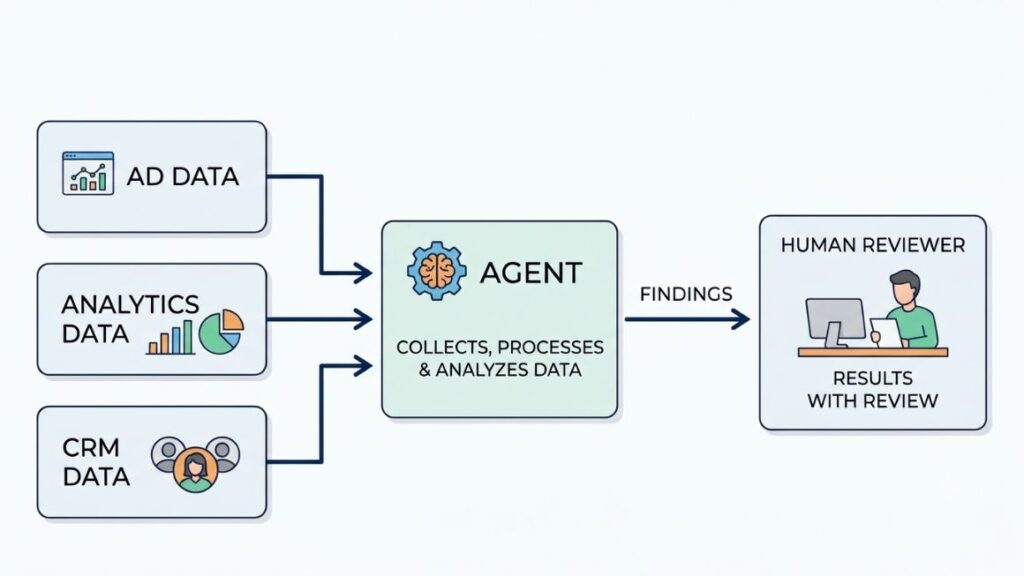
- Connect to approved data sources such as Google Ads, Google Analytics, and your CRM.
- Interpret the marketing goal or question you give it.
- Retrieve the relevant metrics and compare time periods.
- Investigate unusual changes.
- Produce findings, recommendations, or approved actions.
- Record the results so a person can review them.
What Makes It Different From a Chatbot?
A chatbot explains whatever that you paste into it. An agent goes and gets the data itself. It retrieves figures from connected systems, runs several steps in sequence and uses the tools it’s permitted to use. Ask a chatbot why CPA rose and it will guess from general knowledge. Ask an agent and it should check your actual campaigns first.
What It Cannot Reliably Do
Agents get things wrong. The causes are usually boring. Data gaps leave holes in the picture. Ambiguous instructions produce confident answers to the wrong question. Attribution differences between platforms change which campaign gets credit. And missing context, like a product launch nobody logged, can send the agent toward a tidy but incorrect explanation.
An AI agent for marketing analytics retrieves data from connected systems, investigates changes in several steps and reports findings for human review. It can still be wrong when data is incomplete, instructions are vague or platforms attribute conversions differently.
How Is an AI Agent Different From Dashboards, Rules, and AI Assistants?
A dashboard displays data, rule-based automation reacts to a preset condition and an AI assistant explains what you give it. An AI agent for marketing analytics investigates connected data across several steps and adapts as it goes. That is why it needs the most careful supervision.
| Traditional dashboard | Rule-based automation | AI assistant | AI agent | |
| How it receives instructions | Charts built by a person in advance | Fixed if-then rules | Prompts you type | A goal or question in plain language |
| Investigates multiple data sources | No, shows what was configured | No, watches one condition | Only what you supply | Yes, across connected sources |
| Adapts its next step | No | No | Partly, within the chat | Yes |
| Can take action | No | Yes, fixed actions like alerts | Rarely | Yes, if permitted |
| Human supervision needed | Low, but you do all the analysis | Low once rules are tested | Medium, check the explanations | High at first, including approvals |
Here’s how the four layers handle one problem. Brand X, a hypothetical D2C skincare brand, sees acquisition costs climb. Its dashboard flags the increase. A rule sends an alert when CPA crosses a set limit. An assistant, given the numbers, lists possible causes such as creative fatigue or audience overlap. An appropriately connected agent pulls the actual campaign data, checks which campaigns drove the rise, and reports what it found.
What Are the Real Benefits for Marketing Teams?
The main benefits are less time spent on repetitive reporting, faster detection of campaign problems, clearer decisions across channels and easier access to insights for people who don’t write queries. An AI agent for marketing analytics delivers all four only when the data underneath it is clean.
Less Time Spent on Repetitive Reporting
Weekly reports, data pulls, routine period comparisons. These are the tasks most teams dread and agents handle well. With automated marketing reporting, the first draft of Monday’s summary exists before anyone opens a laptop.
Faster Detection of Campaign Problems
Unexpected spending changes, conversion drops, broken tracking. A tag that quietly stops firing on Tuesday can feed you misleading data for days. An agent that watches continuously can catch it sooner than a person checking weekly.
Better Decisions Across Channels
When advertising, website activity, leads and revenue sit in one view, you can see how they relate. A channel that looks expensive on its own may feed leads that close well later.
Easier Access to Marketing Insights
Natural-language questions let nontechnical marketers do their own marketing data analysis without writing queries. Instead of waiting for an analyst to rebuild one of your marketing performance dashboards, you ask directly.
One honest caveat: time saved and business results depend on data quality, workflow design and how often your team uses the findings. A sharp alert nobody reads saves nothing.

What Does It Look Like in Practice? Five Use Cases
Five uses stand out: monitoring campaign performance, producing weekly reports that flag anomalies, pacing budgets, connecting ad data to CRM outcomes and comparing lead volume with revenue. An AI agent for marketing analytics handles each differently. So the examples below follow one hypothetical campaign.
Hypothetical campaign: Brand X is a made-up D2C skincare brand running Google Ads and Meta Ads, tracking sales in Google Analytics, and logging leads in a CRM. Every scenario below is illustrative. None is a real case study, and no results are implied.
Campaign Performance Monitoring
Brand X’s CPA rises sharply week on week. The agent compares spending, conversion volume, and recent campaign changes. It might report that spend held steady while conversions fell in one prospecting campaign, right after a bid strategy change. That’s a lead worth checking, not a verdict. A person still confirms it.
Automated Reporting and Anomaly Detection
Instead of reproducing a spreadsheet, the weekly summary highlights what changed: a campaign pacing well above normal, branded search conversions slipping, a landing page with a sudden bounce spike. That’s marketing analytics automation doing what a static report can’t, which is deciding what deserves your attention.
Budget Pacing and Spend Recommendations
Midway through the month, the agent notices Brand X is underspending on its best campaign. It then proposes moving some daily budget over from a weaker one. Defined limits apply: a maximum shift, and human approval before anything changes. This is where AI-powered campaign optimization needs the tightest guardrails. That’s because it touches real money.
Customer Journey and Attribution Analysis
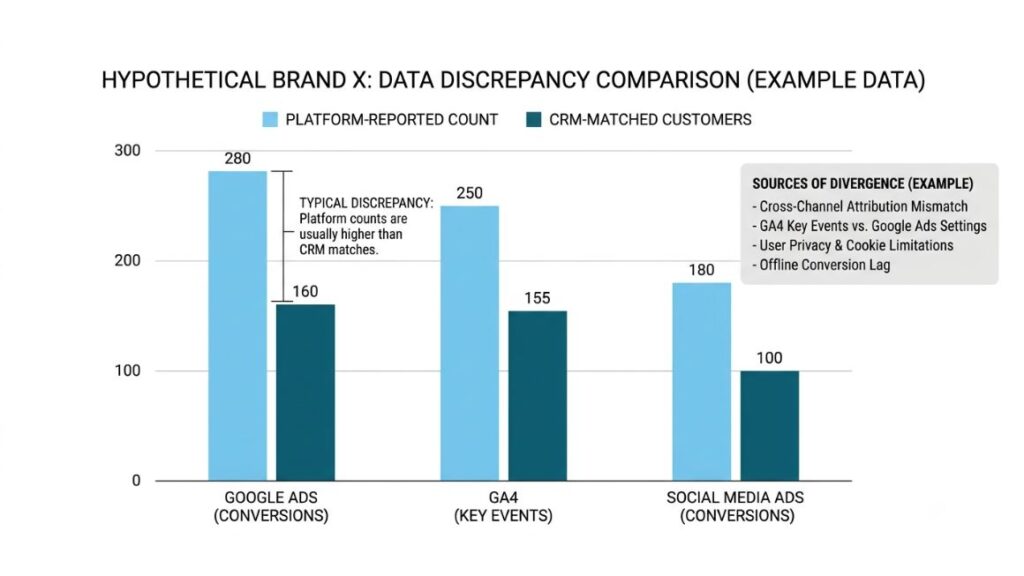
Brand X’s ad platforms claim more conversions than its CRM can match to paying customers. Combining advertising, analytics and CRM data exposes that gap. Cross-channel marketing attribution rarely agrees between tools. Since Google renamed GA4 conversions to key events in 2024, a Google Ads conversion and a GA4 key event can differ because of attribution settings. The agent can show where they diverge. You decide which definition to trust.
Lead Quality and Revenue Analysis
Brand X’s Meta campaign brings cheaper leads than Google Ads. The agent compares lead volume with qualified opportunities and closed revenue, so you see whether cheap leads actually close. Some teams go further into predictive marketing analytics, scoring which leads are likely to buy. That needs more history and a separate build, so treat it as a later step.
Which Type of Solution Should You Choose?
Start with what you already pay for. Built-in assistants cost little to try. Data platforms add cross-channel depth. Custom builds only make sense when you have specific needs and technical help. No option wins for every business.
Types of Solutions to Consider
These AI marketing analytics tools fall into four groups:
- Built-in analytics and advertising assistants, such as Ask Advisor in Google Ads and Google Analytics.
- Marketing data integration and reporting platforms, such as Supermetrics, Funnel.io, and Improvado.
- Business intelligence platforms with agent features, such as Power BI with Copilot or Looker with Gemini.
- Custom agents connected to data sources you approve.
What to Check Before Buying
- Supported integrations and refresh frequency.
- Accuracy of metric definitions.
- Source transparency and a way to verify calculations.
- Permission controls and audit history.
- Setup effort, pricing, support, and scalability.
Ask for a trial on your own data. Demo data always looks clean.
Also Read: AI Agent for Paid Advertising: How to Set Up, Control and Measure One in 2026
Which Option Fits Your Business?
- Freelancers: Start with a built-in assistant and a low-cost connector into a spreadsheet. Skip heavy platforms.
- Small businesses: Pick one assistant and one narrow workflow, like a weekly summary.
- Agencies: Look for a data platform that handles many client accounts with separate permissions for each.
- Larger marketing teams: Prioritize governance, audit trails, and integration with your warehouse or BI tools before considering custom builds.
How Do You Get Started? A 7-Step Setup Plan
Start small. Pick one repeatable task. Audit your data. Define your metrics. Write clear instructions. Test against known results. Keep a human in the loop. Measure what changes. Keep the first workflow read-only. That sequence keeps an AI agent for marketing analytics useful and low-risk from day one.
Step 1. Choose One Repetitive, Measurable Task
Pick a weekly performance summary or an alert for unusual spending. Both repeat often, have a clear right answer and are easy to check. Resist the urge to automate three things at once.
Step 2. Audit and Connect Your Data
Check account access, tracking, naming conventions and data completeness before connecting anything. Fix gaps first, because connecting broken data only makes the problem faster. An agent reading messy campaign names will produce messy conclusions.
Step 3. Define Metrics and Business Rules
Specify exactly what counts as a conversion, qualified lead, purchase, or revenue event. If your team argues about a definition, the agent inherits the argument. Write the definitions down where the agent can read them.
Step 4. Write Clear Instructions
Give the reporting period, comparison baseline, metrics, output format and rules for missing information. For example: “Compare the last seven days with the previous seven. Report spend, conversions and CPA by campaign. If a source is missing, say so instead of estimating.”
Step 5. Test Against Known Results
Run the agent on reports you already trust. Compare the outputs and verify the important calculations by hand. If the numbers don’t match, find out why before trusting the agent with anything newer.
Step 6. Introduce Human Review
Keep the first workflow read-only. Require approval before any campaign change or spending decision. Review early outputs weekly. Loosen oversight only after the agent has earned it.
Step 7. Measure Results and Improve
Track time saved, error rates, useful alerts, recommendation acceptance, and business outcomes. Then adjust the instructions.
The safest way to adopt an agent is to start with one measurable, read-only task, such as a weekly performance summary. Define your metrics before connecting data, test outputs against reports you already trust and require human approval before any change to campaigns or budgets.
What Can Go Wrong, and How Do You Stay Safe?
The main risks are bad source data, misleading explanations, wrong metric definitions, excessive permissions and too much trust in recommendations. Least-privilege access, human approval for high-impact actions and activity logs reduce most of them.
Common Problems to Avoid
- Inconsistent or incomplete source data.
- Misleading correlations and unsupported explanations.
- Incorrect metric definitions or attribution assumptions.
- Excessive permissions and unintended changes.
- Overreliance on automated recommendations.
The industry itself is cautious. Gartner forecast in 2025 that over 40% of agentic AI projects will be canceled by the end of 2027, citing rising costs, unclear business value, or inadequate risk controls. It also warned about “agent washing,” where vendors relabel ordinary assistants and automation as agents.
A Simple Safety Checklist
- Give the agent least-privilege access, meaning only the permissions the task needs.
- Require human approval for high-impact actions.
- Keep logs of what the agent read, said, and did.
- Monitor outputs regularly.
- Use rollback procedures where the platform supports them.
- Review access on a schedule.
Polished writing and a confident tone are not proof of a correct answer. Check the numbers. Treat an AI agent for marketing analytics like a new hire with admin access: useful, but not left unsupervised.
Most agent failures in marketing trace back to bad data, vague metric definitions or permissions set too wide. Treat an agent’s confidence as style, not evidence. Verify important findings against trusted source reports.
How Do You Know It’s Working?
Judge an AI agent for marketing analytics on outcomes, not on how impressive its output sounds. Useful measures include:
- Time required to prepare a report.
- Accuracy against verified source data.
- Percentage of alerts that turned out to be useful.
- CPA and return on ad spend (ROAS), where relevant.
- Qualified leads, conversions, and revenue.
- How often people override the agent, and any unintended actions.
Always compare against a baseline. Record how long reporting took and how accurate it was before the agent. So you have something to measure against. If conversions rise after you introduce it, that doesn’t mean the agent caused it. Seasonality, budget changes, and new creative all move numbers too. Review these measures monthly, not once.
What Comes Next for Marketing Analytics Agents?
Google’s August 2026 announcement is the clearest current sign that an AI agent for marketing analytics is moving into everyday tools. On August 10, 2026, Google announced new agentic capabilities for Ask Advisor, the agent it introduced at Google Marketing Live in May 2026. The announced features include AI-powered insight cards on the Google Ads homepage, Dashboards in Google Ads built from text prompts, and a Google Analytics homepage summary of what changed since your last login.
Google says Dashboards for Google Analytics are coming soon, and coverage of the launch describes some features as beta for English-language accounts.
Those are announced product capabilities. What follows is prediction. Gartner expects 33% of enterprise software applications to include agentic AI by 2028. That is up from less than 1% in 2024. Expect more natural-language analysis, better-connected data, proactive monitoring and action-taking that stays under tight controls. How fast teams adopt any of it is still an open question.
Conclusion
Faster analysis and repeatable reporting are real gains. They don’t replace marketing judgment. An AI agent for marketing analytics can find the odd number and draft the explanation, but you still decide what the business does about it.
So pick one workflow, test it against data you already trust and expand only after the results hold up. The teams that get value from this treat it like any new process: small scope, a clear owner, regular review. If you’d like hands-on practice with an AI agent for marketing analytics and other AI-assisted workflows, explore the AI Marketing course at Young Urban Project.
Frequently Asked Questions
What is an AI agent in marketing analytics?
It’s a system that investigates marketing data across connected tools, works through several steps to answer a question, and reports findings. With the right permissions, it can also take approved actions, such as sending alerts.
How is an AI agent different from an analytics dashboard?
A dashboard displays information you configured in advance. An agent investigates a question through multiple steps, such as comparing periods, checking related metrics, and pulling in other sources, then explains what it found.
Can an AI agent analyze Google Ads and Google Analytics data together?
Often yes, but it depends on four things: integrations between the accounts, access permissions, compatible data and consistent metric definitions. Google Ads conversions and GA4 key events can differ because of attribution settings. So confirm which one the agent is reading.
Are AI marketing analytics agents suitable for small businesses?
Yes, an AI agent for marketing analytics can suit a small business if you start with a narrow task like a weekly summary. Compare the subscription and setup cost against the hours saved. A built-in assistant may be enough to start before you pay for a separate platform.
Can an AI agent automatically change advertising budgets?
It depends on the platform and integration. Some setups allow it. But write permissions and approval controls are essential. Begin read-only, set spending limits and require sign-off for budget changes.
How can I check whether its findings are accurate?
Verify the reporting period, the source metrics and the calculation logic. Then compare a sample of results with a report you already trust. Repeat the check whenever you change the instructions or connect a new data source.