

It’s 11 a.m. on a Monday. A campaign report is due at noon. Three demo requests are sitting unanswered. One Meta ad set is burning budget for reasons nobody has checked yet. Each task is small. Together, they eat the day.
That’s the gap an AI agent for marketing automation is built to close. Unlike a rules-based workflow, an agent can read a goal, pull permitted data from your tools and carry out several steps without being walked through each one. The marketer stops clicking and starts directing.
This guide is for marketers, founders and team leads. Want to know what agents can really do in 2026, which platforms deserve a look and how to start without wasting budget. You’ll get current pricing, checked data and a rollout plan. One point comes up again and again: oversight still matters.
Table of Contents
What Is an AI Marketing Agent?
An AI agent for marketing automation is software that takes a marketing goal, works with the data and tools you’ve connected, and completes multi-step tasks on its own or with your sign-off. Think of a junior teammate who never logs off but only works inside the limits you set.
Here’s the plain-English version. You tell it what you want: “qualify every demo request and route the good ones to sales within ten minutes.” It looks at the lead, checks your CRM, decides what to do and does it. If a step needs a person, it stops and asks.
That last part matters more than most vendor demos admit.
An AI agent for marketing automation takes a goal, uses the data and tools it’s permitted to access, and completes multi-step tasks on its own or with approval. Unlike rules-based automation, it chooses actions within set limits. That is why permissions and oversight matter as much as the technology.
How Does an Agent Work?
Most agents run the same loop.
- Understand the objective and the relevant context.
- Access the data and tools it has permission to use.
- Decide on the next action.
- Execute the task, or request approval.
- Check the outcome, then continue or escalate.
The loop is the point. An agent doesn’t fire once and forget. It looks at what happened and adjusts.
A Simple Marketing Example
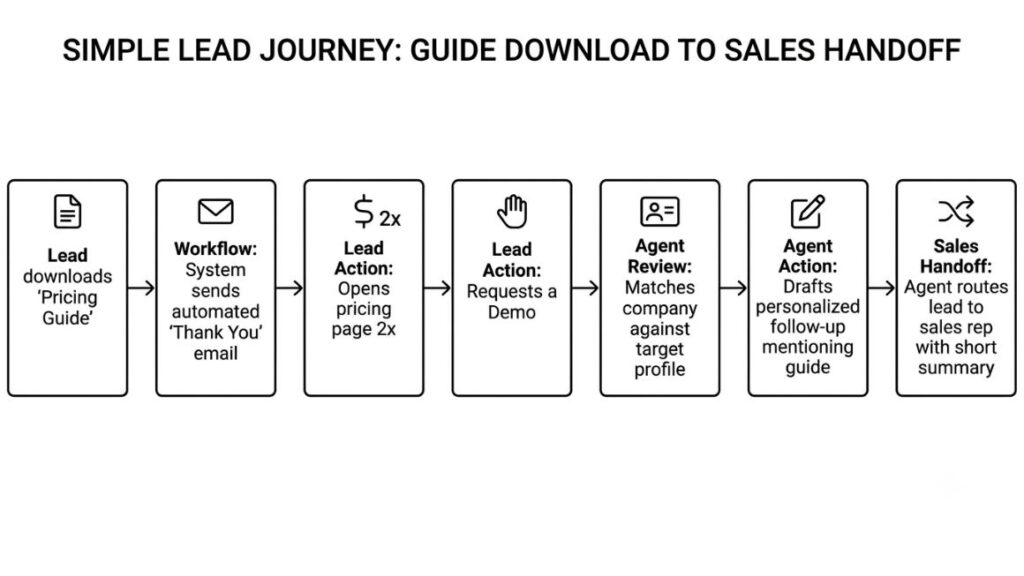
Say a lead downloads your pricing guide, opens the pricing page twice and then requests a demo. A rules-based workflow sends a thank-you email. An agent can see that pattern, match the company against your target profile, draft a follow-up that mentions the guide, and route the lead to the right sales rep with a short summary.
Whether any of that is possible depends on three unglamorous things: integrations, permissions and what your platform can actually do. An agent can’t read a CRM it isn’t connected to. Most demos skip that bit.
How Is It Different from Traditional Marketing Automation?
Traditional automation follows fixed if-this-then-that rules. An AI agent for marketing automation chooses among actions inside a permitted scope, based on context. Rules say what to do. An agent is told what to achieve.
That’s the core of agentic AI in marketing. It’s why your current marketing automation software probably can’t do it without an upgrade.
Rules-Based Automation vs. AI Agents vs. AI Assistants
| Approach | Example | Who decides | Best when |
| Traditional automation | Send an email three days after a download. | The rule you wrote | Steps are predictable and repeatable |
| AI assistant | Suggest three follow-up emails for a marketer to review. | You, using its suggestions | You want drafts, ideas, or analysis to check |
| AI agent | Assess permitted customer signals, select an appropriate next step, and start an approved workflow. | The agent, within set limits | Context changes what the right move is |
Don’t mistake this for “no rules.” An agent still operates inside predefined limits. The difference is that it can reason. It can pick actions within that scope instead of waiting for you to map every branch.
Be careful with labels, though. In June 2025, Gartner warned about “agent washing”. That’s where vendors relabel chatbots and basic automation as agents. The estimate was that only about 130 of the thousands of agentic vendors were genuine. So when a tool says “agent,” ask what it actually decides. If the answer is nothing, it’s automation with a new logo.
Key Benefits for Marketing Teams
The headline benefit of an AI agent for marketing automation is time. Salesforce’s tenth State of Marketing report, which surveyed 4,450 marketers, found that high performers expect to reclaim about eight hours a week through AI agents. That’s nearly a working day.
Time isn’t the only gain, and it isn’t guaranteed either. Here’s where the value shows up.
Reduce Repetitive Work
Weekly reports, lead sorting, recurring hand-offs between tools. This is where agents do their best work. The pattern is stable. An agent can pull the numbers, group leads by fit and nudge the right person. You review exceptions instead of rebuilding the same spreadsheet every Friday.
Make Customer Communication More Relevant
HubSpot’s 2026 research found that 93% of marketers say personalization improves leads or purchases. Yet only 13% personalize using behavioral data. An AI agent for marketing automation can close part of that gap by using approved customer information to shape messaging, timing and next steps. “Approved” is the operative word. If consent isn’t recorded, the data stays out.
Identify Problems Earlier
People check dashboards when they remember to. An agent can watch for unusual spend, falling engagement or a campaign that quietly stopped delivering, then flag it the same day. Faster detection is often worth more than faster creation.
Help Small Teams Handle More Work
Expectations keep climbing. In HubSpot’s 2026 State of Marketing report, 83.5% of marketers said they’re expected to produce more content. For a three-person team, agents can widen execution capacity. That said, don’t assume every workflow will save money or beat a human at the job. Some won’t.
Practical Ways to Use Agents Across Marketing
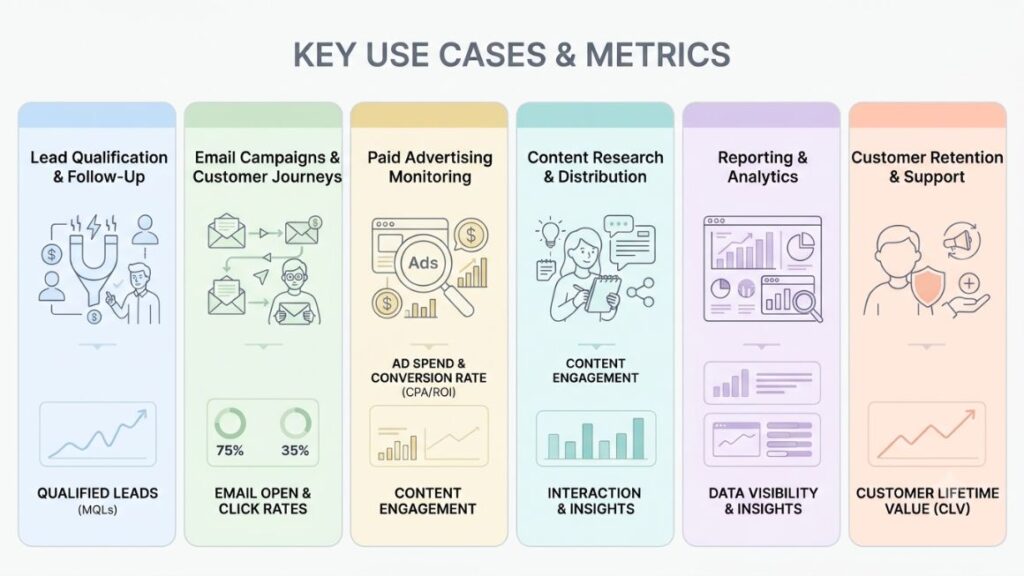
AI marketing agents earn their keep in six places: lead handling, email journeys, paid ad monitoring, content, reporting and retention. One AI agent for marketing automation can cover several of them. So start where your team loses the most hours. Attach one number to every use case so you can tell whether it worked.
Lead Qualification and Follow-Up
An agent can enrich the lead details you’re allowed to use, classify the enquiry, and write a short handoff for sales. HubSpot’s Prospecting Agent does a version of this for outbound and charges $1 per lead it recommends. AI lead generation finds names. The agent’s value is what happens in the next ten minutes.
Measure: response time and the share of leads sales accepts.
Email Campaigns and Customer Journeys
Agents can suggest content variations, coordinate approved sequences, and react to opens, clicks and replies. In Salesforce’s Marketing Cloud Next: You describe a campaign goal. The agent drafts a brief and preview. A separate action compares channel engagement. That’s automated campaign management with a person still approving the send. It feeds personalized customer journeys that don’t need a rebuilt flowchart every time behavior shifts.
Measure: reply rate and unsubscribe rate.
Also Read: 15 Best AI Email Marketing Tools in 2026
Paid Advertising Monitoring
Think anomaly alerts, budget pacing, creative fatigue signals and recommendations. Google Ads’ Ask Advisor, introduced at Google Marketing Live on May 20, 2026, can diagnose a performance drop and apply suggested fixes, but only with your approval. Keep that rule for your own setup. Material budget changes need a human yes. Done well, this is marketing campaign optimization without the late-night dashboard checks.
Measure: time to detect overspend and wasted spend caught.
Also Read: AI Agent for Paid Advertising: How to Set Up, Control and Measure One in 2026
Content Research and Distribution
Agents can research approved sources, prepare briefs, repurpose a webinar into posts, and create drafts for editorial review. Zapier Agents, for instance, can browse the web and act across more than 9,000 apps. Nothing publishes until an editor reads it. Fast and generic is the problem most teams already have.
Measure: hours per brief and the share of drafts that survive editing without a rewrite.
Reporting and Analytics
An agent can combine campaign data, flag week-on-week changes and draft a report with source links. Pulp manufacturer Suzano built an agent that turns plain-language questions into SQL. Google Cloud says it cut query time by 95% for 50,000 employees. That’s AI marketing analytics logic in a non-marketing setting, but the idea transfers.
Measure: hours per weekly report and errors caught in review.
Customer Retention and Support
Agents can spot churn-risk signals, send relevant educational content and escalate sensitive requests to a person. HubSpot says its Customer Agent resolves 65% of conversations and cuts resolution time by 39% across more than 8,000 customers, though that’s the vendor’s own number.
Measure: resolution rate, escalation accuracy and customer satisfaction
AI Marketing Agent Tools Worth Evaluating in 2026
Plenty of AI-powered marketing tools now say “agent” on the box. Three platforms deserve a closer look if you’re shopping for an AI agent for marketing automation. None of them wins on every count. HubSpot suits CRM-centred teams. Salesforce suits large teams with deep customer data. Zapier suits teams stitching many apps together. This AI marketing tools comparison uses pricing checked in October 2026. Prices move, so confirm before you buy.
| Platform | Best fit | Watch out for |
| HubSpot Agent Hub | Teams already on HubSpot’s CRM | Credit costs that scale with volume |
| Salesforce Agentforce | Enterprises with unified customer data | Several overlapping pricing models |
| Zapier Agents | Teams connecting many apps | Activities aren’t the same as finished jobs |
HubSpot Agent Hub
Agent Hub is HubSpot’s central place to build and manage agents across its platform. Since April 14, 2026, the Customer Agent costs 50 credits ($0.50) per resolved conversation, and the prospecting agent costs 100 credits ($1) per recommended lead. Agents need a Professional or Enterprise subscription. Included credits run at 3,000 a month on Professional and 5,000 on Enterprise. Extra credits cost $0.01 each. Unused credits don’t roll over. Some agents are still in beta. So check your own plan before you commit.
Salesforce Agentforce and Marketing Cloud
Salesforce now sells its marketing suite as Agentforce Marketing, with Marketing Cloud Next as the platform underneath. Its help documentation describes a Campaign Creation agent that drafts a brief and preview from your objective, plus an action that summarizes campaign results. Pricing has several meters. Flex Credits cost $500 per 100,000. A standard action uses 20 credits (about $0.10). Customer-facing agents can run at $2 per conversation. Per-user add-ons start at $125 a month. Salesforce also reshuffled its core editions on September 3, 2026. Treat anything you’ve only seen on a keynote stage as roadmap until it runs in your own org.
Zapier and Connected Workflow Platforms
Zapier’s strength is reach, with its pricing materials citing 9,000+ apps. It sells two things that both get called agents. Zaps are rule-based workflows, even when they include an AI step. Zapier Agents is the agentic product, billed in activities rather than tasks: 400 free each month, 1,500 on Pro for $50 monthly or $400 billed annually, and custom pricing on Enterprise. An activity isn’t a finished job. So one research task can use several.
How to Choose the Right Platform?
Compare candidates on five things:
- Core use case, and how much autonomy you want the agent to have.
- Fit with your existing CRM, advertising platforms, and analytics.
- Pricing, usage limits, and implementation effort.
- Human approval options and audit history.
- Data access, privacy controls and support.
There’s no universal winner here. The right pick depends on the systems you already run and the job you need done.
As of October 2026, HubSpot charges $0.50 per resolved conversation and $1 per recommended lead, Salesforce Flex Credits work out to about $0.10 per standard action, and Zapier Agents Pro includes 1,500 activities for $50 a month. Each uses a different meter. So compare cost per finished job, not headline price.
How to Implement an Agent Step by Step?
Rolling out an AI agent for marketing automation works best when you start with one narrow task, give the agent tight permissions, test it with human approval switched on, and widen its scope only after the numbers hold. Six steps turn that into a plan.
Step 1. Select One Repetitive, Measurable Task
Pick something narrow, like compiling the weekly campaign report. It should repeat often, have a clear owner and produce a number you can compare. That’s the right size for a first marketing workflow automation project. Skip anything that talks to customers on day one.
Step 2. Map the Existing Workflow
Write down the trigger, the required data, the decisions, the actions, the exceptions and the final outcome. It sounds tedious. It also exposes what breaks agents, like the lead with no company name or the report that pulls from a spreadsheet nobody owns.
Step 3. Define the Agent’s Scope
Specify its role, objective, approved data, permitted actions, and prohibited actions. The last one matters most. “Never send external email without approval” belongs in writing, not in someone’s head.
Step 4. Connect the Required Tools
Verify access permissions, integration reliability and data quality before anything runs. Salesforce found that only 58% of marketers have full access to service data, 56% to sales data, and 51% to commerce data. Agents inherit those gaps. Poor data in, confident nonsense out.
Step 5. Test with Human Approval
Run sample cases and check for wrong outputs. Require approval before any external message or consequential change. Test the awkward cases too, like duplicate leads, unsubscribed contacts or a prospect who writes back in Hindi.
Step 6. Launch Gradually and Measure
Compare results with a documented baseline, monitor errors, and expand only when the workflow is reliable. A good AI agent for marketing automation earns wider access by proving itself on the narrow job first. Hold that line.

A Practical Example: Automating a Lead Follow-Up Workflow
This is an illustrative scenario, not a customer case study. It shows how the pieces fit when a team handles demo requests.
From New Enquiry to Sales Handoff
- A prospect submits a form.
- The system checks consent and relevant CRM information.
- The agent classifies the enquiry using approved criteria.
- It drafts a relevant response.
- A marketer or sales representative approves the message when required.
- The CRM records the outcome for reporting.
Track four numbers: response time, qualified leads, incorrect classifications, and booked meetings. Count the wrong classifications honestly. They tell you when to tighten the criteria.
And don’t claim a conversion lift unless you’ve measured one against your baseline. “Feels faster” isn’t evidence. A well-run AI agent for marketing automation gives you before-and-after numbers, and they may look unflattering at first.
Risks, Limitations, and Best Practices
An AI agent for marketing automation fails in boring ways: too much data access, a wrong claim sent to a customer, costs that creep. Gartner predicted in June 2025 that over 40% of agentic AI projects will be canceled by the end of 2027, citing rising costs, unclear value, and weak risk controls. Plan around that.
Data Privacy and Permissions
Give agents only the data access the task needs. India makes this concrete. The DPDP Rules were notified on 13 November 2025. Most obligations apply from 13 May 2027, and penalties can reach ₹250 crore. Salesforce’s research also names privacy and data security as marketers’ top AI concern, with accuracy second.
Incorrect Decisions and Brand Damage
Stop unsupported claims by limiting the agent to approved messaging and sources. Block it from changing prices, making promises, or sending first-touch emails unreviewed. Check a sample of outputs every week. One wrong message to the wrong segment can cost more than a month of saved time.
Cost and Integration Complexity
Count subscriptions, usage charges, setup, maintenance and review time. Credit-based billing makes monthly costs hard to predict. Every resolved conversation or recommended lead draws from the pool. Integrations also break when someone renames a field. Budget for that.
Human Oversight and Recovery
Set approval thresholds. Keep activity logs. Define escalation paths. Know how to roll a change back. Ask one question before launch: if this agent does something wrong at 2 a.m., who finds out, and how fast can they undo it?
Current Trends to Watch in 2026
Adoption of any AI agent for marketing automation is still early. HubSpot’s 2026 State of Marketing found that 19% of marketers use agents to automate campaign workflows. Five shifts stand out, though none guarantees results for every business.
- Agents coordinating across applications. Google Cloud’s 2026 AI Agent Trends Report, released in December 2025, describes agentic workflows that run processes across systems.
- Closer links to CRM and customer data. HubSpot describes Agent Hub as a central workspace for agents. Salesforce runs Marketing Cloud Next on its core platform.
- More attention to governance and oversight. Approval gates, like those in Google’s Ask Advisor, are becoming standard.
- From generating content to executing and monitoring. The work is moving from drafting to doing.
- Training for AI-assisted workflows. Google’s report says employees increasingly supervise agents rather than do every task.
Read these as signs of direction, not proof. Your AI marketing strategy should budget for training time, not only software.
How to Measure Performance and ROI?
ROI for an AI agent for marketing automation is incremental benefit minus total cost, divided by total cost, measured against a baseline you recorded before launch.
Establish Baselines Before Deployment
Track task completion time, error rates, lead quality, campaign performance and cost per completed task. Without a baseline, every result is just a story.
Calculate the Actual Return
Use incremental value and cost, not output volume. More emails sent isn’t a return.
ROI (%) = (Incremental benefit – Total cost) / Total cost x 100
Include implementation, integration, monitoring and human review in total cost. Here’s an illustration, not a real result: if an agent saves 20 hours of reporting a month, worth ₹1,000 an hour, the benefit is ₹20,000. With a total monthly cost of ₹8,000, ROI is 150%. Keep measured gains separate from estimates like that one. Google Cloud’s report says 88% of early agentic adopters see positive ROI on at least one use case. “At least one” is doing a lot of work in that sentence.
Measure an agent against a documented baseline, not against output volume. ROI is incremental benefit minus total cost, divided by total cost, and total cost includes setup, integration, monitoring, and human review.
Conclusion
The pattern holds across every platform and use case. Pick a well-defined task. Connect reliable data. Keep human controls where mistakes are costly. Measure against a baseline. An AI agent for marketing automation earns trust one narrow job at a time.
If you’d like structured training on putting AI to work in marketing, explore the YUP AI Marketing course and choose the first task you’ll hand to an agent.
Frequently Asked Questions (FAQs)
What is an AI Agent in Marketing?
An AI agent in marketing is software that works toward a goal using the data and tools it can access, completing multi-step tasks with limited supervision. An AI agent for marketing automation might qualify leads, flag ad overspend, or draft reports, then ask for approval before anything high-impact.
How is an AI Agent Different from Marketing Automation?
Marketing automation runs fixed rules you’ve written, such as sending an email three days after a download. An agent weighs context, such as lead activity or account fit, and picks the next action within limits you set. Many setups combine both.
Can Small Businesses Use AI Agents for Marketing?
Yes, if the task justifies the cost. A small team can run an AI agent for marketing automation by starting with one job, such as weekly reporting or lead follow-up, then comparing the monthly price against hours saved. Zapier Agents includes a free tier of 400 activities, which is enough for testing.
Which Tools Are Best for Marketing Agents?
The best AI agent for marketing automation depends on your workflow, integrations, budget, and control needs. HubSpot suits CRM-centred teams, Salesforce suits enterprises, and Zapier suits teams connecting many apps. Test on one real task before committing.
Can Agents Run Campaigns Without Human Intervention?
Some actions can run unattended, like alerts and report drafts. Approval still makes sense for high-impact decisions such as budget changes and customer-facing messages. Google’s Ask Advisor, for instance, applies changes only after you approve them.
How Do You Measure Their ROI?
Record a baseline first. Then calculate incremental benefit minus total cost, divided by total cost, including setup, integration, monitoring, and human review. An AI agent for marketing automation that can’t show a baseline comparison hasn’t proven anything yet.