

Sales reps spend, on average, only 28% of their week actually selling. The rest goes to data entry, chasing follow-ups, logging calls, and updating pipelines manually. That stat, from Salesforce’s State of Sales report (2023), hasn’t shocked anyone in a sales team because they live it every day.
CRM automation platforms exist to fix exactly this. Not by adding more software to your stack, but by taking the repetitive, low-skill tasks off your team’s plate so they can focus on conversations that move deals forward. When set up well, a good CRM automation platform doesn’t just save time. It closes the gaps that lose deals quietly – the follow-up that didn’t go out, the lead that went cold because nobody noticed, the customer who churned because the onboarding sequence fell apart.
This guide covers how CRM automation platforms work, what features actually matter, how to choose the right one, and what mistakes most teams make when setting one up for the first time.
Table of Contents
What Are CRM Automation Platforms?
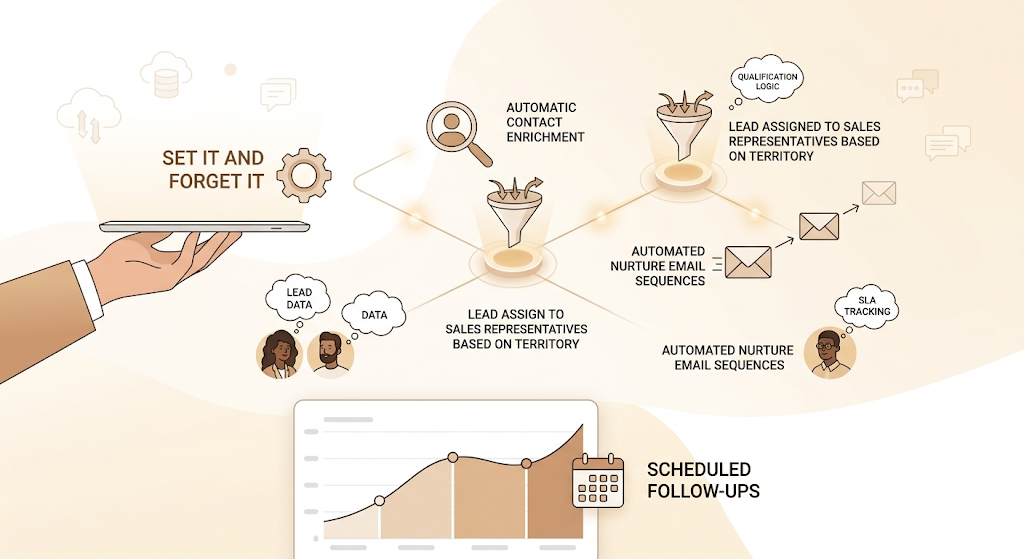
CRM automation platforms are software systems that combine contact management with workflow automation to handle repetitive sales, marketing, and customer service tasks without manual input. They connect your data, your team’s actions, and your customer touchpoints into a single system that keeps moving even when no one is watching.
The distinction matters because a traditional CRM is essentially a database. You put information in, you pull reports out, and someone has to manually trigger every action. A CRM automation platform adds rules and triggers to that database so the system itself can send emails, assign leads, update deal stages, schedule follow-ups, and escalate tickets based on logic you define once.
CRM Automation vs Traditional CRM
Traditional CRM tools like early versions of Salesforce or SugarCRM were built as record systems. Your reps log activity, managers pull reports, and the tool helps you not forget things. It doesn’t do anything unless a human tells it to.
CRM automation platforms, by contrast, act on data. If a lead fills in a form, the platform can automatically enrich their contact data, assign them to the right rep based on territory or industry, add them to a nurture email sequence, and schedule a follow-up task. All of this without anyone clicking a button.
That gap in capability is why most mid-sized businesses eventually outgrow a pure CRM and move to an automation-enabled platform, even if it costs more upfront.
Who Should Use CRM Automation Platforms?
Honestly, if you’re doing more than 50 new leads a month, manual CRM processes will start to break down. CRM automation platforms make the most sense for:
- B2B SaaS companies with multi-step sales cycles and complex lead qualification
- D2C e-commerce brands managing post-purchase journeys and repeat purchase triggers
- Startups scaling their sales team that can’t afford to hire coordinators for every process
- Enterprise teams dealing with large volumes across multiple geographies or segments
- Customer support teams managing ticket routing and SLA tracking at scale
Why Manual CRM Processes Cost You More Than You Think
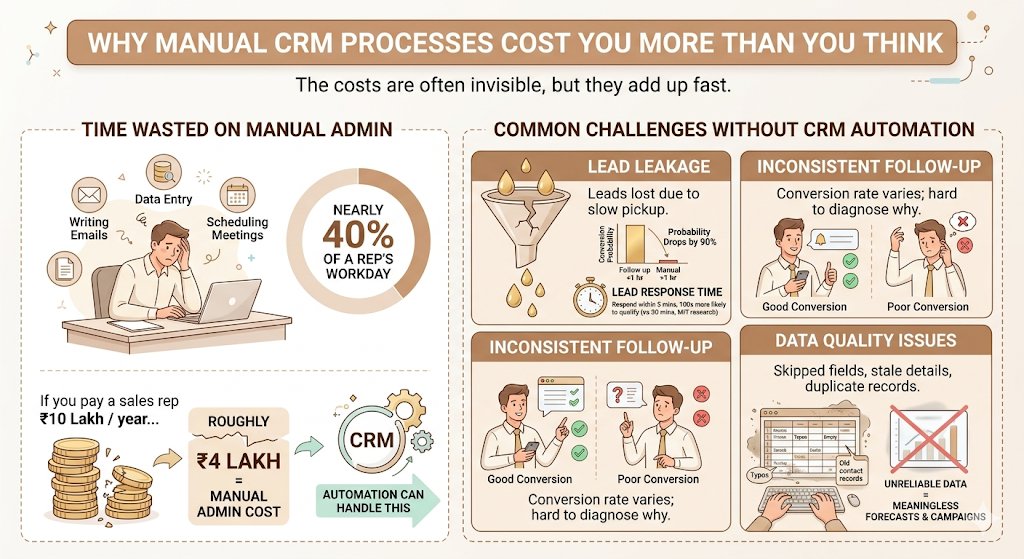
Most companies that haven’t automated their CRM don’t realise the cost because it’s invisible. Nobody books a meeting called “Time we waste on data entry.” But the numbers add up fast.
According to HubSpot’s 2023 Sales Trends Report, sales reps spend 21% of their day writing emails and 17% on data entry. That’s nearly 40% of a rep’s workday on tasks a CRM automation platform can handle. If you’re paying a sales rep ₹10 lakh a year, roughly ₹4 lakh of that cost is going to manual admin.
Common Challenges Without CRM Automation
Lead leakage is the most expensive problem nobody tracks. Leads come in through your website form, your Facebook ads, or an event, and if someone doesn’t manually pick them up and follow up within an hour, the conversion probability drops by 90%. That’s not a hypothetical. MIT’s research on lead response time (published in the Harvard Business Review) found that responding to a lead within five minutes makes you 100 times more likely to qualify them than if you wait 30 minutes.
Inconsistent follow-up is the second killer. Without automation, follow-up depends on individual reps remembering to do it. Some do. Some don’t. Your conversion rate across the team is all over the place, and it’s nearly impossible to diagnose why.
Data quality issues compound over time. When reps manually update records, fields get skipped, contact details go stale, and duplicate records pile up. By the time you try to run a campaign or generate a forecast, the underlying data is unreliable enough to produce meaningless outputs.
Manual CRM processes cost businesses an estimated 40% of sales rep productivity to admin tasks like data entry, email writing, and pipeline updates. Without automation, leads received outside business hours or during busy periods often go uncontacted for hours, at which point conversion probability has already dropped significantly. CRM automation platforms solve this by triggering follow-ups, assignments, and nurture sequences the moment a lead action occurs.
How CRM Automation Platforms Work End to End
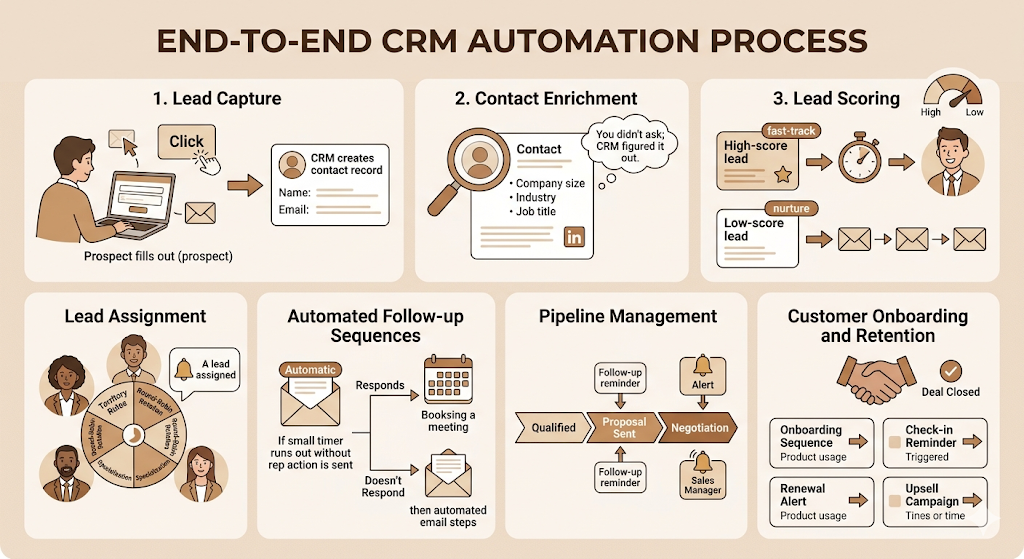
The best way to understand how CRM automation platforms work is to walk through what actually happens when a new lead enters your system.
Step 1: Lead capture. A prospect fills out a form on your website, clicks an ad, or responds to an outbound email. The CRM captures this action and creates a new contact record automatically, pulling in whatever data is available.
Step 2: Contact enrichment. Tools like Clearbit or ZoomInfo integrate with most CRM automation platforms to automatically enrich the contact record with company size, industry, job title, LinkedIn URL, and other firmographic data. You didn’t ask your prospect to fill in ten fields. The CRM just figured it out.
Step 3: Lead scoring. The platform evaluates the new lead against your scoring model. Criteria might include company size, industry match, job title seniority, and the specific page they converted on. High-score leads get fast-tracked. Low-score leads go into a nurture sequence.
Step 4: Lead assignment. Based on territory rules, round-robin rotation, or specialisation, the platform assigns the lead to the right rep and sends them a notification. No coordinator needed.
Step 5: Automated follow-up sequences. If the rep doesn’t contact the lead within a set timeframe, the platform sends an initial email automatically. Depending on how the lead responds or what they click, different branches of the sequence trigger.
Step 6: Pipeline management. As the deal progresses, stage changes trigger new actions. Moving a deal to “Proposal Sent” might trigger a three-day follow-up reminder and log the activity. Moving it to “Negotiation” might alert the sales manager.
Step 7: Customer onboarding and retention. After a deal closes, CRM automation platforms can trigger onboarding sequences, check-in reminders, renewal alerts, and upsell campaigns based on product usage data or time-based triggers.
Key Features to Look for in Any CRM Automation Platform
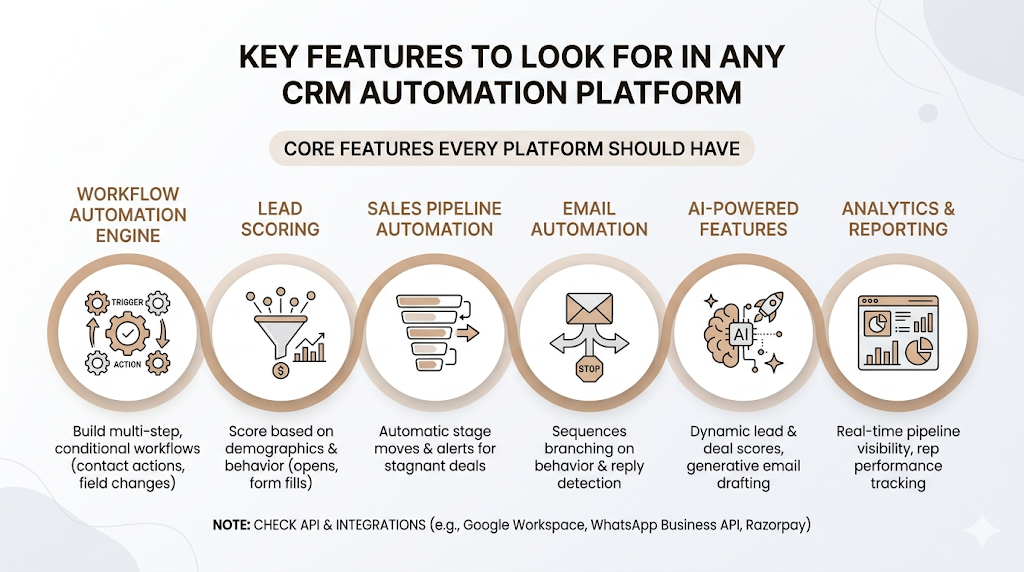
Not all CRM automation platforms are built the same. Some are built for marketers, some for sales teams, and some try to do everything. The features that actually matter depend on your use case, but there’s a core set every platform should have before you commit.
Workflow Automation Engine
This is the core of the product. You need to be able to build multi-step, conditional workflows triggered by contact actions, field changes, deal stage updates, or time delays. If the workflow builder is clunky or limited to simple if/then rules, you’ll hit a ceiling fast. HubSpot’s workflow builder and Salesforce Flow are good reference points for what flexibility looks like at scale.
Lead Scoring
Lead scoring software should let you score contacts based on both demographic fit (industry, company size, job title) and behavioral signals (email opens, page visits, form fills). Platforms that only offer manual scoring or can’t combine both dimensions will give you a model that misses high-intent leads regularly.
Sales Pipeline Automation
Your pipeline should update itself. When a rep logs a call outcome, the next step should trigger automatically. When a deal has sat in one stage for too long, an alert should go out. Sales pipeline automation isn’t just about moving stages faster. It’s about making sure nothing goes invisible.
Email Automation
This isn’t just a drip campaign builder. CRM-level email automation should handle sequences that branch based on opens, clicks, and reply detection. The reply detection feature alone is worth paying for. When a prospect replies, the sequence should stop automatically so a rep can take over without sending a follow-up to someone who already responded.
AI-Powered Features
Most CRM automation platforms now layer AI features on top of their core functionality. The ones worth caring about: AI lead scoring that updates dynamically as behavior changes, predictive deal health scores that flag at-risk opportunities, and generative AI tools for email drafting. AI CRM tools from vendors like Salesforce (Einstein AI) and HubSpot (Breeze) are pushing this further than most buyers realise.
Analytics and Reporting
Reports matter, but they matter less than the dashboards your reps and managers actually look at every morning. Real-time pipeline visibility, individual rep performance tracking, and sequence performance data are non-negotiables. If you need a data analyst to pull your weekly sales report, something is wrong with the platform.
API and Integrations
This is often underrated until it becomes a problem. Check what your CRM connects to natively and what requires custom API work. For most Indian B2B and D2C companies, you’ll want out-of-the-box connections with tools like Zoho, Google Workspace, WhatsApp Business API, Razorpay, and Shopify. CRM integrations that require a developer every time you need to connect a new tool will slow you down every quarter.
The most important features in CRM automation platforms are a conditional workflow engine, multi-dimensional lead scoring, reply-detection email sequences, and real-time pipeline dashboards. AI features like predictive deal scoring are rapidly moving from differentiators to baseline expectations. Before buying, verify native integration support with the specific tools your team already uses.
Types of CRM Automation Platforms
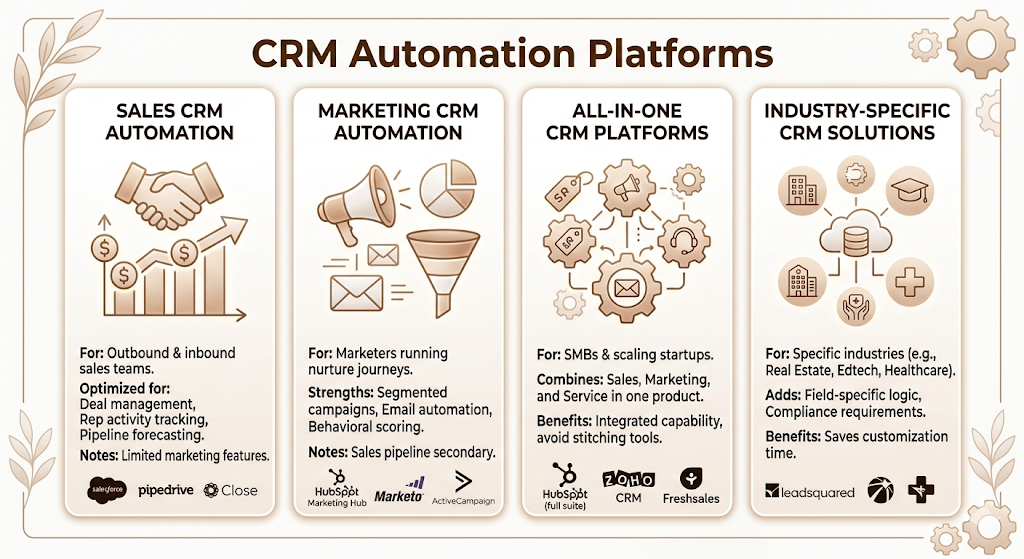
There’s no single category of CRM automation platform that fits every business. The product market has split into a few meaningful categories.
Sales CRM Automation
Built primarily for outbound and inbound sales teams. Examples include Salesforce Sales Cloud, Pipedrive, and Close CRM. These platforms are optimised for deal management, rep activity tracking, and pipeline forecasting. Marketing features are limited or require separate products.
Marketing CRM Automation
Designed for marketers running complex nurture journeys, segmented campaigns, and lifecycle automation. HubSpot Marketing Hub, Marketo, and ActiveCampaign fall here. Lead nurturing, email automation, and behavioral scoring are the strengths. Sales pipeline management is secondary.
All-in-One CRM Platforms
Platforms like HubSpot (full suite), Zoho CRM, and Freshsales combine sales, marketing, and customer service automation in one product. For most SMBs and scaling startups, this is the right category. You get enough capability across all three functions without stitching together three separate tools.
Industry-Specific CRM Solutions
Some CRM automation platforms are built for specific industries and add field-specific logic out of the box. Real estate platforms like Leadsquared (popular in India), edtech CRMs, and healthcare patient management platforms are examples. If your sales process has unusual field structures or compliance requirements, an industry-specific platform may save you significant customisation time.
CRM Automation vs Marketing Automation vs Sales Automation
This comparison trips up a lot of buyers because vendors use these terms interchangeably to mean different things. Here’s how they actually differ.
| Dimension | CRM Automation | Marketing Automation | Sales Automation |
| Primary purpose | Manage the full customer relationship | Drive lead generation and nurture | Accelerate deal progression |
| Core users | Sales + marketing + support teams | Marketing teams | Sales reps and managers |
| Feature focus | Contact management, pipeline, workflow | Email campaigns, lead scoring, nurture | Outreach sequences, call logging, forecasting |
| Automation scope | End-to-end from lead to renewal | Top of funnel and nurture | Mid and bottom of the funnel |
| Best for | B2B companies, SaaS, scaling teams | High-volume inbound lead funnels | Outbound sales teams, deal-heavy pipelines |
Marketing automation software like Marketo or Mailchimp focuses on the phase before a lead becomes a sales opportunity. Sales automation tools like Outreach or Salesloft take over once the rep is actively working on a deal. CRM automation platforms connect both and extend the relationship after the deal closes.
For most businesses, the question isn’t which one to buy. It’s which CRM automation platform covers enough of marketing, sales, and post-sale that you don’t need three separate tools to achieve the same result?
Essential CRM Automation Workflows You Should Set Up First
You don’t need to automate everything on day one. Start with the workflows that directly affect revenue and response time.
Lead Qualification and Routing
Build a scoring model that automatically qualifies inbound leads based on firmographic and behavioral data. Set a threshold above which leads get immediately assigned to a rep with a task to call within one hour. Below-threshold leads enter a nurture sequence instead of clogging up your sales pipeline with unqualified contacts.
Email Follow-Up Sequences
Set up a multi-touch sequence for every new qualified lead that runs until the rep gets a reply or books a meeting. A standard B2B sequence might run five to seven touchpoints over two weeks across email and LinkedIn. Make sure reply detection is enabled so the sequence stops the moment a prospect responds.
Deal Stage Triggers
Every stage in your pipeline should have at least one trigger. When a deal moves to “Demo Scheduled,” send a calendar invite confirmation automatically. When it moves to “Proposal Sent,” schedule a follow-up task for three days later. When it’s been stuck in “Negotiation” for ten days, alert the sales manager. These aren’t complex workflows. They’re just making sure the process you designed actually runs.
Customer Onboarding Automation
This one is underused. Once a deal closes, most companies hand off to a customer success manager and hope for the best. A well-built onboarding automation sequence sends welcome emails, setup guides, check-in reminders, and feature adoption prompts based on what the customer has and hasn’t done. For Indian SaaS companies like Razorpay or Zoho, this kind of automated onboarding at scale is what makes customer success possible without hiring a CS rep for every ten customers.
Renewal and Upsell Triggers
Set automations to fire 90 days, 60 days, and 30 days before contract renewal. Flag customers who haven’t used the product in 14 days for a health check call. Trigger upsell emails when a customer hits usage thresholds that indicate they need a higher plan. These workflows directly protect your revenue without anyone having to remember to act.
The highest-ROI CRM automation workflows to set up first are lead qualification routing, email follow-up sequences with reply detection, deal stage triggers, customer onboarding sequences, and renewal alerts. Companies that automate these five workflows typically see a meaningful reduction in lead response time and an increase in rep capacity without additional headcount.
Must-Have Integrations for CRM Platforms
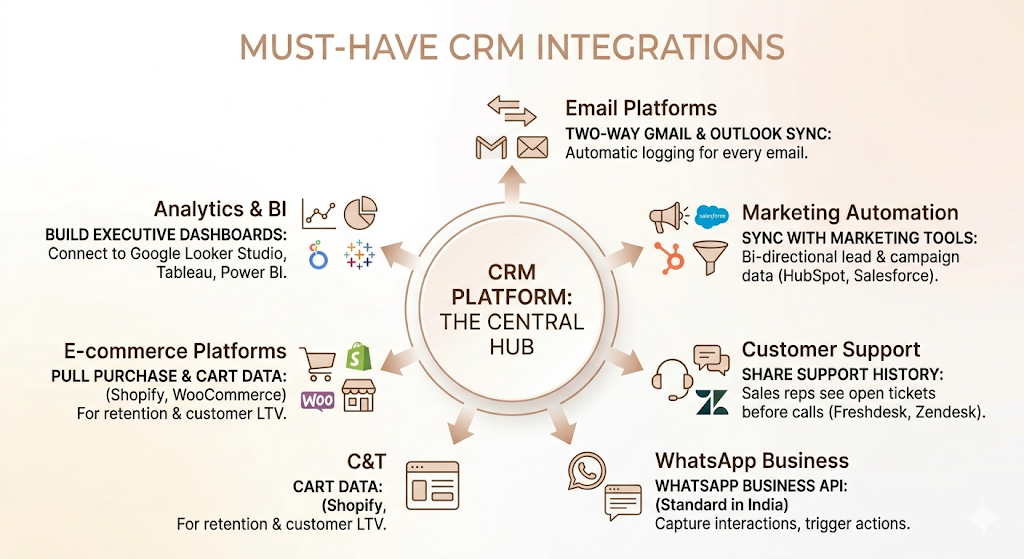
A CRM automation platform’s value is proportional to what it connects with. The platform itself is the hub. The integrations are what make it complete.
Email platforms: Gmail and Outlook integration should be native and two-way. Every email sent or received should log automatically against the contact without the rep doing anything.
Marketing automation tools: If your CRM doesn’t include marketing automation natively, it needs to sync with whatever you’re using. Bi-directional sync between HubSpot and Salesforce, for example, is a common setup in larger teams.
Customer support software: Freshdesk, Zendesk, or Intercom should share contact history with your CRM so a sales rep can see if a prospect has open support tickets before a renewal call. This matters more than most teams realise.
WhatsApp Business API: For Indian companies in particular, CRM integration with WhatsApp Business is now a standard requirement. Platforms like Leadsquared and Zoho CRM have built this in. If your prospects and customers communicate primarily via WhatsApp, your CRM needs to capture and trigger from those interactions.
E-commerce platforms: If you’re running a Shopify or WooCommerce store, your CRM should pull in purchase history, cart abandonment events, and customer lifetime value data. This turns your CRM from a sales tool into a retention tool.
Analytics and BI: Connecting your CRM to Google Looker Studio, Tableau, or Power BI lets you build executive dashboards that go beyond what the CRM’s native reporting offers. For companies making data-driven decisions at the leadership level, this integration is non-negotiable.
How to Choose the Right CRM Automation Platform
The platform that’s right for a 10-person SaaS startup is not the same one that’s right for a 200-person D2C brand. Here’s how to evaluate without getting distracted by feature lists.
Define What You Actually Need to Automate First
Before you look at a single vendor demo, map out the five to ten processes in your current workflow that eat the most time or create the most errors. If most of your pain is in lead routing and follow-up, you need a strong workflow engine and email sequence builder. If your pain is in post-sale customer management, you need a platform with strong onboarding and retention automation. Don’t buy a platform for features you don’t have processes to use.
Evaluate Real Integration Depth, Not the Logos on the Website
Every vendor shows a page of integration logos. Ask specifically about the integrations you need. Is it native or via Zapier? Is it one-way or two-way sync? What data fields sync? A CRM that technically integrates with Shopify but only syncs the customer’s email address is not useful for a D2C brand trying to trigger post-purchase automations.
Check Scalability Before You Need It
The worst time to realise your CRM can’t scale is when you’re growing fast. Ask vendors about contact limits, workflow limits, and API call limits at your next likely price tier. Platforms like Zoho CRM and HubSpot are generally good at scaling with Indian SMBs. Enterprise platforms like Salesforce are powerful but often overkill until you’re at a certain complexity level.
Run a Real Pilot, Not a Demo
Request a 30-day trial with real data before committing. Set up one or two actual workflows from your current process. See how long it takes, whether the UI makes sense to non-technical team members, and what breaks when you push it. A demo shows you what’s possible. A pilot shows you what’s practical for your team.
Compare Total Cost, Not Seat Price
CRM platforms are notoriously good at showing you a low per-seat price and burying the additional costs in add-ons. Email automation, reporting dashboards, advanced workflows, and API access are often paid upgrades. Map out the full feature set you need and price all of it before comparing platforms.
Common Mistakes That Kill CRM Automation Projects
Automation makes good processes faster. It makes bad processes fail faster. Before you blame the platform, check whether any of these are the real problem.
Automating a broken process. If your lead qualification criteria are unclear, automating lead scoring will just route bad leads faster. Fix the underlying process logic first, then automate it.
Overcomplicating workflows from day one. A workflow with 25 branches built in month one will be unmaintainable in six months when you need to update it. Start simple. Add complexity only when the simple version proves its value.
Ignoring data quality. CRM automation depends on clean data. Duplicate records, missing fields, and inconsistent naming conventions break triggers. Before you launch any automation, run a data audit. Most platforms have duplicate detection tools built in.
Poor lead scoring models. The most common failure is building a lead scoring model based on assumptions rather than historical data. If you have six months of closed-won and closed-lost data, analyse what actually predicted a win before you build your scoring criteria. If you don’t have that data yet, start simple and revisit the model after 90 days.
Not measuring automation performance. Setting up workflows and never reviewing them is worse than not automating. Sequence open rates, workflow conversion rates, and time-in-stage trends tell you whether your automation is actually helping. Check them monthly.
Key CRM KPIs to Measure After Automation
Setting up CRM automation platforms without measuring the right outputs is how companies convince themselves automation is working when it isn’t. These are the metrics that matter.
Lead response time: How long does it take from a lead’s first action to first contact from your team? Below five minutes is the target for inbound leads. Track this before and after automation to confirm the impact.
Lead conversion rate: Of all the leads entering your funnel, what percentage convert to opportunities and then to customers? Automation should improve this by ensuring no leads fall through the cracks.
Sales cycle length: How many days from lead creation to deal close? If CRM automation is working, this number should shrink as follow-up gaps and stage delays get removed.
Customer acquisition cost (CAC): If automation is improving rep productivity, you should be able to close more deals with the same headcount, which reduces CAC over time.
Customer lifetime value (CLV): Retention and upsell automations directly affect CLV. Track it quarterly to see the compounding effect.
Pipeline velocity: A formula combining the number of deals in the pipeline, average deal size, win rate, and sales cycle length. This is your single best indicator of sales team health and it should improve meaningfully within 90 days of effective automation.
Email sequence performance: Open rate, reply rate, and conversion rate per step in your sequences. If step three in your sequence has a 2% reply rate, either the message is wrong or the timing is wrong. Automation makes this data available. You still have to act on it.
AI and What’s Changing in CRM Automation
This is the area moving fastest right now, and it’s worth paying attention to even if you’re not ready to adopt it yet.
AI-Powered Lead Scoring
Static lead scoring models decay quickly. A contact’s score should change every time they visit your pricing page, open an email, or go dark for two weeks. AI lead scoring models from platforms like Salesforce Einstein and HubSpot Breeze update scores dynamically based on real-time behavior and pattern matching across your historical data. The result is a model that gets more accurate over time rather than less.
Predictive Sales Forecasting
AI-driven forecasting looks at deal characteristics, rep history, stage progression speed, and engagement signals to predict close probability more accurately than a rep’s gut feel. Salesforce’s Einstein Forecasting and Clari are the best-known examples of this. For Indian SaaS companies building enterprise pipelines, this capability is becoming a real competitive advantage.
Conversational AI and Chatbots
AI chatbots on your website or WhatsApp can now qualify leads, answer product questions, and book demos without human involvement. Intercom’s Fin and Drift’s AI are good examples of this. The quality gap between AI-driven qualification bots and a real SDR conversation has narrowed significantly in 2024.
Agentic CRM Automation
This is the newest and most significant shift. Agentic AI in CRM means the platform doesn’t just execute rules you set – it suggests new workflows, identifies performance gaps, and can take multi-step actions autonomously when you allow it. Salesforce’s Agentforce, launched in late 2024, is the clearest example of this direction. Rather than you building a workflow, the AI proposes one based on your data patterns.
For most Indian businesses, full agentic CRM is 12 to 18 months away from being practical to adopt. But the platforms you evaluate today should have a credible roadmap toward this capability, because it will matter.
Generative AI for Sales and Marketing Content
Most CRM automation platforms now include AI writing assistants for email drafting, follow-up suggestions, and call summaries. HubSpot’s AI email writer and Salesforce’s Einstein GPT are used by sales reps to draft personalised outreach faster. The quality is uneven, but as a starting point for a rep to edit rather than a final send, these tools are genuinely useful.
AI features in CRM automation platforms are shifting from optional add-ons to core product capabilities. In 2025, the most impactful AI features are dynamic lead scoring, predictive deal health monitoring, and AI-driven chatbots for lead qualification. Agentic CRM automation, where the platform autonomously suggests and executes workflows, is an emerging capability led by Salesforce Agentforce and is expected to reach mainstream adoption by 2026.
Conclusion
The real value of CRM automation platforms isn’t in the list of features. It’s in what stops happening. Leads stop falling through the cracks. Follow-ups stop depending on memory. Deals stop stalling because nobody flagged them. Customer renewals stop getting missed because someone forgot to check the calendar.
Most teams that see the biggest improvement from CRM automation didn’t have a technology problem. They had a consistency problem. Automation doesn’t replace good sales instincts or strong customer relationships. It creates the conditions for those things to happen reliably instead of occasionally.
The key takeaways: start by mapping your highest-cost manual processes before buying anything. Choose a platform that covers your actual integration needs, not just an impressive feature demo. And measure lead response time, pipeline velocity, and conversion rate from the beginning, so you know whether the automation is actually working.
Frequently Asked Questions
What are CRM automation platforms?
CRM automation platforms are software tools that combine contact and deal management with workflow automation to handle repetitive sales, marketing, and customer service tasks. They use triggers and rules to automatically route leads, send emails, update pipelines, and run onboarding or retention sequences without manual input from your team.
How do CRM automation platforms work?
They work by connecting your lead and customer data to a conditional workflow engine. When a trigger event occurs (a form fill, a deal stage change, a contract expiry date), the platform executes the next action you’ve defined – sending an email, assigning a task, updating a field, or notifying a rep. Most platforms also support multi-branch workflows that respond differently based on how a contact behaves.
What’s the difference between a CRM and a CRM automation platform?
A traditional CRM is a database for storing customer and deal information. A CRM automation platform adds a workflow engine on top, so the system can act on data without human intervention. The distinction is whether the software requires a human to trigger every action or whether it can execute defined processes automatically.
What tasks can CRM automation handle?
CRM automation can handle lead capture and enrichment, lead scoring and routing, email follow-up sequences, deal stage updates and alerts, meeting scheduling reminders, customer onboarding sequences, support ticket routing and SLA tracking, renewal alerts, and upsell triggers. Anything that follows a repeatable rule can typically be automated.
Which businesses benefit most from CRM automation?
B2B SaaS companies, D2C e-commerce brands, and any business handling more than 50 new leads per month get the most immediate value. Customer support teams managing high ticket volumes also see significant efficiency gains. Very small businesses with fewer than five salespeople and simple pipelines may not need the full capability of a CRM automation platform and are better off starting with a simpler tool.
Can CRM automation platforms integrate with ERP and marketing tools?
Yes, most enterprise and mid-market CRM automation platforms offer integrations with ERP systems like SAP and Oracle, marketing automation tools like Marketo and Mailchimp, and communication tools like Slack and WhatsApp Business API. The depth of these integrations varies significantly by platform, which is why checking integration specs during evaluation matters more than checking whether a logo appears on the integrations page.
How much do CRM automation platforms cost?
Pricing varies widely. HubSpot’s CRM starts free and scales to ₹80,000 to ₹4,00,000 per year, depending on contact volume and features. Zoho CRM ranges from about ₹1,200 to ₹3,000 per user per month. Salesforce Sales Cloud starts at approximately ₹2,000 to ₹6,000 per user per month. Enterprise implementations with customisation, training, and integrations can cost significantly more. Most vendors price by seat with additional charges for feature tiers.
How long does CRM implementation take?
A basic CRM automation setup with core workflows and integrations takes two to four weeks for most SMBs. Enterprise implementations with custom workflows, complex integrations, and data migration can take three to six months. The biggest factor isn’t the software setup time. It’s how long it takes to map your existing processes clearly enough to build reliable automations.
What KPIs should I track after setting up CRM automation?
The most important KPIs are lead response time, lead-to-opportunity conversion rate, sales cycle length, pipeline velocity, and email sequence reply rate. Businesses focused on post-sale automation should also track customer retention rate and time-to-onboard. Track these monthly rather than quarterly so you can catch problems in specific workflows before they affect revenue.
Is CRM automation worth it for small businesses?
It depends on your growth stage. If you’re below 20 leads per month and have two or three salespeople, the overhead of setting up and maintaining automations may outweigh the time saved. But if you’re growing and losing leads due to slow follow-up or inconsistent processes, even a basic CRM automation setup will pay back quickly. The calculation changes when you factor in that most platforms have entry-level tiers that are free or very low cost.