

Most support teams already have a chatbot. Most of them still frustrate customers. An AI agent for customer engagement is something different. Instead of matching a query to a script, it reads the situation, pulls the right data, decides what to do and takes the action. That could be answering a question, updating an order or flagging a human when things get messy.
The line between “AI agent” and “smarter chatbot” gets blurry fast, and vendors don’t help. This article cuts through that. You’ll get a working definition of an AI agent for customer engagement, where it earns its keep across the customer journey, what it needs under the hood to actually function, and an eight-step rollout you can run without a data science team. We’ll also cover where these deployments go wrong, because they do, often, and the honest failure modes matter more than the highlight reel.
Table of Contents
What Is an AI Agent for Customer Engagement?
An AI agent for customer engagement is software that perceives a customer’s context, decides what should happen next and acts on connected systems. All of that happens largely without a human writing the rules for every scenario in advance. That’s the whole idea. It’s not just answering. It’s deciding and doing.
How an AI Agent Actually Works
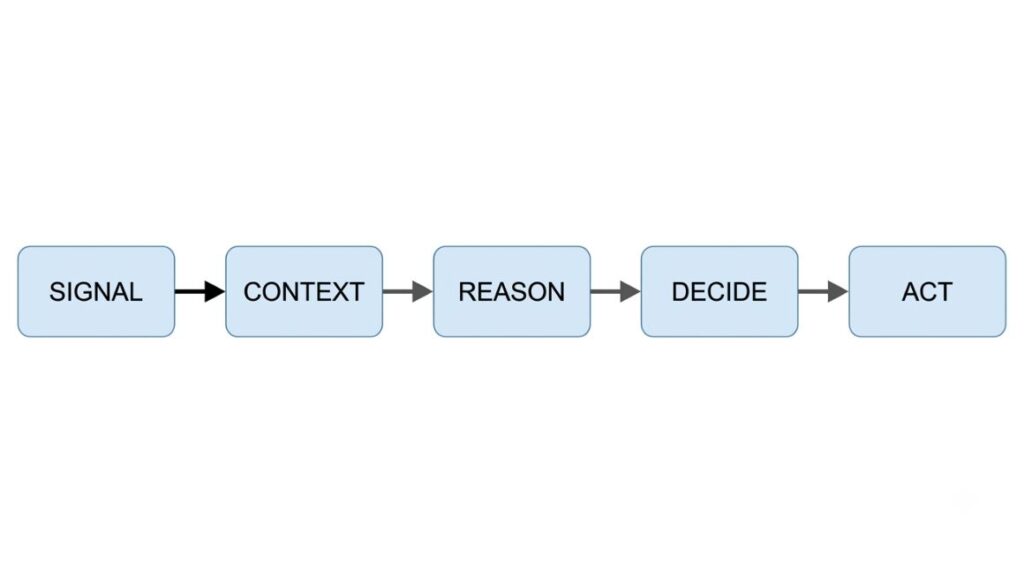
Break it down and you get five steps: signal, context, reason, decide, act.
A signal arrives (a message, a click or a drop in app usage). The agent pulls context (order history, CRM notes or a past conversations). It reasons over that context using a language model. It decides on the best next step within limits someone set for it. Then it acts, sending a message, issuing a refund, updating a CRM field or looping in a person.
That last step is the giveaway. A regular chatbot answers. An AI agent for customer engagement does something in your systems. And it does it without someone clicking through five screens first.
AI Agent vs Chatbot vs Automation vs Copilot
People use these terms interchangeably, which causes real confusion when teams are deciding what to buy.
| Type | What it does | Who’s in control | Example |
| Rule-based chatbot | Matches keywords to scripted replies | Rules written by a human | “Track my order” triggers a canned link |
| Marketing automation | Runs a predefined workflow when a trigger | Human-designed flow, fixed logic | Abandoned cart email sent two hours later |
| Copilot | Assists a human agent with suggestions | Human makes the final call | Suggests a reply, agent approves and sends |
| AI agent | Reasons over context and acts independently within set guardrails | Human sets goals and limits, not every step | Identifies a delayed order, refunds shipping, and messages the customer, unprompted |
The agent is the only one on this list that can act without someone approving each step. That’s what makes it powerful, and also what makes the guardrails section further down non-negotiable.
Also Read: Agentic AI vs AI Agents: Key Differences
When Does a Business Actually Need One?
Not every support inbox needs an agent. You probably need one when query volume outpaces headcount, when the same handful of requests (order status, billing, appointment changes) eat up most agent time, or when customers expect a reply outside business hours and you’re currently not giving them one. If your ticket volume is low and mostly complex, an agent won’t save you much. If it’s high and repetitive, this is exactly the kind of work an AI agent for customer engagement is built for.
What Can AI Agents Do Across the Customer Journey?
This is where the value actually shows up, and it’s broader than most vendor pages suggest.
Before Purchase
An agent can answer product questions pulled straight from your catalogue and policies, qualify a lead by asking a few questions and scoring the response, and recommend products based on browsing behaviour rather than a generic bestseller list. A shopper asking “does this work for oily skin” gets a specific answer instead of a shrug or a support ticket.
During Purchase
This is where conversational AI earns its keep in commerce. It can compare two products side by side on request, walk someone through checkout when they stall and recover an abandoned cart with a personalised nudge instead of a blanket discount code. Increasingly in India, it helps complete a payment through UPI without leaving the chat.
After Purchase
Order status, delivery delays, and refund requests make up the bulk of post-purchase contact, and they’re the most agent-friendly category there is because the answer usually lives in one system: the order database. A well-built agent for customer engagement automation can also walk a new user through onboarding steps, one at a time, instead of dumping a PDF on them.
Retention
This is the part most teams skip. It’s arguably where an AI agent for customer engagement pays for itself fastest. Usage drops, a renewal date approaches, a customer hasn’t opened the app in three weeks: an agent can catch these signals and reach out before the person churns, not after. This is proactive customer engagement in practice. It’s a genuinely different posture from a reactive help desk.
Reactive vs Proactive Engagement
Most support tools are reactive by design. They wait for the customer to show up with a problem. An agent flips that. It watches for the signal that precedes the problem and reaches out first. That’s a meaningful shift. It’s also why guardrails matter more here than anywhere else in this list. An agent reaching out unprompted needs to get the tone and timing right, or it reads as intrusive rather than helpful.
An AI agent for customer engagement can operate across the full customer journey, from pre-purchase questions and lead qualification through checkout assistance, post-purchase support and proactive retention outreach. The shift from reactive to proactive engagement, where the agent reaches out before a problem surfaces rather than after, is what separates an agent from a traditional chatbot.
What Does an AI Customer-Engagement Agent Need to Work?
None of the above happens without infrastructure. Skip this part and you’ll end up with an agent that sounds confident and answers wrong.
Customer Data and CRM
The agent needs a live connection to order history, account status, and past interactions. Without this, it’s guessing, and customers notice fast when an agent asks a question it should already know the answer to.
Knowledge Base and Retrieval
This is the agent’s source of truth: product specs, policies, FAQs, troubleshooting steps. If your knowledge base is outdated or scattered across five different tools, the agent will confidently repeat whatever is wrong in it. Garbage in, garbage out applies here more than almost anywhere else in software.
The AI Model
The reasoning engine that turns context into a decision. This matters less than vendors claim; the model is rarely the reason a deployment fails. Data quality and guardrails are.
Tools, APIs, and Business Systems
The model can reason all day, but it can’t refund an order unless it has permission to call the refund API. This is the “act” step from earlier, and it’s the piece most legacy chatbots never had.
Orchestration and Workflows
Something needs to route a request to the right tool, in the right order. That said, it needs to hand off cleanly when the agent hits its limits. This is the plumbing layer, invisible when it works and obvious the moment it doesn’t.
Guardrails, Permissions, and Human Handoff
The single most important item on this list. Guardrails define what the agent can decide on its own (a small refund, a delivery date change) versus what needs a person (a complaint involving legal risk, a request outside policy). Get this wrong and you either have an agent too timid to be useful or one issuing refunds it shouldn’t. Human handoff needs to carry the full conversation context with it; nothing kills trust faster than repeating your problem to a human after the bot already had all the details.
Also Read: AI Agents for Marketers: The Complete 2026 Guide
Which Channels Can AI Agents Use?
An agent isn’t tied to one surface. It should work wherever your customers already are.
WhatsApp and Messaging
For Indian brands specifically, this channel deserves real attention. WhatsApp has over 500 million active users in India, and a large share of daily commerce conversation happens there already. Meta’s own WhatsApp Business API now supports an AI agent layer directly, called Business AI, which can answer questions, recommend products, and even facilitate UPI payments inside the chat thread. Meta reported that small businesses using this feature, including a personalised gifting business and a skincare brand, saw meaningful gains in managing daily query volume without adding headcount.
Website and In-App Chat
Still the default entry point for most brands, and often the first place an agent gets tested before wider rollout.
Slower, but still essential for anything requiring documentation, attachments, or a paper trail, like a formal complaint or a refund confirmation.
Voice
An AI voice agent handles phone-based support and outbound calls, and increasingly it hands off mid-call into WhatsApp, sending a payment link or a document while the customer is still on the line. This voice-to-chat handoff is becoming a standard pattern in Indian deployments because it solves the “I’ll send that to you” problem that plagued phone support for years.
Omnichannel Context
The real test isn’t whether an agent works on each channel individually. It’s whether it remembers the conversation when a customer switches from web chat to WhatsApp to a phone call. Most omnichannel customer experience failures happen at exactly that handoff point, when context gets dropped and the customer has to start over.
| Channel | Best for | Watch out for |
| High-frequency, transactional queries | Meta’s 24-hour messaging window and template rules | |
| Web/in-app chat | First-time visitors, product discovery | Low intent to return if the answer is wrong once |
| Documentation-heavy requests | Slow response expectations mismatch fast-channel habits | |
| Voice | Urgent or complex issues, older demographics | Higher cost per interaction than text channels |
Also Read: AI Agents for E-commerce Marketing: 10 Ways to Boost Sales and Automate Growth
8 Practical AI Agent Use Cases for Customer Engagement
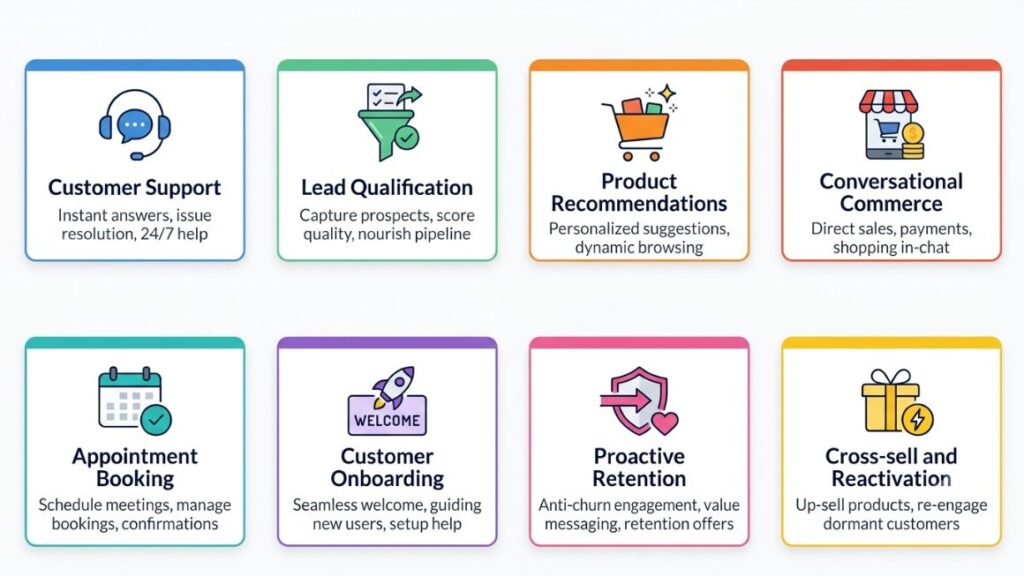
Trigger, action, outcome. That’s the pattern for all eight.
- Customer support. Trigger: a repetitive query like order status. Action: agent retrieves the record and answers directly. Outcome: faster resolution, freed-up human time for complex cases.
- Lead qualification. Trigger: a new website enquiry. Action: agent asks two or three qualifying questions and scores the lead. Outcome: sales gets warmer leads, faster.
- Product recommendations. Trigger: browsing or purchase history. Action: agent surfaces relevant items in the same conversation. Outcome: higher average order value without a hard sell.
- Conversational commerce. Trigger: a product question mid-chat. Action: agent answers and offers to complete the purchase inline. Outcome: fewer drop-offs between interest and checkout.
- Appointment booking. Trigger: a service enquiry. Action: agent checks availability and books directly. Outcome: no back-and-forth over email.
- Customer onboarding. Trigger: a new signup. Action: agent walks the user through setup steps one at a time. Outcome: fewer abandoned accounts in the first week.
- Proactive retention. Trigger: a drop in product usage or an approaching renewal date. Action: agent reaches out with a relevant nudge or offer. Outcome: caught churn risk before it becomes a cancellation.
- Cross-sell and reactivation. Trigger: a completed purchase or a dormant account. Action: agent suggests a complementary product or a win-back offer. Outcome: incremental revenue from an existing base rather than new acquisition spend.

How to Deploy an AI Agent for Customer Engagement?
Step 1: Choose one customer problem. Not five. Pick the highest-volume and the most repetitive query you have. Order status is the usual starting point, and solve that first.
Step 2: Define the desired outcome. Faster resolution? Lower cost per contact? Higher CSAT? Name it before you build anything. It decides how you measure success later.
Step 3: Prepare customer data and knowledge. Clean up the knowledge base. Consolidate scattered policy documents. An agent built on outdated information will confidently give outdated answers.
Step 4: Connect the required systems. CRM, order management, help desk, whatever the agent needs to actually retrieve information and act on it.
Step 5: Define what the agent can do. Spell out the specific actions it’s allowed to take on its own, and the ones that always require a human.
Step 6: Set escalation and human-handoff rules. Decide the exact triggers: an angry customer, a request outside policy, a legal or safety concern. The agent should recognise these and route out immediately, with context intact.
Step 7: Test and launch gradually. Run it on a small percentage of traffic first. Watch the transcripts. Fix what breaks before it reaches everyone.
Step 8: Measure and improve. This isn’t a one-time launch. Review performance monthly, retrain on new edge cases, and expand scope only once the current one is solid.
Forrester has warned that a majority of companies attempting to build advanced agentic AI systems entirely in-house, without vendor support or established frameworks, run into serious trouble. That’s a reasonable case for starting with a platform rather than building from scratch, at least for your first deployment.
How to Choose an AI Customer Engagement Platform?
Don’t get pulled into a feature-list arms race. Evaluate against what you’ll actually use.
| Factor | What to check |
| Channels | Does it cover WhatsApp, web, voice, and email, or just one? |
| Integrations | Can it connect to your CRM, ecommerce platform, and help desk without custom engineering? |
| Knowledge | How does it retrieve and update information, and how often? |
| Actions | What can the agent actually execute, versus just suggest? |
| Human handoff | Does full context carry over, or does the customer repeat themselves? |
| Governance | Are there permission levels, logs, and approval workflows? |
| Analytics | Can you actually measure outcomes, not just conversation volume? |
| Pricing | Usage-based, seat-based, or flat fee, and does that match your volume? |
Broadly, agentic platforms fall into three camps: CRM-native tools built into a system you already use (Salesforce, Microsoft Dynamics 365 and Zendesk). Engagement-led platforms built for marketing and lifecycle messaging (MoEngage, Customer.io). WhatsApp-first platforms common in India (Wati, Interakt, AiSensy and Yellow.ai). The right pick depends on where your customer conversations already live. It doesn’t depend on which vendor has the flashiest demo.
How Do You Measure AI Agent Performance?
Four buckets matter here. It’s easy to only track the first one.
- Engagement metrics: response rate, engagement rate, conversion rate. These tell you whether people are interacting at all.
- Agent metrics: resolution rate, containment (how much the agent handles without escalating), escalation rate, task completion, error rate. These tell you whether the agent is actually doing its job.
- Customer outcomes: CSAT, customer effort score, repeat contact rate, retention. These tell you whether customers are actually happier. This isn’t the same thing as the agent replying fast.
- Business outcomes: cost per resolution, revenue influenced, human hours saved.
Watch that last figure closely. Gartner has cautioned that the cost per resolution for generative AI in customer service could exceed $3 by 2030. This, in some markets, is already higher than an offshore human agent. Cheap today doesn’t guarantee cheap forever, especially as usage scales and model costs shift.
And here’s the distinction that gets missed constantly: an agent handling a conversation is not the same as an agent solving the customer’s problem. A high containment rate paired with a rising repeat-contact rate means the agent is closing conversations, not resolving issues. Track both, or you’ll optimise for the wrong number.
What Can Go Wrong With AI Customer-Engagement Agents?
This is the section vendors skip. It shouldn’t be skipped here.
Poor or outdated knowledge. An agent pulling from a stale FAQ will state a return policy that changed six months ago, with total confidence. This is the single most common cause of bad agent experiences, and it’s entirely preventable with regular knowledge base audits.
Fragmented customer data. If order history sits in one system and support tickets in another, the agent can’t see the whole picture. It shows in every answer that ignores context it should have had.
Too much or too little autonomy. Give it too much rope and it issues refunds it shouldn’t. Give it too little and it escalates everything. That defeats the purpose entirely. This balance needs regular tuning, not a one-time setting.
Weak human handoff. The most common customer complaint about AI support isn’t that the bot was unhelpful. It’s that reaching a human afterward meant repeating everything from scratch. Fix the context handoff or the whole deployment feels broken, even if the agent itself performed fine.
Privacy, consent, and security issues. Especially relevant on WhatsApp in India, where Meta enforces strict opt-in requirements and a 24-hour conversation window for business messaging. Get sloppy here and you risk account suspension, not just a bad customer experience.
Measuring the wrong outcomes. Chasing containment rate alone, without watching CSAT or repeat contacts, tells you the agent is busy, not that it’s helping.
Scaling before the agent is reliable. Rolling out to 100% of traffic before the pilot has proven itself is the fastest way to turn a small problem into a public one.
It’s also worth naming the trust gap directly. Gartner’s own consumer research found that 54% of customers trust human agents more than AI for product or service recommendations. That is compared with 32% who trust AI more. That gap hasn’t closed as fast as the technology has improved, and it’s a real constraint on how much autonomy customers will accept, regardless of how good your agent actually is.
Most AI agent failures trace back to two causes: an outdated or fragmented knowledge base and a human handoff that loses conversation context. Both are fixable with process, not more technology. Gartner’s own consumer research found 54% of customers still trust human agents more than AI for recommendations, a reminder that better models alone don’t close the trust gap.
Real-World AI Agent Examples
Swiggy, in partnership with Databricks, rebuilt its customer support system around an enterprise-scale AI agent after outgrowing its earlier rule-based engine. The goal was to combine automation with the kind of personalised, context-aware handling that a fixed script couldn’t deliver at Swiggy’s order volume. The lesson: rule-based automation hits a ceiling fast at scale, and agentic systems are what companies reach for once they hit it.
Meta’s Business AI rollout for Indian small businesses offers a smaller-scale version of the same story. A personalised gifting business managing 60 to 70 daily queries alongside running the rest of its operations turned to WhatsApp’s built-in AI agent to keep up, without hiring or coding anything custom. The lesson here: you don’t need enterprise infrastructure to get real value from an agent, provided the use case is narrow and the channel is one your customers already use daily.
Zendesk’s deployment at Unity produced measurable numbers worth naming directly: 83% faster first response times and a 93% customer satisfaction score after rollout, achieved without cutting support staff. The lesson: the best-performing deployments tend to pair AI agents with an expanded, not reduced, human team.
Klarna’s reversal is the cautionary tale everyone in this space eventually cites. After leaning heavily into AI-only customer service, the company began rehiring human agents. The lesson isn’t “AI failed”. It’s that fully removing the human layer, rather than redesigning around it, created problems that AI alone couldn’t solve.
What’s Next for AI Agent Customer Engagement?
A few shifts are already visible heading into 2027 and 2028. Proactive engagement is going to keep expanding beyond retention. You may see it in areas like appointment reminders and delivery updates sent before the customer asks. Voice and multimodal agents will become the norm rather than the exception, particularly in markets like India with strong voice-first usage.
Agent-to-agent interactions are moving from theory to early pilots. That is where your AI agent negotiates directly with a customer’s own AI assistant. And governance is catching up: expect more formal permission structures and audit trails as agentic AI matures past its current experimental phase. This matches the direction Gartner’s own 2026 Hype Cycle for Agentic AI has flagged around governance, security and cost control.
Conclusion
An AI agent isn’t simply a chatbot that talks better. It understands context, makes decisions within defined boundaries and takes action across the systems your business already runs on. Get the data, guardrails, and human handoff right, and it becomes one of the highest-leverage tools in your customer engagement stack. Get any of those wrong, and it just becomes a faster way to frustrate people.
If you’re figuring out where to start, begin with the single highest-volume, most repetitive query your team handles today. That’s usually the clearest place an AI agent for customer engagement can prove its value before you expand further.
Want to build the skills to actually design and deploy these systems for your own brand or clients? YUP’s AI Marketing course covers agentic AI workflows, prompt design, and deployment frameworks built for exactly this kind of work.
Frequently Asked Questions
What is an AI agent for customer engagement?
An AI agent for customer engagement is software that understands a customer’s context, decides on the right next step and takes action across connected systems, rather than just replying with a scripted answer.
How is an AI agent different from a chatbot?
A chatbot matches a query to a pre-written response. An AI agent reasons over live data and can actually execute actions. Issuing a refund or booking an appointment is possible, within limits a human has set.
What can AI agents do for customer engagement?
They can answer questions, qualify leads, recommend products, recover abandoned carts, handle order and delivery queries, manage onboarding and reach out proactively when a customer shows signs of churning.
Can an AI agent work across WhatsApp, email and voice?
Yes, provided the platform supports omnichannel context. The harder part isn’t connecting each channel individually. It’s making sure the agent remembers the conversation when a customer switches from one channel to another.
How do AI agents hand off conversations to humans?
A well-designed agent recognises specific triggers, like a frustrated customer or a request outside policy. It routes the conversation to a person along with the full context, so the customer doesn’t have to repeat themselves.
How do you measure an AI agent’s performance?
Track resolution rate and containment alongside customer-facing metrics like CSAT and repeat contact rate. A high containment rate paired with rising repeat contacts usually means the agent is closing conversations without actually solving problems.