
Writing one good ad is manageable. Writing fifteen versions of it, each squeezed under a strict character limit, each with a different angle, for three platforms, before the campaign goes live on Monday? That’s where the afternoon disappears.
An AI ad copy generator exists for exactly that bottleneck. You give it a product, an audience and a goal, and it hands back headlines, descriptions and captions you’d otherwise draft one painful line at a time. Used well, it moves your starting line closer to the finish. Used badly, it floods your account with generic sentences that sound like every other advertiser’s.
This guide covers how these tools work, six worth comparing in 2026, a seven-step workflow, tips for Google Ads and Meta, four prompts you can paste today, and the mistakes that quietly cost people money. One thing up front. AI speeds up the writing. It doesn’t replace strategy, judgement or testing, and the sections below show where each of those still belongs to you.
Table of Contents
What Is an AI Ad Copy Generator?
An AI ad copy generator is software that uses a language model to write advertising text, such as headlines, descriptions and captions, from the product details, audience and goal you give it. It produces drafts in seconds. You edit, fact-check and test them before anything goes live.
The output is often called AI advertising copy. Some tools are built only for ads, while others are general chatbots that write ads well when briefed properly.
How Does It Work?
A language model has learned patterns from huge amounts of text and predicts which words should come next. That’s the engine behind AI-powered copywriting. It doesn’t know your product or what’s true about it, only what ad language tends to sound like.
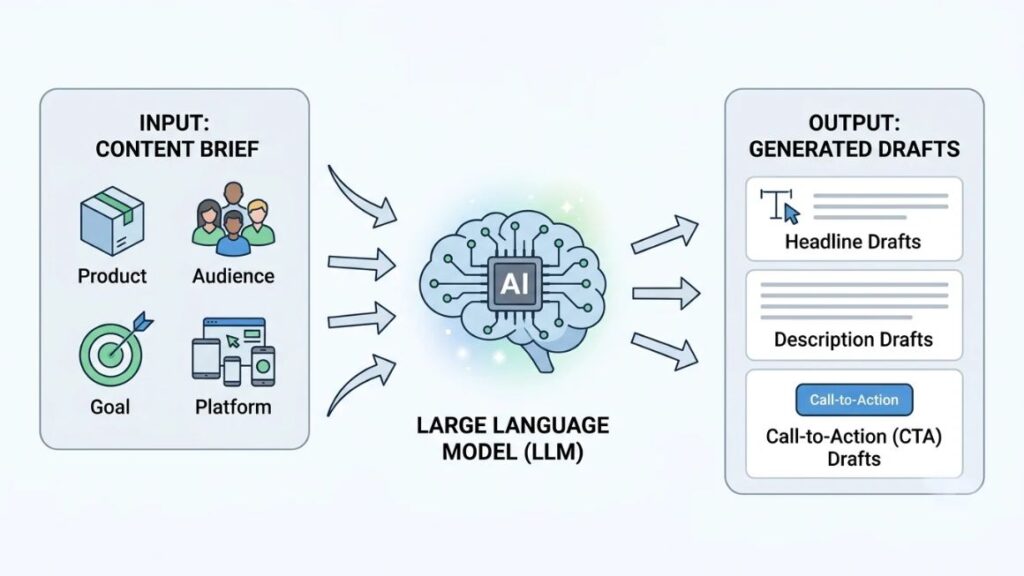
So the brief decides the draft. Product information, audience, campaign objective and platform all steer the output. Ask for a headline with nothing else and you’ll get “Boost Your Business Today”. Add the audience, the offer and a 30-character limit, and the tool starts producing different headlines, descriptions and calls to action (CTAs) worth comparing.
What Can It Generate?
Most tools handle the same core jobs:
- Search ad headlines
- Search ad descriptions
- Social media ad captions
- Product advertising copy
- Promotional messages, such as sale or launch announcements
- Multiple variations of any of the above, for testing
That last one is where the real time saving sits.
An AI ad copy generator turns a brief (product, audience and goal) into draft ad text such as headlines, descriptions and captions. It speeds up first drafts and variations, but it doesn’t know what’s true about your product, so human fact-checking and testing stay necessary.
Why Are Businesses Using AI for Advertising Copy?
Mostly for speed and volume. When an AI ad copy generator turns a first draft into minutes of work, a team can test more ideas and spend its limited time on decisions a tool can’t make.
IAB’s 2026 Digital Video Ad Spend & Strategy Report found that six in 10 video ad buyers now use generative AI to build or enhance video ads, up from 51% a year earlier. That’s video rather than text, yet it shows how fast AI has entered everyday ad production.
Saves Time During Campaign Planning
Ask for 15 headline options and you’re editing within a minute instead of staring at an empty field. The repetitive writing disappears. Automated ad creation has a ceiling, though: it drafts, but it doesn’t decide what’s worth saying.
Helps Generate Fresh Advertising Ideas
Stuck on the same hook for three campaigns? Ask for ten angles on one benefit. Most will be forgettable, but one or two usually change how you think about the message.
Makes Personalisation Easier
One offer can be rewritten for a fresher, a career switcher and a team lead, or for someone just noticing a problem versus someone comparing providers. The tool does the rewriting. You protect consistency, because a drifting tone is easy to miss across five versions.
Supports Faster Creative Testing
More variations means more things to test: headlines, offers, CTAs. Performance data then tells you which lines stay. The tool produces candidates, and your campaign picks the winners.
Best AI Tools for Writing Advertising Copy in 2026
No single pick wins for everyone among today’s AI ad writing tools. ChatGPT suits flexible one-off briefs, Jasper suits teams guarding a brand voice, Anyword and AdCreative.ai add performance scoring, and Shopify Sidekick only makes sense on a Shopify store.
Judge every AI ad copy generator on five things: ad formats and character limits, brand voice, performance scoring, what you can try for free, and fit with the platforms you actually advertise on. Plenty of ad copywriting tools look identical on their landing pages. They stop looking identical once you run a real brief through them.
1. ChatGPT
Best for flexible ad copy and customised prompts. It’ll write Google headlines, Meta captions and LinkedIn variations from one brief, then take follow-up edits. The catch: it knows nothing about your brand unless you paste it in, and it has no performance scoring. A free tier exists with usage limits, and paid plans (Go and Plus) start at about $8 a month, though prices vary by country.
2. Jasper AI
Best for brand consistency and marketing teams. You train Jasper on your brand voice, style guides and product information, and it applies that context across campaigns. It’s priced for teams, with no permanent free plan reported and only a short trial, so a solo advertiser may find a general chatbot cheaper.
3. Anyword
Best for performance-focused copywriting. Each variation gets a Predictive Performance Score, an estimate of how it might perform with a given audience. Anyword claims 82% pairwise prediction accuracy, but that’s the vendor’s own figure. Use the score to sort drafts, not to crown a winner, because real clicks beat predicted ones.
4. AdCreative.ai
Best for combining ad copy and creative generation. It produces banner and social creatives with headline text, then ranks each one with its Creative Scoring AI. Credits are spent when you download a creative, so heavy testing burns through them. Entry plans start around $39 a month on monthly billing, with a 7-day trial and 10 credits.
5. Copy.ai
Best for marketing workflows and many variations at once. It began as a short-form copywriting tool and now leans on workflows, saved sequences that run the same steps every time. Recent checks list its cheapest paid plan, Chat, at $29 a month and suggest the old free plan may be gone, so confirm before you plan around it.
6. Shopify Sidekick
Best for Shopify merchants. Sidekick sits inside the Shopify admin, so it can work from your actual store and products when you ask for promotional copy. It’s included with Shopify plans at no extra charge, though Shopify says features and usage limits vary by plan. Outside Shopify, it’s no use.
Which Tool Should You Choose?
Match the tool to your situation:
- Writing alone and watching costs: start with ChatGPT.
- Need five writers to sound like one brand: look at Jasper.
- Want scores to shortlist variations: try Anyword or AdCreative.ai.
- Selling on Shopify: use Sidekick first, since it costs nothing extra.
Whichever one you test, run the same real brief through two or three and compare the drafts side by side.
| Tool | Best use case | Main features | Brand voice support | Performance scoring | Free access or trial | Pricing last reviewed |
| ChatGPT | Flexible ad copy and custom prompts | General chatbot, any format, follow-up edits | Manual, via custom instructions and custom GPTs | No | Free tier with limits | 11 Nov 2026 |
| Jasper AI | Brand consistency for marketing teams | Brand voice training, marketing templates and agents | Yes, a core feature | Not a headline feature | Short trial; no permanent free plan reported | 11 Nov 2026 |
| Anyword | Performance-focused copy | Predictive Performance Score, ad and email copy | Yes | Yes (predicted) | 7-day trial | 11 Nov 2026 |
| AdCreative.ai | Ad copy plus creatives in one place | Creative generation, ad text, Creative Scoring AI | Brand kit (logos, colours) | Yes (predicted) | 7-day trial with limited credits | 11 Nov 2026 |
| Copy.ai | Marketing workflows and bulk variations | Chat, saved workflows, templates | Yes | No | Free plan reportedly discontinued; confirm | 11 Nov 2026 |
| Shopify Sidekick | Shopify merchants | Store-aware assistant inside the Shopify admin | Remembers your preferences | No | Included with Shopify plans | 11 Nov 2026 |
Plan names, prices and limits change often. The details above were last reviewed on 11 November 2026, so check each vendor’s pricing page before you commit.
The right tool depends on the job. ChatGPT suits flexible briefs, Jasper suits teams protecting a brand voice, Anyword and AdCreative.ai add predicted scores, and Shopify Sidekick suits Shopify stores. Predicted scores are estimates, not results.
How to Use an AI Ad Copy Generator Step by Step
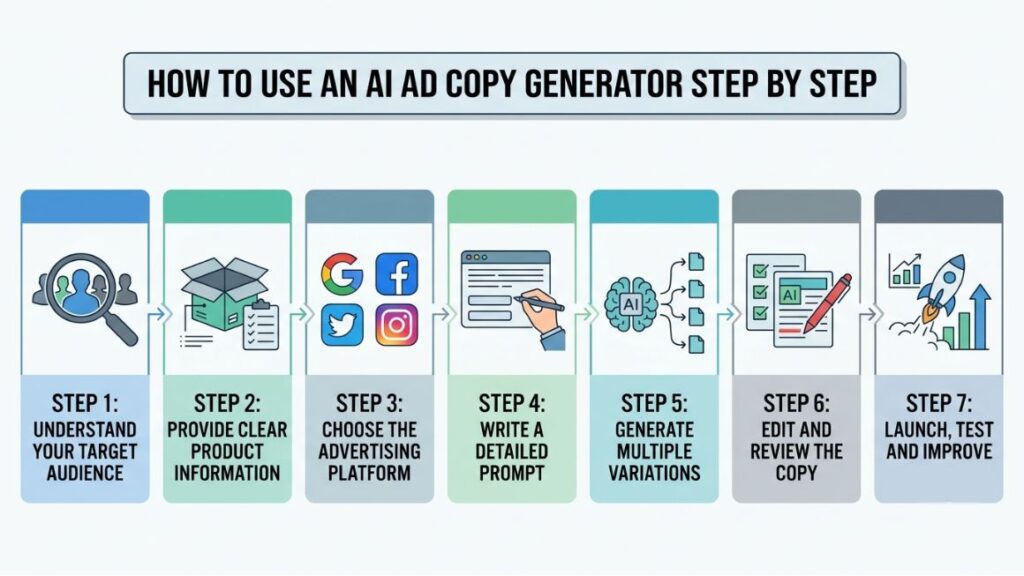
Wondering how to generate ad copy using AI without ending up with filler? The workflow is the same whichever of the AI marketing tools you pick, and the order matters. Most of the quality comes from the thinking you do before you type a single prompt.
Step 1: Understand Your Target Audience
Write down who you’re speaking to, which problem they’re stuck with and what would make them act now. Pull that from customer calls, reviews, support tickets and search terms, not guesses. “Marketing graduates who can’t get interview calls without a portfolio” beats “young professionals” by a mile.
Also Read: How to Do Audience Research for Facebook Advertising (Step-by-Step Guide)
Step 2: Provide Clear Product Information
Give the tool the product’s features, the benefit each one creates, the price or offer, and your unique selling proposition (USP), the one reason someone picks you over the alternative. Leave a gap here and the AI fills it with invention.
Step 3: Choose the Advertising Platform
Google Search, Facebook and Instagram, LinkedIn and other platforms each behave differently. Search reaches people already looking, so match their words. Social interrupts people mid-scroll, so the hook has to work first. LinkedIn leans professional. Name the platform in your brief, because it changes the length, tone and CTA.
Step 4: Write a Detailed Prompt
This is the step most people rush. A good prompt covers the product details, audience information, campaign objective, desired tone, copy format, CTA and character limits. Each item removes a guess the tool would otherwise make. Four ready-made prompts for any AI ad copy generator appear later in this guide.
Step 5: Generate Multiple Variations
Ask for different angles, not rewrites of the same line. A dedicated ad headline generator or a plain chatbot will both do this if you request five distinct angles. Compare the headlines side by side, then ask for alternative CTAs.
Step 6: Edit and Review the Copy
Cut the generic lines (“Take your business to the next level”). Check every fact, and verify offers, prices and claims against what you can actually deliver. Then read the copy aloud. If it doesn’t sound like your brand, rewrite it until it does.
Step 7: Launch, Test and Improve
Run several variations at the same time and wait for enough impressions to mean something. Keep the messaging that wins, rewrite what doesn’t, and feed the winning lines into your next prompt.
How to Write Better Google Ads Using AI?
Google search ads reward specificity. According to Google Ads Help, a responsive search ad accepts up to 15 headlines of 30 characters and up to 4 descriptions of 90 characters, so give the AI those limits up front and ask for headlines that each say something different.
Any Google Ads copy generator, whether built into the platform or a third-party tool, will happily write a 42-character headline unless you stop it. Count the characters yourself before anything goes into the account.
Writing Effective Search Ad Headlines
Start from the search. Someone typing “digital marketing course for beginners” wants to see those words and a reason to click. Include the main benefit and make it specific: “Live Projects, Weekend Batches” beats “Best Quality”.
Writing Effective Ad Descriptions
Descriptions get 90 characters to explain the value, answer one worry and finish with a CTA. “No marketing background needed” answers a worry. “Start today!” doesn’t.
Example of a Google Search Advertisement
Illustrative example only. The course below is imaginary.
Before (typical unedited AI draft)
- Headline 1: Best Digital Marketing Course (29 characters)
- Headline 2: Boost Your Career Today (23)
- Headline 3: Enrol Now and Succeed (21)
- Description 1: Learn digital marketing with expert-led lessons. Start your career journey today! (81)
- Description 2: Join the best course in India and get placed fast. Limited seats, enrol now! (76)
After (edited by a human)
- Headline 1: Digital Marketing Course (24)
- Headline 2: Learn SEO, Ads & Analytics (26)
- Headline 3: Live Projects, Weekend Batches (30)
- Description 1: Build real campaign skills with hands-on projects. No marketing background needed. (82)
- Description 2: Work through Google Ads, SEO and analytics step by step. See the full syllabus first. (85)
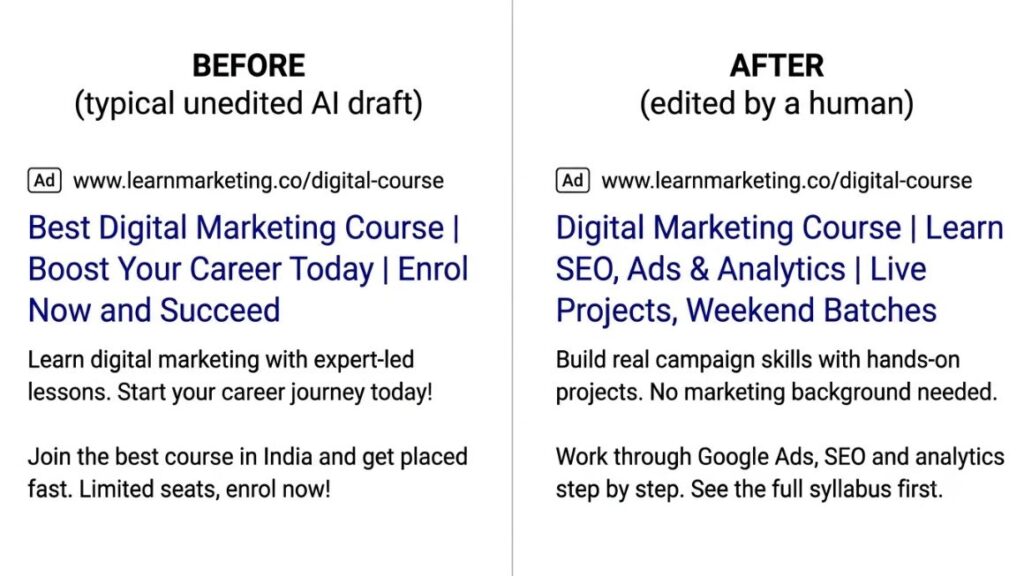
The “before” version is what an AI ad copy generator often hands you by default: vague, packed with claims nobody can prove (“the best”, “get placed fast”) and short on anything a searcher can judge. The edited version names the topic and gives concrete details. That’s what high-converting ad copy usually looks like on a results page: specific, checkable and easy to scan. Whether it converts is for your data to say.
How to Create Better Facebook and Instagram Ads Using AI?
Social ads interrupt people, so the opening line decides almost everything. Meta’s ads guidance recommends keeping primary text near 125 characters and headlines around 27 on feed placements, which means the hook has to land fast.
A Facebook ad copy generator can draft openers by the dozen. Deciding which one speaks to a real person is still your job.
Writing Attention-Grabbing Opening Lines
Start with a problem your audience already feels, in words they’d use themselves. “Know the theory but can’t get an interview call?” works because it describes a situation, not a product. Then show the benefit, quickly.
Creating Different Ad Copy Angles
Ask for the same offer through five lenses:
- Problem-solution
- Benefits-focused
- Social proof (use real testimonials only, never AI-invented ones)
- Promotional
- Educational
Run them against each other. The winning angle is often not the one you’d have bet on.
Also Read: Facebook Ads A/B Testing: A Complete Guide to Testing and Improving Ad Performance in 2026
Example of a Facebook Advertisement
Here’s one of the advertising copy examples promised earlier, built for the same imaginary course.
Illustrative example only. The course, offer and details are imaginary.
- Primary text: Know the theory but can’t get an interview call? Build a portfolio of real campaigns, step by step.
- Headline: Build Real Campaign Skills
- Description: Beginner-friendly batches.
- CTA button: Learn More
The primary text opens with a situation, the headline states the outcome and the description removes one objection. No invented statistics. No guarantees.
Ready-to-Use AI Prompts for Creating Advertising Copy
Paste these into any AI ad copy generator or chatbot, fill in the brackets and expect a draft, not a finished ad. Each prompt tells the AI what not to invent, which saves a lot of deleting later.
Prompt 1: Generate Google Search Ad Copy
Act as a PPC copywriter. Write 15 responsive search ad headlines (maximum 30 characters each) and 4 descriptions (maximum 90 characters each) for , aimed at [audience] searching for [keyword]. Goal: [leads or sales]. Tone: [tone]. Give each headline one distinct benefit, include the keyword in at least three, and end each description with a clear CTA. Don’t invent statistics, prices or guarantees. Show the character count after every line.
Prompt 2: Create Facebook Ad Variations
Write five Facebook and Instagram ad variations for . Audience: [who they are and their main problem]. Use five angles: problem-solution, benefits-focused, social proof (use [PLACEHOLDER] for real testimonials, never invent any), promotional and educational. For each, give primary text under 125 characters, a headline under 27 characters and a CTA.
Prompt 3: Write High-Converting Product Advertisements
Write three ads for . Audience needs: [top three needs]. Features: [list]. Turn every feature into a plain-language customer benefit. Tone: [tone]. End each ad with one CTA. Flag any sentence that makes a claim needing proof.
Prompt 4: Improve Existing Advertising Copy
Here is the current ad: [paste ad]. Audience: [audience]. Goal: [goal]. Identify unclear messaging, weak hooks and missing benefits. Then rewrite the ad in three versions. Don’t add claims that weren’t in the original or in the details supplied.
Also Read: How to Write Prompts for AI Chatbot Marketing
Best Practices for Getting Better Results from AI Advertising Tools
Better inputs beat better tools. Most weak output from an AI ad copy generator comes from thin briefs, unchecked claims and no testing habit, not from the software itself.
Give AI Enough Context
The tool can’t read your mind or your brand guidelines. Paste in the product details, audience, tone notes and two or three ads you admire.
Focus on Customer Benefits Instead of Just Features
A feature is what the product has. A benefit is what the customer gets. “Live project reviews” is a feature; “walk into interviews with real campaigns to show” is the benefit. Tell the AI to make that conversion for you.
Use a Natural and Conversational Tone
Write the way your customer talks. Ask for contractions and plain words, then read the result out loud. If you’d feel silly saying it to someone’s face, change it.
Create Different Versions for Different Audiences
A fresher and a career switcher don’t need the same ad. Brief the tool separately for each, rather than asking for one “universal” version that fits nobody.
Verify Every Claim Before Publishing
AI states made-up facts with total confidence. Check each statistic, price, deadline and guarantee against a source you can point to. Can’t prove a line? Delete it.
Keep Testing and Learning from Results
Treat every campaign as input. Note which angles, hooks and CTAs won, and put them into your next brief.
Common Mistakes to Avoid When Using AI for Ad Copy
Most of these mistakes cost money quietly, long before anyone spots a pattern.
Publishing AI Output Without Editing
Unedited drafts read like every other ad in the feed. REI’s experience is a useful warning on the image side: in June 2026 the retailer pulled a Meta ad after an AI-altered image garbled a bicycle, saying Meta had enrolled it in an AI tool without its knowledge, as PPC Land reported. Review what actually runs, whoever or whatever produced it.
Using Generic and Repetitive Messaging
Fifteen headlines that all promise to “boost” something aren’t fifteen tests. They’re one test, written fifteen times.
Making Unsupported Advertising Claims
“Guaranteed jobs.” “Thousands of happy students.” “Best in India.” A tool will write these on request. Unless you can prove them, they risk disapproval and damaged trust.
Ignoring Platform Advertising Policies
Google’s guidance says AI-generated assets fall under the same ad policies as any other content and should be reviewed before publishing. Meta’s revised Commercial Terms, effective 30 October 2026, make advertisers responsible for what Meta’s AI features create, as Adweek reported.
Choosing Winners Based on AI Scores Alone
Predictive scores from tools such as Anyword and AdCreative.ai are estimates, and the accuracy figures come from the vendors themselves. Use scores to shortlist. Let live data decide.
How to Measure Whether Your AI-Generated Ad Copy Is Working?
Judge it the way you’d judge any copy, whether it came from an AI ad copy generator or a person: against what the campaign is meant to achieve. Are AI-generated advertisements effective? The research is mixed.
Pencil, an AI vendor, reported in 2024 that lightly human-edited AI copy lifted click-through rate by 26% over unassisted human copy in a Facebook test for a beauty brand. A 2025 Journal of Brand Strategy study by Jason Hunt and Dave Kerr found human copywriters beat AI on cost per result in 9 of 12 tested cases. Small tests, different conditions. Your own data is the only result that counts.
Click-Through Rate (CTR)
Click-through rate (CTR) is clicks divided by impressions. It shows whether the headline and opening line earn attention. A high CTR with no sales usually means the copy promised something the landing page didn’t deliver.
Conversion Rate
Conversion rate is the share of clicks that turn into the action you wanted, such as a sign-up or purchase. It shows whether the copy attracted the right people, not just curious ones.
Cost Per Acquisition (CPA)
Cost per acquisition (CPA) is what you pay to win one customer or lead. Cheap clicks mean little if CPA keeps climbing.
Return on Ad Spend (ROAS)
Return on ad spend (ROAS) is revenue divided by ad spend. It’s the sharpest check for ecommerce, though your margins decide what counts as good.
A/B Testing Different Copy Variations
Change one thing at a time, such as the headline or the CTA, and let both versions run long enough to mean something. That discipline is most of ad copy optimization. And no single metric tells the whole story: an awareness campaign shouldn’t be judged on CPA, and a sales campaign shouldn’t be judged on clicks alone.
The Future of AI-Powered Advertising Copy
Expect more automation inside the ad platforms themselves, and the AI ad copy generator may end up built into the ad account you already use. None of what follows is certain.
More Personalised Advertising Messages
Platforms already generate text variations aimed at different audiences. Meta’s Advantage+ creative tools are one example, and the direction of travel suggests more of the same, though the details will keep shifting.
Integration with Advertising Platforms
Google’s Text Customization can write headlines for advertisers, and its Text Guidelines control, released globally in February 2026, lets them list words AI-generated copy must avoid. In October 2026, OpenAI told advertisers it would switch on creative enhancements by default for self-serve ChatGPT campaigns, according to PPC Land.
AI-Assisted Campaign Optimisation
Platforms may increasingly pick which variation to show, and when. That could help performance. It could also mean you see less of what actually ran, so version-level reporting is worth asking about.
The Continued Importance of Human Creativity
A model works from patterns in existing ads. A person knows what a customer said on yesterday’s call. That knowledge is hard to automate, which is why hybrid teams are likely to keep their edge. Likely, not guaranteed.
Conclusion
For most advertisers, yes, as a drafting partner. An AI ad copy generator saves time, widens the number of angles you can test and takes the dullest part of the job off your plate.
The catch hasn’t changed. It doesn’t know what’s true, it doesn’t know your customers, and it won’t take responsibility when an ad goes wrong. You will. So edit hard, check every claim and let results pick the winners.
Try this week: one platform, one product, one audience. Write the brief, generate ten variations and test two of them against each other. That small experiment will teach you more than any guide.
Good briefs and clear campaign reading are skills in their own right, and they’re what separate steady results from lucky ones. If you want to build them properly, YUP’s Performance Marketing course covers practical Google Ads and Meta Ads skills you can apply to real campaigns. [CTA: link to YUP Performance Marketing course]
Frequently Asked Questions (FAQ)
What is the best AI ad copy generator in 2026?
There’s no single winner. ChatGPT suits flexible briefs, Jasper suits teams that need one brand voice, Anyword and AdCreative.ai add predicted performance scores, and Shopify Sidekick suits Shopify merchants. Choose by workflow and budget, then test two tools on the same brief.
Can I generate advertising copy for free using AI?
Yes, within limits. ChatGPT has a free tier, and Shopify Sidekick is included with Shopify plans. The best free AI tools for writing advertisements are usually general chatbots, because most dedicated ad tools offer trials rather than permanent free plans.
Can AI write Facebook and Instagram advertisements?
Yes. It can draft primary text, headlines and variations for different angles, and Meta’s own Advantage+ tools can generate text variations too. Check character limits and claims yourself, because you’re responsible for whatever runs.
Is AI-generated advertising copy good for Google Ads?
An AI ad copy generator is a good drafting aid for responsive search ads, which need many headlines (30 characters) and descriptions (90 characters). Google applies its usual ad policies to generated assets, so review every line before publishing.
Can AI-generated ad copy actually increase conversions?
Sometimes, but the evidence is mixed. One vendor test saw a 26% CTR lift from human-edited AI copy, while a 2025 study found human copy won on cost in most cases. CTR also isn’t conversion, so run your own A/B tests.
How do I make AI-generated advertising copy sound natural?
Feed it real customer language, specify the tone and ban phrases you hate. Then edit by hand: cut adjectives, add specifics and read the ad aloud. If it sounds like a brochure, rewrite it.
Do AI-generated advertisements comply with Google and Meta policies?
Not automatically. Both platforms apply their usual policies to AI-generated content, and Meta’s revised terms put responsibility on advertisers from 30 October 2026, as Adweek reported. IAB and Sonata Insights research in 2026 found 89% of advertisers using generative AI at least sometimes disclose it, though fewer than half always do.
Should businesses use AI or professional copywriters?
Both, ideally. Use an AI ad copy generator for volume, first drafts and variations. Use a skilled writer for strategy, brand voice and flagship campaigns. Small teams can start with AI and bring in a writer where the stakes are highest.