

Most lists of AI tools for marketing fail the same way. They hand you a hundred logos and no way to choose between them. You bookmark the page, feel productive, and go back to the three tools you already use.
This one is built differently. It covers 150+ AI tools for marketing, grouped by the job you’re trying to get done: writing, search, ads, social, email, automation, video, analytics, and a few extras that don’t fit neatly anywhere else. Each tool gets one line on what it does best and a pricing tier, so you can shortlist in minutes instead of hours. If you found this through our Instagram carousel on 48 AI marketing tools, this is the full version.
One caveat before you start. Nobody needs 150 tools. A working marketer usually runs between five and twelve, and the real skill is knowing which ones earn their seat. The last section shows you how to build that stack without paying for overlap.
Pricing tiers reflect what we saw in September 2026. Vendors change plans constantly, so check the pricing page before you commit to anything.
Table of Contents
What Are AI Marketing Tools and How Should You Choose Them?
AI marketing tools are software products that use machine learning or large language models to automate or speed up marketing work such as writing, ad creation, analysis, and campaign management. The right way to choose one is to match it to a single job in your workflow, not to compare feature lists.
That sounds obvious. It almost never happens in practice. Most teams sign up because a tool went viral on LinkedIn, then discover three months later that it overlaps with two things they already pay for.
Run every tool through four questions before you pay:
- Workflow fit: Does it slot into where the work already happens, or does it force your team to open another tab and copy things across?
- Data access: Can it read your real data (ad accounts, CRM, analytics), or only what you paste in? Tools with live access are worth more, and carry more risk.
- Cost at scale: Many tools look cheap for one user and get expensive with credits, seats, or usage. Price it at your real volume.
- Lock-in: What happens if the vendor changes direction? Clearbit is the cautionary tale here. HubSpot acquired it, folded it into HubSpot Breeze Intelligence, and it now only makes sense if you’re already on HubSpot.
In the lists below, the pricing tier next to each tool means one of these: Free (no paid plan needed for real use), Freemium (free plan with limits), Paid (subscription or credits), Open source (free to run yourself, but you pay for hosting and models), or Enterprise (sales call required).
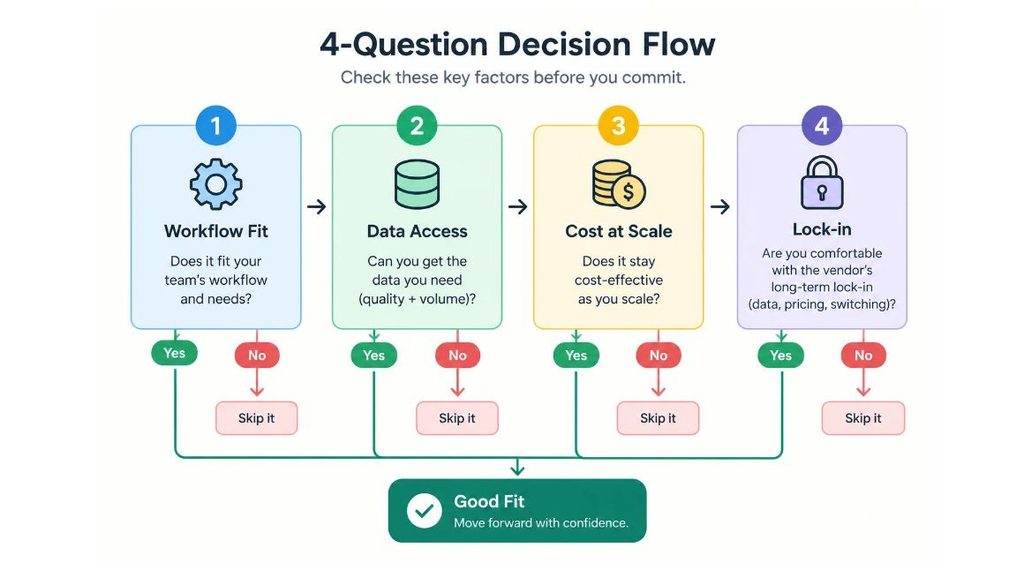
AI marketing tools are software that uses machine learning or large language models to automate marketing tasks such as writing, ad creation, analytics, and campaign management. The most reliable way to choose one is to match it to a single job in your workflow and test it against four criteria: workflow fit, data access, cost at scale, and vendor lock-in.
Which AI Tools Are Best for Writing and Content Creation?
The best AI tools for writing are general-purpose assistants like Claude, ChatGPT, and Gemini for drafting and strategy, paired with specialist tools like Jasper, Writer, and Surfer AI when you need campaign volume, brand voice control, or SEO scoring.
The blank page really is no longer your problem. Your problem is now editing: AI drafts are fast and generic, and the marketers who win are the ones who feed the tool a sharp brief and a clear point of view.
Here are 18 tools worth knowing.
- Claude (Freemium): Long-form writing, strategy, nuanced briefs, and analysis of long documents you upload.
- ChatGPT (Freemium): Ideation, quick drafts, and flexible output across formats.
- Gemini (Freemium): Google’s assistant, useful when your work already lives in Gmail, Docs, and Sheets.
- Perplexity (Freemium): Research with cited sources, good for fact-checking claims before you publish.
- Jasper (Paid): Full campaign content in one pass: blogs, ads, emails, and social posts.
- Copy.ai (Freemium): Go-to-market workflows that chain steps like research, outreach, and content.
- Writer (Enterprise): Brand voice and style rules enforced across large teams.
- Typeface (Enterprise): Brand-safe content generation for larger marketing organisations.
- Anyword (Paid): Copy with predictive performance scores so you can pick variants before testing.
- Writesonic (Freemium): Article, ad, and landing page drafting with SEO features built in.
- Rytr (Freemium): Low-cost drafts for short copy when budget is tight.
- Wordtune (Freemium): Rewrites your own sentences for clarity and tone.
- QuillBot (Freemium): Paraphrasing and summarising, handy for tightening rough drafts.
- Grammarly (Freemium): Editing plus tone and brand consistency checks.
- Notion AI (Paid): Drafting and summarising inside the workspace where your briefs already live.
- Canva AI (Freemium): Design, Magic Resize, and AI copy in one place.
- Surfer AI (Paid): SEO-optimised long-form articles written at scale.
- Frase (Paid): Research and content briefs built from what’s ranking right now.
Where should you start? Pick one general assistant and one specialist. Everything else on this list is optional until you hit a real limit.
Which AI Tools Help You Rank in SEO, AEO and GEO?
The AI tools that help you rank fall into two groups: classic SEO platforms like Semrush and Ahrefs for Google rankings, and newer AI visibility trackers like Profound and Peec AI that show whether ChatGPT, Perplexity, and Gemini cite your brand.
Two terms first. AEO (Answer Engine Optimisation) is structuring content so search engines and AI assistants can lift a direct answer from it. GEO (Generative Engine Optimisation) is getting your brand cited inside AI-generated answers. Different goals, overlapping tactics.
Here’s the honest picture. Ranking on Google still drives most organic traffic for most sites, but being the source an AI answer quotes is becoming its own channel. You need to track both.
- Semrush AI (Paid): SEO plus AI search visibility tracking across ChatGPT, Perplexity, and Gemini.
- Ahrefs (Paid): Backlink intelligence and keyword research, still the reference for link analysis.
- Surfer SEO (Paid): Content optimisation and NLP (natural language processing) scoring against top results.
- NeuronWriter (Paid): Semantic content briefs built from competing pages, popular for outline research.
- Clearscope (Paid): Content grading that shows which terms and topics your draft is missing.
- MarketMuse (Freemium): Topical authority mapping to find gaps across a whole site.
- BrandWell (Paid): AI content and SEO automation aimed at organic growth.
- AlsoAsked (Freemium): People Also Ask data, useful for structuring content around real questions.
- Profound (Enterprise): Tracks how your brand appears in AI answer engines.
- Peec AI (Paid): Monitors brand mentions and citations across major AI assistants.
- Otterly.AI (Paid): AI search monitoring for brand visibility and cited sources.
- AthenaHQ (Paid): Generative engine visibility tracking with optimisation suggestions.
- Scrunch AI (Enterprise): Monitors and improves how AI systems describe your brand.
- SE Ranking (Paid): Rank tracking and audits at a lower price than the big platforms.
- Ubersuggest (Freemium): Entry-level keyword and content ideas for small teams.
- Outranking (Paid): Content briefs and drafts scored against SERP (search engine results page) data.
- Rank Math Content AI (Freemium): On-page suggestions inside WordPress as you write.
- Alli AI (Paid): Automates on-page fixes across a site at scale.
- Search Atlas (Paid): All-in-one SEO platform with an AI agent (OTTO) for on-site changes.
SEO targets rankings on search engines, AEO targets being the direct answer a search feature or assistant surfaces, and GEO targets being cited inside AI-generated answers. Tools like Semrush AI, Profound, and Peec AI now track brand visibility in ChatGPT, Perplexity, and Gemini alongside traditional Google rankings.
What Are the Best AI Tools for Ad Creatives and Paid Media?
The best AI ad tools split into creative generation (AdCreative.ai, Creatify, Predis.ai), creative testing and analytics (Pencil, Motion, Foreplay), and campaign automation (Madgicx, Optmyzr, Smartly.io), plus the AI already built into Meta and Google’s own platforms.
Start with the free option most people overlook. Meta’s Advantage+ campaigns and Google’s Performance Max both use AI to pick placements, audiences, and creative combinations automatically. Before you pay for a third-party optimiser, learn what the native tools already do.
Then add tools where they solve a real bottleneck, usually creative volume or reporting.
- AdCreative.ai (Paid): Performance-optimised ad visuals generated at scale.
- Creatify (Paid): AI video ads generated directly from a product URL.
- Pencil (Paid): Creative testing with predictive performance scoring.
- Predis.ai (Freemium): Captions, visuals, and formats generated in one pass.
- Omneky (Enterprise): AI-generated and personalised ad creative tied to performance data.
- Motion (Paid): Creative analytics that show what’s working and why.
- Foreplay (Paid): Ad swipe file with AI tagging so you can study competitor creative.
- Segwise (Paid): Tags creative elements like hooks and visuals to find winning patterns.
- Madgicx (Paid): Autonomous Meta ad bidding and budget optimisation.
- Bïrch (Paid): Rule-based ad automation, formerly known as Revealbot.
- Optmyzr (Paid): PPC optimisation and scripts for Google and Microsoft Ads.
- Smartly.io (Enterprise): Ad automation across social platforms for large advertisers.
- Meta Advantage+ (Free): Meta’s built-in automation for campaigns and creative.
- Google Performance Max (Free): Google’s AI campaign type spanning Search, YouTube, Display, and more.
A real-world reference point: Pencil was acquired by The Brandtech Group in 2023, and Unilever and Bayer were launch partners for its enterprise version, according to Marketing Dive’s coverage of the deal. Predictive scoring has clearly moved into big-brand workflows. Just treat those scores as a model’s estimate, not a promise of results.
Which AI Tools Work Best for Social Media?
The best AI social media tools handle three jobs: creating posts (Taplio, Predis.ai, Flick), scheduling and recycling them (Buffer, FeedHive, Metricool), and listening to what people say about you (Brandwatch, Brand24, Sprout Social).
Build a content system, not just a content calendar. A calendar tells you what goes out on Tuesday. A system turns one long piece of content into ten posts, schedules them, and feeds performance back into what you make next.
- Buffer AI (Freemium): Caption generation, scheduling, and best-time posting.
- FeedHive (Paid): AI content recycling and conditional posting.
- Taplio (Paid): LinkedIn content creation and engagement analytics.
- Lately (Paid): Repurposes long-form content into social posts automatically.
- Metricool (Freemium): Multi-platform scheduling, analytics, and competitor tracking.
- Sprout Social AI (Enterprise): Enterprise social management with AI sentiment analysis.
- Hootsuite (Paid): Scheduling and listening, with OwlyWriter AI for caption drafts.
- Later (Freemium): Visual planning and scheduling, strong for Instagram.
- Sprinklr (Enterprise): Large-scale social management and customer care with AI.
- Brand24 (Paid): Social listening and mention tracking with AI summaries.
- Brandwatch (Enterprise): Consumer intelligence and social listening for larger teams.
- Flick (Paid): AI-assisted content planning and hashtags for Instagram and LinkedIn.
- Ocoya (Freemium): AI copy plus scheduling, popular with ecommerce brands.
- Vista Social (Freemium): Scheduling, inbox, and reporting with an AI assistant.
- Publer (Freemium): Multi-network scheduling with AI caption help.
- Hypefury (Paid): Scheduling and growth tools for X and LinkedIn.
One opinion, and it’s not a popular one: repurposing tools like Lately are only as good as the source material. Feed them a thin webinar and you’ll get thin posts, faster.
What Are the Best AI Tools for Email Marketing and CRM?
The best AI email and CRM tools use your customer behaviour to decide who gets which message and when: Klaviyo for ecommerce, Brevo and ActiveCampaign for small teams, Customer.io and Braze for behavioural messaging, and Beehiiv for newsletters.
Email is still the highest ROI channel for a lot of businesses, and AI makes it run itself: predictive segments, send-time optimisation, and lifecycle flows that adjust to what each person does.
If you’re in India, note how many strong regional platforms sit on this list. MoEngage, CleverTap, and WebEngage were all founded in India and are widely used by consumer apps here.
- Klaviyo AI (Freemium): Predictive segmentation and behavioural email automation.
- Beehiiv (Freemium): AI-assisted newsletter creation and monetisation.
- Brevo (Freemium): AI send-time optimisation and lifecycle automation.
- Seventh Sense (Paid): AI send-time personalisation for HubSpot and Marketo.
- ActiveCampaign (Paid): AI-powered CRM and marketing automation.
- Customer.io (Paid): Behavioural messaging across email, SMS, and push.
- HubSpot Breeze (Freemium): HubSpot’s built-in AI agents and content tools across its CRM.
- Mailchimp (Freemium): Email and audience tools with AI content and segmentation features.
- Braze (Enterprise): AI-driven personalisation and journey orchestration for large consumer brands.
- MoEngage (Enterprise): Customer engagement platform founded in India, used by consumer apps.
- CleverTap (Enterprise): Mumbai-founded engagement and retention platform with AI-driven segments.
- WebEngage (Paid): Omnichannel engagement and journey automation, popular with Indian D2C brands.
- Omnisend (Freemium): Ecommerce email and SMS with AI campaign helpers.
- Iterable (Enterprise): Cross-channel campaigns with AI-based optimisation.
- Salesforce Agentforce Marketing (Enterprise): Salesforce’s AI agents for campaigns inside its CRM.
- Kit (Freemium): Email for creators, formerly known as ConvertKit.
Which AI Tools Automate Marketing Workflows and Run AI Agents?
Marketing automation tools connect your apps and run tasks on a trigger. AI agents go further: they decide what steps to take. Make, n8n, and Zapier handle the first group, while Grok Bot, OpenClaw, and Hermes Agent belong to the second.
If a task repeats every week, a human shouldn’t be doing it. Weekly reporting, competitor checks, lead routing, content repurposing: all candidates.
The category has changed fast. Two years ago it meant “when a form is filled, add a row.” Now it includes agents that log into your tools and work on their own.
Workflow automation tools
- Make (Freemium): Visual automation for complex multi-step marketing workflows.
- n8n (Open source): Automation with full control and self-hosting.
- Zapier (Freemium): The biggest app library, now with AI agent features.
- Gumloop (Freemium): AI-native workflow automation with built-in LLM reasoning.
- Relay.app (Freemium): Automations with human approval steps built in.
- Activepieces (Open source): Open-source alternative for teams that want self-hosting.
- Pipedream (Freemium): Developer-friendly workflows with code steps.
- Bardeen (Freemium): Browser-based automation for repetitive prospecting and data tasks.
- Clay (Paid): Pulls lead data from many sources and enriches it with AI, popular in outbound.
AI agents
- Grok Bot (Paid): xAI’s team of persistent agents, launched on August 11, 2026, that sign into your tools and keep working around the clock.
- OpenClaw (Open source): Open-source AI agent framework for content, ads, and competitor monitoring. Technical users only.
- Hermes Agent (Open source): Self-improving agent from Nous Research that builds skills from experience.
- Lindy (Freemium): No-code AI agents for email, scheduling, and follow-ups.
- CrewAI (Open source): Framework for building teams of cooperating agents in code.
- Claude Cowork (Paid): Anthropic’s desktop agent for knowledge work, aimed at non-developers.
A word of caution on agents, because the hype is running ahead of the safety. Grok Bot’s agents share one cloud computer, and xAI’s own guidance says not to treat separate Bots as separate security boundaries, according to a Composio guide to the product. OpenClaw can run shell commands and access your file system, which a 2026 arXiv security analysis flags as a real attack surface. Hermes Agent is free under an MIT licence, but you pay for the models and hosting behind it.
The rule we’d follow: start agents on low-risk tasks like research and drafting, give them read-only access first, and keep a human approving anything that publishes, spends money, or emails customers.
Workflow automation tools such as Make, n8n, and Zapier run predefined steps when a trigger fires, while AI agents such as Grok Bot, OpenClaw, and Hermes Agent decide their own steps to reach a goal. Agents can save significant time on recurring marketing tasks, but they need limited permissions and human approval for anything that publishes content, spends budget, or contacts customers.
What Are the Best AI Video and Visual Tools for Marketers?
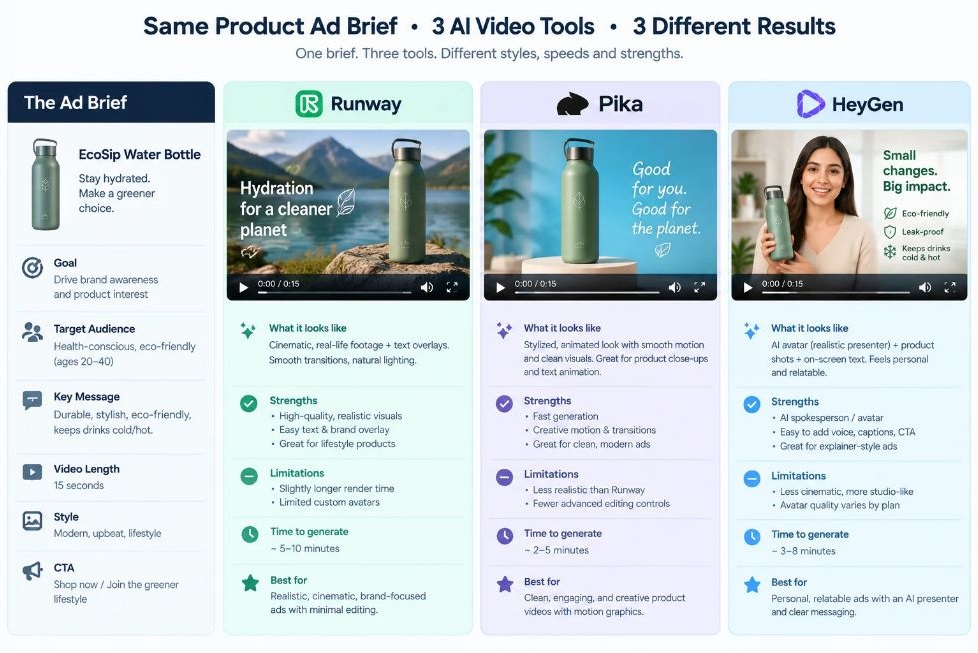
The best AI video tools for marketers depend on the format: HeyGen and Synthesia for avatar and talking-head videos, Runway, Kling AI, Higgsfield, and Google Veo for generated cinematic clips, and Descript or Opus Clip for editing and repurposing existing footage.
Video at scale, with no studio and no production team. That’s the promise, and in 2026 it’s mostly true for short-form content. For anything that needs a real person’s credibility, like founder stories or customer testimonials, it still isn’t.
AI video generation and editing
- HeyGen (Freemium): AI avatar videos and real-time video translation.
- Higgsfield (Paid): Cinematic AI video with character consistency across scenes.
- Runway (Freemium): Text-to-video and advanced AI video editing.
- Kling AI (Freemium): High-quality video generation from text or an image.
- Google Veo (Paid): State-of-the-art video generation with native audio, currently at version 3.1.
- Descript (Freemium): Edit video by editing the transcript.
- Synthesia (Paid): AI presenter videos for training and product explainers.
- Pika (Freemium): Fast, stylised short clips from text or images.
- Luma Dream Machine (Freemium): Text and image to video with camera control.
- Hailuo AI (Freemium): Video generation from MiniMax, strong on motion.
- Opus Clip (Freemium): Turns long videos into short, captioned clips.
- CapCut (Freemium): Mobile and desktop editor with AI captions and effects.
- InVideo AI (Freemium): Text prompt to finished marketing video.
- VEED (Freemium): Browser-based video editor with AI subtitles and cleanup.
- Submagic (Paid): Automatic captions and short-form edits for social.
AI image, product photo, and audio tools
- Midjourney (Paid): High-end image generation for campaign concepts and visuals.
- Adobe Firefly (Freemium): Image generation trained on licensed content, built into Adobe apps.
- Ideogram (Freemium): Strong at rendering legible text inside images.
- Leonardo AI (Freemium): Image generation with fine control and asset tools.
- Krea (Freemium): Real-time image generation and enhancement.
- Photoroom (Freemium): Product photo cleanup and backgrounds for ecommerce.
- Pebblely (Freemium): AI product photography without a shoot.
- ElevenLabs (Freemium): Realistic AI voiceovers and dubbing in many languages.
Note that a lot of these tools have changed names, owners, and pricing over the past year. Before you build a workflow on any video tool, test it on one real project first. Also check the commercial-use terms, because they differ by plan.
Which AI Tools Improve Marketing Analytics and Research?
The best AI analytics tools let you ask questions in plain language and get answers from your own data: Querri and Julius AI for ad hoc queries, Improvado and Supermetrics for pulling data together, Microsoft Clarity for behaviour, and SparkToro and NotebookLM for research.
Better decisions start with better information. That’s the pitch, and here’s the catch: AI will happily give you a confident answer from bad data. Fix the data first.
Start with the free ones. Microsoft Clarity gives you free session recordings and AI behaviour summaries, and Google Analytics 4 has predictive audiences and insights built in.
- Improvado (Enterprise): Unified marketing analytics across all channels.
- Microsoft Clarity (Free): Free session recordings and AI behaviour summaries.
- Querri (Paid): Plain-language data queries without SQL.
- Julius AI (Freemium): Chat with spreadsheets and data files to get analysis and charts.
- SparkToro (Freemium): Audience research: where they spend time and what they read.
- NotebookLM (Freemium): Query your own research documents conversationally.
- Influencity (Paid): AI-powered influencer discovery and campaign analytics.
- Modash (Paid): Influencer search and vetting across Instagram, TikTok, and YouTube.
- Google Analytics 4 (Free): Predictive audiences and automated insights.
- Hotjar (Freemium): Heatmaps and recordings with AI summaries of feedback.
- Amplitude (Freemium): Product and marketing analytics with AI-assisted analysis.
- Mixpanel (Freemium): Event analytics with plain-English question features.
- Triple Whale (Paid): Ecommerce attribution and AI Q&A for D2C brands.
- Similarweb (Freemium): Competitor traffic and market intelligence.
- Exploding Topics (Freemium): Trend discovery before topics peak.
- Dovetail (Freemium): Analyses interviews and customer feedback with AI.
- Tableau (Paid): Dashboards with AI-driven summaries through Tableau Pulse.
- Supermetrics (Paid): Pipes marketing data into sheets, warehouses, and dashboards.
- Whatagraph (Paid): Automated client reporting across marketing channels.
Which AI Tools Fit Other Marketing Jobs?
Several useful AI tools don’t sit in any of the categories above: landing page builders, customer chatbots, sales outreach and data enrichment, presentation makers, and meeting note-takers. Here are the ones worth a look.
- Unbounce (Paid): Smart Builder for landing pages and Smart Traffic for routing visitors to the best variant.
- Framer (Freemium): Design and publish sites with AI page generation.
- Webflow (Freemium): Site builder with AI assistance for copy and layout.
- Intercom Fin (Paid): AI customer support agent that answers from your help content.
- Tidio (Freemium): Chatbot and live chat for small ecommerce sites.
- Chatbase (Freemium): Build a chatbot trained on your own website content.
- Apollo.io (Freemium): Lead database and outbound sequences with AI assistance.
- Breeze Intelligence (Paid): Formerly Clearbit, now HubSpot-only B2B data enrichment.
- lemlist (Paid): Cold outreach with AI personalisation.
- Gong (Enterprise): Revenue intelligence from sales calls.
- Gamma (Freemium): Generates presentations and pages from a prompt.
- Beautiful.ai (Paid): Presentation design with automatic layout.
- Fireflies.ai (Freemium): Meeting recording, transcripts, and summaries.
- Otter.ai (Freemium): Live transcription and meeting notes.
How Do You Build an AI Marketing Stack Without Wasting Budget?
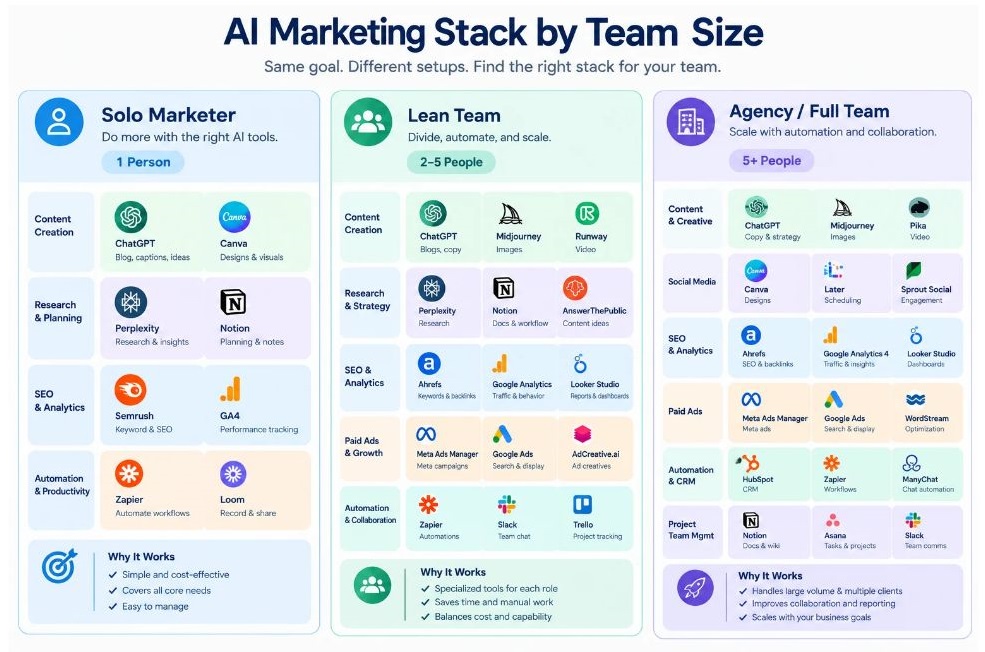
Build your AI marketing stack around one tool per job, start with free tiers, and audit every quarter. A solo marketer needs four or five tools. A lean team needs eight to ten. Agencies add creative testing and reporting on top.
Most people do it backwards. They collect tools, then look for problems. Flip it: list the five tasks that eat the most hours each week, then find one tool for each.
Here are three starting points, not rules.
Solo marketer or founder (4 to 5 tools): One general assistant (Claude or ChatGPT), Canva for design, Buffer or Metricool for scheduling, Microsoft Clarity and Google Analytics 4 for behaviour, and NotebookLM for research. Most of this can start free.
Lean in-house team (8 to 10 tools): Add Semrush or Ahrefs for search, Surfer SEO or Clearscope for content scoring, Klaviyo or Brevo for email, Make or n8n for automation, and HeyGen or Runway for video.
Agency (10 to 15 tools): Add creative testing (Motion, Pencil), reporting (Whatagraph, Supermetrics), social listening (Brandwatch or Brand24), and an AI visibility tracker (Peec AI or Profound) as a new service line for clients.
Then follow three habits:
- One tool per job. If two tools do the same thing, cancel one.
- Quarterly audit. Every 90 days, list what you paid for and what you actually used. Cut anything unused.
- Human on the last step. AI drafts, humans approve. Especially for ads, emails, and anything with your brand on it.
The most expensive mistake isn’t picking the wrong tool. It’s paying for six tools and using two.
Conclusion
Three things matter more than the length of this list. Pick tools by the job, not the hype. Start with free tiers and one tool per job. And keep a human on the last step, especially now that agents can act on their own.
The tools will keep changing. Names will change, pricing will change, and some of the products above will be acquired or absorbed the way Clearbit was. Your process for choosing tools is the part that lasts.
Your next step is small. Write down the five tasks that eat the most of your week, then pick one tool from the relevant section above and test it for two weeks.
If you want structured help doing this across your whole marketing function, that’s exactly what we teach in the YUP AI Marketing course. It covers prompting, building AI workflows, and using tools like the ones in this list on real marketing problems, so you leave with a working stack rather than another bookmark.
FAQ
What are AI marketing tools?
AI marketing tools are software that uses machine learning or large language models to speed up marketing tasks such as writing copy, generating creatives, analysing data, scheduling posts, and automating campaigns. They range from general assistants like Claude and ChatGPT to specialist products like Klaviyo for email or Semrush for SEO.
What are the best AI tools for marketing in 2026?
It depends on the job. For writing, Claude, ChatGPT, and Jasper. For SEO, Semrush, Ahrefs, and Surfer SEO. For ads, AdCreative.ai, Madgicx, and Motion. For email, Klaviyo and Brevo. For automation, Make and n8n. For video, HeyGen, Runway, and Google Veo. Pick by workflow, not by popularity.
Which AI marketing tools are free?
Several offer usable free plans: Claude, ChatGPT, Gemini, Perplexity, Canva, NotebookLM, Buffer, Metricool, and Brevo. Microsoft Clarity and Google Analytics 4 are fully free. Open-source options like n8n and Hermes Agent cost nothing to license, but you pay for hosting and model usage. Free plans change often, so verify before relying on them.
Claude vs ChatGPT: which is better for marketing?
Both are strong, and the honest answer is to test them on your own briefs. In our view, Claude tends to do well on long-form writing, strategy, and analysing long documents, while ChatGPT is versatile for ideation and quick drafts across formats. Many marketers keep both and use whichever gives the better first draft for the task.
How many AI tools does a marketing team need?
Fewer than you think. A solo marketer can run on four or five, a small team on eight to ten, and an agency on ten to fifteen. Overlap is the main waste. If two tools do the same job, keep the one your team actually opens.
What’s the difference between SEO, AEO and GEO?
SEO (Search Engine Optimisation) is ranking on search results pages. AEO (Answer Engine Optimisation) is structuring content so it can be pulled as a direct answer, like a featured snippet or AI Overview. GEO (Generative Engine Optimisation) is getting your brand cited inside answers written by AI assistants such as ChatGPT and Perplexity. Semrush AI and Peec AI can track the last one.
Are AI-generated ads actually worth it?
For volume and testing, yes. Tools like AdCreative.ai and Creatify let you produce many variants quickly, which gives Meta and Google’s algorithms more to work with. But AI creative still needs human review for brand fit, claims, and taste. And predictive scores from tools like Pencil are estimates, not guarantees. Measure real results.
Which AI marketing tools are best for beginners?
Start with one general assistant (Claude or ChatGPT), Canva AI for design, Buffer or Metricool for scheduling, and Microsoft Clarity for understanding website behaviour. All have free plans and gentle learning curves. Add automation with Make or Zapier once you’ve spotted a repetitive task worth automating.
Are AI agents like OpenClaw and Grok Bot safe to use with company accounts?
Use caution. Agents that log into your tools or run commands can make costly mistakes or be manipulated. Start with read-only access, test on low-risk tasks like research, and require human approval for publishing, spending, or emailing customers. For OpenClaw specifically, run it in a sandboxed environment and read the security documentation first.
Why aren’t my AI tools saving me time?
Usually one of three reasons. You’re using vague prompts and rewriting everything. You’ve bought overlapping tools and spend time switching between them. Or the tool doesn’t connect to where the work happens, so you’re copying and pasting. Fix the brief first, then cut duplicates, then look at automation.
How do I get my brand cited by ChatGPT and Perplexity?
Publish content that answers specific questions directly, with clear headings, named sources, and specific facts. Keep your brand information consistent across your site and profiles. Then monitor results with a tracker like Semrush AI, Peec AI, or Otterly.AI, and adjust based on which pages get cited.
Make vs n8n vs Zapier: which should I use?
Zapier has the largest app library and is the easiest start. Make is better for complex, visual multi-step flows at a lower cost per operation. n8n is open source and self-hostable, giving you full control, but it needs more technical comfort. If you’re non-technical, start with Zapier or Make.