

Customers rarely leave without a reason. A parcel shows up a week late and nobody explains why. A new user logs in twice, can’t find the one feature they signed up for, and quietly stops opening your emails. By the time the cancellation request arrives, the decision was made weeks ago.
That’s the real churn problem. The warning signs usually sit in your support tickets, order records and usage logs, but no team has the hours to watch all of them. An AI agent for customer retention does the watching. It reads those signals, spots a customer who’s drifting, and takes an approved step, like fixing a delivery problem or sending the right tutorial, while there’s still time to matter.
In this guide, you’ll learn how that works in plain terms, where it helps and where it doesn’t, and how to run a small, measurable pilot instead of a risky company-wide rollout. You’ll also see which tools are worth evaluating in 2026 and how to tell whether your efforts are paying off.
One more thing before we start. Keeping customers deserves as much attention as winning them. Every customer you already have is one you’ve already paid to acquire, and every one who leaves has to be replaced.
Table of Contents
What Is an AI Agent for Customer Retention?
An AI agent for customer retention is software that monitors customer signals, works out when someone is at risk of leaving, and takes an approved action to keep them, such as fixing an order problem or sending a useful guide.
How it works in simple terms
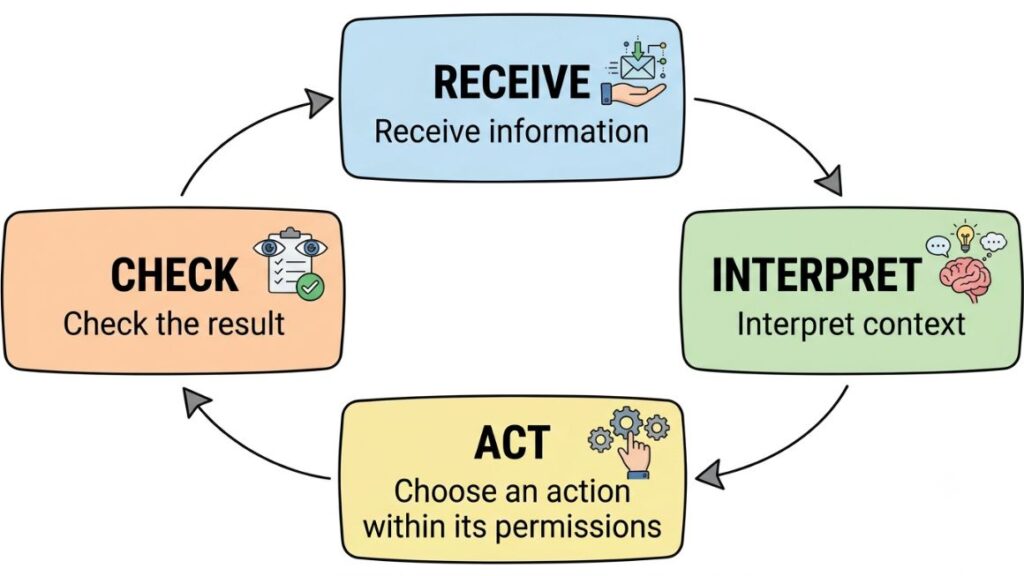
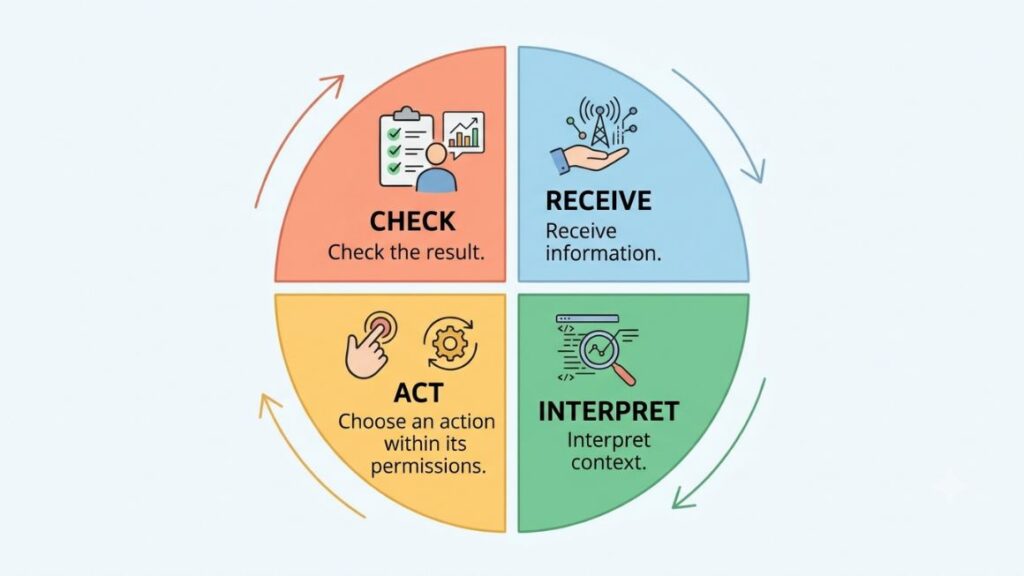
Think of it as a loop with four steps:
- Receive information. The agent pulls in order history, support tickets, product usage and payment status.
- Interpret context. Is this a one-off hiccup or the third complaint in a month?
- Choose an action within its permissions. Send an update, offer a refund up to a set limit, or pass the case to a person.
- Check the result. Did the issue close? Did the customer reply, or go quiet?
Permissions matter most. A good setup spells out what the agent may do alone and what needs a human nod.
How it differs from a traditional chatbot
A traditional chatbot answers the questions it was built for. Ask where your order is and it returns a tracking link. That’s about where AI-powered customer service tools used to stop.
An agent handles the follow-through. Say a delivery is six days late. The agent checks the order, confirms the delay, sends an accurate update, offers the replacement or refund your policy allows, and flags the case to a support lead if the customer has complained before.
Why businesses are paying attention
Support has mostly been reactive: the customer complains, then you respond. Interest in AI customer retention comes from flipping that order, so the problem gets handled before the complaint is written.
Gartner predicted in March 2025 that by 2029, agentic AI will autonomously resolve 80% of common customer service issues without human intervention. That’s a forecast, not a fact, and it doesn’t mean every business needs full autonomy.
An AI agent for customer retention monitors customer signals, estimates who is at risk of leaving, and takes a pre-approved action such as an order update or a tutorial. Unlike a chatbot that only answers questions, it can coordinate several steps and hand off to a human when a case is sensitive.
Why Customer Retention Is a Business Priority
Retention matters because every customer who leaves takes future revenue with them, and you pay again to replace them.
The cost of losing existing customers
Losing a customer costs more than one purchase. You lose repeat orders, pay to acquire a replacement, and make revenue harder to predict. Customer lifetime value (CLV) is the revenue a customer brings in across the whole relationship, and it grows the longer they stay.
The most-quoted proof is a 1990 Harvard Business Review article by Frederick Reichheld of Bain & Company and W. Earl Sasser of Harvard Business School. They reported that cutting defections by 5% raised profits by 30% in an auto-service chain and 85% in one bank’s branch system. Those are 1990 results from specific companies, not a promise for yours.
The claim that acquiring a customer costs five times more than keeping one is hard to trace to a solid study, so treat it as a rough direction at best.
Why customers stop buying or cancel subscriptions
The reasons are rarely mysterious. Support that’s slow. Problems that get logged and never solved.
Onboarding that leaves new customers unsure where to start. Emails and offers that have nothing to do with what they bought. And sometimes the product just doesn’t deliver what the marketing promised. Few of these are visible until someone leaves.
The importance of acting early
A cancellation request is a late signal. By then the customer has often made peace with leaving. A missed delivery, a stalled onboarding or a failed payment shows up days or weeks earlier, and that gap is where an AI agent for customer retention earns its place. Reach out at the first sign of trouble and the conversation is about helping. Wait for the cancellation and it turns into one about discounts.
Retention protects revenue because every lost customer has to be replaced at a cost. Reichheld and Sasser’s 1990 Harvard Business Review research found that cutting defections by 5% lifted profits by 30% in an auto-service chain and 85% in one bank’s branch system, though results differ by business.
How These Agents Help Businesses Keep Customers
An AI agent for customer retention helps in five practical ways: it spots at-risk customers early, personalizes outreach, fixes problems quickly, guides new customers to their first win, and supports renewals and repeat purchases.
Identifying customers who may leave
An AI agent for customer retention watches for patterns that people miss at scale. Logins drop after a strong first month. The same complaint shows up for the third time.
A regular buyer stops ordering. A card payment fails. A new user never reaches the milestone that usually predicts they’ll stay.
This is where customer churn prediction comes in. Many teams pair the agent with predictive analytics that score each account’s risk, then let the agent act on the highest scores. A score is an estimate, though, not a verdict. Some customers flagged as at risk were never going anywhere, and some quiet ones leave without any warning.
Personalizing communication
Customer history tells you what to say. If someone bought running shoes in March, a care tip or a replacement reminder in September makes sense. A discount on kitchenware doesn’t. When the agent draws on purchase history, past support conversations and stated preferences, messages feel relevant instead of generic, and that’s what a personalized customer experience comes down to in practice.
Keep it modest. Using someone’s name and last purchase is helpful. Quoting their browsing history back to them isn’t.
Resolving issues before frustration grows
Speed matters most with problems. The agent can walk someone through troubleshooting, share an order update, or issue a refund within the limit you’ve authorized, say up to ₹500. Anything above that, or anything emotional, goes to a person with the full history attached so the customer doesn’t repeat the story.
Fin, the company formerly known as Intercom, says its AI agent resolves 76% of conversations on average. That’s the vendor’s own figure, so test it on your own tickets.
Improving onboarding and customer engagement
New customers decide fast whether a product is worth their time. The agent can notice that someone hasn’t finished setup and send the one tutorial that gets them to a first useful result. That’s customer engagement automation at its most useful: a well-timed nudge, not a weekly blast. For a fitness app, that might be a logged workout.
Supporting renewals and repeat purchases
The agent can send a reminder before an annual plan renews, prompt a replenishment when someone’s coffee or skincare is likely running low, and offer a pause instead of a cancellation when a customer says money is tight.
Done with care, this is classic retention marketing with better timing. It can also make customer loyalty programs smarter, by rewarding the behaviors that actually keep people around. Recommendations should follow what the customer bought, not what you’d like to clear from stock.
Also Read: AI Agent for Marketing Campaigns: Plan and Launch Campaigns
Practical Examples Across Different Industries
The scenarios below are hypothetical examples that show how the logic plays out. They aren’t published results, and none of them should be read as a benchmark.
E-commerce and online retail
Imagine an online skincare store whose parcels keep getting delayed by one courier. A customer’s order is now five days late, and it’s their second delayed order. The agent checks the available order information, sends an accurate update with a new delivery date, and, because this is a repeat problem, routes the case to a support lead instead of sending another automated apology.
The human decides on a goodwill gesture. The agent handled the speed. The person handled the judgment.
SaaS and subscription businesses
Picture a project management tool where one team’s logins fall sharply two weeks after onboarding. The system flags the drop. The agent suggests a short tutorial on the feature similar teams use most, and if usage stays low, it alerts a customer success manager to set up a call. This is customer success automation doing the monitoring so the manager can spend their time on the conversation.
Education and online learning
Take an online course platform where a learner hasn’t opened a module in nine days. The agent sends a friendly message with the next lesson and a shorter option for people short on time. If the learner replies that the material is confusing, the agent connects them with a mentor rather than pushing on. Some learners need encouragement. Others need a person.
Small businesses and service providers
A dental clinic or a salon doesn’t need a huge system. An agent can send appointment reminders, ask for feedback a day after the visit, and prompt a repeat booking when it’s time for the next check-up or haircut. A low rating goes straight to the owner, who can call the customer personally. Even a basic setup like this beats relying on memory.
How to Implement an AI Retention Strategy Step by Step?
Start small: pick one retention problem, connect the data that explains it, set clear limits on what the agent can do, test with a limited group, and improve from real results. Here’s the sequence.
Step 1: Identify the biggest retention problem
Choose one issue. Repeated support requests about the same problem, low onboarding completion, or cancellations in the first 90 days are all good candidates. Trying to fix everything at once makes results impossible to read. The first job for an AI agent for customer retention should be narrow enough to explain in one sentence, like “new customers who stop using the product in week two.” Ask your support team what people say right before they leave.
Step 2: Collect the right customer information
Review what you already hold: records in your customer relationship management (CRM) system, transaction history, support tickets and product usage. Then check the quality. Duplicate contacts, outdated addresses and missing cancellation reasons will push the agent toward bad decisions.
Use only data you have permission to use, and only what the task needs. Clean, permissioned data matters more than a clever model.
Step 3: Define triggers and permitted actions
Write down three things. What triggers an intervention, for example no login for 14 days or a second failed payment. What the agent may do alone, such as sending a reminder or issuing a small refund. And which decisions need approval, like discounts, policy exceptions and anything involving a billing dispute.
Write the rules in plain language first and configure the tool second. If they don’t fit on one page, the scope is too big.
Step 4: Choose the right platform
Compare options on integrations with your current tools, security, escalation to humans, cost, reporting and how easy the setup is to maintain. Pricing models differ a lot, from per seat to per resolution to per action, so estimate your monthly volume before you compare quotes. Ask for a trial on your own data. A demo on the vendor’s sample data proves very little for an AI agent for customer retention.
Step 5: Run a limited pilot
Pick one segment or workflow, such as customers in their first 60 days. Record your baseline before launch: churn, resolution time, repeat contacts. If you can, keep a similar group untouched for comparison. Set the pilot length before you start, so nobody stops it early because week one looks good. Leave human review switched on, so someone reads a sample of the agent’s messages every week.
Step 6: Improve using actual results
Read the failures. Which conversations ended badly? Which messages did customers ignore or complain about? Where did the agent contact someone who didn’t need contact?
Fix those, check the retention numbers, and only then widen the pilot. Expanding before you’ve learned from the failures just spreads the problems around. Then repeat. An AI agent for customer retention is never really finished.
Tools and Platforms Worth Evaluating
No single tool suits everyone. Support platforms, CRM platforms and specialist agents solve different problems, so the right pick depends on the technology you already run.
Customer support platforms
Zendesk is a long-established support platform. Its Suite plans now include AI agents billed per automated resolution, and independent pricing guides say the per-resolution rate isn’t published openly, so expect to ask for a quote.
Intercom is the customer service platform behind the Fin AI agent. Fin is priced at $0.99 per resolution, on top of helpdesk seats if you use Intercom’s inbox, and it can also run on top of other helpdesks. One thing worth knowing: the company renamed itself Fin in May 2026, and Salesforce completed its acquisition of Fin on September 10, 2026.
CRM and customer data platforms
Salesforce makes sense when your customer records, workflows and service operations already live there. Its Agentforce platform charges through Flex Credits: $500 buys 100,000 credits, and a standard action uses 20 of them, which works out to $0.10 per action, according to Salesforce’s announcement. A single customer conversation can involve several actions, so model your cost per conversation, not per action.
| Platform | Best fit | How AI is priced (2026) | Check first |
| Zendesk | Teams already running support in Zendesk | AI agents included in Suite plans, billed per automated resolution; rate not public | How a “resolution” is defined, and your volume commitment |
| Intercom (Fin) | Teams that want an agent on top of their current helpdesk | $0.99 per resolution, plus seats if you use Intercom’s helpdesk | What counts as a resolution |
| Salesforce Agentforce | Businesses with records and workflows already in Salesforce | Flex Credits, about $0.10 per standard action | Actions used per conversation |
What to check before choosing a tool
Compare integrations, pricing structure, data access, automation limits, analytics, implementation effort and human handoff. Check the last one twice. If a customer can’t reach a person easily, nothing else on the list will save the experience.
Pricing and features change often, so confirm current details on each vendor’s official page before you commit.

How to Measure Whether Your Strategy Is Working?
To judge an AI agent for customer retention, track four groups of numbers: retention rate, churn rate, satisfaction and resolution quality, and revenue and return on investment. Compare each one against a baseline you recorded before launch.
Customer retention rate
Retention rate is the share of customers you keep over a set period. The standard formula is ((customers at the end of the period minus new customers acquired during it) ÷ customers at the start) × 100. Say you start with 1,000 customers and end with 1,050, including 200 new ones. Your retention rate is (1,050 − 200) ÷ 1,000, or 85%.
Churn rate
Churn rate is the percentage of customers lost over the same period: customers lost ÷ customers at the start × 100. In the example above, 150 customers left, so churn is 15%. Define the denominator clearly and stick with it.
Customer satisfaction and resolution quality
Track satisfaction scores, repeat contacts, successful resolution and escalation rates. A fast answer isn’t necessarily a good answer. If tickets close in two minutes and the same customers write back three days later, resolution quality is low. Some teams add customer sentiment analysis to read the tone of messages and catch frustration that a rating won’t show.
Revenue and return on investment
Count repeat revenue, renewal rates, implementation costs, usage costs and the staff time saved. Return on investment is the retained revenue minus total cost, divided by total cost.
Here’s a simple way to compare a pilot against its baseline. Say 90-day churn among new customers was 15% before launch. During the pilot, customers served by the agent churn at 12%, while a similar group without the agent churns at 14%. The fair comparison is 12% against 14%, not 12% against 15%, because a sale or product fix may have lowered churn for everyone. Credit the agent only for the gap your evaluation supports. (Illustrative numbers.)
Retention rate is ((customers at end minus new customers) ÷ customers at start) × 100, and churn rate is customers lost ÷ customers at start × 100. To judge an AI agent for customer retention fairly, compare a pilot group against a similar untouched group, not only against last quarter’s numbers.
Challenges, Risks, and Best Practices
The main risks of an AI agent for customer retention are wrong answers, privacy missteps, missing human judgment and too much automation. Each has a plain guardrail.
Inaccurate responses and weak data
An agent is only as good as the records behind it. If your CRM says a customer is active but they cancelled last week, the agent may send a renewal reminder to someone who has already gone. Outdated policies cause wrong refunds. Incomplete records cause wrong guesses. Fix the data and review samples of agent output before you blame the model.
Privacy and customer trust
Collect only what the task needs, limit who can access it, tell customers when they’re talking to an AI, and get consent where it’s required. In India, the Digital Personal Data Protection Act, 2023 and its 2025 Rules set the framework for notice and consent, with the main obligations phasing in through 2027. The government has floated shortening some timelines, so check the current schedule.
Trust is a retention issue too. Gartner’s 2024 survey of 5,728 customers found that 64% would prefer companies didn’t use AI in customer service, and 53% would consider switching if they learned a company planned to.
Knowing when a human should step in
Escalate sensitive complaints, complex billing disputes, exceptions to policy, and any moment when the system is unsure. Klarna learned this publicly. In February 2024 it said its AI assistant did the work of 700 agents. In May 2025, its CEO told Bloomberg that the cost-focused push had led to lower quality, and the company began hiring human support staff again.
Avoiding excessive automation
More messages don’t mean more loyalty. Too many nudges, irrelevant offers and automatic discounts teach customers to ignore you, or to threaten to cancel just to get a coupon. Set frequency caps. Keep discounts for cases where a person decides they’re worth it.
What Businesses Should Expect Next
Some of this is already here. AI agents handle routine support requests today, and vendors such as Zendesk, Fin and Salesforce now price AI by outcome or action. That part is established.
The rest is forecast. Gartner expects agentic AI to resolve 80% of common service issues on its own by 2029, and also predicts that more than 40% of agentic AI projects will be canceled by the end of 2027 because of rising costs, unclear value or weak risk controls. Both can be true.
Likely next steps include more capable multi-step agents, proactive outreach before a customer raises a problem, closer coordination between service and marketing systems (so a refund conversation doesn’t trigger a promotional email the same day), and stronger evaluation and governance.
Gartner also warns about “agent washing”, where vendors rebrand chatbots as agents, and estimated in June 2025 that only about 130 of the thousands of agentic AI vendors were real. What matters in practice is reliable integrations, controlled actions and human oversight. Fully autonomous retention isn’t right for every business today, and an AI agent for customer retention works best when someone is still accountable for the outcome.
Conclusion
That’s the whole case for an AI agent for customer retention. Watch for early signs, act within clear limits, hand sensitive cases to a person, and measure against a baseline. Pick one retention problem this month and run one small pilot, and within a quarter you’ll know whether it’s worth scaling.
If you want to move from reading about AI agents to using them in your own marketing work, the YUP AI Marketing course is built for working marketers who want to apply AI in their day-to-day projects.
Frequently Asked Questions
Can AI agents really improve customer retention?
A well-run AI agent for customer retention can, under the right conditions. Faster resolution and timely outreach reduce the frustration that pushes people away. But results depend on execution, data quality and what your customers actually need. An agent can’t fix a product people don’t want.
What is the difference between an AI agent and a chatbot?
A chatbot responds to questions with prepared or generated answers. An AI agent can take permitted actions across a workflow, like checking an order, issuing an approved refund and following up. A simple test: does it only talk, or does it also do?
Are these systems suitable for small businesses?
Yes, if you start narrow. Choose one low-risk workflow, such as appointment reminders or post-purchase follow-ups, and an affordable tool that connects to the systems you already use. Skip anything that needs a long, custom build.
Can an AI agent predict customer churn accurately?
It can estimate risk, not certainty. Accuracy depends on data quality and on validating predictions against what actually happened. Check how often flagged customers really left, and how many who left were never flagged.
How long does implementation take?
It varies. Timing depends on integration complexity, data readiness, testing and governance. A narrow pilot on a platform you already use usually moves faster than a custom integration across several systems.