

Generating B2B leads is rarely the hardest part. The harder problem is knowing which accounts matter, identifying the right decision-makers, responding at the right moment, creating relevant content, and connecting all of that activity to actual revenue.
That is where AI Agent for B2B Marketing workflows are becoming useful. Instead of asking marketers to manually research accounts, update CRM records, analyze campaigns, write follow-ups, and build reports, modern AI-powered platforms can handle parts of those workflows automatically while using business data as context.
The shift is significant because B2B buying journeys are complicated. A prospect may visit your website several times, download a report, compare competitors, speak with sales, disappear for three weeks, and then return through a completely different channel. A simple rule such as “send an email when someone downloads an ebook” can’t understand that journey.
Modern platforms can combine CRM information, website behavior, account intelligence, intent signals, campaign performance, and customer interactions to help marketers decide what should happen next.
But there is a catch.
Automation doesn’t automatically create good marketing. Poor data, weak targeting, generic personalization, and uncontrolled AI actions can make a bad process run faster.
This guide explains how to build practical AI-driven workflows for lead generation, account targeting, personalization, campaign optimization, analytics, sales alignment, and customer expansion. It also breaks down the major tools you can use at each stage.
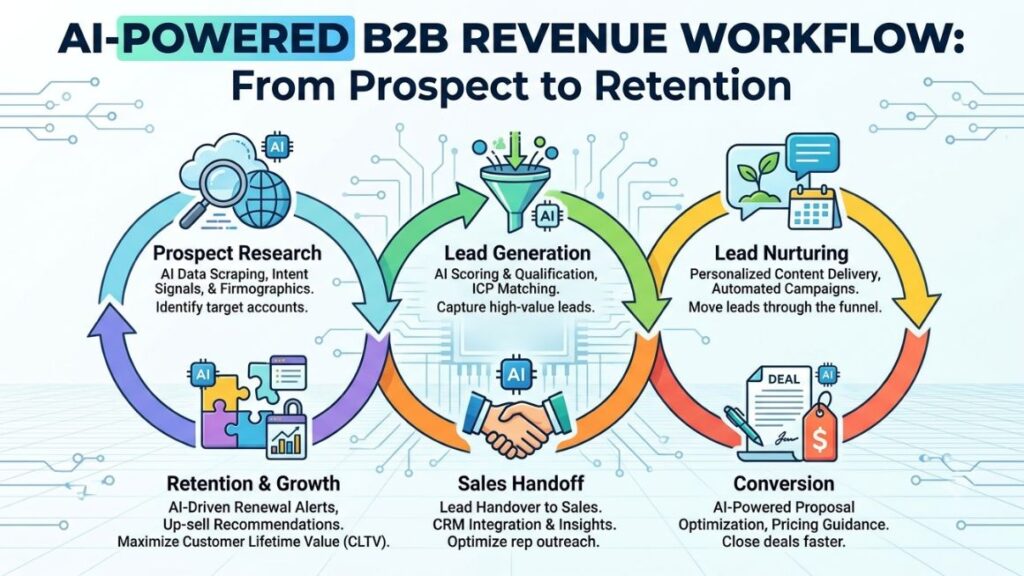
Table of Contents
What Are AI Agents for B2B Marketing?
An AI agent is software that can interpret a goal, use available information, make decisions within defined boundaries, and take actions through connected tools.
The important distinction is between AI assistance and agentic execution. A chatbot that writes an email is assisting you. A system that identifies a target account, researches the company, evaluates its fit, drafts an email, updates the CRM, and triggers a sales task is performing a workflow with agentic behavior. Businesses looking to implement these systems at a broader strategic level can also work with an AI native marketing agency, which can combine AI-powered workflows with human-led strategy, positioning, content, and campaign execution.
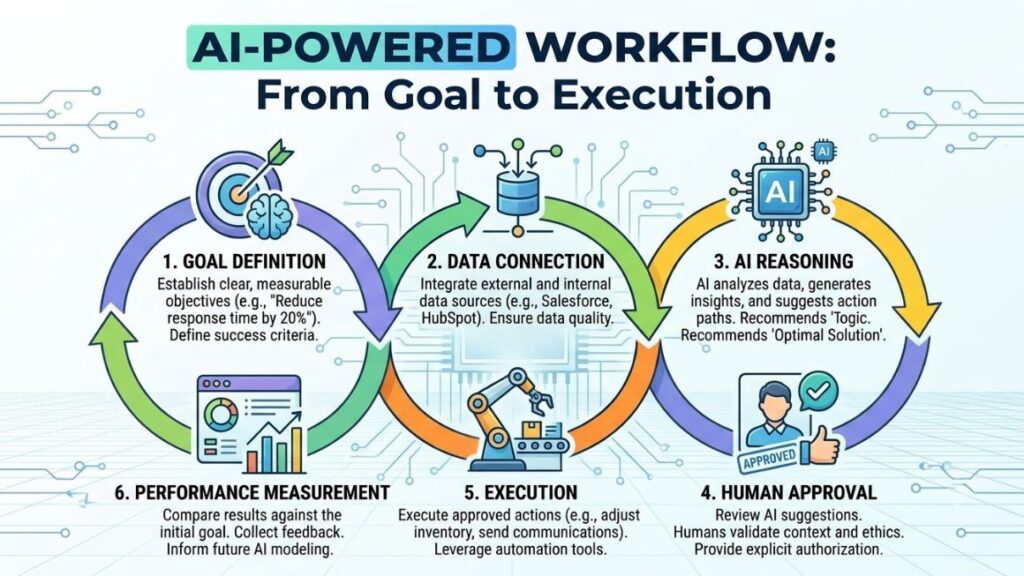
The basic process looks like this:
Goal → Data → Reasoning → Action → Feedback
For example:
- A company visits your pricing page.
- The system identifies the company and checks whether it matches your ideal customer profile.
- It evaluates company size, industry, location, existing CRM history, and buying signals.
- It assigns a qualification score.
- If the account crosses a defined threshold, it creates or updates a CRM record.
- It prepares relevant talking points for sales.
- A human approves the outreach when required.
- The system records the result and uses the outcome for future prioritization.
This is different from a traditional workflow where every condition must be explicitly mapped in advance.
AI assistance vs agentic workflows
AI assistance usually handles one task.
Examples include:
- Writing an email
- Summarizing a call
- Creating an ad variation
- Analyzing a spreadsheet
- Generating a content brief
Agentic workflows can connect several tasks.
For example, a prospecting workflow might:
- Find accounts
- Enrich company data
- Identify contacts
- Research recent business activity
- Score the account
- Personalize messaging
- Push qualified contacts into a sales sequence
- Notify an SDR
- Record the outcome
That doesn’t mean you should let software make every decision independently. High-value actions such as changing large advertising budgets, sending sensitive customer communications, or deleting CRM records should usually require human approval.
AI-powered marketing workflows combine business data, AI reasoning, and connected actions to reduce manual work across research, personalization, campaign execution, and reporting. The strongest implementations keep human approval around high-impact decisions rather than automating every possible action.]
Why Are AI Agents Changing B2B Marketing Workflows?
B2B teams have a data problem as much as they have a workload problem.
Marketing information often sits across CRM systems, advertising platforms, analytics tools, email software, sales engagement platforms, spreadsheets, and customer success systems. The marketer’s job becomes connecting those pieces.
AI can help with that connection.
Long buying cycles create missed opportunities
A B2B prospect might show buying intent today but speak to sales six weeks later. If your team only looks at last week’s lead report, that signal can disappear.
Platforms such as LinkedIn Sales Navigator can surface account and lead activity, while tools such as Demandbase and 6sense focus on account-level intelligence and intent signals.
Personalization is becoming harder
“Hi {{First Name}}” isn’t personalization.
A useful B2B message should reflect the recipient’s role, company situation, business problem, and buying stage. That requires research.
Apollo, for example, combines prospect data with AI research capabilities that can help teams investigate companies and contacts before outreach. Apollo says its AI research combines its own data, external sources, and AI models to generate prospect insights.
Marketing teams need faster feedback
A campaign report that arrives two weeks after launch is useful for the next campaign, but not always for the current one.
AI-powered analytics can continuously inspect performance and flag unusual patterns. The marketer can then investigate the cause and decide whether a campaign needs adjustment.
That is particularly useful when you have multiple campaigns, audiences, regions, and channels running at the same time.
10 Strategies to Boost Leads, Sales, and ROI
1. Automate Lead Research and Prospecting
Lead research is one of the easiest areas to automate because much of the work follows a repeatable pattern.
Suppose your ideal customer is a SaaS company with 100 to 1,000 employees, a sales team of at least 20 people, and a growing outbound function.
Instead of manually researching hundreds of companies, you can create a workflow that:
- Finds companies matching the ICP.
- Enriches firmographic information.
- Identifies relevant employees.
- Checks technologies and business signals.
- Researches recent company activity.
- Scores each account.
- Pushes qualified records into the CRM.
Clay
Clay is particularly useful for this type of workflow.
Clay works as a data orchestration and enrichment layer rather than relying on a single database. Its platform can connect data from many providers and use AI-powered research to investigate accounts and contacts.
One of its useful concepts is waterfall enrichment. Instead of asking one data provider for an answer and accepting failure, a workflow can move through multiple sources until it finds a usable match.
Clay also offers AI research capabilities for questions that aren’t always available as standard database fields. For example, a team might want to determine whether a target company uses a particular technology or whether a job posting suggests a specific business initiative. Clay describes its AI research agent, Claygent, as a way to answer research questions beyond standard provider fields.
Best use: Account research, enrichment, ICP building, signal-based prospecting, and personalized outbound preparation.
Limitation: Data quality still depends on available sources and your enrichment logic. More data doesn’t automatically mean more accurate targeting.
Apollo
Apollo combines B2B contact data, prospecting, engagement, and AI-assisted research.
Its AI capabilities can help sales and marketing teams research people and companies, narrow targeting, score prospects, personalize messages, and automate parts of the outreach process. Apollo describes its AI system as combining real data with AI research and automation rather than relying only on generated assumptions.
A practical workflow could look like:
ICP filter → company research → contact identification → AI research → personalized message → sequence → CRM update
This reduces the time sales development teams spend moving between different research tabs.
Best use: Prospecting and outbound sales development.
Limitation: Automated outreach still needs human review. Personalization based only on scraped company facts can quickly become repetitive.
2. Score and Prioritize Leads Automatically
Not every lead deserves the same amount of attention.
Lead scoring assigns a value to a prospect based on factors such as:
- Company size
- Industry
- Job role
- Website activity
- Content engagement
- Product interest
- Previous conversations
- Buying intent
- CRM history
A simple score might be:
Lead Score = Fit Score + Engagement Score + Intent Score
A more sophisticated system can use predictive models to estimate which accounts are more likely to progress.
HubSpot
HubSpot provides CRM, marketing automation, AI-assisted personalization, lead capture, audience segmentation, and AI-powered workflows.
Its current Marketing Hub includes features such as Breeze Customer Agent, Prospecting Agent, intelligent forms, audience segments, personalized email capabilities, and campaign management.
For example, a HubSpot workflow could identify a company visiting pricing and product pages repeatedly, combine that behavior with company fit, and prioritize the account for sales follow-up.
The real value isn’t the score itself. It’s what happens after the score changes.
A good workflow might automatically:
- Increase lead priority
- Create a sales task
- Add the account to a relevant campaign
- Recommend content
- Notify a salesperson
- Update the CRM lifecycle stage
Best use: CRM-based lead scoring, marketing automation, lead capture, and lifecycle management.
Limitation: A sophisticated scoring model is useless if your CRM contains duplicate, outdated, or incomplete data.
Salesforce
Salesforce takes a broader approach by combining CRM data, automation, analytics, and AI through its Agentforce platform.
Agentforce Marketing can help teams plan campaigns, create content, optimize activity, and orchestrate customer experiences using connected data. Salesforce describes Agentforce Marketing as a platform connecting customer data, AI, automation, and engagement.
For an enterprise team, Salesforce becomes particularly useful when marketing, sales, service, and customer data already live inside the same environment.
Best use: Enterprise CRM, lead management, opportunity intelligence, campaign orchestration, and revenue operations.
Limitation: Salesforce can become complex. Poor implementation, excessive customization, or weak data governance can reduce the value of its AI capabilities.
3. Personalize Outreach at Scale
Personalized outreach works when the message reflects something meaningful about the recipient.
Compare:
“We help companies improve their marketing.”
with:
“I noticed your team has expanded its performance marketing function. If you’re also increasing campaign volume, reporting and budget allocation can become difficult to manage manually.”
The second message gives the recipient a reason to care.
LinkedIn Sales Navigator
LinkedIn Sales Navigator helps sales teams find decision-makers, understand accounts, identify relationship signals, and prepare for conversations.
Its AI-assisted features include Account IQ, Lead IQ, Message Assist, and Ask for intro. LinkedIn says Account IQ can summarize company information, strategic priorities, likely pain points, financial information, and employee discussions.
Message Assist can also draft personalized first-touch InMail using account insights, lead information, and product selling points.
That makes Sales Navigator useful before the email is ever written.
Best use: Account research, buyer identification, social selling, and personalized outreach.
Limitation: AI-generated messages still need editing. A prospect can usually tell when a message was created from a generic template.
4. Build Automated Lead-Nurturing Workflows
A lead who isn’t ready today isn’t necessarily a bad lead.
Lead nurturing keeps prospects engaged until they have enough intent or business need to speak with sales.
A useful nurture workflow might be:
New lead → educational content → product proof → case study → webinar → sales signal → sales handoff
Marketo Engage
Adobe Marketo Engage is designed for enterprise marketing automation.
Its Engagement Programs support scheduled content distribution and ongoing campaigns for leads and customers. Adobe describes Marketo programs as a way to build always-on campaigns and personalized experiences.
Marketo works well when you need detailed segmentation and complex lead lifecycle management.
For example, you can create separate journeys for:
- New prospects
- High-intent leads
- Existing opportunities
- Dormant leads
- Existing customers
- Expansion accounts
Best use: Enterprise lead nurturing, segmentation, lifecycle management, and multi-touch campaigns.
Limitation: It requires thoughtful implementation. Complex automation can become difficult to manage when naming conventions, scoring rules, and ownership aren’t documented.
ActiveCampaign
ActiveCampaign is useful for teams that need email automation, CRM workflows, segmentation, and customer journeys without the complexity of a large enterprise stack.
You can use it to trigger communications based on:
- Form submissions
- Email engagement
- Website behavior
- Lead scores
- Pipeline stages
- Customer activity
For smaller B2B teams, this can be enough to create useful nurture systems without buying a much larger platform.
Best use: Email nurturing, segmentation, lifecycle automation, and SMB or mid-market workflows.
5. Use Account-Based Marketing to Focus on High-Value Accounts
Account-based marketing, or ABM, flips the usual lead-generation model.
Instead of asking, “How many leads can we generate?”, you ask, “Which accounts are most likely to become valuable customers?”
That requires account intelligence.
6sense
6sense focuses on predictive account intelligence, buying signals, intent, and account-based strategies.
A useful 6sense workflow can help a revenue team identify accounts showing signs of active research, prioritize those accounts, and coordinate advertising and sales outreach around them.
The important concept is timing.
Your ideal account might have been a perfect fit six months ago. But if it has no current need, aggressive outreach may waste resources.
Intent data tries to answer a different question:
Which suitable accounts appear to be in-market now?
Best use: ABM, account prioritization, intent-based targeting, and sales alignment.
Limitation: Intent signals are signals, not proof of a purchase decision. You still need context from your CRM, sales conversations, and actual account activity.
Demandbase
Demandbase combines account data, intent, technographics, account identification, and AI-powered intelligence.
Demandbase says its Account Intelligence combines first-party data with proprietary B2B data and AI models to identify and prioritize opportunities. It also provides information such as company data, technologies, contacts, intent signals, and account identification.
For an ABM team, the workflow can look like:
Target account list → account intelligence → intent signal → audience activation → personalized content → sales engagement
Demandbase has also introduced an MCP capability designed to bring account intelligence, buying groups, and intent signals into AI assistants.
Best use: Enterprise ABM and account intelligence.
Limitation: It makes the most sense when you have a clearly defined account strategy and enough sales capacity to follow up.
6. Create and Optimize Content Faster
Content teams spend significant time on research, outlines, briefs, first drafts, repurposing, and editing.
AI can reduce the manual workload, but it shouldn’t remove editorial judgment.
ChatGPT
ChatGPT can support marketing research, content briefs, campaign ideas, customer research, messaging, performance analysis, and reporting.
OpenAI’s current marketing solution positions ChatGPT Work as a tool for turning customer insights and campaign context into briefs, creative assets, and performance reports.
For example, you can provide:
- ICP information
- Customer interviews
- Sales objections
- Product documentation
- Existing campaign results
- Competitor notes
Then use the information to generate a campaign brief or content structure.
The strongest workflow isn’t:
Prompt → publish
It is:
Research → AI draft → expert review → fact check → brand edit → publish → performance analysis
Best use: Research, content planning, messaging, campaign analysis, and marketing operations.
Limitation: AI can produce confident but incorrect claims. Give it reliable source material and verify important facts.
Claude
Claude is useful for long documents, strategic analysis, research synthesis, content review, and complex instructions.
It can be particularly useful when you need to analyze several documents together, such as:
- Customer interview transcripts
- Product documentation
- Competitor pages
- Sales call notes
- Brand guidelines
- Campaign reports
For B2B marketers, the benefit is less about generating another generic blog post and more about processing large amounts of business context.
Best use: Long-form analysis, research synthesis, messaging strategy, document review, and content planning.
Limitation: Like any generative system, output quality depends heavily on the context and source material provided.
Jasper
Jasper is specifically designed around marketing workflows rather than general-purpose AI conversations.
Jasper currently positions its platform around marketing agents, content pipelines, brand governance, personalization, campaign execution, and marketing-specific workflows. Its Jasper IQ layer is designed to apply brand voice, audience information, style guidance, and product knowledge across outputs.
This distinction matters for large marketing teams.
A general AI tool can write content. Jasper tries to make the content operation repeatable across a team.
Best use: Enterprise content operations, brand consistency, campaign content, personalization, localization, and marketing workflows.
Limitation: It can be more than a small team needs if your main requirement is occasional copywriting.
7. Optimize Paid Campaigns
Advertising platforms already use machine learning heavily for bidding, audience selection, delivery, and creative optimization.
The marketer’s job is changing from manually controlling every variable to giving the platform strong inputs and monitoring whether automated decisions are producing business results.
Google Ads
Google Ads uses machine learning across bidding, targeting, campaign optimization, and other parts of advertising.
For B2B campaigns, automated bidding can be useful when Google has enough conversion data to distinguish valuable traffic from low-quality clicks.
The critical issue is conversion quality.
If you optimize toward every form submission, the system may find more people willing to submit forms. That doesn’t mean it will find more companies likely to buy.
Your conversion structure should therefore separate signals such as:
- Form submission
- Qualified lead
- Sales opportunity
- Pipeline value
- Closed revenue
Best use: Search demand capture, lead generation, automated bidding, and conversion optimization.
Limitation: Automation can optimize exactly what you tell it to optimize. If the conversion signal is weak, the campaign can become efficient at producing the wrong outcome.
LinkedIn Ads
LinkedIn Ads is particularly useful when job role, industry, company, seniority, and professional context matter.
LinkedIn provides targeting based on professional attributes and supports objectives such as lead generation, awareness, and event promotion.
For B2B campaigns, LinkedIn can work well alongside account lists.
For example:
Target accounts → reach decision-makers → promote high-value content → capture lead → enrich CRM → nurture → sales
Best use: Enterprise demand generation, ABM advertising, professional audience targeting, and lead generation.
Limitation: Cost per lead can be high. Evaluate performance based on qualified pipeline rather than cheap form submissions.
Meta Ads Manager
Meta Ads Manager can also contribute to B2B acquisition, particularly for retargeting, founder-led brands, professional education, SaaS, and audiences with strong consumer-style engagement patterns.
Meta’s Advantage+ products use AI across areas such as audience, placement, budget, and creative optimization. Meta reports that its Advantage+ leads campaigns have delivered lower cost per qualified lead in its own reported testing.
The important point is that platform-reported improvements are not universal benchmarks. Your own conversion quality and economics matter more.
Best use: Retargeting, lead generation, creative testing, and broader audience discovery.
Limitation: B2B buying decisions can be difficult to attribute to a single Meta interaction, particularly when the sales cycle is long.
8. Automate Marketing Analytics and Reporting
Reporting becomes valuable when it answers:
What happened? Why did it happen? What should we do next?
A dashboard that only shows numbers doesn’t necessarily answer the third question.
Google Analytics 4
Google Analytics helps marketers analyze acquisition, engagement, conversions, user behavior, and audiences.
GA4 also supports predictive audiences based on predictive metrics. Google explains that predictive audiences can include users likely to take actions such as purchasing within a future time period, using behavioral event data from websites and apps.
For a B2B website, useful signals include:
- Traffic source
- Landing page
- Engagement
- Key events
- Form interactions
- Content consumption
- Returning visitors
- Conversion paths
Don’t treat GA4 as your complete revenue system. CRM data is usually needed to connect marketing activity with opportunities and closed revenue.
Looker Studio
Looker Studio can turn marketing data into dashboards that combine information from different sources.
A useful B2B dashboard might connect:
- GA4
- Google Ads
- Search Console
- CRM exports
- LinkedIn campaign data
- Sales pipeline information
The goal isn’t to create 40 charts.
A strong executive dashboard might show:
Spend → Leads → Qualified Leads → Opportunities → Pipeline → Revenue → CAC → ROI
Best use: Marketing dashboards, cross-channel reporting, and stakeholder reporting.
Limitation: Looker Studio is a reporting layer. If your underlying data is inconsistent, a beautiful dashboard won’t fix it.
Power BI
Microsoft Power BI becomes more useful when marketing data needs to connect with broader business intelligence.
Microsoft’s Copilot for Power BI can help users analyze data through natural language, generate DAX, summarize reports, and work with semantic models. Microsoft also notes that AI-ready data preparation improves the quality of Copilot interactions.
For an enterprise marketing team, Power BI can connect marketing metrics with:
- Sales revenue
- Customer data
- Product usage
- Finance
- Regional performance
- Forecasting
Best use: Enterprise analytics and marketing-to-revenue reporting.
Limitation: It requires good data modeling. AI can’t compensate for a badly designed data model.
9. Connect Marketing and Sales Systems
The biggest operational problem isn’t always a lack of AI.
It’s disconnected systems.
A lead may enter through a form, sit in marketing automation, become qualified in a CRM, get contacted by sales, and later become an opportunity. If those systems don’t communicate properly, the customer journey becomes fragmented.
Gong
Gong focuses on revenue intelligence and analyzing customer interactions.
Gong can analyze conversations and sales activity to identify patterns around deals, pipeline risk, seller behavior, and customer conversations. Gong positions its Revenue AI OS around capturing interactions, analyzing what works, predicting pipeline risk, and automating next actions.
For marketing, the value can come from feeding sales intelligence back into campaigns.
For example, if sales conversations repeatedly mention:
- Pricing concerns
- Integration problems
- Security requirements
- Implementation time
- Competitor comparisons
Marketing can use those insights to create better content and campaigns.
Best use: Sales conversation intelligence, revenue insights, sales coaching, and marketing-sales feedback loops.
Limitation: Conversation data can be sensitive. Your organization needs clear policies around recording, storage, access, and privacy.
10. Identify Retention, Upsell, and Expansion Opportunities
Lead generation gets attention because it is easy to count.
Revenue expansion often gets less attention even though existing customers can be valuable growth opportunities.
Customer data can reveal:
- Increased product usage
- New departments adopting a product
- Additional employees joining
- Feature adoption
- Support activity
- Contract changes
- Declining engagement
Gainsight
Gainsight focuses on customer success, retention, expansion, and customer health.
A customer intelligence workflow can identify accounts that appear ready for:
- Upselling
- Cross-selling
- Renewal conversations
- Customer education
- Executive engagement
The marketing team can then create targeted campaigns instead of sending the same newsletter to every customer.
Best use: Customer retention, expansion campaigns, customer health, and lifecycle marketing.
Limitation: Expansion predictions are only useful when customer data is accurate and the sales or customer success team can act on the signals.
Best AI Tools for B2B Growth
There isn’t one perfect platform. Your best stack depends on your sales cycle, CRM, team size, data maturity, and budget.
| Tool | Primary job | Best use |
|---|---|---|
| HubSpot | CRM and marketing automation | Lead capture, scoring, nurture |
| Salesforce | Enterprise CRM | Revenue operations and orchestration |
| Clay | Data enrichment | Prospect research and personalization |
| Apollo | Prospecting | Outbound and contact research |
| 6sense | Account intelligence | Intent and ABM |
| Demandbase | ABM intelligence | Enterprise account targeting |
| LinkedIn Sales Navigator | Sales intelligence | Buyer and account research |
| Gong | Revenue intelligence | Sales conversations and pipeline |
| ChatGPT | General AI work | Research, content, analysis |
| Claude | Long-form AI analysis | Documents and strategy |
| Jasper | Marketing AI | Content operations |
| Google Ads | Paid acquisition | Search demand capture |
| LinkedIn Ads | B2B advertising | Professional audiences |
| Meta Ads | Paid social | Retargeting and audience expansion |
| GA4 | Analytics | Website and conversion analysis |
| Looker Studio | Reporting | Marketing dashboards |
| Power BI | Business intelligence | Enterprise reporting |
| Marketo Engage | Marketing automation | Enterprise nurture |
| ActiveCampaign | Automation | Email and lifecycle workflows |
| Zapier | Workflow automation | Connecting applications |
| Make | Visual automation | Complex multi-step workflows |
| Gainsight | Customer success | Retention and expansion |
Zapier
Zapier is useful when you need to connect systems without building custom software.
For example:
New form submission → enrich lead → classify lead → create CRM record → notify Slack → create sales task
Zapier’s current AI by Zapier system allows AI-powered steps to work inside Zaps, including agentic steps that can reason and use connected tools. Zapier has also been moving its standalone Agents functionality into AI by Zapier within the main Zap editor.
The important part is that you don’t need AI everywhere.
Use deterministic automation when the rule is predictable. Use AI when interpretation is required.
For example:
Good for normal automation: If lead source = webinar, add to webinar campaign.
Good for AI: Read the lead’s job description and company information, then classify the account into the most relevant sales segment.
Best use: Connecting CRM, email, forms, Slack, spreadsheets, AI models, and marketing platforms.
Limitation: Complex workflows can become difficult to audit if you don’t document them.
Make
Make provides visual workflow automation and increasingly supports AI agents.
Make’s AI Agents functionality lets teams configure agents with instructions, knowledge, and tools. It also supports scenarios and MCP tools as part of agent workflows.
Make is useful when the workflow needs:
- Branching logic
- Multiple conditions
- Data transformation
- API calls
- Iterations
- Multiple applications
- AI reasoning
For example, an account research workflow could collect data from a CRM, run enrichment, ask an AI model to classify the account, branch based on the score, and send different actions to sales or marketing.
Best use: Complex visual automation and multi-step workflows.
Limitation: As workflows grow, documentation and testing become increasingly important.
AI Agent for B2B Marketing: How to Build a Practical Workflow
You don’t need to automate the entire revenue operation on day one.
Start with one repetitive workflow where the outcome is measurable.
Step 1: Define the business goal
Don’t start with:
“We want to use AI.”
Start with:
“We want to reduce lead qualification time.”
Or:
“We want to increase qualified meetings from target accounts.”
Or:
“We want to reduce the time required to prepare weekly campaign reports.”
A specific goal makes tool selection much easier.
Step 2: Map the current workflow
Write down what happens today.
For example:
- Lead submits form.
- Marketing checks company information.
- Someone enriches the contact.
- Someone checks whether the company fits the ICP.
- Lead gets assigned.
- Sales receives an email.
- Sales researches the company.
- Sales sends outreach.
Now identify which steps require judgment and which are repetitive.
Step 3: Connect your data
Useful sources may include:
- CRM
- Website analytics
- Advertising platforms
- Email platform
- Product analytics
- Sales conversations
- Account databases
- Customer success data
Your AI workflow is only as good as the information it can access.
Step 4: Define the actions
Give the system a narrow set of allowed actions.
For example:
Allowed:
- Read lead data
- Enrich account
- Score lead
- Draft message
- Create CRM task
- Notify sales
Human approval required:
- Send external message
- Change advertising budget
- Delete CRM record
- Change opportunity stage
- Export sensitive data
This separation reduces risk.
Step 5: Test with historical data
Before letting a workflow act on live leads, test it against previous records.
Ask:
- Did it classify leads correctly?
- Did it identify the right accounts?
- Did it miss important signals?
- Did it create false positives?
- Were the recommended actions useful?
This is where most teams should spend more time.
Step 6: Measure business results
Don’t measure only the number of automated tasks.
Measure:
- Qualified leads
- Sales meetings
- Opportunity rate
- Pipeline created
- Revenue
- CAC
- Sales cycle length
- Time saved
- Conversion rate
If automation saves 20 hours but produces lower-quality leads, it isn’t a successful system.
AI Agents vs Traditional Marketing Automation
Traditional automation follows predefined rules.
For example:
IF form submitted
THEN send email
THEN add contact to workflow
An agentic workflow can interpret more context.
For example:
IF a new lead arrives, research the company, evaluate its ICP fit, check previous interactions, determine the most appropriate segment, recommend the next action, and create the relevant task.
The difference is flexibility.
| Area | Traditional automation | Agentic workflow |
|---|---|---|
| Logic | Predefined rules | Goal plus context |
| Decisions | Fixed conditions | AI-assisted reasoning |
| Data | Usually predefined fields | Can combine multiple sources |
| Actions | Fixed sequence | Can select from available actions |
| Best for | Predictable processes | Variable research and decisions |
| Risk | Rule failure | Incorrect AI reasoning |
| Oversight | Workflow testing | Testing plus approval controls |
You shouldn’t replace every automation with AI.
If a deterministic rule works perfectly, keep it.
Zapier itself makes this distinction clear in its current AI guidance: conventional automation is often better for predictable tasks, while AI adds value where interpretation or reasoning is required.
Benefits and Limitations
Benefits
The strongest benefits usually come from reducing repetitive work and improving decision speed.
Faster lead response: High-intent signals can trigger workflows without waiting for someone to review a spreadsheet.
Better research: AI can summarize large amounts of company and customer information.
More personalization: Sales and marketing teams can create account-specific messaging without manually researching every prospect.
Improved prioritization: Scoring and intent signals can help teams focus limited sales capacity on higher-value accounts.
Lower operational workload: Repetitive CRM updates, reporting, classification, and routing can be automated.
Better marketing-sales alignment: Shared data and automated handoffs reduce information gaps.
Faster campaign feedback: AI-assisted reporting can identify patterns sooner.
Limitations
The technology isn’t magic.
Bad data creates bad decisions. If your CRM is full of duplicates, outdated contacts, and incorrect account ownership, AI will inherit those problems.
AI can be wrong. Generated research can contain inaccurate assumptions.
Personalization can become fake. Adding one company fact to an otherwise generic email doesn’t make it genuinely relevant.
Automation can amplify mistakes. A human making one bad classification is one bad classification. A workflow making the same mistake 5,000 times is an operational problem.
Privacy matters. Customer information, employee information, sales conversations, and personal data need appropriate access controls.
Costs can grow. Data providers, AI usage, CRM subscriptions, automation platforms, and advertising systems can add up quickly.
The practical answer is not to avoid automation. It’s to put guardrails around it.
How to Measure ROI
The ROI equation should connect marketing activity to business outcomes.
A simple formula is:
Marketing ROI = (Revenue attributed to marketing – Marketing cost) ÷ Marketing cost × 100
But B2B companies should look beyond a single number.
Cost per qualified lead
Instead of measuring cost per form submission, calculate:
Total marketing spend ÷ qualified leads
This filters out low-quality conversions.
Lead-to-opportunity conversion rate
Calculate:
Qualified opportunities ÷ qualified leads × 100
If automation increases lead volume but decreases this rate, you may have optimized for quantity instead of quality.
Pipeline generated
Measure the total opportunity value associated with marketing-generated or marketing-influenced accounts.
Customer acquisition cost
CAC helps you understand the full cost of acquiring a customer.
CAC = Sales and marketing costs ÷ new customers
If AI reduces manual work but doesn’t improve acquisition economics, the financial impact may be limited.
Sales cycle length
If automated research and qualification help sales teams reach suitable prospects earlier, track whether average time to opportunity or close changes.
Time saved
Time is not the final ROI metric, but it matters.
Track hours saved on:
- Lead research
- Reporting
- CRM updates
- Content production
- Campaign analysis
- Sales preparation
Then calculate the economic value of that time.
The ROI of AI-powered marketing should be measured through qualified pipeline, revenue, conversion rates, customer acquisition cost, sales-cycle length, and operational time saved. Task automation alone isn’t a sufficient success metric because faster execution can still produce poor business outcomes.
Real-World Platform Examples
The current market shows several different ways AI is being embedded into revenue workflows.
Salesforce
Salesforce has moved beyond isolated AI assistants with Agentforce Marketing, where AI agents can help plan, create, optimize, and orchestrate campaigns using connected customer and campaign data.
This model is particularly relevant to large companies that already have CRM, marketing, sales, and service data inside Salesforce.
HubSpot
HubSpot combines CRM, marketing automation, AI-powered lead capture, prospecting, personalization, and campaign management.
Its Prospecting Agent is positioned around finding accounts that are ready to buy, researching them, personalizing outreach, and supporting pipeline generation. Its Customer Agent can engage website visitors and help convert interest into sales-ready leads.
LinkedIn’s Sales Navigator uses generative AI to provide account and lead insights and help sellers prepare personalized outreach. Its Account IQ and Lead IQ features are designed to reduce manual research.
This is especially useful when professional identity, job changes, company activity, and relationships are important buying signals.
Gong
Gong focuses on revenue intelligence by analyzing customer interactions and sales activity. Its platform is designed to identify deal risks, improve seller productivity, and automate revenue workflows.
For marketing teams, the interesting part is the feedback loop. Sales conversations can reveal customer objections and language that marketing can use in campaigns, landing pages, case studies, and content.
Demandbase
Demandbase uses account intelligence, intent data, technographics, company information, and AI to help revenue teams identify and prioritize accounts.
Its newer MCP capabilities also show where the category is heading: bringing proprietary go-to-market context directly into AI assistants rather than forcing users to switch between separate systems.
How to Get Started Without Over-Automating
The safest implementation is usually small.
Pick one workflow.
Good candidates include:
- Lead enrichment
- Lead scoring
- Sales research
- Content repurposing
- Campaign reporting
- CRM data cleanup
- Lead routing
- Customer re-engagement
Then follow five rules.
1. Start with a measurable problem
Don’t automate something simply because you can.
Choose a workflow that currently costs your team significant time or causes measurable revenue leakage.
2. Clean your data first
Before building AI workflows, fix:
- Duplicate accounts
- Missing fields
- Incorrect lifecycle stages
- Old contacts
- Inconsistent naming
- Poor attribution
AI doesn’t repair broken business processes automatically.
3. Keep humans in high-impact decisions
A human should usually review actions involving:
- Large budgets
- External communications
- Sensitive customer data
- Strategic accounts
- Contract or pricing decisions
- Major CRM changes
4. Start with recommendations
A good first version can recommend what should happen next without taking the action.
For example:
“This account appears highly qualified. Here are the reasons and recommended next steps.”
Your sales team can then approve the recommendation.
Once accuracy is proven, selected actions can become automated.
5. Expand only after measuring results
If the workflow improves qualification accuracy and saves time, connect another system.
Don’t build a giant automated revenue machine before proving that the first workflow works.
What Does the Future Look Like?
The next stage is less about individual AI tools and more about connected workflows.
Imagine a target account showing increased website activity.
The system could identify the company, enrich the account, check buying signals, identify decision-makers, review CRM history, recommend an audience, prepare personalized content, notify sales, and track the resulting opportunity.
That is much closer to an operating system for revenue work than a simple content generator.
Tools such as Zapier and Make are already moving in this direction by allowing AI reasoning to interact with connected applications. Zapier’s current AI by Zapier approach combines AI steps with deterministic automation, while Make provides AI agents that can use instructions, knowledge, and tools inside scenarios.
The winning teams won’t necessarily be the teams with the most AI tools.
They’ll be the teams that connect the right data, workflows, people, and measurement systems.
Conclusion
AI is becoming useful in B2B growth because it can connect tasks that previously required several people and several disconnected systems.
The biggest opportunity isn’t simply generating more content or sending more emails. It’s helping your team identify the right accounts, understand buyer signals, personalize interactions, prioritize sales activity, analyze campaign performance, and connect marketing work to revenue.
Start small. Choose one workflow where manual effort is high and the result is measurable. Clean the data, define the actions, add approval points, and measure qualified pipeline rather than vanity metrics.
The goal isn’t to remove marketers from the process. It’s to give marketers more time for the work that requires judgment, creativity, positioning, and customer understanding.
If you’re building these skills, learning how AI workflows, automation, prompting, analytics, and marketing strategy fit together will give you a much stronger foundation than simply collecting AI tools.
FAQs
What are AI agents in B2B marketing?
AI agents are software systems that can interpret goals, use business data, make decisions within defined boundaries, and perform actions through connected tools. In marketing, they can support research, lead qualification, personalization, campaign analysis, CRM updates, and customer lifecycle workflows.
What is the difference between AI agents and marketing automation?
Traditional marketing automation mainly follows predefined rules. Agentic workflows can interpret information and choose actions based on context. However, traditional automation remains better for predictable tasks where you need the same outcome every time.
Can AI agents generate B2B leads?
Yes. AI-powered platforms can help identify target accounts, find relevant contacts, enrich prospect information, detect buying signals, personalize outreach, and route qualified prospects to sales. Lead quality still depends on your ICP, data sources, and qualification rules.
Which tools are best for B2B lead generation?
Clay, Apollo, LinkedIn Sales Navigator, HubSpot, 6sense, and Demandbase are useful for different lead-generation requirements. Clay is strong for enrichment and research, Apollo for prospecting and outbound, Sales Navigator for professional account research, and 6sense and Demandbase for account intelligence.
Can AI automatically qualify leads?
Yes, but you should define qualification criteria carefully. AI can evaluate company characteristics, engagement, intent signals, and CRM activity, then recommend or assign a qualification score. High-value accounts should still receive human review.
How can AI improve sales and marketing alignment?
AI can connect lead signals, CRM activity, marketing engagement, and sales conversations. It can also automate lead routing, create sales tasks, summarize conversations, and send customer insights back to marketing. This gives both teams a shared view of account activity.
Is AI automation useful for small B2B companies?
Yes, but smaller companies should start with focused workflows. Lead enrichment, email classification, CRM updates, reporting, and content repurposing are often easier starting points than complex enterprise ABM systems.
What are the biggest risks of AI-powered marketing?
The main risks include inaccurate data, incorrect AI outputs, privacy problems, excessive automation, poor personalization, and weak governance. The safest approach is to restrict what automated systems can do and require approval for high-impact actions.
How do you calculate ROI from AI marketing workflows?
Measure business outcomes before and after implementation. Track qualified leads, opportunity conversion, pipeline, revenue, CAC, sales-cycle length, and time saved. Compare those improvements with software, data, implementation, and operational costs.
Should marketers automate every marketing task with AI?
No. Automation is most useful when a task is repetitive, measurable, and governed by clear rules. Keep strategic decisions, sensitive communications, major budget changes, and complex customer decisions under human control.