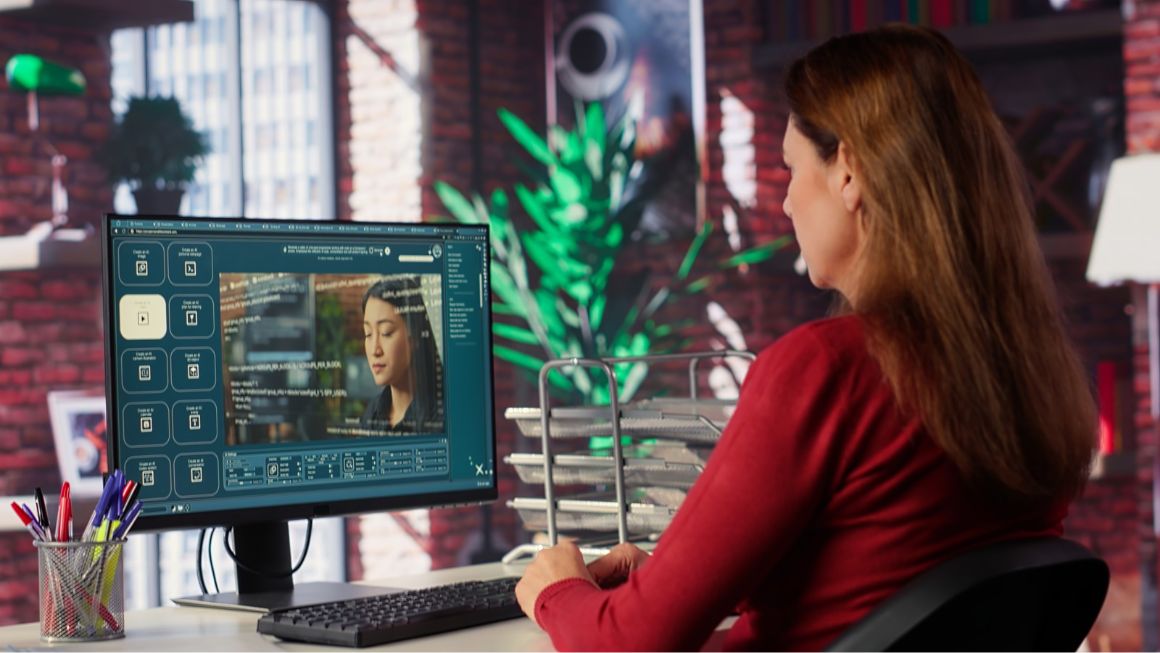
A single product ad used to mean a brief, a designer, a photographer and a week of back-and-forth. Now a marketer with one decent photo and a clear idea can have a dozen versions before lunch. That’s the pitch behind every AI image ads generator, and plenty of teams have bought in. IAB’s January 2026 research with Sonata Insights found that 83% of ad executives say their company now uses AI in the creative process. That’s up from 60% in 2024.
But a pitch isn’t a result. Some tools make ads you’d happily run. Others hand you warped logos and strange hands. Telling them apart takes homework.
This guide covers what a modern AI ad generator actually does, which ten tools deserve a look in 2026 and how to build an ad step by step. You’ll also get copy-and-use prompts, ways to lift both image quality and campaign results and a checklist of what to verify before anything goes live.
Table of Contents
What Is an AI Image Ads Generator?
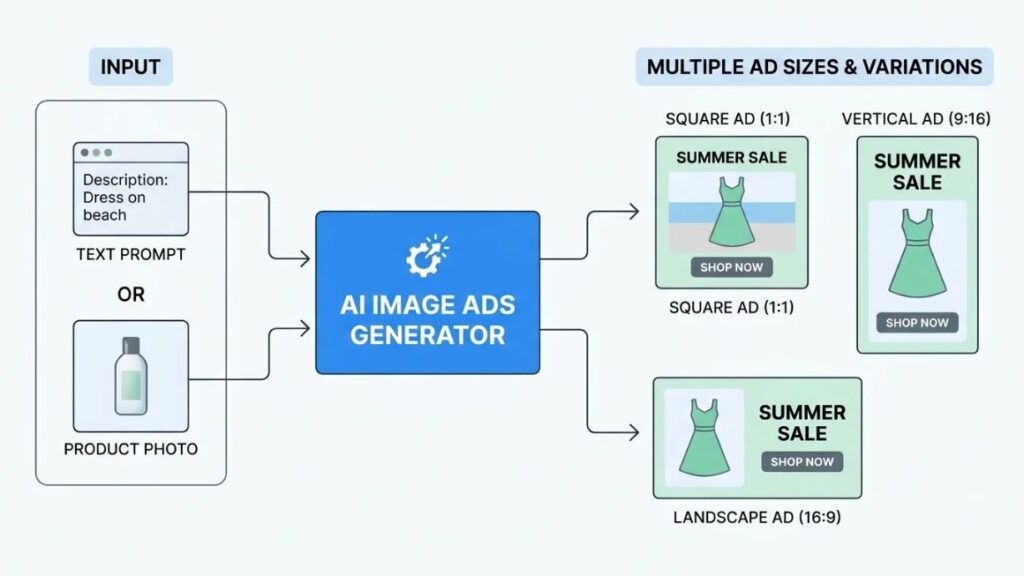
An AI image ads generator is software that turns a text prompt, a product photo or a web address into finished ad images, usually in several sizes. You describe the ad. The tool builds it.
Some tools only generate pictures. Others fix a photo you already own. Or they add a headline and button on top. A few live inside Google or Meta and work on live campaigns. Same label, very different jobs.
How Does It Work?
Most tools run the same loop. You supply something. The tool produces options. You pick, edit or regenerate. Type a prompt and it builds an image from nothing. Upload a product photo and it keeps the product while changing the world around it, which. That is why background replacement is the workhorse feature. Casetify, the phone case brand, reported a 13% lift in return on ad spend from Meta’s background generation. That’s according to the Meta’s 2024 announcement.
Then comes branding: logo, colours, fonts, a headline, a button. And finally ad variation. This is where AI-generated ad creatives earn their keep. That’s because ten versions of one idea cost almost nothing to produce.
Who Should Use These Tools?
Anyone who needs ad images faster than a design queue allows can get something from an AI image ads generator:
- Small business owners without a full-time designer
- Ecommerce sellers with a catalogue of product photos
- Digital marketing professionals who need testing volume
- Social media managers feeding several channels at once
- Freelancers and agencies juggling multiple brands
They sit comfortably next to the other AI marketing tools most teams already use for copy, reporting and research.
An AI image ads generator creates ad images from a prompt, a product photo or a web page, and usually resizes and varies them for different placements. It speeds up production, but a human still has to check accuracy, branding and platform fit.
10 Best Tools for Creating AI Advertising Images in 2026
No tool wins every job. Anyone who says otherwise is selling something. These ten solve different problems. Some turn out static banners at volume. Some rescue product photos. Two live inside the ad platforms themselves. Here’s how the AI advertising tools compare, based on what each vendor documents as of November 2026. Picking the right AI image ads generator comes down to the job, not the hype.
1. AdCreative.ai
AdCreative.ai generates static banners, product shots and copy from a website scan or product photo. It then gives each version a predicted performance score. That score is the hook. The vendor claims accuracy above 90%. Independent testing says results vary, so treat it as a rough sort, not a verdict. It runs on credits, one per download. Scoring reportedly sits on higher plans. Best for static ads in volume. Weaker if video matters most.
2. Canva Magic Studio
Canva’s Magic Studio puts AI generation, Magic Design layouts and image editing inside the editor most marketers already know. Brand Kit keeps logos, colours and fonts consistent. Everything stays editable by hand. Free users get a small monthly allowance of AI credits. Heavier use and Brand Kit usually need a paid plan. It won’t score or publish your ads. Best for non-designers who want control.
3. Adobe Firefly
Adobe Firefly handles text-to-image generation, generative edits and reference-based creation, with close ties to Photoshop and Illustrator. The draw is legal comfort. Adobe describes its own Firefly models as commercially safe. Qualifying enterprise plans include IP indemnification. Partner models inside Firefly are different. Their terms vary and they can burn credits faster.
Best for brands and agencies that care about licensing. Overkill for ten quick banners.
4. Predis.ai
Predis.ai sits closer to social media management than to design. Feed it a prompt and it produces posts, carousels, short videos and ad creatives with captions, then schedules them. Handy.
But reviewers call the images template-like. So expect to customise. Free access depends on the plan and has shifted. Best for small teams wanting content and ads from one dashboard.
5. Recraft
Recraft is for people who care how things look. It generates regular images and native vector graphics (SVG). A handful of reference images can steer style so a campaign feels like one family.
One catch on the free plan: images are public, Recraft owns them and commercial use is limited. Paid plans change that. Best for designers wanting real art direction. Not a one-click banner machine.
6. Creatify
Creatify starts from a product link. Paste a URL and it pulls images, price and description, then builds ads around them, mostly short video with AI presenters plus image ads. Its own plan details list a free tier with 10 monthly credits, roughly two video ads or twenty image ads, with watermarked exports. It’s tuned for short vertical formats.
Best for ecommerce teams running quick tests, and a handy AI product ad generator when your catalogue already has decent photos.
7. Photoroom
Photoroom began as a background remover and grew into a product photo studio. It cuts products out cleanly, places them in AI-generated scenes, adds shadows and handles batches through an API. Free access is capped and can add a watermark, so check the current plan.
AI scenes sometimes look off with complex products. Best for ecommerce sellers who need clean, consistent product images before any ad gets built.
8. Quickads
Quickads pairs an ad library with generation tools. Its Discover section lets you browse a large database of competitor ads, then generate image or video ads, clone formats that seem to work and set up virtual product shoots.
Output quality gets mixed reviews, and what counts as free differs between reviewers. Best for small ecommerce teams wanting research and production in one place, if someone checks the results by eye.
9. Google Ads Asset Studio
Google launched Asset Studio inside Google Ads in September 2025, with Imagen 4 handling images. At Google Marketing Live on May 20, 2026, it added plain-language briefs, Gemini Omni video and 1-Click Creative Testing, rolling out through the summer, English first.
Images made here go straight into Performance Max and Demand Gen campaigns. The catch: it only works inside Google Ads, so check what’s live in your account. Best for advertisers already on Google.
10. Meta Advantage+ Creative
Advantage+ creative lives inside Ads Manager and offers background generation, image expansion to new ratios, and text variations. Meta said on July 7, 2026 that its Muse Image model would reach advertisers through it within weeks, but independent trackers hadn’t confirmed it as live by late September, so look in your own account.
Ads made or significantly edited with Meta’s generative features can carry an “AI info” label. Best for Facebook and Instagram advertisers wanting quick variations. Useless outside Meta.
| Tool | Best for | Free option | Main strength |
| AdCreative.ai | Static ad production | Trial | Ad variations |
| Canva | Flexible design | Yes | Editing |
| Adobe Firefly | Image generation | Limited access | Creative control |
| Predis.ai | Social content | Plan-dependent | Content workflow |
| Recraft | Art-directed images | Limited access | Visual quality |
| Creatify | Product-led ads | Yes | Image and video |
| Photoroom | Product visuals | Limited access | Product photography |
| Quickads | Ad research and creation | Plan-dependent | Creative workflow |
| Google Asset Studio | Google Ads | Account-dependent | Native integration |
| Meta Advantage+ | Meta campaigns | Included features | Platform integration |
Plans, limits and availability change often, so check each vendor’s pricing page before you commit.
Hunting for a free AI ad generator? Canva’s free plan and Creatify’s free tier are the most practical starting points, while Recraft and Photoroom offer limited free access. Read the fine print on watermarks, usage caps and commercial rights before a free image goes into a paid campaign.
The best AI image ads generator depends on the job. Canva and Adobe Firefly suit hands-on design, AdCreative.ai and Quickads suit volume, Photoroom suits product photos, and Google Ads Asset Studio and Meta Advantage+ suit campaigns already running on those platforms.
How to Create an Advertisement Using AI: Step-by-Step Guide
To create an ad with AI, pick one goal, choose a tool that fits it, give the tool a clear product image or prompt, generate options, add your message, check everything by hand and test more than one version. Here’s each step in order.
Step 1. Define Your Advertising Goal
Decide what the ad is for before you open any tool. Brand awareness, product sales, lead generation and website traffic each need a different image, message and call to action. A sale ad needs the product and the offer front and centre. An awareness ad can afford to be moodier.
Step 2. Choose the Right Tool
Match the tool to your budget, output format and design needs. Want static banners at volume? Look at AdCreative.ai. Want hands-on control? Canva or Firefly. Already advertising on Google or Meta? Try their built-in tools first. Whichever AI image ads generator you pick, run one small test before committing.
Step 3. Upload Your Product Image or Write a Prompt
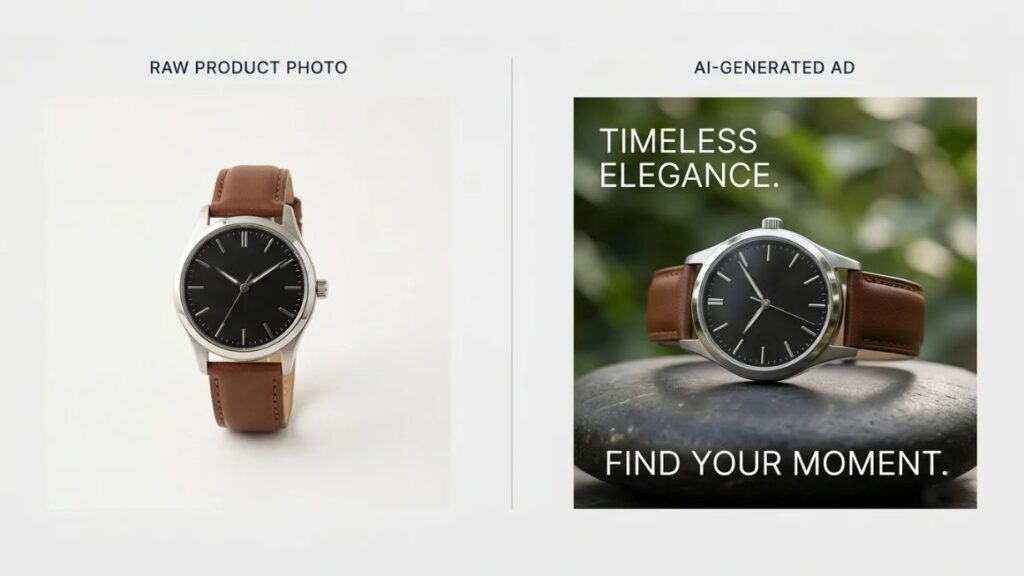
Quality in, quality out. Use a sharp, well-lit product photo with the whole product visible, because the tool builds everything else around it. Writing a prompt instead? Be specific about product, setting and mood. Vague prompts get generic ads.
Step 4. Generate Your First Ad Creative
Tell the tool about the background, lighting, composition, audience and visual style, then generate several options. The first batch will be rough. Keep the one or two closest to what you want and refine those instead of starting over.
Step 5. Add Your Advertising Message
A headline, an offer and a call to action. That’s the whole job. Keep the text short and large enough to read on a phone. Many generators still garble words inside images, so adding the text yourself in an editor is often safer.
Step 6. Review and Export Your Ad
Zoom in. Check the product against the real thing, then spelling, logos, hands, edges and brand colours. Export at the dimensions each placement needs, and confirm the platform’s current spec sheet first.
Step 7. Test Different Variations
Don’t bet everything on one design. Test different images, messages and offers, changing one thing at a time so you know what worked. Google’s own demo of 1-Click Creative Testing pitted lifestyle images against solid backgrounds, a test most advertisers could copy tomorrow.
Best AI Image Ad Prompts You Can Use
Paste any of these into your AI image ads generator of choice, whether that’s Adobe Firefly, Canva or Recraft, then swap in your own product details. Each names the subject, setting, light and style, which is most of what makes a prompt work.
Prompt for a Skincare Product Advertisement
Product photo of a frosted glass serum bottle on a pale stone pedestal, soft morning window light, clean cream background, tiny water droplets, premium minimalist look, empty space on the left for a headline. Keep the bottle label and shape unchanged.
Prompt for a Fashion Advertisement
Full-length shot of a model in a rust-orange linen shirt dress, walking through a sunny Jaipur courtyard, natural light, relaxed lifestyle feel, shot at eye level, fabric texture clearly visible, room at the top for text. Keep the dress colour and cut exactly as in the reference photo.
Prompt for a Food Advertisement
Overhead shot of a steaming bowl of butter chicken with naan on a dark slate table, glossy sauce, fresh coriander, realistic texture, warm side lighting, shallow depth of field, appetising but honest, no extra dishes.
Prompt for a Technology Product Advertisement
Black wireless earbuds beside an open charging case on a dark reflective surface, cool blue rim lighting, crisp edges, subtle reflections, modern studio background, centred composition. Keep the logo and button placement exactly as uploaded.
What Makes a Good Advertising Prompt?
Be specific. Name the audience, the visual style and the composition, then say what must not change: the label, the logo, the product shape. That last line saves more rework than anything else. And leave room for text. That’s how to write prompts for AI advertising images that actually behave.
How to Create Ads for Facebook, Instagram and Google?
Each platform crops, stacks and shows images differently, so one file from your AI image ads generator rarely fits everywhere. Plan three shapes: 4:5 for feeds, 9:16 for full-screen vertical and 1.91:1 for Google’s landscape slots.
Creating Facebook Ad Images
Feed placements reward a clear product, one obvious offer and text you can read on a phone without squinting. Meta’s guidance now leans vertical, with 4:5 for feed images and 9:16 for Stories and Reels. Whichever Facebook ad image generator you use, preview the ad across placements in Ads Manager before publishing. Stories and Reels have shared one safe zone since March 2026, so keep text and logos away from the top and bottom edges.
Designing Instagram Advertising Creatives
Instagram is vertical-first. Meta’s Ads Guide recommends 4:5 at 1440 x 1800 pixels for feed image ads and 9:16 for Stories and Reels. The first second decides everything, so put the product and one strong visual idea up front. Any Instagram ad creator worth using should export both ratios from the same design.
Creating Google Display and Performance Max Assets
Performance Max asks for three image shapes, according to Google Ads Help: landscape at 1.91:1 (1200 x 628 recommended), square at 1:1 (1200 x 1200) and portrait at 4:5 (960 x 1200), each under 5,120 KB. Upload several per shape and use clean product images so Google can crop them safely. For banner advertising, an AI banner generator can resize one design into the standard display shapes, but check every crop for cut-off text.
Platform specifications change, so always check the current advertising guidelines before you export.
Benefits and Limitations of Using AI for Advertising Images
An AI image ads generator makes ad images faster and cheaper to produce, but it doesn’t make them right. The speed is real. So are the mistakes.
Key Benefits
Speed comes first. Automated ad creation can turn a week of production into an afternoon and lowers the barrier for anyone without design training. IAB’s 2026 research found cost efficiency is now the top benefit advertisers cite, named by 64%. More variations also mean easier experimentation, and small teams get tools that once needed a studio. Zepto is a useful example: Google’s case study says the quick commerce app turned product images into AI-made video ads and doubled its app installs with 11% better efficiency.
Limitations You Should Know
Now the other side. Any AI image ads generator can get product details wrong. Images can look slightly unnatural, and text and logos still distort. Meta’s developer documentation puts the job of previewing AI-generated ads on the advertiser, not the platform. Copyright is murkier too: the US Copyright Office concluded in January 2025 that prompts alone don’t make a user the author of the output, so you may not own what you generate. Brand identity can drift between versions. Every one of these points to the same fix, a human reviewer.
How to Make AI-Generated Ads More Effective?
Better inputs and better testing make AI ads work harder, because the tool can produce images but can’t read your customer. Google’s Marketing Live 2026 materials cite NCSolutions data showing creative drives 49% of incremental sales, so the image deserves attention.
Understand Your Target Audience
Know who the ad is for before you write the prompt. New buyers and repeat customers respond to different images and different offers, and the tool can’t guess which one you mean.
Focus on One Clear Advertising Message
One ad, one idea. One product, one offer, one button. The moment an image tries to say three things, it says none of them.
Use High-Quality Product Images
Generators amplify whatever you feed them. A blurry, badly lit photo gives you a blurry, badly lit ad, just bigger. Start sharp.
Maintain Brand Consistency
Lock in your colours, fonts, logo placement and tone once, using a brand kit wherever the tool offers one. Good AI ad design still follows brand rules. The tool just draws faster.
Create Multiple Creative Variations
Make several versions of each idea, with different backgrounds, crops and headlines. That’s how to create multiple ad variations quickly without hiring anyone. Then let the data pick.
Measure Results and Improve Your Ads
Four numbers tell most of the story. CTR (click-through rate) is the share of people who saw your ad and clicked it. Conversion rate is the share of clickers who buy or sign up. CPA, cost per acquisition, is what each sale or lead costs. ROAS, return on ad spend, is revenue divided by ad spend. Ad creative optimization is mostly the habit of comparing these across versions and dropping the weak ones.
One honest caveat. AI helps you produce assets quicker, but it doesn’t guarantee they’ll perform better than a human-made ad.
Also Read: Meta Ads Optimization Checklist: The Complete Guide for Andromeda-Era Campaigns (2026)
Common Mistakes to Avoid When Creating Ads With AI
Most failures with an AI image ads generator are process failures, not tool failures.
- Writing vague prompts. Say nothing specific and you’ll get something forgettable, in a style that looks like everyone else’s.
- Using unrealistic product images. If the generated product doesn’t match what actually ships, expect complaints and returns.
- Adding too much text. Crowded images read badly on a phone, and distorted letters make it worse.
- Ignoring brand identity. Ten off-brand variations are still ten off-brand ads, no matter how fast you made them.
- Publishing without checking accuracy. One warped logo or misspelt offer can undo the whole campaign.
- Ignoring platform specifications. A headline hidden under the Reels buttons is a headline nobody reads.
- Treating generated designs as proven winners. Looking polished isn’t the same as performing. Test it against your current best ad before you scale it.
AI Advertising Trends Businesses Should Watch in 2026
Four shifts are worth watching, and this year’s Google and Meta announcements point to all of them.
More Advertising Tools Built Into Ad Platforms
Google’s Asset Studio now takes plain-language briefs, and Meta says Muse Image is headed for Advantage+ creative. Meta reports that more than 8 million advertisers already use at least one of its generative AI ad tools. Creation is moving inside the platforms where ads run.
Personalized Product Imagery
Digital Applied’s March 2026 coverage says Meta added persona-based image generation to Advantage+, so one product can appear in different settings for different shoppers. Expect your next AI image ads generator to offer something similar.
Faster Creative Testing and Variation
Google’s 1-Click Creative Testing, announced in May 2026, lets advertisers test a new asset with a single click. Faster testing means more variations. More variations means more to review before launch.
Greater Focus on AI Transparency
Meta applies “AI info” labels to ads made or significantly edited with its generative tools, and Google added an AI label setting in July 2026. For campaigns aimed at the EU, India or New York, labelled assets can also carry a visible overlay. India’s IT Amendment Rules 2026, in force since February 20, add labelling duties for platforms.
Also Read: AI Agent for Paid Advertising: How to Set Up, Control and Measure One in 2026
Conclusion
An AI image ads generator won’t replace judgment. It replaces the slow part: the first draft, the resize, the fifth variation nobody wanted to build by hand. Used well, that frees you to spend your time on the offer and the audience.
Start small. Pick one tool from the list, make three or four versions of a single ad, and test them against a real campaign goal. Check every image by hand before it runs.
If you want to go deeper on running and measuring paid campaigns, Young Urban Project’s digital marketing learning resources and workshops are a good next stop.
Ad creation is moving inside Google and Meta, and disclosure is moving with it. Google’s AI label setting and Meta’s “AI info” labels mean advertisers need to track which images used generative AI, and India’s 2026 IT rules add labelling duties for platforms.
Frequently Asked Questions (FAQ)
What Is the Best AI Image Ads Generator in 2026?
There isn’t one. Canva and Firefly suit hands-on design, AdCreative.ai suits volume, Photoroom suits product photos, and Google or Meta’s own tools suit campaigns on those platforms.
Can I Create Advertising Images With AI for Free?
Yes, within limits. Canva, Creatify, Recraft and Photoroom offer free access in some form, but caps, watermarks and commercial-use limits apply. Check the terms first.
Can AI Create Facebook and Instagram Ads?
Yes. Meta’s Advantage+ creative generates backgrounds, expands images and writes text variations inside Ads Manager, and outside tools can produce files you upload. Review everything first.
Are AI-Generated Advertising Images Copyright-Free?
Not in the way people hope. The US Copyright Office says prompts alone don’t make you the author, and each tool’s terms decide how you can use outputs. Read the licence, and get legal advice for big campaigns.
Can AI Generate Product Images Without a Photoshoot?
Mostly. Photoroom and Meta’s background generation start from your own product photo and change the setting. Fully invented products drift from the real thing, so keep a real photo as the base.
Do AI-Generated Ads Actually Convert?
Sometimes. An AI image ads generator speeds up production, but vendor case studies are selected wins. Run AI versions against your current best ad and compare CPA and ROAS.
Is It Safe to Use AI-Generated Images in Paid Advertising?
Generally yes, if you check accuracy, follow platform policies and disclose where required. IAB’s 2026 research found 73% of Gen Z and Millennial consumers said knowing an ad used AI would raise or not change their purchase likelihood.
Do I Need Design Skills to Create Ads With AI?
No, but taste helps. Canva and Creatify handle layout, so you can create ads without graphic design skills. You still need to spot a bad crop or a garbled word.