

Most Google Ads accounts don’t break at launch. They break around week six, when the excitement is gone, the budget keeps draining, and nobody can explain why the leads are so bad.
If that sounds familiar, you’re not alone. Running ads is the easy part. Knowing how to optimize Google Ads campaigns so they bring in customers you can actually afford is what separates a healthy account from an expensive habit. Wasted budget, pricey clicks, junk leads and flat conversion rates usually trace back to the same root problem. Nobody is checking closely enough, or often enough.
Google Ads optimization isn’t a one-time setup job. It’s a loop: measure, change one thing, wait, measure again. This guide follows that loop in the order that matters, starting with your baseline and tracking, then keywords, structure, bidding, ads and landing pages, and finishing with budget, competitors and a review routine you can stick to.
One more thing worth flagging early. Google has pushed automation hard through 2026, with AI Max and Performance Max making more decisions on your behalf. That can help. It can also quietly spend money on searches you’d never choose, so you’ll see exactly where to keep control.
Table of Contents
Understand Your Google Ads Campaign Performance Before Making Changes
Before you touch a bid, a budget or a keyword, pull a baseline report covering the last 30 to 90 days. It’s the only way to know later whether a change worked or the numbers just wandered on their own.
Every attempt to improve Google Ads performance starts with this slightly dull step. Skipping it is how people end up asking “Why are my Google Ads not converting?” while having no record of what converting looked like last month.
Identify Your Campaign Goals
Each campaign needs one primary job. Lead generation, e-commerce sales, website traffic, app installs, and phone calls and inquiries are all legitimate goals, but they don’t share a scoreboard. A campaign built to get calls shouldn’t be judged on cart value, and a store campaign shouldn’t be praised for cheap traffic.
Mixed goals inside one campaign are where reporting turns muddy.
If you can’t say in one sentence what a campaign is for, split it or rethink it.
Understand the Important Performance Metrics
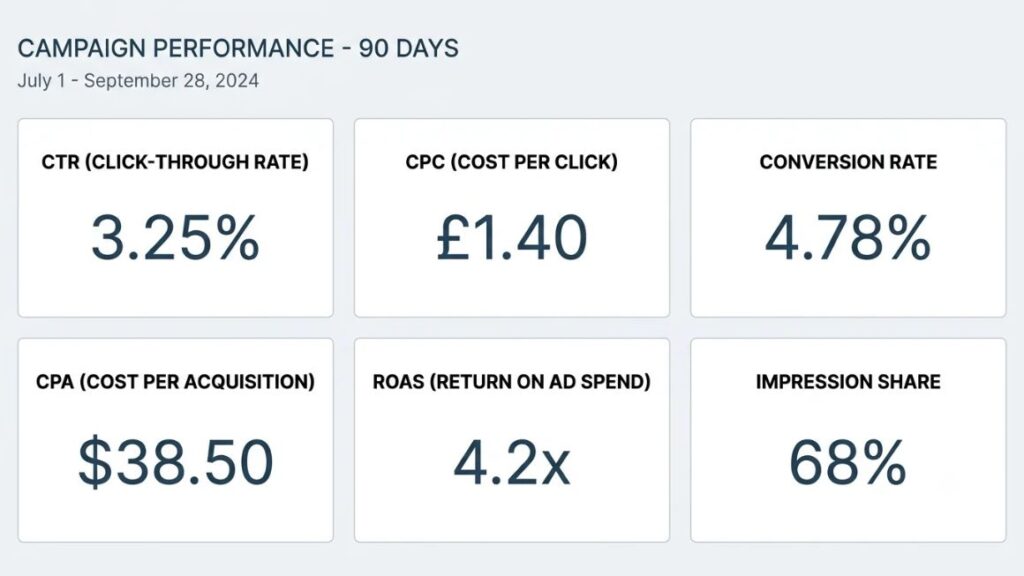
Six numbers do most of the work. Here’s what each one tells you, with a simple example.
| Metric | What it tells you | Simple example |
| CTR (click-through rate) | How frequently people click your ads | 50 clicks from 1,000 impressions is a 5% CTR |
| CPC (cost per click) | Average amount paid per click | ₹4,000 spent across 200 clicks is ₹20 per click |
| Conversion rate | Percentage of clicks resulting in conversions | 10 inquiries from 200 clicks is 5% |
| CPA (cost per acquisition) | Average cost of acquiring a conversion | ₹4,000 spent for 10 inquiries is ₹400 each |
| ROAS (return on ad spend) | Revenue generated for each unit of ad spend | ₹40,000 revenue on ₹10,000 spend is 4x |
| Impression share | Percentage of eligible impressions received | 6,000 impressions out of 10,000 eligible is 60% |
Also Read: Top Performance Marketing Metrics Every Marketer Should Track
ROAS is revenue divided by ad spend, so a 4x ROAS means every rupee spent brought back four. Impression share is the share of eligible impressions you actually got, which tells you how much demand you’re leaving on the table.
Benchmarks can give you a rough anchor, but handle them gently. LocaliQ’s 2026 benchmark analysis of more than 13,000 US campaigns put the average search CTR at 6.64%, the average CPC at $5.42, the average conversion rate at 8.18% and the average cost per lead at $66.69. Those are US figures spread across 23 industries. Costs in India will look different, and your own trend line matters more than anybody’s average.
Identify Where Your Campaign Is Losing Money
Most leaks are boring. High clicks with low conversions. A high CPC with nothing to show for it. Irrelevant search queries. A landing page that doesn’t match the ad. Budget flowing to traffic that was never going to buy.
A quick way to spot them: sort your search terms by cost, then sort locations and devices by cost per conversion. The expensive rows with zero conversions are your first suspects. It’s common to find a handful of queries eating a painful share of spend.
Actionable insight: Create a baseline performance report before making any changes. Export impressions, clicks, cost, conversions and CPA by campaign, then save it somewhere you’ll find again.
A baseline report is a record of Google Ads performance before any change: impressions, clicks, cost, conversions and cost per conversion by campaign over the last 30 to 90 days. Without it, you can’t tell whether an optimization improved results or performance simply moved on its own.
How to Optimize Google Ads Campaigns – The Next Steps
Set Up Accurate Conversion Tracking
Conversion tracking is how Google Ads learns which clicks turned into something valuable. If it’s wrong, every bid decision built on it is wrong too, and no amount of clever keyword work fixes that.
That’s why Google Ads performance tracking comes before bidding and targeting in this guide. Plenty of accounts get the order backwards. They test new bidding strategies for weeks on top of a tag that’s counting page views as sales.
Track the Actions That Actually Matter
Count what the business would pay for. For most advertisers that means purchase completions, qualified lead submissions, phone calls, appointment bookings and other high-value customer actions. A newsletter signup might deserve tracking too, but it shouldn’t sit beside a completed purchase as though the two were equal.
Set Up Google Ads Conversion Tracking
The setup is simple on paper. Here’s the order that works.
- Create a conversion action in Google Ads for the outcome you care about, such as a completed purchase or a submitted lead form.
- Install the Google tag on your site, either directly or through Google Tag Manager, and fire it on the confirmation step rather than on the button click.
- If you use GA4, link it, but decide which system is the source of truth for bidding so the same sale isn’t counted twice.
- Test with a real submission and confirm the conversion shows up with the right value before you spend another rupee.
Step four gets skipped constantly. Don’t skip it.
Also Read: How to set up performance marketing tracking correctly
Use Enhanced Conversions and Offline Conversion Data
Enhanced conversions improve measurement by sending hashed first-party data, such as an email address, alongside a conversion. Offline conversion data goes a step further and tells Google what happened after a lead entered your sales funnel, like which inquiries turned into paying customers.
There’s a 2026 change worth knowing about, and it’s less scary than it sounds. From April 2026, Google Ads began accepting user-provided data from website tags, Data Manager and API connections at the same time. In June 2026, the separate web and leads versions of enhanced conversions were combined into a single on and off setting, and existing users were migrated automatically if they’d already agreed to Google’s customer data terms.
The part that affects people using custom scripts is the Data Manager API. Google’s help page says that from June 15, 2026, offline conversion imports and enhanced conversions for leads uploads were migrated to the Data Manager API and blocked in the Google Ads API. If your leads reach Google through a no-code connector, Google lists HubSpot and Zapier among the supported import methods, so check there first. If a developer built a custom upload, ask them whether it has moved.
Google’s own case study on Grammarly shows why this kind of measurement work pays off. The company modernized its measurement by importing lifetime values for value-based bidding, then consolidated keywords, used broad match and built new ad copy from historical performance. Google reports a 29% rise in subscription revenue and a 23% improvement in ROAS. It’s a vendor-published case, so read it as an illustration rather than a promise.
Actionable insight: Don’t optimize campaigns around button clicks if your actual business goal is qualified leads or completed sales. A form full of spam will happily report a fantastic CPA.

3. Improve Your Keyword Strategy
Keywords decide who sees your ad, so they set the ceiling on traffic quality. Google Ads keyword optimization is less about adding new terms than about deciding which searches you’re willing to pay for.
Find Keywords That Match Customer Intent
Not every search deserves a bid. It helps to sort queries into four buckets.
- Transactional intent: the person is ready to act, as in “buy running shoes online” or “hire a performance marketing agency”. Usually the best conversion rates and the highest CPCs.
- Commercial investigation: they’re comparing, with searches like “best performance marketing course” or “HubSpot vs Zoho”. Good for lead generation if the page helps them decide.
- Informational intent: “what is ROAS”. Cheap clicks, thin conversions. Rarely worth paid budget unless you’re deliberately building an audience.
- Branded searches: people typing your name. Cheap, and they convert well.
Branded traffic often hides weak performance elsewhere, because it flatters the numbers of whatever campaign it sits in. Give it its own campaign so you can see the real picture.
Choose the Right Keyword Match Types
Match types control how closely a search must relate to your keyword. Google describes broad match as reaching related searches, phrase match as reaching searches that include the meaning of your keyword, and exact match as reaching searches with the same meaning or intent. So exact no longer means identical text.
Also Read: Dynamic Keyword Insertion (DKI): The Complete 2026 SEO + Google Ads Guide
| Match type | Advantage | Limitation |
| Broad match | Widest reach, and gives Smart Bidding more searches to learn from | Can drift into irrelevant queries without conversion-based bidding and close monitoring |
| Phrase match | A middle path between reach and control | Still lets in variations you didn’t picture |
| Exact match | The most control over who sees your ad | Reaches the fewest searches |
Google’s help documentation calls it critical to pair Smart Bidding with broad match, because the bid for each search should reflect signals available at the moment of the auction. Broad match with manual bidding and shaky tracking is how budgets disappear. Broad match with conversion-based bidding and a tidy negative list is a different story.
Regularly Review the Search Terms Report
The search terms report shows the actual queries that triggered your ads, and it’s rarely what you pictured. Check it weekly. You’re hunting for irrelevant searches, valuable new queries you hadn’t thought of, expensive searches that never convert, and keyword opportunities worth promoting into their own ad group.
If you’re wondering how to find negative keywords in Google Ads, this report is the answer, and the process is mechanical.
- Open the search terms report for a campaign and set the date range to the last 30 days.
- Sort by cost, highest first.
- Flag queries that have spend, no conversions and a clear mismatch with your offer.
- Add them as negative keywords at the right match type and level, either in the campaign or in a shared list.
Build and Maintain Negative Keyword Lists
Google Ads negative keywords tell Google which searches should never trigger your ad. Negative broad match blocks searches that contain your negative terms, even out of order. Negative phrase match blocks them in the same order. Negative exact match blocks only that precise query.
Practical example: a company advertising paid digital marketing courses may want to exclude searches like “free digital marketing course”, “digital marketing course pdf” and “digital marketing jobs”, because those searchers aren’t looking to pay for anything. That’s an illustration, not a universal list. If you run a free webinar to feed your sales funnel, blocking “free” would cut off your own best source of leads.
Build one shared list for the obvious junk and review it every month. Language, products and offers change, and a negative list left alone goes stale.
Also Read: Step-by-Step Guide to Become a Google Ads Expert in 2026
4. Optimize Your Google Ads Campaign Structure
A well-organized account makes every later decision easier, because you can finally see what’s working. Structure should mirror how the business earns money, with products, regions and goals separated so each campaign has its own budget, targeting and numbers.
Organize Campaigns Around Business Objectives
Separate products and services that have different margins. Separate geographical markets where the economics differ. Separate campaigns with different conversion goals, so a lead campaign and a sales campaign never share a bidding strategy. And skip the duplicate campaigns that feel tidy but end up competing with each other and splitting your data.
The classic failure is the “everything” campaign. One budget, forty keywords, three offers. Nobody can tell what’s working, and the algorithm can’t either.
Create Relevant Ad Groups
Tightly themed ad groups keep the search query, the keyword and the ad message pointing the same way. If one ad group holds “performance marketing course”, “SEO training” and “content writing course”, no single ad can be closely relevant to all three. Split them, and each ad gets to speak to one need.
Review Location, Language, and Device Targeting
Geographic settings are where small defaults cost real money. Google’s default and recommended location option is “Presence or interest”, which reaches people in, regularly in, or interested in your targeted area. “Presence” limits ads to people who are in or regularly in those places. If your service only works in person, the difference matters.
Google also warns that most campaigns see fewer impressions after moving away from the default, so make the switch deliberately, not as a reflex.
Then check language settings against the language your customers actually search in, which in India is often a mix. Look at mobile, desktop and tablet performance separately. A campaign that converts well on desktop and badly on mobile usually has a mobile page problem, not a bidding problem.
Actionable insight: Review actual customer locations and sales data before excluding a geographical area. The city that looks small on a map might be where your best customers live.
5. Choose the Right Bidding Strategy
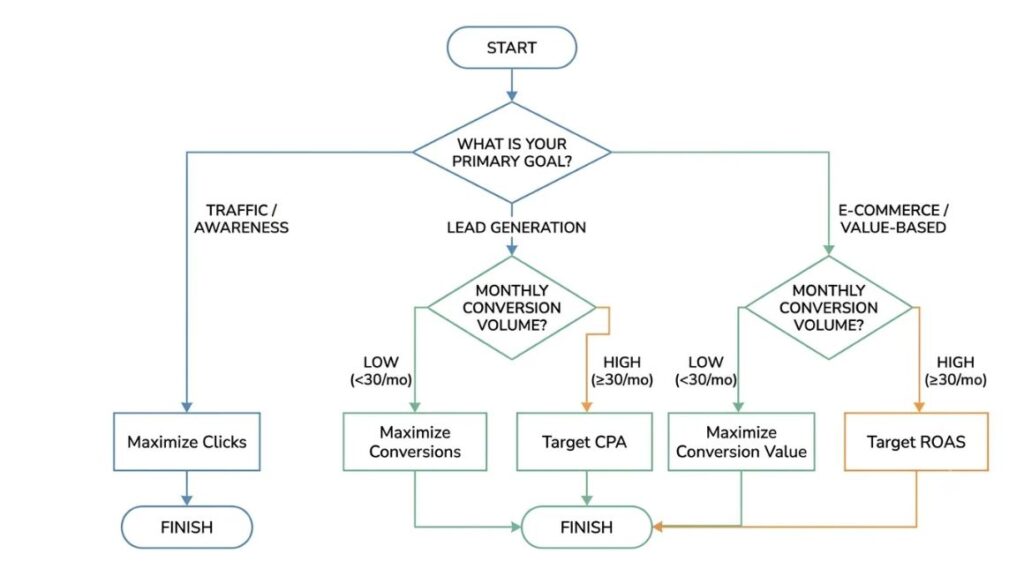
Which bidding strategy is best for Google Ads? The one that matches your goal and the conversion data you already have. Lead generation usually points to Maximize Conversions or Target CPA, while sales with reliable revenue values point to Maximize Conversion Value or Target ROAS.
Google Ads bidding strategies shape three things at once: how much traffic you get, how many conversions come from it and what each one costs. Pick the wrong one and good keywords still produce bad results.
Understand Manual and Automated Bidding
Manual CPC gives you control of each bid. It suits brand-new campaigns with almost no conversion data, tiny budgets, or situations where you need to steer tightly. Automated bidding makes sense once you have enough reliable conversions for the system to learn from, because it sets bids at auction time using signals you can’t see or adjust by hand.
Understand Smart Bidding Strategies
These five are not interchangeable. Each chases a different objective.
| Strategy | What it optimizes for | Best fit | Watch out for |
| Maximize Clicks | Traffic volume within budget | Traffic or awareness goals | Clicks aren’t customers |
| Maximize Conversions | The most conversions for your budget | New campaigns and lead generation | Without a cost target it tries to spend the full budget |
| Target CPA | Conversions at a set average cost | Steady lead flow with a known cost per lead | A target set too low can choke volume |
| Maximize Conversion Value | The most conversion value for your budget | E-commerce and value-based leads | Needs accurate values, and without a target it also aims to spend the full budget |
| Target ROAS | Conversion value at a set return | Steady volume and reliable values | A target set too high can limit reach |
One naming note. In June 2026 Google began relabeling its strategies, so “Maximize conversions with a Target CPA” became simply “Target CPA”, and “Maximize conversion value with a Target ROAS” became “Target ROAS”. Google says the bidding behavior stays exactly the same. Strictly speaking, Google’s Smart Bidding guide lists four conversion-based strategies, and Maximize Clicks isn’t one of them.
Value-based bidding needs patience. Google’s measurement tips say to report values for four weeks or three conversion cycles, whichever is longer, before you set a ROAS target.
When Should You Change Your Bidding Strategy?
Change it when business objectives change, when conversion data becomes reliable enough to support a more targeted strategy, when performance consistently misses targets over a fair window, or when you have evidence rather than a hunch.
Then comes the harder part of how to optimize Google Ads campaigns: waiting. Google rewrote its learning-period guidance in 2026. According to Search Engine Roundtable, the visible Learning status now never lasts more than seven days. PPC News Feed, meanwhile, reports that Google’s help page says calibration can take up to around 50 conversion events or three conversion cycles. Put simply, a bid change on a campaign getting six conversions a week needs far more patience than one getting sixty.
Actionable insight: Avoid changing bidding strategies repeatedly without giving campaigns sufficient time and data to adjust. Write down the date of every change, and don’t judge it until it has had a fair run.
The best Google Ads bidding strategy depends on your goal and conversion data, not on a universal ranking. Maximize Conversions and Target CPA suit lead generation, while Maximize Conversion Value and Target ROAS suit sales with reliable revenue values. Google began relabeling Target CPA and Target ROAS as standalone strategies in June 2026, with no change to how they bid.
6. Write Better Ads That Attract the Right Customers
An ad shouldn’t just earn a click. It should put off the wrong clicks and draw in people who might actually buy. A plain ad that states the price, the duration and the format can beat a clever one, because it filters out freebie hunters before they cost you money.
Improve Responsive Search Ads
Responsive search ads let you supply up to 15 headlines and 4 descriptions. Headlines can run to 30 characters and descriptions to 90, and Google assembles combinations for each search. Write headlines that echo the keywords in the ad group, and descriptions that add something new rather than repeating the headline. State real selling points, like price, speed, a guarantee or a specialization. Close with a clear call to action.
And stop repeating yourself. Fifteen versions of the same idea give Google nothing to test.
Ad Strength is useful, but it’s feedback on variety and relevance, not on profit. Google says advertisers who move their responsive search ads from Poor to Excellent see 15% more conversions on average, which is a Google-reported figure worth testing rather than assuming. A middling Ad Strength with a strong offer can beat an excellent score on a weak one.
Use Ad Assets Effectively
Assets add extra information around your ad. The useful ones are sitelink assets that link to specific pages, call assets for phone inquiries, callout assets for short selling points like free delivery, structured snippets that list categories or items, image assets where eligible and promotion assets for time-limited offers. According to Google, adding assets costs nothing and clicks on them are charged as usual, so the only question is whether each one earns its space.
Test Different Ad Messages
Run one message theme at a time so you actually learn something. Four themes cover most situations:
- Price-focused: “Courses from ₹999”
- Benefit-focused: “Cut your cost per lead”
- Trust-focused: “Trusted by [number] learners”
- Offer-focused: “Free demo class this week”
Search Engine Land’s guide to responsive search ads suggests using experiments for ad copy tests rather than stacking several ads in one ad group, since a clean split gives cleaner answers. And if AI Max text customization is on, Google may rewrite your headlines, which makes results harder to read. Keep that in mind before you declare a winner.
7. Improve Your Landing Pages to Generate More Conversions
Here’s the scenario that makes people want to throw a laptop. The clicks are relevant, the CPC is fair, and nothing converts. Most of the time the ad did its job and the page dropped the ball.
If you’re asking how to get more conversions from Google Ads, look at the landing page before you touch another bid. Google Ads landing page optimization is where plenty of the easiest gains hide, because it’s the one place where a single change helps every campaign pointing there.
Match Your Landing Page With Your Ad Message
Message consistency should run in a straight line from keyword to ad to page. Someone who searched “performance marketing course for beginners” and clicked an ad promising a beginner batch shouldn’t land on a homepage banner about “transforming careers”. They’ll leave.
Practical example: if an ad promises a free consultation, the landing page should make booking that consultation easy rather than sending visitors to a generic homepage.
This is also where Quality Score comes in. If you’re wondering how to improve Google Ads Quality Score, treat it as a diagnostic rather than a target. Google says the 1 to 10 score isn’t an input in the auction. What the auction does use are real-time evaluations of expected clickthrough rate, ad relevance and landing page experience, and each of those is rated above average, average or below average.
So read the weakest component. Below-average ad relevance points to a keyword and ad mismatch. Below-average expected CTR points to weak copy or a weak offer. Below-average landing page experience sends you straight back to the page.
Quality Score is a 1 to 10 diagnostic, not a direct input in the Google Ads auction. The auction instead uses real-time evaluations of expected clickthrough rate, ad relevance and landing page experience. Fix the component rated below average, and the score tends to follow.
Improve Mobile Experience and Page Speed
A lot of your clicks arrive on phones, so test on one. Check mobile responsiveness, loading performance, simple navigation, readable content and forms a thumb can complete. Open the page on a mid-range Android phone over mobile data, not office Wi-Fi, and see how long you’d wait before giving up.
Shorter forms usually win for first inquiries, though lead quality can slip, so measure both. That’s the practical heart of Google Ads conversion rate optimization: change the page, then judge the change by qualified leads, not raw form fills.
Make Your Call to Action Clear
One page, one main action. For lead generation, calls to action like “Book a free consultation”, “Get a callback” or “Download the syllabus” tell people exactly what happens next. For e-commerce, “Add to cart”, “Buy now” and “Check delivery to your pincode” do the same job. Vague buttons like “Submit” waste the most valuable line of text on the page.
Build Trust With Landing Page Elements
People hand over money or phone numbers only to businesses that look real. Customer testimonials, reviews, certifications, transparent pricing, easy-to-find contact information and clear business details all help. Put proof near the call to action, not buried in the footer.
Also Read: How to Identify Performance Bottlenecks in Ad Funnels
8. Use AI and Automation to Improve Campaign Performance
Use automation for the decisions Google can make better with data, and keep your own hands on goals, budgets, brand safety and landing pages. That balance matters more in 2026 than it did a year ago, because Google is moving more Search campaigns onto AI Max automatically.
Google Ads campaign management in 2026 is increasingly supervision: checking what the machine did, and why.
Understand AI Max for Search Campaigns
AI Max is an optimization layer you switch on inside existing Search campaigns. It is not a separate campaign type. It bundles search term matching, which finds searches beyond your keywords, text customization, which rewrites headlines and descriptions using your landing pages, and final URL expansion, which can send people to a different page on your site. Brand controls let you include or exclude specific brands, and search term reporting shows AI Max matches as their own match type.
The timeline matters here. Google stopped allowing new campaign-level broad match and legacy automatically created assets campaigns on August 3, 2026, then upgraded existing ones to AI Max between September 1 and 30. Dynamic Search Ads follow in February 2027. If you haven’t checked yet, filter your change history for changes made by Google in September and see which campaigns moved.
Does it work? Google says advertisers who activate AI Max typically see 14% more conversions or conversion value at a similar CPA or ROAS, rising to 27% for campaigns still leaning on exact and phrase match. That comes from Google’s 2025 internal data on non-retail advertisers. Independent analysis is less rosy. Work by Smarter Ecommerce, covered by Search Engine Land, found AI Max recycling existing coverage up to 63% of the time, and one account where a single competitor’s brand terms took 69% of Search impressions after AI Max was switched on.
Mixed evidence means one thing. Test it, set brand controls, and read the search terms weekly.
Also Read: Performance Marketing Automation: Scaling Campaigns Efficiently
Understand Performance Max Campaigns
Performance Max runs across Google’s channels from a single campaign, using automated bidding, audience signals, creative assets organized into asset groups, and the conversion goals you set. Audience signals are hints, not hard targeting. The creative assets you supply are the raw material, and thin assets produce thin results.
Reporting has improved. Google announced channel performance reporting on April 30, 2025, and 2026 updates brought campaign-level negative keywords, brand exclusions and search themes, with up to 50 per asset group according to several industry write-ups. Use them. In particular, keep Performance Max away from your own brand terms if a dedicated brand campaign already covers them, otherwise it will happily take credit for conversions you’d have won anyway.
Use Automation Without Losing Control
Automation isn’t the enemy. Unsupervised automation is. A weekly check covers most of the risk:
- Read the headlines and descriptions Google writes for you, and remove claims you can’t back up.
- Look at which landing pages are actually getting the traffic after final URL expansion.
- Skim search terms for drift away from your offer.
- Compare lead quality and revenue, not just lead volume.
- Test on one or two campaigns before spreading any new feature across the whole account.
Review Google Ads Recommendations Carefully
A higher optimization score doesn’t automatically mean higher profit. The score reflects how many of Google’s suggestions you’ve applied, not whether your cost per sale improved. Some recommendations are genuinely useful, like fixing a broken tag or a policy issue. Others, such as raising budgets or broadening keywords, can serve Google’s goal of more spend as much as yours.
Search Engine Land’s guidance on recommendations is to untick every auto-apply box and review suggestions yourself. Dismissing a recommendation is a perfectly normal thing to do.
AI Max is an optimization layer inside existing Google Search campaigns, not a new campaign type. It adds search term matching, text customization and final URL expansion, and Google began upgrading campaigns that used campaign-level broad match or automatically created assets in September 2026. Google reports 14% more conversions at similar efficiency for non-retail advertisers, but independent tests show mixed results, so test it before you scale it.
9. Optimize Your Budget and Reduce Unnecessary Spending
The fastest way to cut spend without losing customers is to remove waste first, not to shrink the budget. If you’re searching for how to reduce Google Ads spending, that order matters. Cut irrelevant searches, poor-performing locations and duplicate campaigns, and cost per conversion falls while volume holds.
Allocate Budget Based on Actual Performance
Find the campaigns producing valuable conversions at an acceptable cost and feed them first. Check which ones are limited by budget, meaning they could have shown more but ran out of money, and compare that against the campaigns wasting theirs. Spread a small budget across ten campaigns and each one gets too little data to learn from. Concentrate it on the profitable opportunities instead.
Identify and Reduce Wasted Ad Spend
The usual suspects are irrelevant search terms, locations that never convert, low-quality traffic, campaigns overlapping each other, and poor conversion tracking that hides what’s actually working. To reduce Google Ads cost without hurting results, work through them in that order, starting with the search terms report.
Understand When to Increase or Decrease Your Budget
Scale when the numbers justify it. Say a campaign has held a CPA of ₹400 for six weeks, it’s limited by budget and the lead quality checks out. A modest increase is reasonable there. Reduce or pause when a campaign has missed its target across a full conversion cycle even after you’ve fixed tracking, targeting and the page. And be wary of cuts made in a panic after one bad week.
What about how to optimize Google Ads on a small budget? Narrow everything. One goal, a tight location, phrase and exact keywords for your best-intent searches, a lean negative list, and one or two campaigns. A small budget can’t afford to learn slowly from five experiments at once.
Also Read: Campaign Optimization Strategies: How to Cut Cost Per Result Without Increasing Budget
10. Analyze Competitors and Auction Insights
Auction Insights shows who you compete against and how often you win, which is the closest thing Google gives you to a competitor report. A monthly look is enough, mainly to catch changes in who’s bidding on your terms.
Understand the Auction Insights Report
For Search campaigns, the report covers impression share, overlap rate, position above rate, top of page rate, absolute top of page rate and outranking share. Impression share is the impressions you received divided by the impressions you were eligible to receive. Overlap rate shows how often another advertiser’s ad appeared when yours did. Position above rate shows how often theirs sat higher than yours when both showed.
Top of page rate is how often an ad appeared above the organic results. Outranking share counts how often your ad ranked higher than theirs, or showed when theirs didn’t. Google notes the report doesn’t show insights when your impression share is below 10%.
Read these together. A competitor with high overlap and a rising position above rate is the pattern that hurts: more of them, ranking higher than you. A new name with low overlap is usually just passing through.
Study Competitor Ad Messaging
Search your own keywords and read the ads like a customer would. Note the offers, pricing, benefits, landing pages and calls to action. Screenshot them monthly. It’s unglamorous work, but it’s how you notice that three competitors suddenly lead with free trials while you’re still talking about features.
Find Opportunities to Differentiate Your Ads
Copying competitors is a good way to become the fourth identical ad on the page. Look for gaps instead: an objection nobody answers, a guarantee nobody offers, a customer type nobody speaks to, a landing page experience everyone fumbles. Then say the thing nobody else is saying.
11. Follow a Regular Campaign Optimization Schedule
How often should you optimize Google Ads? Check the basics daily, review search terms and budgets weekly, revisit bidding and conversion quality monthly, and rethink structure quarterly. A routine like this turns Google Ads campaign optimization into a habit instead of a panic response.
| Frequency | What to review |
| Daily | Spend anomalies, disapproved ads, tracking issues |
| Weekly | Search terms, negative keywords, budget allocation |
| Monthly | Bidding, conversion quality, ad performance, landing pages |
| Quarterly | Campaign structure, profitability, strategic experiments |
These are recommended review intervals, not permission to change things every day. Daily checks exist to catch breakages, like a disapproved ad or a tag that stopped firing. They’re not a reason to rewrite a bid because Tuesday looked worse than Monday. Small swings in a campaign with few conversions are mostly noise.
Knowing how to optimize Google Ads campaigns includes knowing when to leave them alone.
Keep a simple change log with the date, what changed, why, and what you expect to happen. Three months later, it’ll answer questions your memory can’t.
12. Common Google Ads Optimization Mistakes to Avoid
The same expensive mistakes repeat across accounts. Here are ten, roughly in the order they do damage.
- Optimizing for clicks instead of business outcomes. A cheap click that never buys is still a cost.
- Ignoring conversion tracking, so everything downstream inherits the error.
- Using overly broad targeting without monitoring relevance.
- Making frequent bidding changes, which keeps campaigns stuck in recalibration.
- Ignoring negative keywords, so the same junk searches keep draining budget.
- Sending all traffic to the homepage when a focused page would convert better.
- Trusting automation without reviewing results.
- Pausing campaigns too quickly, before they’ve had a full conversion cycle.
- Focusing only on optimization scores instead of cost per qualified lead.
- Ignoring lead quality and actual revenue.
Look at that last one again. It’s the mistake that hides inside good-looking dashboards, where a low CPA sits next to a sales team that can’t close a single lead.
13. A Practical Checklist: How to Optimize Google Ads Campaigns Step by Step
Save this list and run through it once a month.
- Verify conversion tracking.
- Review campaign objectives.
- Check keyword relevance.
- Analyze search terms.
- Add negative keywords.
- Review bidding strategies.
- Improve ad messaging.
- Check ad assets.
- Review landing page experience.
- Analyze device and location performance.
- Review budget distribution.
- Check automation settings.
- Compare lead quality and revenue.
- Record changes and monitor results.
Conclusion
Accurate tracking, relevant targeting, honest ads and a landing page that finishes the job do most of the work. Bidding and automation sit on top of them. If the foundation is wrong, no clever setting will rescue the account.
The thing to remember about how to optimize Google Ads campaigns is that your business results are the judge. Not the optimization score, not CTR, not the recommendations tab. Test a change, give it time, and keep what works. Resist acting on assumptions, especially now that automation makes more calls than ever.
If you’d rather learn this with real campaigns and proper feedback than by trial and error with your own budget, Young Urban Project can help. Its Performance Marketing course is built for marketers who want to learn performance marketing and manage advertising campaigns more effectively. Take a look at it at Young Urban Project and start running Google Ads with more confidence.
Frequently Asked Questions (FAQ)
How often should you optimize Google Ads campaigns?
Check for problems daily, review search terms and budgets weekly, look at bidding, conversion quality and landing pages monthly, and rethink structure quarterly. Those are review intervals, not a signal to change settings every time. Campaigns with few conversions need longer gaps between changes, because small swings are mostly noise.
How can I reduce my Google Ads cost per conversion?
Start with waste. Add negative keywords from the search terms report, fix location and device leaks, and make sure the landing page matches the ad. Then confirm that conversion tracking counts real outcomes, because a bidding strategy chasing the wrong action will push your CPA up however you set it. Cutting the budget rarely lowers cost per conversion on its own.
Why are my Google Ads getting clicks but no conversions?
Four causes cover most cases: broken or missing tracking, search terms that don’t match buyer intent, a landing page that doesn’t continue the promise of the ad, and an offer that isn’t compelling enough. Check the conversion tag first, then the search terms report, then the page on a phone. Fix them in that order.
Which bidding strategy is best for Google Ads?
None wins every time. Maximize Conversions or Target CPA usually suit lead generation, while Maximize Conversion Value or Target ROAS suit sales when your revenue values are accurate. Start with the simplest strategy your conversion volume supports, and avoid switching until it has had time to settle.
Does Quality Score affect Google Ads performance?
Indirectly. Google says the 1 to 10 Quality Score isn’t an input in the auction, but real-time evaluations of expected CTR, ad relevance and landing page experience are. Use the score as a diagnostic, and read its three component ratings to see whether your ads, keywords or landing page need work.
How long does it take to see results after optimizing a campaign?
After a bidding change, the Learning status doesn’t last more than seven days, but performance can take longer to settle, up to around 50 conversions or three conversion cycles according to reports on Google’s updated help page. Low-volume campaigns and long sales cycles need more time. Judge a change against your baseline, not against yesterday.
Is AI Max worth using for Google Search campaigns?
It can be, but test before you trust it. Google reports typically 14% more conversions or conversion value at a similar CPA or ROAS, based on 2025 internal data for non-retail advertisers, while independent analyses found cannibalization and competitor-term drift. Run it as an experiment, set brand controls and review search terms weekly. Campaigns using campaign-level broad match or automatically created assets were already upgraded in September 2026.
How much budget should I allocate to Google Ads?
There’s no universal number. Work backwards from your target CPA and multiply it by the conversions you want each month. As an illustration, a ₹500 CPA and a goal of 30 conversions means roughly ₹15,000 a month, before any learning period. If that’s out of reach, narrow the targeting rather than spreading a small budget thin.
Can small businesses optimize Google Ads with a limited budget?
Yes, and a tight budget forces good habits. Focus on one goal and one location, use phrase and exact keywords for your best-intent searches, keep a strong negative keyword list and send traffic to a dedicated page. Hold off on extra campaigns until the first one converts reliably.
What is the most important factor in Google Ads optimization?
Accurate conversion tracking tied to a real business outcome. Bidding, keywords and automation all learn from your conversion data, so if it’s wrong, everything they learn is wrong too. A close second is a landing page that finishes what the ad started.