

Most marketers running Google Shopping or Meta catalog ads are still doing the same manual grind they did three years ago. Pulling feed reports, adjusting bids by hand, checking product disapprovals one SKU at a time. Meanwhile, the platforms keep getting smarter on their own end, and the gap between manual teams and automated ones keeps widening.
That gap is exactly where an AI Agent for Shopping Campaigns fits in. It is not another dashboard. It is software that can read your feed, flag problems, adjust bids, and in some setups, take action without you clicking through five tabs first.
This guide breaks down what this kind of automated system actually does, how it differs from the automation already built into Google Ads or Meta Ads Manager, which tools are worth testing right now, and where the limits still are. By the end, you will know exactly how to evaluate one for your own catalog, whether you run 50 SKUs or 50,000.
Table of Contents
What This Kind of Automation Actually Is
At its core, this is a software system that monitors your product feed and ad account, then makes or recommends changes on its own, using machine learning models instead of static rules. That is the whole idea in one sentence, and it is worth sitting with for a second because the word “agent” gets thrown around loosely.
A regular automation rule says: if cost per acquisition goes above ₹500, pause the ad group. A true agent says: here is why your CPA spiked, here are three products causing it, and here is the bid change being made right now to fix it, with a reason attached. The difference is judgment, not just triggers.
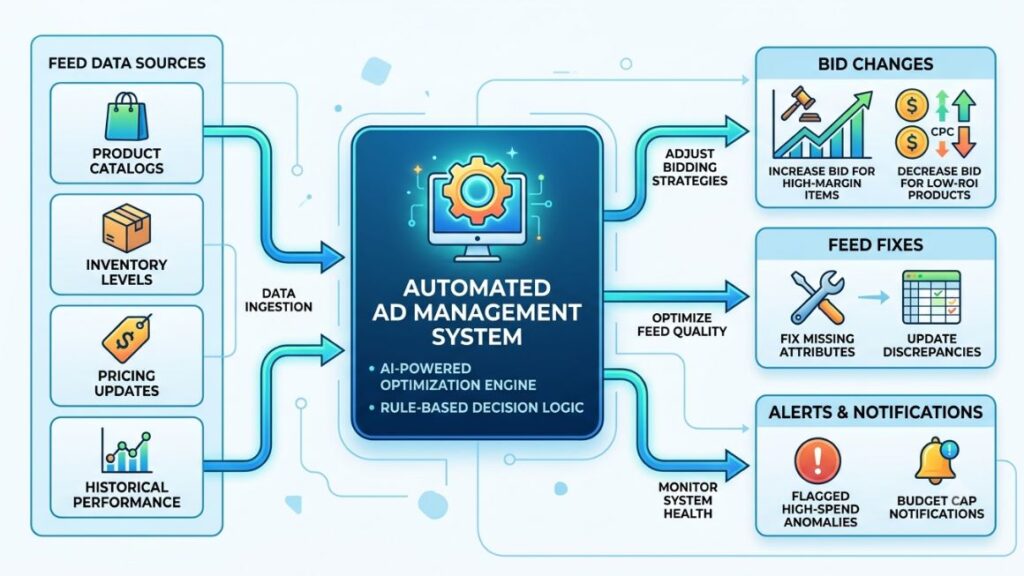
Google’s own Performance Max already blends automated bidding with creative and audience signals across Search, Display, YouTube, and Shopping. But a fuller autonomous system usually goes further than that. It sits on top of your ad accounts and your product feed at the same time, which most native platform tools do not do well.
Honestly, this is the part most marketers get wrong. They assume smart bidding and a genuinely autonomous system are the same thing. They are not. Smart bidding optimises one lever inside one platform. A well-built AI agent looks across feed health, competitor pricing, inventory levels, and bids together, and decides what actually needs fixing first.
Read More: What is Agentic Marketing? (And Why Most Vendors Get It Wrong)
Rule-Based Automation vs. Agentic Automation
Rule-based tools execute exactly what you told them to do, nothing more. Agentic tools interpret a goal you gave them, like “protect a 4x ROAS,” and figure out the steps themselves, adjusting as conditions change throughout the day.
That distinction matters more than it sounds. A rule-based tool will happily keep bidding on a product that just went out of stock because nobody wrote a rule for that specific case. A system trained to watch inventory and feed status usually catches it within the hour.
This category of software monitors product feeds and ad accounts continuously, then adjusts bids, fixes feed errors, or flags issues using machine learning rather than static if-then rules. Unlike traditional smart bidding, which optimises a single metric inside one platform, it typically works across feed health, pricing, and inventory data at the same time.
Why Manual Feed and Bid Management Is Breaking Down
Catalogs are not getting smaller. According to Google’s 2024 Merchant Center data, retailers using automated feed rules saw meaningfully fewer product disapprovals than those managing feeds manually, and that gap widens as SKU count grows past a few hundred items.
Most e-commerce teams still check feed health once a week, sometimes once a month if things are busy. A missing GTIN, a price mismatch between the site and the feed, or a broken image link can sit there quietly draining impressions for days before anyone notices.
Bid management has the same problem, just faster moving. Auction dynamics on Google Shopping can shift within hours during sale periods, and a bid that was efficient on Monday morning can be wildly overpriced by Monday afternoon.
Feed health refers to how accurately and completely your product data matches what the ad platform requires, including titles, GTINs, availability, and pricing.
Here is the problem in practice: a mid-size fashion retailer with 8,000 SKUs cannot realistically have a human check every product’s feed status daily. Something always slips. That is the gap this software was built to close, and it is why adoption is accelerating faster here than almost anywhere else in paid media.
Read More: AI Agent for Customer Acquisition: Benefits, Use Cases & Best Tools
How Does the System Actually Run a Campaign?
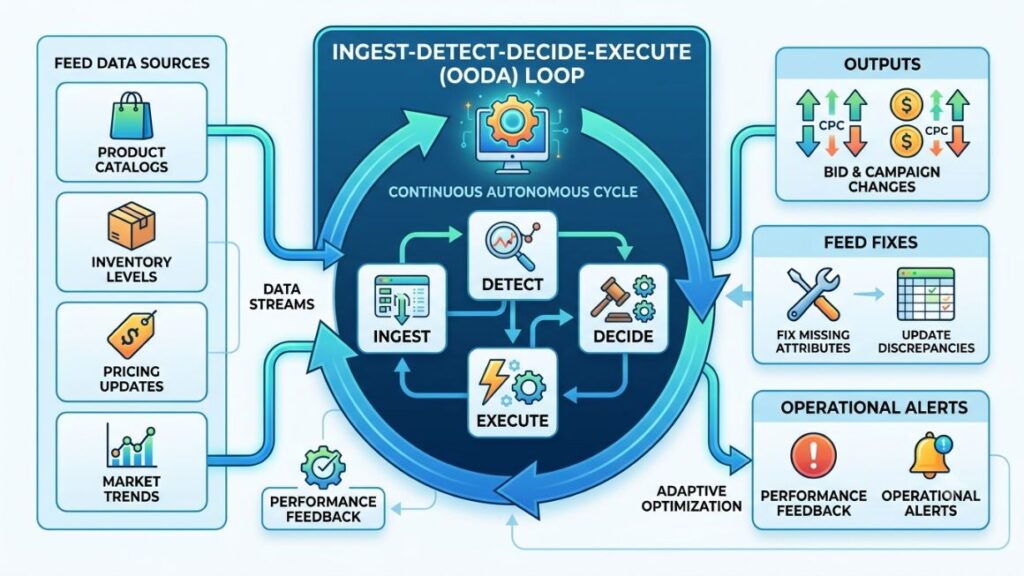
At a high level, most tools in this category follow four steps on a loop: ingest data, detect anomalies, decide an action, and either execute it or flag it for approval. That loop can run every few minutes instead of once a week, which is the entire point.
- Ingest data from your product feed, ad platform, analytics tool, and sometimes your inventory management system, pulling everything into one place the system can reason over.
- Detect anomalies by comparing current performance against historical baselines, flagging things like a sudden CTR drop, a disapproved product, or a bid that has drifted out of your target range.
- Decide an action using a model trained on your account’s own history, deciding whether to raise a bid, pause a SKU, rewrite a title, or simply alert a human.
- Execute or escalate, either making the change automatically within limits you set, or sending it to you for a one-click approval if the change is above a certain risk threshold.
That last step matters a lot in practice. Most marketers do not hand over full autonomy on day one, and they shouldn’t. The better tools let you set guardrails, like a maximum bid change per day, so the system earns trust before it gets full control.
Feed Optimisation Layer
This part focuses purely on the product data itself, catching missing attributes, weak titles, and category mismatches before Google or Meta ever rejects the product. Feedonomics and DataFeedWatch both offer AI-assisted title rewriting for this exact reason.
Bid and Budget Layer
This part focuses on spend, shifting budget toward SKUs with strong margin and pausing ones burning spend without converting. It is the layer most people picture first when they hear the term, even though feed health usually needs fixing before bidding can work well.
Read More: AI Agent for Sales Outreach: Complete Guide for Modern Sales Teams (2026)
Core Capabilities to Look for Before You Buy
Not every tool marketed this way actually behaves like one. Some are just smart bidding with a new name on the box. Before signing a contract, check for these five capabilities specifically.
- Autonomous bid adjustment within guardrails you define, not just suggestions you still have to click through manually.
- Feed error detection and auto-fix for common issues like missing GTINs, broken links, or price mismatches, ideally caught before Google flags them.
- Cross-channel visibility, meaning it can see Google Shopping, Meta catalog ads, and sometimes Amazon Ads in one place rather than working in a silo.
- Explainable decisions, where every action comes with a plain-language reason, not a black box change you cannot audit later.
- Approval workflows, letting you set a spend or bid-change threshold above which the system asks before acting instead of just acting.
That last point deserves more attention than it usually gets. A tool with no approval workflow is a liability the first time it misreads a seasonal dip as a permanent trend and slashes bids on your best sellers.
The five capabilities that separate a genuinely autonomous system from basic smart bidding are bid adjustment within guardrails, automated feed error detection, cross-channel visibility across Google and Meta, explainable decision logs, and configurable approval workflows for high-risk changes.
Top Tools Marketers Are Using in 2026
You do not need to build this from scratch. Several established platforms already offer these features for catalog advertising, and picking between them mostly comes down to your catalog size and existing stack.
Google’s Performance Max remains the default starting point for most advertisers since it is native to Google Ads and requires no extra integration, though its automation stays inside Google’s own walls and offers limited feed-fixing.
Meta’s Advantage+ Shopping Campaigns work similarly on the Meta side, automating creative testing and budget allocation across catalog ads, but again without deep feed diagnostics.
For feed-specific work, Feedonomics and DataFeedWatch both use AI to rewrite weak titles and flag attribute errors before submission, which cuts disapprovals significantly for large catalogs.
Tools like Optmyzr and Smartly.io sit closer to full autonomy, combining bid automation, creative testing, and feed monitoring with explainable rules you can audit and override.
That range matters. A 200-SKU D2C brand probably does not need Smartly’s enterprise feature set, while a seller with thousands of SKUs usually cannot run efficiently without something in that tier.
Pricing follows a similar split. Native platform automation like Performance Max costs nothing beyond your media spend, which makes it the obvious first step for anyone still testing the waters. Dedicated tools in the Feedonomics or Smartly.io range typically charge a percentage of managed ad spend or a flat monthly fee that scales with SKU count, so the maths only works once your catalog is large enough to justify it.
It also helps to separate what you are actually buying. Some vendors sell feed management as the core product with light bidding support bolted on. Others sell bid automation first, with feed diagnostics as a secondary feature. Knowing which one you need most, based on whether your bigger problem is feed quality or bid inefficiency, saves you from paying for capabilities you will barely touch.
Read More: AI Agent for Lead Generation: Benefits, Use Cases & Best Practices
Real Brands Using Automated Catalog Tools
Nykaa runs a catalog well into the tens of thousands of SKUs across beauty and personal care, and feed automation at that scale is less of a nice-to-have and more of a survival requirement given how often pricing and stock change daily.
Mamaearth, scaling rapidly across marketplaces and its own D2C site, has leaned on automated feed management to keep listings consistent across channels, since manual syncing at that speed invites constant disapprovals.
boAt’s catalog spans multiple categories with frequent new launches and price changes during sale events, which is exactly the kind of volatile, fast-moving inventory where rule-based bidding alone tends to lag behind actual demand.
From what we have seen with YUP learners running D2C accounts, the biggest early win from adopting any tool like this is not the bidding automation itself. It is the feed error alerts, because those catch revenue leaks nobody was actively watching for.
Read More: How to Use an AI Agent for Video Marketing: Step-by-Step Guide
Where This Automation Still Falls Short
Nothing here replaces a marketer’s read on brand strategy, and it would be dishonest to pretend otherwise. These systems optimise toward the goal you set, and a poorly defined goal produces confidently wrong decisions.
This may not apply to every setup, but in most cases, these tools struggle with genuinely new product launches that have no historical data to learn from. They also struggle with highly seasonal categories where last year’s pattern does not match this year’s demand shift.
That said, the bigger risk is over-trust. Teams that hand over full autonomy too early sometimes discover weeks later that the system quietly shifted budget away from a strategically important product line because it looked “inefficient” on paper, even though the brand had other reasons to keep pushing it.
Acknowledging a limitation like this is not a knock against the category. It is a reminder that these tools work best as a second set of eyes with real authority, not a replacement for the marketer’s judgment on what actually matters to the business.
There is also a data quality ceiling worth knowing about upfront. Any model trained on your account’s history is only as good as that history, and an account that switched bidding strategies three times last quarter gives the system a messier signal to learn from. Newer advertisers, or brands that recently rebranded and changed their entire catalog structure, should expect a longer settling-in period before recommendations get genuinely sharp.
B2B sellers with long sales cycles and low-frequency purchases are a different story altogether. Feed and bid automation built for high-volume D2C catalogs generally assumes fast conversion signals, which most B2B shopping setups simply do not produce at the same speed.
Read More: AI Agent for Video Marketing: Automate Video Creation, Publishing & Analytics
How to Set Up Your First Automated Campaign
Getting started does not require ripping out your existing setup. Most teams layer this kind of tool on top of what they already run in Google Ads or Meta Ads Manager.
- Audit your feed first, before connecting anything, so you are not asking software to optimise on top of broken or incomplete product data.
- Connect your feed and ad accounts to the chosen tool, giving it read access initially rather than write access, so you can observe its recommendations before granting control.
- Set your guardrails, including maximum daily bid change percentage and a spend cap the system cannot exceed without your approval.
- Run in recommendation-only mode for two to three weeks, reviewing every suggested change to build confidence in its logic before automating anything.
- Grant limited autonomy on lower-risk actions first, like pausing disapproved products, before letting it touch bids on your top revenue drivers.
- Review weekly, checking the decision log against actual performance, and tightening or loosening guardrails based on what you see.
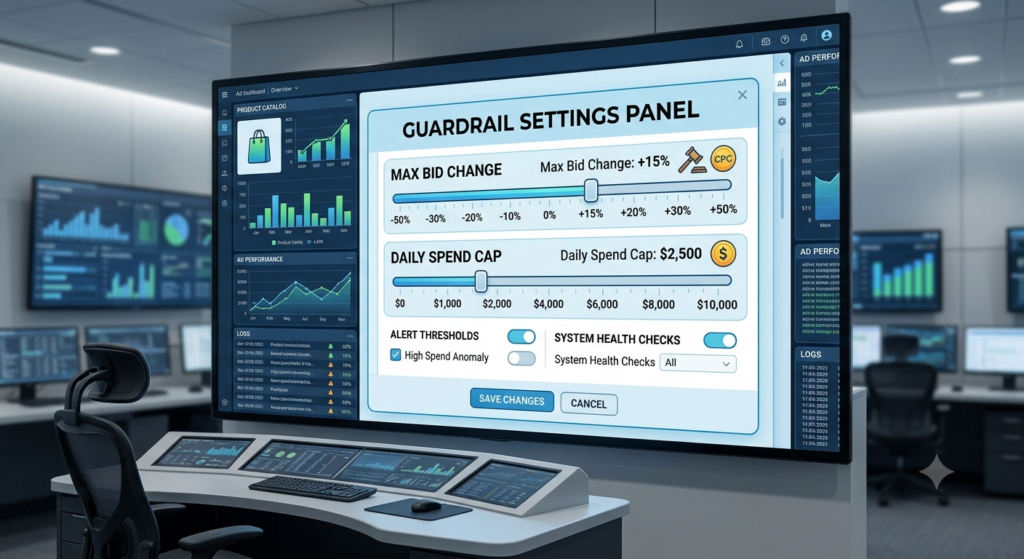
Following that sequence protects you from the single biggest mistake teams make: granting full autonomy on day one because a demo looked impressive. An AI Agent for Shopping Campaigns earns its access gradually. It is not handed the keys on day one, no matter how good the sales pitch sounds.
Read More: AI Agent for Affiliate Marketing: Automate Content, SEO & Conversions
Conclusion
The core idea is simple even though the tools keep getting more sophisticated: feed health comes first, bidding automation comes second, and full autonomy is something you earn through guardrails, not something you grant on day one. Get the sequencing wrong and even the best system will optimise confidently toward the wrong outcome.
Start small. Run one tool in recommendation-only mode on a portion of your catalog, watch its decision log for a few weeks, and expand access from there.
If you want a structured way to learn how to evaluate and deploy AI tools like this across your paid media stack, YUP’s AI Marketing course walks through exactly this kind of tool evaluation and setup, along with the broader shift toward agentic marketing tools. You can also try the Hotskill app to practice prompting and evaluating AI tools hands-on before rolling anything out on a live ad account.
FAQ
What is this kind of automated tool, exactly?
It is software that continuously monitors your product feed and ad account performance, then makes or recommends bid, budget, and feed changes using machine learning instead of fixed rules. It typically works across feed health, pricing, and bidding at once, rather than optimising a single metric.
How is this different from Google’s Performance Max?
Performance Max automates bidding, creative testing, and placement within Google’s own ad network. A dedicated tool in this category usually adds feed diagnostics, cross-platform visibility across Google and Meta, and explainable decision logs, going beyond what Performance Max covers on its own.
Do I need a large catalog to benefit from one?
Not necessarily, though the value scales with SKU count and how often your pricing or stock changes. A 50-SKU catalog with stable pricing may see limited benefit, while a catalog with thousands of SKUs or frequent price changes usually sees faster returns.
Is this the same as smart bidding?
No. Smart bidding adjusts one lever, usually bids, inside one platform based on a target you set. A fuller system looks across feed health, inventory, and bidding together and can take or recommend action on several fronts at once.
How much control should I give it when starting out?
Start with read-only access and recommendation mode for two to three weeks before granting any write access. Move to limited autonomy on lower-risk actions, like pausing disapproved products, before allowing bid changes on your top revenue-driving SKUs.
Can it fix product feed errors automatically?
Many tools, including Feedonomics and DataFeedWatch, can auto-fix common issues like missing GTINs or weak titles before submission. More complex errors, like incorrect category mapping, usually still need a human review before the fix goes live.
What happens if it makes a bad decision?
Good tools log every decision with a plain-language reason, so you can audit what happened and roll it back quickly. This is exactly why approval workflows and spend caps matter, since they limit how much damage a wrong call can cause before you catch it.
Is it worth the cost for a small D2C brand?
It depends on margins and catalog size, but for most small brands with under a few hundred SKUs and stable pricing, starting with platform-native tools like Performance Max or Meta’s automated options is usually enough before paying for a dedicated system.
Why isn’t it catching every feed error?
Most tools in this category are trained on common error patterns like missing attributes or broken links, but newer or unusual error types sometimes slip through until the model has seen enough examples. Regular manual spot checks alongside the tool, especially after major catalog updates, still catch things automation misses.
Who should actually be managing this day to day?
Whoever owns performance marketing or paid media for the catalog should own it, since it needs someone checking guardrails and decision logs weekly rather than treating it as fully hands-off. For larger teams, this often sits with a dedicated growth or paid media manager rather than a generalist marketer.