
Most marketing teams don’t have a video problem. They have a bandwidth problem. Demand for video content has outpaced the number of hours a small team can spend scripting, filming, editing, scheduling, and reporting on it. According to Cisco’s Visual Networking Index, video now accounts for 82% of all internet traffic, and the pressure to publish more of it, on more platforms, at a faster clip, isn’t going away.
That’s the gap an AI Agent for Video Marketing is built to close. Instead of a single tool that helps with one stage of production, an agent chains together the entire pipeline, from the first script draft to the analytics report that tells you what to make next. This article breaks down what these agents actually do, which tools are worth your budget in 2026, and how to set up your first automated workflow without losing brand control.
Table of Contents
What Is an Autonomous Video Agent, and How Is It Different From a Single AI Tool?
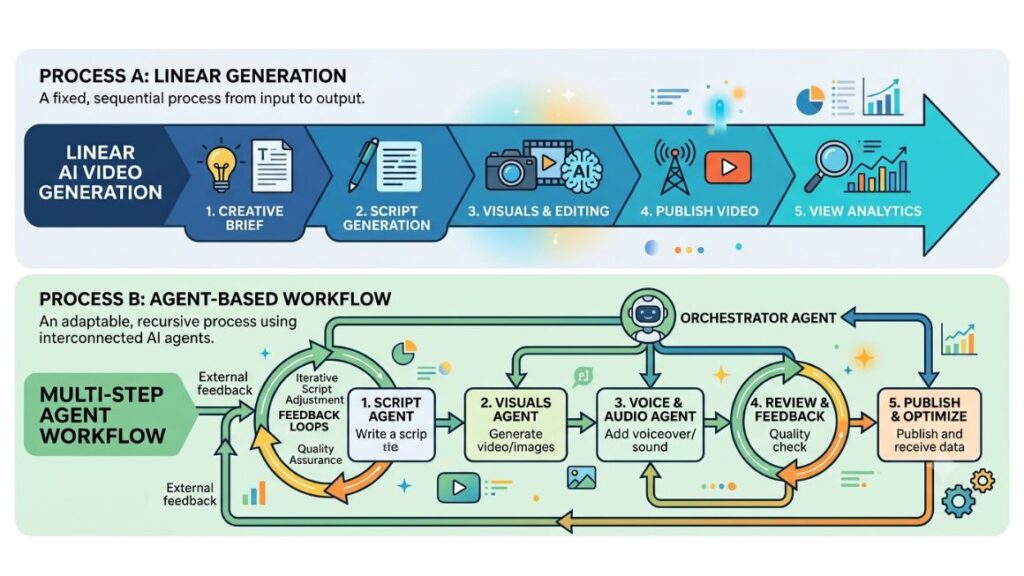
An autonomous video agent is a system that plans and executes a multi-step production task on its own, instead of waiting for a prompt at every stage. Give it a brief and it can draft the script, choose a visual style, generate the footage, add captions, and hand off a publish-ready file, checking its own output against your brand rules along the way.
That’s a different animal from a text-to-video generator you prompt once and edit manually. A single tool gives you one output for one input. An agent chains several models and decision points together, and it can loop back and retry a step if the result doesn’t clear a quality bar you’ve set. Think of the difference between a calculator and an accountant. One executes the operation you type in. The other decides which operations to run in the first place.
An autonomous video agent differs from a standard AI video generator by chaining multiple production stages, scripting, visual generation, editing, and distribution, into one workflow rather than requiring a manual prompt at each step. This is what most people mean when they search for an AI Agent for Video Marketing: not a single generator, but an orchestrated system that plans, executes, and checks its own output.
Honestly, the “agent” label gets applied loosely across the industry right now. Some tools marketed as agents are still single-prompt generators with a new name. The real test is whether the system can complete more than one production stage without you manually feeding it the next input.
Why Marketing Teams Are Adopting Autonomous Video Agents Right Now
Three forces are converging at once: rising short-form demand, shrinking production budgets, and platforms that reward posting frequency over polish.
Short-form video under 60 seconds now generates 2.5 times more engagement per impression than any other content format, according to Digital Applied’s 2026 video marketing statistics report, and 57% of marketing budgets now carry a dedicated short-form line item. That’s a lot of clips to produce on a schedule that used to support one long-form video a month. Traditional production simply wasn’t built to move at that speed.
Cost is the second driver. Runway’s own workflow data shows traditional video production running $5,000 to $15,000 per finished minute when you count filming, editing, and talent. Agentic workflows compress a comparable minute of output to a few hundred dollars in credits and subscription cost. That math doesn’t work for every use case, brand storytelling with real emotional nuance still benefits from a human director, but for social clips, product demos, and testimonial-style ads, the gap is wide enough to change hiring and budgeting decisions.
The third driver is platform behavior itself. Algorithms on TikTok, Instagram, and YouTube Shorts reward channels that post consistently, not just channels that post well. A brand that ships three solid clips a week will often outperform one that ships a single polished video a month, purely on the strength of consistency signals the algorithm tracks. Agents make that cadence achievable without tripling headcount.
That said, adoption isn’t universal yet. A 2026 industry stat collection from Digital Applied found that while 34% of marketing teams already use AI video tools in production, 72% still require human review before anything ships. The gap tells you something important: speed has arrived, but trust in fully unsupervised output hasn’t, at least not yet.
How an Autonomous Agent Automates Video Creation
Video creation is where most of the manual hours disappear, and it’s the stage where agents currently deliver the clearest time savings.
Scripting and Storyboarding
The agent starts with a brief, your product, your audience, your goal, and drafts a script matched to the platform’s pacing conventions. A script built for a 30-second TikTok hook reads nothing like a script built for a two-minute YouTube explainer, and a well-built agent adjusts sentence length, hook placement, and call-to-action timing automatically based on the target format.
Storyboarding follows the same logic. The agent breaks the script into shots, assigns a visual treatment to each one (talking head, B-roll, product close-up, text overlay), and passes that shot list to the generation stage. This is the step most manual workflows skip entirely, which is exactly why so many AI-generated videos feel like a single unbroken monologue instead of an edited piece of content. Invideo Agent closes this gap with an AI storyboard maker that converts scripts into organized shot sequences, giving creators a structured visual plan before production starts.
Voiceover, Avatars, and B-Roll Generation
Once the storyboard exists, the agent generates the actual footage. Avatar-based tools like HeyGen and Synthesia produce a spokesperson delivering the script with matched lip-sync, while cinematic generators like Runway and Kling AI handle B-roll and environment shots the avatar can’t cover on its own. A common 2026 production pattern pairs the two: Runway or Kling for establishing shots and product environments, an avatar tool for the direct-to-camera segments, stitched together by the agent’s editing layer.
Voice cloning and multilingual dubbing sit inside this stage too. HeyGen’s Instant Dubbing adjusts the speaker’s facial muscles to match the phonemes of the target language, which is a meaningfully different result from simply overlaying a translated audio track on unchanged lip movement. For a brand running the same campaign across five markets, that single feature can replace what used to be five separate shoots.
Editing and Repurposing Long-Form Video Into Clips
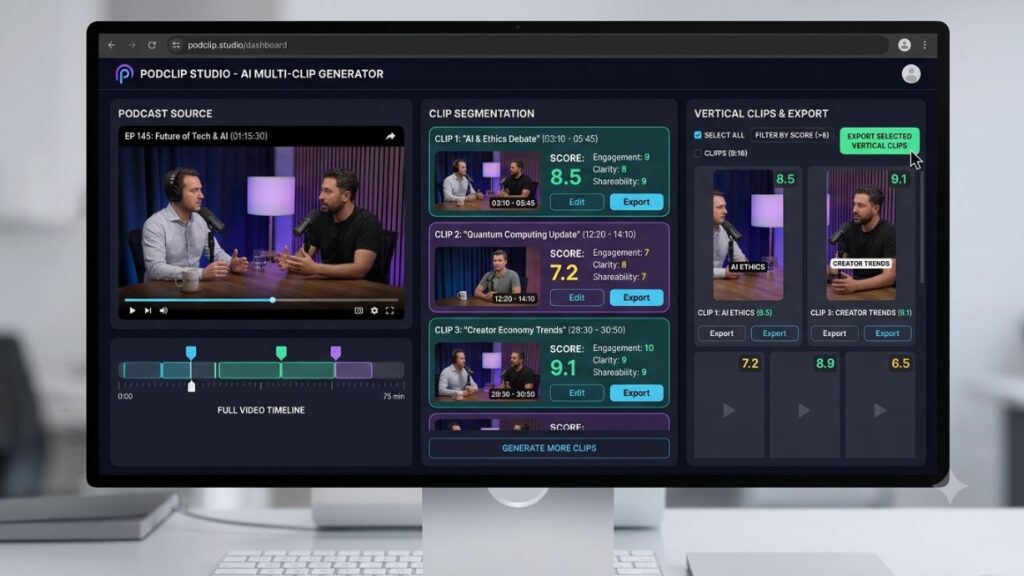
This is where tools like Opus Clip and Klap do their heaviest lifting. Feed either tool a podcast, webinar, or long-form recording, and it analyzes the transcript, audio sentiment, and visual cues to find self-contained moments with a hook and a payoff, then reframes them to vertical, adds animated captions, and scores each clip for predicted performance.
The workflow that tends to pay off, according to a June 2026 field report on the Opus Clip pipeline, is straightforward: process the long video, sort the resulting clips by their virality score, manually polish only the top three to five, and batch-schedule the rest. Klap takes a similar approach but leans further into manual refinement, offering a full editor on every plan rather than gating heavier edits behind an add-on, which suits teams that want more say over the final cut.
Repurposing tools like Opus Clip and Klap turn a single long-form recording into ten or more short clips automatically, scoring each one for predicted engagement so teams can prioritize which clips get manual polish before publishing. The practical workflow is to trust the AI for volume and reserve human editing time for the handful of clips the score identifies as strongest.
How an Autonomous Agent Handles Publishing and Distribution
Creating the video was never the only bottleneck. Getting it onto five platforms, each with its own aspect ratio, caption style, and posting window, ate just as many hours.
Multi-Platform Scheduling
Modern agents connect directly to your social accounts and handle the posting step without a separate scheduling tool. Opus Clip’s built-in scheduler, for instance, can auto-post to YouTube, YouTube Shorts, Instagram Reels, TikTok, Facebook Pages, LinkedIn business pages, and X from inside the same platform that generated the clip. That removes an entire handoff, exporting files, re-uploading them to a scheduler, tagging them again, that used to sit between editing and going live.
Step-by-step, a typical scheduling flow looks like this:
- Connect your social accounts to the agent’s publishing dashboard.
- Review the auto-generated caption and hashtag set for each platform.
- Confirm or adjust the suggested posting time based on the agent’s audience-activity data.
- Approve the batch, or set an approval rule so clips above a certain performance score post automatically.
Platform-Specific Formatting for Shorts, Reels, and TikTok
A single piece of source footage doesn’t work identically across platforms, even after it’s cropped to 9:16. TikTok favors quick cuts and on-screen text within the first three seconds. YouTube Shorts rewards slightly longer setups because its audience skews toward search-driven discovery rather than pure scroll behavior. Instagram Reels sits somewhere between the two, with captions that need to work even when sound is off.
A capable agent doesn’t just resize the frame. It adjusts caption timing, font weight, and even hook phrasing per platform, because Google’s own research shows nearly 40% of Gen Z users now prefer searching TikTok and Instagram over traditional search engines for categories like restaurants and product reviews. That means your TikTok caption is doing SEO work, not just decoration.
How an Autonomous Agent Powers Video Analytics
Analytics used to be the stage everyone skipped because it required logging into four different dashboards and manually reconciling the numbers.
Performance Tracking Across Platforms
Platforms like Vidyard consolidate viewer-level data, who watched, how long, and where they dropped off, across your website, YouTube channel, and other social properties into one dashboard. For sales and demand-gen teams, Vidyard also syncs that engagement data back into the CRM, so a video view becomes a trackable signal in the pipeline rather than a vanity metric sitting in isolation.
On the YouTube side specifically, tools like TubeBuddy and VidIQ layer keyword scoring, thumbnail testing, and retention-curve analysis on top of native YouTube Studio data. Neither tool can access private CPM or RPM figures, since that data only lives inside the authenticated YouTube Analytics API, but both are strong for spotting where a video’s retention graph drops and correlating that dip with a specific edit choice.
Turning Analytics Into the Next Video Brief
The real value isn’t the dashboard. It’s what the agent does with the numbers afterward. A well-built system feeds retention data, comment sentiment, and completion rate back into the scripting stage, so your next brief already accounts for the fact that viewers dropped off at the 12-second mark last time, or that your how-to format consistently outperforms your hot-take format for this specific audience.
This is the part most off-the-shelf tools still handle poorly. Closing the loop between reporting and production has always been the theory, but manually pulling the report, drawing the conclusion, and rewriting the brief is exactly the kind of repetitive analytical work an agent is suited to automate. From what we’ve seen with YUP learners experimenting with these workflows, the biggest early win isn’t more videos. It’s fewer videos that repeat the same mistake.
The most valuable output of a video analytics agent isn’t the report itself, it’s the automatic translation of retention and engagement data into the next production brief. Closing that loop without manual analysis is what separates a reporting tool from a genuine automation agent.
The Best AI Tools for Automated Video Production in 2026
No single platform covers creation, publishing, and analytics equally well yet, so most real workflows stitch two or three tools together. Here’s a detailed look at the ones worth your attention.
HeyGen. Built around AI avatars and digital twins, HeyGen lets a brand clone a spokesperson from a short recording and generate unlimited scripted variations of that person delivering different messages. Its Instant Dubbing feature translates and adjusts facial movement across more than 175 languages, which makes it a strong fit for B2B teams running the same explainer across multiple regional markets. It’s a weaker fit if you need spontaneous, unscripted-feeling UGC content, since the avatar delivery reads as polished rather than casual.
Synthesia. The name most marketing leaders already recognize, Synthesia remains the standard for scripted, professional spokesperson videos, the kind of clean, corporate-polished explainer that suits fintech, SaaS onboarding, and enterprise training. Its 2026 update added a built-in playground pulling in third-party generative video models for B-roll, closing a gap that used to require leaving the platform. Pricing climbs steeply from its Creator plan to Enterprise, and features like SSO sit only on the top tier.
Runway. A creative suite focused on cinematic generation rather than talking-head delivery, Runway is what most 2026 workflows reach for when they need B-roll, environment shots, or product visuals that would traditionally require a film crew. Its World Consistency feature keeps characters, locations, and objects uniform across 50 or more shots in the same project, which matters for any campaign with a recurring visual identity. API access supports high-volume automation for teams generating creative at scale.
Kling AI. Kling delivers true 4K output at 60 frames per second and, since its version 3.0 release, supports multi-shot storyboarding with up to six distinct camera cuts in a single generation pass. Its standout feature for global brands is native multi-language lip-sync, including mid-sentence language switching, which has let companies like Unilever and Decathlon cut localization costs significantly on social video production.
Opus Clip. The market leader for turning long-form recordings into short, platform-ready clips. Its ClipAnything model analyzes visual, audio, and sentiment cues to find self-contained moments, then reframes, captions, and scores each one for predicted performance before handing off to its own multi-platform scheduler. Best for teams already sitting on podcast or webinar footage who need volume without hiring an editor.
Klap. A direct alternative to Opus Clip, Klap trades some of Opus’s speed for deeper manual control, every plan includes a full editor rather than gating it behind an add-on, and its content-aware reframing holds up better on footage without a clear, consistent face in frame, like product demos or screen recordings. Its API is open to every customer without an approval process, which matters if you’re building clip generation into your own product.
Vidyard. Less a video generator than a hosting and analytics layer, Vidyard is built for sales and demand-gen teams who need to know exactly which prospect watched which video and for how long. Its CRM integrations turn video engagement into a pipeline signal, and its AI Avatar feature lets sales reps automate personalized outreach video at scale.
TubeBuddy and VidIQ. Both function as YouTube-specific optimization layers rather than production tools, handling keyword research, thumbnail A/B testing, and retention analysis directly inside the YouTube Studio interface. TubeBuddy leans toward workflow automation and bulk channel audits; VidIQ leans toward search-driven keyword coaching. Neither replaces a full analytics agent, but both are inexpensive additions for any channel relying on YouTube search discovery.
How to Set Up Your First Video Agent Workflow
You don’t need every tool above on day one. Start narrow and expand once the first workflow is proving itself out.
- Pick one bottleneck. Choose the single stage costing you the most manual hours right now, usually either raw creation or repurposing long-form content, rather than trying to automate the entire pipeline at once.
- Choose one creation or repurposing tool. Match the tool to your source material. If you already record podcasts or webinars, start with Opus Clip or Klap. If you’re building from scratch, start with an avatar tool like HeyGen or a cinematic generator like Runway.
- Set your brand rules before generating anything. Upload your logo, brand colors, fonts, and a short style brief. Skipping this step is the single most common reason agent-generated output feels off-brand on the first attempt.
- Connect your publishing accounts. Link the tool’s scheduler to your social platforms and review the first batch of suggested captions and posting times manually before turning on any auto-approval rule.
- Run a two-week test batch. Publish consistently for two weeks before drawing conclusions. Short-form performance data is noisy in small samples.
- Review the analytics and rewrite your next brief. Pull retention and engagement data at the two-week mark and feed the pattern you see, not the outlier, back into your next batch of briefs.
- Add a second tool only once the first is running smoothly. Expanding the stack before the first workflow is stable just adds complexity without adding output.
What Still Needs a Human: The Limits of Video Automation
None of this replaces judgment, and it’s worth saying plainly: agents are still weak in specific, predictable ways.
Brand storytelling with real emotional nuance is the clearest gap. Digital Applied’s 2026 data shows AI-generated video reaching 87% comparable engagement for social clips but dropping to just 61% for brand storytelling content requiring genuine emotional weight. That’s not a small difference, and it’s exactly why the same report found 72% of teams still keep a human review step before anything ships.
Long-form narrative coherence is the second limit. Most generation models still lose visual and character consistency somewhere past the five-to-seven-minute mark, which is why agencies pair short generated segments with human-directed editing for anything approaching documentary length. And legal or compliance review isn’t optional for regulated industries, an AI agent can draft a script, but it shouldn’t be the last set of eyes on a healthcare, finance, or pharmaceutical claim before it airs.
This is the honest caveat worth sitting with: the tools above compress production time dramatically, but they compress it best for high-volume, lower-stakes content. The riskier the claim or the higher the brand stakes, the more human oversight still belongs in the loop.
Getting Started Without the Overwhelm
The teams getting real results from video automation right now aren’t the ones running the most tools. They’re the ones who picked one bottleneck, set clear brand rules upfront, and gave the workflow two full weeks before judging it. Start with the stage costing you the most hours today, whether that’s scripting from scratch or repurposing footage you already have sitting in a folder, and let the analytics loop tell you what to build next.
If you want a structured way to learn how to build and manage these workflows without burning weeks on trial and error, YUP’s AI Marketing course walks through agent setup, prompt design, and workflow automation step by step, and the Hotskill app gives you a faster way to practice the prompting skills these tools actually reward.
FAQs
What does an automated video agent actually do?
It’s a system that automates multiple stages of video production, scripting, generation, editing, publishing, and analytics, in a connected workflow rather than requiring manual input between each step. The key difference from a standalone AI video tool is that an agent can chain decisions together and adjust its own output based on rules you’ve set.
Is an automated video agent the same as an AI video generator?
No. A generator produces one output from one prompt, like a script-to-avatar video. An agent manages the full pipeline, deciding what to generate, checking it against brand rules, publishing it to the right platforms, and pulling analytics afterward without you manually restarting the process at each stage.
How do I set up my first AI video agent workflow?
Start with one bottleneck, usually repurposing long-form content or generating new short clips, choose one tool that matches your source material, set your brand rules before generating anything, connect your publishing accounts, and run a two-week test batch before adding a second tool.
Which AI tool is best for turning long podcasts into short clips?
Opus Clip and Klap are the two leading options. Opus Clip is faster and includes a built-in virality score; Klap offers deeper manual editing control and a fully open API. Both reframe footage to vertical, add captions, and can auto-schedule to multiple platforms.
Do I need an AI avatar tool or a cinematic generator?
It depends on the content. Choose an avatar tool like HeyGen or Synthesia for scripted spokesperson delivery and multilingual dubbing. Choose a cinematic generator like Runway or Kling AI for B-roll, product shots, and environments where no human presenter is needed.
Is video automation actually worth it for a small marketing team?
For high-volume, lower-stakes content like social clips and product demos, yes, the cost and time savings are substantial. For brand storytelling requiring emotional nuance, the gap between AI-generated and human-produced quality is still noticeable, so budget human time for those specific pieces.
Why do my AI-generated videos look off-brand?
The most common cause is skipping the brand-setup step before generation, no uploaded logo, colors, fonts, or style brief for the tool to reference. Most platforms let you configure this once and apply it automatically to every future output, so it’s worth doing before your first real production run.
Can an automated agent actually publish videos to social media by itself?
Yes. Tools like Opus Clip include a built-in scheduler that posts directly to platforms including YouTube, TikTok, Instagram Reels, Facebook, and LinkedIn without a separate scheduling tool. Most teams still review captions and posting times manually before turning on full auto-approval.
How does an automated agent use analytics to improve future videos?
A well-built agent pulls retention, completion rate, and engagement data after publishing, then feeds the pattern back into the next script brief, flagging where viewers dropped off or which format outperformed. This closes the loop between reporting and production, which is normally the most neglected step in manual workflows.
What’s the biggest risk of relying on AI automation for video content?
Over-trusting fully unsupervised output on content where stakes are high, regulated claims, sensitive topics, or anything requiring emotional nuance. Roughly seven in ten teams already keep a human review step for exactly this reason, and that ratio is unlikely to shrink to zero anytime soon.