

Most businesses don’t realise they have an inventory problem until it’s already costing them. A stockout during a peak sale period. A warehouse full of slow-moving goods that never sell. A purchase order was raised too late because someone forgot to check the stock sheet.
Inventory management software exists to prevent exactly these scenarios. But the category is crowded, the feature lists all look similar, and choosing the wrong system can create more chaos than the spreadsheet it was meant to replace.
This guide covers everything you actually need to know: what inventory management software does, which features matter (and which are noise), how to pick the right system for your business size and industry, and what good implementation looks like. Whether you’re a founder running a growing D2C brand or an operations manager at a mid-size distributor, this is written for you.
What Is Inventory Management Software?
Inventory management software is a digital system that tracks, manages, and optimises a business’s stock levels across the entire supply chain. It records what you have, where it is, how much it costs, and when you need to reorder.
At its simplest, it replaces spreadsheets. At its most powerful, it connects procurement, warehousing, fulfilment, and finance into a single real-time picture.
Table of Contents
How It Works
The software connects to your purchase orders, sales orders, and physical warehouse operations. Every time stock moves, whether that’s a delivery arriving, a product picked for an order, or a return coming back, the system updates automatically.
Most modern platforms use barcode scanning or RFID to record movements. Some cloud-based tools integrate directly with your e-commerce platform, so an online sale immediately reduces your stock count.
Inventory Management vs Inventory Control
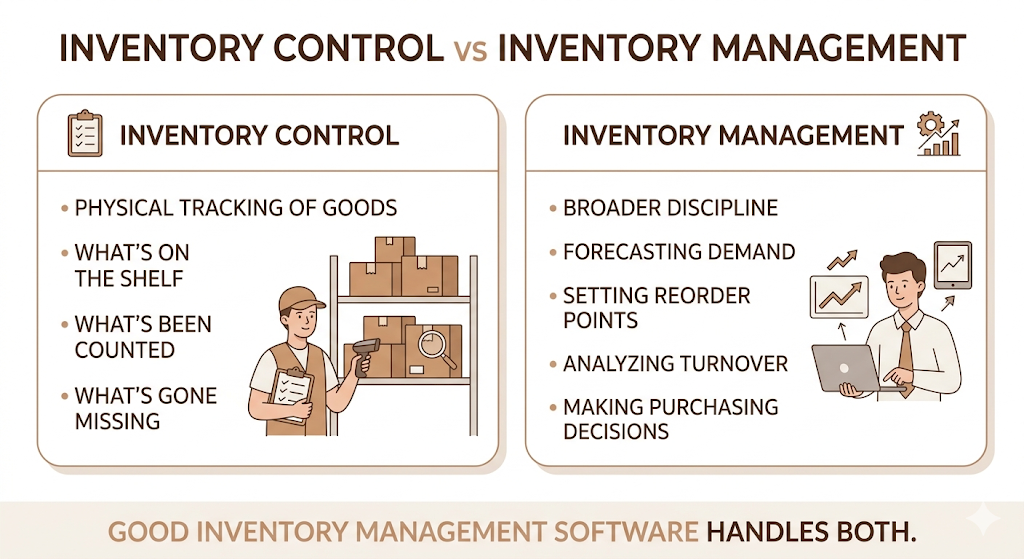
These two terms get used interchangeably, but they’re not quite the same. Inventory control focuses on the physical tracking of goods: what’s on the shelf, what’s been counted, what’s gone missing. Inventory management is the broader discipline: forecasting demand, setting reorder points, analysing turnover, and making purchasing decisions.
Good inventory management software handles both.
Who Needs Inventory Management Software?
The short answer: any business that holds physical stock. That includes retail stores, e-commerce brands, manufacturers, wholesalers, distributors, healthcare providers, and food and beverage businesses.
The longer answer: you specifically need dedicated software when spreadsheets start causing errors, when you have more than one storage location, or when your order volume means manual tracking takes more time than it’s worth.
Why Inventory Management Matters More Than People Think
Businesses consistently underestimate how much poor inventory management costs them. It’s not just about running out of stock.
A 2023 IHL Group report estimated that globally, retailers lose approximately $1.77 trillion per year to inventory distortion, the combined cost of stockouts and overstocks. That’s not a small problem.
Common Inventory Challenges
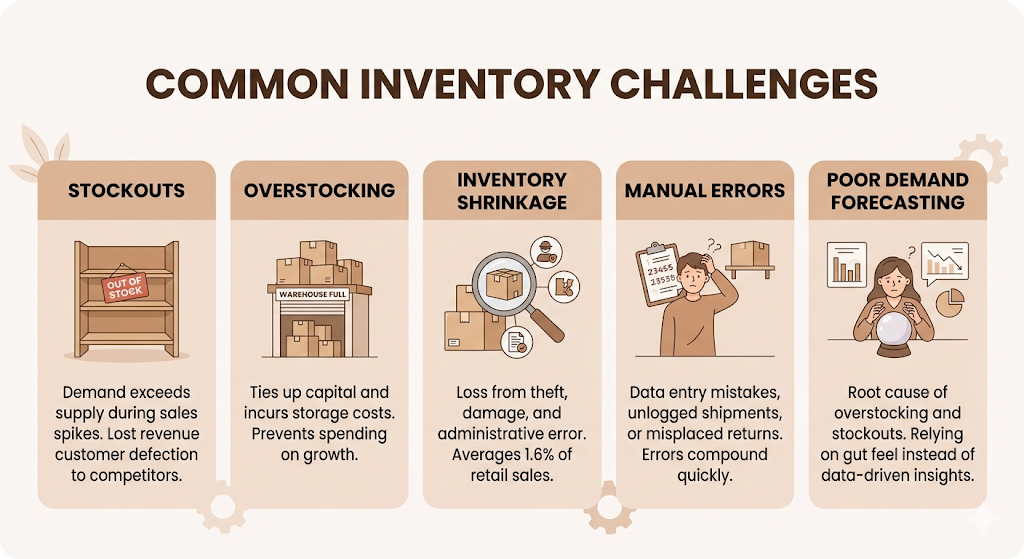
Stockouts happen when demand outpaces supply. For a brand like Mamaearth, during a sale spike, running out of a bestselling SKU doesn’t just mean lost revenue that day. It sends the customer to a competitor they might not come back from.
Overstocking ties up cash and costs money to store. A warehouse full of the wrong products is capital you can’t spend on growth.
Inventory shrinkage covers theft, damage, and administrative error. According to the National Retail Federation’s 2023 Retail Security Survey, shrinkage accounts for an average of 1.6% of retail sales. Doesn’t sound like much until you’re a brand doing Rs. 10 crore in revenue.
Manual errors are exactly what they sound like. Someone enters 500 units instead of 50. A received shipment doesn’t get logged. A return goes back to the wrong shelf. These errors compound fast.
Poor demand forecasting is the root cause of most overstocking and stockout problems. Without data-driven forecasting, most businesses rely on gut feel and last month’s numbers. That’s not good enough.
What Poor Inventory Management Actually Costs
The visible costs are easy to quantify: stockouts that lose sales, excess stock that expires or becomes obsolete, and storage costs for goods that sit too long. The less visible costs include the labour time spent manually counting and reconciling, the management time spent firefighting instead of planning, and the customer trust eroded by late or incorrect orders.
: Poor inventory management creates two parallel costs: hard costs from stockouts and excess stock, and soft costs from management time lost to manual work and customer satisfaction erosion. For growing businesses, the soft costs often exceed the hard ones. A reliable inventory management software system addresses both by automating tracking, surfacing demand signals, and reducing the need for reactive decision-making.
Key Features Every Inventory Management Software Should Have
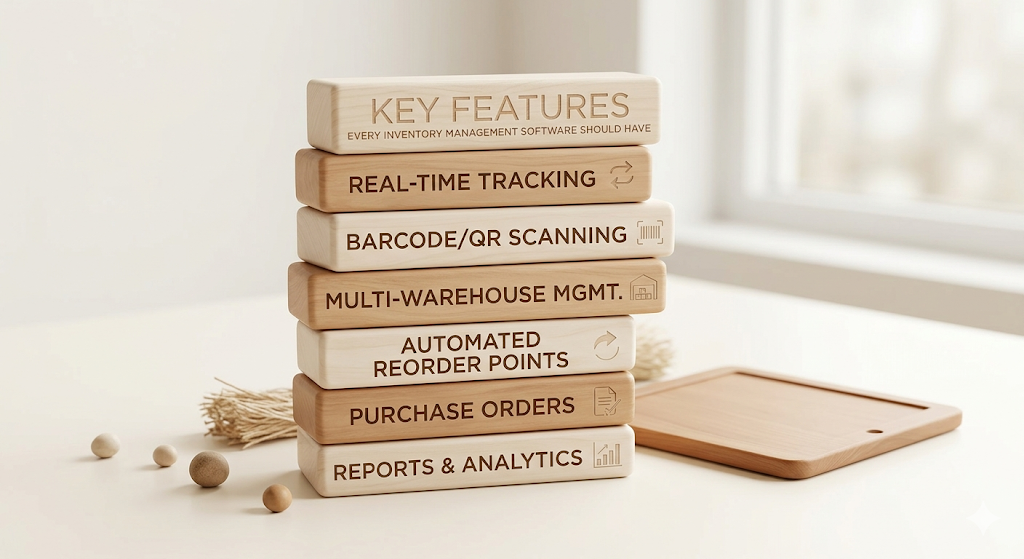
Not all features are equal. Some are genuinely necessary. Others are things vendors list to make their pricing tiers look different from each other. Here’s what actually matters.
Real-Time Inventory Tracking
Real-time inventory tracking means your stock count updates the moment a transaction occurs. A sale goes through: stock drops. A delivery arrives: stock rises. No end-of-day batch updates. No reconciliation gaps.
This is non-negotiable for any business with meaningful order volume. The alternative, batch updates, means you could be selling products you don’t actually have in stock.
Barcode and QR Code Scanning
Manual data entry is slow and error-prone. Barcode scanning solves both problems. A warehouse operative scans an item on arrival, at picking, and at dispatch. The system records every movement without anyone typing a product code. Adopting an autofill questionnaire tool extends this efficiency to digital administrative workflows by populating web-based forms instantly using data stored in a central knowledge base.
QR codes are gaining ground because they hold more data and can be scanned from any direction. For businesses with complex SKU structures, barcoding is one of the highest-ROI investments you can make.
RFID Support
RFID (Radio Frequency Identification) goes further than barcodes by allowing you to scan multiple items simultaneously without line-of-sight. A pallet of goods can be scanned in seconds rather than individually.
RFID infrastructure is expensive to set up, so it’s not right for every business. But for high-volume distributors and large-scale warehouses, the speed gains are significant.
Multi-Warehouse Management
If you hold stock in more than one location, whether that’s two retail stores, a warehouse plus a third-party logistics partner, or regional distribution centres, you need software that tracks each location separately while showing you a consolidated view.
Zepto, for example, operates hundreds of dark stores across Indian cities. Managing each as an isolated unit while also being able to see the total network stock is exactly the kind of multi-location visibility that purpose-built software provides.
Purchase Order Management
Good inventory management software doesn’t just track what you have. It helps you manage what you’re ordering. Purchase order management lets you raise, send, and track supplier orders from within the same system. When a delivery arrives, the purchase order closes and stock updates automatically.
This removes the need for a separate procurement workflow and eliminates the common problem of a delivery being received without anyone updating the inventory count.
Automated Reorder Points
Automated reorder points trigger a purchase order (or a reorder alert) when a product’s stock level falls below a defined threshold. You set the threshold based on lead time and expected demand. The system does the rest.
The difference between a business that manually checks stock levels every week and one that has automated reorder points can be weeks of lead time on a replenishment. During a demand spike, that’s the difference between a fulfilled order and a stockout.
Inventory Forecasting
Inventory forecasting uses historical sales data, seasonality patterns, and in more advanced systems, external signals like search trends and promotional calendars to predict future demand. The goal is to hold the right amount of stock: not too much, not too little.
Most businesses that have moved beyond spreadsheets still forecast manually. Dedicated forecasting tools inside inventory management software can significantly reduce both stockouts and overstock situations.
Batch and Serial Number Tracking
Batch tracking groups products manufactured or received together under a single lot number. This matters most for food, pharmaceuticals, and cosmetics, where you need to trace all units of a specific production batch in case of a recall.
Serial number tracking assigns a unique identifier to each individual item. This is standard for electronics, machinery, and any product with a warranty or service history.
Returns Management
Returns are a cost of doing business, especially in e-commerce. Your software needs to handle a returned item properly: check it back into stock if it’s resaleable, route it to a quarantine location if it needs inspection, and update your financial records accordingly.
Poor returns management leads to stock that’s physically in the warehouse but doesn’t appear in your available inventory. It’s a bigger source of shrinkage than most businesses realise.
Reporting and Analytics
Data is only useful if you can act on it. Good inventory management software includes built-in reporting for inventory turnover, carrying costs, dead stock, stockout frequency, and supplier performance. The best systems let you build custom reports so you’re not scrolling through dashboards to find the one number you actually need.
Mobile Inventory Management
Your warehouse team shouldn’t have to walk to a desktop to check or update stock. Mobile apps that connect to the inventory system let staff scan items, raise purchase orders, and check stock levels from anywhere in the warehouse.
This is now a standard expectation, not a premium feature.
User Permissions and Audit Logs
Inventory data is sensitive. Different team members need different levels of access. A picker doesn’t need to see supplier pricing. An accountant doesn’t need to adjust stock quantities. User permissions control who can see and change what.
Audit logs record every change: who made it, when, and what the previous value was. When a discrepancy appears, you can trace it back to the exact transaction.
ERP, POS, and Accounting Integrations
An inventory management software system that doesn’t connect to your other business tools creates data silos. If your stock management doesn’t talk to your accounting software, you’re still doing manual reconciliation. If it doesn’t connect to your POS system, your retail sales won’t reduce your stock count in real time.
We’ll cover integrations in detail in a later section.
How Inventory Management Software Works: The Full Lifecycle
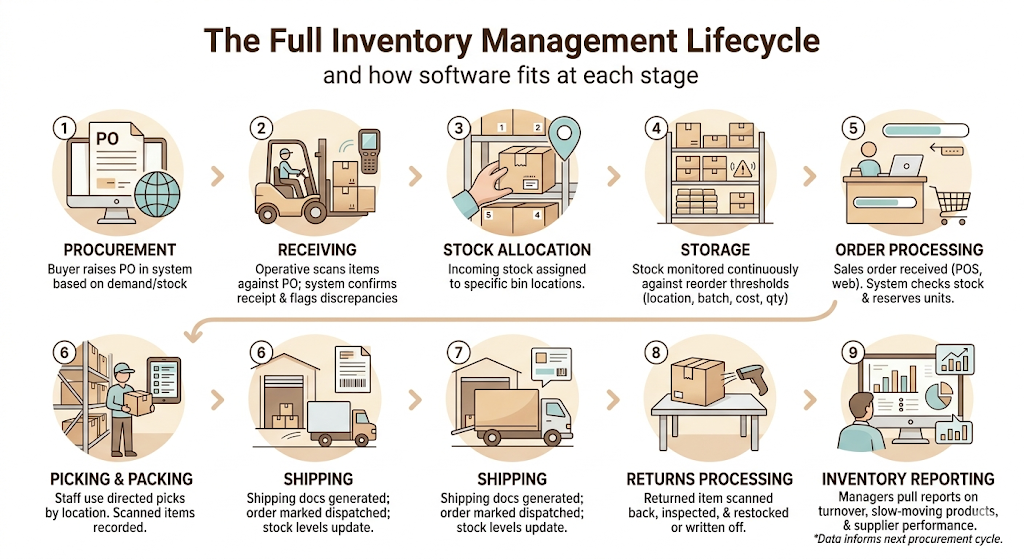
Understanding the full inventory lifecycle helps you see where software fits at every stage.
1. Procurement: A buyer raises a purchase order in the system based on current stock levels, reorder points, or a forecasted demand shortfall. The system sends the PO to the supplier and logs the expected delivery date.
2. Receiving: When the delivery arrives, a warehouse operative scans each item against the PO. The system confirms receipt, flags any discrepancies, and immediately updates stock levels.
3. Stock Allocation: Incoming stock is assigned to specific bin locations within the warehouse. The system records exactly where each product is stored, so pickers can find it quickly.
4. Storage: Stock sits in the warehouse with its location, batch number, cost, and quantity all logged in real time. The system monitors stock levels continuously against reorder thresholds.
5. Order Processing: A sales order comes in (from a POS, e-commerce platform, or manual entry). The system checks stock availability, reserves the required units, and generates a picking list.
6. Picking and Packing: Warehouse staff use the picking list to collect the right items. The system guides picks by location (to reduce walking distance) and records each item scanned.
7. Shipping: Once packed, the system generates shipping documentation and marks the order as dispatched. Stock levels update to reflect what’s left.
8. Returns Processing: A returned item is scanned back in, inspected, and either returned to sellable stock or written off. The system updates stock and financial records.
9. Inventory Reporting: At any point, managers can pull reports on stock levels, turnover rates, slow-moving products, and supplier performance. The data informs the next procurement cycle.
Inventory management software tracks stock through every stage of the lifecycle, from purchase order to returns processing. At each stage, the system updates stock levels automatically, removing the need for manual data entry and giving businesses a real-time view of what they hold, where it is, and what it’s worth. This end-to-end visibility is the core operational advantage over spreadsheet-based tracking.
Types of Inventory Management Software
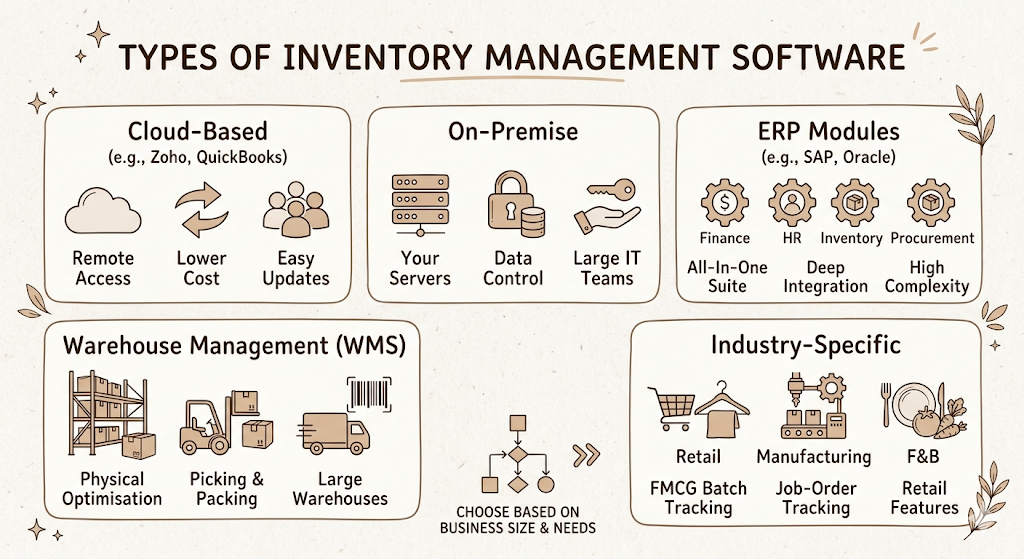
Not all inventory systems are built the same. The type you choose should match your business size, complexity, and how you’re already structured.
Cloud-Based Inventory Software
Cloud-based systems run on external servers and are accessed via a browser or app. You pay a monthly or annual subscription. Updates happen automatically. Your team can access the system from anywhere.
This is the default choice for most small to mid-size businesses. Lower upfront cost, faster implementation, and no IT infrastructure to maintain. Tools like Zoho Inventory, QuickBooks Commerce, and inFlow operate in this space.
On-Premise Inventory Software
On-premise systems are installed on your own servers. You own the licence. You control the data. You manage the updates and maintenance.
This option suits large enterprises with specific compliance requirements, businesses in sectors with strict data sovereignty rules, or organisations that already have an IT team managing infrastructure.
ERP Inventory Modules
Enterprise Resource Planning (ERP) systems like SAP, Oracle NetSuite, and Microsoft Dynamics include inventory management as one module within a broader business management suite. The advantage is deep integration across finance, HR, procurement, and operations. The trade-off is complexity and cost.
ERP inventory modules are not a standalone purchase. They’re bought as part of a larger ERP implementation, which typically starts at several lakhs of rupees and can scale to crores.
Warehouse Management Systems (WMS)
A Warehouse Management System focuses specifically on warehouse operations: receiving, putaway, picking, packing, and shipping. WMS tools are designed for businesses that run large-scale warehouse operations where optimising physical movement is the primary goal.
WMS differs from inventory management software in depth rather than breadth. It goes deeper into warehouse-specific workflows, but typically does less on the demand forecasting and procurement side.
Industry-Specific Inventory Solutions
Some inventory software is built for specific industries. Lightspeed and Shopify POS have strong retail-specific inventory features. Fishbowl is built for manufacturers. MarketMan targets food and beverage. Vend focuses on retail.
If your inventory challenges are heavily industry-specific (for example, batch tracking with expiry dates in FMCG, or job-order tracking in manufacturing), an industry-specific tool often outperforms a general one.
Inventory Management Software vs ERP vs WMS: What’s the Difference?
This comparison comes up constantly, and most articles gloss over it. Here’s the full breakdown.
| Inventory Management Software | ERP System | Warehouse Management System (WMS) | |
| Primary Purpose | Track and manage stock levels | Manage entire business operations | Optimise warehouse operations |
| Best For | SMBs, D2C, e-commerce, retailers | Mid-size to large enterprises | Large-scale distribution and 3PL |
| Core Features | Stock tracking, reorder alerts, forecasting, reporting | Inventory + finance + HR + procurement + CRM | Receiving, putaway, picking, packing, dispatch |
| Cost | Rs. 2,000 to Rs. 30,000/month | Rs. 5 lakh to Rs. 5 crore+ (implementation) | Rs. 1 lakh to Rs. 50 lakh+ |
| Scalability | Good for growing businesses | High, built for enterprise scale | Scales with warehouse complexity |
| Complexity | Low to medium | High | Medium to high |
| Integrations | POS, e-commerce, accounting, shipping | Everything (native modules) | Inventory software, ERP, shipping |
The practical rule: start with inventory management software. Add a WMS when your warehouse operations become complex enough to justify it. Move to ERP only when you need cross-department integration and can justify the implementation cost.
Inventory management software, ERP systems, and warehouse management systems serve different operational needs. Inventory software is the right starting point for most growing businesses because it solves the core tracking and forecasting problem without the cost and complexity of a full ERP implementation. ERP makes sense when the business needs integrated finance and operations management. WMS is the right addition when warehouse physical operations become the primary constraint on order fulfilment speed.
Inventory Management Methods You Should Know
How you manage stock isn’t just about the software. It’s also about the methodology you apply. Your software should support whichever method fits your business.
FIFO (First In, First Out)
FIFO means the oldest stock is sold or used first. It’s the standard method for most consumer goods businesses and is mandatory for perishables. The inventory sitting in your warehouse the longest goes out first. This prevents spoilage and keeps your cost-of-goods-sold calculation accurate during inflationary periods.
LIFO (Last In, First Out)
LIFO assumes the most recently received inventory is sold first. It’s used primarily for tax accounting purposes in some countries, though it’s not permitted under IFRS accounting standards (which India uses). Worth knowing, but unlikely to be your chosen method.
FEFO (First Expired, First Out)
FEFO is FIFO’s cousin, designed for products with expiry dates. The stock expiring soonest is sold first, regardless of when it was received. Essential for food, pharma, and cosmetics. Any brand in these categories should confirm that its inventory management software supports FEFO-based picking.
Just-in-Time (JIT)
JIT inventory means ordering stock to arrive exactly when you need it, minimising how much you hold at any time. It reduces storage costs and working capital tied up in stock. The risk is that any supply chain disruption leaves you with nothing. JIT works best with reliable suppliers and stable demand. Brands like Maruti Suzuki use JIT in manufacturing. It’s much harder to apply in D2C e-commerce with unpredictable demand spikes.
ABC Inventory Analysis
ABC analysis segments your inventory into three categories based on value and sales frequency. A items are high-value, fast-moving products that deserve the most attention and tightest stock controls. B items are of medium value and frequency. C items are low-value, slow-moving products that need less oversight. This method helps you focus and redirect attention where it matters most.
Economic Order Quantity (EOQ)
EOQ is the formula that calculates the ideal order quantity to minimise the combined cost of ordering and holding inventory. Ordering too little means frequent reorders (higher ordering costs). Ordering too much means excess stock to store (higher holding costs). EOQ finds the balance. Most inventory management software calculates EOQ automatically once you’ve entered your holding and ordering cost data.
Safety Stock
Safety stock is the buffer inventory you hold above your expected need to protect against demand spikes and supply delays. It’s not a waste. It’s insurance. The right amount depends on demand variability, supplier lead time reliability, and how much a stockout would actually cost you.
Cycle Counting
Rather than counting your entire warehouse once a year (a disruptive, expensive exercise), cycle counting involves counting a small subset of inventory on a rotating basis. High-value A items might be counted weekly. Low-value C items might be counted quarterly. Done consistently, cycle counting is more accurate than annual physical counts and doesn’t require shutting down operations.
Benefits of Inventory Management Software
The benefits aren’t theoretical. They show up in specific, measurable ways.
Better inventory accuracy is the most immediate gain. A 2022 McKinsey report on retail operations found that businesses using automated inventory tracking achieved inventory accuracy rates above 95%, compared to below 70% for those relying on manual methods.
Lower operational costs come from reduced labour time on manual counting and reconciliation, fewer emergency orders at premium prices, and less write-off from expired or obsolete stock.
Reduced stockouts protect revenue. When you have accurate reorder points and automated alerts, you don’t run out of your best-sellers during peak demand.
Faster order fulfilment is a direct result of accurate stock data and optimised picking. If your system knows exactly where every product is, picking time drops significantly.
Improved customer satisfaction follows. Orders that ship correctly and on time don’t generate support tickets.
Better cash flow comes from tighter inventory. You’re not tying up working capital in excess stock. You’re ordering what you need, when you need it.
Smarter purchasing decisions come from having real demand data. Instead of guessing how much to order, you’re working from historical sales patterns, seasonal trends, and supplier lead times.
Business scalability means you can grow without proportionally growing your operations headcount. A business doing 500 orders a month and one doing 5,000 can run the same inventory management software. The software scales. A manual spreadsheet process doesn’t.
Must-Have Integrations
An inventory management software system that sits in isolation creates more work, not less. These integrations are the ones that actually matter.
ERP Systems
If you’re running an ERP, your inventory software needs to sync with it. Finance needs accurate cost-of-goods data. Procurement needs to see inventory levels. If these systems don’t talk to each other, you’re maintaining two sources of truth.
Accounting Software
The connection between inventory and accounting is fundamental. Tally (widely used in India), Zoho Books, QuickBooks, and Xero all offer integration with popular inventory tools. Every stock movement affects your cost-of-goods-sold, your asset valuation, and your accounts payable. Manual reconciliation between inventory software and accounting software is a half-step that costs time and introduces errors.
POS Systems
For retail businesses with physical stores, the POS integration is critical. A sale at the counter must immediately reduce your stock count. Without this, your inventory numbers diverge from reality every single business day.
E-Commerce Platforms
Shopify, WooCommerce, Magento, and Amazon Seller Central all need to sync with your inventory. The most important capability is preventing overselling: if your stock count says 5 and your e-commerce platform says 10, you’ll sell products you don’t have.
Shipping Software
Integrations with Shiprocket, Delhivery, Easyship, or ShipStation allow your inventory system to trigger shipping labels, update tracking, and record dispatches automatically. This removes a manual handoff in the fulfilment process.
CRM Systems
CRM integration is more valuable for B2B businesses, where customer purchase history informs both sales and inventory decisions. If your sales team can see product availability directly in your CRM, they can make commitments to customers based on actual stock data.
Barcode Hardware
The best inventory software in the world is slow to use if it doesn’t integrate well with your barcode scanners and printers. Check that any system you’re evaluating supports the hardware you already have, or factor in hardware costs as part of your evaluation.
How to Choose the Right Inventory Management Software
This is where most businesses spend too little time and end up choosing based on price or a demo that looked good. Here’s what actually matters.
Understand Your Business Requirements
Before comparing tools, map your actual requirements. How many SKUs do you manage? How many locations? What’s your order volume per day? Do you need multi-currency support? Do you have regulatory requirements (expiry tracking, batch numbers)? These answers eliminate a large chunk of the market before you even start demo requests.
Assess Inventory Complexity
A business with 200 SKUs and one warehouse has different needs from a distributor with 10,000 SKUs across five locations. Be honest about where you are and where you’ll be in two years.
Evaluate Scalability
Your inventory management software needs to grow with you. Ask vendors directly: what happens to pricing and performance when your SKU count doubles? What’s the process for adding a new warehouse location? Businesses that choose based on where they are today rather than where they’ll be in 24 months often find themselves re-implementing within two years.
Consider Deployment Options
Cloud is right for most businesses. But if your warehouse has unreliable internet connectivity, you need a system that can operate offline and sync when the connection is restored. Some cloud tools offer this. Others don’t. It’s worth asking.
Compare Pricing Models
Most cloud inventory software charges per month, per user, or per order volume. Understand the full cost, including setup fees, data migration, training, and any add-on modules you’ll need. A tool that looks cheap at Rs. 3,000/month can become Rs. 15,000/month once you add the integrations you actually need.
Check Ease of Use
A system your warehouse team can’t use is not a system. Request a trial and have the people who will actually use it (warehouse staff, buyers, ops managers) test it. The software that wins on paper doesn’t always win on the floor.
Review Customer Support
When something breaks during a sales event, you need support fast. Check support hours, response time commitments, and what’s included in your plan. An offshore support team that responds in 48 hours is not acceptable when your order management is down.
Request Product Demos
Don’t evaluate inventory management software on screenshots and feature pages. Request live demos, specifically for your workflow. Ask vendors to show you the exact scenario you care most about: receiving a partial delivery against a PO, managing a return that goes into quarantine stock, or setting up reorder points for seasonal products.
Read Customer Reviews
G2, Capterra, and Trustpilot have verified reviews for most inventory tools. Look specifically for reviews from businesses similar to yours in size and industry. Pay more attention to 3-star reviews than 5-star ones. The 3-star reviews tell you what the software actually doesn’t do well.
Common Mistakes to Avoid
Relying on spreadsheets for growing operations. Spreadsheets work until they don’t. The tipping point is usually around 300-500 SKUs, two or more locations, or more than one person needing to update the sheet simultaneously. By the time it’s obviously broken, it’s already cost you.
Ignoring demand forecasting. Most businesses use inventory software for tracking and completely underuse the forecasting features. Even basic historical data analysis dramatically improves purchasing accuracy.
Choosing software without the integrations you need. Check integrations before signing a contract. Not “integration coming soon.” Working integrations with the specific tools you already use.
Poor data migration. Moving from spreadsheets to software requires clean, accurate data. If your product master data has duplicate SKUs, inconsistent naming, and missing costs, the new system will be as inaccurate as the old one. Migration is a good opportunity to clean house.
Skipping employee training. The software does nothing if people use it wrong. Budget time for training and build standard operating procedures around how the system should be used.
Overbuying features you won’t use. A manufacturing-grade WMS with advanced labour management and slotting optimisation is overkill for most e-commerce businesses. Pay for what you’ll actually use in the next 18 months.
Not monitoring inventory KPIs. Implementing the software is the start, not the end. Without regular KPI review, you won’t know whether the system is actually improving performance.
Best Practices for a Successful Implementation
Clean Existing Inventory Data
Before you import anything into the new system, audit your product master data. Remove duplicates. Standardise naming conventions. Ensure every SKU has a cost, a unit of measure, and a category. This takes time. Skip it, and you’ll pay for it later.
Standardise Product Information
Every product needs a consistent structure: SKU code, product name, category, unit of measure, supplier, lead time, reorder point, and safety stock level. If different team members have different conventions, the system will reflect that inconsistency.
Train Employees
Train by role, not by system. Warehouse staff need to know how to receive stock and pick orders. Buyers need to know how to manage purchase orders and reorder settings. Managers need to know how to pull reports. Each group has a different workflow and different things they need to understand.
Automate Routine Processes
Set up your reorder points, your safety stock levels, and your automated alerts in the first week of implementation. The whole point of the software is to remove manual effort from routine decisions. Don’t recreate the manual process inside a digital tool.
Conduct Regular Inventory Audits
Cycle counting should start immediately after go-live. Real stock counts reveal any discrepancies between what the software says and what’s physically on the shelf, so you can identify and fix errors early rather than discovering them during a customer order.
Continuously Monitor Performance
Schedule a monthly review of your key inventory KPIs. Track whether stockout frequency is dropping. Check whether inventory turnover is improving. If the metrics aren’t moving, the software isn’t being used correctly, or the processes around it need adjusting.
Key Inventory KPIs to Track
Software generates data. KPIs tell you whether that data reflects a healthy operation.
The Inventory Turnover Ratio measures how many times your stock cycles through in a given period. Higher is generally better. Formula: Cost of Goods Sold / Average Inventory Value. A ratio below 4 for an FMCG business is a warning sign.
Stock Accuracy compares your system’s recorded stock count against a physical count. Good operations target 97% or above. Below 90% indicates a process problem.
Carrying Cost is the total cost of holding inventory: storage, insurance, financing, and the cost of stock becoming obsolete. Usually expressed as a percentage of inventory value. Industry benchmarks range from 20% to 30% annually.
Stockout Rate measures how often products are unavailable when a customer wants them. Track this by SKU to identify which products have the most frequent availability problems.
Order Fulfilment Rate tracks what percentage of orders are fulfilled completely and on time. For most e-commerce businesses, the target is 95%+.
The sell-through rate measures how much of your available stock you actually sold in a period. High sell-through rates mean you’re buying the right products in the right quantities.
Dead Stock is inventory that hasn’t sold in a defined period (usually 90 to 180 days). Tracking dead stock forces procurement decisions about whether to discount, return to the supplier, or write off.
Days Inventory Outstanding (DIO) measures how long, on average, your stock sits before being sold. Formula: (Average Inventory / COGS) x Number of Days. Lower DIO means faster-moving stock and better cash flow.
Future Trends in Inventory Management Software
The category is evolving quickly. Here’s where it’s heading.
AI-Powered Demand Forecasting
The next generation of inventory management software uses machine learning models that go beyond historical sales data. They incorporate external demand signals: weather, local events, social media trends, and competitor pricing. This is already live in platforms like NetSuite and Brightpearl. For most growing businesses, it’s 18 to 24 months away from being accessible at an affordable price point.
Predictive Inventory Planning
Predictive planning goes further than forecasting. Rather than telling you what demand will look like, it recommends specific procurement actions: order X units of SKU Y from supplier Z by date W to maintain a 95% service level. The system acts as a procurement analyst, not just a data source.
IoT-Enabled Smart Warehouses
IoT sensors can track temperature, humidity, and stock movement without human input. For pharma and food businesses, real-time temperature monitoring connected to the inventory system can automatically flag stock that may have been stored outside acceptable conditions. Swiggy’s dark store network already uses IoT-based shelf monitoring for freshness tracking.
RFID and Automation
RFID costs have dropped significantly over the past five years. Combined with automated conveyor systems and robotic picking, large-scale warehouses are moving toward near-total automation of stock movement tracking. Amazon’s fulfilment centres are the benchmark, but smaller-scale automation is becoming viable for mid-market businesses.
Mobile-First Inventory Management
The shift to mobile isn’t a future trend. It’s current. But the next evolution is richer mobile functionality: AR-guided warehouse picking, mobile cycle counting with camera-based scanning instead of hardware scanners, and voice-guided workflows for hands-free operation.
Cloud-Native Platforms
The majority of new inventory management software launches are cloud-native. This means it was built specifically for the cloud, not legacy systems ported to a browser. Cloud-native architecture makes updates faster, integration easier, and downtime less likely.
Sustainable Inventory Management
Sustainability is becoming an operational metric, not just a marketing claim. Inventory software is starting to include carbon footprint tracking for procurement decisions, tools to reduce overordering-driven waste, and reporting on sustainability performance for businesses that need it for ESG reporting or customer requirements.
Conclusion
Getting inventory management right is fundamentally a data problem. You can’t make good purchasing decisions without accurate stock data. You can’t fulfil orders reliably without real-time visibility into what you have and where it is. You can’t forecast demand without historical transaction data that isn’t stuck in a spreadsheet.
Inventory management software solves all three. But only if you choose the right tool for your size and complexity, implement it properly, and actually use the data it generates to make better decisions.
The businesses that get the most value from inventory software aren’t the ones with the most sophisticated tools. They’re the ones that have clean data, trained teams, and a habit of reviewing KPIs regularly. The technology is the enabler. The discipline is what makes it work.
If you’re still relying on spreadsheets, the cost of switching is almost certainly lower than the cost of staying. The question isn’t whether to make the move. It’s which system and when.
Frequently Asked Questions
What is inventory management software?
Inventory management software is a digital system that tracks and manages a business’s stock levels, from procurement through to sale and returns. It replaces manual spreadsheets with automated, real-time stock tracking and connects procurement, warehousing, and fulfilment into a single system.
Who should use inventory management software?
Any business that holds physical stock benefits from inventory management software. It’s most valuable for businesses with more than 200 SKUs, multiple storage locations, or order volumes that make manual tracking too slow and error-prone.
What features matter most?
Real-time inventory tracking, automated reorder points, and integration with your existing systems (POS, e-commerce, accounting) are the three most impactful features for most businesses. Everything else depends on your specific operations.
What’s the difference between inventory software and ERP?
Inventory management software focuses specifically on stock tracking, procurement, and fulfilment. ERP is a broader suite that includes inventory management plus finance, HR, CRM, and manufacturing. ERP is more powerful but significantly more expensive and complex to implement.
Can inventory management software automate reordering?
Yes. Most inventory management platforms support automated reorder points that trigger alerts or purchase orders when stock falls below a set threshold. Some advanced systems generate recommended order quantities based on demand forecasting and supplier lead times.
Is cloud-based inventory software better?
For most small to mid-size businesses, yes. Cloud-based inventory software is cheaper to start, faster to implement, and requires no IT infrastructure. The exception is businesses with strict data sovereignty requirements or unreliable internet connectivity.
How much does inventory management software cost?
Cloud-based inventory management software typically costs between Rs. 2,000 and Rs. 30,000 per month for SMBs, depending on features, users, and order volume. ERP-based inventory modules can cost several lakhs in implementation fees plus ongoing licensing. Most vendors offer a free trial period.
Can inventory software integrate with accounting software?
Yes. Most major inventory management platforms integrate with accounting tools, including Tally, Zoho Books, QuickBooks, and Xero. This sync ensures every stock movement updates your financial records automatically.
How long does implementation take?
A cloud-based inventory management software implementation for a small business can go live in one to two weeks. Mid-market implementations with significant data migration and integration work typically take four to twelve weeks. ERP-based inventory modules can take three to twelve months.
What KPIs should I track?
Start with inventory turnover ratio, stock accuracy, stockout rate, and order fulfilment rate. These four cover the most important dimensions of inventory health. Add days inventory outstanding and carrying cost once you have the basics dialled in.