
A brief on Monday morning used to mean a full day blocked out for concepting, a designer buried in mockups, and a marketer waiting until Thursday to see a single option. That timeline has quietly collapsed. According to Figma’s 2026 State of the Designer report, based on a survey of 906 designers, 91% now use generative AI weekly, up from 54% in 2025.
That jump matters because it changes what “fast” means for anyone shipping visual content. Marketers now expect a first draft in minutes. Creators expect to test five visual directions before lunch. And designers, the people who actually have to make the output usable, are the ones deciding which tools earn a permanent spot in the stack.
This guide breaks down the tools actually worth your time in 2026, what each one does well, where it falls short, and who should be using it. You’ll also get a framework for choosing between them, because picking the wrong tool for your workflow wastes more time than not using AI at all.
Table of Contents
What Are AI Design Tools and Why Do They Matter in 2026?
AI design tools are software applications that use machine learning models, mostly generative image and layout models, to create, edit, or refine visual content from text prompts or existing assets. That’s the whole definition. What’s changed is how far that capability now reaches.
Three years ago, “AI design” mostly meant a single image generator bolted onto a creative suite. Now it spans the full pipeline: concept art, UI layouts, brand systems, video, and even production-ready code from a design file. Adobe’s Firefly, for instance, is trained on licensed and public domain content, which is exactly why enterprise teams trust it for commercial output in a way they don’t trust every image generator on the market.
Honestly, the shift isn’t really about speed anymore. Every tool on this list is fast. The real differentiator in 2026 is judgment: knowing which AI output to keep, which to refine, and which to throw out entirely. A recent industry report on AI in design summarized this well, noting that the most valuable designers aren’t the ones generating the most output, but the ones editing it down to what actually works.
AI design tools use generative machine learning to produce images, layouts, and full UI systems from text prompts. Adoption jumped from 54% to 91% among designers between 2025 and 2026, according to Figma’s State of the Designer report. The tools that matter most now aren’t the ones producing the most output, but the ones that let teams edit, refine, and ship faster.
Top AI Design Tools for Designers, Marketers & Creators
There’s no single winner here. The right pick depends on whether you’re generating concept art, building a product interface, or churning out social posts by the dozen. Below are the twelve tools that actually earn a spot in most professional workflows right now.
Adobe Firefly
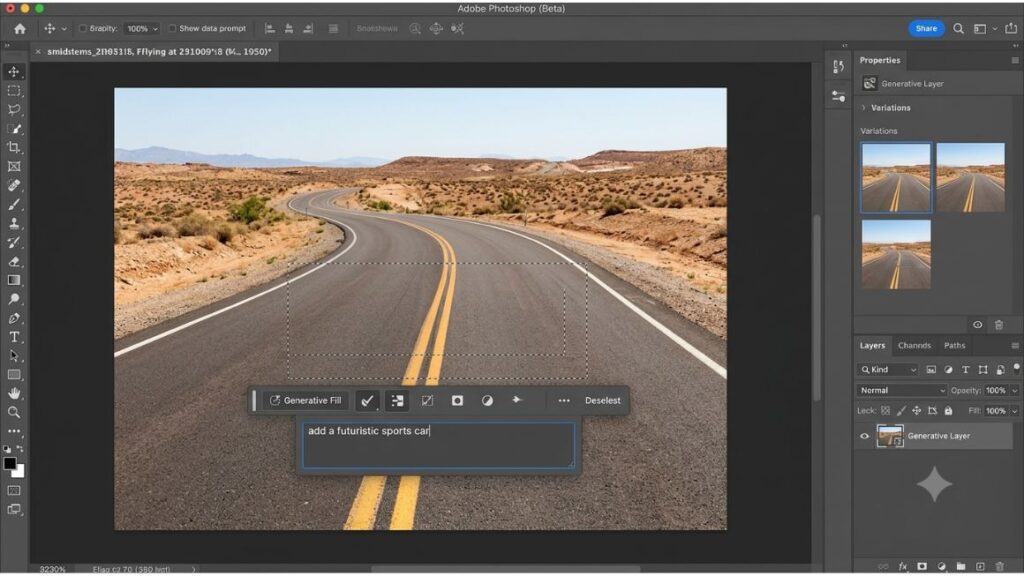
Firefly is Adobe’s generative AI model, built directly into Photoshop, Illustrator, and Adobe Express. It handles text-to-image generation, generative fill, background removal, and vector recoloring, and it does all of it inside tools designers already use daily.
Key features: Generative Fill and Expand in Photoshop, text effects, Firefly Boards for moodboarding, and vector generation in Illustrator.
Pricing: Plans start around $9.99 a month, with limited free credits available on a basic tier.
Best for: Agencies and in-house teams that need commercially safe AI output without legal risk.
The reason Firefly gets picked over flashier competitors comes down to training data. Adobe built it on licensed Adobe Stock content and public domain material, so the output carries indemnification for enterprise use. A brand team at a company like Mamaearth, working across dozens of SKUs and constant packaging refreshes, can generate variations without worrying about a copyright claim landing on legal’s desk later.
Canva Magic Studio
Canva Magic Studio bundles a set of AI features, Magic Design, Magic Write, Magic Eraser, and Magic Media, into the Canva interface most marketers already know. It generates full layouts from a prompt or a rough brief, not just single images.
Key features: Magic Design for full-layout generation, Magic Switch to resize one design across formats, and Magic Media for on-brand image generation.
Pricing: A generous free plan exists, with Canva Pro running from roughly $13 a month.
Best for: Non-designers, social teams, and small businesses that need high-volume visual content fast.
This is the tool most marketing teams should start with, not because it’s the most powerful, but because it’s the one people actually finish projects in. A social media manager at a D2C brand can turn a single campaign brief into ten platform-ready formats in one sitting, something that used to require a design ticket and a two-day wait.
Midjourney
Midjourney remains the reference point for raw image quality. It runs primarily through Discord, though a web interface now exists, and it generates highly stylized, often striking artwork from short text prompts.
Key features: Style reference and character consistency across prompts, high-resolution upscaling, and strong control over lighting and composition.
Pricing: Subscriptions start around $10 a month.
Best for: Concept artists, illustrators, and creators who need visual exploration rather than final production assets.
Midjourney isn’t built for commercial production the way Firefly is, and its training data policy is far less transparent. That’s a real limitation. What it’s genuinely excellent at is early-stage ideation, generating a dozen visual directions for a mood board before a single line gets drawn by hand.
Figma AI and Figma Make
Figma folded AI directly into the platform designers already use for interface work. Figma AI handles smaller assistive tasks, renaming layers, generating alt text, running quick visual searches, while Figma Make (formerly First Draft) turns natural language prompts into functional UI layouts and even production-ready code.
Key features: Prompt-to-UI generation, automatic component organization, and Dev Mode for translating designs straight into code specs.
Pricing: Basic AI features are included on free plans, with paid seats starting around $15 a month per editor.
Best for: Product teams and UI/UX designers who need the full pipeline from concept to developer handoff.
Framer AI
Framer built its reputation on AI-powered website creation, letting anyone describe a site and get a working, responsive draft in return. It’s positioned less as a design tool and more as a full site-builder with design intelligence baked in.
Key features: Prompt-to-website generation, built-in CMS, and one-click publishing without a developer handoff.
Pricing: A free tier exists for basic sites, with paid plans scaling by traffic and features.
Best for: Founders, marketers, and creators who need a live website without hiring a developer.
Recraft
Recraft focuses on something most image generators handle poorly: vector output and brand-consistent generation. Where Midjourney gives you a raster image, Recraft can produce editable vectors, which matters enormously for logo and icon work.
Key features: Vector illustration generation, brand style presets for consistent output across assets, and icon generation.
Pricing: A free tier is available, with paid plans for higher-volume or commercial use.
Best for: Brand designers who need multiple assets that share one consistent visual language.
Runway
Runway is the standout for AI video. Its generative video models turn text prompts into short clips, and its editing suite includes background removal, motion tracking, and color grading built on top of AI.
Key features: Text-to-video generation, motion brush for targeted edits, and automated color grading.
Pricing: A free tier with limited generations exists, with paid plans starting around $12 a month billed annually.
Best for: Video creators and social teams for whom video content, not static images, drives most of their engagement.
Given how much of content strategy now runs through short-form video, Runway is worth learning even for teams that consider themselves primarily image-first.
Adobe Firefly, Canva Magic Studio, and Midjourney lead the AI design tools category in 2026 for commercial safety, marketing volume, and image quality respectively. Runway leads separately in AI video generation, reflecting how much design work now spans formats beyond static images. Most professional teams combine two or three tools rather than standardizing on one.
Uizard
Uizard is built specifically for rapid UI prototyping. You describe a screen or upload a rough sketch, and it generates an editable interface mockup, complete with placeholder components.
Key features: Text-to-UI generation, screenshot-to-design conversion, and a design system that keeps components consistent.
Pricing: A free tier is available for basic prototyping.
Best for: Non-designers, founders, and product managers who need to visualize an idea before involving a design team.
Google Stitch
Stitch is Google’s experimental AI design tool, aimed at generating UI concepts and layouts from prompts, with an emphasis on quick iteration over polished final output.
Key features: Prompt-based UI generation and rapid concept iteration for early-stage product ideas.
Pricing: Available as a free experimental tool.
Best for: Product teams exploring UI directions before committing design resources to a full build.
Designs.ai
Designs.ai takes the opposite approach from most tools on this list: instead of doing one thing well, it bundles a logo maker, video maker, social graphics tool, and mockup generator into a single subscription.
Key features: Logo generation, video creation, mockup generation, and social media graphics, all under one login.
Pricing: Plans start around $29 a month for the basic tier.
Best for: Solopreneurs and small businesses that want one platform instead of juggling five subscriptions.
The breadth is genuinely useful if you’re a one-person marketing team. To be fair, individual modules aren’t as polished as a dedicated tool like Firefly or Recraft, so larger teams tend to outgrow it.
Kittl
Kittl specializes in logo and typography design, with advanced text effects and branding templates aimed at print and merchandise work.
Key features: AI-generated text effects, branding templates, and export options built for print production.
Pricing: A free tier exists, with paid plans for expanded asset libraries and commercial licensing.
Best for: Independent creators and small brands producing logos, merch designs, and print materials.
Ideogram
Ideogram is one of the few image generators that reliably renders legible text inside generated images, which most competing models still struggle with.
Key features: Accurate in-image text rendering, style variety, and a generous free tier for casual use.
Pricing: Free plan available, with paid tiers unlocking higher resolution and commercial rights.
Best for: Creators who need posters, social graphics, or ads where readable text has to sit inside the image itself.
How to Choose the Right AI Design Tool for Your Workflow
Start with the output, not the tool. If you need static marketing graphics at volume, Canva Magic Studio wins. If you need a functioning product interface, Figma AI is the only real contender.
Here’s a simple way to narrow it down:
- Identify your primary output. Static images, UI screens, video, or a full website each point to a different tool.
- Check the licensing terms. If the output will be used commercially, confirm the tool’s training data policy before you build a campaign around it.
- Test the free tier with a real project. Not a demo prompt, an actual brief you’re currently working on.
- Build a stack of two or three tools. Almost nobody standardizes on a single AI design tool anymore, because no single tool covers ideation, production, and final polish equally well.
That last point matters more than people expect. From what we’ve seen with YUP’s AI Marketing course learners, the teams getting the most value aren’t the ones chasing every new AI design tool release. They’re the ones who picked two tools, learned their limits, and built a repeatable process around them.
AI Design Tools for Designers vs Marketers vs Creators
The same tool rarely serves all three groups equally well. A UI designer optimizing for developer handoff has almost nothing in common with a solo creator generating Instagram graphics.
| Group | Primary Need | Best Fit Tools |
|---|---|---|
| Designers | Prototyping, UI systems, dev handoff | Figma AI, Uizard, Google Stitch, Recraft |
| Marketers | High-volume, on-brand content fast | Canva Magic Studio, Adobe Express, Designs.ai |
| Creators | Concept art, video, distinctive visuals | Midjourney, Runway, Ideogram, Kittl |
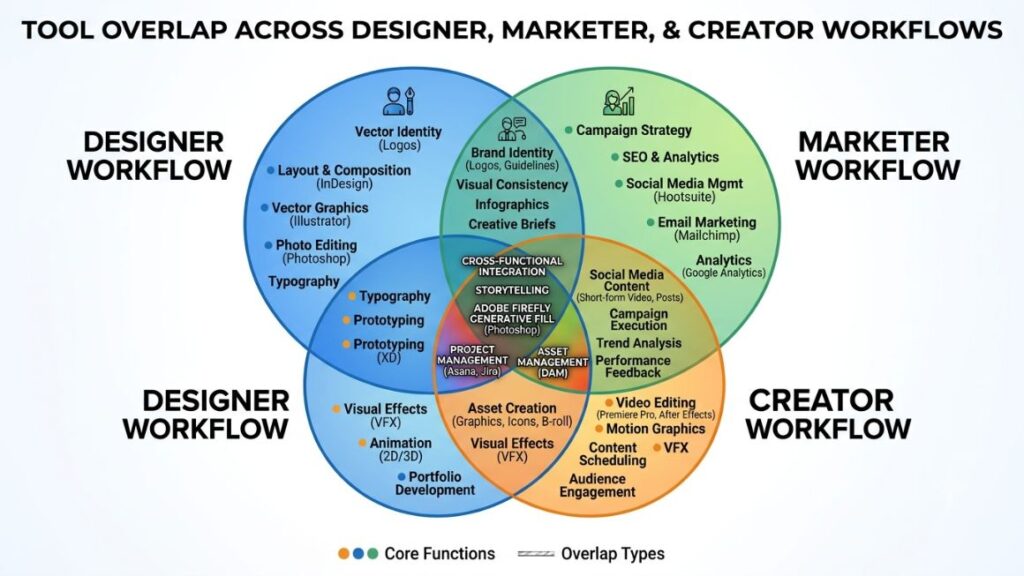
Marketers who lean on design tools built for volume, like Canva, will hit a ceiling fast if the request shifts to a functional prototype. Similarly, a designer using Figma Make to generate a working interface has little use for Midjourney’s stylized artwork in that same workflow. Knowing which lane you’re in before you pick a subscription saves a surprising amount of money.
Common Mistakes to Avoid When Adopting AI Design Tools
The biggest mistake isn’t picking the wrong tool. It’s assuming AI output is ready to ship without a human pass. Most projects still need manual edits, brand adjustments, and a usability check before anything goes live.
A second, quieter mistake: ignoring licensing until a client or legal team asks about it. Tools built on undisclosed training data, which includes several image generators still popular in 2026, carry real commercial risk that a marketing team rarely thinks about until it’s already a problem.
And a third: chasing every new release. New AI design tools launch monthly. Most teams don’t need a sixth subscription, they need to get genuinely fluent in the two or three they already have.
Conclusion
The tool doesn’t make the designer, but the right one removes a lot of friction between an idea and a finished asset. Adobe Firefly, Canva Magic Studio, Figma AI, and Midjourney each solve a different problem, and most professionals now run two or three of them side by side rather than betting on one.
What actually separates teams getting real value from AI design tools isn’t which subscription they picked. It’s whether they built a process around editing and refining the output, not just generating more of it.
If you want a structured way to build that process, and actually turn AI tools into a repeatable part of your marketing workflow rather than a novelty, YUP’s AI Marketing course walks through exactly how to integrate tools like these into a real content pipeline, from prompt to publish.
FAQs
What are AI design tools?
AI design tools are software applications that use generative machine learning to create or edit visual content, such as images, layouts, and full UI systems, based on text prompts or existing files. They range from single-purpose image generators like Midjourney to full platforms like Figma AI that handle an entire product design workflow.
How is AI design different from traditional design software?
Traditional design software, like a blank Photoshop canvas or Illustrator file, requires you to build every element manually. AI design tools generate a starting point, a full layout, an image, or a UI screen, from a prompt, which you then refine rather than build from scratch. The output still usually needs manual editing before it’s client-ready.
How do I start using AI design tools in my workflow?
Pick one clear output you need right now, like social graphics or a UI prototype, and test a single tool’s free tier against that real project. Avoid demo prompts and use an actual brief so you can judge whether the output saves real time. Once you’ve found one tool that works, add a second for a different need rather than replacing the first.
Who should use AI design tools, designers or marketers?
Both, but for different reasons. Designers use them to speed up prototyping and layout generation inside an existing product workflow, while marketers use them to produce high volumes of on-brand content without waiting on a design queue.
Are AI design tools actually worth paying for?
For most teams producing regular visual content, yes. A marketer generating ten social variations a week in Canva Magic Studio, instead of filing a design request each time, recovers the subscription cost within the first month through time saved alone.
Why do AI-generated designs look inconsistent or off-brand?
This usually happens when a team skips brand presets or style references and relies on raw prompts alone. Tools like Recraft and Firefly let you set brand colors, fonts, and style guides upfront, which dramatically improves consistency across generations.
Is Canva or Adobe Firefly better for AI design?
Canva Magic Studio is better for marketers producing high-volume, template-based content quickly. Adobe Firefly is better for teams needing commercially safe output with clear licensing, especially inside Photoshop or Illustrator workflows already in use.
How do I choose the right AI design tool for my team?
Start by identifying your primary output, static images, UI screens, video, or a full website, since each points toward a different category of tool. Then check licensing terms for commercial use, test the free tier against a real project, and build a stack of two or three tools rather than searching for one that does everything.
Can AI design tools replace a professional designer?
Not for most serious projects. AI-generated designs are strong starting points, but they typically still need manual refinement, usability review, and brand judgment that current tools can’t fully replicate on their own.
What are the legal risks of using AI-generated images commercially?
The main risk comes from tools trained on undisclosed or unlicensed data, which can create copyright exposure if the output resembles existing copyrighted work. Adobe Firefly reduces this risk through licensed training data, while tools like Midjourney carry less transparency, so it’s worth checking a tool’s terms of service before using any AI-generated asset in client deliverables.