

Most marketing teams already know video outperforms every other format. What they don’t have is the headcount to produce it fast enough. An AI Agent for Video Marketing solves a narrower, more practical problem: it chains together scripting, editing, avatars, and publishing so one person can ship what used to take a five-person crew a week. According to Wyzowl’s late-2025 State of Video Marketing survey, 91% of businesses now use video as a marketing tool, and 63% of video marketers say they’ve used AI tools to help create or edit their content. The gap between demand and output capacity is exactly where these systems earn their keep.
This piece breaks down what these agents actually do, which tools are worth building into your stack, how to wire them together without a developer on payroll, and where the automation still needs a human in the loop.
Table of Contents
Why Manual Video Production Can No Longer Keep Pace
Ninety-three percent of marketers call video an important part of their overall strategy, per Wyzowl’s 2025 survey. Nearly all of them, though, are running the same production process they ran three years ago: brief, shoot, edit, caption, resize for five platforms, schedule, repeat.
That process doesn’t break at low volume. It breaks the moment a team tries to scale. A single 60-minute podcast episode can realistically yield 15-20 short clips, but cutting each one by hand, writing captions, reframing for vertical, and scheduling across TikTok, Instagram, and YouTube Shorts eats an entire workday. Most teams simply don’t do it. They post the long version once and move on, leaving most of the reusable content on the table.
Budget doesn’t explain the gap either. Wistia’s 2025 State of Video Report found close to half of companies spent under $5,000 on video production last year, and most plan to keep or increase that budget. The constraint isn’t money. It’s the number of hours between “we have footage” and “it’s live on four platforms.”
Video adoption is nearly universal, with 91% of businesses using it as a marketing tool and 63% of marketers already using AI tools somewhere in their creation process, according to Wyzowl’s late-2025 report. The bottleneck has shifted from budget to production speed, since most teams can’t repurpose long-form footage fast enough to match publishing demand.
What Is an AI Video Agent, and How Is It Different from a Single Tool?
A single AI tool does one job. You feed Synthesia a script, it hands back an avatar video. You feed Opus Clip a podcast, it hands back short clips. Neither one talks to the other.
An agent is different. It’s a system that plans a sequence of steps, calls the right tool for each one, checks the output, and moves to the next step without you manually copying files between apps. Think of it as the difference between owning a hammer and owning a foreman who knows which tool to pick up next.
In a video context, that usually means an orchestration layer, often built in n8n or Make, sitting on top of individual generation and editing tools. The layer receives a brief, decides whether it needs an avatar video or a clip pulled from existing footage, routes the job to the right API, waits for the render, then pushes the finished file to a scheduler. That’s the version of AI Agent for Video Marketing worth actually building, not just a single generator with a new name.
Honestly, most “AI video agent” products marketed to small businesses today are still single tools wearing agent branding. The real distinction is whether the system makes routing decisions on its own or whether you’re still the one deciding what happens next.
How Does an Agent Handle the Full Video Creation Pipeline?
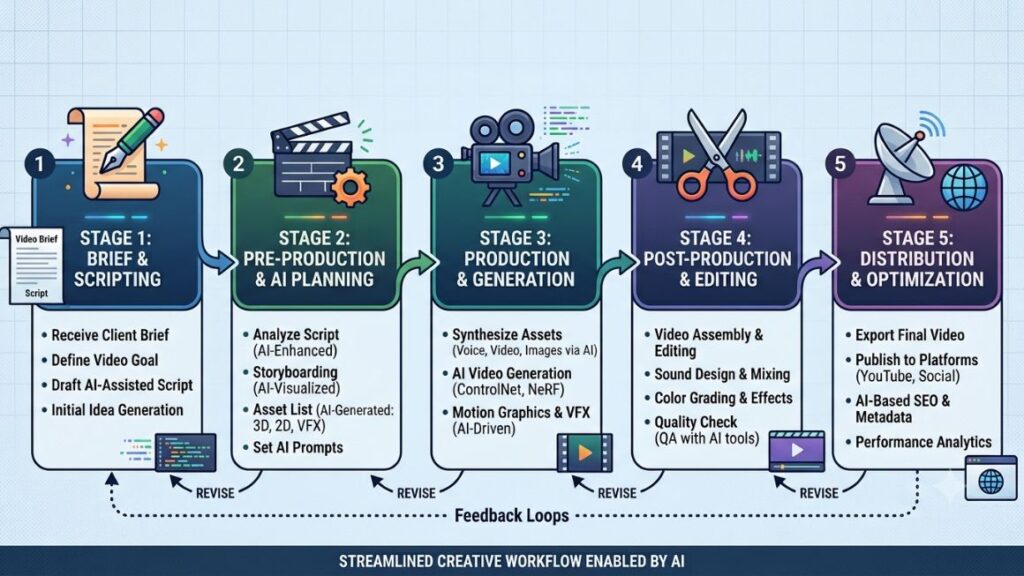
A working pipeline usually breaks into five stages, each handled by a different specialist tool rather than one do-everything app.
- Brief and script generation. An LLM turns a rough content brief into a scene-by-scene script, matched to the target platform’s pacing conventions.
- Visual generation or sourcing. The system either generates an avatar delivering the script, generates B-roll from a text prompt, or pulls from existing long-form footage.
- Assembly and editing. Clips, voiceover, captions, and music get combined into a rough cut, with filler words and dead air stripped automatically.
- Quality review. A human, or in more mature setups an AI reviewer checking against brand guidelines, approves the cut before it goes further.
- Distribution. The finished asset gets reframed for each target platform’s aspect ratio and pushed out on a schedule with platform-specific captions.
That sounds tidy on paper. In practice, step 4 is where most teams keep a person firmly in the loop, and for good reason: Idomoo’s 2024 State of Video Technology study found that lack of trust in AI-generated content was the top concern among consumers surveyed, cited by 58% of respondents with reservations about AI video.
The Best AI Tools Worth Building Into Your Video Stack
No single platform does all five stages well. Here’s what each tool actually does, and where it fits.
Synthesia for Avatar-Led Corporate and Training Content
Synthesia turns a written script into a video of an AI avatar speaking it, with lip-sync, gestures, and a voice matched to the script’s language. As of 2026 the platform offers 240+ stock avatars and voiceovers in 160+ languages, and it can generate a video directly from an uploaded document or PowerPoint rather than a hand-typed script.
It shines for onboarding, compliance training, and internal communications where the same message needs to reach teams in a dozen countries. One documented case: a learning and development team localized 100 hours of training content into 10 minutes of work using Synthesia’s one-click translation. It’s less suited to persuasive, emotionally nuanced brand advertising, where the avatar delivery can still read as a little clinical.
Pricing in 2026 starts at a free plan (10 watermarked minutes/month), moving to Starter at roughly $18/month billed annually, up to custom Enterprise pricing with unlimited minutes.
HeyGen for Fast, Multilingual Marketing Avatars
HeyGen competes directly with Synthesia but leans harder into marketing and ad use cases rather than pure L&D. Its Avatar IV model produces more expressive body movement and gestures, and its translation feature dubs an existing video into 175+ languages with lip-sync resynced to match. Companies including HubSpot, Shopify, and Salesforce use it for localized product videos, per HeyGen’s own case study data.
The catch is its credit system. Avatar IV burns through credits roughly seven times faster than the standard Avatar III model, so a Creator plan’s 200 monthly credits cover only about 10 minutes of the premium avatar tier. Budget accordingly if your workflow leans on the higher-fidelity avatars.
Runway for Generative B-Roll and Creative Video
Runway’s Gen-4 family generates original video from a text prompt or a single reference image, complete with camera movement control (pan, tilt, dolly, crane) specified in plain language. It’s the tool to reach for when you need a product-in-motion shot, an abstract data visualization, or B-roll that doesn’t exist as footage anywhere.
It’s not a script-to-avatar tool and it’s not cheap at scale. A 60-second 1080p video at standard quality can burn through more than two months of entry-tier credits in one render, according to independent pricing breakdowns published in 2026. Treat it as a specialist for hero shots and short brand films, not your default engine for routine weekly content.
Descript for Script-Based Editing and Repurposing
Descript treats video editing like editing a text document: delete a sentence from the transcript, and the matching video segment disappears too. Its AI co-editor, Underlord, can strip filler words, clean up audio, correct on-camera eye contact, and draft a rough script from a prompt, all inside one interface.
It’s the strongest fit for podcast-to-video workflows and talking-head content that needs a fast, forgiving edit rather than cinematic polish. Descript reports edit times drop 60-70% compared to traditional timeline editors like Premiere for this kind of dialogue-driven content. Pricing runs from a free 60-minutes/month plan up to around $50/month per seat for team plans.
Opus Clip for Turning Long-Form Video into Shorts
Opus Clip does one job extremely well: it takes a long recording, a podcast, webinar, or YouTube video, and cuts it into 10-20 short, captioned, vertically-framed clips ranked by a predicted virality score. Active speaker detection keeps the camera focus on whoever is talking, which matters a lot for interview-format content.
It needs existing source footage to work; it generates nothing from scratch. Reviewers in 2026 report roughly 80% of the clips it surfaces from podcast content are usable without further editing. Pricing starts free (60 processing minutes/month, watermarked) with the Pro tier at $29/month unlocking 1080p export, auto-posting, and AI B-roll insertion.
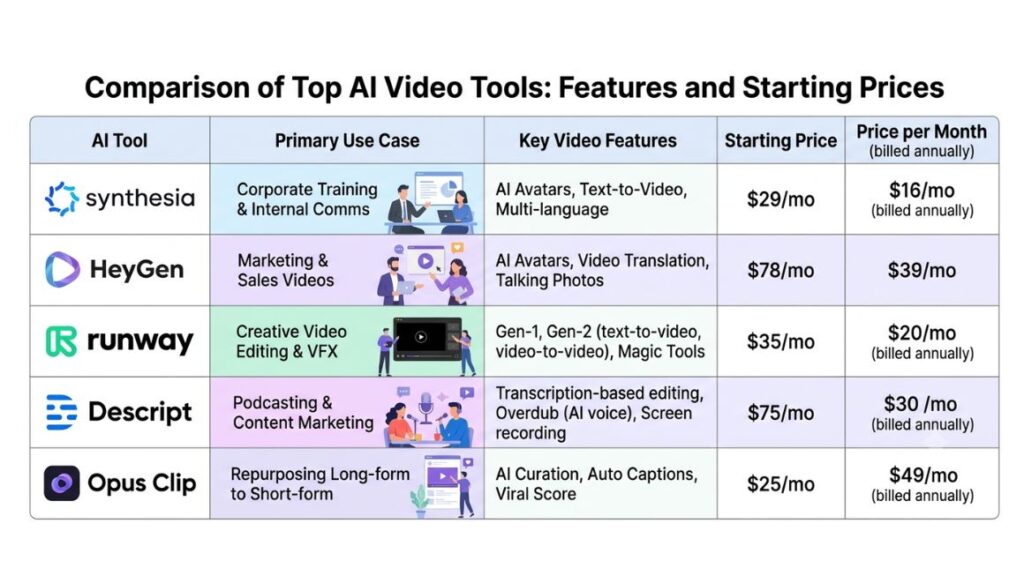
No single video tool covers the full pipeline. Synthesia and HeyGen handle avatar-led scripted video, Runway generates original footage from prompts, Descript handles transcript-based editing, and Opus Clip repurposes existing long-form video into shorts. Most working setups combine at least two of these rather than relying on one platform.
How Agents Automate Distribution Across Platforms
Creating the video is half the job. Getting it onto five platforms in the right aspect ratio, with platform-appropriate captions, at the right time, is the part teams underinvest in most.
Opus Clip’s built-in scheduler covers YouTube Shorts, TikTok, Instagram Reels, Facebook Pages, and LinkedIn directly from the clipping tool, generating platform-specific titles and hashtags for each. The honest limitation, flagged by several 2026 reviews, is that TikTok’s auto-posting connection drops occasionally, so heavy users often download and post to TikTok manually as a backup.
Dedicated schedulers like Metricool and Buffer sit a layer above individual tools and handle multi-account publishing, analytics, and approval workflows for teams managing several brands or client accounts at once. Repurpose.io specializes narrowly in one thing: automatically resharing a video posted to one platform across the rest, which is useful once your creation pipeline is already producing more assets than one person wants to upload by hand.
Rhetorically, the question worth asking here is not which scheduler has the most features. It’s which one your team will actually open every day. A powerful dashboard nobody checks does less for you than a simple one that gets used.
Building Your Own Automated Video Workflow with n8n or Make
You don’t need to be a developer to wire these tools together, though a technical workflow does help for the more advanced branching logic.
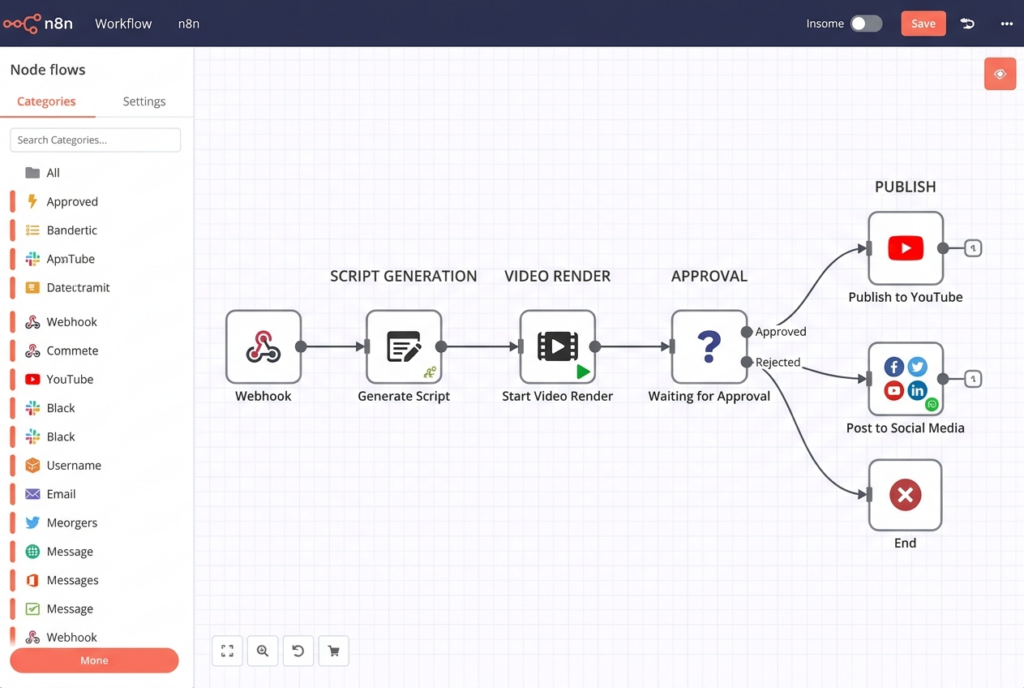
- Set the trigger. Start with a form submission, a new row in a content calendar spreadsheet, or a scheduled weekly run.
- Generate the script. Route the brief through an LLM node to produce a scene-by-scene script matched to the target platform.
- Generate the visual asset. Call the Synthesia or HeyGen API for avatar-led scripts, or the Runway API for generative B-roll.
- Assemble the rough cut. Send the generated assets to Descript’s API, or a rendering tool, to combine voiceover, captions, and music.
- Route for human approval. Post the draft to a Slack channel with an approve/reject button before anything publishes.
- Publish across platforms. On approval, push the final file to Opus Clip’s scheduler, Metricool, or Buffer for multi-platform distribution.
n8n’s advantage here is its native support for building actual decision-making agents, with 70+ AI-focused nodes and persistent memory across runs, according to a 2026 comparison of the two platforms. Make’s advantage is a cleaner visual canvas that a non-technical marketer can build and maintain without developer support. If your workflow genuinely needs an LLM to decide what happens next rather than just generate text, n8n is the stronger foundation. If a marketing ops person needs to own the build themselves, Make gets there faster.
Real Brands Already Running AI-Driven Video Workflows
HubSpot uses HeyGen to localize product walkthrough videos for regional teams instead of re-filming each version with a native speaker, according to HeyGen’s published customer data. Miro and Shopify appear in the same customer list for similar localization use cases.
On the repurposing side, podcasters and YouTube creators running weekly long-form shows use Opus Clip to turn each episode into a week of short-form posts rather than hiring an editor to cut clips by hand. From what we’ve seen with YUP learners experimenting with these workflows, the biggest early win usually isn’t the avatar video itself. It’s the repurposing layer, since most brands already have hours of unused webinar and interview footage sitting in a shared drive doing nothing.
This does have a real limit for B2C brands built on personality and camera presence. An Instagram-first D2C brand like boAt or Mamaearth, where founder or influencer authenticity drives engagement, gets far less value from avatar-led generation than a B2B software company producing explainer and onboarding content at volume.
Where AI Agents for Video Still Fall Short
Trust is the biggest one. Idomoo’s 2024 study found 59% of surveyed consumers had some concern about AI-generated video, with a lack of trust cited most often. That’s not a technical problem you can automate away. It means disclosure and quality control matter more, not less, as production speeds up.
Text rendering inside generated video is still unreliable across every major generative model, including Runway’s Gen-4.5, meaning any on-screen signage, labels, or product text usually needs a manual fix pass. Avatar delivery, even at its best, still reads as slightly clinical for content that needs genuine emotional range, a limitation Synthesia itself acknowledges is better suited to corporate and training content than persuasive brand storytelling.
And credit-based pricing across nearly every tool in this stack means costs scale with usage in ways that are easy to underestimate. A team that plans around entry-tier credit allocations and then scales up production volume can find itself hitting caps mid-month more often than expected.
Where This Actually Takes Your Video Strategy
The teams getting real leverage from this aren’t the ones chasing the flashiest avatar demo. They’re the ones treating video production like a pipeline with clear handoffs: script, generate, edit, approve, publish, each stage owned by the tool built for it.
Start smaller than you think you need to. Pick one bottleneck, probably repurposing existing long-form content into shorts, and automate that single stage before you try to wire together a five-tool pipeline. Get that working reliably, then add the next stage.
If you want to build the underlying skills to design and run these workflows yourself rather than depending on an agency, Hotskill’s hands-on AI tooling walkthroughs and YUP’s AI Marketing course both go deeper into exactly this kind of build, prompt structuring, tool selection, and automation logic included.
Frequently Asked Questions
What exactly is an AI video marketing agent?
It’s an automated system that plans and executes multiple video production steps, scripting, generation, editing, and publishing, by routing tasks between specialist AI tools rather than requiring a person to operate each tool separately.
Is an AI video agent the same as an AI video generator?
No. A generator like Synthesia or Runway produces one type of output from a prompt or script. An agent sits above multiple generators and editing tools, deciding which one to call for a given task and moving the output through the pipeline automatically.
How do I set up an automated video workflow?
Start with a trigger such as a content calendar entry, route the brief through a script-generation step, call an avatar or generative video API, assemble the rough cut, add a human approval step, then publish through a scheduler like Opus Clip or Metricool. n8n and Make are the two most common orchestration platforms for this.
Who actually needs this kind of automation?
Teams already producing enough long-form or scripted content that manual editing and reposting has become the bottleneck, podcasters, B2B marketing teams doing localization at scale, and agencies managing several client accounts, get the most value. A solo creator posting once a week rarely needs a full setup like this.
Is AI video actually worth the cost, or is it hype?
For scripted, repeatable content like training, onboarding, and localized product explainers, the time savings are well documented, Synthesia customers report up to 90% faster production. For persuasive brand storytelling that depends on personality and emotional nuance, the return is weaker and a human-shot video usually still performs better.
Why do my AI-generated clips look robotic or miss the mark?
Usually it’s a source-material problem, not a tool problem. Clipping tools only work as well as the footage you feed them, and avatar tools produce flatter delivery on scripts written for reading rather than speaking. Write scripts in short, direct sentences meant to be heard, not read.
Can this automation post directly to TikTok, Instagram, and YouTube?
Most tools can, though reliability varies by platform. Opus Clip and Metricool both support direct scheduling to major platforms, but TikTok’s auto-posting connection is the least reliable in current reviews, so many teams keep a manual backup step for that platform specifically.
Do I need to disclose that a video was made with AI?
There’s no single global rule, but given that 59% of consumers report some distrust of AI-generated video per Idomoo’s research, disclosure is generally the safer choice for brand trust, particularly for avatar-led content standing in for a real spokesperson.
What’s the difference between n8n and Make for building this?
n8n is better suited to workflows where an LLM needs to make real decisions about what happens next, with deeper native AI agent support. Make offers a more approachable visual canvas that’s faster for non-technical marketers to build and maintain without developer help.
Can one tool handle the entire creation and distribution pipeline?
Not yet, realistically. Every platform covered here specializes in one stage, avatar generation, generative B-roll, transcript editing, clipping, or scheduling, and most working setups chain two or three of them together through an orchestration layer rather than relying on a single all-in-one product.