

Most marketing teams still segment customers the way they did a decade ago. Someone exports a CSV from the CRM, drops it into a spreadsheet, applies a few filters based on last purchase date and order value, and calls it a segmentation strategy. It works, until the business grows past a few thousand customers and the spreadsheet stops keeping up.
That’s the gap an AI Agent for Customer Segmentation is built to close. Instead of a marketer manually slicing data once a quarter, an autonomous system watches behavior continuously, updates groups on its own, and flags shifts a human would catch weeks too late. For a D2C brand running daily campaigns or a SaaS company tracking usage patterns, that lag is expensive.
This article breaks down what these agents actually do, how they work under the hood, and how to set one up without turning your data stack into a mess. You’ll also get real examples from brands already doing this, plus the mistakes teams make when they automate segmentation too fast.
Table of Contents
What Customer Segmentation Actually Means Today
Customer segmentation is the practice of dividing your customer base into groups that share meaningful traits, so you can market to each group differently instead of treating everyone the same. That’s the textbook definition. In practice, it’s evolved into something a lot more granular.
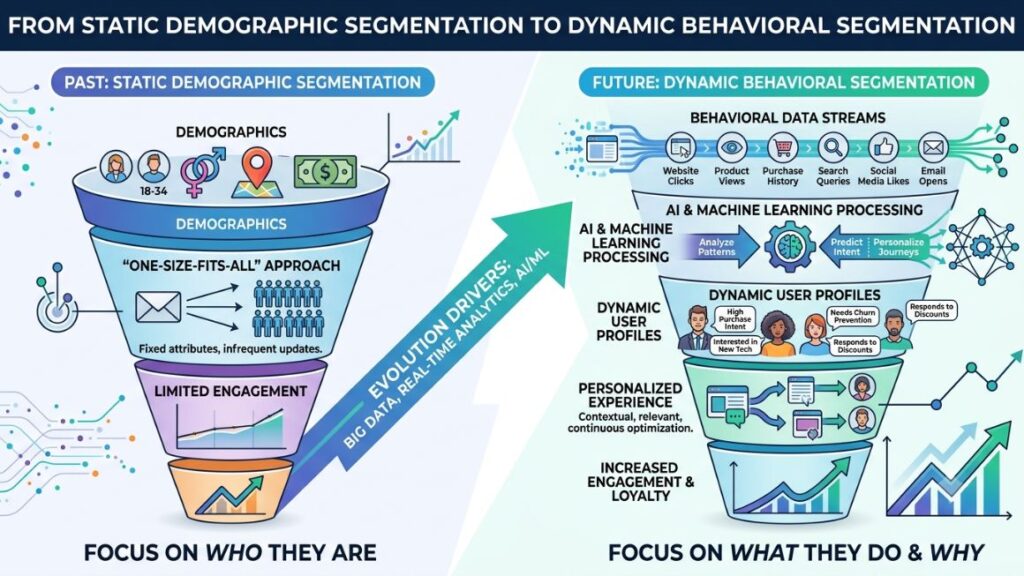
Ten years ago, segmentation meant age, gender, and location. Basic demographics, applied once and left alone for months. Today, the useful segments are behavioral: how often someone opens your app, what they browse but don’t buy, how they respond to a discount versus free shipping. Static demographic buckets barely predict anything anymore.
Honestly, this shift is why so many segmentation projects stall. Teams build a segmentation model in a workshop, present it in a slide deck, and then never touch it again because updating it manually takes too much effort. The segments go stale. Six months later, marketing is still targeting a “high-value customer” group that quietly churned.
This is precisely the problem that pushed teams toward automation in the first place. When segments need to update daily instead of quarterly, no human team can keep pace by hand.
What Is an AI Agent, and Why Does Segmentation Need One
An AI agent is a software system that can perceive data, make decisions, and take action toward a goal with minimal human input, often across multiple steps without a person approving each one. That’s different from a simple automation script that runs a fixed rule. An agent adapts its behavior based on what it observes.
For segmentation specifically, that distinction matters a lot. A rule-based system might say “if a customer hasn’t purchased in 60 days, move them to the at-risk segment.” An agent goes further. It can notice that browsing frequency dropped before the 60-day mark, connect that to a pattern it’s seen in customers who eventually churned, and reclassify the customer early, without anyone writing that specific rule.
Most marketers skip understanding this distinction. It shows in how they evaluate tools. They ask “does it segment my customers,” when the real question is whether the system can reason about new patterns it hasn’t been explicitly told to look for.
An AI agent for customer segmentation differs from rule-based automation because it can detect new behavioral patterns and reclassify customers without a human writing a new rule for every scenario. This adaptability is what makes segments stay accurate as customer behavior shifts, rather than going stale between manual updates.
How an AI Agent for Customer Segmentation Actually Works
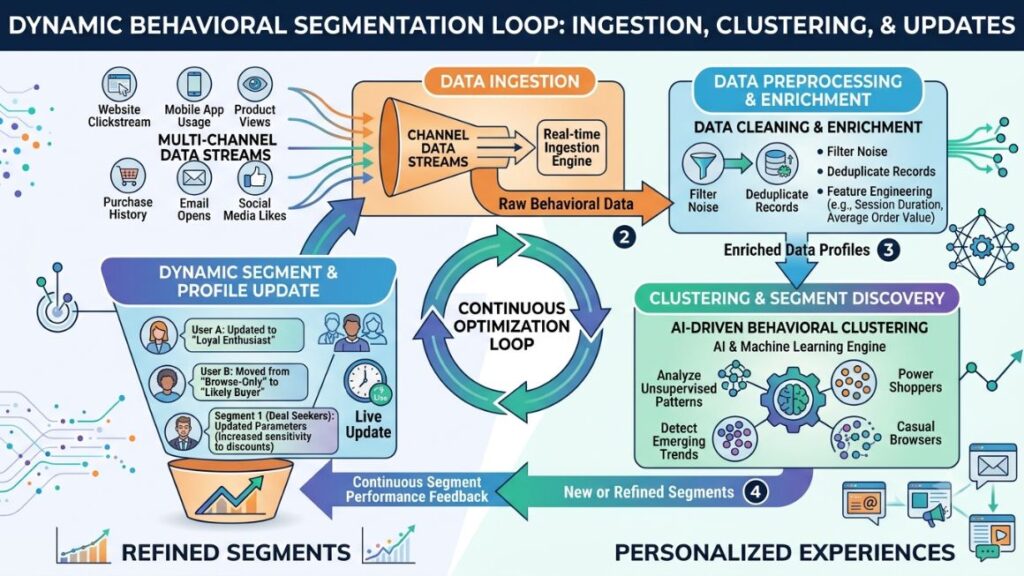
An AI Agent for Customer Segmentation pulls data from every customer touchpoint, clusters customers using pattern recognition rather than fixed rules, and updates those groups continuously as new behavior comes in. That’s the short version. The longer version has three distinct stages worth understanding before you set one up.
Stage 1: Data Ingestion Across Channels
The agent needs a unified view of the customer, which means pulling from your CRM, website analytics, app events, support tickets, and email engagement data all at once. Fragmented data is the single biggest reason segmentation projects fail before they even start.
A retail brand using Shopify, Klaviyo, and a separate loyalty app, for instance, often has three incomplete pictures of the same customer instead of one complete one. The agent’s job is to stitch these together using a unique identifier like email or phone number, then build a single behavioral profile.
Stage 2: Pattern Detection and Clustering
Once the data is unified, the agent applies clustering techniques, often variations of k-means clustering or more advanced embedding-based methods, to group customers by similarity rather than by predefined labels. This is where machine learning actually earns its place in the process.
Unlike a marketer manually deciding “these five behaviors define a loyal customer,” the agent lets the data reveal which behaviors actually correlate with loyalty. Sometimes the result confirms intuition. Sometimes it doesn’t, and that’s usually the more useful outcome.
Stage 3: Dynamic Segment Updates and Action
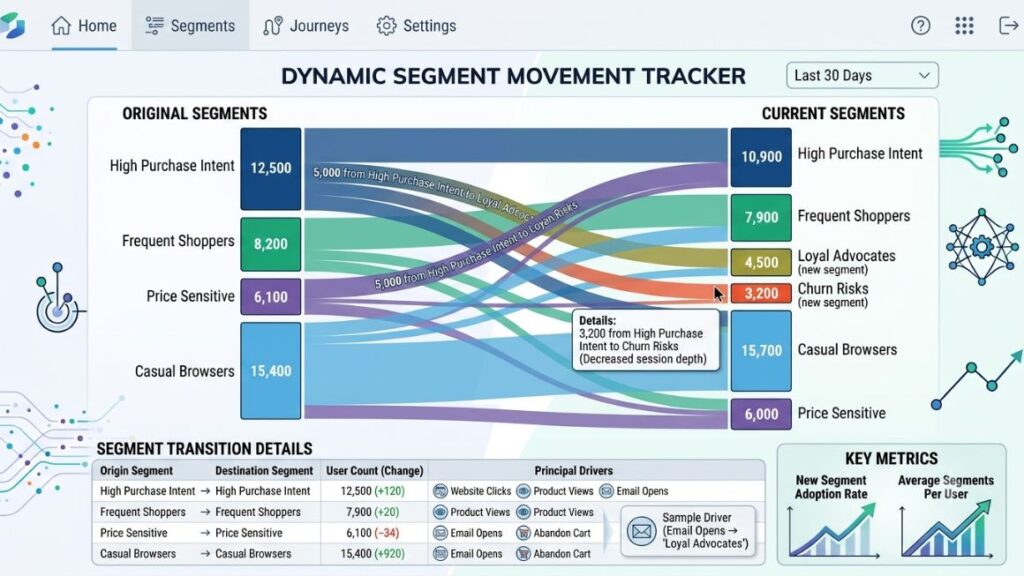
Static segmentation stops here. An agent doesn’t. It monitors each customer’s profile continuously and moves them between segments as behavior changes, then often triggers the next action automatically, like adding someone to a win-back email flow the moment they slip into an at-risk cluster.
That’s the part that separates customer segmentation built on automation from segmentation that lives in a spreadsheet. The insight and the action happen in the same system, without a marketer manually exporting a new list every week.
Key Benefits of Automating Customer Segmentation
The appeal isn’t just saving time, though that’s real too. Automated segmentation changes what’s possible with targeting in ways manual methods structurally can’t match.
- Segments update in real time, so a customer who just abandoned a cart gets treated differently within minutes, not at the next quarterly review.
- Hidden micro-segments surface that a human analyst would likely never spot manually, because clustering algorithms don’t rely on the categories a person already assumes exist.
- Marketing spend gets more efficient because campaigns target people who actually match the current behavior pattern, not a stale label from three months ago.
- Personalization scales without adding headcount, since the agent handles reclassification work that would otherwise need an analyst full time.
- Churn signals surface earlier, often days or weeks before a customer would show up on a standard RFM (recency, frequency, monetary) report.
According to a 2024 McKinsey report on personalization, companies that excel at personalization generate 40% more revenue from those activities than average players. Segmentation accuracy is the foundation that personalization efforts sit on. Get the segments wrong, and even the best-written email copy targets the wrong audience.
That said, the gains aren’t automatic just because you bought a tool. The benefits show up only when the underlying data feeding the agent is clean and connected, which is exactly where most teams trip up.
Real-World Use Cases: Brands Already Doing This
Nykaa uses behavioral and purchase-pattern data to power personalized product recommendations and targeted campaigns across its beauty and wellness catalog, adjusting what a customer sees based on recent browsing and buying signals rather than a fixed customer profile set months earlier. The result is a recommendation feed that feels current instead of generic.
Swiggy applies similar logic to food delivery, where a customer’s ordering cadence, cuisine preference, and price sensitivity shift constantly. A dynamic segmentation approach lets the platform push a different offer to someone who orders daily lunch versus someone who only orders on weekends, without a marketer manually maintaining those two lists.
From what we’ve seen with YUP learners working in D2C and quick commerce, the biggest shift isn’t the technology itself. It’s the mental model change from “segmentation is a project we run twice a year” to “segmentation is a system that runs continuously in the background.” That mindset shift usually matters more than which specific tool a team picks.
How to Set Up an Automated Segmentation Agent, Step by Step
Setting up an agent isn’t a plug-and-play weekend project, but it’s also not the multi-quarter data science initiative some vendors make it sound like. Here’s the realistic path.
- Audit your existing data sources. List every system that holds customer behavior data, including your CRM, e-commerce platform, email tool, and support software, and confirm each has a shared customer identifier.
- Connect your data into a single pipeline. Use a customer data platform (CDP) like Segment or a data warehouse setup to unify records before the agent ever touches them.
- Define your business objective for segmentation. Decide whether the priority is reducing churn, increasing average order value, or improving win-back rates, since this shapes which features the clustering model should weight.
- Choose or configure the agent’s clustering logic. Most modern tools, including platforms built on top of large language models, let you set initial parameters without needing a data science team to code the model from scratch.
- Run a pilot on a subset of customers. Test the agent’s segment assignments against your team’s manual judgment for a sample group before rolling it out fully.
- Automate the downstream actions. Connect segment changes to your email, ads, or CRM platform so a customer moving segments triggers the right next step automatically.
- Review and retrain monthly. Check whether the segments still align with business outcomes, and retrain the model if customer behavior has shifted meaningfully.
Common Mistakes Teams Make When Automating Segmentation
The thing is, most segmentation automation failures aren’t a technology problem. They’re a process problem that shows up after the tool is already live.
Feeding the agent incomplete data is the most common one. If support ticket history isn’t connected, the agent can’t factor in that a customer just had a bad experience, and it might keep recommending upsell campaigns to someone who’s about to churn out of frustration.
Treating the agent as fully hands-off causes the second failure. Teams set it up, walk away, and never check whether the segments still make business sense six months later. An agent needs periodic review, not permanent supervision, but zero oversight is where things drift.
Over-segmenting is a subtler mistake. Splitting customers into 40 micro-segments sounds sophisticated, but if marketing can’t realistically build 40 different campaigns, the extra granularity does nothing but add complexity. Ten well-defined, actionable segments beat forty that never get used.
This may not apply to every business, but for most mid-sized D2C and SaaS companies, five to twelve active segments is the practical range where the system stays useful without becoming unmanageable.
The most common reason automated segmentation fails isn’t the AI model itself, but incomplete or disconnected data feeding it. Teams that unify CRM, support, and behavioral data before deploying an agent see far more accurate segment assignments than those who automate on top of fragmented records.
Choosing the Right Tools for Your Segmentation Agent
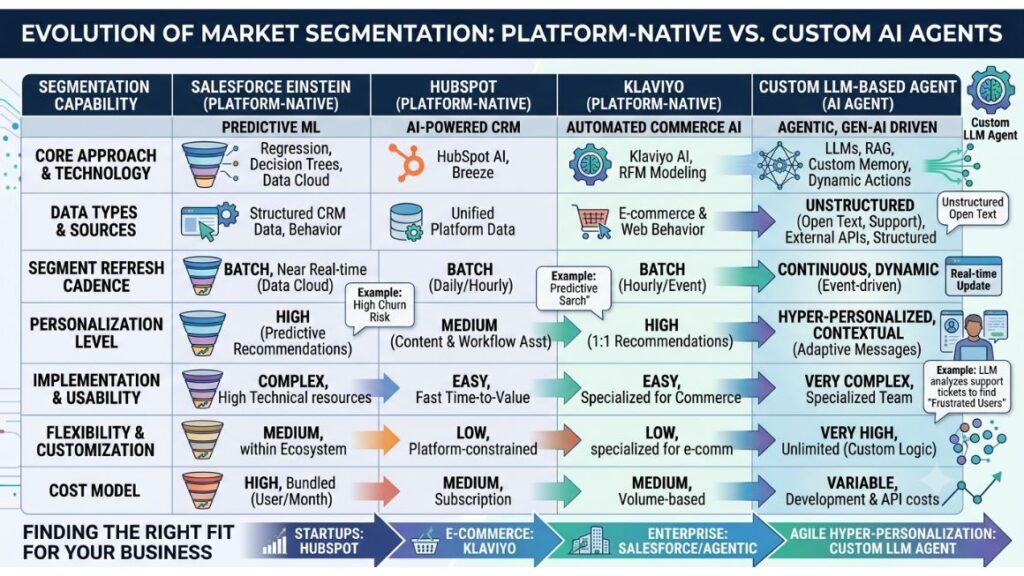
Not every business needs a custom-built agent from scratch. Platforms like Salesforce Einstein, HubSpot’s AI tools, and Klaviyo’s predictive analytics already offer segmentation automation built into tools many teams use anyway.
For teams wanting more control, building a custom agent using a large language model API, connected to a data warehouse like BigQuery or Snowflake, gives more flexibility over exactly which behaviors the clustering logic weighs. This route needs more setup time but pays off for businesses with unusual customer journeys that generic tools don’t model well.
To be fair, most companies don’t need the custom route. If your existing CRM or email platform already has a segmentation module with predictive scoring, start there before building something new. The custom-agent path makes sense once you’ve outgrown what off-the-shelf tools can do, not before.
Getting this right isn’t about picking the fanciest tool on the market. It’s about matching the setup to how complex your customer journeys actually are, and being honest about whether your data is clean enough to feed an agent in the first place.
Getting Started With Segmentation Automation
The core idea here isn’t complicated: customer behavior changes constantly, so the systems tracking it need to change just as fast. A spreadsheet updated once a quarter simply can’t keep up with a customer base making decisions daily.
Start small. Connect your existing data sources, run a pilot on one segment type, like churn risk or high-value customers, and measure whether the automated groupings actually improve campaign performance before rolling it out across your entire customer base. The teams that get the most value from this aren’t the ones with the fanciest models. They’re the ones with clean, connected data feeding a system built around a clear business goal.
If you’re looking to build practical AI skills like this into your own marketing workflow, YUP’s AI Marketing course walks through setting up automation like this step by step, with real tools and real campaigns, not just theory.
Frequently Asked Questions
What is an AI agent for customer segmentation?
It’s a software system that automatically groups customers based on behavioral and transactional data, then updates those groups continuously as new data comes in. Unlike manual segmentation, it doesn’t need a marketer to re-run the analysis every quarter.
How is this different from regular customer segmentation software?
Traditional segmentation software applies fixed rules a person sets up in advance, like “customers who spent over ₹5,000 go into the VIP segment.” An agent uses pattern recognition to find groupings a person might not think to define manually, and it adjusts those groups on its own over time.
Do I need a data science team to set one up?
Not necessarily. Many platforms like HubSpot, Salesforce Einstein, and Klaviyo now include built-in segmentation automation that doesn’t require coding. A data science team becomes useful mainly if you’re building a fully custom agent for an unusual customer journey.
How often do the segments update?
This depends on the platform, but most modern agents update in near real time or on a daily batch cycle. The frequency should match how fast your customers’ behavior actually changes, since updating hourly for a business with slow purchase cycles adds no real value.
Is automated segmentation worth it for a small business?
It depends on your customer base size. If you have under a few thousand customers, manual segmentation in a spreadsheet may still be manageable. Once you cross into tens of thousands of customers with frequent behavior changes, automation starts paying for itself quickly.
What data does the agent need to work well?
At minimum, it needs purchase history, browsing or app usage data, and some form of engagement data like email opens or clicks. The more channels you connect, including support tickets and loyalty program activity, the more accurate the resulting segments become.
Can this replace my marketing team?
No, and it isn’t meant to. The agent handles the analytical and reclassification work, but a marketing team still needs to decide what to do with each segment, write the campaigns, and judge whether the segments align with business goals.
Why isn’t my segmentation agent producing useful groups?
This usually traces back to incomplete data feeding the model, such as missing support history or disconnected e-commerce and email platforms. Check your data pipeline first before assuming the algorithm itself is the problem.
How many customer segments should I actually have?
For most mid-sized businesses, five to twelve active segments strikes the right balance between precision and manageability. More than that, and marketing teams typically can’t build enough distinct campaigns to act on every segment anyway.
Does this work for B2B companies, or just D2C and retail?
It applies to both, but the underlying signals differ. B2B segmentation often weighs account size, usage frequency of a product, and contract renewal timing instead of individual purchase behavior, so the model needs to be configured around those business-specific signals.