

Most sales teams still lose hours every week to the same grind: scraping lists, checking if a contact is even worth emailing, writing the same follow-up for the fifth time. Meanwhile the pipeline stays thin because nobody has time to actually prospect. That gap between “we need more leads” and “we don’t have the hours to find them” is exactly where an AI Agent for Lead Generation earns its place. It can run the repetitive front-end of prospecting around the clock, so your reps spend their time on calls that are actually worth taking.
This piece breaks down what these systems do differently from a basic chatbot or a simple automation rule, where they’re already working in the field, and how to roll one out without wrecking your pipeline quality in the process.
Table of Contents
What Sets This Kind of Sales Automation Apart
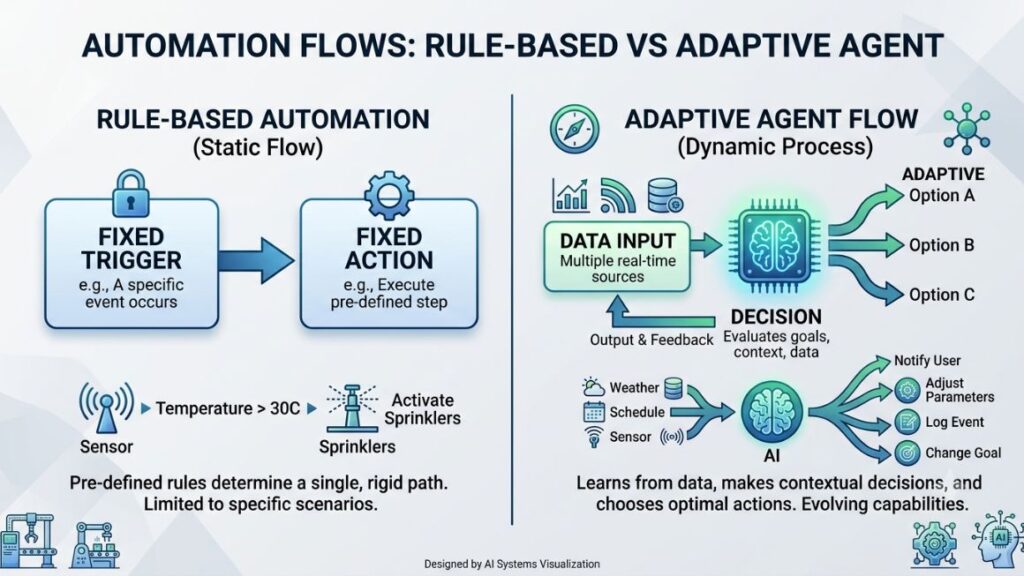
An AI agent is software that can take in information, make a decision, and act on it without a human approving each step. That’s the part that separates it from a chatbot, which mostly waits for a prompt and replies. Point one at prospecting, and it will research a company, score how good a fit it is, and start outreach on its own, adjusting each message to what it found rather than sending the same template to everyone.
This kind of system is autonomous software that identifies, qualifies, and engages potential customers using real-time data, without a human manually triggering each action. Unlike rule-based automation, it adapts its next move based on what it learns about the prospect, rather than following a fixed script.
Compare that to a standard email sequence tool. Those run on triggers you set once: if someone opens an email, send email two three days later. A smarter system, on the other hand, can pull a prospect’s recent funding news, notice they just hired a VP of Marketing, and reference both in the first line of an outreach message it writes itself. That’s a meaningfully different level of personalization at scale, and it’s the reason marketing teams have started treating this as its own category rather than “email automation with extra steps.”
How the Qualification and Outreach Loop Works
Under the hood, most of these systems follow a loop: pull data, score the prospect, decide on an action, execute it, then log the result and learn from it. The exact stack varies, but the loop is consistent across tools like Clay, Apollo.io, and 11x’s Alice.
The system starts by pulling firmographic and intent data from sources like LinkedIn Sales Navigator, Clearbit, or a company’s own CRM. It then runs that data against a scoring model, usually built on criteria like company size, industry, recent hiring activity, or website visits from a tool like Clearbit Reveal. Prospects that clear the threshold move into an outreach sequence the software writes itself, drawing on whatever signal triggered the qualification in the first place.
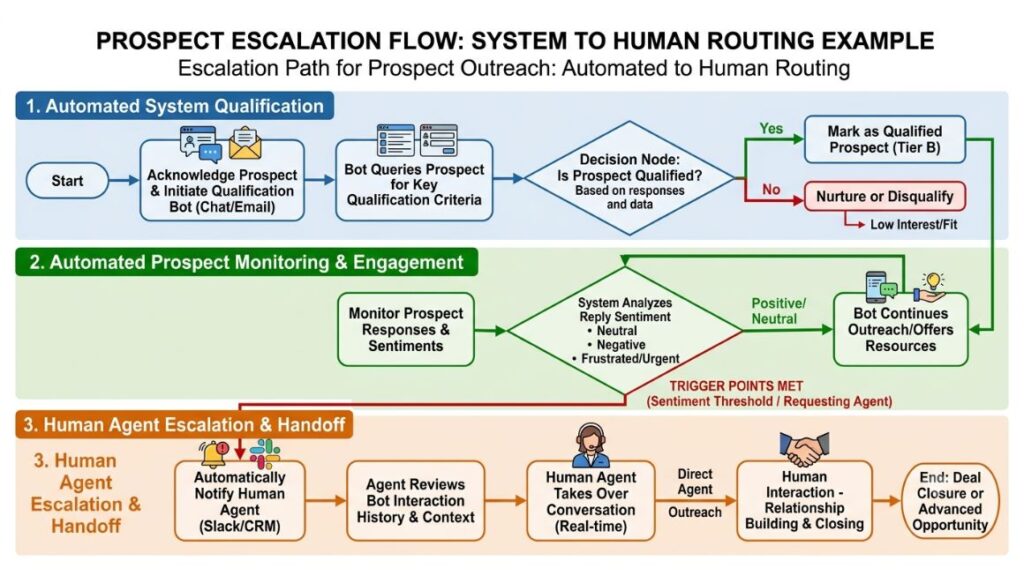
Once a prospect replies, the system reads the response and decides what happens next. A positive reply about pricing might get routed straight to a sales rep’s calendar link. A “not right now” gets tagged and moved into a longer nurture sequence instead of being dropped entirely. That handoff logic is what most teams get wrong when they first set this up, and it’s worth spending real time on before launch.
Key Benefits of Automated Prospecting
The case for adopting this kind of tool comes down to three things: time, accuracy, and coverage. Each shows up differently depending on team size, but all three compound once the system is tuned properly.
Time Saved on Prospecting and Research
Manual research is where most SDR hours disappear. Checking a company’s tech stack, recent news, and hiring activity before a single cold email can easily take fifteen minutes per prospect. An automated system compresses that into seconds, running the same checks across hundreds of accounts in parallel.
According to a 2024 HubSpot State of Sales report, sales reps spend only about 28% of their week actually selling, with the rest lost to admin work and research. That’s the exact block of time this kind of tool is built to reclaim.
Better Qualification and Scoring Accuracy
Human scoring is inconsistent. Two reps looking at the same prospect will often reach different conclusions about whether it’s worth pursuing, especially under deadline pressure. A consistent scoring model applies the same logic every time, which means qualified prospects stop slipping through because someone was rushing on a Friday afternoon.
This consistency also makes it easier to spot which criteria actually predict a closed deal, since the scoring inputs are logged and traceable rather than living in someone’s head.
Round-the-Clock Engagement Without Added Headcount
A prospect browsing your pricing page at 11pm doesn’t wait for business hours to lose interest. An automated system can trigger a relevant follow-up the moment that signal fires, instead of queuing it for a rep to handle the next morning. For teams selling into different time zones, this alone can meaningfully shorten the average response time that often decides whether a prospect converts at all.
Speed to first response is one of the strongest predictors of conversion, and automating outreach removes the business-hours ceiling that limits how fast a human team can realistically respond.
Real-World Use Cases
Theory is one thing. Here’s where this kind of system is actually running in production today.
B2B SaaS Outbound Prospecting
11x built its sales agent, Alice, specifically to handle outbound for B2B SaaS teams, running prospect research, personalized email writing, and follow-up sequencing without a human drafting each message. Teams using it typically layer it on top of existing CRMs like HubSpot or Salesforce, letting Alice populate and update records as conversations progress.
E-commerce and D2C Retargeting
D2C brands use these systems to catch cart abandonment and browse behavior that a static email flow would miss. Nykaa-style retargeting logic, for instance, benefits from software that can distinguish between a shopper who abandoned checkout over shipping cost versus one who was simply comparing products, and message each one differently instead of sending the same generic reminder.
Real Estate and High-Ticket Service Inquiries
Real estate platforms like Zillow’s Premier Agent tools use conversational software to qualify inbound inquiries before a human agent ever picks up the phone, asking about budget, timeline, and location preference automatically. That filtering step matters more here than almost anywhere else, since a single unqualified call can eat thirty minutes of an agent’s day for a prospect that was never going to close. Filtering the line type matters just as much, since a quick run through a VoIP checker reveals whether the inbound inquiry actually connects to a reachable person or to a burner number that disappears the moment a rep dials.
Best Practices for a Successful Rollout
Getting value out of this kind of system isn’t automatic. Most failed rollouts trace back to a handful of avoidable mistakes.
Feed It Clean, Structured Data
An automated system is only as good as what it’s reading. Duplicate contacts, outdated job titles, and messy CRM fields will produce outreach that references information that’s simply wrong, which damages credibility faster than no outreach at all. Run a data cleanup pass before connecting anything to your CRM, not after.
Keep a Human in the Loop for High-Value Prospects
Full automation makes sense for low-ticket, high-volume prospecting. It makes far less sense once a prospect looks like a six-figure enterprise deal. Most teams set a threshold, based on deal size or account tier, above which the software flags the prospect for a human rep instead of continuing the sequence on its own.
This may not apply to every setup, but in most cases, the highest-value 10 to 15% of prospects deserve a person’s judgment before the next message goes out.
Set Clear Escalation and Handoff Rules
Define exactly what triggers a handoff to a human, whether that’s a specific keyword in a reply, a certain number of exchanges, or a direct pricing question. Without this, automated systems either escalate too much, defeating the purpose of the setup, or too little, letting a hot prospect sit in a sequence when they were ready to talk three messages ago.
Common Mistakes and Limitations to Watch For
Honestly, this technology gets oversold more than most. It won’t fix a weak offer or a poorly defined ideal customer profile, it just executes whatever targeting logic you give it faster and at greater scale, mistakes included.
Teams also underestimate how much tuning a scoring model needs in the first few weeks. Expect false positives and missed signals early on, and budget time to review outputs rather than assuming it’ll be accurate out of the box. This works well for high-volume outbound motions, but it’s a poor fit for complex, relationship-led enterprise sales where a single wrong data point can sour an entire account relationship.
There’s also a data privacy angle worth taking seriously. Any system pulling from LinkedIn, company websites, or third-party enrichment tools needs to operate within the terms of service of each platform and relevant regulations like India’s Digital Personal Data Protection Act. Skipping that review isn’t a shortcut worth taking.
Your prospecting still needs a strategy underneath it, since automation only handles the execution layer of your broader Lead Generation motion, not the positioning or targeting decisions that determine whether it’s even pointed at the right accounts.
Conclusion
An AI Agent for Lead Generation isn’t magic, but it does remove a genuine bottleneck: the hours of manual research and first-touch outreach that keep pipelines thin no matter how good your offer is. Get the data clean, set sensible escalation rules, and keep a human reviewing the highest-value prospects, and the time it frees up goes straight back into the conversations that actually close.
If you’re figuring out how to fold AI tools like this into your broader marketing stack without breaking what already works, that’s exactly what we cover inside the Hotskill app, with practical, hands-on lessons on deploying AI across real marketing workflows.
FAQ
What does this kind of system actually do?
It finds, researches, and qualifies potential customers, then engages them with personalized outreach, adjusting its approach based on real-time signals rather than following a fixed script.
How is this different from a chatbot?
A chatbot mostly reacts to a message someone sends it. This kind of system takes initiative, pulling data and starting outreach on its own once it identifies a qualifying signal, without waiting for a person to trigger each step.
How is this different from standard marketing automation?
Marketing automation runs on fixed triggers you set in advance, like “send this email if that link is clicked.” An adaptive system makes a fresh decision each time based on current data, which means its next action can change even if the trigger looks the same as last time.
How do I set one up for my sales team?
Start by connecting it to your CRM and a data enrichment source, then define your ideal customer profile and scoring criteria before turning on outreach. Test it on a small segment first, review the messages it sends, then expand once you’re confident in the quality.
Who gets the most value from this kind of setup?
Teams with high-volume outbound motions, like B2B SaaS or D2C ecommerce, tend to see the fastest returns. Businesses with very few, very high-value deals may get less out of full automation and more out of using it purely for research support.
Is it actually worth it for a small sales team?
For most small teams, yes, since it replaces hours of manual research and first-touch outreach that a lean team can’t otherwise cover. The return depends heavily on having clean data and a clearly defined target customer going in.
Can this replace my sales reps entirely?
No. It handles research, qualification, and early-stage outreach well, but closing complex or high-value deals still benefits from human judgment, relationship building, and negotiation that current software can’t fully replicate.
Why am I not getting quality prospects out of it?
The most common cause is messy or outdated CRM data feeding the scoring model, followed closely by a scoring threshold that’s set too loose. Review your data hygiene and tighten your qualification criteria before assuming the tool itself is the problem.
What tools are commonly used to build these systems?
Clay, Apollo.io, and 11x’s Alice are widely used, each integrating with CRMs like HubSpot or Salesforce and enrichment sources like Clearbit or LinkedIn Sales Navigator to power the research and scoring layer.
Does this raise data privacy concerns?
Yes, since it typically pulls from third-party data sources. Make sure any system you use complies with the terms of service of those platforms and with relevant data protection regulations in the markets you operate in.