

A feature can be genuinely good and still go unused for a year. Nobody found it. Or somebody did, but the tooltip popped up halfway through an invoice upload, got closed in a hurry, and that was that.
This is the quiet problem product messaging tools exist to fix. They put the right guide, email or push notification in front of the right user at a moment that makes sense, so your product’s value doesn’t depend on people stumbling into it. Used badly, the same software turns into a machine for confusing, badly timed prompts. The tool rarely decides which one you get. Your goals and your restraint do.
This guide compares ten platforms for 2026, from onboarding-first products like Userpilot and Appcues to Braze at the enterprise end and developer infrastructure like Courier and Novu.
It’s written for product managers, marketers, founders and customer success leads who have to pick one. Which one fits depends on what you’re trying to change, what you can spend, how much engineering time you can borrow, and which channels your users actually pay attention to.
Table of Contents
What Are Product Messaging Tools?
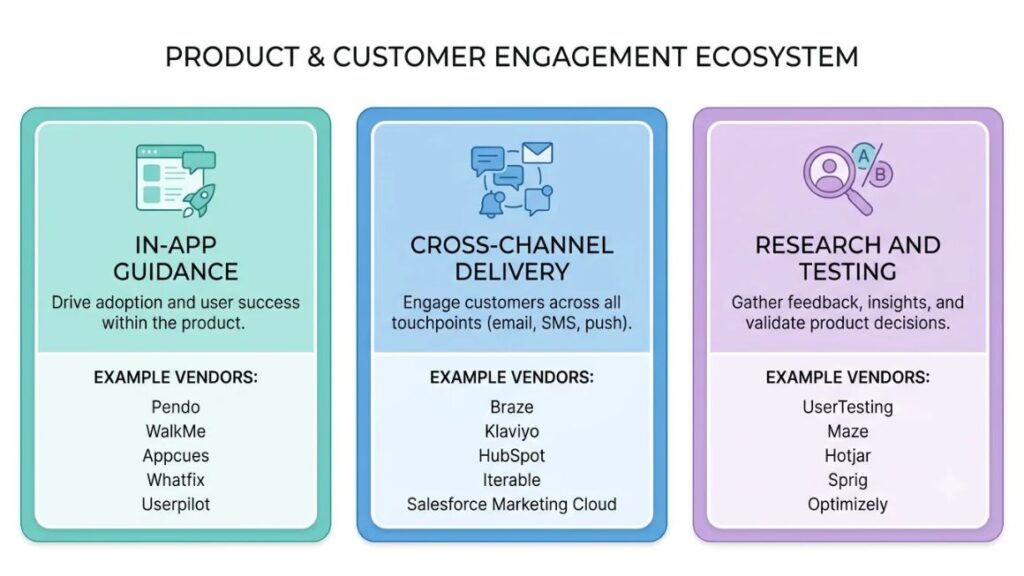
Product messaging tools are software platforms that help a company deliver, automate and test the messages users receive around its product, from in-app guides and announcements to emails, push notifications and SMS. Some live inside the product. Some reach people wherever they are. A few exist mainly to help you work out what to say.
Think of three rough buckets of product messaging tools. In-app messaging software shows tours, checklists and banners while someone is actually using the product. Cross-channel platforms trigger email, push, SMS or WhatsApp based on what a user did or skipped. Message testing tools and survey products help you learn which wording and timing earn a response. Real products straddle the lines (Pendo mixes analytics with guides, Intercom mixes chat with tours), and they sit beside other product marketing tools like roadmaps and dashboards. The difference is that these ones talk to users directly.
How They Help Businesses Communicate With Users
A decent platform does four jobs:
- Guides new users through setup, so the first session ends with something done rather than abandoned.
- Announces useful features and product changes to the people who’d care, not everyone.
- Sends relevant reminders and behavioral prompts, like a nudge when a trial user hasn’t invited a teammate.
- Collects feedback and improves product experiences through a short survey at the right moment.
Every one of those jobs is really a timing problem. The same checklist works on day one and fails on day thirty, which is also why user activation depends so much on when the message lands.
Who Should Use Them?
SaaS teams get the most obvious payoff, since trials convert when people reach a first win fast. Mobile app companies lean on push and in-app prompts for re-engagement, and any serious cross-channel communication plan builds on both. Ecommerce brands run order updates and back-in-stock alerts. Product managers use product messaging tools to check whether a new feature is being found at all, marketers to build lifecycle campaigns that react to behavior instead of a calendar, and customer success teams to spot accounts going quiet. If anyone on your team has ever said “we shipped it and nobody uses it”, you’re the audience.
Product messaging tools are software platforms that deliver, automate or test the messages users receive around a product, including in-app guides, emails and push notifications. They fall roughly into in-app guidance, cross-channel delivery and message research, and many products cover more than one. What they share is timing: the right message at the right point in the user journey.
Key Features to Look for Before Choosing a Platform
Four things decide whether any of the product messaging tools on the market earns its price: segmentation, trigger-based automation, analytics with experimentation, and a setup you can live with on privacy, effort and cost. Most feature lists are padded. These four aren’t.
Audience Segmentation and Personalization
Behavioral segmentation is what separates a useful message from noise. Instead of one announcement for everybody, you target by what people did, which plan or account type they’re on, and where they are in the customer journey. Airship’s 2025 push notification benchmarks found that segmented push lifted direct open rates by between 18% and 65% for the brands that used it. Message personalization works on the same logic: the more a message reflects someone’s situation, the less it feels like a broadcast. One practical check. Some entry plans cap how many segments you can create.
Automation and Trigger-Based Messaging
You want messages that fire when a user does, or doesn’t do, something. Onboarding sequences, reminders, follow-ups. Picture a welcome tour on first login, an email after two quiet days, a push on day three. Can you build that logic visually, with delays and branches, or does an engineer have to wire up every step?
Analytics, Experiments, and Integrations
Delivery and engagement numbers are the shallow end. What you really need is completed actions: did people finish setup after seeing the checklist? Look for conversion tracking, retention analytics and built-in A/B testing, then confirm the platform connects to your analytics stack or CRM. Segment, HubSpot and Salesforce are common ones. If data only flows one way, you’ll be exporting spreadsheets forever.
Ease of Use, Privacy, and Scalability
No-code editors save engineering time, though nearly every platform still needs an SDK or snippet installed first. Ask about consent management and where user data is stored. Then look at the pricing metric, because it differs more than people expect. Userpilot prices by monthly active users, Intercom combines seat fees with usage-based charges, and Novu counts workflow runs. The sticker price tells you very little about what you’ll pay in a year.
The features that matter most in a product messaging platform are behavioral segmentation, trigger-based automation, analytics that track completed actions, and a pricing model that scales predictably. Airship’s 2025 benchmarks found segmented push notifications lifted direct open rates by 18% to 65%, which is why targeting deserves more attention than template libraries.
10 Platforms Worth Comparing in 2026
Nothing about these product messaging tools comes from hands-on testing. These profiles draw on vendor documentation, vendor-published comparisons and third-party reviews, and each one flags what to double-check. Treat the ten as candidates, not a ranking. The table first, for the lay of the land.
| Platform | Where messages reach users | Who typically runs it |
| Userpilot | In-app flows, checklists, banners and surveys, plus product analytics | Product and growth teams |
| Appcues | In-app flows and checklists on web and mobile, with behavioral email and push | Product and marketing teams |
| UserGuiding | In-app tours, checklists, tooltips and a help center for web apps | Small product and success teams |
| Intercom | Chat Messenger, in-app messages, tours, email and push | Support, success and product teams |
| Braze | Email, push, in-app, SMS/RCS, WhatsApp, web and more | Lifecycle teams with engineering help |
| Pendo | In-app guides, analytics, session replay and feedback | Product teams at larger companies |
| OneSignal | Mobile and web push, in-app, email and SMS | Developers and growth teams |
| Customer.io | Email, SMS, push and in-app, driven by event data | Technical marketers |
| Courier | Email, SMS, push, in-app inbox and chat apps through one API | Developers |
| Novu | In-app inbox, email, SMS, push and chat through one API, self-hostable | Developers |
1. Userpilot: Best for Product Adoption and Onboarding
Userpilot sits closest to what people picture when they say product adoption tools: flows, spotlights, banners and checklists wrapped around analytics and feature tagging, so you can see which features people actually touch. NPS and micro-surveys come along too, and a pricing tracker logged workflow automation and session replay arriving in 2026. The trade-off is the usual one for all-in-one platforms. You’re paying for breadth you may not use, and tiers are gated by user volume, so ask early what the Growth plan costs once your numbers climb.
2. Appcues: Best for No-Code User Experiences
Appcues is built so product and marketing people can ship guidance without waiting for a sprint. Flows use modals, slideouts, tooltips and hotspots, checklists break onboarding into small tasks, and the same builder handles announcements, which makes it passable product announcement software for modest launches. Appcues says every plan includes the full platform, yet independent reviewers describe some integrations as premium or one-way. Confirm which integrations and channels, email and push included, your plan really covers before you sign.
3. UserGuiding: Best for Straightforward Onboarding
UserGuiding covers the basics: product tours, checklists, tooltips, hotspots, surveys, a resource center and a light knowledge base. Reviewers keep praising how fast a non-technical teammate can publish a first guide, which makes it appealing user onboarding software for small teams. Two things to test. Analytics are lighter than the bigger adoption platforms, and several reviews say it doesn’t support native mobile app onboarding. A web-only SaaS product? Probably fine. Mobile-first? Probably not.
4. Intercom: Best for Messaging Combined With Customer Support
Intercom started as a chat Messenger and still does that best. Around it sit a shared inbox, a help center, the Fin AI agent, targeted in-app messages, product tours and outbound email and push. That bundle pays off when the people answering tickets also own onboarding, because context follows the customer. Pricing is the complication. Third-party reviews report that tours and surveys sit behind a paid add-on, on top of seat fees and usage charges for Fin. If tours and checklists are all you need, a dedicated onboarding platform is likely simpler and cheaper.
5. Braze: Best for Enterprise-Scale Customer Journeys
Braze is one of the customer engagement platforms built for scale. Canvas Flow triggers messages from user actions such as browsing, clicks or cart abandonment, and a single journey can mix email, push, in-app, SMS and WhatsApp. Food delivery brand foodora used Intelligent Timing to time each message to the individual customer, and Floward found WhatsApp generated its highest revenue and conversion rates in a Valentine’s Day campaign. Expect real setup work: event data, integrations, someone who owns journeys. Pricing is quote-based, so model total cost, not just the licence.
6. Pendo: Best for Product Analytics and Guidance
Pendo starts from analytics (funnels, paths, retention, feature adoption) and layers guides, session replay and feedback on top. A drop-off in a funnel can lead straight to a replay or a targeted walkthrough, which is useful for feature discovery because you’re targeting real behavior, not page URLs. A permanent free tier covers 500 monthly active users, and reviewers note a steep learning curve for non-technical users. Guides are in-app only; cross-channel sequencing sits in a separate product called Orchestrate. Ask yourself honestly whether you need this much measurement.
7. OneSignal: Best for Push and Multichannel Messaging
OneSignal began as a push service and has added email, SMS, in-app messages and Journeys. Among push notification platforms it’s an easy first entry on a shortlist, partly because its own pricing explainer, updated in August 2025, describes a free plan with unlimited mobile push subscribers, 10,000 emails a month and one live in-app message at a time. That’s developer-led delivery, though, not an adoption suite. Tours, checklists and deep product analytics aren’t the point here. Think reach and reliability, and check current plan limits before building around them
8. Customer.io: Best for Behavior-Based Lifecycle Campaigns
Customer.io works from events. A user finishes setup, skips a step, goes quiet for a week, and the visual Journeys builder responds across email, SMS, push and in-app messages, with Liquid templating for personalization. For technical marketing teams it’s strong customer journey automation, since the same behavioral data that runs your product decides what gets sent. The flip side: it needs clean event tracking. Reviewers note that segments stay accurate only when instrumentation does, and WhatsApp availability varies by plan and region.
9. Courier: Best for Developer-Friendly Message Delivery Across Channels
Courier is notification infrastructure. One REST API sends across email, SMS, push, an in-app inbox and chat apps including Slack, Microsoft Teams and WhatsApp, with routing, fallbacks and user preferences handled in one place. A visual template designer lets non-developers edit copy, while developers get SDKs and delivery logs. But the core job differs from no-code product tours. Courier decides how and where a message gets delivered. It won’t build your onboarding checklist, so pair it with something that does, or use it for transactional notifications.
10. Novu: Best for Teams Seeking Flexible Notification Infrastructure
Novu is the open-source option here. The core is MIT-licensed, with enterprise code under a commercial licence, and you can self-host with Docker Compose or use its cloud. Workflows combine channels with delay, digest and throttle steps, and a drop-in Inbox component handles in-app notifications. Novu says its cloud plan is free up to 10,000 events a month. The cost of that flexibility is engineering time, because someone has to implement, host, monitor and upgrade it. No one on your team owns infrastructure? Look elsewhere.

Which Platform Fits Your Needs?
Pick by primary use case first, then check the main consideration, because that’s the thing most likely to bite you after purchase. Among product messaging tools, onboarding on a web product points toward Userpilot, Appcues or UserGuiding. Cross-channel campaigns point toward Braze or Customer.io. Engineers who own notifications will look at Courier and Novu.
| Platform | Primary use case | Main consideration |
| Userpilot | Adoption and onboarding | Analytics and pricing fit |
| Appcues | No-code product guidance | Customization and integrations |
| UserGuiding | Basic onboarding | Required feature coverage |
| Intercom | Support and messaging | Overall support requirements |
| Braze | Enterprise journeys | Implementation and cost |
| Pendo | Analytics and guidance | Analytics requirements |
| OneSignal | Push and multichannel delivery | Channel and analytics coverage |
| Customer.io | Lifecycle automation | Event setup and journey complexity |
| Courier | Cross-channel delivery infrastructure | Developer resources |
| Novu | Notification infrastructure | Hosting and maintenance needs |
This is an editorial comparison built from vendor documentation and reviews, not a benchmark from hands-on testing. Plans and features change often. Check each vendor’s current pages before you commit.
How to Choose the Right Option for Your Business?
Most mistakes with product messaging tools happen before anyone sits through a demo. Four decisions, made in this order, prevent the worst of them.
Start With One Business Goal
Decide whether the priority is activation, feature adoption, retention, customer support or notification delivery. One. A platform that tries to serve all five usually serves none of them well. Activation points toward an onboarding platform, retention across channels toward a journey tool, and reliable delivery toward infrastructure.
Match the Tool to Your Team
A three-person product team needs a simple editor and a quick start. An enterprise team running dozens of journeys needs advanced orchestration and engineers to feed it data. And if your users are mostly mobile-first in India, add CleverTap to the shortlist, which comparison sites describe as strong across India, Southeast Asia and the Middle East.
Calculate the Total Cost
The subscription is only the start. Add usage limits, implementation time, ongoing maintenance and any analytics you’ll have to buy separately. A cheap messaging layer plus a separate analytics product can cost more than one platform that covers both.
Run a Small Pilot Before Committing
Test one meaningful use case, like the first-week onboarding flow. Write down the baseline first, whether that’s setup completion or activation. Run the pilot for a few weeks, then compare. If nothing moves, the problem may be your message, not the platform.
Choose a messaging platform by starting with a single business goal, matching it to your team’s technical capacity, calculating total cost beyond the subscription, and piloting one use case against a measured baseline. A platform that fits the goal but not the team’s resources usually fails at implementation.
Practical Ways to Improve Your Messaging Strategy
Even the best product messaging tools won’t rescue a weak message. These four habits matter more than any feature on the list.
Send Messages at Relevant Moments
Use behavioral triggers rather than showing the same announcement to everyone. Contextual in-app messages, shown when someone reaches the relevant screen, beat blasts almost by definition. Airship’s 2025 benchmark report found in-app messages lifted push opt-in rates by 14% on average among users who had opted out, which hints that a well-timed ask in context works where a cold system prompt doesn’t.
Keep the Copy Clear and Useful
Lead with the customer’s problem or desired outcome, then offer one clear next step. “Your new dashboard is live” is about you. “See which campaigns brought paying customers this week” is about them. One button, one action.
Test Before Scaling
Compare message variants and measure completed actions, not just clicks or impressions. A button that gets clicked and then leads to an abandoned setup isn’t winning. Run a proper A/B test on a slice of your audience first, then roll out the winner.
Use AI Carefully
AI can draft variations, summarize feedback and help with personalization. Customer feedback analysis is the sweet spot: turning hundreds of survey comments into a handful of themes saves hours. But a person should review every message, product details must be accurate, and you should know exactly what customer data an AI feature can see before you switch it on.
Also Read: Messaging Framework: How to Go From Positioning to Words Customers Actually Understand
Common Mistakes to Avoid
- Sending too many messages. A consumer survey cited in Airship’s 2025 report found that across seven countries, the top two reasons for opting out were messages arriving too often or not feeling relevant.
- Interrupting users during important tasks, like a modal landing mid-checkout.
- Choosing product messaging tools before defining the goal.
- Measuring opens and clicks without checking meaningful outcomes.
- Overpersonalizing with unreliable or unnecessary data. A wrong first name is worse than none.
- Automating inaccurate or outdated product information.
Useful communication matters more than message volume. A handful of messages that help someone finish something will beat a calendar full of reminders every time.
Conclusion
The ten platforms fall into three camps. Userpilot, Appcues and UserGuiding help people reach a first win inside the product. Braze, Customer.io and OneSignal follow users out of it. Courier and Novu make sure the message arrives at all, with Pendo and Intercom straddling the lines.
Pick one business problem before you shop for product messaging tools. Shortlist two or three platforms, run a small pilot, and judge it on completed actions rather than opens. If the numbers move, scale it. If they don’t, fix the message before you blame the software.
Choosing the tool is the easy part. Deciding what to say, to whom and when is the harder skill, and it’s what YUP’s Product Marketing course is there to sharpen.
Frequently Asked Questions
What are product messaging tools used for?
Product messaging tools are used to onboard new users, offer contextual guidance, announce features and keep customers informed. Teams also use them to collect feedback and send behavior-based reminders by email, push or SMS. The goal is helping people find value in a product faster.
What is the difference between in-app messaging and push notifications?
In-app messages appear inside the product while someone is using it, so they suit guidance, announcements and surveys. Push notifications reach people outside the app, on a lock screen or browser, so they suit reminders and re-engagement. Push also requires the user to opt in.
Which platform is best for a small SaaS business?
It depends on budget, setup effort and how much you need analytics or onboarding. A small web-product team often does well with a no-code onboarding platform like UserGuiding or Appcues. A team with spare engineers and a mobile app might start with OneSignal or Novu.
Can these platforms automate personalized messages?
Yes, through behavioral triggers and segmentation. A message can fire when a user finishes setup or goes quiet, and the content can change by plan or role. The catch is data quality: bad event tracking means wrong messages, sent automatically.
How much does messaging software cost?
It varies a lot. Some vendors, including OneSignal, Pendo and Novu, publish free tiers. Others charge by monthly active users, seats, channel volume or workflow runs, and enterprise platforms like Braze quote custom pricing. Check each vendor’s pricing page and count setup and maintenance too.
How do you measure whether messaging is working?
Track activation, task completion, feature adoption, conversion and retention against a baseline taken before launch. Watch dismissals and opt-outs too, since a message people keep closing costs you goodwill. Opens and clicks alone don’t show whether users succeeded.
Are AI-powered messaging platforms worth using?
They can be, mostly for drafting variations, summarizing feedback and suggesting send times. They don’t replace testing. Someone still has to check accuracy and tone, and you should know what customer data the AI feature can access.