

Somewhere in almost every launch, a landing page goes live promising a feature engineering hasn’t shipped. Sales hears about the pricing change on the morning of the announcement. Support finds out from a customer. Nobody here is bad at their job. They’re just working from five spreadsheets, three chat threads and a calendar invite nobody accepted.
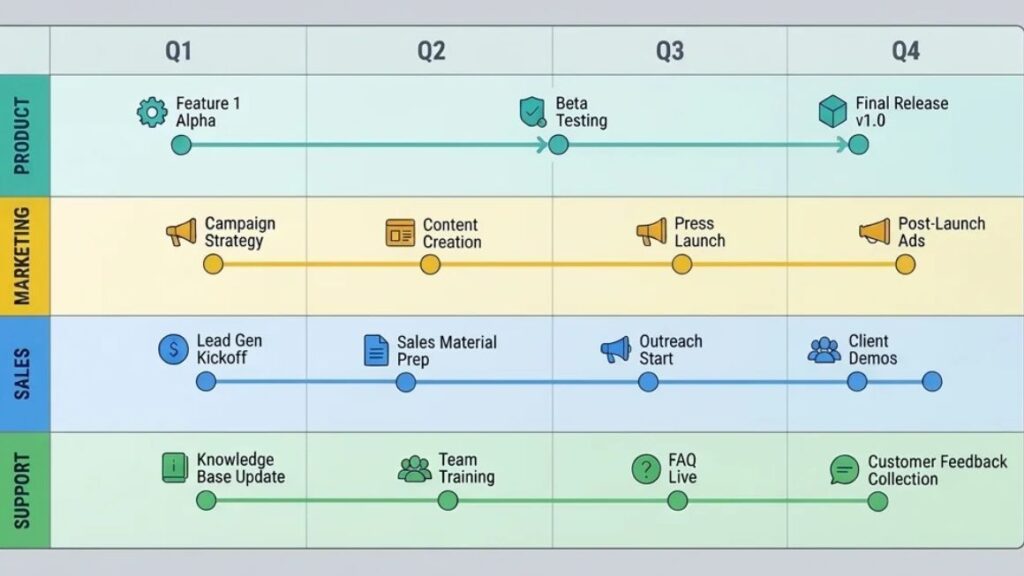
That’s the gap product launch management software exists to close. It gives product, marketing, engineering, sales and customer support one shared place to see who owns what, what depends on what, and what still isn’t ready.
This guide compares ten tools people in this space actually shortlist, and it’s upfront about something most roundups skip: they aren’t interchangeable. Some run the whole launch. Others handle one slice, like roadmaps or feature flags. By the end you’ll know which kind of product launch software fits your launch complexity, team size and business goals, and how to test it before you pay for it.
Table of Contents
What Is Product Launch Management Software?
Product launch management software is a platform that helps cross-functional teams plan, coordinate and track a launch from the first brief to the post-launch review. It keeps tasks, owners, deadlines, approvals and launch assets in one place instead of scattered across inboxes.
So how is that different from the tools you already pay for? A general project management tool tracks work. A product development tool, like an issue tracker, tracks what engineering builds. Launch-focused tools ask a different question: is everything around the release ready, and does everyone know it? Very few products do all of that natively, which is why most teams stitch a work platform together with a roadmap or release tool.
The problem is measurable. Appcues and Navattic’s State of Product Launches 2026 survey found that 56% of marketers hear about releases close to launch or after the fact. It covered only 60 marketers and comes from a vendor, so read it as a signal, not a verdict.
How It Supports the Launch Process
- Coordinating tasks, owners and deadlines, so nothing sits in “someone’s got it” limbo
- Managing dependencies and approval workflows, like legal sign-off before a pricing page goes live
- Organizing launch messaging and sales enablement material where sellers can find it
- Tracking launch readiness before the date and performance after it
Who Needs It?
Startups often don’t, at least until the second or third launch. SaaS companies shipping every few weeks feel the pain sooner. Product marketing teams live with it daily because they’re the ones chasing everyone else. Enterprise product organizations need permissions and approval trails. And businesses launching physical products have it hardest, since packaging, inventory, retail partners and a fixed ship date all depend on each other.
This type of software helps teams coordinate the tasks, owners, approvals and assets around a launch. It differs from general project management tools because it tracks whether the whole launch is ready across product, marketing, sales and support, not just whether tasks are done.
10 Best Product Launch Management Software Tools to Consider in 2026
No single tool here does everything. They split into work management platforms (ClickUp, Asana, monday.com), product roadmap software (Aha! Roadmaps, Productboard), documentation and data tools (Notion, Airtable), and specialists for delivery, rollout and adoption (Jira, LaunchDarkly, Pendo). Here’s how the best product launch tools compare at a glance.
| Tool | Best use case | Main strengths | Limitations | Pricing model |
| ClickUp | Flexible all-in-one launch planning | Templates, dashboards, automation, dependencies | Setup can sprawl | Free plan, then per-user tiers |
| Asana | Cross-functional coordination | Timelines, ownership, approvals | Not a roadmap or engineering tracker | Free plan for tiny teams, then per-user tiers |
| monday.com | Visual launch workflows | Boards, timelines, dashboards, automations | Three-seat minimum; automations start mid-tier | Free for two seats, then per-seat tiers |
| Aha! Roadmaps | Strategic product planning | Prioritization, goals, release planning | Premium pricing; light on marketing tasks | Per-user tiers, trial but no free plan |
| Productboard | Customer-informed planning | Feedback, prioritization, roadmaps | Not a task manager | Free plan, then per-maker tiers |
| Jira | Engineering-led releases | Issue tracking, delivery workflows | Not a full launch tool | Free up to 10 users, then per-user tiers |
| Notion | Documentation-heavy launches | Briefs, wikis, checklists | Native dependencies and approvals are thin | Free plan, then per-member tiers |
| Airtable | Custom launch databases | Structured data, calendars, asset tracking | Needs setup skill; record limits | Free plan, then per-seat tiers |
| LaunchDarkly | Controlled technical rollouts | Feature flags, staged exposure | Engineering-only | Free plan, then usage-based |
| Pendo | Adoption and in-app guidance | Usage insights, onboarding, guides | Not a planning tool | Free to 500 MAU, then quote-based |
1. ClickUp: Best for Flexible, All-in-One Launch Planning
ClickUp tries to hold the whole launch in one workspace: tasks, docs, dashboards, automations and the dependencies between them. Build a launch template once, clone it for every release, and a configurable setup starts paying off. That’s the upside. The downside is that flexibility needs an owner, and teams without one end up with a workspace only its builder understands. There’s a free plan, and paid tiers start around $7 per user per month on annual billing, rising to about $12 on Business.
2. Asana: Best for Cross-Functional Coordination
Non-technical teammates tend to pick up Asana without a training session. Timelines, clear task ownership and approval steps cover the unglamorous heart of a launch: who signs off, and by when. Marketing and product can share one project without either feeling like a guest. It won’t replace a roadmap tool or an engineering tracker, though, and some of the heavier approval and reporting features depend on your tier. List prices run from about $10.99 to $24.99 per user per month on annual billing.
3. monday.com: Best for Visual Launch Workflows
monday.com is the most visual of the ten: color-coded boards, timeline views and dashboards a busy executive can read in seconds. Automations take care of the repetitive nudges. Read the pricing page slowly, though. Paid plans start at three seats, and automations only begin on the Standard tier, around $12 per seat per month billed annually (Basic is about $9, Pro about $19). Teams with deep technical workflows will probably pair it with something else.
4. Aha! Roadmaps: Best for Strategic Product Planning
Aha! Roadmaps is where strategy meets the calendar. You score ideas, tie initiatives to goals and publish roadmaps that show leadership how a launch fits the bigger plan, with release planning in the same place. It’s built for product strategy, not for chasing a copywriter about a landing page, so marketing-heavy teams will want a second tool. And it sits at the expensive end: there’s no free plan, just a 30-day trial, and Premium starts at roughly $59 per user per month on annual billing.
5. Productboard: Best for Customer-Informed Planning
Productboard starts from the customer side. Feedback from support tickets, sales calls and surveys lands in one place, gets linked to features, and feeds prioritization and roadmaps, so you can show why something made the launch cut. It’s weaker as a task manager, so you’ll still need somewhere to run the actual launch tasks. Pricing is per maker, meaning the people who edit. There’s a free plan, and paid tiers are about $19 (Plus) and $59 (Business) per maker per month on annual billing, with a two-maker minimum on Business.
6. Jira: Best for Engineering-Led Releases
Jira is the default for engineering teams for good reason. Issues, sprints, versions and delivery workflows give engineers a precise view of what’s built, tested and ready to ship. For product release management, meaning the technical side of getting code out the door, it’s hard to beat. But a Jira release isn’t a launch. It won’t tell you whether the pricing page is approved, sales is trained or support has its answers ready. Jira is free for up to 10 users, with paid plans at list around $7.91 and $14.54 per user per month, and those rates fall as seat counts grow.
7. Notion: Best for Documentation-Heavy Launches
Notion is where the launch brief tends to live. The messaging doc, the sales FAQ, the checklist and the post-launch notes can all sit side by side and link to each other, and almost anyone can edit them. For documentation-heavy launches, that flexibility is hard to match. Dependencies, timelines and formal approvals are another story: you can build them with databases, but you’re building them yourself. Notion has a free plan, and paid tiers are about $10 (Plus) and $20 (Business) per member per month on annual billing, with the fuller AI features on Business.
8. Airtable: Best for Custom Launch Databases
Some launches are really just a lot of structured data: every asset, channel, market, owner and status, each one a record. Airtable handles that well, then slices the same data into calendar, kanban and gallery views. Think content calendars for a multi-market launch, or asset tracking across agencies. It takes someone comfortable with bases and linked records to set up, and the free plan caps each base at 1,000 records. Paid plans run about $20 (Team) and $45 (Business) per seat per month annually, and read-only viewers don’t need a seat.
9. LaunchDarkly: Best for Controlled Technical Rollouts
LaunchDarkly separates deploying code from releasing it. Ship a feature behind a flag, switch it on for a small slice of users, widen it in stages, and turn it off if something breaks. That’s precisely what a controlled technical rollout needs. It does nothing for your launch email, sales deck or support readiness, so treat it as one specialist piece of a bigger plan, not the plan itself. Pricing is usage-based rather than per seat, metered on things like service connections and monthly active users, and there’s a free Developer plan to start.
10. Pendo: Best for Product Adoption and In-App Guidance
Pendo picks up where the announcement ends. Usage analytics show who touched the new feature, in-app guides walk people through it, and adoption data tells you whether the launch worked or just made noise. It’s not a planning tool, so don’t expect it to manage your timeline. The free plan covers up to 500 monthly active users, and paid tiers are quoted by sales based on monthly active users, so budget time for a conversation.
Also Read: 10 Best Product Backlog Management Tools in 2026: Features, Pros, Cons & How to Choose
Essential Features to Look for Before Buying
Feature lists get long fast, and most of what’s on them won’t matter. Four areas decide whether a tool helps or just adds another login. Use them as a filter when you compare product launch planning tools.
Planning, Timelines, and Dependencies
Milestones and named owners prevent most delays. If the pricing page can’t go live until legal approves, and legal can’t review until messaging is final, the tool should show that chain and shout when one link slips. A timeline without dependencies is a nice-looking guess.
Collaboration, Approvals, and Integrations
Look at how reviewers leave feedback and where files live. Then check the connections: your CRM for pipeline, chat for nudges, and development tools like Jira or GitHub so engineering status flows in without anyone retyping it. If you’re evaluating product marketing software specifically, run one real asset through the approval flow before you decide.
Reporting, Analytics, and Automation
One readiness dashboard showing what’s blocked, who owns it and how many days are left beats ten polished reports. Automated reminders cut the chasing. After launch, you want adoption and pipeline numbers either inside the tool or connected to it. Automate last, though, once the process works by hand.
AI-Assisted Workflows and Data Security
AI earns its place in small jobs: summarizing customer feedback, drafting a first-pass brief, release notes or FAQ. Treat the output as a draft a person checks, especially any claim about what the product does. Then ask the dull security questions. Who sees what? How do permissions work for agencies and contractors? Where is data stored, and is your content used to train models?

How to Choose the Right Platform for Your Team?
Pick by launch type and team size first. Price comes second, and brand name comes last. Most buying mistakes in launch project management start with teams doing it the other way around.
Match the Tool to Your Launch Type
A SaaS feature launch usually needs a work platform like Asana or ClickUp, plus a rollout tool such as LaunchDarkly if engineering wants staged releases. Physical products add suppliers, inventory and retail dates, and Airtable’s structured records suit that kind of data. Enterprise releases lean on approvals and governance, which points toward Aha! or the higher tiers of Asana and monday.com. Smaller campaigns? A free plan and a Notion page may be plenty.
Compare Total Cost, Not Just the Starting Price
Seats are only part of it. Count paid seats against free guest or viewer access, then add the extras: add-ons, onboarding time, integrations and the cost of migrating later. Sticker prices hide a lot. monday.com’s paid plans start at three seats, Productboard’s Business tier needs two makers, and LaunchDarkly and Pendo charge by usage instead of people.
Run a Small Pilot Before Committing
Test one real launch, not a demo project. Ask the team what slowed them down, then check whether reporting and approvals worked the way you assumed they would. A small launch full of honest friction teaches more than any feature comparison.
The right launch platform depends on launch type, team size and total cost, not the starting price. Seat minimums, add-ons and usage-based pricing can change the real bill, so test a shortlist on one real launch before committing.
Also Read: Product Launch vs Feature Launch: Key Differences
A Practical Product Launch Workflow Using Software
You don’t need a 200-line product launch checklist. You need five phases and one accountable owner for each. The workflow stays the same whichever tool you pick.
Phase 1: Research and Define Success
Name the target audience and the customer problem first. Then set launch objectives you can measure: activations, qualified leads, revenue, whatever matters for this release. If you can’t say what success looks like, no dashboard will say it for you.
Phase 2: Plan and Assign Ownership
Build the timeline and give every deliverable a single accountable owner. Map dependencies, then agree on approval deadlines up front. This is where your product launch strategy turns into dates and names.
Phase 3: Prepare Marketing and Sales
Coordinate the landing page, email campaigns, product demos, messaging and sales training, and keep it all where sales and support can find it. Some teams add go-to-market software at this stage, such as a messaging or sales enablement tool. For smaller launches, a shared workspace does the job.
Phase 4: Test and Launch
Check product quality, tracking, support readiness and communications. Have a rollback plan where one applies. And confirm tracking fires before launch day, not after.
Phase 5: Measure and Improve
Review adoption, qualified leads, conversions and customer feedback. Then write down lessons for the next launch while everyone still remembers them. That’s the step most teams skip.
A practical launch workflow has five phases: define success, plan and assign owners, prepare marketing and sales, test and launch, then measure and improve. Each phase needs one accountable owner and a clear approval deadline.
Also Read: Understanding the New Product Development Process: The 7 Stages Explained
Common Mistakes to Avoid
- Buying too many tools before defining the workflow.
- Leaving tasks without a clear owner.
- Treating the launch date as the only measure of success.
- Ignoring sales and customer support readiness.
- Failing to verify tracking before launch day.
- Automating a poorly defined process.
Here’s how the second one plays out. Picture a hypothetical SaaS team that finishes a new reporting feature two weeks early. The landing page is built and the announcement email is written. But the pricing copy needs finance sign-off, and the request went to a shared inbox instead of a named person. Nobody notices for nine days. Development was done, and the launch still slipped.
The tool didn’t cause that delay, and a better one wouldn’t have prevented it. A named approver with a deadline would have.
Conclusion
Match the tool to the job. For cross-team coordination, start with Asana, monday.com or ClickUp. For roadmaps and strategy, look at Aha! Roadmaps or Productboard. For engineering delivery and rollout control, Jira and LaunchDarkly. Notion and Airtable suit documentation-heavy and data-heavy launches, and Pendo handles what happens after.
Whatever you shortlist, test it on a real launch before you sign anything. Here’s a practical next step: write down the three biggest delays from your last launch, then check which tool would have caught each one. If a shortlisted platform can’t answer that, keep looking.
Planning launches is a core product marketing skill. If you want to build it properly, take a look at YUP’s Product Marketing course.
Frequently Asked Questions
What is the best software for managing a product launch?
For most cross-functional teams, start with a work management platform such as Asana, monday.com or ClickUp. Choose Aha! Roadmaps or Productboard if strategic planning matters most, Jira if engineering delivery does, and Pendo if you care about adoption. No single product wins every scenario.
Is there free software for planning a product launch?
Yes. ClickUp, Asana, monday.com, Jira, Notion, Airtable and Productboard all have free plans, and LaunchDarkly and Pendo offer free tiers for their own jobs. Expect limits on automation, reporting, collaboration or integrations, plus caps on users, records or storage. A free plan suits a small launch, but check the limits first.
How is launch management software different from project management software?
Project management software tracks tasks and deadlines for any kind of work. Product launch management software coordinates one outcome end to end: product readiness, messaging, sales enablement, approvals, support and post-launch results. In practice, many teams run launches inside a project management platform they’ve configured for the job.
How much does launch planning software cost?
It runs from free to custom quotes. Per-seat plans on the work platforms above cost roughly $7 to $45 per user per month on annual billing, while Aha! Roadmaps sits higher, LaunchDarkly bills by usage and Pendo is quoted by sales. Add up seats, add-ons and onboarding, not just the headline number.
Can AI help manage a product launch?
Yes, in supporting roles: drafting briefs, summarizing feedback, suggesting timelines and pulling reports. It won’t fix a broken process, though. In Appcues and Navattic’s September 2026 survey of 60 marketers, 93% used AI to keep up with launch volume, yet only 7% said their launch process was keeping up. Have a person review anything customer-facing.
How do you measure a successful product launch?
Pick metrics tied to the goal you set before launch. Common ones are activation and adoption for feature launches, revenue and conversions for new products, retention for existing customers, and qualified pipeline for B2B. Record a baseline first, then review at set intervals, not only on launch day.