
Most landing pages lose visitors in the first few seconds. The headline gets skimmed, the offer doesn’t land, and the tab closes. A short video can fix part of that. 60 seconds of motion and voice explains what a paragraph can’t.
The catch used to be production. Scripts, cameras, editors, endless revisions. AI marketing & landing page video makers changed that. You can now turn a script, a product link or a long recording into a finished video in an afternoon.
Speed alone doesn’t convert anyone, though. This guide explains how the tools work, compares 12 of them, and shows how to build, place and test videos that move real numbers.
Table of Contents
What Are AI Video Makers and How Do They Work?
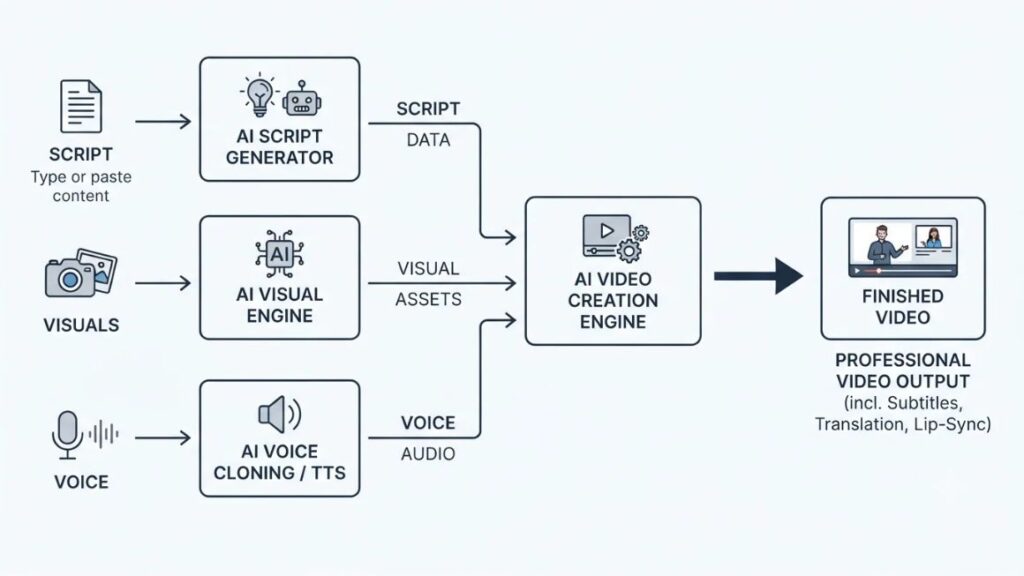
An AI video maker is software that generates or edits video from simple inputs such as text, images or existing footage. It handles scripting, visuals, voiceover and captions using machine learning, so one person can do work that once needed a small crew.
Understanding AI-powered video creation
Most AI video creation software does three jobs. It writes or reads a script, picks or generates visuals, and adds a voice. Paste a blog post and it becomes scenes. Some tools add avatars, digital presenters that lip-sync to your script. Others handle subtitles and translation. Quality swings widely between tools, and between prompts.
How AI video makers help businesses
Production time drops from days to hours. One script becomes five versions for five audiences. A two-person team can ship what once needed an agency. The barrier was never ideas. It was the editing software.
Different types of AI video creation tools
Five categories cover most of what you’ll see:
- Text-to-video generators that build clips from prompts
- AI avatar and presenter platforms that put a digital speaker on screen
- Product video generators that turn a store link into ads
- AI-assisted video editors that cut, caption and clean recordings
- Video repurposing platforms that slice long videos into short clips
Many blend two or three. Knowing the category first stops you from buying the wrong AI marketing video tools for the job.
Also Read: AI Tools for Marketing: 150+ Tools to Build Your Stack in 2026
Why Businesses Are Using AI for Marketing Videos in 2026
Businesses use AI for marketing videos because it shortens production, makes audience-specific versions cheap, and lets teams test more ideas. Speed only helps if the video still earns attention.
Faster content production
Marketers can draft, voice and caption a video without doing every task by hand. Wistia’s 2026 State of Video Report, which surveyed nearly 1,000 marketers and analysed over 13 million videos, found AI shows up most in planning and scripting, with captions the top generative use.
Also Read: Content Marketing Trends 2026
Better audience personalization
One master video can become several: a Hindi cut, an English cut, a version for founders, another for freelancers. Personalized marketing videos used to be a big-budget play. Translation and voice swaps now put them within reach of small teams. Keep them honest, though.
More opportunities for creative testing
Cheaper versions mean more tests: three hooks, two offers, two calls to action. Before AI, that meant three shoots. Now it means three prompts.
Cost and resource management
AI trims cost where work is repetitive: voiceovers, captions, resizing. It doesn’t replace a real shoot when you need genuine customers. Film the moments that need trust, then generate the rest.
The wider industry is moving the same way. The IAB’s 2026 Digital Video Ad Spend & Strategy Report found around six in 10 digital video ad buyers now use generative AI to build or enhance video ads, up from 51% in 2025. For AI video ads, that’s no longer an experiment, though buyers still want humans involved in some use cases.
Generative AI is now mainstream in video advertising. The IAB’s 2026 Digital Video Ad Spend & Strategy Report found around six in 10 digital video ad buyers use it to build or enhance video ads, up from 51% in 2025.
12 Best AI Marketing & Landing Page Video Makers
No single tool fits every marketing job. HeyGen and Synthesia suit presenter-led videos, Runway, Pika and Luma AI suit creative clips, and Descript, VEED and OpusClip suit editing and repurposing.
Below are 12 AI marketing & landing page video makers worth comparing. This isn’t a ranking. Plans change often, so confirm features, regional availability, licensing and pricing on each vendor’s page before you pay. Prices are in US dollars, as of November 2026, and will differ in rupees after conversion and tax.
| Tool | Best for | Free plan |
| HeyGen | Presenters, multilingual videos | Yes |
| Synthesia | Business explainers | Yes |
| Runway | Original visuals | Yes, one-time credits |
| InVideo AI | Script to full video | Yes |
| Canva | Branded social videos | Yes |
| Creatify | Product ads | Yes |
| Pictory | Text to video | 14-day trial only |
| Descript | Editing recordings | Yes |
| VEED | Subtitles and resizing | Yes |
| OpusClip | Long video to short clips | Yes |
| Pika | Creative short clips | Yes |
| Luma AI | Cinematic scenes | Check current plans |
1. HeyGen
HeyGen builds presenter-led videos from a script. As an AI avatar video generator, it offers stock and custom avatars, voice cloning and lip-synced translation, which suits product explanations and multilingual campaigns.
Limit: credits drain fast on premium avatar models.
Pricing: a free plan allows up to three short videos a month, and Creator was listed at $29 a month.
2. Synthesia
Synthesia turns scripts into videos with a digital presenter, and it’s strongest for polished business content like onboarding and training. Expect avatars, templates, brand controls and PowerPoint import.
Limit: tight monthly minute caps, and presenters can feel stiff in punchy ads.
Pricing: a free plan exists, and Starter lists at $29 a month and Creator at $89 on monthly billing.
3. Runway
Runway generates original footage from text or images, so you can create cinematic scenes you’d otherwise have to film or buy.
Limit: clips are short and credits burn quickly.
Pricing: the free plan gives 125 one-time credits, and Standard lists at $15 a month.
4. InVideo AI
InVideo AI turns a prompt or script into a full video, with scenes, stock footage, voiceover and subtitles, then lets you refine with instructions.
Limit: stock footage can feel generic, so review every scene.
Pricing: a free plan with watermarks and limited credits exists, and paid plans start around $20 a month, though listings vary.
5. Canva
Canva is the easiest entry point if you already make graphics there. Its templates, Brand Kit and AI tools help beginners produce branded promos and social clips in one place.
Limit: AI generation is lighter than in dedicated tools, and some features sit behind Pro.
Pricing: a free plan is available, and Pro rates differ by region.
6. Creatify
Creatify is built for performance ads. Paste a product URL and it pulls details, writes scripts and renders avatar-led ad variations in many languages, so e-commerce teams can test hooks fast.
Limit: credits are spent per video, so costs climb with volume.
Pricing: a free plan gives 10 monthly credits with watermarked exports, and Starter lists at $39 a month.
Also Read: AI UGC Ad Generator: Best Tools, Features, Costs & How to Create High-Converting Ads in 2026
7. Pictory
Pictory converts blog posts, scripts and long recordings into short videos with stock footage, captions and AI voiceover.
Limit: results lean on stock visuals and can look templated.
Pricing: no permanent free plan, only a 14-day trial, and Starter lists at $29 a month, or $25 billed annually.
8. Descript
Descript edits video by editing its transcript. Delete a sentence in the text and it disappears from the video. It also removes filler words, cleans audio and records your screen.
Limit: it isn’t a generator, so it won’t invent visuals.
Pricing: the free plan covers about an hour of media a month, and Hobbyist lists at $16 a month billed annually, or $24 monthly.

9. VEED
VEED is a browser-based editor with auto-subtitles, resizing, screen recording, and AI features such as translation and avatars. It works well as a finishing tool: caption once, export for Reels, YouTube and your landing page.
Limit: the free plan adds a watermark and caps exports at 720p.
Pricing varies by billing cycle, so check the plan page.
10. OpusClip
OpusClip cuts long videos like webinars and podcasts into short, captioned clips with automatic reframing. It needs existing footage, and credits roughly track source minutes.
Review its picks: the AI chooses moments, not messages.
Pricing: a free plan gives 60 credits a month, and Starter lists at $15 and Pro at $29 a month.
11. Pika
Pika makes short, stylised clips from text or images, with effects that suit playful social content.
Limit: clips are brief, and commercial-use rights differ by plan, so check before using output in ads.
Pricing: a free Basic plan exists, and paid Standard starts around $10 a month, or about $8 billed annually.
12. Luma AI
Luma AI’s Dream Machine and Ray models generate cinematic scenes and camera moves from text or images. Its plans have been reshuffled, and older and newer tiers both appear online. Luma’s terms tie commercial use to an active paid subscription.
Pricing: confirm the current plan, because free-tier details vary by source.
How to Choose the Right Tool for Your Marketing Goals?
Choose by the job, not the hype. Presenter tools suit explainers, product-link tools suit ads, editors add polish, and repurposing tools add volume.
For small businesses and startups
Start with Canva or InVideo AI. Prices are low and templates carry the weight. Test on free plans first.
For digital marketing agencies
Look for team seats, brand kits and fast variations. Synthesia and Descript both charge per editor, so check seat costs.
For e-commerce businesses
Creatify and Canva fit best. Product demo videos still deserve real footage of the product in use, with AI handling captions and cutdowns.
For SaaS and service-based companies
Synthesia and HeyGen suit onboarding and customer education. Pair them with Descript for real screen walkthroughs.
For marketers who do not want to appear on camera
Avatar platforms or voiceover-led tools like Pictory solve this. Clone your own voice only with consent, and never pass a synthetic presenter off as a real customer.
How to Create a High-Converting Marketing Video Using AI?
A high-converting AI marketing video follows seven steps: know the audience, pick one goal, write a tight script, generate visuals and voice, edit, make versions, and review. Video marketing automation handles the repetitive parts. You still own the message.
Step 1: Understand your target audience
List the three problems your buyer mentions most. Pull them from sales calls, reviews and support tickets. Those words become your script.
Step 2: Decide what the video needs to achieve
Pick one objective: generating leads, explaining a product or encouraging a purchase. A video that tries all three does none well.
Step 3: Write a simple and engaging script
Speech runs at roughly 130 to 150 words a minute, so 60 seconds needs about that many. Use five beats:
- Hook: capture attention in the first three seconds.
- Problem: name a challenge your customer already feels.
- Solution: introduce the product or service.
- Benefits: explain the value in plain terms.
- CTA: tell viewers exactly what to do next.
Also Read: Best AI Script Generators: Features, Use Cases & SEO Tips
Step 4: Generate visuals and narration
Feed the script into text-to-video AI tools or an avatar platform. Choose a voice, mix in real footage, and regenerate weak scenes.
Step 5: Edit and refine the video
Tighten pacing, cut dead air, and add captions and branding. AI video editing tools like Descript and VEED make this fast. Check audio first. Bad sound ruins good visuals.
Step 6: Create multiple versions
Make two or three versions with different opening lines, lengths and CTAs. Change one thing at a time.
Step 7: Review before publishing
Check facts, prices and claims. Watch for warped hands, garbled text and mismatched lip-sync. Confirm music and avatar licensing.
How to Use Videos Effectively on Landing Pages?
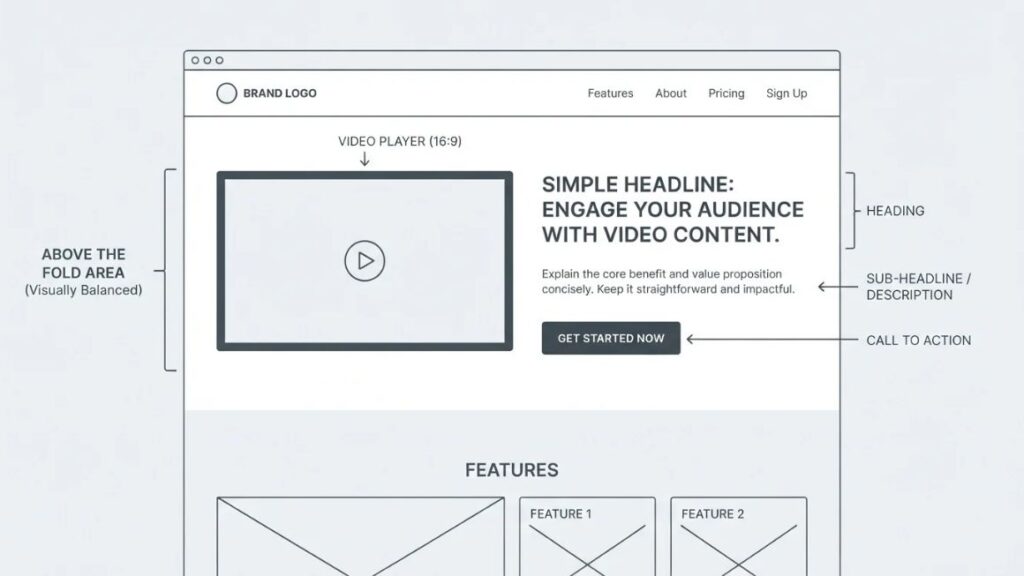
Put one short video near the top, focus it on a single benefit, add a clear CTA beside it, and make it load fast on mobile. That is the core of video landing page optimization.
Place the main video where visitors can find it
Put it above the fold, next to a clear headline and CTA. The video supports the headline. It shouldn’t replace it.
Choose the right video format
Match the format to the visitor’s doubt:
- Product demonstrations for considered purchases
- Explainer videos for unfamiliar categories
- Customer testimonials for trust
- Founder introductions for service businesses
- Service walkthroughs for complex offers
Keep the message short and focused
One main benefit. Everything else belongs on the page. Start at 60 to 90 seconds and shorten it if viewers leave early.
Add a clear call to action
Tell viewers what to do next, in the video and beside it: book a consultation, start a trial, buy now.
Make the video mobile-friendly
Many visitors will be on a phone, often with the sound off. Use responsive embeds and large captions.
Protect page loading speed
Video can hurt Largest Contentful Paint (LCP), the metric for how quickly the main content appears. Compress files, use a thumbnail that loads the player on click, and host with a platform like YouTube or Wistia. Test in Google PageSpeed Insights before and after.
Also Read: Technical SEO Checklist: 10 Key Steps (+5 Expert Tips!)
Real-World Examples of Marketing Videos That Businesses Can Create
These landing page video examples are scenarios, not case studies.
E-commerce product demonstration
A D2C skincare brand explains its serum.
Objective: lift purchases.
Format: a 30-second demo with real footage.
Tool: Creatify for variations, Canva for branding.
CTA: “Add to cart.”
SaaS product walkthrough
A software company shows how its platform fixes late invoices.
Objective: free-trial signups.
Format: a 90-second screen walkthrough with voiceover.
Tool: Descript for recording and cleanup, HeyGen for a short presenter intro.
CTA: “Start free trial.”
Online course promotional video
A test-prep company introduces a new course.
Objective: enrolments.
Format: a 60-second presenter video in English and Hindi.
Tool: Synthesia or HeyGen.
CTA: “Reserve your seat.”
Lead generation campaign
A marketing agency creates service intros for different segments.
Objective: consultation bookings.
Format: three 45-second versions for e-commerce, SaaS and local businesses.
Tool: InVideo AI, with VEED for captions and resizing.
CTA: “Book a free audit.”
Best Practices for Getting Better Results From AI Marketing Videos
Better results come from audience focus, believable visuals, consistent branding, captions and honest claims. More AI features don’t help.
Focus on the audience rather than the technology
Viewers don’t care that AI made it. They care whether it solved their problem.
Use realistic visuals and natural-sounding narration
Fix odd pronunciations and reject clips with warped hands or text.
Maintain consistent branding
Lock colours, fonts and logo placement in a brand kit.
Add captions and make content accessible
Caption every video. It helps muted viewers and people with hearing loss.
Avoid misleading claims and artificial testimonials
Never present an avatar as a real customer. It breaks trust and can break advertising rules.
Check commercial usage rights and privacy requirements
Read each tool’s licence for ads. Get consent before cloning a voice or face.
Review every video before publishing
One person, one full watch, sound on.
How to Measure Video Performance and Improve Conversions?
Measure two layers: how people watch the video, and what they do on the page afterward. Both feed video conversion optimization, and neither means much without a baseline from before you added the video.
Video engagement metrics
Track views, average watch time, video completion rate and engagement rate. A healthy view count with a cliff at second ten means the hook is failing.
Landing page performance metrics
Watch conversion rate, CTA click-through rate, form completion rate and bounce or engagement signals in Google Analytics 4. Compare each with the same page before the video went live.
A/B testing ideas
Test one variable at a time:
- Video versus no video
- Different opening hooks
- Different video placements
- Short versus longer versions
- Different CTA messages
Run versions at the same time, with similar audience conditions, and judge results against your original conversion baseline. Don’t call a winner after a handful of visits.
Also Read: How to Measure Performance of Content Marketing
AI Video Marketing Trends Businesses Should Watch in 2026
AI-powered video content is spreading fast, but human storytelling and judgment still decide what works.
More personalized video experiences
WordStream’s 2026 trends piece points to AI-assisted personalization, with human quality control still needed.
Realistic digital presenters
Avatars keep improving, but flat delivery shows. Use them to explain, not to carry emotion.
Multilingual video creation
Translation and lip-sync let one video reach several markets, such as English, Hindi and regional cuts in India. Have a native speaker check each one.
Short-form creative for paid advertising
The IAB’s 2026 report puts generative AI in about 33% of digital video ads, up from 24% in 2025. WordStream still calls short-form key for awareness.
AI-assisted content repurposing
Wistia’s 2026 research found AI users are 27% more likely to make product videos and 52% more likely to make ads.
Human creativity and AI working together
WordStream says storytelling remains the most important part of video marketing. Wistia found AI use among video marketers slipped to 38% in 2026, after nearly doubling from 18% to 41% across earlier waves.
In 2026 research, AI is spreading in video but not replacing storytelling. IAB reports generative AI in about a third of digital video ads, while WordStream still ranks storytelling as video marketing’s most important element.
Common Mistakes to Avoid When Using AI Video Makers
Most failures come from process, not technology.
Choosing tools based only on popularity
The best-known AI marketing & landing page video makers may not suit your job. Match category to task first.
Publishing videos without checking their accuracy
AI invents details. A wrong price in a video is still your mistake.
Using generic scripts and repetitive visuals
Prompt with specifics: customer words, real numbers, product detail.
Ignoring landing page speed
A heavy video can cost more conversions than it wins.
Also Read: Technical SEO Checklist: 10 Key Steps (+5 Expert Tips!)
Making videos without a clear CTA
A video without a next step is just entertainment.
Forgetting to measure actual business results
Views aren’t revenue. Tie each video to a conversion metric.
Conclusion: AI Marketing & Landing Page Video Makers
AI marketing & landing page video makers cut the cost of making video. It doesn’t choose the message. Three things carry most of the results: pick the tool that fits the objective, build each video around one benefit and one CTA, and measure against the baseline you had before.
Storytelling still beats feature count. So keep your video marketing strategy small at first: one video, one landing page, one test. Learn what moves the numbers, then scale.
Young Urban Project teaches this workflow for working marketers. The YUP AI Marketing course covers AI tools and automation you can use in real campaigns, including video.
Frequently Asked Questions
What are the best AI marketing & landing page video makers for marketing?
It depends on the job. HeyGen or Synthesia suit presenter-led explainers, Creatify suits product ads, InVideo AI suits script-to-video, and Descript or VEED suit editing. Beginners can start on the free plans of Canva or InVideo AI.
Can AI create professional marketing videos?
Yes, with review. AI handles drafts, voiceover, captions and resizing well. A person still decides the message and checks accuracy.
Which AI video maker is best for landing pages?
For a presenter-led explainer, try HeyGen or Synthesia. For fast script-to-video, try InVideo AI. For a demo with real footage, record it and polish it in Descript or VEED.
Are AI-generated videos good for advertising?
They can be, especially for testing many variations quickly. The IAB’s 2026 report found generative AI in about a third of digital video ads. Check each platform’s policy on synthetic content.
Can I create marketing videos without showing my face?
Yes. Use an avatar platform, voiceover over screen recordings, or text-to-video clips. HeyGen, Synthesia and Pictory all support faceless formats.
How much do AI video makers cost?
Most offer a free plan or trial, and entry paid plans mostly sit between about $10 and $40 a month. As of November 2026, examples include OpusClip and Runway at $15, HeyGen and Synthesia at $29, and Creatify at $39. Credits can cap output.
How long should a landing page video be?
Start at 60 to 90 seconds for an explainer and 30 to 60 seconds for a teaser. Keep one benefit per video. If most viewers leave early, shorten it.
Do videos improve landing page conversions?
Often, but not automatically. Big lift figures online usually come from vendor studies with no shared baseline. Run an A/B test of video versus no video on your own audience.
Can AI videos be used for commercial purposes?
Usually on paid plans. Luma’s terms tie commercial use to an active paid subscription, and Pika’s rights differ by plan. Check each licence, and get consent before cloning anyone’s voice or face.
How can beginners start creating AI marketing videos?
Pick one landing page and one goal. Write a 100-word script with a hook, problem, solution, benefit and CTA. Generate it on a free plan, add captions and publish. Measure before making the next one.