

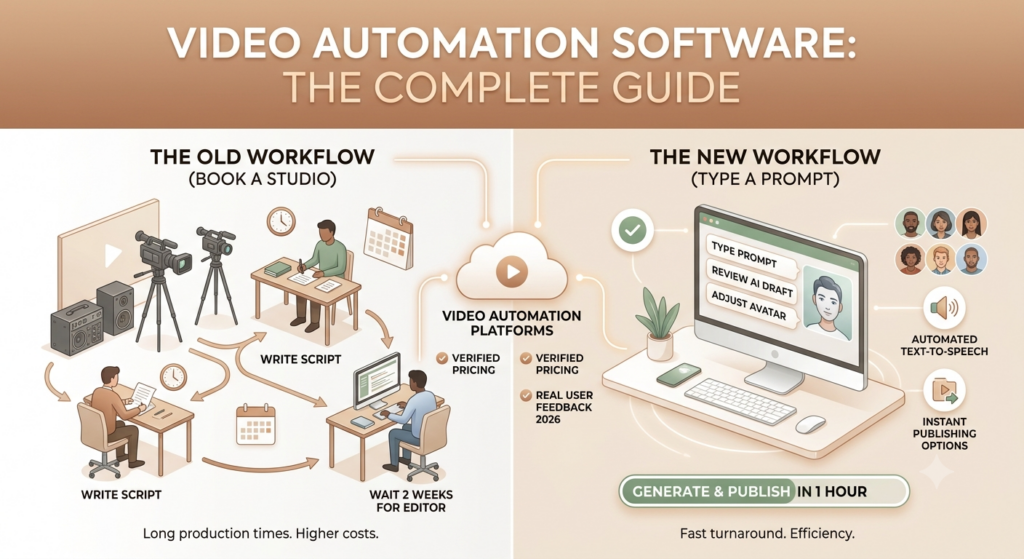
Most marketing teams are running two workflows in parallel right now. One is the old one: book a studio, write a script, brief a video editor, wait two weeks, publish. The other is the new one: type a prompt, review an AI draft, adjust the avatar, hit generate, publish in an hour.
If you’re reading this, you already know the second workflow exists. The harder question is which video automation software actually delivers on that promise – and which ones look impressive in demos but frustrate you in production.
This guide is built entirely on 2026 data: verified pricing, current features, and real user feedback. No recycled claims from 2024. Every tool section reflects what these platforms actually do today.
What Is Video Automation Software?
Video automation software is software that uses artificial intelligence to automate one or more stages of video production -scripting, footage selection, voiceover, editing, subtitling, translation, or publishing. The output is a complete or near-complete video, with far less human input than traditional production requires.
The category is broad. At one end, you have full-stack tools like HeyGen and Synthesia that take a text script and produce a finished avatar video in minutes. At the other end, you have narrower tools like OpusClip, which takes one long video and automatically clips it into a dozen social-ready short-form pieces.
What all of them share is the core value: reducing the manual, repetitive work in video production so teams can produce more content without proportionally growing their headcount.
Table of Contents
How Video Automation Works -The 7-Step Pipeline
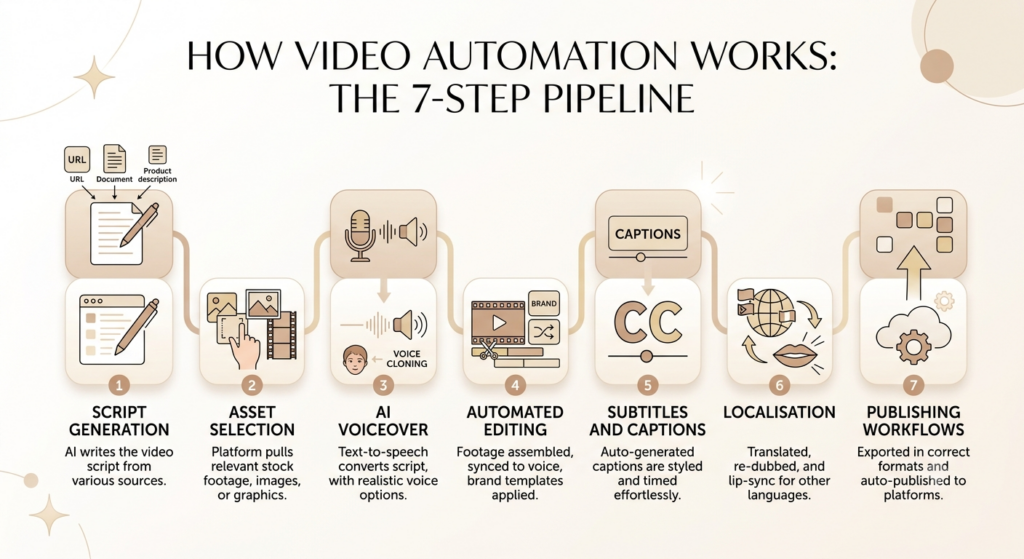
Most video automation platforms automate some or all of these steps:
- Script generation -AI writes the video script from a URL, a document, a product description, or a plain text prompt.
- Asset selection -The platform pulls relevant stock footage, images, or graphics from built-in libraries based on what the script says.
- AI voiceover -Text-to-speech converts the script into narration. The best platforms use voice cloning, so the output sounds like a specific real person.
- Automated editing -Footage is assembled, synced to the voiceover, transitions are added, and brand templates are applied automatically.
- Subtitles and captions -Auto-generated captions are styled and timed without manual effort.
- Localisation -The video is translated and re-dubbed into other languages, with AI lip-sync keeping the avatar’s mouth movements aligned to the new audio.
- Publishing workflows -Finished videos export in the right dimensions for each platform and can be auto-published via integrations.
How This Differs from Traditional Video Editing
Traditional tools like Adobe Premiere Pro and Final Cut Pro are built for skilled editors who want precise manual control over every frame. They’re powerful, but they’re operator-dependent. Video automation software takes the opposite bet: AI handles the decisions, you get speed and scale, and creative control is partially traded away. For most marketing, training, and social content, that trade is worth making.
Video automation software uses AI to automate scripting, footage selection, voiceover, editing, captioning, localisation, and publishing -reducing production timelines from days or weeks to hours. The core trade is creative control for speed and scale. For most marketing, training, and social content use cases in 2026, the trade-off strongly favours automation.
Why the Numbers for AI Video Are Impossible to Ignore in 2026
Let’s talk about what’s actually happening in the market right now, with numbers that are verified.
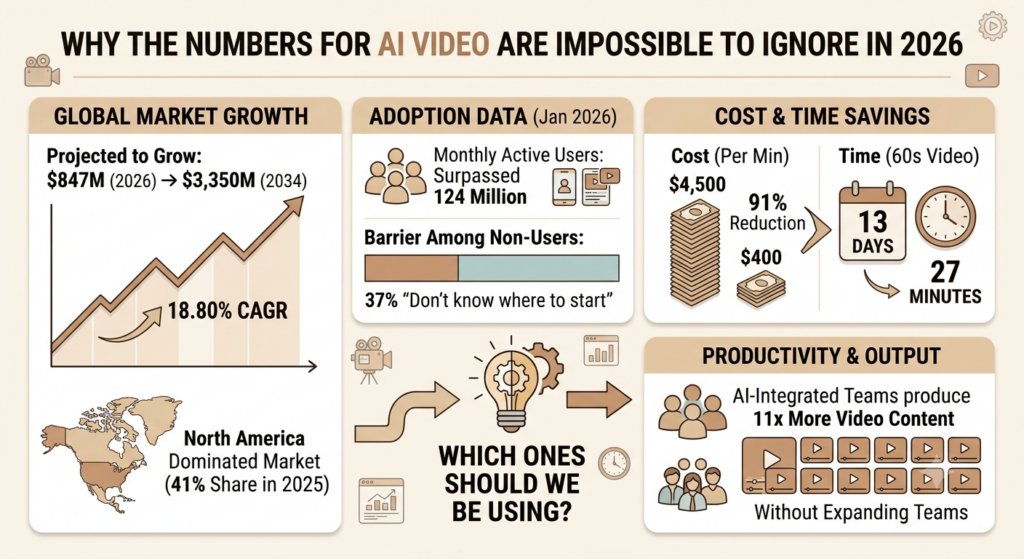
According to Fortune Business Insights, the global AI video generator market is projected to grow from $847 million in 2026 to $3,350 million by 2034, exhibiting a CAGR of 18.80%. North America dominated the market with a share of 41% in 2025.
That growth isn’t speculative. The adoption data backs it up. Monthly active users across AI video platforms surpassed 124 million in January 2026. And the most telling barrier to adoption among non-users isn’t cost -37% of marketers who don’t create video say they simply don’t know where to start.
The cost argument is getting harder and harder to ignore. AI tools have slashed video production costs by 91%, from an average of $4,500 per minute to roughly $400, while cutting the average 60-second marketing video production time from 13 days to 27 minutes.
And for teams already using these tools, the productivity numbers are striking. Agencies that have integrated AI video tools into their workflows produce 11 times more video content per month without expanding their teams.
The competitive implication is simple: if a competitor’s content team is producing 11x the output at a fraction of your cost, the question is no longer “should we try AI video tools?” It’s “which ones should we be using?”
Read More: Best Creative Automation Tools
Key Features That Separate Good Video Automation Software from Average
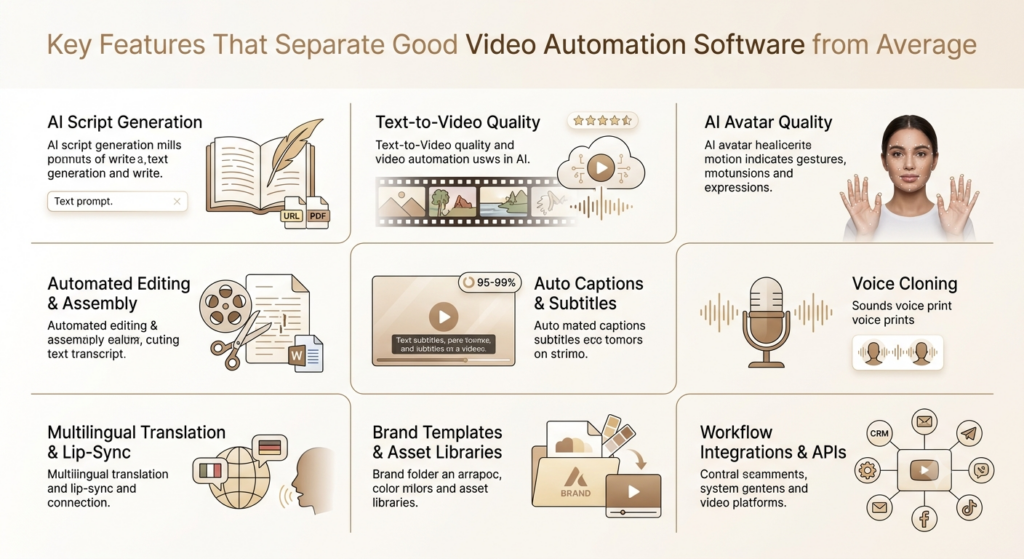
Not all platforms are created equal. Here’s what actually matters when you’re evaluating tools.
AI Script Generation
The strongest platforms can generate a video-ready script from a URL, a PDF, a product description, or a plain conversational prompt. Look for tools that show you the script before generating the video so you can edit it. InVideo AI does this through a chat interface where you describe what you want in plain language, and the platform produces a structured script in response.
Text-to-Video Quality
This is the core capability. Quality varies widely. InVideo AI is currently the only platform that bundles access to both OpenAI’s Sora 2 and Google’s VEO 3.1 within a single subscription starting from $28/month. Sora 2 standalone via ChatGPT Pro costs $200/month, and VEO 3.1 Ultra runs around $250/month. That’s a significant value gap.
For cinematic work, Runway Gen-4.5 remains the benchmark for camera control and visual fidelity.
AI Avatar Quality
AI avatars are the digital on-screen presenters that read your script. HeyGen’s Avatar IV engine is the current-generation avatar system, producing 30-minute videos with timing-aware gestures and emotional micro-expressions. Synthesia takes the opposite approach: its avatars are deliberately neutral and consistent, which is what enterprise L&D teams want for compliance training watched by thousands of employees.
Automated Editing and Assembly
The best platforms don’t just generate -they assemble. Descript’s text-based editing model is the clearest example: you edit the video transcript as if it’s a Word document, and the video updates to match. Delete a sentence, and the corresponding footage is cut.
Auto Captions and Subtitle Generation
Captioning accuracy is now table stakes. Descript, VEED, and CapCut all achieve 95-99% accuracy on clear English audio. Accuracy drops on heavy accents, technical terms, multi-speaker overlap, and background noise. Check the captioning accuracy on your actual content before committing.
Voice Cloning
HeyGen offers unlimited voice clones from the Creator plan upward, and as of February 2026, audio dubbing is unlimited on all paid plans and doesn’t consume premium credits, which is meaningful if localisation is your primary use case.
Multilingual Translation with AI Lip-Sync
This is where platforms genuinely differ. HeyGen’s translation covers 175+ languages with lip-sync re-animation of the avatar’s mouth. Synthesia covers 140+ languages. Both support one-click translation of full videos. For Indian brands running multilingual campaigns across Hindi, Tamil, Telugu, Bengali, and English, this feature alone can replace several regional content production budgets.
Brand Templates and Asset Libraries
Look for platforms that let you upload your logo, fonts, colour palette, and intro/outro once, then apply them automatically to every video. InVideo AI’s branding kit covers this well; so does Lumen5 for teams focused on social content.
Workflow Integrations and APIs
HeyGen restructured its API in February 2026 to a pay-as-you-go model with no monthly commitments. The minimum top-up is $5, credits expire 12 months after purchase, and there are no free API credits. For teams building automated video pipelines -personalised outreach, CRM-triggered welcome videos -API access is what makes scale possible.
Types of Video Automation Software
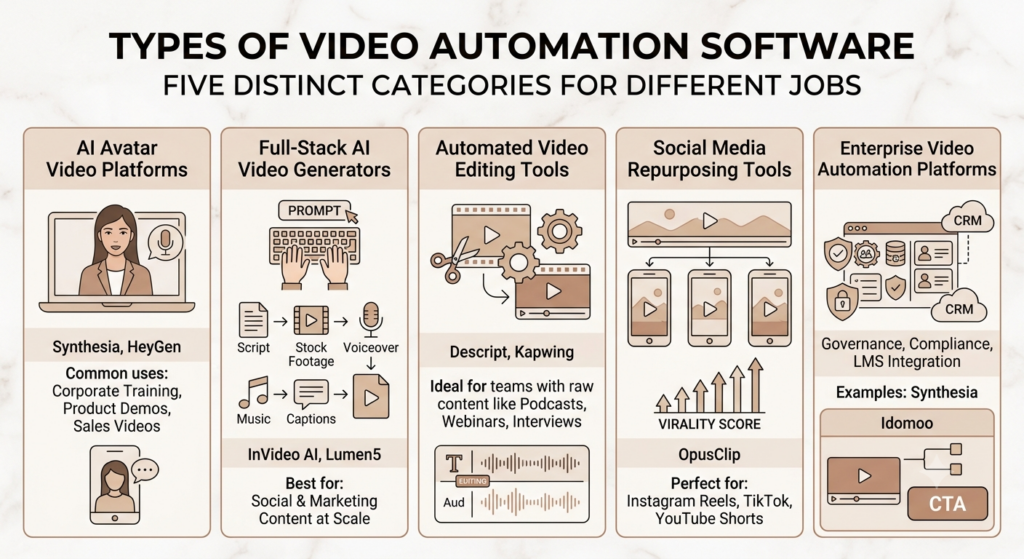
The category splits into five distinct types, each built for a different job.
AI Avatar Video Platforms
These put a human-like digital presenter on screen, speaking your script. Synthesia and HeyGen dominate this category. They’re the go-to for corporate training, product demos, sales videos, and any content where a human face on screen matters.
Full-Stack AI Video Generators
These take a text prompt and produce a complete video: script, footage, voiceover, music, and captions. InVideo AI and Lumen5 are the main options. They’re built for volume social and marketing content, where you need to go from brief to finished output quickly.
Automated Video Editing Tools
These automate the editing of footage you already have. Descript and Kapwing fall here. They’re strongest for teams that record raw footage -podcasts, webinars, interviews -and need to cut and polish it into finished content without a professional editor.
Social Media Repurposing Tools
OpusClip is the clearest example. These tools take one long-form video and automatically clip it into multiple short social pieces, with AI-predicted virality scores and automatic vertical reformatting for Instagram Reels, TikTok, and YouTube Shorts.
Enterprise Video Automation Platforms
Enterprise platforms add governance, compliance, LMS integration, and team management on top of core generation. Synthesia is the clearest example. Idomoo sits in its own sub-category with CRM-integrated personalised video at scale, including interactive branching and embedded CTAs.
The Best Video Automation Software in 2026
Synthesia -Best for Enterprise Training and Internal Communications
Synthesia is the corporate standard for AI avatar video. It’s trusted by over 50,000 teams globally and holds a 4.7-star rating on G2 from more than 2,000 reviews.
What’s new in 2026: Synthesia 3.0 added Video Agents for real-time two-way conversations, an AI Copilot that writes scripts and suggests visuals, and interactive Courses for structured workplace learning. Synthesia also raised a $200M Series E in January 2026 at a $4 billion valuation, signalling serious enterprise momentum.
Key features: 240+ stock avatars, 140+ language support with one-click translation, SCORM export for LMS integration, SOC 2 Type II and GDPR compliance, AI script assistant, interactive video for training assessments, and a media library that scales from Pexels on the free tier to Getty Images on higher plans.
Current pricing (verified May 2026):
- Free: 3 minutes of video/month, 9 avatars, watermark
- Starter: ~$18-$29/month (annual vs. monthly) -10 min/month, 125+ avatars, no watermark
- Creator: ~$64-$89/month -30 min/month, 180+ avatars, custom avatar creation, API access
- Enterprise: Custom -unlimited minutes, 240+ avatars, SSO, SCORM, unlimited personal avatars
Vendr marketplace data shows a median annual enterprise spend of around $30,000 across 17 verified enterprise purchases. Compliance features like SSO/SAML, SCORM export, and unlimited personal avatars are restricted to the Enterprise tier only.
Where it falls short: Synthesia’s minute-based pricing on self-serve plans surprises new buyers. The per-minute cap doesn’t roll over between billing cycles. Teams that need unlimited video creation on a predictable budget often find HeyGen’s credit model easier to manage. The avatars are also deliberately neutral -great for training, less suited for short-form marketing or ads.
Best for: Corporate L&D, compliance training, HR communications, global enterprises needing multi-language content at scale.
HeyGen -Best for Marketing, Sales, and Social Content
HeyGen is the strongest all-rounder in 2026 for teams producing marketing and sales-facing video. It holds a 4.8/5 on G2 across more than 1,000 reviews and 4.7/5 on Capterra across 313 verified reviews as of June 2026. G2’s own avatar quality metric scores HeyGen at 9.2/10.
What’s new in 2026: HeyGen allows real-time conversational avatars that can act as automated visual chatbots on landing pages to answer customer questions. The Video Agent API lets teams build fully automated video pipelines triggered by CRM updates, form submissions, or Zapier workflows. HeyGen’s Team plan is being deprecated in January 2026 as the company moves to a new credit-based model with a HeyGen For Business plan.
Key features: 120+ stock avatars with Avatar IV realism, 175+ language translations with lip-sync, unlimited video creation on paid plans, video agent API for automated pipelines, voice cloning and digital twin creation, ChatGPT-driven video creation, and integration with Sora 2 and Veo 3.1 for cinematic B-roll.
Current pricing (verified June 2026):
- Free: 3 videos/month, watermark, limited avatar access
- Creator: $29/month ($24/month annual) -unlimited videos, 200 monthly credits, 1080p, voice cloning
- Pro: $49/month -1,000 monthly credits, 4K export, more AI capacity for solo power users
- Business: $149/month + $20/additional seat -1,500 credits, 4K, team collaboration, SCORM, interactive video
- Enterprise: Custom
The credit system gotcha: The key variable is avatar generation quality. Avatar IV content consumes 20 credits per minute versus Avatar III at 3 credits per minute -6.7x more credits for the same runtime. A team that prides itself on Avatar III usage that switches to Avatar IV will burn through their monthly allocation about seven times faster than expected.
Real-world proof: Trivago localised video for 30 markets with an 80% cost reduction using HeyGen, producing one localised video per day where previously it took weeks. Miro reported 10x faster video production.
Best for: Marketing teams, sales outreach, product demos, social content, and any team where expressive avatar quality and multilingual reach matter.
InVideo AI -Best for Social Content at Scale
InVideo AI is the most accessible full-stack video automation tool in 2026. The platform is the only one that bundles both OpenAI’s Sora 2 and Google’s VEO 3.1 within a single subscription starting at $28/month. That combination is genuinely notable: you get frontier-grade generative footage for social content at a price point most small teams can justify.
Key features: Chat-based video generation where you describe the video in plain language, 16M+ royalty-free stock assets, AI voiceover, automatic subtitles, branding kit, 50+ language support, 7,000+ templates across social formats. The platform runs two parallel products: InVideo AI for prompt-first generation and InVideo Studio for manual timeline editing.
Current pricing:
- Free: Limited credits, watermark
- Plus: $28/month -full video generation, Sora 2 + Veo 3.1 access, branding kit, 1080p
- Max and Generative tiers for higher volume and longer video formats
Where it falls short: About one in four editing commands needs a retry, and credits get consumed on bad outputs with no refund. Treat it as a rapid-drafting engine rather than a finished-product machine. It’s also not suited for avatar-led content -for that, you want HeyGen or Synthesia.
Best for: Solo marketers, small business teams, and content agencies needing daily social video without a steep learning curve or production budget.
VEED -Best for Caption-Heavy Social and Collaborative Editing
VEED is a browser-based video editor and automation platform with a strong reputation for caption accuracy. On G2, user Matt S. specifically called out VEED’s captioning as superior to Adobe Premiere Pro’s, describing it as precise and easy to create. It’s a common go-to for YouTube Shorts creators and social media managers.
Key features: Auto captions with full styling control, AI text-to-video, screen recording, video resizing for platform presets, subtitle translation, team collaboration workspace, and AI-generated scripts.
Current pricing:
- Free: Watermark on exports, basic features
- Lite: $12/month (billed annually) -watermark-free, 1080p, 5GB storage
- Pro: Full HD, unlimited AI tools, 50GB storage, translation
- Business: Multi-seat, private workspaces, advanced analytics
One thing to know: If you want to go beyond editing and tap into AI content creation, you’ll need to purchase AI credits separately from the base subscription, which raises the total monthly cost. Price accordingly.
Best for: Social media managers, YouTube creators, and content teams who need strong captioning automation and collaborative editing without an avatar workflow.
Descript -Best for Editing Recorded Footage
Descript flips the editing model. Instead of a timeline, you get a text document. The platform transcribes any footage you upload, and you edit the video by editing the text. Delete a sentence, cut the video. Rearrange paragraphs, rearrange scenes.
Key features: Text-based video editing, Overdub voice cloning for fixing pronunciation errors in recorded content, automatic filler word removal, AI Clips for generating social short-form from long-form, multi-track editing, and the “Underlord” AI co-pilot that has evolved into a full production assistant in 2026.
Current pricing: Descript’s pricing in 2026 ranges from £0 on the Free plan to roughly £20 per month on the Business tier when paid annually.
Best for: Podcasters, YouTubers who film themselves, webinar teams, and any creator who records raw footage and needs to edit it efficiently. If you’ve recorded a 40-minute product demo and need a 3-minute highlights cut, Descript gets this done faster than any traditional editor.
Runway -Best for Cinematic AI-Generated Footage
Runway is not a marketing automation tool. It’s a creative production platform for filmmakers, directors, and ad agencies who need AI-generated footage with precise camera control.
Key features: Gen-4.5 generative model, camera motion controls and keyframe precision, timeline editing, motion tracking, real-time style transfer, AI background removal, and 4K upscaling via Topaz-style neural rendering on higher tiers.
Current pricing:
- Basic: Free, limited credits, watermark
- Standard: $35/month -625 monthly credits (e.g. ~52 seconds of Gen-4 footage), 4K upscaling, 100GB storage, up to 5 users
- Pro: Custom voice creation for lip sync, 2,250 credits, 500GB storage
Best for: Creative agencies, ad production teams, and filmmakers who need AI B-roll and generated visuals. Not for teams who need avatar-led explainers or high-volume social content. If your work is purely creative and cinematic, Runway is the strongest technical option. If you need an end-to-end production pipeline, pair it with another tool.
Pictory -Best for Blog-to-Video Repurposing
Pictory converts written content into video automatically. Paste a blog post URL, and the platform breaks it into scenes, matches each one with stock footage, and produces a finished social video. It’s a narrow use case, but it’s genuinely useful for content marketing teams sitting on years of published articles with no video counterpart.
Key features: URL-to-video generation, script-to-video, highlight reel generation from long-form footage, brand kit features, auto-captions, 3 million+ video clips, and 15,000+ music tracks.
Current pricing: Pictory starts at $19/month for the Starter plan, Professional at $29/month, and Teams at $99/month.
Best for: Content marketers and bloggers who want to turn written content into social-ready video without additional production work. Pictory’s template variety is limited -you won’t find the creative range of InVideo -but for blog-to-video at speed, it’s the most direct solution.
OpusClip -Best for Repurposing Long-Form Video into Social Clips
OpusClip is built for one job: taking a long video and generating multiple short-form clips optimised for TikTok, Instagram Reels, and YouTube Shorts. It’s the default tool for podcasters, webinar producers, and YouTubers who want social presence without a separate production effort.
Key features: AI-detected highlight clipping from long-form content, virality scoring (AI predicts which clips will perform best based on TikTok, LinkedIn, and YouTube Shorts trend data), Active Speaker Detection for automatic vertical reformatting, animated captions that highlight key phrases, and auto-scheduling to social platforms.
Pricing: Free tier with 60 credits/month and watermarked output. Paid plans start around $19/month for individuals, scaling up for teams.
Best for: Content creators, podcasters, agencies with libraries of long-form content, and marketing teams that run regular webinars or LinkedIn Live sessions and want automated social clips without a dedicated editor.
Lumen5 -Best for Social Video from Written Content
Lumen5 is trusted by over 4,000,000 companies globally. It’s an AI-powered video maker designed for businesses to create professional marketing, communication, and educational videos quickly, turning text like blogs, articles, or bullet points into engaging videos with drag-and-drop ease.
Key features: Text-to-video and blog-to-video automation, automatic storyboard generation from pasted content or URLs, built-in stock media library, social media format presets, brand overlay controls, and AI narration on higher plans.
Current pricing: Plans range from Free to $149/month billed yearly, with custom pricing for Teams. The Free plan offers 5 videos/month with Lumen5 branding.
Where Lumen5 shows its limits: Results can still need manual editing, especially when captions, visuals, timing, or longer YouTube-style videos need closer control. Lumen5 lacks the depth for complex, high-end edits. It’s built for speed and brand alignment, not creative flexibility.
Best for: Marketing teams turning blog content into LinkedIn and social video, internal communications teams, and brands with high written content volume who want a matching video output.
Kapwing -Best for Collaborative Team Editing
Kapwing is a browser-based editor that gives teams the ability to refine clips collaboratively before publishing rather than auto-exporting. Pro starts at $16/month, Business at $50/month.
Key features: Real-time collaborative editing, auto-subtitles, AI dubbing, video resizing for platform presets, smart cut (removes silence and filler words), background removal, and a template library for social formats.
Best for: Small content teams, agencies managing multiple client social accounts, and anyone who needs a collaborative video tool where multiple people review and edit before publishing. It’s not the most automated tool, but it’s the best at making collaboration efficient.
Read More: 17 Best Video Editing Platforms for 2026
Honest Comparison Table
| Tool | Avatar Video | Text-to-Video | Auto Editing | Translation | Starting Price | Best For |
| Synthesia | Yes (240+) | Limited | Limited | 140+ languages | ~$18/mo (annual) | Enterprise training |
| HeyGen | Yes (120+) | Yes | Limited | 175+ languages | $24/mo (annual) | Marketing & sales video |
| InVideo AI | Limited | Yes (Sora 2 + Veo 3.1) | Yes | 50+ languages | $28/mo | Social content at scale |
| VEED | Limited | Yes | Yes | Yes | $12/mo (annual) | Captions & collaboration |
| Descript | No | No | Yes | Limited | $16/mo | Editing recorded footage |
| Runway | No | Yes (cinematic) | Yes | No | $35/mo | Creative & cinematic B-roll |
| Pictory | No | Yes | Yes | Limited | $19/mo | Blog-to-video |
| OpusClip | No | No | Yes (clipping) | Limited | $19/mo | Long-form repurposing |
| Lumen5 | Limited | Yes | Yes | Limited | Free-$149/mo | Text-to-social video |
| Kapwing | No | Limited | Yes | Yes | $16/mo | Team collaboration |
Common Use Cases -Where Each Type Actually Wins
Marketing and Brand Videos
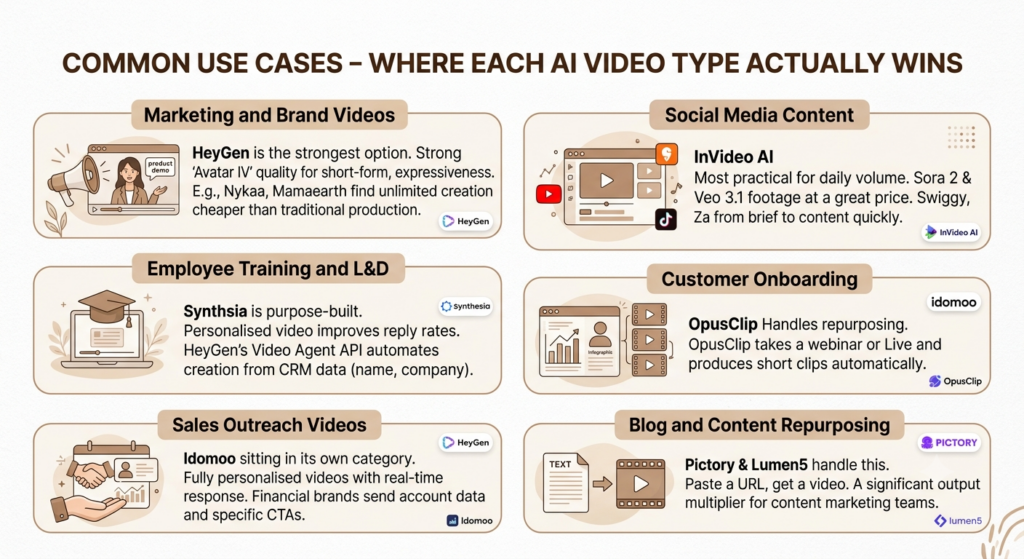
For avatar-led product explainers, brand videos, and marketing content, HeyGen is the strongest option in 2026. Its Avatar IV quality holds up in short-form contexts -ads, product demos, LinkedIn content -where expressiveness matters. Brands like Nykaa and Mamaearth, which maintain heavy content calendars across performance and brand channels, would find HeyGen’s unlimited video creation at the Creator tier significantly cheaper than traditional video production for mid-funnel content.
Employee Training and L&D
Synthesia is purpose-built for this. Its SCORM export means training modules integrate directly into LMS platforms like Cornerstone, SAP SuccessFactors, or Workday Learning. The SOC 2 Type II compliance and review workflow features meet the governance requirements that L&D teams in financial services, pharma, and large enterprises need.
Sales Outreach Videos
Personalised video in sales outreach improves reply rates significantly. HeyGen’s Video Agent API lets sales teams trigger personalised avatar videos automatically from CRM data -a prospect’s name, company, and specific pain point appear in a video generated without manual effort at each step.
Social Media Content
For daily social volume, InVideo AI is the most practical tool. The Sora 2 and Veo 3.1 integration within one subscription means the footage quality is competitive with tools costing 10x more. OpusClip handles the repurposing angle: if your team runs a weekly LinkedIn Live or webinar, OpusClip produces a week’s worth of social clips automatically.
Teams like Swiggy and Zepto, which require daily social touchpoints across Instagram, YouTube Shorts, and LinkedIn, can use InVideo AI to take a product brief from text to publishable content in a single session.
Customer Onboarding
Idomoo sits in its own category for onboarding: it integrates with CRM and first-party data to generate fully personalised videos that respond to viewer input in real time. A financial services brand can send each customer a video that shows their specific account data, personalised recommendations, and a CTA tied to their user segment. This kind of interactive, data-driven personalisation is not what Synthesia or HeyGen are built for.
Blog and Content Repurposing
Pictory and Lumen5 handle this. Paste a URL, get a video. For content marketing teams sitting on thousands of published articles, turning even 20% of that content into social video automatically is a significant output multiplier.
In 2026, the strongest video automation software use cases are: Synthesia for enterprise training with SCORM LMS integration; HeyGen for marketing, sales, and multilingual content with 175+ language support; InVideo AI for social content at scale with Sora 2 and Veo 3.1 bundled; OpusClip for turning long-form recordings into social clips; and Pictory for blog-to-video repurposing at speed.
How AI Is Reshaping Video Production Workflows in 2026
Frontier Generation Models Are Now Inside Marketing Tools
The biggest shift in 2026 is not a new standalone model -it’s the integration of frontier models into everyday marketing platforms. Google’s Veo 3.1 and OpenAI’s Sora 2 are now accessible inside InVideo AI subscriptions from $28/month. These models produce footage that reviewers describe as indistinguishable from filmed content in short clips. A year ago, accessing either model required enterprise budgets. Today it’s a line item below most freelance videographers’ day rate.
Real-Time Conversational Avatars
In 2026, HeyGen will allow real-time conversational avatars that can act as automated, visual chatbots on landing pages, answering customer questions. Synthesia’s Video Agents enable two-way interactive video for training assessments. These aren’t just passive explainer videos anymore -they’re interactive interfaces. The line between video and chatbot is genuinely blurring.
Text-Based Video Editing Is Becoming the Default
Descript’s approach -edit video by editing text -has proven popular enough that other platforms are beginning to replicate it. Google Gemini Omni’s June 2026 update introduced multi-track AI editing that synchronises footage from multiple cameras automatically. The direction the whole industry is moving in is toward natural language as the primary interface for video editing, not timelines.
Video Personalisation at Scale
AI video generation systems let creators make videos 10 to 100 times faster than traditional methods and cut production expenses by reducing the need for extensive manual editing. They enable the creation of personalised video content at scale for targeted marketing and automatically produce multilingual versions through AI dubbing and subtitles.
The personalisation use case is accelerating fastest in e-commerce, financial services, and enterprise HR. Sending 10,000 customers a video with their name, their usage data, and their personalised recommendation is now operationally feasible. It wasn’t two years ago.
AI Agents for Video Production
The next frontier is agentic workflows: AI systems that manage the entire video production pipeline without any human trigger at each step. HeyGen’s Video Agent API is the clearest 2026 example. A sales team can set up a workflow where every new lead in HubSpot automatically receives a personalised avatar video within minutes of entering the CRM -no manual work per lead.
The three biggest AI video trends reshaping workflows in 2026 are: frontier generation models (Sora 2, Veo 3.1) now bundled inside affordable marketing subscriptions; real-time conversational avatars blurring the line between video and chatbot; and agentic video pipelines that trigger and produce personalised videos automatically from CRM and workflow data, with no per-video human intervention required.
Challenges You Should Know Before You Buy
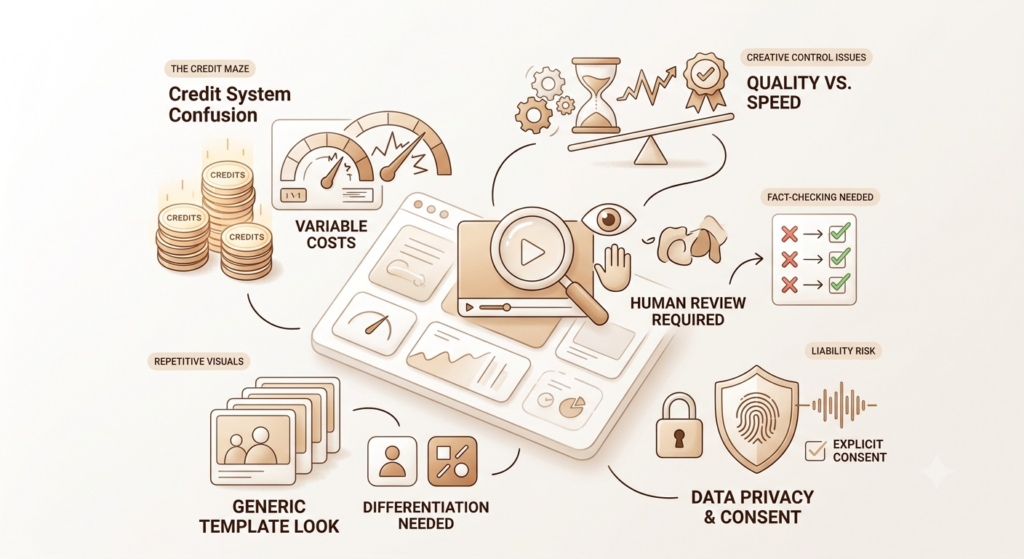
The category is genuinely impressive. It’s also genuinely imperfect. Here’s what the marketing brochures don’t tell you.
The Credit System Confusion
Almost every platform in this category has moved to some form of credit-based pricing, and credits work differently across platforms. HeyGen’s Avatar IV consumes 20 credits per minute versus 3 credits per minute for Avatar III -a 6.7x gap that regularly shocks new users mid-month. Synthesia’s minute-based model is more predictable, but unused minutes don’t roll over. VEED charges separately for AI generation credits on top of base subscriptions.
Before you commit to any plan, map your expected monthly video output, which quality tier you’ll actually use, and run the math against the credit allocation. The actual cost is often 40-60% higher than the headline price for teams using premium features.
The Quality vs. Speed Trade-Off Is Real
Video automation software is excellent for 80% of production work. It’s less reliable for the 20% that requires precise creative direction, complex emotional storytelling, or brand-critical visual treatments. AI-selected stock footage doesn’t always match your brand’s visual identity. Avatar expressions can feel slightly off for nuanced scripts. For consumer-facing brand advertising -the kind where every frame is a brand statement -human creative directors are still in the loop.
Human Review Is Still Non-Negotiable
Publishing directly from automated output without a human review is how errors go live. An AI-generated script may get a fact wrong. Auto-captions on heavily accented speech may misfire. Avatar lip-sync occasionally breaks on unusual phonemes. The right workflow is automation for production, with human review before publishing.
Data Privacy and Consent for Custom Avatars
Creating a custom avatar requires recording your likeness. Voice cloning requires recording your voice. Both raise consent and data handling questions. Synthesia and HeyGen are SOC 2 Type II and GDPR compliant and require explicit consent for custom avatar creation. Smaller platforms may not apply the same standards. For enterprise deployments, check compliance certifications before piloting.
Over-Reliance on Templates Makes Content Look Generic Over Time
If every brand on a platform uses the same 10 templates, social feeds start to look repetitive. InVideo AI’s stock footage library and template variety help here -16M+ assets and 7,000+ templates give you more room to differentiate. But the broader risk is real: video automation tools used without creative thinking produce video automation-looking content.
How to Choose the Right Video Automation Software for Your Team
For Solo Marketers and Small Business Owners
Start with InVideo AI at $28/month or Pictory at $19/month. Both cover text-to-video without technical complexity. InVideo AI gives you better generative footage quality (Sora 2 + Veo 3.1). Pictory is the better option if your primary use case is turning existing articles into video.
Don’t start with HeyGen or Synthesia. Both tools offer better avatar quality but come with credit systems that require more planning. Get comfortable with the basics of AI video first.
For Marketing Teams
Most marketing teams need two things: avatar-led content for longer explainers and demos, and fast social-first content for daily publishing. HeyGen handles the first at $29/month Creator. InVideo AI or Lumen5 handles the second. Running both tools simultaneously isn’t expensive -it’s often cheaper than a single freelance edit -and covers the full content calendar.
For Content Agencies
Kapwing for collaborative client editing, OpusClip for repurposing client long-form into social, and either HeyGen or InVideo AI for new video creation covers most agency workflows. The biggest priority for agencies is collaboration -make sure your tool of choice allows multi-user workspaces without ballooning per-seat costs.
For Enterprise Organizations
Evaluate Synthesia first if training, compliance, or internal communications are the core use case. Its SCORM export, LMS integration, SOC 2 compliance, and governance features are built specifically for this. If marketing and sales video is the primary need, HeyGen Business at $149/month or HeyGen Enterprise is the right evaluation.
For enterprise Synthesia contracts, budget $25,000-$40,000 annually for mid-market deployments, with 50-100% variance based on specific requirements. Get competitive quotes from HeyGen and Colossyan before signing.
Budget and ROI Framework
The question isn’t whether the tool costs $30, $100, or $200 per month. The question is what your current video production costs are and how many more videos you could produce with automation at that budget.
AI-powered video scripting tools shorten pre-production times by around 53%. AI editing tools boost team productivity by 47%. For a team that spends 20 hours a month on video production, that’s roughly 10 hours saved -hours that can go into more videos or other priorities.
The real ROI check: take your current cost per video (internal hours + external spend) and divide by the number of videos you actually publish per month. Then estimate what that number could be with automation. The math almost always favours at least one tool at entry pricing.
To choose the right video automation software in 2026, match the tool to the job: InVideo AI for social content at scale, HeyGen for avatar-led marketing and multilingual content, Synthesia for enterprise training with LMS integration, Descript for editing recorded footage, and OpusClip for repurposing long-form into social clips. Running two tools simultaneously often costs less than a single freelance edit and covers a wider range of content types.
Conclusion
Video automation software in 2026 isn’t a future bet -it’s current infrastructure. 78% of marketing teams now incorporate AI-generated video into at least one campaign each quarter. The tools have matured enough that avatar quality is broadly convincing, generative footage from Sora 2 and Veo 3.1 is approaching filmed quality, and the production time savings are real and documented.
The thing most teams get wrong is trying to find one tool that does everything. HeyGen for avatar video, InVideo AI for social content, Descript for editing recorded footage -these are three different jobs that three different tools do well. Trying to force one platform to cover all three will result in either overpaying for features you don’t use or under-delivering on quality where it matters.
Start narrow. Pick the single highest-volume content type your team produces, find the tool that handles it best, and build the workflow from there. Once that pipeline runs reliably, add the second tool.
Frequently Asked Questions
What is video automation software?
Video automation software is a category of AI-powered tools that automate one or more stages of video production -scripting, footage selection, voiceover, editing, captioning, translation, and publishing. The goal is to reduce the time and cost of video production by replacing repetitive manual steps with AI-driven processes.
How does AI automate video creation?
AI video automation combines several technologies: natural language processing generates and processes scripts; generative video models produce footage from text or images; text-to-speech and voice cloning create narration; computer vision selects relevant stock footage; and workflow automation handles publishing. Most platforms combine these into a single interface where users input text and receive a finished video.
Is video automation software suitable for small businesses?
Yes. Pictory at $19/month and InVideo AI at $28/month are specifically designed for small businesses and individuals. Both produce social-ready video from a text prompt or blog post URL without requiring any video editing skills. The per-video cost at these price points is a fraction of traditional production.
What is the best video automation software in 2026?
There’s no single best -the right answer depends on your use case. For podcast and talking-head content, Descript leads. For creative or AI-generated cinematic video, Runway is strongest. For B2B marketing video at scale from written content, Pictory is the most direct. For repurposing long-form into social clips, OpusClip is the go-to. For browser-based team editing, VEED covers the most ground. For avatar-led enterprise training, Synthesia. For marketing and multilingual sales video, HeyGen.
Can AI create videos from text?
Yes, and it’s a mature capability in 2026. InVideo AI, HeyGen, Synthesia, and Lumen5 all convert text scripts into complete videos with footage, voiceover, captions, and music. InVideo AI specifically bundles Sora 2 and Veo 3.1 generative models, producing some of the highest-quality AI-generated footage available at that price point.
How much does video automation software cost?
Pricing ranges from free (limited tiers on most platforms) to $150-$200+/month for business plans, and into five-figure annual contracts for enterprise. Most useful entry-level plans fall between $19-$35/month. Credit-based systems make actual cost harder to predict than headline pricing suggests -always model your specific monthly output before committing to a plan.
Can video automation software translate videos into multiple languages?
Yes. HeyGen’s translation covers 175+ languages with AI lip-sync re-animation. Synthesia covers 140+ languages with one-click translation. As of February 2026, HeyGen’s audio dubbing is unlimited on all paid plans and doesn’t consume premium credits, making multilingual content creation significantly more cost-effective for localisation-heavy teams.
What’s the difference between HeyGen and Synthesia?
Both platforms create avatar-led videos from scripts without cameras or studios. HeyGen’s Avatar IV is more expressive and realistic for short-form marketing content. Synthesia’s avatars are more neutral and consistent, which is preferable for long-form enterprise training where stability across modules matters more than charisma. HeyGen starts at $24/month annually; Synthesia at ~$18/month annually. HeyGen leads on avatar expressiveness and language coverage. Synthesia leads on enterprise governance and structured training content.
What’s the biggest mistake teams make when buying video automation software?
Buying on features rather than workflow fit. A team that needs daily social content buying Synthesia (built for structured avatar training) will be frustrated by minute caps and the absence of fast social templates. A team buying HeyGen without modelling Avatar IV credit consumption mid-month will feel the pricing is higher than expected. Match the tool to your primary output type first -everything else follows.
How are Indian brands using video automation software?
Indian brands are using video automation tools primarily for multilingual content across regional languages, high-volume social publishing, and cost-effective alternatives to studio production. A D2C brand launching a campaign in Hindi, Tamil, Telugu, and Marathi simultaneously can use HeyGen to produce all four language versions from one English script in a single session, without separate voice artists or editing runs per language. For social content, teams at brands like Zepto and Swiggy benefit from InVideo AI’s volume capabilities to maintain daily publishing cadences across platforms.