
Your best ad just stopped working. Frequency crept up. Click-through slid. And the same question lands on your desk again: where do the next ten videos come from?
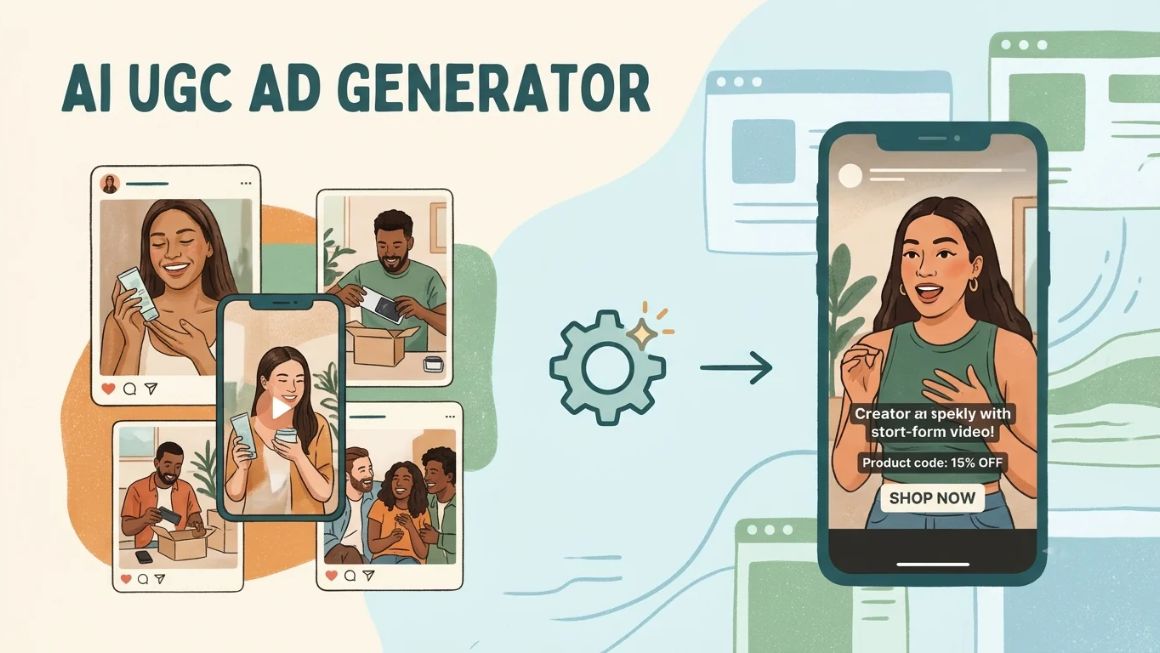
That’s the gap an AI UGC ad generator tries to fill. You feed it a product link and a script. It returns a creator-style video with an AI presenter talking straight to camera. No studio. No creator who went quiet on day three.
The shift is already well underway. The IAB’s 2025 Digital Video Ad Spend & Strategy report found that 30% of digital video ads in 2024 were built or enhanced with generative AI. Buyers expected 39% by 2026, with small brands leaning in hardest.
Viewers aren’t as thrilled though. In the IAB’s January 2026 research, only 45% of Gen Z and Millennial consumers felt positive about AI-generated ads. 82% of ad executives assumed they did. That gap is where most AI-made creative goes wrong.
This guide covers how the tools work, seven platforms worth comparing, what they cost, a full build from script to export, how to measure results and the compliance rules people trip over. One warning up front: pricing in this category shifts almost monthly. So read every number here as a late-2026 snapshot.
Table of Contents
What Is an AI UGC Ad Generator?
An AI UGC ad generator is software that turns a product link, a script or a few images into a short, creator-style video ad, usually with an AI-generated presenter speaking to the camera. It looks like something a customer filmed on their phone. It isn’t.
Under the hood, the tool strings together a script writer, a synthetic voice, a lip-synced avatar and some product footage. Some vendors call the category an AI UGC video generator, but the job is the same: casual-looking video without a shoot.
The word UGC is where people get confused. Real user-generated content comes from actual customers or creators who used the product. What these tools make is UGC-style. Same handheld feel, same direct address. But nobody used anything. That difference matters legally and ethically. The compliance section below covers it.
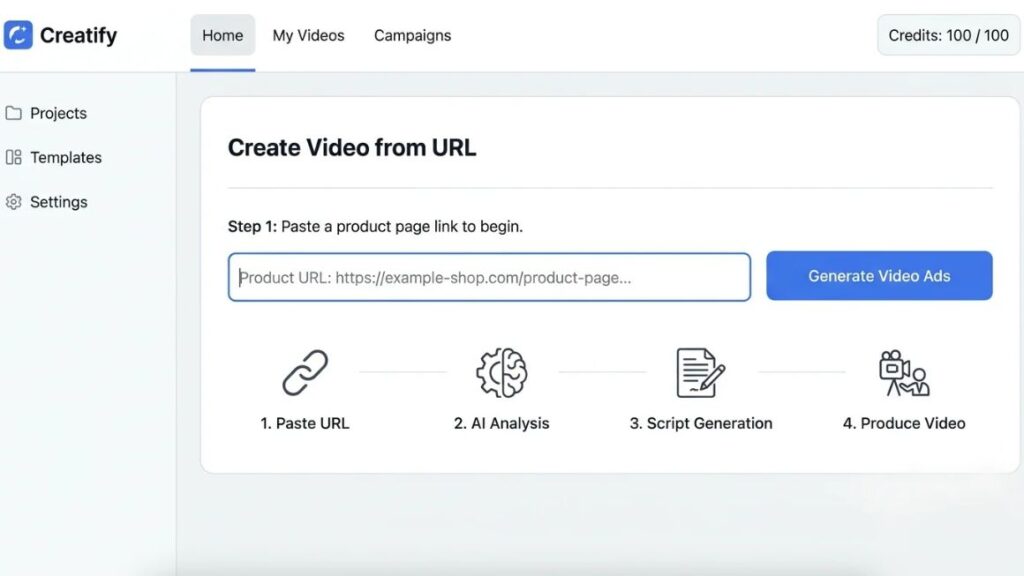
Picture a small store selling steel water bottles (a hypothetical example). The owner pastes the product page into Creatify, picks a presenter, and gets a 20-second demo clip in minutes. Then another with a different opening line. Then another.
Where does it fit? At the front of your testing process. It produces cheap first drafts so you learn which hooks work before paying a creator to film the winner.
An AI UGC ad generator creates creator-style video ads from product links and scripts using AI presenters. The output imitates user-generated content but isn’t made by real customers, so disclosure and honest claims matter. It works best as a fast testing tool, not a replacement for real customer content.
How Does an AI UGC Ad Generator Work?
Most platforms follow the same six steps. You add product details. The tool drafts a script. You pick a presenter. It renders the video. You edit and export. You review before anything goes live. That last step is the one teams skip.
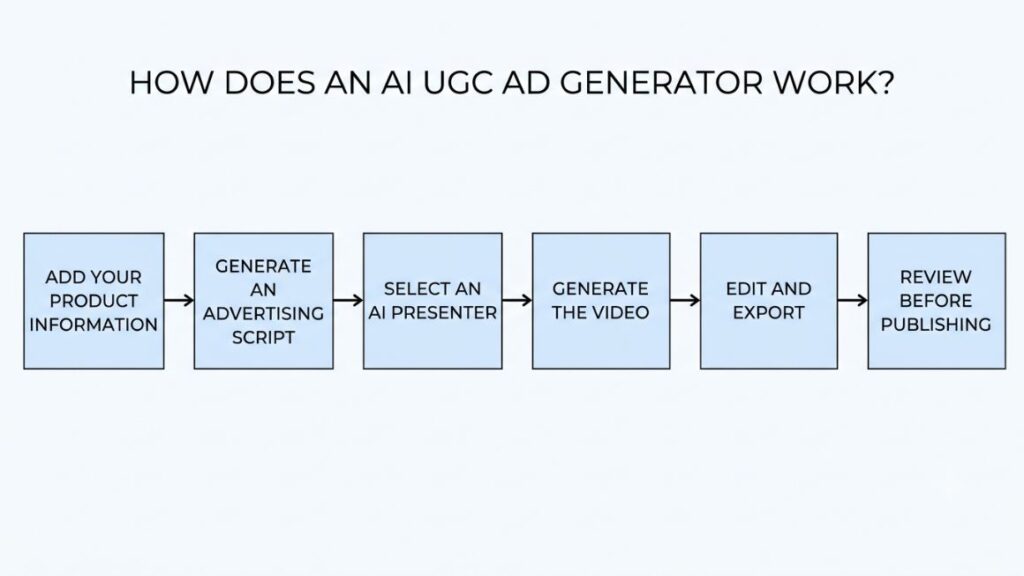
Step 1: Add Your Product Information
Paste a product URL, or upload images, a description and brand assets like your logo and colours. Better inputs mean less cleanup. Blurry packshots produce blurry videos.
Step 2: Generate an Advertising Script
The tool drafts several scripts at once, each with its own hook, benefit and call to action. Treat them as rough drafts. They tend to read like ads. You want them to sound like a person.
Step 3: Select an AI Presenter
Choose an avatar by look, age, voice and language. Match the presenter to the buyer. A presenter who looks nothing like your customer costs you trust before the first sentence ends.
Step 4: Generate the Video
Now the tool handles lip-syncing, voiceover, backgrounds and product placement. Check the hands first. That’s where glitches show up.
Step 5: Edit and Export
Add captions and subtitles, trim dead air, and export in the right shape: 9:16 for TikTok and Reels, 4:5 for feeds.
Step 6: Review Before Publishing
Watch the whole thing with a sceptical eye. Is the product shown accurately? Does any claim need proof? Is AI use disclosed where it must be? Does it sound like your brand?
Also Read: AI Creative Testing Tools: How to Pick and Use the Right Platform in 2026
Best AI UGC Ad Generator Tools in 2026
Most roundups in this space are affiliate lists with a thin layer of opinion on top, so here’s the method. Each platform was judged on some questions. How well does it handle creator-style ads specifically? How realistic do the presenters look? How fast does a product link become a video? How clear is the pricing? Does it help with compliance?
Features and prices come from vendor pages and third-party trackers read in October and November 2026. No head-to-head output test sits behind this list. So realism comments reflect published reviews. If you’re shortlisting UGC advertising tools, treat the table at the end as a starting filter, not a verdict.
4.1 Creatify
Creatify is built around one move: paste a product URL and it pulls the details, writes scripts and returns video ads with AI presenters. Its Standard plan starts at $10/month, while Pro costs $38/month with annual-plan pricing displayed on its website. Credits, not plan names, decide how many videos you get. That suits ecommerce teams cranking out hook variations. The catch is the credit ceiling on lower tiers, which can run out mid-test.
4.2 Arcads
Arcads built its name on AI actors for marketing. Reviewers often rank its actors the most believable of the group. The flow is script-led. Write the lines. Pick an actor. Generate. According to Arcads’ FAQ, the actors are based on real people who consented to the use of their likeness and are paid for it. Cost is the sticking point. There’s no public price page. Reported Starter pricing sits near $110 a month for about ten talking-actor videos, so roughly $11 each. Arcads also tests pricing now and then, which explains why reviews disagree. Great for performance teams that care about realism. Painful if you’re testing fifty hooks on a thin budget.
4.3 MakeUGC
MakeUGC pairs a big actor bench with a price you can actually see. Starter lists 300+ actors and Pro 1,000+, with 50+ languages and a Product in Hand feature where actors hold your item. Entry pricing starts near $29 a month on yearly billing; one tracker saw $59 on monthly. Batch Mode, which generates multiple creative variations, is available across all three plans.
Two limits: Starter caps exports at 480p or 720p and runs one video at a time. And the $1 trial reportedly renews at full price, so read the terms before adding a card.
4.4 HeyGen
HeyGen began as an avatar tool for explainers and training, which shows in what it does best: avatars, voices and translation. Think of it as an AI avatar generator for ads, internal videos and sales outreach alike, so it’s less ad-specific than the rest. The free plan gives three watermarked videos a month, up to a minute each. Paid plans run $29 for Creator, from $49 for Pro (with 4K export) and $149 for Business. Reviewers rate it highly for volume and translation. The annoyance: Creator and Pro users can’t buy top-up credits mid-month, so running dry means upgrading or waiting.
4.5 Topview
Topview works link-first. Paste a product URL, pick assets, language, voice and an avatar, then generate. Its Product Avatar feature turns a still product image into a clip where an AI person holds the item, and the library lists 5,000+ public avatars. The Plus plan starts at $36/month with annual billing, while Business costs $44 and Ultra $50. These prices are billed annually, so check the total before subscribing.
One limitation is the output quality. A G2 reviewer called the avatar movement formulaic.
4.6 Higgsfield
Higgsfield comes from the generative-video side, so you get camera moves, character consistency and lip-synced dialogue. Its Marketing Studio, rebuilt in 2026, runs on 1,500+ templates across six categories, UGC videos among them, and Click-to-Ad starts from a product URL. Prices differ by country and tracker, with entry plans between roughly $9 and $15 a month in recent lists. Paid plans include commercial use; the free plan doesn’t. Expect raw clips you finish yourself. It suits creative teams wanting control more than anyone wanting a one-click ad.
4.7 Zeely
Zeely is the all-in-one pitch: static ads, UGC-style videos and Meta campaign launch from one web and mobile app. Older pages listed Starter at $29.95, Plus at $49.95 and Growth at $79.95 with fixed video caps; the current page moved to monthly credits, so check live pricing. Reviews split. Setup is easy, but one review calls its avatars serviceable rather than photorealistic next to Arcads or HeyGen, and a DEV Community reviewer said four of six video attempts stalled. Fine for beginners. Less so if realism drives your results.
Quick Comparison: Which Tool Should You Choose?
| Tool | Best for | Entry price (late 2026, verify) | Free option | Standout |
| Creatify | Ecommerce, URL-to-ad | About $39/month | Sources conflict | Product-link workflow, 200+ templates |
| Arcads | Performance marketers | About $110/month | None confirmed | Realistic actors |
| MakeUGC | Agencies, volume | About $29/month (yearly billing) | $1 trial | Product in Hand, Batch Mode |
| HeyGen | Multilingual work | $29/month | Yes, watermarked | Avatars plus translation |
| Topview | Beginners | About $8 to $16/month | Reported | Link-to-video, Product Avatar |
| Higgsfield | Creative teams | About $9 to $15/month | Limited, no commercial rights | Camera control, 1,500+ templates |
| Zeely | Small businesses | About $29.95/month (older pages) | Limited trial credits | Ads plus Meta launch |
Short version: beginners should start with Topview or Zeely, ecommerce stores with Creatify, agencies with MakeUGC, and performance marketers who can afford it with Arcads. HeyGen wins when language coverage matters most.
Also Read: AI Agent for Ad Creative Generation: How to Build a Workflow That Scales?
How to Create an AI UGC Ad From Scratch?
Here’s a full run-through using an invented product. Illustrative example only: ClearDrop is a made-up niacinamide serum. It isn’t a real brand, campaign or customer testimonial.
Step 1: Choose a Product and Define Your Audience
Pick one product and one buyer. ClearDrop’s imagined buyer is a 25-year-old in Bengaluru with oily skin who commutes in the heat.
Step 2: Identify the Main Customer Problem
Find the one problem the ad solves, and look for it in your real reviews and support chats. For ClearDrop, say it’s skin that looks shiny by late morning.
Step 3: Write a Natural-Sounding Ad Script
Keep it spoken and short.
- Hook: Shiny by 11 a.m.? This serum is made for that.
- Body: ClearDrop has 5% niacinamide in a light gel. Two pumps after cleansing, then moisturiser.
- CTA: Tap the link to see the ingredients and reviews.
Notice what’s missing. The avatar never says it has used the product for a month, because it hasn’t.
Step 4: Choose Your Presenter and Video Style
Pick a presenter close to your buyer’s age and tone, then set a bathroom-counter background with handheld framing. Skip the glossy studio look.
Step 5: Generate and Edit Your Advertisement
Render three versions with different hooks. Watch each one muted, then with sound. Check that the label on the pack matches the real product.
Step 6: Add Captions and a Strong CTA
Burn in captions, since plenty of people scroll with the sound off. End on one action only.
Step 7: Export and Publish Your Ad
Export vertical 9:16 for TikTok UGC ads and Reels. Switch on the platform’s AI label if it asks. Launch as a small test, not a big bet.
Also Read: How to Create a Facebook Ads Strategy in 2026 (Step-by-Step Guide)
What Makes an AI UGC Ad Effective?
Effective AI-made UGC-style ads share seven traits: a fast hook, a script that sounds spoken, a clear demo, a relatable problem, phone-shot visuals, one CTA, and the right length for the platform. Miss the first two and the rest rarely rescues it.
Strong Opening Hooks
You get about three seconds. Open on the problem or a surprising line, not on a greeting.
Also Read: 5 Tips to make Perfect Youtube Video Ads
Natural-Sounding Scripts
Read it out loud. If you’d never say it to a friend, rewrite it.
Clear Product Demonstrations
Show the product doing its job: texture, size, the moment of use. If the avatar can’t hold it convincingly, cut to real product footage.
Relatable Storytelling
A tiny story beats a feature list. Situation, snag, fix. One situation per video.
Authentic-Looking Visuals
Slightly imperfect framing, ordinary rooms, daylight. Over-polished video reads as an ad, and people scroll past ads.
Simple and Direct CTAs
One action. Tap to see ingredients, say. Never three asks at once.
Platform-Appropriate Video Length and Formatting
Vertical 9:16 suits TikTok and Reels, while Facebook and Instagram video ads also run in 4:5 feed placements. Shorter tends to win with cold audiences, so test 15 and 30 seconds against each other.
AI UGC Ads vs Traditional UGC Ads: What’s the Difference?
Traditional UGC ads come from real customers or paid creators who used your product. AI UGC ads come from software and a script. Real creators bring trust and lived experience; AI brings speed, volume and control. Most brands end up using both.
Production Cost and Time
A reported Arcads Starter plan works out near $11 per video. Creator fees vary wildly with reach and usage rights, so get quotes. AI also wins on turnaround: minutes, not shipping cycles.
Creative Control
With AI you change a line, re-render, done. A creator reshoot means another round of messages.
Authenticity and Trust
This is where real creators win. Disclosure may cost less than you’d fear, though: 73% of Gen Z and Millennial respondents in the IAB’s 2026 study said knowing an ad was AI-made would raise or not change their likelihood to buy.
Scalability and Creative Variations
Testing thirty hooks with creators gets expensive fast. With AI it’s a credit question.
When Should a Brand Choose Real Creators?
Choose them when the claim depends on a real experience: skincare results, food taste, fit, anything health-related. Choose them for hero creative and for testimonials. Always.
| Factor | AI UGC-style ads | Traditional UGC |
| Cost per video | Low, credit-based | Varies by creator and rights |
| Turnaround | Minutes to hours | Days to weeks |
| Creative control | High | Moderate |
| Trust | Lower, needs disclosure | Higher, real experience |
| Variations | Easy at volume | Costly at volume |
| Best use | Testing hooks and angles | Hero ads, testimonials |
AI-made UGC-style ads win on speed, cost and variation volume, while real creators win on trust and lived experience. Most brands get the best results by using AI to test hooks and creators to film the winners. Where a claim depends on personal experience, use a real person.
Benefits of Using AI for UGC-Style Advertising
The biggest win is speed. UGC ad creation stops depending on shipping schedules, availability and edit rounds.
Testing gets easier too. Ten hooks cost roughly what two shoots would, so you learn faster which concept earns the click. Language is the next gain: Topview’s own site lists Hindi among its supported languages, and MakeUGC lists 50+, so regional versions no longer need a separate shoot.
You also get tighter control over variations, one line changed at a time. And smaller teams benefit most. The IAB’s 2025 video report found small brands cited faster turnaround and affordable prototyping as their top reasons for using generative AI.
Common Mistakes to Avoid When Creating AI UGC Ads
- Robotic scripts. Ad copy read aloud by an avatar sounds like ad copy read aloud by an avatar.
- Wrong product demos. Wrong colour, wrong size, wrong pack. Check every frame.
- Odd faces and lip-sync. If the mouth drifts, regenerate. Don’t hope nobody notices.
- Fake experiences. No invented testimonials, no I used this for a month from an avatar.
- Ignoring the audience. The IAB found Gen Z is far more negative about AI ads than Millennials, 39% versus 20%.
- Reusing one creative. UGC video ads burn out fast once frequency climbs.
- Skipping human review. Someone with product knowledge watches every video before it runs.
How to Measure the Performance of AI UGC Ads?
Track six numbers, and read them together. One alone misleads.
Hook Rate and Video Retention
Hook rate is usually the share of impressions that watch past the first three seconds, though teams define it differently. The retention curve shows where people leave. If it collapses at second four, the hook promised something the next line didn’t deliver.
Click-Through Rate (CTR)
Clicks divided by impressions. Strong hook rate but weak CTR usually means a weak offer or CTA.
Cost Per Click (CPC)
Spend divided by clicks. Watch for cheap curiosity clicks that never buy.
Cost Per Acquisition (CPA)
Spend divided by purchases or sign-ups. This is the number your finance team cares about.
Return on Ad Spend (ROAS)
Revenue divided by ad spend. Compare it with your break-even ROAS, which depends on margin.
Creative Fatigue and Frequency
Frequency is how often the average person saw the ad. When frequency climbs and CTR sinks, the creative is tired. Swap it.
Controlled testing keeps the data honest. Change one variable per test, whether hook, presenter or script. Keep audience, budget and dates identical, and wait for enough conversions before calling a winner. Ten clicks proves nothing.
Also Read: How to Build a Meta Ads Creative Decision Framework: Kill, Keep, Iterate Rules
AI UGC Advertising Trends to Watch in 2026
Presenters keep getting more realistic, and HeyGen’s Avatar IV tier is one sign of the race. Automated variations are spreading: among buyers using or planning generative AI, 42% aim to make different versions of one video for different audiences, per the IAB. Product-link-to-video is now standard across Creatify, Topview and Higgsfield. Multilingual output keeps widening.
Campaign workflows are moving into the same tools, as Zeely’s Meta launch shows. The sensible pattern is human-led creative direction with AI doing the production. And transparency is turning into infrastructure: Meta now detects AI-made ads from third-party tools through industry-standard signals, and AI-generated video ads face labelling on most major platforms.
Is AI UGC Advertising Safe, Ethical and Compliant?
It can be, if you disclose AI use where platforms and regulators expect it, never invent customer experiences, and hold the rights to everything in the video. Rules differ by country and platform, and nothing here is legal advice.
AI-Generated Content Disclosure
On TikTok, an Ads Manager toggle labelled This ad contains AI-generated content adds a visible AI label. It applies to non-Spark ads, so check TikTok’s current guidance for Spark Ads. Meta applies AI info labels to ads made or significantly edited with its tools, and since 2026 it also detects ads from third-party tools; a photorealistic AI person puts the label next to the Sponsored tag.
In India, ASCI issued guidelines on labelling synthetic content in advertising in September 2026. They focus on content that could materially influence consumers, and synthetic influencers need disclosure. Disclosure habits lag, though: 89% of advertisers disclose AI at least sometimes, but fewer than half always do, per the IAB.
Fake Reviews and Misleading Testimonials
The FTC’s rule on fake reviews took effect in October 2024 and covers testimonials from people who don’t exist, AI-generated ones included. Maximum civil penalties were set at $51,744 per violation at launch. An avatar claiming it used your product for thirty days describes an experience nobody had. That’s the pattern the rule targets.
Consent and Use of Real People’s Likeness
Stock avatars from vendors like Arcads are based on paid, consenting actors. A custom avatar of a real person needs that person’s written consent. ASCI’s draft even flagged replicating a real person’s likeness or voice as a risk category with consent in place.
Copyright, Music and Commercial Usage Rights
Check your plan’s commercial terms; Higgsfield’s free plan, for one, excludes commercial use. Use music from a licensed library or one you hold rights to.
Platform Advertising Policies
Enforcement is uneven. The Verge reported in March 2026 that some AI ads on TikTok ran without the required label. Don’t treat weak policing as permission. Some US states, New York among them, have also begun passing their own AI advertising rules.
Compliant AI-made ads disclose AI use through platform tools like TikTok’s AI-generated content toggle and Meta’s AI info labels, avoid fabricated testimonials, and use only licensed or consented likenesses. The FTC’s fake-review rule covers AI-generated testimonials, and India’s ASCI issued synthetic-content labelling guidelines in September 2026.
Who Should Use AI UGC Advertising?
- Ecommerce businesses that need constant product demos.
- D2C brands testing angles before paying creators.
- Marketing agencies producing variations for several clients.
- App and SaaS companies explaining a feature in thirty seconds.
- Startups and small businesses without a creative budget.
- Performance marketing teams that already juggle AI ad creative tools and need volume for testing.
One caution. In health, finance and similar categories, consumers want AI use disclosed most, per the IAB. Go slower there.
Conclusion
For most small teams, yes, as a testing tool. It’s fast, cheap per video and easy to vary. It’s weaker on trust, it needs disclosure, and it can’t replace someone who really used the product.
Ecommerce, D2C and agency teams gain the most. Start small: one product, three hooks, one presenter, a modest budget, two weeks. Review every video by hand, and feed real customer feedback back into your scripts.
The tools are the easy part. Knowing what to test and how to read the numbers is what pays off. If you’d rather learn that side with proper guidance, YUP’s AI Marketing course is the logical next step.
Frequently Asked Questions (FAQs)
What is an AI UGC ad generator?
An AI UGC ad generator is software that creates short, creator-style video ads from product links, scripts or images, using AI presenters. The videos look like customer content but aren’t made by real customers.
Are AI UGC ads free to create?
Partly. HeyGen’s free plan gives three watermarked videos a month, and a few others offer limited free credits. Real testing needs a paid plan, plus media spend. Some free outputs, Higgsfield’s for one, can’t be used commercially.
Which is the best AI UGC ad generator in 2026?
It depends on the job. Arcads leads on realism, Creatify on product-link ecommerce ads, MakeUGC on volume and visible pricing, and HeyGen on languages. Start with a trial and compare outputs on your own product.
Can I create UGC-style ads without hiring influencers?
Yes. AI presenters, voiceovers and product shots replace the shoot. Just keep claims honest and avoid inventing customer experiences.
Can AI-generated presenters hold actual products?
Some can. MakeUGC offers Product in Hand and Topview offers Product Avatar. Check hands and labels closely, since that’s where errors appear first.
Are AI UGC ads allowed on Facebook and Instagram?
Yes. Meta labels ads made or significantly edited with AI, including photorealistic AI people, through AI info labels. Ordinary ad policies still apply, including bans on misleading claims.
Can I use AI UGC ads on TikTok?
Yes, with disclosure. For eligible non-Spark ads, switch on the AI-generated content toggle in Ads Manager. TikTok may also detect and label AI content itself.
Do AI-generated UGC ads actually convert?
No reliable public benchmark exists, and results depend on the offer, hook and product. Consumer scepticism is real, per the IAB, so test against your current best creative instead of assuming.
How much does it cost to create an AI UGC video?
Reported figures run from about $11 a video on Arcads’ entry plan to under $2 on some budget plans; Topview once advertised roughly $1.50 to $1.90 per sub-minute video. Retries and credits push real cost up. Divide the monthly price by the videos you actually keep.
Is AI-generated UGC suitable for small businesses?
Yes, as a testing tool. The IAB found small brands expect the largest share of AI-built video creative. Start with one product and a small budget.
Are AI-generated testimonials legal?
Fake ones aren’t, at least in the US. The FTC’s rule bans fake testimonials, including those from people who don’t exist. India’s ASCI also expects disclosure for synthetic content that could sway buyers. Check local rules and get legal advice for regulated categories.