
Internal linking is easy when your site has 20 posts. You remember what you wrote, so you link it. At 200 posts, you don’t. At 2,000, nobody does, and good pages quietly sit with zero links pointing at them.
That’s the gap AI internal linking tools are built to close. They crawl your content, read what each page is about, and suggest where one page should point to another. Some insert the links for you. Others only flag the opportunity and leave the decision to your editor.
Here’s the catch. The “AI” label now gets stuck on everything, including plain keyword matchers and crawlers. So this guide sorts 10 tools by what they do, what they cost and where they fall short, then gives you a six-step process to use one.
The best pick depends on four things: site size, CMS, budget, and how much automation you’re comfortable with. A food blogger on WordPress and an agency running 30 client sites need very different tools.
Table of Contents
What Are AI Internal Linking Tools?
AI internal linking tools are software that scans your site, works out what each page covers, and recommends links between related pages. Some also insert those links. The aim is simple: connect your content faster, and more accurately, than searching your own site by hand.
Think of AI-powered internal linking as a research assistant that has read every page you’ve published. It can’t judge your strategy. It can remember what you wrote in 2022, though.
How Do These Tools Work?
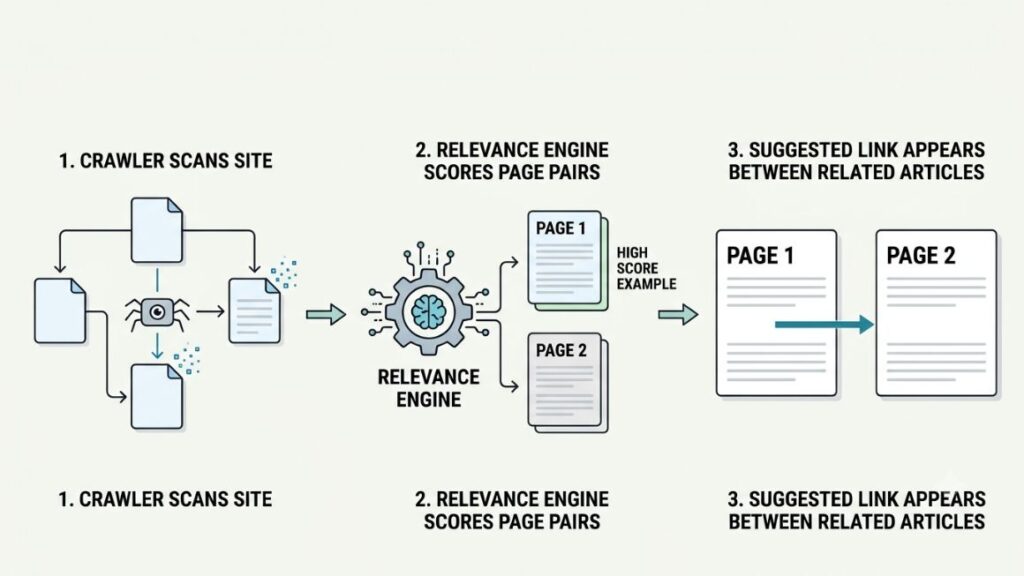
Most tools follow the same pipeline, with different depth at each stage.
- Crawling and page discovery: the tool crawls your site or reads your CMS database to list every page.
- Semantic analysis: it reads the text to understand topics and context, not just exact keywords.
- Opportunity spotting: it finds sentences where a link would genuinely help the reader.
- Anchor text ideas: it proposes the clickable words, usually a natural phrase already in the sentence.
- Orphan page detection: it flags pages that have no internal links pointing to them.
- Insertion: it adds links automatically or waits for your approval.
How Are AI-Based Tools Different from Traditional Linking Tools?
Here’s how the four common approaches compare.
| Approach | How it decides | Main risk |
| Manual linking | Your memory and site search | Pages get missed as the site grows |
| Keyword-based automation | Matches phrases you set in advance | Over-linking, no sense of context |
| Context-aware AI suggestions | Reads the meaning of surrounding text | Occasional off-topic ideas |
| Fully automated insertion | Adds links without per-link review | Mistakes spread at scale |
Here’s a quick example. You publish a new post on Google Ads bidding strategies. A keyword tool links only if it sees an exact phrase you configured earlier. A context-aware tool reads your paragraph about cost per click, matches it to your existing article on PPC campaign optimization, and suggests the anchor text “optimize your PPC campaigns”.
At the far end sits automated internal linking software, which would add that link without asking. Handy at scale. Risky if nobody checks.
Why Does Internal Linking Matter for SEO?
Internal links help Google find your pages, understand how they connect, and judge which ones matter. They also move readers from one useful page to the next. Google’s Search Central documentation says it uses links as a relevance signal and to discover new pages to crawl.
Helps Search Engines Discover Important Pages
A page with nothing linking to it is hard to find. Google follows links written as standard HTML anchor tags with an href attribute, according to its link guidance. A button that only runs a script may not count.
Distributes Internal Link Equity
Link equity is the value one page passes to another through a link. Google hasn’t published a formula for how this works inside a site. SEOs generally assume that pages linked from your strongest, most relevant pages get treated as more important.
Improves Website Navigation and User Experience
Someone reading your Google Ads guide probably wants conversion tracking next. A link right there saves them a search. Readers find the answer on your site instead of leaving to find it.
Strengthens Topical Relationships Between Pages
Pillar pages cover a broad topic. Supporting articles go deep on one slice of it. Links tie them together so readers and crawlers see the whole cluster. HubSpot popularised this pillar-and-cluster model, and most content teams still build around it.
Also Read: On-Page SEO Checklist: Step-by-Step Guide for 2026
Internal links help search engines find pages, understand how topics connect, and judge which pages matter most. They also guide readers to related content. Google’s Search Central documentation states that it uses links as a relevance signal and to discover new pages to crawl.
10 Best AI Internal Linking Tools in 2026
Here’s the shortlist. These tools help with internal linking at different levels of automation, and not all of them use generative AI.
| Tool | Best for | Key feature |
| Link Whisper | WordPress websites | Contextual suggestions |
| LinkBoss | Large websites | Bulk semantic linking |
| LinkStorm | SEO agencies | Automated link opportunities |
| InLinks | Semantic SEO | Entity-based analysis |
| Rank Math | WordPress users | In-editor link suggestions |
| Yoast SEO | Content publishers | Link suggestions while writing |
| AIOSEO | WordPress site owners | Link Assistant |
| Internal Link Juicer | Automated WordPress linking | Keyword-based linking |
| Surfer | Content teams | Content optimization workflow |
| Screaming Frog | Technical SEO professionals | Site crawling and link audits |
Prices change often. Treat the figures below as a November 2026 snapshot and confirm them with each vendor.
1. Link Whisper
Link Whisper is a WordPress internal linking plugin that reads your content and recommends links as you write or from a dashboard. Suggestions are contextual, not just keyword matches. You can insert links in bulk, set auto-linking rules, and pull up a report of orphaned posts. The vendor also lists Shopify support.
Paid plans start around $97 a year for one site in 2026 listings, and AI features run on credits (2,000 on the entry plan, per Toolradar’s September 2026 check). Lifetime licences are no longer sold to new buyers, per 2026 reviews.
Best for WordPress bloggers and small publishers.
2. LinkBoss
LinkBoss is a cloud-based tool with a WordPress connector. It uses NLP to find semantically related pages and can insert up to 2,000 links in a single batch. It also offers silo presets (reverse, serial, priority and circular) and orphan fixes, and says it works with WordPress, Shopify and any CMS.
Pricing is credit-based, so cost follows usage. Listings show plans from roughly $11 a month, and a free account includes 100 credits. The catch: your content syncs to its servers, and bulk power means a bad rule spreads fast. Test rollback on a few pages first.
Best for large sites, agencies and silo-minded SEOs.
3. LinkStorm
LinkStorm crawls your site, suggests contextual links, and offers auto-linking that you can still review and remove. It also finds broken and nofollow internal links and reports on anchor text distribution.
Plans scale by URLs crawled, not sites. Per G2 and its own listings, that’s about $30 a month for roughly 1,000 URLs, $60 for 5,000, and $120 for 20,000. There’s a trial but no permanent free plan, and the company only launched in 2024, so its track record is shorter.
Best for agencies juggling many small client sites.
4. InLinks
InLinks maps your pages to topics, called entities, using NLP and a knowledge graph. It then suggests contextual links and varies the anchor text. It also covers schema and content briefs, so it’s broader than a linker.
There’s a free plan that links 25 pages. Paid plans start at $49 a month and run to about $196 for agencies, per 2026 listings. Auto-insertion uses a JavaScript snippet or a manual export. If you go the script route, confirm the links appear in the rendered HTML Google sees.
Best for semantic SEO practitioners who like entity thinking.
5. Rank Math
Rank Math’s AI Link Genius is a module inside Rank Math PRO. In the editor, you click Generate under Link Opportunities, then insert a suggestion. A links dashboard has an Orphan Posts tab, bulk update tools, and keyword maps that automate linking and can be rolled back.
PRO is paid, and listed prices have moved around, so check the pricing page. It’s WordPress only.
Best for sites already running Rank Math.
6. Yoast SEO
Yoast SEO Premium shows internal link suggestions in the sidebar while you write. It also has an orphaned content filter, a guided workout for fixing those pages, and cornerstone content tools. The free version doesn’t include the suggestions.
Premium costs roughly $99 to $119 a year per site in 2026 listings. The linking features are basic. There’s no bulk insertion or auto-linking, and Yoast doesn’t position it as generative AI. If you already pay for Yoast, try it first.
Best for publishers who want linking inside their existing SEO plugin.
7. AIOSEO Link Assistant
Link Assistant is available on AIOSEO’s Pro plan or higher, per AIOSEO’s documentation. A links report has filters for Linking Opportunities and Orphaned Posts, and it shows suggested posts to link from or to. You can add links from that report in a few clicks.
List prices have changed over time, so verify. It’s a report-and-suggest workflow, not bulk automation, and it’s WordPress only.
Best for AIOSEO users who want a site-wide link report.
8. Internal Link Juicer
Internal Link Juicer is keyword-based, not AI. You set target keywords for a post, and the plugin links to it whenever those words appear in other content. It’s internal linking automation at its simplest.
The free Basic version works well. Pro adds taxonomy linking, custom link targets, keyword import and stats, and starts around $69.99 a year for one site in a 2026 roundup. The cost is setup time and zero context awareness, so over-linking is a real risk.
Best for WordPress sites that want rule-based automation on a budget.
9. Surfer
Surfer is a content optimization platform with an Auto Internal Links feature. According to Surfer’s help docs, it’s included on the Pro, Peace of Mind and Enterprise plans. It needs a Google Search Console connection, semantic linking requires a Content Audit project, and you can accept or cancel the result.
Reviews in mid-2026 put the Pro plan around $182 a month. Among SEO automation tools, Surfer is a content workflow first and a linker second.
Best for content teams already optimizing at volume.
10. Screaming Frog SEO Spider
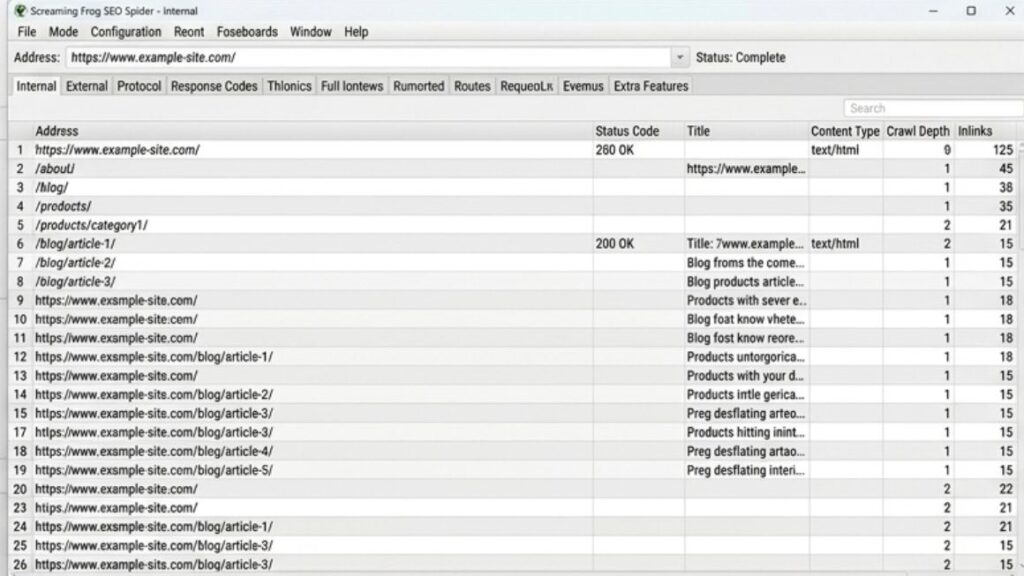
Screaming Frog is a desktop crawler, not an AI link inserter. It reports link counts, crawl depth, broken links, redirects and site structure, and it calculates an internal Link Score. Add Search Console, Analytics or a sitemap, and it can surface orphan pages too.
It’s the best free place to start internal link analysis on a small site. The free version crawls 500 URLs. A licence is listed at £199 a year, with euro and dollar prices varying by listing. It won’t suggest or insert a single link. You fix things in your CMS yourself.
Best for technical SEO professionals and audits.
Also Read: Best AI SEO Tools to Boost Rankings & Simplify Your Workflow
The 10 tools split into three types: suggestion engines (Link Whisper, Rank Math, Yoast, AIOSEO), bulk or rule-based inserters (LinkBoss, LinkStorm, InLinks, Internal Link Juicer), and audit or content platforms (Screaming Frog, Surfer). Only some use AI. Match the type to your workflow, not the label.
How to Choose the Right Internal Linking Tool for Your Website?
Choose by CMS first, link quality second, and the level of control you want third. Price comes last, because a cheap tool that fills your site with irrelevant links costs more than it saves. Most internal link building tools look alike on a features page, so test before you commit.
Consider Your Website’s CMS
On WordPress, plugins give you the most options. Shopify narrows it: Link Whisper and LinkBoss both say they support it. Cloud tools like LinkStorm and LinkBoss claim to work across platforms, and Screaming Frog works on anything it can crawl.
Check the Quality of Link Suggestions
Relevance beats volume. Run a trial on 20 real pages and count how many suggestions you’d honestly accept. If it’s fewer than half, move on.
Check How It Finds Orphaned Pages
Important pages shouldn’t float free of the rest of your site. Some tools only list orphaned pages. Better ones also suggest which existing articles should link to them.
Compare Automation and Editorial Control
Manual approval is slow but safe. Bulk insertion and auto-linking save hours, but errors multiply. Check for a preview step and a rollback option. If you can’t undo it, don’t run it site-wide.
Evaluate Pricing and Scalability
Costs follow different units. Link Whisper and LinkBoss use credits, LinkStorm charges by URLs, and plugins charge by site. Free tiers help you test: InLinks covers 25 pages and Screaming Frog crawls 500 URLs.
The right internal linking tool matches your CMS, your tolerance for automation, and your site size. A long feature list matters less than link relevance, a review step and a rollback option.
How to Use AI Internal Linking Tools: A Step-by-Step Process?
A repeatable process beats any single tool. These six steps work whichever one you pick.
Step 1: Crawl Your Website
Collect every URL, its status code and its current link count. Screaming Frog’s free version handles up to 500 URLs, and most plugins crawl inside your CMS. Export it for later comparison.
Step 2: Identify Important Pages
Decide which pages deserve links first:
- High-performing blog posts
- Service and product pages
- Pillar content
- Pages with direct business value
Search Console shows which pages already earn impressions.
Step 3: Find Missing Linking Opportunities
Look for important pages with few incoming links, plus any orphaned ones. Then let the tool find older articles that mention the topic.
Step 4: Review Suggested Links and Anchor Text
Ask three questions. Would a reader click this? Does the sentence support it? Is the destination the best page? Anchor text should describe the destination, and Google’s guidance warns against vague text like “click here”.
Step 5: Add Links and Check Their Placement
Approve selectively. Then open the live page and confirm the link works, sits in a natural sentence, and doesn’t crowd a paragraph with others.
Step 6: Monitor Performance
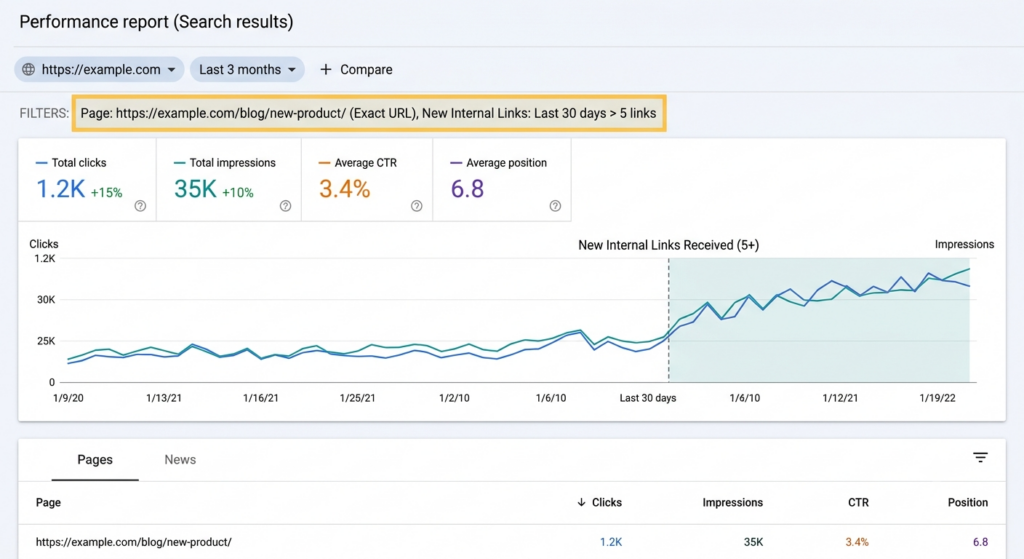
Watch Search Console for impressions, clicks and indexing changes on the pages you linked to. Check analytics for engagement. Re-crawl every month or quarter. Treat internal link optimization as a recurring job, not a one-off cleanup.
A practical example. Say a digital marketing blog has 50 articles, including separate guides on SEO, Google Ads, Facebook Ads and content marketing. A decent tool would likely flag connections like these:
- The Google Ads guide should link to a post on PPC campaign optimization.
- The Facebook Ads guide should link to a post on conversion tracking.
- The content marketing guide should link to the SEO guide where keyword research comes up.
- The SEO guide should link to a post on technical SEO audits.
Also Read: What is PPC in Digital Marketing? Pay-per-click Marketing
AI Internal Linking Best Practices to Follow
Prioritize Contextually Relevant Links
Link only where the sentence naturally leads to the destination. If you’d feel odd explaining the link to a reader, delete it.
Write Natural and Descriptive Anchor Text
Use words that tell people what they’ll get. “Google Ads bidding strategies” beats “read more” every time.
Avoid Excessive Internal Linking
Google doesn’t publish an ideal number. Too many links dilute attention and make pages feel spammy.
Link to Important Pages from Relevant Content
Point your best content at the pages that make money. A post about ad budgets should reach your Performance Marketing service page.
Review Automated Suggestions Before Publishing
Treat suggestions as drafts. A two-minute review per post prevents mismatches.
Regularly Audit Broken and Outdated Links
Run a crawl each quarter and fix redirects, 404s and links to retired pages.
Common Internal Linking Mistakes to Avoid
Adding Links Just to Increase Link Count
More links don’t mean better SEO.
Using the Same Anchor Text Everywhere
Identical anchors on every link look mechanical. Vary the wording while keeping it descriptive.
Linking to Irrelevant Pages
A link to your pricing page from a glossary entry might convert, but only if the topic connects. Otherwise it’s noise.
Ignoring Orphaned and Outdated Content
Old posts still hold value. Refresh or merge them, then link to them again.
Depending Entirely on Automation
Rules can’t tell when a link would confuse someone. Even in a fully automated setup, someone should spot-check the output.
What Is the Future of Internal Linking With AI?
Nobody knows exactly where this goes, so treat these as likely directions, not facts.
More Context-Aware Link Recommendations
Tools are moving from matching phrases to understanding paragraphs. Expect fewer irrelevant suggestions, not zero.
Automated Website Architecture Analysis
Crawlers and plugins increasingly show crawl depth, silos and weak sections at a glance. That makes audits faster.
Integration with AI Content Workflows
Surfer already offers links inside its editor. Expect more writing tools to suggest links as you draft.
Smarter Content Relationship Mapping
Entity-based tools like InLinks hint at richer maps of how topics relate.
Greater Focus on Human Review and Quality Control
As automation spreads, preview and rollback controls will matter more. The tools that win trust will make mistakes easy to catch.
Conclusion
Match the tool to your situation:
- WordPress bloggers: Link Whisper.
- Large websites and bulk linking: LinkBoss.
- Agencies managing different CMS platforms: LinkStorm.
- Semantic SEO requirements: InLinks.
- Existing WordPress SEO plugin users: Rank Math, Yoast or AIOSEO.
- Technical website audits: Screaming Frog.
Notice what’s missing from that list: the number of AI features. A simpler tool that fits your workflow beats a flashy one you’ll abandon in a month. Start with a trial, test 20 pages, and keep a human in the loop. If you want to go deeper on site structure, topical authority and the rest of on-page SEO, our SEO course walks you through it with real projects.
Frequently Asked Questions About AI Internal Linking
What are AI internal linking tools?
AI internal linking tools are programs that scan your website, understand what each page covers, and suggest links between related pages. Some add the links automatically, while others wait for your approval. They save the most time on large sites, where remembering every article isn’t realistic.
Which is the best AI internal linking tool in 2026?
There isn’t one winner. Link Whisper suits most WordPress sites, LinkBoss suits large catalogues, and LinkStorm suits agencies. InLinks fits semantic SEO work, and Screaming Frog fits audits. Choose based on your CMS, budget and how much automation you want.
Can AI automatically add internal links to a website?
Yes. Tools like LinkBoss, LinkStorm, Link Whisper and Internal Link Juicer can insert links automatically or in bulk. Most also let you review or roll back changes. Check those controls first, because mistakes can repeat across hundreds of pages.
Are AI-generated internal links good for SEO?
They can be, when they’re relevant and reviewed. Google uses links to find pages and understand relevance, so useful links help. Irrelevant or repetitive ones don’t. Google hasn’t said AI-made links are treated differently, so quality is what counts.
Which internal linking tool is best for WordPress?
Link Whisper is the most popular dedicated pick. If you already use Rank Math, Yoast Premium or AIOSEO Pro, try their built-in linking first. Internal Link Juicer works for free keyword-based linking, and LinkBoss suits big sites that need bulk control.
Are there free tools for internal linking?
Yes, with limits. Internal Link Juicer has a free Basic version. Screaming Frog crawls 500 URLs free, and InLinks links 25 pages on its free plan. Link Whisper offers a limited free version too. Free tiers work for testing and small sites, but not for large-scale automation.
How many internal links should a blog post have?
There’s no official number. A common rule of thumb is 3 to 5 relevant links for a 1,500-word post, adjusted to content length and usefulness. Ask whether each link helps the reader, and add more only when the topic truly supports them.
Can AI tools find orphan pages?
Yes. Link Whisper, LinkBoss, Rank Math, Yoast Premium and AIOSEO Pro all report orphaned pages, and Screaming Frog can find them when you add sitemap, Analytics or Search Console data. Deciding what to link them from still needs your judgement.
Do internal links help Google understand website content?
Yes. Google’s documentation says it uses links to find pages and as a relevance signal, and it notes that descriptive anchor text helps people and Google understand what the linked page is about. Clear, topical links make your site structure easier to interpret.
Should you manually review AI-generated internal links?
Yes, at least in a sample. AI can match topics well, but it can miss intent, brand context or outdated pages. A quick review catches irrelevant anchors before they go live. After a few batches, you’ll know how much to trust your tool.
Internal links are one of the few SEO levers you fully control. Pick a tool, test it on a small batch, and keep reviewing.