
Most performance marketing teams are running on 12 to 15 tools before anyone notices the subscription bill. A creative testing tool here, an attribution platform there, three separate reporting dashboards because nobody agreed on one. It’s not a strategy problem. It’s a stack problem, and it quietly eats hours every week that should be going toward the campaigns themselves.
This is the toolkit we’d actually hand a new hire on day one. Not a list of 200 logos scraped from a comparison site, but the performance marketing tools that show up again and again in the workflows of marketers running real budgets, across Meta Ads, Google Ads, CRO, analytics, SEO, AI, and reporting. Every tool here earns its place because of what it does for a specific job, not because it has a nice landing page.
Use this as a reference, not a shopping list. Nobody needs all 100+ of these at once, and buying tools you don’t have a workflow for is how stack bloat happens in the first place.
Table of Contents
How to Actually Choose Tools From a List Like This
Skip straight to the tools you’re missing right now, not the ones that sound impressive. That’s the entire framework.
Before adding anything to your stack, answer three questions honestly. What stage is your budget at? A brand spending ₹2 lakh a month on Meta doesn’t need an enterprise attribution platform built for eight-figure spenders. What’s your team size? A solo marketer needs tools that replace headcount, while a five-person team needs tools that remove friction between people. And are you in-house or agency? Agencies weight reporting and client-facing tools much higher, because the deliverable isn’t just performance, it’s proof of performance.
Here’s the mistake we see most often with YUP learners moving from junior to senior roles: they adopt a tool because a LinkedIn post said it was a game changer, then spend three weeks reverse-engineering a workflow to justify the subscription. Work backward from the bottleneck instead. Identify what’s actually slow or broken today, then find the tool built for that specific gap.
The right performance marketing tool is chosen based on budget stage, team size, and in-house versus agency structure, not popularity. Start from the bottleneck in your current workflow and find the tool built for that specific gap, rather than adopting tools because they’re trending.
Meta Ads Tools: Creative, Campaign Management, and Competitive Research
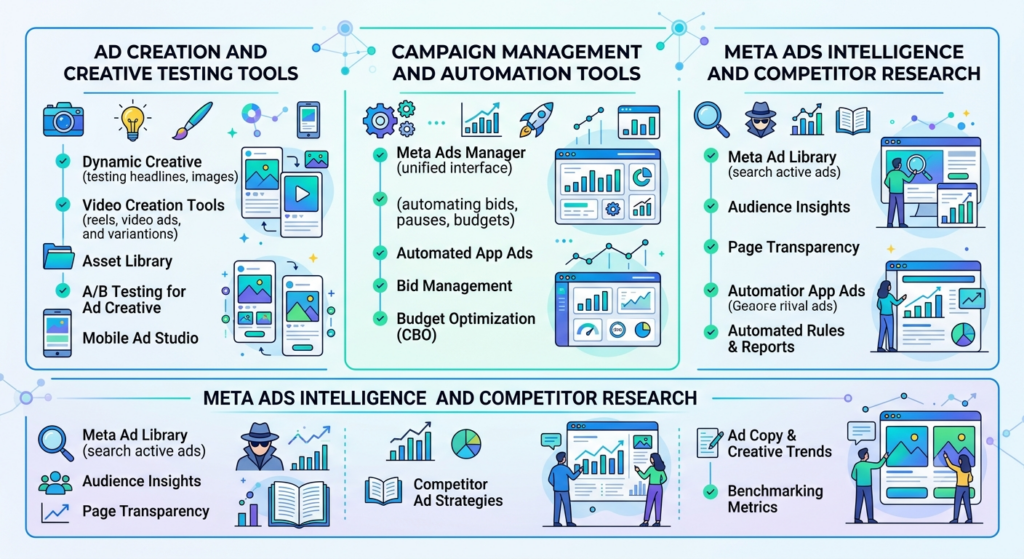
Meta Ads success in 2026 is a creative problem first and a targeting problem second. Advantage+ has automated most of the audience and placement decisions that used to require manual work, which means the tools that matter most now are the ones that help you produce, test, and manage creative faster than your competitors.
Ad Creation and Creative Testing Tools
Creative fatigue is the single biggest reason Meta campaigns lose efficiency month over month, so this is where most of your tooling budget should go if you’re forced to choose.
- Canva remains the fastest way to produce on-brand static and video ad variations at scale, especially for teams without a dedicated designer.
- Icon (formerly Foreplay) is built specifically for ad creative organization, letting teams save, tag, and brief creative concepts from competitor research directly into production.
- AdCreative.ai generates and scores ad creative variations using AI, which is useful for teams that need volume without a full creative department.
- Motion connects creative performance data directly to individual assets, so you can see which specific hook, thumbnail, or CTA is driving results rather than judging a whole ad set.
- Bannerbear automates creative production at scale through templates, which matters for e-commerce brands running hundreds of SKU-specific ads.
Campaign Management and Automation Tools
Once creative is live, the job shifts to budget allocation, bid management, and knowing when to kill or scale a campaign before the algorithm does it for you.
- Meta Ads Manager is still the source of truth for targeting, budgets, and Advantage+ campaign setup, and no third-party tool replaces it.
- Revealbot automates rule-based actions like budget shifts and pausing underperforming ad sets, which saves hours for teams managing multiple accounts.
- Madgicx layers AI-driven budget optimization and creative analytics on top of Meta’s native reporting.
- Smartly.io is built for enterprise-scale creative automation and cross-platform budget management, and it shows up constantly in agency stacks managing seven-figure monthly spend.
- Triple Whale pulls Meta performance data alongside Shopify revenue for a real profitability view, not just platform-reported ROAS.
Meta Ads Intelligence and Competitor Research
Knowing what’s working for competitors before you brief your own creative team is a genuine edge, not a nice-to-have.
- Meta Ad Library is free, official, and the first stop for seeing exactly what any advertiser is currently running.
- PowerAdSpy and BigSpy both let you filter competitor ads by industry, engagement, and running duration.
- Winning Hunter focuses specifically on identifying scaling e-commerce ads across Meta and TikTok.
Nykaa’s performance team has publicly discussed running dozens of creative variants per week during high-traffic periods like end-of-season sale, which is only realistic with a creative production tool doing the heavy lifting rather than a design team building each one from scratch.
Google Ads Tools: Search, Shopping, and Performance Max
How do you manage Google Ads efficiently when Performance Max has automated most of the manual bid and placement decisions? You shift your tooling toward feed quality, keyword intelligence, and auditing, because that’s where humans still add the most value.
Google Ads still dominates paid search. According to eMarketer’s 2025 forecast, Google captured 26.4% of worldwide digital ad spend, running neck and neck with Meta’s 26.8% share, which means the platform isn’t going anywhere even as automation reshapes how it’s managed.
Keyword and Bid Management Tools
- Google Keyword Planner is the free baseline every account should start from, even if you layer paid tools on top.
- SEMrush and Ahrefs both offer competitive keyword and spend estimation that goes well beyond what Google’s own tools reveal about competitor strategy.
- Optmyzr automates bid management and account auditing specifically for Google Ads, and it’s one of the few tools built exclusively for PPC managers rather than a broader marketing suite.
- SpyFu shows historical ad copy and keyword history for any domain, which is genuinely useful for competitive research before a new campaign launch.
Performance Max and Shopping Feed Tools
Feed quality is the actual lever in Performance Max campaigns, since Google’s algorithm can only work with the product data you give it.
- Google Merchant Center is mandatory for any Shopping or PMax campaign and should be the first thing audited when performance drops.
- DataFeedWatch and Feedonomics both clean and optimize product feeds before they hit Merchant Center, fixing titles, categories, and attributes that Google’s algorithm relies on.
- Channable handles feed management across multiple channels at once, useful for brands running Shopping ads on Google, Meta, and marketplaces simultaneously.
Google Ads Auditing and Scripts
- Google Ads Scripts let you automate custom rules directly inside the platform, free, though it requires some comfort with JavaScript.
- Adalysis runs automated account audits and flags issues like disapproved ads or wasted spend that would otherwise sit unnoticed for weeks.
- Google Ads Editor remains the fastest way to make bulk changes across large accounts without waiting on the web interface to load.
Google’s ad platform generated $294.68 billion in 2025, according to Statista and Alphabet’s earnings reports, and Google captures roughly 65% of clicks on buying-intent keywords compared to organic results. With Performance Max automating most bid decisions, the highest-leverage tools now sit in feed quality and account auditing rather than manual bid management.
Conversion Rate Optimization (CRO) Tools
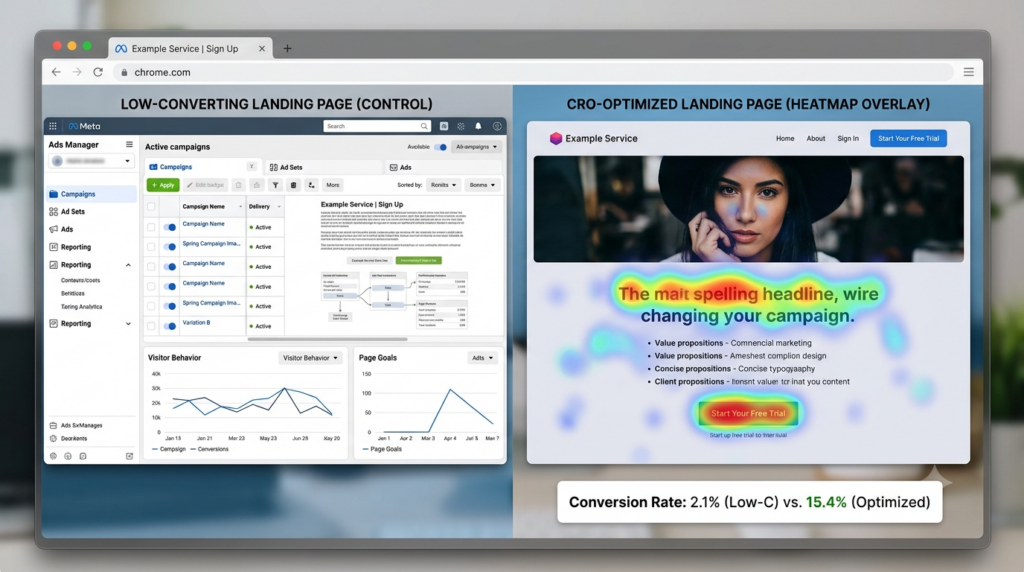
Traffic acquisition tools get most of the attention, but the tools that fix your landing page are frequently the highest ROI purchase in the entire stack. A 20% lift in landing page conversion rate is often cheaper to buy than a 20% increase in ad spend.
Heatmaps, Session Recording, and User Behavior
Watching real users struggle on your landing page tells you things no analytics dashboard will surface on its own.
- Hotjar combines heatmaps, session recordings, and on-page surveys in one tool, and it’s usually the first CRO tool any team adds.
- Microsoft Clarity does almost the same job entirely free, which makes it the obvious starting point for smaller budgets.
- FullStory goes deeper into session replay with error tracking, better suited for product-led companies debugging conversion drop-offs tied to technical issues rather than copy or design.
A/B Testing and Experimentation Platforms
- VWO and Optimizely are the two most established full-scale experimentation platforms, both handling everything from simple A/B tests to complex multivariate testing.
- AB Tasty and Convert.com serve similar functions with pricing better suited to mid-market teams rather than enterprise budgets.
Landing Page Builders for Speed
The tool matters less here than the discipline of testing at all, but speed of iteration is the real differentiator between these platforms.
- Unbounce was built specifically for performance marketing landing pages and includes built-in A/B testing.
- Instapage focuses heavily on post-click optimization and personalization at scale for paid traffic specifically.
- Webflow trades some speed for full design control, which matters when brand consistency is non-negotiable.
Boat’s landing pages for major sale events like the Republic Day sale are a good example of this discipline in practice: stripped-down pages, one clear CTA, and fast load times over decorative design choices.
Analytics and Attribution Tools
Attribution is the process of assigning credit for a conversion to the specific marketing touchpoints that led to it. Get this wrong and every other tool in your stack is optimizing against bad data.
Web and Product Analytics
- Google Analytics 4 (GA4) is the default for most teams, though the learning curve from Universal Analytics has been genuinely steep for marketers who never rebuilt their reporting habits.
- Mixpanel and Amplitude both specialize in product and behavioral analytics, tracking user actions inside an app or product rather than just site-wide traffic.
- PostHog has grown quickly as an open-source alternative that bundles analytics, session recording, and feature flags in one platform.
Multi-Touch Attribution and Marketing Mix Modeling Tools
This may not apply to every business, but for brands spending significant budget across multiple paid channels, platform-reported ROAS is almost always inflated because Meta and Google both claim credit for the same conversion.
- Triple Whale and Northbeam both specialize in e-commerce attribution, pulling data from ad platforms and connecting it to actual revenue.
- Hyros is built specifically for tracking attribution across long, multi-touch funnels common in course and coaching businesses.
- Meridian, Google’s open-source marketing mix modeling tool, works at the budget allocation level rather than individual conversion tracking, which suits larger brands with enough historical spend data to model against.
Attribution assigns marketing credit to specific touchpoints in a customer’s path to conversion. Platform-reported metrics like Meta ROAS and Google Ads conversions frequently overlap and double-count the same sale, which is why brands spending across multiple channels need a dedicated multi-touch attribution or marketing mix modeling tool rather than trusting native platform dashboards alone.
SEO Tools for Performance Marketers
Performance marketers who ignore SEO entirely are leaving the cheapest acquisition channel untouched. You don’t need to become an SEO specialist. You need enough tooling to catch the obvious wins.
Keyword Research and Content Gap Tools
- Ahrefs and SEMrush remain the two most complete platforms for keyword research, competitor gap analysis, and backlink tracking.
- Surfer SEO and Clearscope both focus on content optimization against ranking competitors, useful once you’ve identified the keyword and need to actually write something that ranks.
- AnswerThePublic surfaces the actual questions people search around a topic, which pairs well with the FAQ-driven content that also performs for AI answer engines.
Technical SEO and Site Health Tools
- Screaming Frog crawls a site to surface broken links, missing metadata, and indexing issues, and it’s still the industry standard despite its dated interface.
- Google Search Console is free, official, and shows exactly which queries are already driving impressions and clicks, which most marketers underuse.
- Sitebulb offers a more visual, report-friendly version of the same technical crawl data, better suited for client-facing agency reporting.
Google’s zero-click search problem is real and getting worse. According to a 2025 analysis by GrowthNavigate, nearly 58.5% of Google searches now end without a single click to any website, which means ranking is necessary but no longer sufficient on its own.
AI Tools Reshaping Performance Marketing Workflows
Adoption of AI in marketing isn’t a future trend anymore. It’s already the default. According to HubSpot’s 2025 AI Trends for Marketers report, 66% of marketers globally are already using AI in their role, and that number climbs to 74% in the United States.
AI for Ad Copy and Creative
- ChatGPT and Claude both handle ad copy variations, headline testing, and creative briefs, with Claude generally producing more nuanced, on-brand long-form copy when given a detailed prompt.
- Jasper and Copy.ai are built specifically for marketing copy at scale, with brand voice training features that generic chatbots don’t offer out of the box.
- Midjourney and Ideogram generate ad creative imagery, useful for concept testing before committing budget to a full photoshoot.
AI for Data Analysis and Insights
- Claude and ChatGPT’s advanced data analysis features can both take a raw campaign export and return a readable performance breakdown in minutes, work that used to take a junior analyst half a day.
- Julius AI is built specifically around conversational data analysis, useful for marketers who want to query a dataset in plain English rather than build a pivot table.
- Peec AI tracks how brands are being mentioned and cited inside AI answer engines like ChatGPT and Perplexity, which is becoming its own reporting category entirely.
AI Agents and Automation Through MCP-Based Workflows
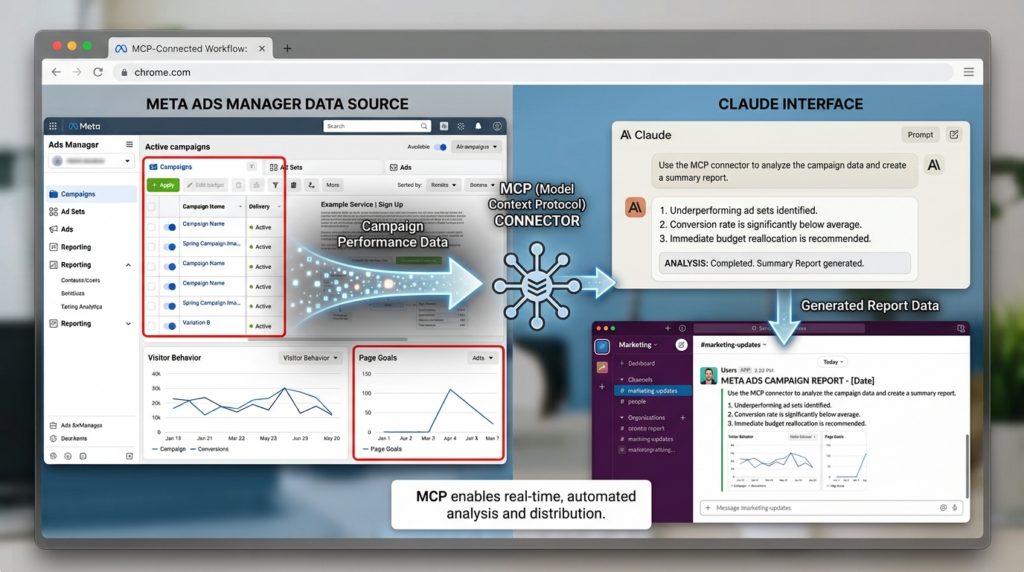
Here’s where the stack is genuinely shifting, and fast. MCP, or Model Context Protocol, is a standard that lets AI tools like Claude connect directly to platforms like Meta Ads, Google Sheets, or Slack and take real actions instead of just generating text.
Instead of asking an AI tool to draft a report and then manually pulling data yourself, an MCP-connected workflow can pull live campaign data from Meta Ads Manager, format it, and push it into a Slack channel without a human touching each step. Zapier, Make, and n8n all now support AI-driven automation on top of their existing no-code workflows, layering agent-style decision making onto processes that used to be pure if-this-then-that logic.
From what we’ve seen with YUP learners experimenting with this, the teams getting the most value aren’t using AI to replace strategic thinking. They’re using it to compress the two or three hours of manual reporting and data pulling that used to happen between the strategic decisions.
66% of marketers globally now use AI in their role, according to HubSpot’s 2025 AI Trends for Marketers report, with content creation and data analysis as the two leading use cases. MCP, or Model Context Protocol, extends this further by letting AI tools take direct action inside ad platforms and spreadsheets rather than only generating text for a human to copy over manually.
Reporting and Dashboarding Tools
Reporting is where a lot of good performance marketing work goes to die, buried in a spreadsheet nobody outside the team ever opens. The right tool here isn’t about more data. It’s about the two or three numbers that actually change a client or stakeholder’s decision.
Client and Team Reporting Platforms
- AgencyAnalytics and Whatagraph are both built specifically for agencies managing reporting across multiple clients and channels at once.
- Databox pulls from a wide range of data sources into customizable dashboards, with a genuinely useful free tier for smaller teams.
- Swydo focuses specifically on automated PPC and SEO client reporting, cutting down the manual export-and-format cycle most agencies still run monthly.
Custom Dashboard and BI Tools
- Looker Studio (formerly Google Data Studio) remains free and connects natively to Google Ads, Analytics, and Search Console, making it the default choice for most in-house teams.
- Supermetrics and Funnel.io both handle the unglamorous but critical work of pulling data from dozens of ad and analytics platforms into one clean source, feeding tools like Looker Studio or a spreadsheet.
- Tableau and Power BI suit larger organizations that need reporting to connect beyond marketing into broader business intelligence.
That’s the whole toolkit across seven categories. It’s a lot. It’s supposed to be, because “top marketers” doesn’t mean one person running all of these at once. It means knowing which five or six actually solve the problem in front of you today.
Building Your Own Stack Without Burning Budget
So how do you actually go from this list to a working stack without spending your entire quarterly budget on subscriptions? Start smaller than feels comfortable.
A solo marketer or small D2C brand rarely needs more than five tools to run a genuinely effective operation: Meta Ads Manager, Google Analytics 4, Hotjar or Microsoft Clarity, Looker Studio, and one AI tool like Claude or ChatGPT for copy and analysis. That combination covers creative insight, behavior data, reporting, and speed, without a single tool that costs more than a hundred dollars a month.
A mid-size team managing multiple channels and a real budget usually adds attribution (Triple Whale or Northbeam), a dedicated PPC auditing tool (Optmyzr), and an SEO platform (Ahrefs or SEMrush) on top of the base stack. That’s where subscription costs start climbing into four figures monthly, and it’s worth revisiting the stack every quarter to cut anything that isn’t directly tied to a decision someone actually made in the last 30 days.
Agencies are the exception. Client-facing reporting tools like AgencyAnalytics or Whatagraph earn their cost almost immediately, because the alternative is an analyst manually building decks every month. That’s the one category where paying for convenience is nearly always the right call.
Getting the Stack Right Is Only Half the Job
A well-chosen toolkit removes friction. It doesn’t replace the judgment of knowing which metric actually matters this month, or which creative angle is worth testing next. That’s the part no tool on this list does for you, and it’s the part that separates marketers who run a stack from marketers the stack runs.
Start with the five-tool baseline if you’re early, add deliberately as real bottlenecks show up, and revisit the subscription list every quarter without exception. The goal was never to own the most tools. It’s to spend less time managing the toolkit and more time on the campaigns it’s supposed to be serving.
If you’re looking to build the strategic thinking that decides which of these 100+ tools actually deserves a seat in your stack, YUP’s Performance Marketing course walks through the frameworks for channel selection, budget allocation, and measurement that sit underneath every tool choice on this list. The Crystal Clear Newsletter also covers new tool releases and workflow breakdowns as the space keeps shifting, usually faster than any list like this one can keep up with.
FAQ
What are the most important performance marketing tools for beginners?
For someone just starting out, the priority order is Meta Ads Manager or Google Ads for the platform itself, Google Analytics 4 for measurement, and a free CRO tool like Microsoft Clarity to see how people actually use the landing page. Everything else can wait until you’ve got budget and a real bottleneck to solve.
Performance marketing tools vs organic marketing tools, what’s the difference?
Performance marketing tools focus on paid channels where you’re buying traffic directly, like Meta Ads and Google Ads platforms, attribution software, and CRO tools that maximize the return on that spend. Organic tools like Ahrefs or Screaming Frog focus on earned traffic through search rankings, which typically takes longer to show results but costs nothing per click once it’s ranking.
How do I calculate ROI on a marketing tool subscription?
Compare the tool’s monthly cost against the time it saves multiplied by an hourly rate for the person doing that work, or against the measurable performance lift it drives, like a conversion rate increase from a CRO tool. If a tool can’t clear that bar within one full quarter of use, it’s usually not earning its place in the stack.
Who should use enterprise attribution tools like Northbeam or Triple Whale?
These tools make sense once you’re spending significant budget across three or more paid channels simultaneously, because that’s when platform-reported ROAS starts double-counting conversions. A brand running only Meta Ads with a modest budget doesn’t need this level of attribution complexity yet.
Is it worth paying for both Ahrefs and SEMrush?
For most teams, no. The two platforms overlap heavily on keyword research and backlink data, and picking one based on which interface your team prefers is usually the better call than paying for both. Agencies serving very different client verticals are the exception, since coverage gaps between the two tools do show up occasionally.
What do most marketers get wrong about AI tools in their stack?
The most common mistake is using AI tools only for first-draft content generation and stopping there, when the bigger time savings usually sit in data analysis, reporting automation, and campaign auditing. Teams that treat AI purely as a writing assistant are leaving most of the actual value on the table.
How many tools does a small marketing team actually need?
Five to seven tools covering the ad platform itself, analytics, CRO or heatmaps, reporting, and one AI tool is enough for most small teams to run effectively. Anything beyond that should be added only when there’s a specific, named bottleneck the current stack can’t solve.
Do I need separate tools for Meta Ads and Google Ads management?
Yes, in most cases. While platforms like Supermetrics or Funnel.io can pull data from both into one dashboard, the actual campaign management, bidding, and creative workflows are different enough between Meta and Google that dedicated tools for each usually outperform a single generalist platform trying to do both.
What is MCP and do I need it for my marketing stack?
MCP, or Model Context Protocol, is a standard that lets AI tools like Claude connect directly to platforms like Meta Ads or Google Sheets and take real actions rather than only generating text. It’s not essential yet for smaller teams, but it’s becoming the fastest way to cut manual reporting time for anyone managing multiple ad accounts.