
[IMAGE: Hero image of a Google results page with the ranking pages and SERP features annotated]
You write a 2,000-word guide, hit publish, and wait. Nothing. Page three, if you’re lucky. The writing wasn’t bad. It just answered a question Google wasn’t asking for that keyword.
That’s the gap AI SERP analysis tools are built to close. They read the live results for a query, pull out what the top pages have in common, and show you what your page has to match or beat. The old way meant ten browser tabs, a messy spreadsheet and a lot of squinting.
Plenty of AI SEO tools now promise all of this, and some deliver. This guide covers 11: what each does well, what it costs as of November 2026, and where it lets you down. You’ll also get a method for reading a results page, and a look at how AI Overviews and AI Mode are changing what “ranking” means. Fair warning: the tools differ a lot in capability, pricing and fit.
Table of Contents
What Are AI SERP Analysis Tools?
AI SERP analysis tools collect the live results for a search query, then use AI to summarize what ranks, what the ranking pages share and what they miss. SERP stands for search engine results page, the page Google shows after you hit enter.
Search engine results page analysis means studying that page: who ranks, in what format, and which features sit around the links, like AI Overviews or People Also Ask boxes. A good AI SERP analyzer does that reading like a sharp editor and hands you a brief instead of a data dump.
Most tools pull the top results, scrape headings, word counts and links from each page, then cluster what they find. Traditional SEO software gives you numbers: volume, difficulty, your rank. The AI layer adds interpretation: intent labels, gaps, draft outlines.
Say you’re about to write about “best laptop for video editing.” A SERP tool shows whether Google wants listicles, buying guides or product pages, and which questions every winner answers. If page one is wall-to-wall listicles and you planned an essay, you just saved a week.
Why SERP Analysis Matters for SEO in 2026
The results page is Google telling you, for free, what it thinks a searcher wants. Google SERP analysis is the cheapest research you’ll ever do, and most teams still skip it.
It shows what Google rewards, what competitors do well and where nobody has answered properly. SERP competitor analysis also turns up rivals you’d never listed: a Reddit thread, a government page, a one-person blog. Pew Research Center’s 2025 study of Google’s AI summaries found Wikipedia, .gov sites and Reddit among the most-linked sources.
Layouts shift too. Ahrefs’ study of 300,000 keywords, published in February 2026, found AI Overviews cut the click-through rate of the top result by 58% as of December 2025. Plan from a keyword list alone and you’re planning blind.
11 Best AI SERP Analysis Tools in 2026
The best AI SERP analysis tools depend on the job: Semrush and Ahrefs for full suites, thruuu and Surfer for content briefs, Search Console for free first-party data. Prices are monthly list prices from vendor and review pages checked in November 2026, so confirm before buying.
1. Semrush: Best for Comprehensive SEO and Competitor Research
Semrush is the widest suite here, and the price shows it. Its SERP tools sit inside a toolkit that also covers keyword research, audits, position tracking and an AI Visibility Toolkit. Check the ranking pages, then jump to a competitor’s domain and compare keyword overlap. Adobe completed its acquisition of Semrush on April 28, 2026, so expect more focus on AI-search reporting.
The upside is breadth: SEO competitor research, tracking and audits under one login. The downside is cost. Classic plans run $139.95 (Pro), $249.95 (Guru) and $499.95 (Business), and Semrush One bundles start at $199. Best fit: agencies and in-house teams.
2. Ahrefs: Best for SERP History and Backlink Research
Ahrefs’ SERP Overview shows the live results for a keyword with metrics for every ranking page, and you can look back at how the SERP shifted over time. Backlink data is why many SEOs pay.
In Site Explorer, filter organic keywords by the AI Overview SERP feature to see where your rankings trigger one. Lite is $129 a month, Standard $249, Advanced $449, plus a limited $29 Starter plan. Its free SERP checker is worth trying first. Worth it if links drive your strategy.
3. SE Ranking: Best for Rank Tracking and SEO Research
SE Ranking covers rank tracking, audits, keyword research and competitor monitoring in one mid-priced package. If you want SERP tracking tools that also handle audits and backlinks without three subscriptions, it’s the middle path.
Plans were restructured in 2026 into Core ($129 a month, or 103.20billedannually),Growth(279, or $223.20) and Enterprise. No free plan, just a 14-day trial.
Watch the add-ons: AI Search starts at $89 a month, and agency extras stack up. A good fit for small agencies.
4. Mangools SERPChecker: Best for Beginners
SERPChecker puts top results next to authority and link metrics, so you can judge how hard page one really is at a glance. Compare SERPs, switch location, check difficulty.
Entry plans start around $29 a month. Mangools has also listed a free allowance of five lookups per 24 hours, though pricing pages differ, so confirm it.
The catch: daily lookup caps on lower plans and a smaller keyword database than Semrush or Ahrefs. Built for bloggers and freelancers.
5. Surfer SEO: Best for Content Optimization
Surfer turns SERP data into a writing target. Its SERP Analyzer breaks down the ranking pages, and the Content Editor scores your draft against what they cover.
Early-2026 price lists put Essential at about $99 a month and Scale at $219, with an AI Tracker add-on near $95, though Surfer has reshuffled plans more than once. And it’s a scoring tool. Authority, backlinks and page speed sit outside it, so a high content score won’t rescue a weak site.
Who it suits: writers and editors.
6. LowFruits: Best for Finding Low-Competition Opportunities
LowFruits hunts for weak spots: low-authority pages like forums, Q&A threads and thin blogs sitting in the top 10. A keyword with weak spots is one a newer site might actually win. It works in bulk and mines competitor sites.
Standard costs 29.90amonth(20.75 billed yearly) for 3,000 credits, and pay-as-you-go starts at $25 for 2,000. Subscription credits don’t roll over. One reviewer argues forums now rank so widely that a weak spot isn’t always as weak as it looks. Best for niche-site builders hunting easy wins.
7. Moz Pro: Best for SEO Metrics and Reporting
Moz Pro pairs keyword research and rank tracking with Domain Authority, the metric Moz made familiar, and reports that are easy to hand to a client.
Plans list at $49 (Starter), $99 (Standard), $179 (Medium) and $299 (Large), roughly 20% less billed annually. The limit that bites: rank tracking updates weekly on Starter and Standard, daily only from Medium up. Suits teams that report on authority and visibility.
8. SpyFu: Best for Competitor SEO and PPC Research
SpyFu shows the organic and paid keywords any domain ranks or bids on, plus ad history, a quick way to see what rivals have been testing.
Basic is 39amonth(29 annually), Pro + AI is 119(89 annually), and Team/Agency runs about $249. Rankings update weekly, so don’t expect day-to-day tracking. PPC managers will get the most out of it.
9. thruuu: Best for SERP-Based Content Briefs
thruuu scrapes the ranking pages and turns them into a content brief: headings, topics, questions, word counts. It also monitors AI Overviews and clusters keywords by SERP overlap.
One change matters. Google stopped supporting its num=100 parameter on September 14, 2025, so pulling 100 results now takes 10 separate page requests. There’s a free plan (10 one-time credits), then Starter at $19, Pro at $49 and Agency at $99. Good for writers producing briefs at volume.
10. Google Search Console: Best Free First-Party Search Data
Search Console is the only tool here that shows what actually happened on your site instead of a modeled estimate. The Performance report gives clicks, impressions, CTR and average position by page and query, for the last 16 months. That makes it the one source of keyword ranking analysis you can fully trust.
AI Overviews and AI Mode activity is already counted in those totals, and Google began rolling out a separate generative AI report in June 2026 that shows impressions only. All links inside one AI Overview share a single position, so that data is blunt. And you can’t see competitors. Every site owner should set this up first.
11. Visualping: Best for Monitoring Search Result Changes
Visualping watches a web page and emails you when it visibly changes. Point it at a competitor’s landing page or a results URL and you get changes highlighted.
The free plan covers 5 pages and 150 checks a month, no more often than every 60 minutes. Paid plans start at $14 a month for 10 pages and 1,000 checks. The limit: it watches pages, not rankings, and Google results vary by location and device, so SERP alerts can be noisy. A cheap way to watch competitors.
Comparison of the Best Tools at a Glance
Three kinds of tool sit in this list. Dedicated tools exist mainly for SERP work. Full suites include it among much more. Supporting tools cover one slice of the job.
| Tool | Type | Best for | From (per month) | Free access |
| Semrush | Full suite | Competitor and SERP research | $139.95 | Trial |
| Ahrefs | Full suite | SERP history, backlinks | $129 | Free tools |
| SE Ranking | Full suite | Tracking and audits | $129 | 14-day trial |
| Mangools SERPChecker | Dedicated | Beginners | About $29 | Verify |
| Surfer SEO | Dedicated | Content optimization | About $99 | No |
| LowFruits | Dedicated | Weak-spot keywords | $29.90 | Limited |
| Moz Pro | Full suite | Metrics, reporting | $49 | Trial |
| SpyFu | Full suite | Organic and paid rivals | $39 | Verify |
| thruuu | Dedicated | Content briefs | $19 | Free plan |
| Google Search Console | Supporting | First-party data | Free | Yes |
| Visualping | Supporting | Change monitoring | $14 | Free plan |
How to Choose the Right Tool for Your SEO Goals?
Choose by the job you need done, not the feature list. Briefs, competitor research, tracking and AI visibility each point to a different tool. Your shortlist of AI SERP analysis tools should be two or three names, not eleven.
Consider Your SEO Requirements
Writing briefs? Look at thruuu or Surfer. Hunting competitors or backlinks? Semrush, Ahrefs or SpyFu. Tracking rankings and reporting? SE Ranking or Moz Pro. Watching changes and your own data? Visualping and Search Console.
Compare Pricing and Available Features
Pricing for SERP analysis software swings from free to hundreds of dollars a month, so compare limits, not sticker prices: tracked keywords, credits, refresh frequency, location and device settings. Weekly updates are fine for planning, less so for launch week. Add-ons change the real total.
Check Data Quality and Reliability
Most tools report estimates. Traffic, difficulty and volume are modeled; Search Console is first-party. Check how far back history goes, then run a few of your own keywords and compare against a real Google search in a private window. If they disagree on the basics, believe Google.
How to Analyze Google Search Results Step by Step?
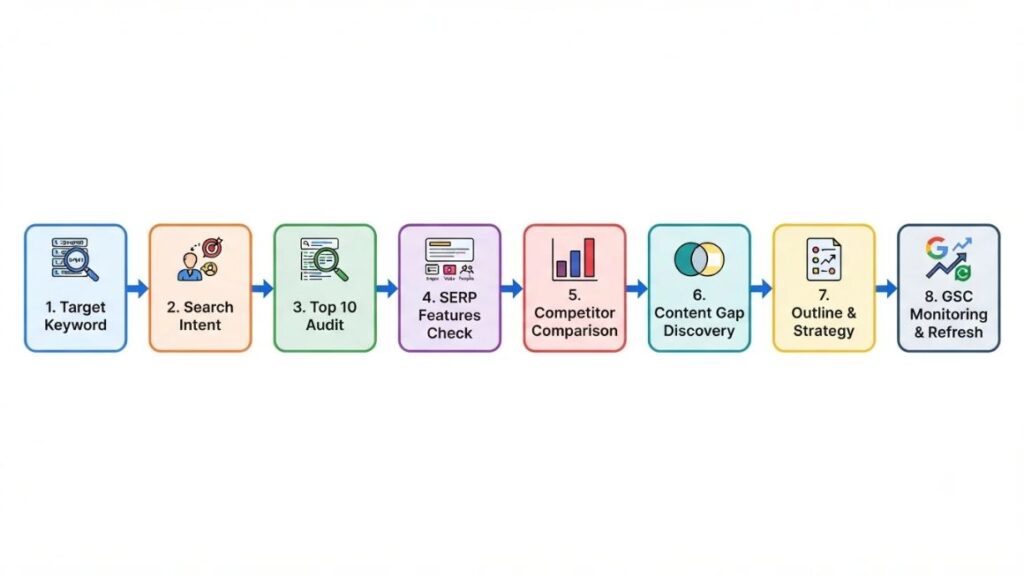
Analyzing a results page takes eight steps, from picking a keyword to monitoring results. The example below is illustrative; your real SERP will differ.
Step 1: Choose Your Target Keyword
Start with one specific query you can realistically serve, like “best laptops under 50000.” Specific beats broad. Check volume, but don’t let it decide.
Step 2: Identify the Search Intent
Read page one cold. Mostly comparison articles? The intent is commercial. A mix of product pages, videos and forums? Google is hedging. This is search intent analysis done by eye, and AI SERP analysis tools can label it for you, though you should still check their call.
Step 3: Study the Top 10 Ranking Pages
Note each page’s format, headings, length and date, and who’s behind it: brand, publisher or forum. This is also how you find competitors ranking for a keyword. If a forum ranks, the bar may be lower than the difficulty score says.
Step 4: Analyze SERP Features
Look at what surrounds the links: an AI Overview, People Also Ask, shopping results, videos. SERP features analysis shows where clicks leak before anyone reaches your page.
Step 5: Compare Competitor Content
Open the top three and list what each covers: sections, tables, data. Where all three agree, that’s table stakes.
Step 6: Identify Content Gaps
Find what nobody does well. An outdated price, a missing pick for a specific budget, a People Also Ask question no page answers directly. Those are your angles.
Also Read: Content Gap Analysis: Spot Gaps & Boost Website Authority
Step 7: Build a Better Content Strategy
Turn the gaps into an outline. Match the intent and format, add what’s missing, and give the page a reason to exist, like original testing.
Step 8: Monitor Results and Make Improvements
Track the page in Search Console and a rank tracker. Recheck the SERP after a month or two, because layouts and rivals move.
Analyzing a SERP takes eight steps: choose a keyword, identify intent, study the top 10, check SERP features, compare content, find gaps, plan and monitor. The skill is reading what Google already ranks, then adding what those pages lack.
How AI Is Changing Search Results and SEO Analysis
AI features now answer many queries on the results page itself, so analyzing SERPs means checking what Google shows above the links, not only who ranks.
The Growing Role of AI Overviews
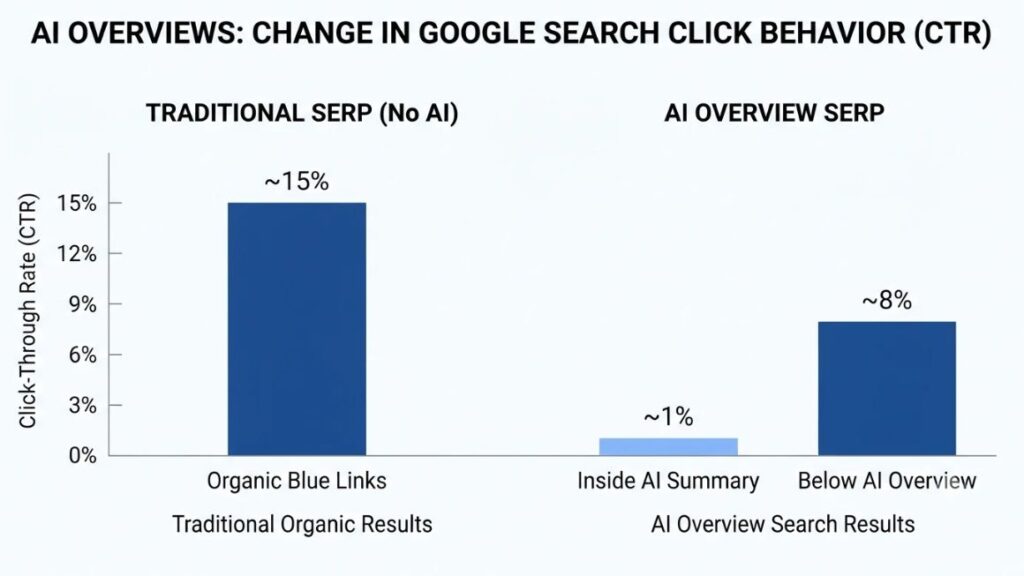
Pew Research Center tracked 900 U.S. adults in March 2025. People clicked a traditional result in 8% of visits when an AI summary appeared, against 15% when it didn’t, and clicked a link inside the summary in just 1%. It’s one U.S. panel, so treat it as directional.
Understanding AI Mode and Conversational Search
AI Mode lets people ask follow-up questions in a chat-style flow, and Google’s documentation says each follow-up counts as a new query in Search Console. Its AI features may also use query fan-out, running related searches before answering, so your page can surface for a question you never targeted.
Tracking Brand Visibility in AI Search
Classic rank trackers can’t tell you whether ChatGPT or Perplexity mention your brand. That’s why Semrush, Ahrefs (Brand Radar) and SE Ranking now sell AI search visibility tracking, often as an add-on. Useful, but noisier than rankings.
Why Helpful, Reliable Content Still Matters
In May 2026, Google published its first official guide to AI features and said no extra requirements apply to appear in AI Overviews or AI Mode. Same index, same ranking systems. It also said llms.txt, content chunking and special AI schema give no particular advantage there. So the unglamorous work still counts: original data and real expertise.
How to Prepare Your Website for Changing Search Experiences?
Keep pages crawlable and indexable, fix slow or broken ones, and link related content internally. Then add something a summary can’t copy: first-hand tests, screenshots, local detail. Watch impressions and clicks together in Search Console. Rising impressions with falling clicks is the pattern to catch.
Google says AI Overviews and AI Mode run on its existing index and ranking systems, with no special optimization required. Ahrefs found AI Overviews cut position-one click-through by 58% as of December 2025, so SERP analysis must include what sits above the links.
Common Mistakes to Avoid When Analyzing SERPs
Most SERP mistakes come from trusting AI SERP analysis tools more than the page itself. Watch for these:
- Focusing only on keyword difficulty. A low score doesn’t help if the intent doesn’t match your page.
- Ignoring search intent. Format matters as much as topic.
- Copying competitor content. Matching coverage is fine. Matching wording isn’t.
- Trusting estimated metrics without verification. Traffic and difficulty are models.
- Ignoring local and mobile differences. Results change by location and device.
- Treating AI-generated recommendations as guaranteed ranking advice. They’re patterns, not promises.
- Failing to revisit older content. SERPs drift, and yesterday’s match may miss today.
Best Practices for Getting Better Results
Look at the actual results before you write a word. Satisfy the intent first, then add what the other pages lack. Treat AI SERP analysis tools as a second opinion, not an oracle, and mix sources: a suite for competitors, Search Console for the truth. Review rankings and SERP features regularly, and measure traffic, engagement and conversions, not just position.
Also Read: On-Page SEO Checklist: Step-by-Step Guide for 2026
Conclusion: Which Tool Should You Choose?
If you want one answer, start free. Search Console, a manual read of the results page and thruuu’s free credits will teach you more than a premium plan you haven’t learned to use. Then pay for the gap. Briefs? thruuu or Surfer. Competitors and backlinks? Ahrefs or Semrush. Tracking? SE Ranking or Moz Pro.
The right pick among these AI SERP analysis tools depends on your workflow. Run one real analysis this week on a keyword you plan to target.
If you’d like to practice this on real keywords, YUP’s SEO course is a good next step for working marketers.
Frequently Asked Questions
What is a SERP analysis tool?
A SERP analysis tool collects the results Google shows for a query and breaks them down: who ranks, with what content, and which features appear. It helps you plan content that fits what searchers want.
Which tool is best for analyzing Google search results?
There’s no single winner among AI SERP analysis tools. Ahrefs and Semrush give the deepest competitor data, thruuu and Surfer suit content briefs, and Search Console is the best free source for your own site.
Are there free tools for SERP analysis?
Yes. Google Search Console, Ahrefs’ free SERP checker, thruuu’s free plan and Visualping’s free plan all work. Limits are tight, but fine for learning.
Can AI analyze search engine results?
Yes, within limits. AI SERP analysis tools can summarize what ranking pages cover, label intent and draft briefs. They can misread context, so check the output against the real results page.
How often should you analyze search results?
Before every new page, then every few months for pages that matter. Check sooner after a major update or traffic drop.
What is the difference between SERP analysis and rank tracking?
SERP analysis studies who ranks and why for a query. Rank tracking records where your own pages sit over time. One decides what to build, the other shows whether it worked.
Can SERP analysis tools help improve Google rankings?
Indirectly. They show what to match and what to add, but they don’t rank pages for you. Content quality, links and site health still do the work.
How do AI Overviews affect traditional SEO?
They answer many queries on the results page, which cuts clicks. Ranking still matters, though, since Google says AI features use the same index and ranking systems.
Which tool is best for competitor analysis?
Semrush and Ahrefs lead for broad competitor data, SpyFu covers organic and paid keywords together, and LowFruits spots weak rivals on specific keywords. Match the tool to what you need to see: links, keywords or ads.
Do beginners need paid SEO analysis software?
Not at first. Start with Search Console, free tiers and a manual read of the results. Pay once you hit a clear limit, like needing bulk lookups.