

Speechify built its name on one promise: turn any text into a voice you can listen to while you drive, walk, or fold laundry. It worked well enough that the app now claims a user base of more than 55 million people and even picked up an Apple Design Award in 2025. That’s a real achievement for a reading app.
But here’s the problem. A lot of people who try Speechify hit the same wall a few weeks in. The free tier is thin, the annual plan runs close to $139 a year, and cancelling isn’t as simple as it should be. The Better Business Bureau has logged more than 90 billing complaints against Speechify, enough that the company holds an F rating there. That’s not a small detail if you’re a student on a tight budget or a creator who just wants to test a tool before committing.
If you’ve searched for alternatives to Speechify before, you already know the results are usually a mix of outdated pricing and vague reviews. So people go looking for Speechify Alternatives that match their actual workflow instead of a one-size-fits-all subscription. Some want offline reading. Some want a cheaper way to convert a PDF into an audiobook. Others need studio-grade voiceovers for YouTube videos, not a reading app at all. This guide breaks down the best Speechify alternatives available right now, organised by who they actually serve: students, professionals, and creators.
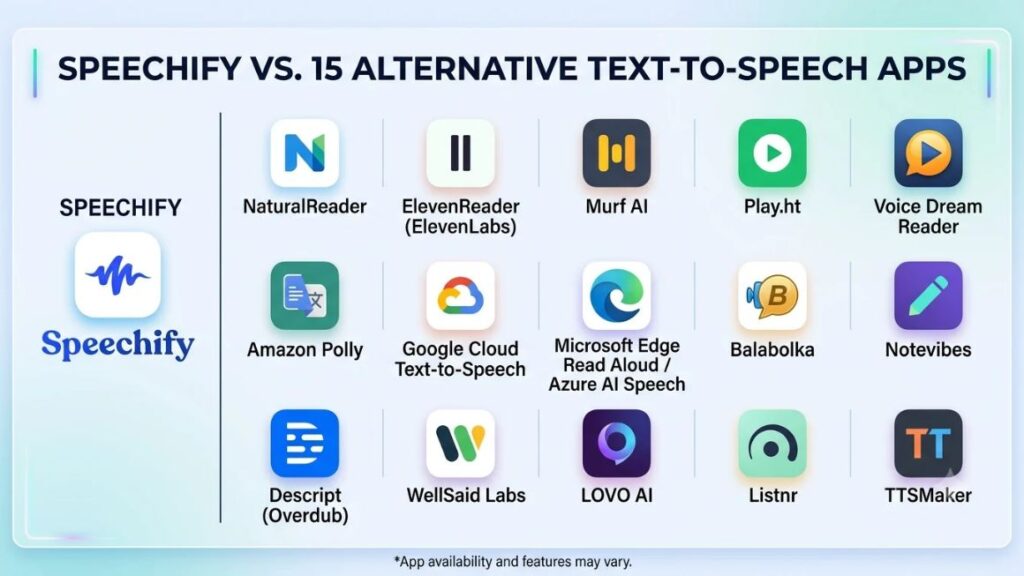
Table of Contents
What to Look For in a Text-to-Speech Tool That Beats Speechify
A good replacement gets four things right: natural-sounding voices, honest pricing, real platform coverage, and a cancellation process that doesn’t feel like a trap. Everything else is a nice-to-have.
Voice quality is the obvious one. Most text-to-speech apps sound fine for two minutes and start to grate after twenty. Pay attention to pacing, breath sounds, and how the engine handles punctuation, not just the demo clip on the pricing page.
Pricing structure matters more than the sticker price. A $10-a-month plan with unlimited words beats a $7-a-month plan that caps you at 20,000 characters. Read the fine print before you compare numbers side by side.
Platform coverage decides whether the tool fits your actual day. If you read PDFs on a laptop at work and listen to the same document on your commute, you need a tool that syncs across desktop and mobile, not just one or the other.
And then there’s the deal-breaker most reviews skip: can you actually cancel without a phone call or a retention maze? Several tools in this list, including Speechify itself, make that harder than it should be.
The strongest picks in this category balance four factors: natural voice quality, transparent per-word or per-minute pricing, full cross-device sync, and a cancellation flow that doesn’t require contacting support. Tools that win on voice quality alone often lose on pricing transparency, which is why persona-based picks work better than a single “best overall” winner.
15 Tools Worth Switching To
We looked at more than 20 Speechify competitors, cutting the list down to the 15 that actually earn a spot based on voice quality, pricing clarity, and platform fit. Each one below serves a slightly different job, so read the “best for” line before you commit to a free trial.
1. NaturalReader
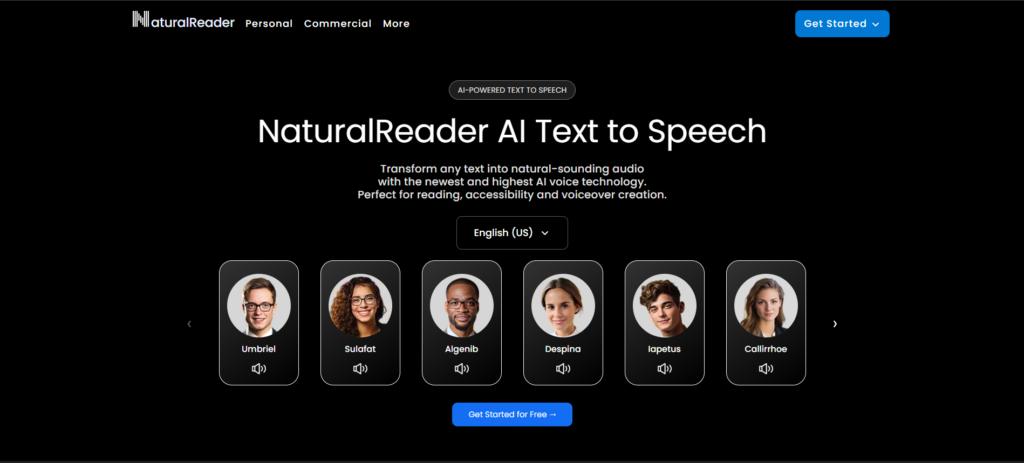
NaturalReader is the closest single Speechify alternative if you just want the same reading experience from a different company. It reads documents, PDFs, and web pages aloud using natural AI voices, and it runs on desktop, mobile, and as a Chrome extension.
The tool handles PDF-heavy reading especially well, which makes it a strong pick for students working through research papers or professionals reviewing long contracts. Its OCR feature can even read scanned documents that don’t have selectable text, something Speechify also does but at a higher price tier.
Best for: Anyone who wants a direct, familiar swap from Speechify without relearning a new interface. Pricing: Free tier available; Plus runs about $20.90/month or $119/year, Pro around $25.90/month or $159/year, according to NaturalReader’s own pricing page as of mid-2026. Trade-off: It’s cloud-based, and the free tier is metered by daily usage.
2. ElevenReader (ElevenLabs)
ElevenReader, built by the ElevenLabs team, leads the pack on pure voice realism. If you’ve ever tried an AI voice generator that sounded flat or robotic, ElevenReader is the corrective. For long-form fiction and audiobook-style listening, its voices are the most lifelike among AI reading apps on this list.
ElevenLabs also offers a broader API and voice cloning suite for developers and creators who want to build the technology into their own products, not just read text on a phone.
Best for: Novel and audiobook listeners who care more about how human the voice sounds than about document formatting features. Pricing: Free tier with limited monthly characters; paid plans start around $5/month and scale up based on usage and cloning needs. Trade-off: The reading app is lighter on document management tools like PDF annotation compared to NaturalReader.
3. Murf AI
Murf AI works less like a reading app and more like a full production studio. It’s built for people making voiceovers, not people trying to listen to their inbox. Marketers, YouTubers, and course creators use it to generate polished narration for videos, ads, and e-learning modules.
The platform includes pitch and pace controls, background music syncing, and a built-in script editor, so you can go from a Google Doc to a finished voiceover without exporting to a separate audio tool.
Best for: Creators and marketing teams producing video voiceovers, ads, or course narration at scale. Pricing: Paid plans generally start around $19 to $29/month depending on the tier, based on pricing comparisons published by eWeek in April 2026. Trade-off: Overkill if all you want is to hear an article read back to you.
4. Play.ht
Play.ht sits in the middle ground between a reading app and a voiceover studio. It supports well over 100 languages, which makes it a strong pick for teams producing content for international audiences.
The platform’s API is a big draw for developers who want to embed text-to-speech software directly into an app or website rather than using Play.ht as a standalone tool. Content teams also use it to batch-convert blog archives into podcast-style audio versions.
Best for: Teams localising content across many languages or developers who need API access. Pricing: Plans start in the range of $7 to $9/month for individual creators, scaling up for commercial and API use. Trade-off: The interface has a steeper learning curve than a simple reading app.
5. Voice Dream Reader
Among reading apps built specifically for students, Voice Dream Reader still holds up. It was one of the first apps to combine text-to-speech with real study tools: highlighting, bookmarking, dictionary lookups, and syncing across devices.
It’s also a favourite in accessibility circles. Voice Dream Reader was originally designed with dyslexic and visually impaired readers in mind, and that focus still shows in how carefully the reading experience is built.
Best for: Students who need study features layered on top of plain text-to-speech. Pricing: One-time purchase model on iOS, which is unusual in a market dominated by subscriptions. Trade-off: Android support and cross-platform sync are weaker than newer, subscription-based competitors.
6. Amazon Polly
Amazon Polly isn’t an app you open on your phone. It’s a cloud API that developers plug into their own products to add text-to-speech functionality. If you’re building an app, a customer service bot, or an internal tool that needs to read text aloud, Polly is the infrastructure layer.
It supports dozens of languages and offers both standard and neural voice engines, with the neural tier sounding significantly more natural.
Best for: Developers and engineering teams building text-to-speech into their own product. Pricing: Pay-as-you-go, billed per character processed, with a free tier for the first 12 months under AWS’s standard offer. Trade-off: Not usable out of the box. You need development resources to make it work.
Read More: Best Visual Testing Tools in 2026: Features, Comparison and How to Choose
7. Google Cloud Text-to-Speech
Google’s offering competes directly with Amazon Polly for developers who want reliable, well-documented AI text-to-speech tools without building a voice engine from scratch. It uses WaveNet technology, which Google has continued to refine for more natural intonation.
Teams already using Google Cloud infrastructure tend to default here simply because billing and access management stay in one place.
Best for: Engineering teams already on Google Cloud who need a TTS API. Pricing: Pay-per-character, with a monthly free quota. Trade-off: Same limitation as Polly: it’s infrastructure, not a consumer app.
8. Microsoft Edge Read Aloud / Azure AI Speech
If you barely want to spend anything, Microsoft’s Read Aloud feature inside Edge is a genuinely underrated pick. It reads web pages and PDFs aloud for free, with voice quality that’s improved a lot in recent updates.
For anyone who needs more control, Azure AI Speech is Microsoft’s developer-facing API, offering neural voices and custom voice training for businesses.
Best for: Casual readers who just want a free option baked into a browser they already use. Pricing: Read Aloud in Edge is free. Azure AI Speech is usage-based for developers. Trade-off: Read Aloud lacks the study features and offline support of dedicated reading apps.
9. Balabolka
Balabolka is a free, Windows-only desktop tool that’s been around for years and quietly stayed relevant. It converts text files, documents, and even ebook formats into audio using your system’s installed voices or added voice packs.
It has no subscription, no login, and no cloud dependency, which appeals to privacy-conscious users who don’t want their reading habits tracked by a company’s servers.
Best for: Windows users who want a completely free, offline, no-account-needed option. Pricing: Free. Trade-off: The interface looks dated, and voice quality depends entirely on which voice packs you install.
10. Notevibes
Notevibes focuses on one thing: clean, professional-sounding voices at a lower price point than most competitors. It’s popular with podcasters and video creators who need narration but don’t need Murf AI’s full production suite.
The platform offers a large library of voices across multiple accents and languages, with straightforward per-word pricing that’s easy to budget around.
Best for: Creators who want good voiceover quality without paying for features they won’t use. Pricing: Pay-per-character packages, generally cheaper than subscription-based competitors for occasional use. Trade-off: Fewer advanced editing tools compared to Murf AI or Play.ht.
11. Descript (Overdub)
Descript approaches text-to-speech from a completely different angle. It’s primarily an audio and video editing tool, and its Overdub feature lets you type new words into an existing recording and have it spoken in a cloned version of your own voice, or a stock voice.
Podcasters use this constantly to fix a flubbed line without re-recording an entire segment. It’s less about reading articles and more about production efficiency.
Best for: Podcasters and video editors who need to fix or extend recorded audio using text edits. Pricing: Plans start around $12 to $24/month depending on the tier and included transcription hours. Trade-off: Not designed for general reading. It’s a production tool that happens to include TTS.
Read More: Best AI Video Editors in 2026
12. WellSaid Labs
WellSaid Labs targets enterprise and corporate training teams. Its voices are built for e-learning modules, internal training videos, and product demos where consistency matters more than creative flair.
Companies license specific “voice avatars” here, which stay consistent across hundreds of hours of content, something that matters a lot for large L&D teams producing onboarding material at scale.
Best for: Corporate training and e-learning teams needing consistent narration across many modules. Pricing: Enterprise-focused, with custom quotes rather than public self-serve pricing in most cases. Trade-off: Not built for individual users or casual reading needs.
13. LOVO AI
LOVO AI combines text-to-speech with a video creation suite, making it popular with marketing teams that need voiceovers paired directly with visuals. Its Genny platform lets you generate a voiceover and drop it straight into a video template.
The voice library spans more than 100 languages and accents, and the platform includes emotion controls that let you adjust tone for different scenes.
Best for: Marketing teams producing branded video content who want voiceover and video editing in one place. Pricing: Plans typically start around $19 to $24/month for individual creators. Trade-off: The video editing features add complexity if you only need audio.
14. Listnr
Listnr is built for one specific use case: turning blog posts and articles into audio versions people can listen to on the go, essentially a podcast feed made from your existing content. Publishers and bloggers use it to add an audio player to every post without manually recording anything.
It integrates directly with WordPress, which makes it a practical option for content teams already running a blog on that platform.
Best for: Publishers and bloggers who want to auto-generate audio versions of written content. Pricing: Free tier available; paid plans scale based on monthly word volume. Trade-off: Less useful for personal reading needs outside the publishing use case.
15. TTSMaker
TTSMaker is a free, no-signup web tool for quick, one-off conversions. Paste text, pick a voice, download an MP3. There’s no account, no subscription, and no ongoing relationship with the tool.
It won’t replace a full reading app for daily use, but for a one-time voiceover on a small project, it’s hard to beat the zero-friction setup.
Best for: Quick, occasional conversions where signing up for another account feels like overkill. Pricing: Free, with some usage limits per session. Trade-off: No study features, no sync, and voice selection is more limited than paid platforms.
Among the 15 tools reviewed, the split is clear. NaturalReader and ElevenReader work best as direct reading-app replacements for Speechify. Murf AI, Play.ht, LOVO AI, and Notevibes target creators building voiceovers. Amazon Polly, Google Cloud Text-to-Speech, and Azure AI Speech serve developers who need an API rather than a consumer app.
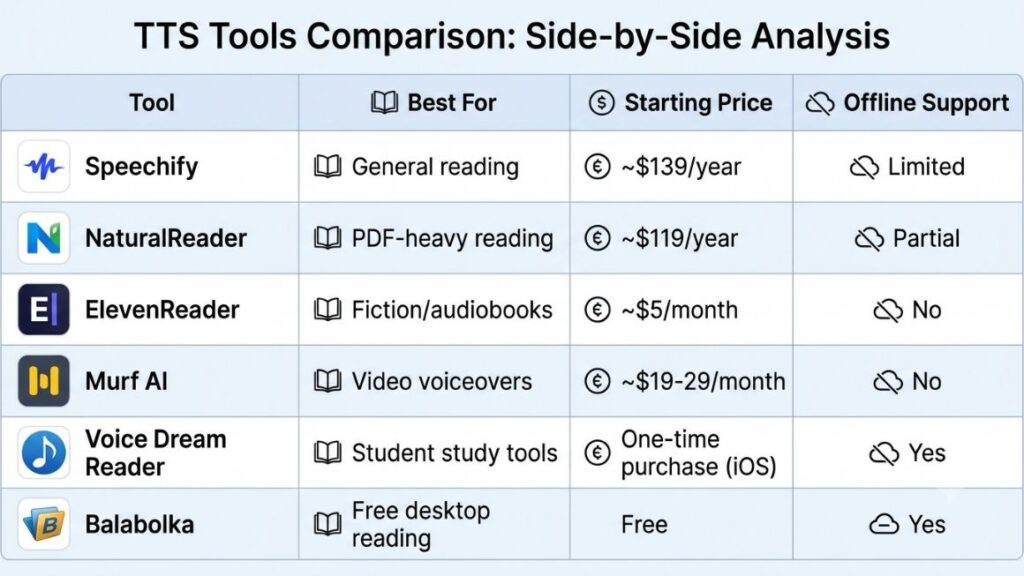
Speechify vs the Competition: A Quick Comparison
| Tool | Best For | Starting Price | Offline Support |
|---|---|---|---|
| Speechify | General reading | ~$139/year | Limited |
| NaturalReader | PDF-heavy reading | ~$119/year | Partial |
| ElevenReader | Fiction/audiobooks | ~$5/month | No |
| Murf AI | Video voiceovers | ~$19-29/month | No |
| Voice Dream Reader | Student study tools | One-time purchase (iOS) | Yes |
| Balabolka | Free desktop reading | Free | Yes |
Which Tool Actually Fits You?
No single pick works for everyone, which is why this list of Speechify alternatives covers three different reader profiles instead of crowning one overall winner.
If you’re a student, start with Voice Dream Reader or NaturalReader. Both handle PDFs and long documents well, and Voice Dream Reader’s study features (highlighting, bookmarking, dictionary lookups) matter more for coursework than raw voice realism does.
If you’re a working professional who mostly reads reports, contracts, or long emails, NaturalReader or Microsoft’s free Read Aloud in Edge will cover most needs without adding another subscription to your list.
If you’re a creator making videos, podcasts, or courses, skip the reading apps entirely and go straight to Murf AI, ElevenReader, or Descript’s Overdub, depending on whether you need studio narration, realistic fiction voices, or fast audio edits.
And if you’re a developer building text-to-speech into your own product, Amazon Polly and Google Cloud Text-to-Speech are the two to actually pilot, since Speechify itself was never built for this use case in the first place.
How to Switch From Speechify Without Losing Your Workflow
Switching tools feels riskier than it actually is if you follow a simple sequence instead of cancelling Speechify cold turkey.
Step 1: Export or note down any documents, highlights, or bookmarks currently saved inside Speechify, since most competitors won’t import this data automatically.
Step 2: Sign up for a free tier of your chosen alternative and test it on the same document type you use most, whether that’s a PDF, a Word file, or a web article.
Step 3: Run both tools side by side for one week before cancelling anything, so you catch missing features early instead of after your Speechify subscription has already lapsed.
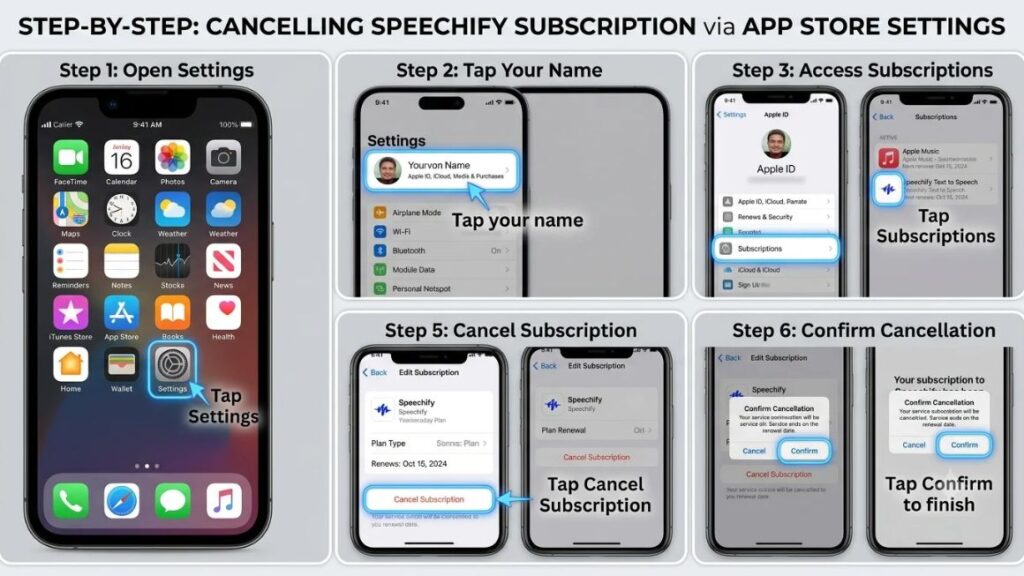
Step 4: Cancel your Speechify subscription directly through your app store account settings (Apple App Store or Google Play) rather than through Speechify’s website, since app store cancellations are typically faster and leave a clear confirmation record.
Step 5: Set a calendar reminder to check your bank statement the following month, given the volume of billing complaints tied to Speechify’s renewal process.
Conclusion
Speechify earned its reputation, but reputation isn’t the same as fit. A student buried in PDFs needs something different from a podcaster fixing a flubbed line, and a developer building voice into a product needs neither of those things. The 15 tools above cover every one of those jobs, from free desktop options like Balabolka to production-grade platforms like Murf AI and developer APIs like Amazon Polly.
Pick based on what you actually do every day, not the tool with the biggest marketing budget. Test the free tier first, run it alongside Speechify for a week, and only then decide what stays and what goes.
If you’re building AI tools into your own marketing or content workflow beyond just text-to-speech, YUP’s AI Marketing course walks through exactly how to evaluate, pilot, and scale tools like these without wasting a subscription cycle on the wrong one. It’s a practical next step if this list left you wanting a broader system for choosing AI tools, not just this one category.
FAQ
What’s the best free option instead of Speechify?
Balabolka is the strongest fully free option for Windows desktop users, while TTSMaker works well for quick, occasional conversions on any device. Microsoft Edge’s built-in Read Aloud is also free and requires no account.
Is NaturalReader better than Speechify?
NaturalReader matches Speechify closely on core reading features and PDF handling, and its pricing is slightly lower at most tiers. Whether it’s “better” depends on whether you value NaturalReader’s OCR accuracy or Speechify’s broader voice library more.
What’s the difference between a reading app and a voice generation tool?
A reading app like NaturalReader or Voice Dream Reader is built to read existing documents aloud for personal consumption. A voice generation platform like Murf AI or ElevenLabs is built to produce new audio content, such as voiceovers for videos or ads.
How do I convert a PDF to audio without Speechify?
NaturalReader, Voice Dream Reader, and Google Cloud Text-to-Speech (via its API) can all convert PDFs to audio. For scanned PDFs without selectable text, look specifically for a tool with built-in OCR, since not every option on this list supports it.
Are these tools cheaper than Speechify?
Most are, though not all. NaturalReader, Balabolka, and TTSMaker all cost less than Speechify’s roughly $139/year plan, sometimes significantly so. Enterprise-focused tools like WellSaid Labs can actually cost more, depending on usage volume.
Do any of these tools work offline?
Voice Dream Reader and Balabolka both offer offline functionality once voices are downloaded. Most cloud-based options, including Speechify itself, require an internet connection for voice generation.
Which tool is best for students specifically?
Voice Dream Reader is the strongest pick for students because of its study-focused features like highlighting and dictionary lookups. NaturalReader is a close second for anyone who reads a high volume of academic PDFs.
Can I use these tools for commercial voiceover work?
Yes, but check licensing terms carefully. Murf AI, Play.ht, Notevibes, and LOVO AI all offer commercial usage rights on paid plans, while free tiers often restrict commercial use.
Why do people say Speechify is hard to cancel?
The Better Business Bureau has logged over 90 billing complaints against Speechify, many related to renewal charges after a trial period. Cancelling directly through your app store account rather than Speechify’s website tends to avoid this issue.
Is ElevenReader worth it just for audiobooks?
If voice realism is your top priority for fiction and long-form audiobooks, yes. ElevenReader’s voices are widely regarded as among the most natural-sounding of any reading app currently available, though it offers fewer document management features than NaturalReader.