
Plenty of people can design a clean screen in Figma and still struggle to get hired. The gap isn’t visual skill. Companies hiring product designers want someone who can decide what to build, prove it works, and ship it with engineers.
If you’re wondering how to become a product designer, that gap is the thing to close. Most beginner portfolios show finished screens and nothing else. Hiring managers want the thinking behind them: the problem, the options you rejected, the trade-off you made, and what happened after launch.
This guide covers the whole path. You’ll see what the job involves, the skills to build, the process teams follow, a six-phase learning roadmap, how to structure a portfolio, how to land and interview for your first role, and what the first 90 days look like. It’s written for people starting out or switching in from another field, and it assumes you can put in around 10 to 15 hours a week.
Table of Contents
What Does a Product Designer Actually Do?
A product designer owns how a digital product works and feels, from the first idea through launch and the improvements after it. That means understanding users, defining the problem, designing the solution, and checking whether it worked.
Open Zepto and look at how the home screen is built. Delivery time sits at the top, the product grid is dense, and adding an item takes one tap. Each of those choices traces back to the business promise, which is speed. A product designer is the person who connects a promise like that to a thousand small decisions on screen.
Responsibilities from idea to post-launch
The day-to-day varies by company, but most product designers do the following:
- Learn who the users are and what they’re trying to get done
- Work out whether a problem is worth solving and how success will be measured
- Explore solutions through flows, wireframes, and prototypes
- Design the final interface, including interactions and visual detail
- Work with product managers, engineers, researchers, and marketers
- Test ideas, read the results, and improve the product after launch
Notice how much of that happens before and after the screens. That’s the part beginners tend to underestimate.
Product Designer vs UI/UX Designer: Where Do the Roles Differ?
UX design is the practice of shaping how a product works so people can reach their goals with little friction. UI design is the practice of designing the visual layer people interact with, including layout, type, color, and components. A product designer does both and also owns the problem itself, including the business goal and the outcome.
So a UI/UX designer is often asked, “How should this feature work and look?” A product designer is asked, “Should we build this feature at all, and how will we know it worked?”
To be fair, the titles overlap heavily. At a small startup, a UI/UX designer may do everything described above, and at a large company, a product designer may spend most of their time on interface detail. Read the job description, not the title.
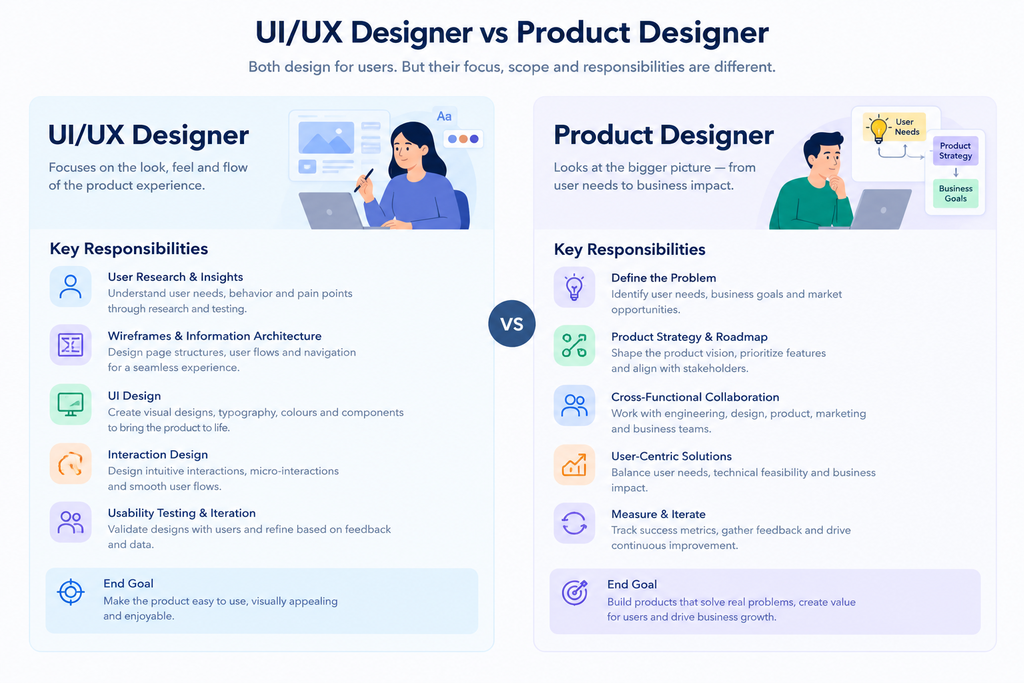
A product designer owns how a digital product works and feels, from the first idea through launch and improvement. Unlike a UI/UX designer, who often focuses on the usability and look of a specific feature, a product designer is also responsible for the problem being solved, the business goal, and the measured outcome.
Is Product Design the Right Career for You?
Here’s a quick test. When someone hands you a feature request, is your first instinct to open Figma, or to ask what problem it solves?
Product design tends to suit people who enjoy asking why before how, who are comfortable with incomplete information, and who like seeing their work move real numbers such as adoption, retention, or revenue. You’ll also spend a lot of time with people from other functions, so you need to be fine with disagreement and willing to let go of ideas that don’t test well.
It may not suit you if you mostly want to focus on visual craft, illustration, or branding. That’s a legitimate path, and visual or UI design roles exist for it. But if you dislike conversations about metrics, constraints, and trade-offs, product design will feel like a lot of meetings and very little design.
Which Skills Does a Product Designer Need?
A product designer needs five skill areas: research, product thinking, interaction design, visual design, and communication. You don’t have to master all five before applying, but you need working ability in each and real strength in one or two.
Research and discovery
User research is the practice of learning what people need and do through interviews, observation, and data. You should be able to plan an interview, write open questions that don’t lead the answer, and turn messy notes into themes and insights.
One habit matters more than any method: separate what people say from what they do. Users will tell you they’d love a feature and then never open it.
Product thinking
Product thinking is the habit of tying every design decision to a user problem and a business outcome. It’s what separates a designer who delivers screens from one who delivers results.
In practice, that means defining the problem before designing, choosing success metrics, and prioritizing by impact and effort. Google’s HEART framework, introduced by Google researchers in 2010, is a useful starting point for metrics. It covers Happiness, Engagement, Adoption, Retention, and Task success. The Jobs-to-be-Done approach is another, which asks what “job” a user is hiring your product to do.
Interaction and UX design
This is where you shape structure and behavior: information architecture, user flows, wireframes, and prototypes. Beginners often design only the happy path, where everything works. Real products spend most of their time elsewhere, in empty states, loading states, errors, and edge cases.
Learn Nielsen Norman Group’s 10 usability heuristics, published by Jakob Nielsen in 1994. They’re old, they still hold up, and interviewers often use them as a shared vocabulary.
Visual and UI design
Visual design covers hierarchy, spacing, typography, color, and consistency. In Figma, that means getting comfortable with auto layout, components, and variants, because that’s how real design systems are built.
Accessibility belongs here too. The W3C’s Web Content Accessibility Guidelines (WCAG) 2.1 set a minimum contrast ratio of 4.5:1 for normal text at the AA level. Build that habit early and you won’t have to unlearn anything.
Communication and collaboration
The best design in the world dies if you can’t explain it. You’ll present decisions, write short briefs, take feedback you disagree with, and work with engineers on what’s feasible.
Honestly, this is the skill most self-taught designers neglect, and it’s often what decides who gets promoted.
Product designers work across five skill areas: research, product thinking, interaction design, visual design, and communication. Beginners usually over-invest in visual design, but hiring managers consistently look for evidence of problem definition, testing, and clear decision-making.
What Does the Product Design Process Look Like?
Most product design processes follow eight stages: understand the problem, research, define, ideate, design and prototype, test, hand off and build, and measure. Teams rename and reorder them, but the logic stays the same: learn first, design second, check the result after.
The UK Design Council’s Double Diamond model (2005) frames this as two rounds of opening up and narrowing down. First you explore the problem widely and then settle on a definition. Then you explore solutions widely and settle on one.
Here’s the sequence step by step:
- Step 1: Understand the problem. Ask who is struggling, what they’re trying to do, and what the business needs. Write a one or two sentence problem statement before drawing anything.
- Step 2: Research. Gather evidence from interviews, usage data, support conversations, competitor products, and direct observation. Summarize it so a teammate can absorb it in two minutes.
- Step 3: Define. Pick the user, the core problem, and the success measure. Set constraints on time, technology, and scope.
- Step 4: Ideate. Sketch several directions instead of committing to the first. Compare them and write down the trade-offs.
- Step 5: Design and prototype. Build the flow, then refine it into detailed screens. Cover edge cases and make the prototype realistic enough to test the main task.
- Step 6: Test and iterate. Put the prototype in front of real people, watch where they hesitate, and fix the biggest problems first.
- Step 7: Hand off and build. Work with engineers throughout, not only at the end. Review the built result against the design.
- Step 8: Measure and learn. Check the metrics you defined after launch and decide what to improve next.
Step 8 is where product designers part ways with people who only deliver screens.
Take a retailer like Nykaa. Helping someone find one lipstick shade among thousands of products is a discovery problem long before it’s a visual one. The decisions about filters, search, and how products are grouped come from Steps 1 to 4. The final screens are the visible tip.
The product design process runs through eight stages: understand the problem, research, define, ideate, design and prototype, test, hand off, and measure. Strong designers spend as much time on the stages before and after the screens as on the screens themselves.
How to Become a Product Designer: A 6-Phase Roadmap
You can build a job-ready portfolio in roughly eight months of steady practice at 10 to 15 hours a week, then start the job search. The path runs through six phases: foundations, core UX skills, visual craft, product thinking, portfolio projects, and job search. Someone with a graphic design or front-end background may move faster, and someone starting from zero may take longer. That’s fine.
Phase 1: Foundations (Weeks 1 to 4)
Get the vocabulary and basic principles down. Learn usability, user-centered design, mental models, and heuristics, plus the visual basics of hierarchy, alignment, contrast, and spacing. Get comfortable in Figma by recreating existing interfaces pixel by pixel. Then start analyzing apps you use every day, asking what works, what frustrates you, and why.
Checkpoint: you can explain why a screen is easy or hard to use, using proper terms.
Phase 2: Core UX skills (Weeks 5 to 10)
Learn to structure a solution. Practice user flows, sitemaps, and wireframes. Run simple interviews and usability tests with friends or colleagues. Write problem statements and short design briefs. Study how forms, navigation, search, onboarding, and settings usually work.
Checkpoint: you can take a small problem and produce a clear flow and wireframes with reasons for each choice.
Phase 3: Visual and UI craft (Weeks 11 to 16)
Make your work look professional and consistent. Build a small design system with colors, a type scale, spacing rules, buttons, inputs, and cards. Learn auto layout, components, and variants. Study accessibility basics, then redesign one screen several times, improving it each round.
Checkpoint: your screens follow consistent rules and look polished.
Phase 4: Product thinking (Weeks 17 to 22)
Move from designing screens to designing outcomes. Learn how products make money and how teams measure success. Define metrics for a feature, such as activation, retention, conversion, and task success. Practice prioritization and short product briefs, and get used to explaining what you chose and what you rejected.
Checkpoint: you can describe the business impact of a design decision.
Phase 5: Portfolio projects (Weeks 23 to 34)
Produce proof of your ability. The next section covers exactly how.
Phase 6: Job search and interview prep (Week 35 onward)
Convert the portfolio into offers. Sections 7 to 9 cover this.
A beginner can build a job-ready product design portfolio in about eight months at 10 to 15 hours a week. The six phases are foundations, core UX skills, visual craft, product thinking, portfolio projects, and job search, with each phase ending in a skill you can demonstrate.
How to Build a Product Design Portfolio That Gets Noticed
A product design portfolio is a set of case studies that show how you think, not a gallery of finished screens. Polished visuals matter, but reasoning matters more, because that’s what a hiring manager can’t judge from a pretty mockup.
Quality beats quantity here. Two to four strong case studies will do more for you than ten shallow ones.
Which projects to include
Aim for a mix of these:
- An end-to-end product project: research, definition, design, testing, and iteration for a real or realistic problem.
- A redesign with clear reasoning: pick an existing product with a real flaw, explain what’s broken, and justify your changes.
- A feature addition: show how you designed within an existing product’s constraints and design language.
- A project with data or metrics: even a small one, such as a usability test result or a measured improvement in task success.
- A collaboration project: work with a developer or another designer, if you can, to show teamwork.
Real work beats hypothetical work. A small local business, a student club, or an early-stage startup can give you real users and real constraints, which makes a far better story than a made-up brief.
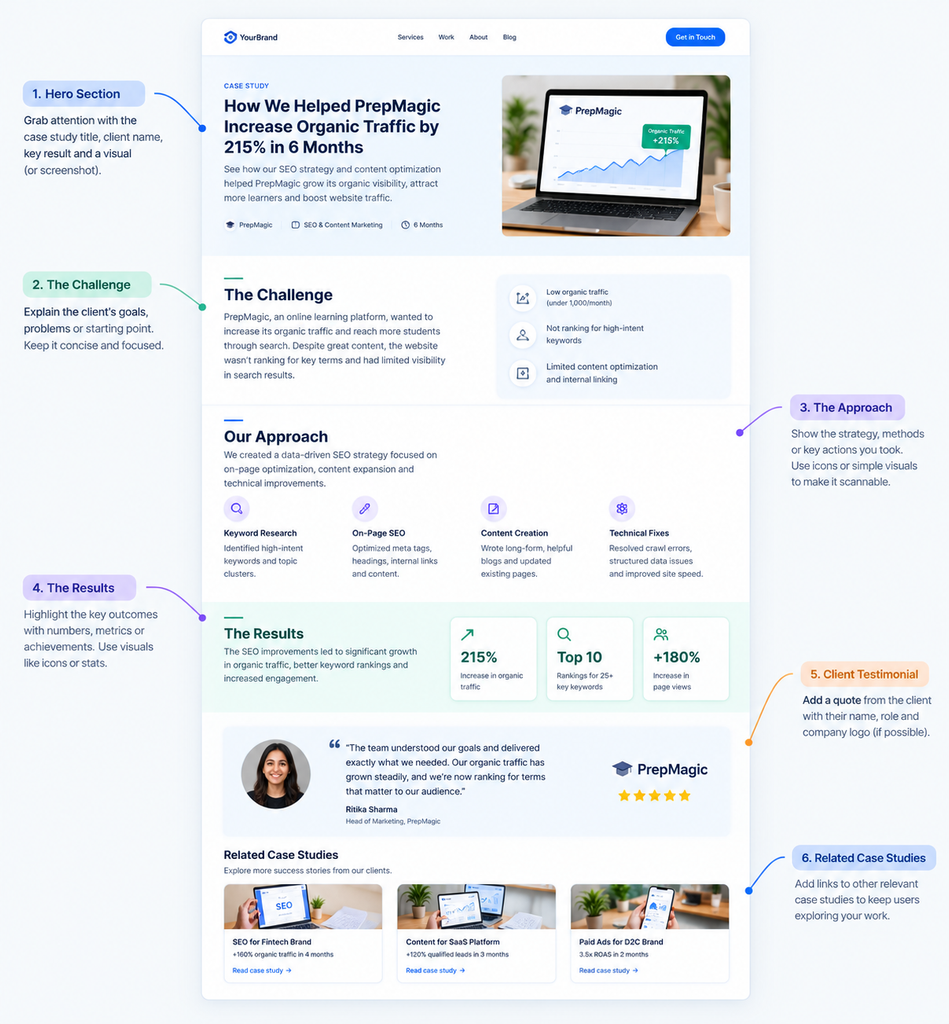
Case study structure
Use the same structure for every case study so reviewers know where to look:
- Summary: one paragraph with the problem, your role, the timeline, and the outcome.
- The problem: who is affected, why it matters, and the business context.
- Research: what you did and what you learned.
- Definition: the core insight and the goal you set.
- Exploration: a few options you considered and why you chose one.
- The solution: key screens and flows, with the reason behind each major decision.
- Testing and iteration: what you tested, what failed, and what you changed.
- Outcome: results, metrics, or lessons.
- Reflection: what you’d do differently.
That last one is underrated. Honest reflection tells a hiring manager you’ll keep improving.
Portfolio mistakes to avoid
- Showing only final screens with no process
- Using vague claims like “improved the user experience” with no evidence
- Hiding failures, when honest iteration shows maturity
- Writing walls of text instead of clear headings, visuals, and short paragraphs
- Presenting team work as if you did everything
- Copying trending visual styles with no connection to the problem
Make it easy to review, too. A recruiter may spend under two minutes on a first look, so put your strongest project first, add a short intro about who you are, and make your contact details easy to find. Every case study should make sense from its headings and images alone.
A product design portfolio should contain two to four deep case studies rather than many shallow ones. Each case study should show the problem, research, options considered, final solution, testing, and outcome, because hiring managers evaluate reasoning more than visual polish.
How Do You Prepare for a Product Design Interview?
A product design interview usually has four parts: a recruiter call, a portfolio presentation, a design exercise, and conversations with the team. You prepare by rehearsing your case studies out loud and practicing a structured approach to open-ended problems.
The portfolio presentation
Choose one or two case studies and rehearse a 20 to 30 minute walkthrough. Focus on the problem and why it mattered, your specific role and decisions, the trade-offs you faced, and what you learned, including what went wrong.
Time yourself, and practice with someone who’ll interrupt. They will interrupt in the real interview.
The design exercise
You may get a problem to work through live or as a take-home task. Follow these steps:
- Ask clarifying questions about users, goals, and constraints.
- State your assumptions out loud.
- Define the problem before you sketch anything.
- Explore more than one direction.
- Choose one and explain why.
- Cover edge cases and say how you’d measure success.
Interviewers are evaluating how you think. A rough sketch with sharp reasoning beats a polished screen with none.
Common questions and how to answer them
Expect questions like these:
- Walk me through a project you’re proud of.
- Tell me about a time you disagreed with a stakeholder or engineer.
- How do you decide what to prioritize?
- How do you know a design is successful?
- Describe a time your design tested poorly.
- How do you work with engineers?
- How do you handle feedback you disagree with?
For behavioral questions, use a simple structure: the situation, your task, the actions you took, and the result. End with what you learned. And have your own questions ready, such as how design impact is measured, what success looks like in the first 90 days, and what the biggest design challenges are right now.
A product design interview typically includes a recruiter call, a portfolio presentation, a design exercise, and team conversations. Candidates are judged on how they define problems, weigh trade-offs, and explain decisions, not only on the polish of their final screens.
What Should You Do in Your First 90 Days?
In your first 90 days as a product designer, you should move from learning the product, to contributing to small features, to owning a project with support. Don’t try to prove yourself with a big redesign in week two.
Days 1 to 30: Learn. Understand the product, users, business model, and team structure. Use the product daily and keep a list of observations. Meet teammates one on one, learn the design system and the team’s process, and take on small tasks to build trust.
Days 31 to 60: Contribute. Own a small feature or improvement. Ask for feedback early and often, and document your decisions. Build a good working relationship with your engineering partner, because that relationship decides how smoothly your designs get built.
Days 61 to 90: Own. Lead a project end to end with support. Connect your work to team metrics, share specific suggestions based on what you’ve noticed, and agree on goals for the next quarter with your manager.
One caution. Every team works differently, and a startup with three designers won’t offer the same structure as a company with a mature design organization. Adjust the plan to the team, not the other way around.
What Does the Product Designer Career Path Look Like?
The product designer career path usually runs from junior designer to senior designer, then branches into an individual contributor track or a management track. Titles vary by company, but the progression in scope is consistent.
- Junior or Associate Product Designer: executes well-defined tasks with guidance and learns the craft and process.
- Product Designer: owns features end to end, works independently, and contributes to product decisions.
- Senior Product Designer: leads complex, ambiguous problems, mentors others, and influences roadmap and strategy.
- Lead, Staff, or Principal Designer: shapes design direction across teams or products and handles the hardest cross-functional problems.
- Design Manager or Head of Design: builds and leads teams, hires, sets standards, and aligns design with company strategy.
Most designers eventually choose between deepening their craft as an individual contributor and growing by leading people. Neither is better. Pick the one that energizes you, not the one that sounds more senior.
Some designers also move sideways into product management, where design experience gives them a real advantage in understanding users.
10 Beginner Mistakes That Slow Product Designers Down
These mistakes show up again and again in junior portfolios and early interviews. Most are fixable in a single project.
- Jumping straight to visual design. Designing before understanding the problem produces nice screens that solve nothing.
- Copying trends. A style that works for someone else’s problem rarely fits yours.
- Designing only the happy path. Errors, empty states, and edge cases are most of real usage.
- Skipping testing. It feels uncomfortable, and that’s exactly why it’s valuable.
- Falling for the first idea. Explore at least two or three directions before committing.
- Working alone too long. Show rough work early, because late feedback is expensive.
- Leaving accessibility until the end. Retrofitting contrast and touch targets is far harder than starting right.
- Treating the portfolio as a gallery. It should tell a story of decisions, not display outputs.
- Waiting to feel ready. You’ll rarely feel ready, and applying teaches you things study can’t.
- Comparing yourself to senior designers. You’re seeing their tenth year next to your first.
Product Designer Readiness Checklist
Before you start applying, check how many of these you can honestly tick off:
- I can explain what product design is and how it differs from UI/UX design
- I can run a basic interview and turn the findings into insights
- I can define a problem and success metrics before designing
- I can create flows, wireframes, and a clickable prototype
- I can design clean, consistent, accessible interfaces
- I have at least two complete case studies with process and outcomes
- I’ve tested my designs with real people and iterated on the results
- I can present my work clearly and handle questions
- My portfolio, resume, and professional profiles are up to date
- I have a list of target companies and a plan to reach out
You don’t need all ten. If you’re at seven or eight, start applying while you close the gaps.
Start With One Project
Three things matter most if you’re serious about this path. Learn to define the problem before you design. Test your work with real people, even if it’s uncomfortable. And build case studies that show your reasoning, not just your screens.
Your next step is small. Pick one app you use daily, find one real flaw, and run it through the eight stages above, from problem statement to a tested prototype. Finish it properly and you’ll have the start of your first case study.
If you want practical career breakdowns like this in your inbox, that’s what the Crystal Clear Newsletter is for. Each edition covers one skill or career move you can apply the same week.
Frequently Asked Questions About Becoming a Product Designer
What is a product designer?
A product designer is a professional who owns how a digital product works and feels, from understanding the user problem to shipping the solution and measuring results. They combine research, interaction design, visual design, and product thinking, and they work closely with product managers and engineers.
Product designer vs UX designer: what’s the difference?
A UX designer focuses on how a product works and how usable it is. A product designer covers UX and UI, and also owns the problem definition, business goals, and post-launch results. In practice the titles overlap heavily, so check the responsibilities in the job description.
How long does it take to become a product designer?
Most people need around eight months of steady practice, at 10 to 15 hours a week, to build a portfolio that’s ready for applications. It depends on your starting point. Someone with a graphic design or front-end background may be faster, and the job search itself can take several more months.
Do you need a degree to become a product designer?
No. Most hiring managers weigh your portfolio and your ability to explain your decisions more than your degree. That said, some large companies and certain regions still screen on formal qualifications, so check the requirements for the roles you want.
Do product designers need to know how to code?
No, but understanding how front-end development works helps. You’ll design things that engineers can actually build, you’ll have better conversations about trade-offs, and you’ll spot technical limits earlier.
Who should become a product designer?
Product design suits people who enjoy solving problems, working with people from different functions, and seeing the measurable effect of their work. If you only want to focus on visuals or illustration, a UI or visual design path may fit you better.
Is a product design career worth it?
For most people who enjoy the work, yes, but it’s competitive at the entry level. Hiring tends to favor candidates with strong case studies over those with certificates. If you can show real problem solving, you stand out from the many applicants who only show screens.
How many case studies do I need in my portfolio?
Two to four strong case studies are enough to start. Depth matters more than count, and each one should show your research, options, solution, testing, and outcome.
Why am I not getting interviews?
The usual cause is a portfolio that shows finished screens without process. Add the problem, your reasoning, what you tested, and what changed. Also check that you’re tailoring each application, and ask a working designer to review your portfolio for the two-minute skim a recruiter will give it.
Which tools should a beginner product designer learn?
Figma is the standard tool for interface design and prototyping in most teams, so learn auto layout, components, and variants. After that, tool choice matters less than your process, because teams use different tools for research, documentation, and handoff.
What do most beginners get wrong about product design?
They treat it as a visual job. Product design is about problem solving first, and visuals second. If your portfolio shows how you defined a problem and tested a solution, you’re already ahead of most applicants.