

Weekly AI use among designers jumped from 54% in 2025 to 91% in 2026, according to the AI in Design 2026 report from Designer Fund and Foundation Capital. It is based on a survey of 906 designers across 60+ countries. Adoption isn’t the hard part anymore. Choosing the right tools is.
The market for AI tools for product designers has long moved past one click image generators. Current tools read your research draft screens inside your design system. They build clickable prototypes and hand developers working code. A few do two or three of those jobs. Most do one well and the rest badly.
That’s why picking the right tool matters more than collecting the most tools. Eight subscriptions that don’t connect cost more time than they save. This guide sorts the tools by workflow stage, from research to development. So you can match each one to the job it does.
Table of Contents
What AI Is Actually Changing in Product Design
AI is changing how quickly you get from a blank canvas to a first draft. It isn’t changing who decides what has to be built.
Generative AI for product design now touches: concept exploration, research synthesis, wireframes and UI, interactive prototypes, UX writing, testing analysis, design-system chores and design-to-code handoffs. Speed is the clear win for AI tools for product designers. Figma’s 2025 AI Report surveyed 2,500 designers and developers. It found that 78% say AI makes their workflows more efficient, while only 58% say it improves the quality of the work.
What AI Is Good At
Repetitive, high-volume and first-draft work. Ten layout variations before lunch. A first-pass tag on forty interview transcripts. Fifteen versions of an onboarding message. AI shines wherever a bad draft costs almost nothing and a blank page costs an afternoon.
What AI Still Struggles With
It doesn’t know your users’ real context. It can’t decide which problem deserves your next quarter. Ambiguous research trips it up. So do product trade-offs, accessibility judgment and stakeholder alignment. It also can’t tell whether a generated design is actually appropriate for the people who’ll use it.
The New Role of the Product Designer
The job is shifting from producing every screen to directing, evaluating, testing and refining options a model produced. You’re closer to an editor than a drafter. That sounds like a demotion. It isn’t. Evaluation is the harder skill. Most teams are short on it.
Where AI Fits Into the Product Design Workflow
AI belongs at specific stages of the workflow, not across all of it. The sequence runs Research, Define, Ideate, Wireframe, UI, Prototype, Validate, Handoff, Build, and every category of AI product design tools covers only a few of those stages.
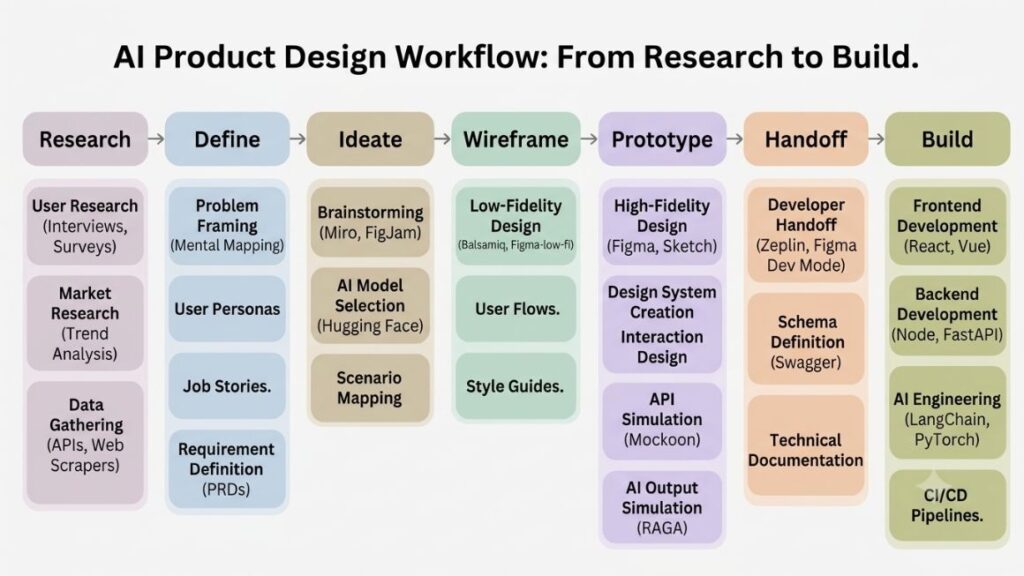
Choose AI tools for product designers by the job, not the label. Almost every product advertises an “AI feature,” which tells you close to nothing. Dovetail and Maze sit at the research and validation ends. Figma Make, Google Stitch and UX Pilot cover wireframes, UI and prototypes. v0, Lovable and Bolt push toward build. Find the stage that’s slowing you down, and the shortlist shrinks fast.
Also Read: Top AI Design Tools for Designers, Marketers & Creators
Best AI Tools for Product Design Research and Synthesis
The best AI user research tools shorten the gap between raw notes and a pattern you can review. They don’t tell you what the pattern means, and that’s still your job.
Dovetail for Research Synthesis
Dovetail’s AI clusters highlights into themes, summarises notes and transcripts, and tags positive and negative sentiment. It also transcribes uploaded audio and video. Its Channels feature classifies incoming support tickets, app reviews and NPS responses.
Where does it stop? Frequency isn’t importance. Ten users mentioning a minor annoyance can outrank one offhand comment from the segment your business depends on, and the model won’t know. Dovetail’s own documentation frames its AI output as a starting point for you to refine and validate. Treat it that way.
Maze for Usability Testing and Research Analysis
Maze runs fast, unmoderated studies such as prototype tests, surveys and card sorts, with a built-in panel to recruit from. It has added AI features including a study builder and an AI moderator. Task success and drop-off per screen land in one place.
Why use it over pasting feedback into an LLM? Because the data is structured and tied to a prototype. A chatbot only sees the text you give it. Maze sees where participants stopped clicking.
ChatGPT or Claude for Early Research Work
For early work, a general-purpose LLM does plenty. Use ChatGPT or Claude to summarise interview transcripts, cluster feedback, draft research questions, suggest possible themes and write a first research summary. Remove participant names before you paste anything in.
Every theme it hands back is a hypothesis. Check each one against the original quotes before it goes anywhere near a roadmap.
This is also why customer-centric product development still matters when AI is involved.
Mini-workflow: Research notes → AI-assisted clustering → Human review → Evidence-backed insight → Design decision
AI research tools speed up the first pass of synthesis: transcription, tagging, clustering and summaries. The output is a set of hypotheses, not findings, so check every theme against original participant evidence before it shapes a design decision.
Best AI Tools for Ideation and Product Concept Exploration
AI helps most in ideation when you use it to widen the option set before you narrow it. Ask for ten directions. Then kill nine.
ChatGPT for Structured Ideation
A general-purpose LLM is the cheapest ideation partner among AI tools for product designers. Treat ChatGPT as an AI design assistant for the thinking that comes before screens. Ask it to: reframe the problem three ways, propose alternative solutions, write user scenarios, list edge cases and suggest how to prioritise features against a goal you define. Its answers are raw material. You still choose.
Miro AI for Collaborative Ideation
Miro’s AI features help cluster sticky notes, organise workshop output, map concepts and turn an unstructured brainstorm into themes.
Midjourney and Visual-Generation Tools
Midjourney is strong at moodboards, visual direction and atmosphere, so it’s useful when you’re exploring a brand feel. A pretty image isn’t product UI, though. It has no components, no states, no grid and no accessibility logic. Treat it as inspiration.
Best AI Tools for Wireframing and UI Generation
For prompt-to-UI, Figma Make suits existing Figma teams. Google Stitch suits fast free exploration. Uizard suits beginners. UX Pilot adds review and prediction. Relume suits website structure.
Most AI UI design tools generate fast and edit badly. So judge each one by how well its output lands in your main design environment.
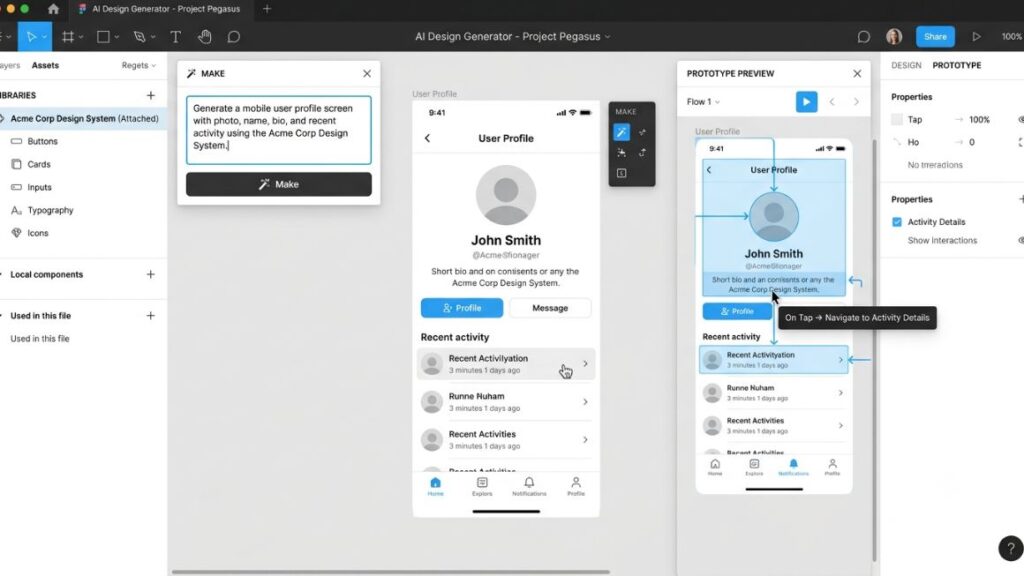
Figma Make
Figma introduced Make at Config 2025 as a prompt-to-app capability. It takes you from concept to a functional prototype in a few prompts. You can attach styling context from your Figma library to stay consistent with your design system. Then copy the preview as design layers to keep iterating in Figma Design.
The catch: without a design system attached, Make tends to drift off brand. For teams already in Figma with a maintained library, it’s the lowest-friction option. For everyone else, it adds a learning curve.
Google Stitch
Google Labs unveiled Stitch at Google I/O 2025 as a free browser tool. It turns prompts or sketches into UI designs plus front-end code. It returns several variants per prompt, and exports go to Figma, code or Google AI Studio.
Limits matter. As of April 2026 it’s free with caps of 350 standard and 200 experimental generations a month, it offers little fine-grained editing, and Google has a history of retiring Labs products. Good for exploring ten directions on a Tuesday. Risky as the backbone of a team process.
Uizard
Uizard’s Autodesigner generates multi-screen UI from text descriptions, and sketch-to-wireframe conversion is built in. It suits beginners, founders and non-designers who need a believable early concept. Miro acquired Uizard in June 2024. Serious teams tend to outgrow it. Reviewers point out it has no Figma export.
UX Pilot
UX Pilot generates wireframes, high-fidelity screens and user flows from text prompts or reference images. Its Figma plugin has over 100,000 installs. Among AI UX design tools, it’s the one built around review as much as generation. A predictive heatmap shows where attention is likely to land. An automated design review flags contrast and spacing problems.
The heatmaps are predictions, not real sessions. They rest on visual-hierarchy research rather than user data. Use them to sanity-check a layout, then test with people.
Relume
Relume turns a short prompt into a sitemap, then into a wireframe built from ready-made components, over 1,000 of them for Figma, Webflow and React. It’s the most structured of the AI wireframing tools, which makes it strong for marketing sites, content-heavy sites and information architecture. It isn’t a universal product-design solution, and a SaaS dashboard isn’t its home turf.
Best AI Tools for Prototyping and Building Functional Experiences
A visual mockup shows what a product could look like. A functional prototype lets you test what it actually does. That distinction decides which of these AI prototyping tools you need, and which AI tools for product designers can skip this section.
v0 for UI and React-Based Prototypes
v0, from Vercel, generates React components using shadcn/ui and Tailwind. It doesn’t try to own your whole app, which is why designers and front-end engineers both like it: the output drops into an existing project cleanly. The trade-offs? You bring your own backend, and it’s React only.
Lovable for Full-Stack Product Concepts
Lovable is a chat-first builder that produces full-stack React, TypeScript and Tailwind apps with Supabase as the default backend. That makes it good for validating a concept with something that actually saves data. GitHub export lets engineers inspect what it built. A generated app that works in a demo isn’t production-ready by default.
Bolt for Rapid Full-Stack Experimentation
Bolt isn’t locked to React. It supports Next.js, Astro, SvelteKit and Vue, plus Expo for mobile. It runs in the browser, which makes it quick for experiments. Reviewers tend to point technical prototypers toward it. Choose it when you’re comfortable reading code and want control over the stack.
When Product Designers Should Use Functional Prototypes
Reach for one when a static flow can’t answer the question. Stakeholders react differently to a working screen. Usability tests improve when participants can type, tap and fail naturally. Feasibility talks get shorter when engineers can open the prototype. And a hypothesis like “will users connect their bank account?” needs behaviour, not opinions.
Best AI Tools for Visual Assets and Product Design Exploration
These AI tools for product designers support your product-design software rather than replace it. Use them for imagery, icons and visual references. Then bring the winners into Figma.
Adobe Firefly
Firefly is trained on licensed Adobe Stock content and public-domain images. That is why it’s positioned as commercially safe. It generates images and variations inside Photoshop and Illustrator. So Creative Cloud users can explore directions without switching apps. The output can read as corporate stock. Fine for placeholder imagery, less so for personality.
Midjourney
Midjourney is the pick for concept visuals, moodboards, art direction and visual references. It can’t generate vector SVGs or hold a brand style as consistently as Recraft. Treat its output as a reference, not a deliverable.
Recraft
Recraft produces editable vector SVG output and lets you save reference images as reusable style tokens. That’s practical for icon sets that need one consistent look. Quality drops on highly complex illustrations, so keep requests simple, flat and geometric.
Generating an asset isn’t the same as designing an experience.
Best AI Tools for UX Writing and Product Content
Interface copy now sits inside the product-design workflow, because a layout full of placeholder text can’t be tested honestly. Few AI tools for product designers are as quick at first drafts as an LLM, and none are reliable at final ones.
ChatGPT and Claude for First Drafts
Use them for button labels, onboarding copy, empty states, error messages and tooltips. Their real value is alternatives. Ask for five versions of an error message at different lengths and tones, then pick one or merge two.
Figma’s AI-Assisted Content Workflows
Staying in the canvas saves context switching. Figma’s Agent can take a single prompt that updates copy across several selected frames at once. That beats editing sixty text layers by hand.
Why Human Review Still Matters
Models default to generic language. They run long. They write wording that sounds clear and isn’t. They drift from your brand voice and miss context, like cheerful copy on a failed-payment screen. Read every string aloud. If you’d never say it to a customer, don’t ship it.
AI Tools for Design Systems, Accessibility and Design Quality
Generating screens is the flashy part. Keeping them consistent, accessible and well evaluated is where products are won.
AI for Design-System Consistency
AI design automation pays off most in the unglamorous work. Naming layers and components. Writing documentation. Spotting inconsistencies. Checking that reusable components actually get reused. Figma’s Agent works with your design system as context. Figma also offers a generator that drafts a design-system document from your file. Output is only as good as the system underneath it. A messy library produces messy results faster.
AI for Accessibility Checks
Automated checks catch contrast failures, hard-to-read text, weak hierarchy and other visible issues early. They can’t judge whether a screen reader user can finish a task, or whether your focus order makes sense. Specialist review and testing with real users still do that work.
AI-Powered Attention and Heatmap Tools
Attention Insight and UX Pilot predict where eyes land on a screen. Attention Insight says its heatmaps match real eye-tracking with up to 96% accuracy. That’s a vendor figure based on a model trained on 5.5 million fixations. The predictions cover where visitors look in the first three to five seconds.
That’s useful for early evaluation of visibility and hierarchy. It says nothing about whether people understand the page or complete the task. So it doesn’t replace usability testing.
AI Design-to-Code Tools: What Product Designers Need to Know
AI design-to-code tools turn a design or a prompt into working front-end code. They’re one of the clearest shifts in the 2026 workflow. The AI in Design 2026 report found roughly half of surveyed designers have shipped AI-generated code to production. For AI tools for product designers, that changes what “handoff” means.
What Design-to-Code Actually Means
Design → Generated code → Functional prototype → Developer review → Production. Notice where developer review sits: before production. That step isn’t optional.
Where Design-to-Code Helps
Faster feasibility testing. Clearer designer-developer communication. Both of you are looking at the same working thing. Functional prototypes for interaction testing, and an early look at technical constraints before you’ve promised stakeholders a design.
Where Generated Code Falls Short
Accessibility, edge cases, architecture, performance, security, maintainability and production dependencies are all weak spots. Veracode’s 2025 GenAI Code Security Report tested more than 100 language models on 80 coding tasks and found security vulnerabilities in 45% of cases. A prototype that works isn’t a product that’s safe.
The Designer’s New Advantage
You don’t need to become a full-stack engineer. You do need to read a component structure, understand props and state and know why a layout breaks at 360 pixels. That literacy lets you review output instead of just accepting it.
Design-to-code tools shorten the path from design to a working prototype, but generated code needs developer review. Veracode’s 2025 GenAI Code Security Report found security vulnerabilities in 45% of AI-generated code test cases, so treat the output as a prototype until engineers check it.
How to Choose the Right AI Tool for Your Product Design Workflow?
Don’t rank tools from one to ten. Pick by bottleneck, output, integration, cleanup time and data risk. The right AI tools for product designers on your team surface quickly.
Start With the Bottleneck
Is research taking too long? Are wireframes slowing you down? Do you need more visual directions? Are prototypes too static? Is handoff causing friction? Fix the one that hurts most first.
Check What the Tool Produces
An image, an editable design, a prototype, code, a research insight or documentation? Those are different deliverables. A tool that outputs images can’t fix a handoff problem.
Check Integration With Your Existing Workflow
Look at Figma, your design system, GitHub, your engineering stack and your research repository. A tool that plugs into none of them usually means extra copy-paste.
Evaluate Cleanup Time
For most AI tools for product designers, cleanup is the hidden cost. A two-minute generation that needs an hour of fixing hasn’t saved you anything. Time one real task end to end.
Consider Privacy and Product Data
Be careful with unreleased product concepts, customer research, confidential screenshots, proprietary design systems and sensitive user information. Dovetail says its AI features run privately on AWS and don’t use customer data to train models for other customers. Ask the vendor of any AI tools for product designers you’re considering the same question before you upload anything.
A Practical AI Workflow for Product Designers
A repeatable AI design workflow starts with evidence and ends with human judgment. The tools in between change. The sequence holds.
Step 1: Understand the Problem
Use research tools and an LLM to organise existing evidence before you open a design file.
Step 2: Explore Solutions
Generate several product directions and sort them by how well they fit the problem.
Step 3: Create Rough Wireframes
Use a prompt-to-UI tool for fast and disposable early exploration.
Step 4: Refine the Strongest Direction
Move the best concept into your primary design environment, where your components and standards live.
Step 5: Build a Functional Prototype
Use Figma Make, v0 or Lovable where the question needs real behaviour.
Step 6: Test It
Run usability tests and collect real user feedback. Nothing else substitutes for it.
Step 7: Refine and Hand Off
Check states, accessibility, responsive behaviour, components, interactions and edge cases before developers see the file.
Step 8: Keep Human Judgment in Charge
AI generates options. You decide what survives.
Common Mistakes When Using AI in Product Design
Most mistakes with AI tools for product designers come from speed outrunning judgment.
- Choosing tools before identifying the problem.
- Accepting the first generated UI.
- Designing from prompts without user research.
- Confusing visual polish with usability.
- Ignoring accessibility.
- Uploading confidential product information.
- Treating generated code as production-ready.
- Using too many AI tools at once.
- Skipping real-user testing.
Will AI Replace Product Designers?
No. AI is automating tasks inside product design jobs, not the jobs themselves. Figma’s State of the Designer 2026 report is a survey of 906 designers that found that 72% already use generative AI tools. AI-powered product design is raising the baseline. That makes judgment more visible, not less.
What AI Is Already Automating
First-draft wireframes, UI variations, research summaries, copy variations, asset generation, prototype generation and code generation. All of it is first-draft work.
What Still Requires Product-Design Judgment
Problem definition. User understanding. Prioritisation, product strategy and trade-offs. Stakeholder alignment, ethical decisions and usability evaluation. A model can propose an answer to any of these. But someone has to be accountable for it.
What Designers Should Learn Next
AI-assisted workflows, prompting, design systems, prototyping, basic code literacy, research interpretation, accessibility and product thinking. The same report found designers who are increasing their AI use are 25% more likely to report growing happiness than those who aren’t.
Best AI Tool Stack for Different Types of Product Designers
The best AI tools for product designers depend on your role. These seven combinations cover the most common setups.
| Designer type | Suggested stack | Main purpose |
| Beginner | ChatGPT + Figma + Uizard | Learn and explore |
| UX-focused | Dovetail + Maze + Figma | Research and validation |
| UI-focused | Figma Make + Stitch + Firefly | UI exploration |
| Product designer | Figma + Dovetail + v0 | End-to-end workflow |
| Design engineer | Figma Make + v0 + Cursor | Design-to-code |
| Startup designer | ChatGPT + Figma + Lovable | Fast validation |
| Design lead | Figma + Dovetail + Maze | Research and team workflow |
The goal isn’t to use every one of the AI tools for product designers on the market. A small stack that fits your workflow is usually more useful than a large collection of subscriptions.
How to Build Your AI Product Design Skillset in 2026?
Tool names age quickly, even for the best AI tools for product designers. The skills underneath them don’t.
Learn AI-Assisted Research
Cluster interview notes with an LLM. Then audit every theme against the source quotes.
Learn Prompt-to-UI Workflows
Write one brief and run it through Figma Make, Stitch and UX Pilot. Compare what each gets wrong.
Learn Functional Prototyping
Build one flow in v0 or Lovable that stores real data and can be tested with users.
Learn Basic Front-End Concepts
Learn HTML structure, CSS layout, components and state well enough to review generated code.
Learn to Evaluate AI Output
Build a checklist covering accessibility, edge cases, consistency and user fit. Apply it to every generation.
Build Process-Focused Portfolio Projects
A strong portfolio shows Problem → Research → Decision → Prototype → Testing → Iteration, not just a polished AI-generated final screen.
Conclusion
AI makes the product design workflow faster. But speed doesn’t automatically produce better products. The designers getting real value choose tools by workflow stage. Judge every output critically, validate decisions with users and understand how a design turns into code. Judgment stays at the centre.
Start with one bottleneck. Adopt one or two relevant AI tools for product designers. Measure whether they genuinely improve your workflow. Expand only from there.
Tool lists go stale within months, but a clear way of thinking about them doesn’t. If you want more practical breakdowns like this one, join the Crystal Clear Newsletter.
Frequently Asked Questions
What are the best AI tools for product designers in 2026?
Figma Make, Google Stitch and UX Pilot for UI, Dovetail and Maze for research, and v0 or Lovable for prototypes. The right set depends on your bottleneck. Most designers need only two or three.
Can AI generate a complete product design?
It can generate screens, flows and prototypes, but not a complete design. Problem definition, user context, trade-offs and accessibility still need a human. So treat output as a first draft that needs testing.
Which AI tool is best for UI design?
Figma Make is the strongest fit if you already work in Figma. That’s because it can use your design system. Google Stitch is a free alternative, though it’s experimental and offers limited fine-grained editing.
Which AI tool is best for UX research?
Dovetail suits synthesis across interviews and feedback. Maze suits prototype testing. Either way, treat AI-generated themes as hypotheses. Check them against original participant evidence before acting.
Can Figma generate designs with AI?
Yes. Figma Make builds interactive prototypes from prompts, and Figma’s Agent generates and edits designs using your design-system context. Output still needs review for consistency, states and accessibility before handoff.
Is Google Stitch useful for product designers?
Yes, for fast early exploration: it’s free, produces variants and exports to Figma or code. It’s still a Google Labs experiment with usage caps, so don’t build a team process around it.
Can AI turn a Figma design into working code?
Yes. Figma’s MCP server can pipe design context into coding tools like Claude Code, Codex and Cursor. The resulting code still needs developer review for accessibility, security and maintainability.
Will AI replace product designers?
Unlikely. It’s automating first drafts and repetitive tasks, but problem definition, trade-offs and stakeholder alignment need human judgment. Designers who learn to direct and evaluate AI output are gaining ground.
Should beginners learn AI tools before learning Figma?
Learn design fundamentals and Figma first. AI tools are far more useful when you can judge layout, hierarchy and usability. A tool like Uizard can help you explore ideas alongside that learning.
How many AI tools does a product designer actually need?
Two or three is usually enough: one for research or ideation, one for UI or prototyping and your main design tool. More tools add switching costs. So add one only when a clear bottleneck justifies it.
Are AI-generated designs ready for production?
Rarely. Generated designs usually miss states, edge cases, accessibility checks and design-system alignment. Use them to speed up exploration, then refine, test and review before anything reaches developers or users.
What AI skills should product designers learn in 2026?
Prompting, AI-assisted research, prompt-to-UI and functional prototyping, plus basic front-end literacy. Above all, learn to evaluate output critically. Judging what’s good matters more than generating more of it.