

It’s 9:40 on a Monday morning. The campaign report isn’t built yet. Google Ads is open in one tab, Analytics in another and a spreadsheet in a third. The content calendar is hiding behind all of them. By the time the numbers are pasted and double-checked, half the morning has gone and nobody has made a single decision.
That’s the gap an AI agent for marketing productivity is meant to close. Gathering, formatting and chasing can only do so much. The agent on the other hand, takes a defined and repetitive slice of the work. Pulling the data. Spotting what changed. Drafting the summary. You keep the strategy, the budget and the final call.
This guide covers what these agents are, where they help, which tools are worth a look and how to run a first workflow safely. You’ll also get a worked calculation for judging whether the effort paid off.
Table of Contents
What Is an AI Marketing Agent?
AI marketing agents are software systems that work toward a goal you set. They use connected tools and data to plan steps, take actions, and check results within the permissions you give them. Think of them as sitting between a chatbot that waits for your question and an automation that only repeats fixed steps.
How an AI Agent Works in Everyday Marketing
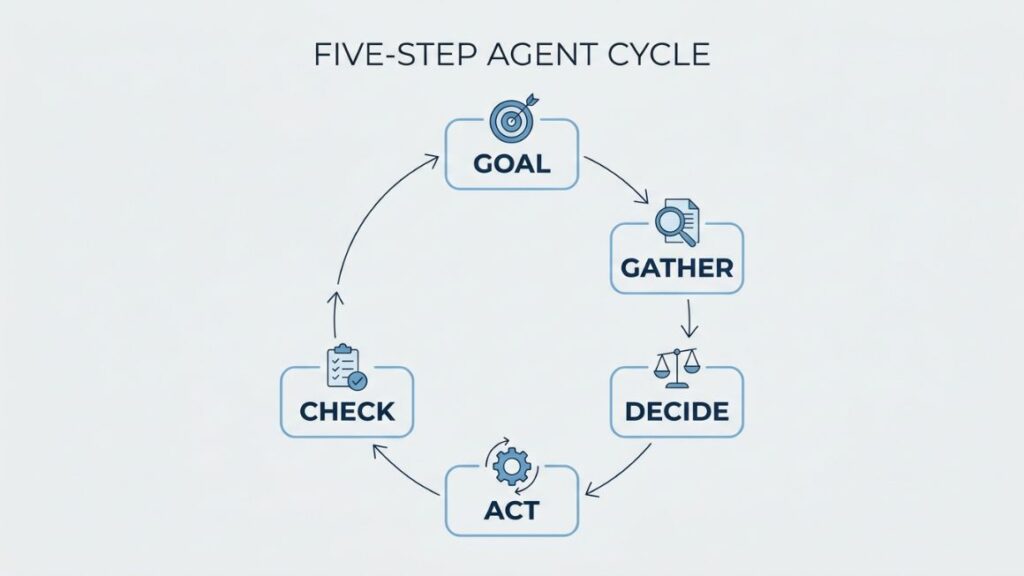
An agent runs in a loop: it receives a goal, gathers information, decides the next step, performs an action, and checks the result. Then it goes around again.
Here’s what that looks like on a normal Tuesday. Cost per acquisition jumps on one campaign. The agent pulls the change history, notices that a new creative went live the same day, writes a three-line summary of likely causes, and alerts the marketing manager. It doesn’t pause anything. It tells you why you might want to.
AI Agent vs Chatbot vs Traditional Automation
Traditional marketing workflow automation runs on rules written in advance: if a lead fills a form, send email one. That’s predictable, which is its strength. It also breaks the moment something falls outside the rule.
| Traditional dashboard | Rule-based automation | AI assistant | AI agent | |
| How it receives instructions | Charts built by a person in advance | Fixed if-then rules | Prompts you type | A goal or question in plain language |
| Investigates multiple data sources | No, shows what was configured | No, watches one condition | Only what you supply | Yes, across connected sources |
| Adapts its next step | No | No | Partly, within the chat | Yes |
| Can take action | No | Yes, fixed actions like alerts | Rarely | Yes, if permitted |
| Human supervision needed | Low, but you do all the analysis | Low once rules are tested | Medium, check the explanations | High at first, including approvals |
Not everything sold as an agent behaves like one. In a June 2025 release, Gartner called out “agent washing,” the rebranding of assistants, chatbots, and robotic process automation as agents. It estimated that only about 130 of the thousands of agentic AI vendors are real. So ask every vendor one blunt question: what can this do before a person clicks approve?
An AI agent in marketing receives a goal, gathers data, decides a next step, acts and checks the result. A chatbot answers requests and a traditional automation repeats fixed rules. So autonomy within set permissions is what separates an agent from both.

How an AI Agent for Marketing Productivity Helps Teams Work Smarter
An AI agent for marketing productivity takes over repeatable work such as gathering data, compiling reports, routing leads and flagging problems. Your team spends less time assembling information and more time deciding what to do with it.
The appetite is there, but the practice is thin. Salesforce’s tenth State of Marketing report (2026, 4,450 marketers) found that only 13% of marketers currently use agentic AI. Marketers expect agents to give back roughly eight hours a week. Treat that eight hours as an expectation, not a guarantee.
Reducing Repetitive Work and Manual Reporting
Marketing task automation isn’t new. What changes with agents is the messy middle: pulling figures from three platforms, matching inconsistent campaign names, and writing the first version of the weekly summary. You review a finished draft instead of building one from scratch.
Improving Response Time and Team Coordination
Speed matters most where delay costs money. An agent can route a high-intent lead to the right salesperson the moment a form is submitted, flag a broken tracking tag before it ruins a week of data and post the relevant update in the right channel. Nobody has to remember to forward it.
Giving Marketers More Time for Strategy and Creativity
Recovered hours only count if they go somewhere useful: positioning, customer interviews, creative direction, the campaign decisions no report can make for you. Productivity isn’t doing more tasks. It’s cutting wasted effort without lowering the quality of the work.
Practical Ways Marketing Teams Can Use AI Agents
AI agents for digital marketing work best on tasks with clear inputs, a repeatable pattern, and a human checkpoint before anything goes out. These six workflows fit that description, and each one ends with the checkpoint you shouldn’t skip.
Content Research and Planning
Give the agent a topic area and it can collect ideas, pull together the questions your audience keeps asking, and draft a first content brief. That removes the blank-page hour, not the thinking. Human checkpoint: verify sources, originality, brand fit, and search intent before anything reaches a writer.
SEO Monitoring and Competitor Research
Here’s a weekly SEO report that works. Every Monday, the agent pulls clicks and impressions from Google Search Console for your top 50 pages and compares them with the previous four weeks. It lists pages that lost, say, more than 20% of their clicks, checks what competitors published on those topics and drafts a one-page summary. Human checkpoint: confirm the data before anyone rewrites a title, a page or the content plan.
Paid Advertising Monitoring
Say you set an alert rule: if cost per acquisition rises more than 25% against the seven-day average, the agent pulls recent changes, checks creative and audience edits, and posts a short diagnosis in your team channel. Let it flag. Keep marketing campaign optimization decisions, such as moving budget or pausing a campaign, behind a person’s approval.
Also Read: AI Agent for Paid Advertising: How to Set Up, Control and Measure One in 2026
Email Marketing and Lead Follow-Up
Take a demo request. The agent researches the company from public sources, summarizes which pages the lead visited, drafts a follow-up, and drops it into an approval queue. A person edits and sends it. Automated lead generation sounds like a switch you flip, but the research is the part that automates well. The sending still needs a person on most teams.
Some platforms push further into AI-driven customer segmentation, where the agent decides which customer gets which message and when. TechCrunch reported in June 2026 that MoEngage acquired Aampe, whose software assigns a dedicated agent to each customer, and named Swiggy among its users. That’s a much higher level of autonomy than drafting a follow-up, so it needs tighter controls.
Human checkpoint: respect consent, data privacy, and each person’s communication preferences.
Social Media Planning and Repurposing
Feed the agent approved content and it can produce LinkedIn and Instagram drafts, suggest publishing slots, and prepare a performance summary. Bata India announced in August 2026 that agents built with its technology partner Zocket now run its creative calendar from briefing to publishing, and the company estimates savings above USD 1 million a year. That’s a company-reported figure from a launch announcement, so read it as a direction, not a benchmark. Human checkpoint: review tone, facts, and context before anything is published.
Analytics and Performance Reporting
An agent can combine approved data sources into a weekly summary, highlight anomalies, and suggest questions worth investigating. The big platforms are building this in. On August 10, 2026, Google announced AI summaries on the Google Analytics homepage, text-prompt dashboards in Google Ads (listed as coming soon for Analytics), and benchmarking inside its Ask Advisor agent. Most of these AI marketing analytics features are live today.
Human checkpoint: validate attribution, date ranges, and metric definitions. An agent that compares Sunday-to-Saturday weeks against a Monday-to-Sunday dashboard will produce confident nonsense.
Marketing agents are most reliable on tasks with clear inputs, a repeatable pattern, and a human approval step before anything customer-facing or budget-related happens. Reporting, monitoring, and research workflows meet that bar today. Sending and spending usually still need a person.
Which Tools Should You Consider?
Pick tools by the job, the systems they must reach, your security needs, and your budget. No single product is best for every team, and no tool supports every capability described above.
AI-powered marketing tools fall into three groups, and most teams end up combining two of them.
General-Purpose AI Assistants
ChatGPT and Claude can support research, drafting, analysis, and connected workflows, depending on your plan, the features switched on, and the permissions you grant. Both connect to outside apps, and both can ask for your approval before an action that changes something. How that approval works varies by app and setting, and OpenAI has renamed its integrations more than once, so check the current names and controls before you build around them.
Workflow Automation Platforms
Make and n8n connect applications and coordinate multi-step workflows. Make’s AI Agent app, released in February 2026 and still in open beta, lets an agent use modules, scenarios, and MCP (Model Context Protocol) server tools; Make warns that features and pricing may change. n8n’s documentation describes human-in-the-loop steps where an agent pauses and asks for approval before running a tool, through services such as Microsoft Teams, Google Chat, or WhatsApp Business Cloud.
CRM and Marketing Platforms
If your leads and campaigns already live in a CRM, start there. HubSpot’s Breeze agents include a Prospecting Agent, a Customer Agent, and a Content Agent, and third-party reviews report that access depends on your plan and runs on credits. Salesforce now brands Marketing Cloud as Agentforce Marketing, and its Marketing Cloud Next product uses Agentforce to generate campaign briefs, audience segments, content, and journeys. Either way, an agent is only as good as the data behind it, and availability depends on your edition.
Also Read: Marketing Automation Software (2026 Guide)
How to Choose the Right Tool?
When you compare marketing productivity tools, ask for a demo on your own data, not theirs. Then score each option on:
- Integration support for the platforms you already use
- Autonomy: what it can do without approval
- Setup effort, and who maintains it
- Data protection, and where your data goes
- Approval controls, logs, and a way to stop it
- Usage limits and credit rules
- Total cost, including setup and review time
How to Implement Your First Marketing Agent?
To launch your first AI agent for marketing productivity, start with one repetitive task, define a measurable goal, connect only the data it needs, test with human approval, and compare against your baseline. Expand only after the workflow runs reliably.
Step 1: Choose One Repetitive Task
Pick a task you do often, that eats real time, and that has clear inputs and outputs. The weekly campaign report is the usual winner, because everyone already knows what a good one looks like. Give it a named owner before you build anything.
Step 2: Define the Goal and Success Metric
Write the job in one sentence: produce a one-page weekly report from Google Ads and Google Analytics by 9 a.m. Monday, with every figure traceable to its source. Then set boundaries (read-only access, no sending) and two measures: hours saved and errors per report.
Step 3: Connect Only the Necessary Data
List the minimum systems the agent needs and start with read-only access. Check the data before you connect it. Duplicate conversions and inconsistent campaign names turn into confident, wrong summaries, and no agent fixes that for you.
Step 4: Test With Human Approval
Run the agent alongside your manual process for two to four weeks. Review every output, log each error, and keep external actions (sending, posting, spending) switched off until the results hold up.
Step 5: Measure Results and Improve
Compare the results with the baseline you recorded at the start. Expand only when the workflow performs reliably. Once the weekly report is trustworthy, add anomaly alerts on top of it, not before.
Before you switch it on:
- One task chosen, with a named owner
- Goal, boundaries, and success metric written down
- Read-only access, with cleaned data
- An approval step in place, and a way to stop the agent
- Baseline hours and error rate recorded
Benefits, Limitations, and Risks to Understand
The main benefit of an AI agent for marketing productivity is less manual work and faster access to information. The main risks are wrong outputs, poor data, privacy lapses, off-brand messages, and actions nobody approved.
Potential Benefits
- Less manual work and fewer repetitive steps
- Faster access to the information you need
- More consistent reporting and follow-up
- Better use of your team’s time
Common Risks and How to Reduce Them
Gartner’s June 2025 forecast says over 40% of agentic AI projects will be canceled by the end of 2027 because of rising costs, unclear value, or weak risk controls. These habits target the same weak spots:
- Incorrect outputs: verify important claims and calculations before they leave the team.
- Poor data quality: clean and validate inputs first.
- Privacy concerns: limit permissions and protect personal information.
- Brand inconsistency: give the agent written brand guidelines, and keep a human reviewer.
- Unintended actions: set spending limits, approval gates, logs, and a stop mechanism.
Why Human Judgment Still Matters
An agent can misread data, state a false claim with total confidence, or take the wrong action. It can’t be held accountable. People can. Strategy, creative direction, sensitive customer conversations, and any decision with real consequences should stay with someone who answers for the result.
Agents can misread data, state false claims with confidence, and take wrong actions. Limit permissions, require approval before spending or sending, keep logs, and give someone the authority to switch the agent off.
How to Measure Productivity and Return on Investment?
Net productivity gain is the value of the time an agent recovers, minus the cost of reviewing its work, maintaining it, correcting its errors, and paying for the tool. Measure it against a baseline you recorded before the agent started.
Track More Than the Number of Automated Tasks
Counting automated tasks flatters the project. Track these instead:
- Hours spent on the task before and after
- Output quality and revision rates
- Errors, and the time needed to fix them
- Campaign performance, only where you can reasonably link cause and effect
- Total tool, setup, maintenance, and review costs
Calculate the Net Productivity Gain
Here’s a worked example. The figures are hypothetical and for illustration only, so swap in your own.
- Weekly report before: 5 hours. After: 1 hour of review. Time recovered: 4 hours a week, or 16 hours a month.
- Value of that time at ₹900 an hour: ₹14,400.
- Monthly costs: ₹4,000 for the tool, ₹1,800 for maintenance (2 hours), and ₹900 for fixing errors (1 hour). Total: ₹6,700.
- Net gain: ₹14,400 minus ₹6,700 = ₹7,700 a month.
- One-time setup of 8 hours (₹7,200) pays back in under a month.
That gain is real only if the recovered 16 hours go into work that matters. And nobody can promise a universal productivity percentage. Results shift with the workflow, the team, the integrations, and the quality of oversight.
Marketing Agent Trends to Watch in 2026
Some of these trends are already shipping. Others are forecasts, and the difference matters.
- Agents inside software you already use (available now). Google’s August 10, 2026 announcement put AI summaries and its Ask Advisor agent on the Ads and Analytics screens, and Salesforce and HubSpot ship agents inside their platforms.
- Several specialized agents working together (early). Inc42 reported that JustAI, an agentic marketing startup that raised $17 million, describes a team of four coordinated agents covering strategy, creative, decisioning, and data. That’s the company’s own description, so test before you trust it.
- More weight on approvals and governance (growing). Gartner’s agent-washing warning and its 40% cancellation forecast point the same way, and tools like n8n already offer approval steps.
- Outcomes over adoption (shift under way). Gartner advised pursuing agentic AI only where it shows clear value, and its January 2026 forecast says 60% of brands will use agentic AI for one-to-one customer interactions by 2028. That second number is a forecast, not a fact.
- Brand voice as the differentiator. As more teams use the same agents, original thinking and a distinct voice matter more, not less.
Conclusion
Pick one task with a clear problem. Give the agent limited access, measure it against a baseline, and expand only when it earns it. That’s the whole method behind getting real value from an AI agent for marketing productivity, and the best setups support your judgment on strategy, brand, and customers rather than replacing it.
If you’d like guided, practical learning on this, Young Urban Project’s AI Marketing course is a good place to start. Have a look at what it covers and choose the first workflow you want to build.
Frequently Asked Questions
What is an AI agent in marketing?
An AI agent in marketing is software that works toward a goal you set. It gathers data from connected tools, decides the next step, acts within its permissions, and checks the result. A person defines the boundaries and approves anything consequential.
How do marketing agents improve productivity?
They cut manual effort, speed up analysis, and make routine work more consistent. An agent can compile a weekly report, flag a cost spike, or draft a lead follow-up quickly, which leaves your team time for decisions.
Is an AI agent worth it for a small marketing team?
Often yes, if you start with one narrow workflow and a small budget. Pick a task that already costs you hours, such as the weekly report, and test it on a low-cost plan before you commit to anything bigger.
Can AI agents run campaigns without human input?
Some actions can be automated, but not all should be. Customer-facing messages and material spending decisions need approval gates, spending limits, and logs. Most teams get better results when agents prepare and flag while people decide.
What is the difference between an AI agent and marketing automation?
Marketing automation follows predefined rules. An AI agent works toward a goal across several steps and chooses its next move. Real products often combine both: rules for predictable steps, an agent for the parts that need judgment.
How can a business measure the ROI of an AI agent?
Compare time saved against a baseline, then subtract review, maintenance, error-correction, and tool costs. Add quality measures such as revision rates, and link business outcomes like leads or conversions only where cause and effect is reasonable.
Are AI agents safe to use in marketing?
They’re safe enough when you limit what they can touch. Use minimum-necessary access, approval before sending or spending, activity logs, and a clear way to stop the agent. Unchecked agents can misread data or take the wrong action.
Why do AI agent projects fail?
Gartner points to rising costs, unclear business value, and weak risk controls. Starting too big makes all three worse: a broad agent, messy data, and no baseline. Start with one measurable workflow instead.