

A customer messages your brand at 11 pm to ask where their order is. Another is stuck on hold, trying to change a delivery address. A third has explained the same problem twice already, once on chat and once over email. Nobody’s being unreasonable here. People just expect fast, accurate and personalised help on whichever channel they pick, and most teams can’t staff for that around the clock.
That’s the gap AI agents for customer experience are meant to close. Unlike a basic chatbot, an AI agent can read a request, check approved information and take a permitted action, like starting a return or booking an appointment.
But there’s a catch. Adopting one takes more than adding a chat widget to your website. Messy data, vague permissions and no route to a human can make things worse, not better.
This guide covers what these agents are, where they help, where they fall short, how Salesforce and Zendesk use them, and a six-step plan to roll one out without losing customer trust.
Table of Contents
What Is an AI Agent for Customer Experience?
An AI agent for customer experience is software that understands what a customer is asking, uses approved company information and connected tools, and takes permitted actions to finish the task. It doesn’t just reply. It can check an order, update a record or pass the case to a person.
You’ll also see the term AI customer service agents used for the same idea. The word that matters is “permitted”. Every agent works inside limits you set, such as which systems it can read and which actions it can take.
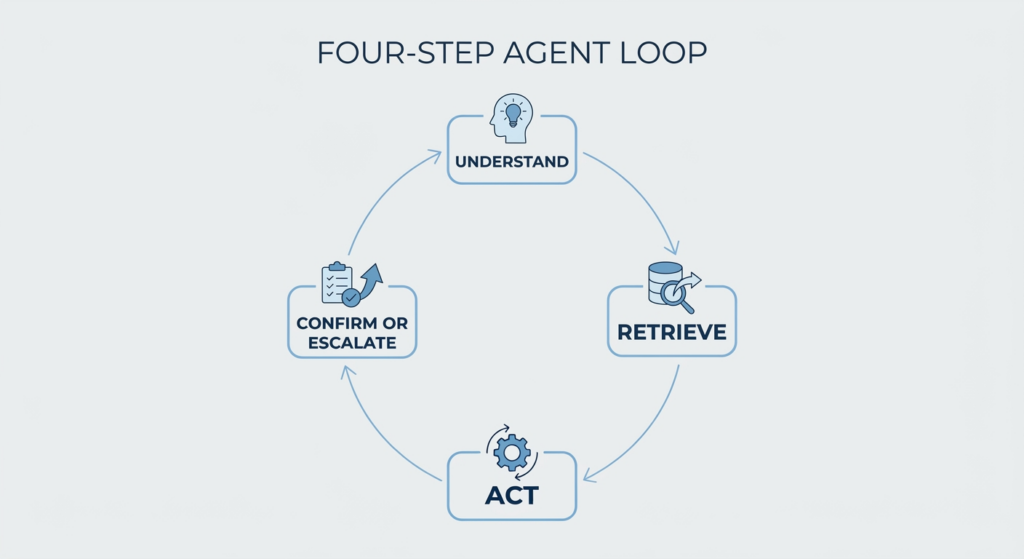
How Does It Work?
Most AI agents for customer experience follow the same four-step loop:
- Understand the customer’s request and context, including who they are and what they’ve already tried.
- Retrieve the right information from approved sources, such as help articles, policies and order records.
- Select an action that sits within its permissions.
- Complete the task and confirm the outcome, or escalate it to a human.
The last step matters more than people expect. A good agent knows when to stop.
How Is It Different from a Traditional Chatbot?
The AI chatbots vs AI agents question comes down to flexibility. A traditional chatbot follows fixed conversation flows, so if a customer’s wording doesn’t match a pre-built path, it gets stuck. An agent can reason through a request, choose a tool and work through several steps.
| Traditional chatbot | AI agent | |
| How it works | Fixed flows and scripted replies | Reasons through the request using connected tools |
| Typical result | Answers a question | Completes a task or escalates |
One caution. What AI agents for customer experience can actually do varies a lot by product, and not everything sold as an “agent” has the same level of autonomy. Some are chatbots with a better language model. Ask any vendor what the tool can do, not just what it can say.
Also Read: AI Agents for Marketers: The Complete 2026 Guide
Why Are Businesses Adopting This Technology Now?
Because support volumes keep climbing, customers expect answers in minutes, and the information needed to help them sits in too many places. AI agents for customer experience promise to handle routine work at scale without adding friction for the customer.
Fragmentation is the quiet problem. Order data lives in one system, policies in another, past conversations in a third. McKinsey’s July 2026 article on customer experience says many companies layer AI onto fragmented journeys and let handoffs break context, which only scales the inconsistency they already had.
Then there’s the adoption data. Salesforce’s State of Service: AI Agents Edition, published in May 2026 and based on a survey of 3,075 service professionals across 13 countries, found that adoption of AI agents among service organisations rose from 39% in 2025 to 66% in 2026. Salesforce also reported that 70% of adopters saw measurable value within 60 days, and that customer satisfaction was the most improved KPI.
Keep one thing in mind. This is a vendor’s survey, and Salesforce sells these tools. Treat 66% as a signal from the organisations it surveyed, not a universal industry figure.
Salesforce’s May 2026 State of Service research, a survey of 3,075 service professionals, found that adoption of AI agents among customer service organisations rose from 39% in 2025 to 66% in 2026. The figure comes from one vendor’s survey, so it shows direction, not an industry-wide measurement.
What Has Changed in 2026?
Three shifts stand out.
First, agents have moved from answering questions to completing tasks. Second, they connect better to business systems. Zendesk’s documentation says its agents can carry out actions in authorised systems, not just chat. Third, teams are starting to coordinate several specialised agents. McKinsey calls this domain orchestration, and notes that most production deployments today still sit at the simpler stage, where one agent runs one well-defined workflow within strict guardrails.
That’s the practical story of agentic AI in customer experience right now. Useful, but narrower than the headlines suggest.
Key Benefits for Businesses and Customers
How do AI agents improve customer experience? They answer routine questions faster, keep answers in line with current policy and free human reps for the cases that need judgement. That’s the promise of AI-powered customer support. Here’s how AI agents for customer experience deliver it day to day, with the usual caveats.
Faster Responses and Round-the-Clock Availability
An agent can handle a routine request at 2 am without a queue. McKinsey describes a large UK energy retailer that put a natural-voice agent on first contact for high-volume, low-complexity issues. Within five months, it understood about 75% of customer needs and customer satisfaction scores rose 6%. Availability still depends on uptime, though. If the order system is down, the agent can’t check your order.
More Consistent and Relevant Answers
Agents connected to approved knowledge sources can reflect current policies instead of whatever a rep happens to remember. Two customers asking the same question get the same answer. The flip side is simple. An agent is only as current as the content behind it, so stale help articles produce stale answers.
Less Repetitive Work for Support Teams
Ticket tagging, pulling account details, summarising long threads and filling in admin fields eat a surprising share of a rep’s day. McKinsey reports on a US premium automotive manufacturer whose AI agent supported its human reps, lifting first-contact resolution by 24% and rep productivity by 30%. That frees reps for the conversations where a person actually makes the difference.
Better Personalisation and Customer Retention
When an agent can see customer history, people stop repeating themselves. Salesforce says its own Help agent draws on customer history and product usage data, which is what lets it answer for a specific account instead of in general terms. Using history well means using only what’s relevant. Mentioning a past purchase to solve today’s problem helps. Reciting someone’s entire history just feels intrusive.
Potential Cost Savings and Operational Efficiency
Two different things hide behind “savings”. Lowering the cost per resolved issue is real. Merely deflecting customers away from human support isn’t, because unresolved people come back, and they come back angrier. McKinsey puts the UK retailer’s annual run-rate impact above $10 million, but that’s one company’s result. Savings from AI agents for customer experience only count after you subtract software, integration, oversight and maintenance costs.
AI agents help most when they take over routine, rule-based requests and give human reps more time for complex cases. McKinsey-reported results include a 24% rise in first-contact resolution for one automotive manufacturer, but results vary by company and setup.
Practical Applications Across the Customer Journey
Which tasks can AI agents handle independently? Repeatable ones with clear rules, like checking an order, answering a policy question, booking a slot or starting a return within set limits. Large refunds, distress and disputes should go to a person, or at least need a human to approve.
McKinsey mapped 17 core customer experience workflows and picked six as the best near-term candidates, including contact-centre issue resolution, shopping and solution exploration, and personalised case management. That tells you where AI agents in customer service do best: repetitive work with the rules written down. It’s also where customer experience automation pays off first. A quick test for AI agents for customer experience is to ask whether the task is repetitive and the rules are written down. If the honest answer is “it depends on the rep”, the task isn’t ready.
Handling Common Customer Questions
Product information, order status, account queries, store policies and service availability make up most of the volume. In a 2025 Salesforce account, the travel management company Engine said it launched an agent in 14 days and that it now handles 30% of customer inquiries. A good agent also knows its edges. If the question is about a policy exception, it shouldn’t guess.
Managing Orders, Returns, and Appointments
Picture a customer in Pune asking to return shoes bought three weeks ago. The agent checks the order, compares the date with the return policy and starts the return through an authorised workflow. If the item falls outside the window, it explains why and offers a person. Every step uses a system the agent has permission to read or change, and nothing beyond that.
Also Read: AI Agent for Cart Recovery: How It Works in 2026
Supporting Sales and Product Discovery
Agents can help customers compare options, narrow a shortlist by budget and need, and answer questions on delivery, warranty or sizing. McKinsey lists shopping and solution exploration among its priority workflows, with better conversion and larger transactions as the aim. The line to hold is honesty. No fake scarcity, and no steering people to the pricier option when a cheaper one fits.
Helping Human Representatives Resolve Difficult Cases
Not every case should be automated. For the hard ones, an agent can pull account history, summarise earlier conversations, suggest the right documentation and prepare a clean handoff, so the customer doesn’t start from zero.
Supporting Customers Across Different Channels
Customers move between websites, messaging apps, email and voice. Zendesk’s documentation lists messaging, email and voice as channels for its agents. The real test for AI agents for customer experience is whether context travels with the customer. Salesforce says its voice agent on the Help line carries context forward, so callers don’t repeat themselves.
Real-World Examples and Lessons from Leading Companies
These AI customer service examples come from published, company-reported sources. Read the numbers as claims, not audits.
Salesforce and Its Agentforce Service Offering
Salesforce used its own Help site as the test case. It says the site gets over 60 million visits a year, yet its support team still received about two million requests annually. Agentforce launched there in October 2024, starting with a four-week pilot of 200 authenticated users.
Salesforce now says the agent has handled more than five million conversations and resolved over 63% of them instantly, in seven languages. Look closely at the wording. “Resolved” means the agent answered the inquiry, and Salesforce counts abandoned conversations and human handoffs separately. Earlier Salesforce updates quoted higher rates, 84% and 70% at different points, which is a good reason to check how any vendor defines “resolved”. All of it is company-reported, and the “#1” ranking Salesforce cites comes from a Futurum study it commissioned.
How Zendesk Approaches Automated Support
Zendesk builds its agents on three parts. Knowledge sources, such as help centre articles and external files. Procedures, which are step-by-step workflows Zendesk says can be generated from plain-language descriptions. And actions in connected systems. Its documentation describes agents that hold conversations and act in authorised systems on their own, so human agents can focus on harder work. They run across messaging, email and voice, though Zendesk’s help documentation has labelled voice an early-access channel, so check its current status. Public material mostly explains the design rather than one headline result, so judge it on structure.
What Businesses Can Learn from These Examples
Four lessons repeat. Reliable data comes first, because the agent is only as good as its sources. Tasks should be clearly defined, which is why McKinsey describes working agents as running one well-defined workflow within strict guardrails. Escalation rules need writing down. And evaluation never stops, which is why Salesforce publishes weekly metrics for its own agent. Buying a platform doesn’t guarantee the same outcome. AI agents for customer experience succeed on foundations, not on brand names.

How to Implement It: A Step-by-Step Roadmap
Here’s how AI customer support implementation usually goes when it works. Six steps, and skipping any of them shows up later as complaints. It’s also the section to bookmark, because this is where most projects are won or lost.
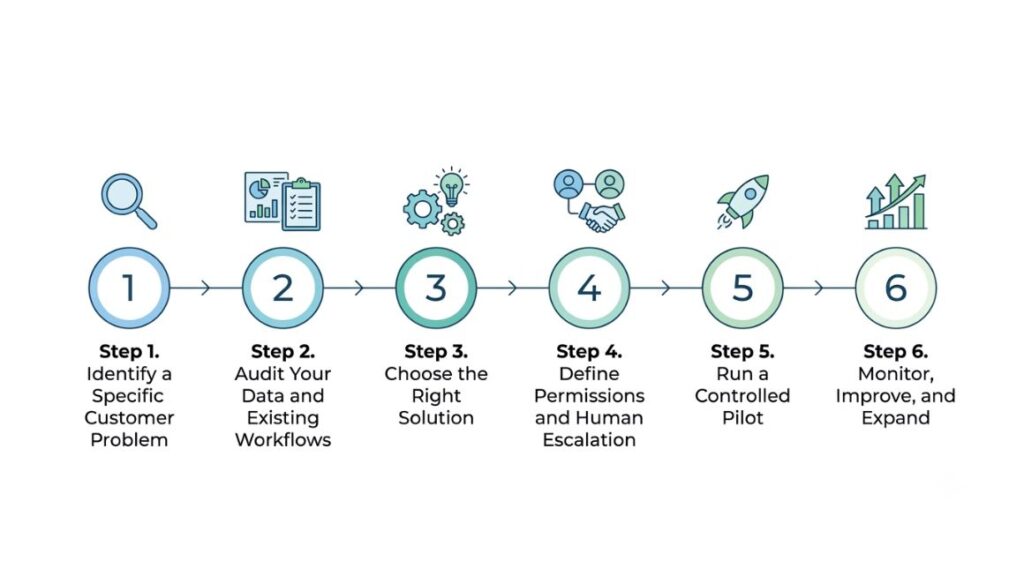
Step 1. Identify a Specific Customer Problem
Start with requests that are frequent and well understood. Pull the last three months of tickets and find the top five contact reasons. “Where’s my order?” is a classic. Write the goal as one sentence, such as “resolve order-status questions without a human”. If you can’t, the scope is still too wide. Pick one. The best first job for AI agents for customer experience is a boring one with clear rules. Automating every interaction at once is how projects stall.
Step 2. Audit Your Data and Existing Workflows
Review help articles, policies, CRM records, permissions and the systems an agent needs to finish a task. Fix contradictions first. If two articles disagree on refunds, the agent will confidently pick one. Ask who owns each policy, too, because someone has to keep it current once the agent depends on it. Also list what the agent can’t reach yet. A return can’t be started if the agent can’t touch the order system.
Step 3. Choose the Right Solution
Compare AI customer experience tools on integrations with your helpdesk, CRM and order system, supported channels, access controls, analytics, customisation and total cost. Ask for a demo using your own tickets, not the vendor’s tidy ones. And ask what happens when the agent gets stuck, because that answer tells you more than any feature list. Check where transcripts are stored and who can see them.
Step 4. Define Permissions and Human Escalation
Set boundaries for refunds, account changes, sensitive requests and anything needing approval. So, when should an AI agent transfer a customer to a human? When the customer asks, when the agent isn’t confident, after a failed attempt or two, and for complaints, distress, disputes or money above your limit. Gartner advises a visible route to a person, with the information already collected passed along. Write the rules down as a short table of action, limit and approver, and get reps and managers to sign off before launch.
Step 5. Run a Controlled Pilot
Test with a small group first. Salesforce began with 200 users. Set a pass mark before you start, such as the share of test cases completed correctly, so “it felt fine” doesn’t decide the launch. Include ambiguous questions, missing data, wrong assumptions and failed transactions, because that’s where agents break. Have your best support reps try to trick it. They know the awkward cases customers actually bring.
Step 6. Monitor, Improve, and Expand
Review outcomes, customer feedback, failed tasks and escalations every week at first. Read the actual conversations, not just the dashboard. Only add harder workflows once the first one holds up. Teams that get this right with AI agents for customer experience grow one workflow at a time.
Also Read: Marketing Automation Strategy: Full Guide for 2026
Challenges, Risks, and Responsible Use
What are the risks of using AI in customer support? Four come up again and again. They’re about data, security, people and money, and every one of them applies to AI agents for customer experience.
Inaccurate or Outdated Information
An agent that answers from old policies will be wrong, politely and at scale. Trusted data sources and thorough testing matter. So does a clear way for the agent to say “I’m not sure” and hand over, instead of guessing. Test it with the questions your policies answer badly, because those are the ones customers ask.
Privacy, Security, and Unauthorised Actions
Agents act across systems, so small errors compound. McKinsey warns that pulling the wrong record or misapplying a rule can quickly become a privacy problem. Use tight access controls, collect only the data needed, keep audit logs and set hard limits on what the agent can do. Treat the agent like a new employee with system access, not a tool with no consequences.
Losing the Human Touch
Gartner’s survey of 3,566 customers, run in February and March 2026, found that 87% consider access to a human agent essential when companies use generative AI for customer service. Half said their interactions are easier with it. A separate Gartner finding is blunter: only 27% would try a chatbot again after a bad experience. So complaints, distress, disputes and unusual cases need a practical route to a person.
Gartner’s 2026 survey of 3,566 customers found that 87% say it is essential to be able to reach a human agent when companies use generative AI for customer service. Customers aren’t rejecting AI. They’re rejecting AI that blocks them from getting help.
Hidden Costs and Ongoing Maintenance
Integration work, monitoring, evaluation and constant updates to policies and knowledge sources all cost money. They’re easy to leave out of the business case, and they’re usually what sinks it. Budget for a person who owns the agent after launch.
How to Measure Success and Business Value?
How do you measure the ROI of AI customer service? Compare performance before and after, using the same definitions both times. Treat AI customer service ROI as a comparison across several numbers, not one headline figure. For AI agents for customer experience, that means capturing your baseline before launch, because you can’t prove improvement against a number you never recorded. Revisit the numbers every month.
The Metrics Worth Tracking
- First-contact resolution and successful task completion
- Customer satisfaction and customer effort
- Average resolution time and repeat-contact rate
- Escalation rate and the reasons for escalation
- Cost per successfully resolved request
- Error rates, complaints and policy violations
For cost, divide the full running cost of the agent, including software, integration, oversight and maintenance, by the requests it resolved successfully. Then compare that with your human cost per resolved request. Don’t stop at averages either. An agent can look good overall while failing badly on one request type, so check each type separately.
No single metric proves success. A falling escalation rate looks great on a dashboard, but it’s harmful if customers can’t reach a human when they need one. Read the numbers together, and look at the reasons behind each escalation, not just the count.
What the Future Looks Like
Expect more capable voice interactions, coordinated agents, better use of context and more proactive help, where an agent flags a problem before the customer notices. Those are the AI customer experience trends 2026 is already hinting at.
McKinsey’s July 2026 article ties these trends to a bigger shift, from designing fixed customer journeys to governing decisions as they happen. It reports that 41% of AI deployments in customer-facing functions have fully scaled. It also says no organisation operates fully at its most advanced stage today.
So the direction is clear, but the timing isn’t. Pace and payoff will differ by industry and by how well each company is set up. A bank and a fashion retailer won’t move at the same speed. AI agents for customer experience will likely look quite different in two years, which is a reason to build on solid foundations now rather than chase every new feature.
Conclusion
Useful automation starts with a real customer problem. After that it needs reliable information, clear permissions and a measurable definition of success. Skip one and the agent just gets things wrong faster. That’s the central message of this guide on AI agents for customer experience.
So pick one repetitive request, fix the content behind it, set the limits and keep a human one click away. Measure, then expand.
If you want to get hands-on with this, Young Urban Project’s 4-week Advanced AI for Marketers course covers complex AI tools and building agents for real marketing growth. Bring a customer problem from your own work and you’ll have something concrete to test.
Frequently Asked Questions
Can AI agents replace human customer service representatives?
They can take over selected tasks, mainly routine and rule-based ones. They can’t replace people across the board, and most teams settle on a mix of the two. Complex or sensitive situations still benefit from human judgement, and Gartner’s 2026 survey found 87% of customers want a route to a human when companies use generative AI.
How are AI agents different from chatbots?
A chatbot mostly follows scripts and answers questions. An AI agent can use approved tools to carry out tasks, such as checking an order or starting a return, within the permissions you set. How much it can really do depends on the product and how it’s connected to your systems.
Are AI agents suitable for small businesses?
Yes, if you start narrow. AI agents for customer experience don’t need an enterprise budget when you pick one frequent request, such as order status, and use an agent built into a helpdesk you already pay for rather than building from scratch. Keep a human fallback from day one, and review the first few weeks of conversations by hand.
How long does implementation take?
It depends on integrations, data quality, permissions, testing and task complexity. Salesforce’s survey found 70% of adopters saw measurable value within 60 days, but that’s self-reported. A narrow pilot can move quickly. A multi-system rollout won’t, and rushing the data audit usually costs more time later.
How can businesses know whether an agent is working well?
Look at successful task completion, customer satisfaction, error rates and total cost. Conversation volume alone says little, because an agent can handle thousands of chats and still leave people stuck. Compare everything against your pre-launch baseline, and read a sample of real conversations every week. A healthy agent shows rising task completion without rising complaints.