

In May 2025, at a press briefing on Google’s new agentic ad tools, a journalist asked a simple question: if an AI agent changes a campaign inside your account, will that show up in the change history under your name or the agent’s? Pallavi Naresh, Director of Product Management for Google Ads, didn’t have a clean answer. “I don’t know if it’ll show up with your username or like you and the agent’s username,” she said.
That’s the honest state of things right now. Every vendor selling an AI agent for Google Ads will tell you it saves ten hours a week and lifts ROAS by double digits. Some of that is true. But the plumbing underneath, who’s accountable when the agent gets it wrong, whether the change log even distinguishes you from the software, is still being figured out in real time.
This guide covers what an AI agent for Google Ads actually is, how it differs from the automation already built into the platform, which tools are worth looking at in 2026 and how it fits into the broader shift toward AI performance marketing. Learn how to set boundaries before you hand over account access to something that can spend money without asking first.
Table of Contents
What Is an AI Agent for Google Ads?
An AI agent for Google Ads is software, usually built on a large language model, that connects to your account through the Google Ads API, analyses performance data, and takes action on campaigns, bids, budgets, or keywords with limited or no human sign-off. That’s different from a recommendation engine that hands you a list and waits. An agent does something with what it finds.
Most confusion starts here, because Google has spent the last two years layering AI into the platform itself. Smart Bidding, Performance Max, automatically created assets. None of that is what people mean when they say “AI agent.”
Also Read: AI Performance Marketing Strategies That Drive Measurable Growth
How It Differs from Smart Bidding and Performance Max
Smart Bidding and Performance Max are optimisation layers. They work within parameters you set, bid caps, target ROAS, budget ranges, and adjust continuously inside that box. They’re genuinely good at what they do. They also don’t decide whether to use automated bidding in the first place, don’t reallocate budget across campaigns based on your business priorities, and can’t tell you that a Performance Max campaign is quietly eating your branded search traffic.
An AI agent for Google Ads sits a level above that. It reads account-wide data, including what Smart Bidding and Performance Max are doing, and makes judgment calls about strategy, not just execution within a fixed box. Alexander Perleman, Head of Product at Groas and formerly of Goldman Sachs, put it plainly in a May 2026 piece: platform-native AI optimises within the parameters you set, but it doesn’t set the parameters. That’s the gap agents are trying to close.
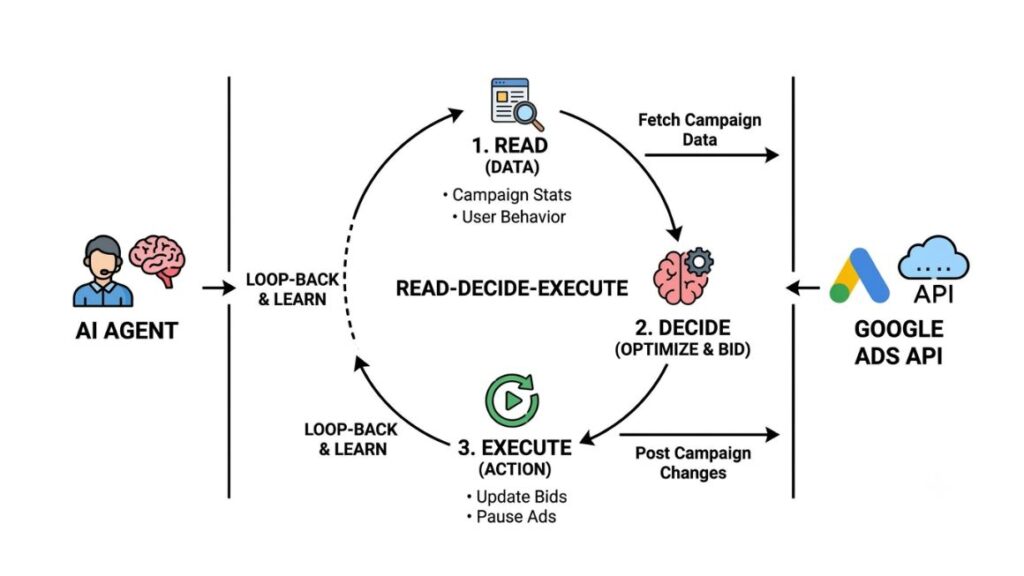
Read, Decide, Execute – the Three Things a Real Agent Does
Adstudio, one of the more transparent players in this space, defined the category in a blog post this August with a bar most tools quietly fail: an agent has to read your real account data rather than screenshots you paste in, decide what to change with reasoning you can actually inspect, and execute that change through the API itself, pausing a campaign, adding a negative keyword, moving a budget.
By that definition, most “AI for Google Ads” products on the market are analysis layers wearing agent branding. They find the problem. They don’t touch anything.
An AI agent for Google Ads reads live account data through the Google Ads API, reasons about what to change, and executes the change directly, pausing campaigns, adjusting bids, or adding negative keywords, without waiting for a human to apply the suggestion. This distinguishes it from a recommendation tool, which only surfaces a list of ideas.
How an AI Agent for Google Ads Actually Works
Underneath the marketing, every real agent runs on the same basic plumbing: an API connection for account access, a language model for reasoning, and increasingly, a standard called MCP that makes connecting the two far less painful than it used to be.
The Google Ads API Connection
The agent authenticates into your account using OAuth credentials and a developer token, the same access layer any third-party reporting tool or bid management platform has always used. Once connected, it can pull campaign structure, historical performance, search term reports, and auction insights data through GAQL, Google Ads Query Language, the query syntax the API runs on.
Google’s own official MCP server, built by the google-marketing-solutions team, gives read-only GAQL access to campaign performance, geographic and device breakdowns, and change history. It’s free, but it’s read-only by design and requires you to run it yourself on infrastructure you manage, with a developer token and OAuth setup that’s genuinely fiddly for anyone without an engineering background.
What MCP (Model Context Protocol) Changed in 2026
MCP, short for Model Context Protocol, is an open standard that lets AI assistants like Claude connect to external tools and data sources through a consistent interface, instead of every vendor building a one-off integration. Before MCP became standard, connecting an LLM to Google Ads meant custom API wiring for every project. Now it’s closer to plug and play.
Google itself leaned into this in 2026, publishing Agent Skills for the Google Ads API that install with a single command into Claude Code, Antigravity, Cursor, or Codex. Third-party servers went further. MCPBundles, for instance, layers 24 structured tools on top of the raw API, letting an AI agent write RSA ad copy or build a full campaign without ever constructing a GAQL query by hand. New campaigns are created paused by default, so nothing goes live without a human reviewing it first.
That safety default, paused unless a human flips it live, shows up again and again across the ecosystem. It’s the closest thing to an industry norm this category has right now.
What an AI Agent Can Do Inside Your Account
Strip away the marketing copy and the actual task list is fairly consistent across tools. It falls into three buckets.
Account Audits and Wasted-Spend Detection
This is the entry point for nearly every AI agent for Google Ads on the market. The agent scans campaign structure, bidding strategy, and historical spend, flags wasted budget, inefficient bids, and search terms burning money with no conversions, then ranks the issues by potential impact. This part is genuinely low-risk. It’s analysis, not execution, and most tools offer a version of it free.
Bid, Budget, and Negative Keyword Management
This is where agents start acting rather than reporting. Adjusting bids on underperforming keywords, shifting budget from a stalling campaign to one that’s converting, adding negative keywords when the search term report shows obvious waste. Some tools do this fully autonomously. Others queue the change and wait for your approval, which is the split you’ll spend most of your evaluation time thinking about.
RSA Copy Generation and Campaign Creation
The most advanced agents can build entire campaigns from scratch, generating responsive search ad headlines and descriptions based on landing page content and past performance data, then structuring ad groups and setting initial budgets. Worth knowing before you get excited: human-written ads still tend to outperform AI-generated ones on click-through rate in head-to-head tests, so treat this as a fast first draft, not a finished asset.
Also Read: Performance Marketing Automation: Scaling Campaigns Efficiently
The Best AI Agents for Google Ads in 2026
The field is smaller than the “top 10” listicles suggest once you apply the read-decide-execute bar strictly. Here’s how the real contenders stack up, based on public pricing, documentation, and how much of the workflow each one actually executes versus just recommends.
| Tool | Autonomy model | Approx. pricing | Best for |
| Adstudio | Executes changes, human approval step | Not publicly listed | Teams wanting operational work done with sign-off retained |
| Ryze AI | Fully autonomous execution | From $89/month | Advertisers with clean conversion tracking who trust full automation |
| Optmyzr Auto-Pilot | Rule-based, auditable | From $209/month | Google-only PPC professionals who want control over the rules |
| Hyper | Multi-platform autonomous agent | Not publicly listed | Teams running Google, Meta, TikTok, LinkedIn, and Amazon together |
| Claude + Google Ads MCP | DIY, fully configurable | Free (self-hosted) plus Claude usage | Technical teams who want to build their own agent |
A caveat worth stating outright: most of the rankings circulating for this category come from the vendors themselves, and every one of them ranks their own product first. Treat any “9.6 out of 10” score as marketing, not an independent benchmark, and verify claims against your own account before trusting them.
Google’s own built-in AI, Smart Bidding and Performance Max’s auto-applied recommendations, is worth naming as the fourth real option, since most advertisers already have it. It also carries the clearest conflict of interest, since Google profits from the spend it recommends.
In 2026, the field of true AI agents for Google Ads, tools that read account data, decide on changes, and execute them via the API, is smaller than marketing suggests. Adstudio, Ryze AI, Optmyzr Auto-Pilot, and Hyper represent the main options, alongside a DIY route using Claude connected via the Model Context Protocol.
Also Read: Agentic Marketing Platforms: The Complete Guide to AI Agents That Plan, Execute & Optimize Marketing
The Real Risks of Letting AI Run Your Ad Account
Every vendor page for an AI agent for Google Ads leads with the upside. Fewer of them mention what happens when the agent is wrong, and that’s the part worth slowing down for before you connect a live account.
The Liability Question Nobody’s Answered Yet
Digiday reported in 2026 that AI agents were already being used to plan, launch and optimise ad campaigns, while the advertising industry was still working out governance, accountability and contractual frameworks for agentic systems. If an agent makes a bad bid, runs brand-unsafe creative, or burns budget in a channel nobody approved, there’s currently no clear answer for who’s responsible. Google’s own product leads couldn’t clarify whether an agent’s changes would even show up distinctly from a human’s in the account’s change history, which makes disputing a bad decision after the fact harder than it should be.
This isn’t a future risk to plan for eventually. It’s an active exposure for any organisation running automated campaign execution today. If you’re an agency, add explicit liability and override clauses to any contract touching AI-automated execution, before an incident forces the conversation.
Why Human-Written Ads Still Outperform AI on CTR
The data here is less flattering to the AI-agent pitch than most vendors let on. Traditional campaigns structured and managed by humans have outperformed Google’s automated campaign setups by an average of 22% higher conversion rates in comparative analysis. Ad copy tells a similar story: one study found human-written ads earned a 4.98% click-through rate against 3.65% for AI-generated equivalents, about 27% more engagement from the human version.
None of this means agents aren’t useful. It means the “set it and forget it” pitch doesn’t hold up, and the accounts getting real value are the ones pairing agent execution with a human who still writes the creative and sets the strategy.

AI Agent vs. Human PPC Manager – Where Each One Wins
This isn’t really an either-or question, whatever the vendor pages imply. An agent wins on speed and coverage: it can review account performance hourly instead of weekly, catch a wasted-spend pattern the moment it starts instead of at the end of the month, and apply the same rule consistently across hundreds of ad groups without fatigue.
A human wins on judgment calls that depend on context an agent doesn’t have. Whether a Performance Max campaign cannibalising branded search actually matters given this quarter’s business priorities. Whether a competitor’s aggressive bidding signals something worth matching or ignoring. Whether the account structure itself needs rethinking because the business changed, not because a metric moved.
The honest framing, the one that shows up consistently across agency commentary on this shift, is that AI is taking over the execution layer agencies used to charge for, bid management, keyword matching, basic targeting, while strategic judgment, the part that actually justifies a retainer, still sits with people.
How to Choose an AI Agent for Google Ads: A Practical Framework
Picking a tool from a comparison table is the easy part. Deciding how much control to hand over is where most people skip the thinking and regret it later.
Questions to Ask Before You Connect Your Account
Ask these before you authorise API access, not after:
- Does the agent execute changes automatically, or queue them for your approval?
- Where does every change show up, does it distinguish the agent’s edits from yours in the account’s native change history?
- What happens if the agent loses its data connection mid-decision, does it pause, or does it keep acting on stale information?
- Can you set a hard budget ceiling it cannot cross regardless of what it decides?
- Is there a human at the vendor you can reach if something goes wrong at 2am on a Saturday?
If a sales page can’t answer the first three clearly, that’s information too.
Setting Approval Thresholds and Spend Guardrails
Most serious tools let you set thresholds: auto-approve changes under a certain dollar impact, require sign-off above it. Start conservative. Require approval on anything touching budget or bid strategy for the first month, and only widen autonomy once you’ve watched the agent’s reasoning enough times to trust the pattern, not just the outcome.
Set a hard spend ceiling the agent physically cannot exceed, separate from any target you’ve given it. Targets are goals. Ceilings are guardrails. Don’t confuse the two.
Before connecting an AI agent to a live Google Ads account, set an approval threshold below which changes execute automatically and above which they require human sign-off, and set a hard budget ceiling separate from any performance target. This limits exposure while the account history on agent-attributed changes remains unclear.
Setting Up Your First AI Agent for Google Ads
- Audit your conversion tracking first. Most agents need at least 30 clean conversion events before they can make confident autonomous decisions, and a broken tag will teach the agent the wrong lesson.
- Choose your autonomy model. Decide upfront whether you want human-approval, rule-based, or fully autonomous execution before you evaluate vendors, since this narrows the field fast.
- Connect via OAuth and developer token, or through your chosen MCP server if you’re building a DIY route with Claude.
- Set your spend ceiling and approval thresholds inside the tool before granting write access to any campaign.
- Run it read-only for the first one to two weeks. Watch what it would have done before letting it act.
- Review the account’s change history weekly for the first month, checking specifically whether agent-made changes are clearly attributable.
- Widen autonomy gradually, campaign by campaign, not account-wide, once you trust the pattern of decisions.
Most vendors quote a learning period of one to two weeks before an agent has enough signal to make confident calls, so don’t judge performance in the first few days.
Also Read: Step-by-Step Guide to Become a Google Ads Expert in 2026
AI Agents for Google Ads in the Indian PPC Market
Adoption here is uneven, and that’s worth naming honestly rather than glossing over with a generic “global trend” line. Larger Indian D2C brands and performance marketing agencies running six-figure monthly spend across categories like fashion, quick commerce, and fintech are the ones experimenting first, largely because they already have clean GA4 and conversion tracking, the prerequisite most agents need to work well.
Smaller advertisers and in-house teams running under roughly ₹5-10 lakh a month in spend generally see less value from a dedicated AI agent right now. The setup overhead, developer tokens, OAuth, tracking cleanup, often costs more time than it saves at that scale, and Google’s native Smart Bidding usually gets you 80% of the benefit with none of the governance questions.
Agencies serving the Indian market face the liability question more acutely than most, since client contracts here rarely mention AI-automated execution explicitly yet. From what we’ve seen with YUP learners running client accounts, the agencies moving fastest on agent adoption are the ones that put spend ceilings and approval workflows in writing before connecting anything, not after.
Best Practices for Running an AI Agent Safely
A short, unglamorous list, but it’s the difference between an agent that saves time and one that becomes a liability:
- Never grant full autonomy on a new account in its first month. Trust is earned campaign by campaign.
- Review the change log weekly, not monthly. Small drift compounds fast in an account nobody’s watching closely.
- Keep a human writing final ad copy. Agent-generated RSA copy is a strong first draft, not a finished asset.
- Document your spend ceilings and approval rules somewhere outside the tool itself, in a shared doc your team and client both have access to.
- Reconnect and re-audit tracking quarterly. An agent making decisions on decaying data is worse than no agent at all.
Where Google Ads Automation Is Headed Next
Google’s own trajectory gives a decent hint. Ask Ad Manager, the Gemini-powered assistant Google rolled out for publishers in June 2026. It still can’t spend a dollar without a human clicking approve. That ceiling exists for reasons unlikely to disappear soon: liability, brand safety and regulatory exposure around automated decisions that affect consumer targeting.
Expect the next year to bring tighter integration between MCP-based tooling and Google’s official API surface, more vendors adopting the pause-by-default pattern MCPBundles and Adstudio already use, and pressure on Google to actually resolve the change-attribution question its own product leads couldn’t answer in July. The tools will keep getting better at execution. The governance layer around them is still catching up. That gap is where most of the real risk sits for the next twelve months.
Conclusion
The category is real, and the time savings on account audits and wasted-spend detection are genuine, from what the tools that actually execute changes through the API are showing right now. But the governance layer hasn’t caught up to the execution layer. Google’s own product leads couldn’t answer basic accountability questions about their agentic tools as of mid-2026, and the contracts most agencies are running client accounts under don’t mention AI-automated execution at all yet.
Start with read-only access. Set a spend ceiling before you set anything else. And keep a human writing the ad copy and making the strategic calls that still separate accounts that grow from accounts that just get managed efficiently.
If you’re building the skills to run this kind of AI-assisted campaign work professionally, YUP’s AI Marketing course covers how to set up, audit, and manage AI agents inside real ad accounts, along with the governance frameworks agencies are starting to require before they’ll hand over API access at all.
Frequently Asked Questions
What is an AI agent for Google Ads?
An AI agent for Google Ads is software that connects to your account through the Google Ads API, analyses performance data and executes changes, bids, budgets, negative keywords, campaign structure, with limited or no human approval at each step. It differs from a reporting tool because it acts, not just recommends.
Is an AI agent the same as Smart Bidding?
No. Smart Bidding optimises bids within parameters you’ve already set. An AI agent operates a level above that, deciding whether to use automated bidding at all, reallocating budget across campaigns and evaluating whether your account structure still fits your business goals.
AI agent vs Performance Max, what’s the difference?
Performance Max is a Google-native campaign type that automates targeting, bidding and creative delivery within the campaign you build. An AI agent sits outside any single campaign type and can evaluate whether that campaign is even the right strategy, including whether it’s cannibalising other traffic.
How do I set up an AI agent for my Google Ads account?
Start by auditing your conversion tracking, then connect the agent via OAuth and a developer token or an MCP server. Set a hard spend ceiling and approval thresholds, and run it read-only for the first one to two weeks before granting write access.
How much does an AI agent for Google Ads cost?
Pricing ranges widely. Some tools start around $89 a month for smaller accounts, rule-based platforms run from roughly $209 a month, and enterprise multi-platform agents often don’t publish pricing at all. A DIY route using Claude and an open-source MCP server is free aside from your API usage costs.
Do I still need a human PPC manager if I use an AI agent?
Yes, for now. Agents handle execution well, bid adjustments, negative keyword additions, wasted-spend detection, but strategic decisions, account restructuring, and final ad copy still benefit from human judgment, and human-written ads currently outperform AI-generated ones on click-through rate.
Is an AI agent for Google Ads actually worth it?
For accounts with clean conversion tracking spending above a meaningful monthly threshold, generally yes, the time saved on audits and monitoring is real. For smaller accounts or messy tracking setups, the setup overhead often outweighs the benefit, and Google’s native Smart Bidding covers most of the value already.
Can an AI agent spend my budget without approval?
It depends entirely on the tool and how you’ve configured it. Fully autonomous agents can adjust budgets without waiting for sign-off unless you’ve set a hard ceiling. Human-approval models queue every change for review first. Always confirm which model you’re getting before connecting a live account.
Why did my AI agent make a change I didn’t approve?
Check your approval threshold settings first. Most tools auto-execute changes below a dollar or percentage impact you’ve configured, even in “approval required” mode. If the change falls outside that threshold and still executed, that’s worth raising with the vendor directly, since it suggests a configuration or platform issue.
Is my Google Ads data safe if I connect an AI agent?
The agent gains the same level of account access any third-party tool has always had through the API, so the real question is the vendor’s security practices and whether write access is scoped as tightly as possible. Read-only MCP servers, like Google’s own official one, carry lower risk than tools with full write access by default.
Do I need an AI agent if I’m only spending a small budget?
Probably not yet. Most agents need at least 30 clean conversion events to make confident decisions, and the setup time, tracking audits, API credentials, threshold configuration, often isn’t worth it below a few lakh rupees a month in spend. Google’s native Smart Bidding will likely get you most of the same benefit.
Is AI running Google Ads safe right now?
Safer with guardrails than without them. The biggest documented risks come from accounts with no defined limits and no human checking the agent’s work, not from the underlying technology being unreliable at the auction level. Set spend ceilings, review the change log weekly, and you materially reduce the exposure.