

Your engineering team just shipped a feature nobody asked for. Meanwhile, three customer requests worth real revenue are sitting in a Slack thread from six weeks ago that nobody revisited. This isn’t a discipline problem. It’s a tooling problem.
When roadmaps live across spreadsheets, decks, and a dozen open browser tabs, priorities drift. Someone finds out about a scope change in standup instead of in a plan. Picking the right product planning software fixes this before it becomes a pattern, because the tool you choose determines whether feedback, prioritization, and roadmapping actually connect or stay stuck in separate silos.
The market has split into two camps. One is dedicated product management platforms built specifically for discovery, scoring, and roadmapping. The other is flexible workspace tools that product teams bend to the same job, often at a fraction of the cost. Both camps show up on this list, because the right pick depends on your team’s stage and budget, not just a feature checklist.
You’ll get a rundown of ten tools worth shortlisting in 2026, what each one actually does well, where it falls short, and current pricing pulled from vendor pages and pricing-analysis firms as of August 2026.
Table of Contents
What to Look For Before You Commit
A good roadmapping tool should let you capture ideas, score them against a consistent framework, and turn the result into a roadmap stakeholders can actually read. If it can’t do those three things in sequence, it’s a nice-looking board, not a planning system.
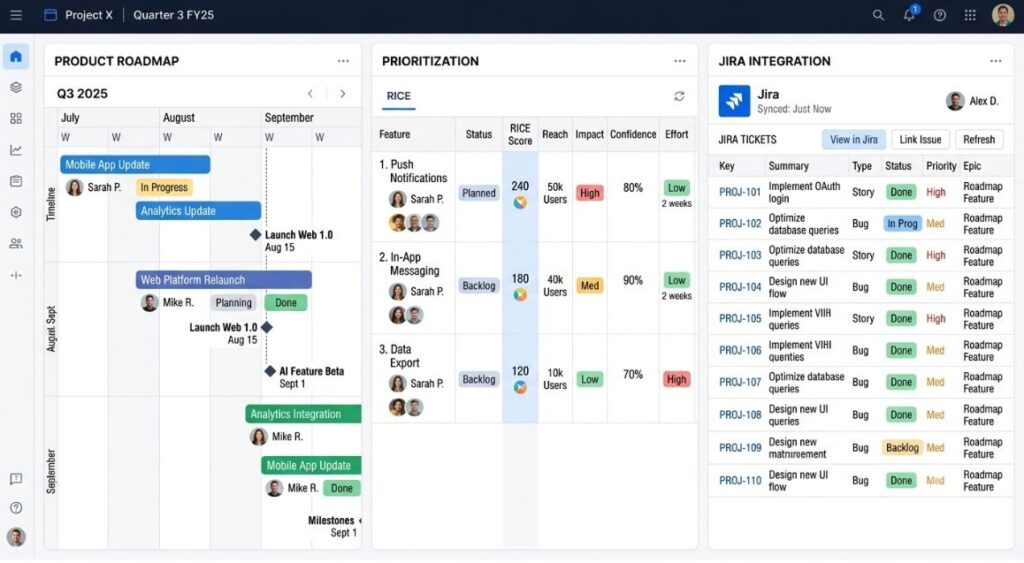
Start with prioritization support. Most serious tools now build in frameworks like RICE (Reach, Impact, Confidence, Effort, a scoring model Intercom’s product team developed to replace gut-feel prioritization) or lighter versions like ICE and weighted scoring. If a tool only offers drag-and-drop timelines with no scoring layer, you’ll end up prioritizing in a spreadsheet anyway and importing the result. That defeats the purpose.
Integrations matter more than most buyers expect going in. Your roadmap tool needs to talk to wherever engineering actually tracks delivery, usually Jira, Linear, or Azure DevOps, or the whole system turns into two sources of truth that quietly drift apart. Check for native two-way sync, not a one-time CSV import.
Feedback capture is the third piece. Sales calls, support tickets, and NPS comments generate raw signal constantly, but that signal is worthless if it never reaches the person deciding what ships next. Tools like Productboard and Craft.io build a feedback repository directly into the workflow. Others, like Miro or Notion, leave you to build that pipeline yourself.
The strongest product planning tools connect three layers: a feedback repository, a scoring framework such as RICE, and a roadmap view that syncs with delivery tools like Jira. Tools that only cover one or two of these layers force teams to stitch together spreadsheets and screenshots to fill the gap, which is exactly the problem dedicated planning software is meant to solve.
Finally, look hard at pricing structure before you fall in love with a feature list. Per-maker or per-editor pricing (Productboard, Aha!, ProductPlan) scales fast once your team grows past five or six people with edit access. Flat or low-cost per-seat pricing (ClickUp, Notion, Miro) stays cheaper longer but usually means you’re building the prioritization workflow yourself.
The 10 Best Tools for Product Teams
1. Productboard
Productboard is built around a specific idea: customer feedback should flow directly into roadmap decisions instead of dying in a support inbox. Feedback from tickets, sales calls, and surveys lands in a centralized insights repository, where product managers link it to features and score priorities using customizable frameworks.
The standout feature here is the insights-to-roadmap pipeline. You tag a piece of feedback, link it to a feature idea, and the system tracks how much demand that feature has accumulated over time. That data becomes your prioritization argument when someone asks why a feature moved up the list.
Pricing changed meaningfully in 2026. Productboard now runs on a Spark plan structure: Plus starts at $19 per maker per month billed annually ($25 monthly), and Business runs $59 per maker per month annually ($75 monthly), with a small seat minimum on Business. Enterprise pricing is custom. AI features are metered through a monthly credit system rather than billed flat, which is worth budgeting for separately.
Productboard counts companies like Zendesk, Microsoft, and UiPath among its customers, which tells you where its sweet spot sits: mid-market and enterprise teams that need a structured research-to-roadmap pipeline, not solo founders testing an MVP.
Limitation: per-maker pricing adds up fast once your team scales past 10 to 15 editors, and Productboard doesn’t include a built-in knowledge base or changelog tool, so most teams end up paying for a second product to cover those gaps.
Read More: How to Run Product Discovery
2. Aha!
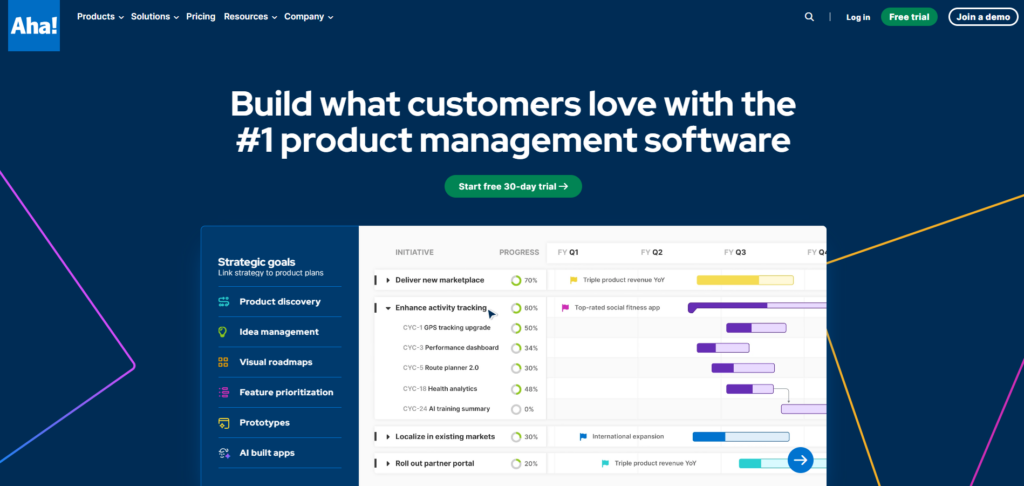
Aha! takes a strategy-first approach that most other tools skip. Before you touch a roadmap, Aha! wants you to define goals and initiatives, then map every feature back to one of them. That structure is either exactly what your team needs or more ceremony than a five-person startup can stomach.
The platform is sold as separate “hubs” you can mix and match: Roadmaps, Ideas, Develop, and Knowledge. Aha! Roadmaps starts at $59 per user per month, scaling to $149 for the Enterprise tier, both billed annually. Aha! Ideas, the feedback and voting module, starts separately at $39 per user per month. Bundling hubs unlocks discounts, but the sticker price climbs quickly once you add modules.
What sets Aha! apart is the depth of its goals-and-initiatives layer. You can trace a single feature all the way up to a company OKR, which is genuinely useful when a VP asks why the team is building something. Aha! Whiteboards, an add-on for visual brainstorming, rounds out the suite.
Limitation: the learning curve is real, and reviewers consistently flag that Aha! delivers strong value for large-scale strategic planning but feels like overkill for day-to-day sprint or backlog management. If your team is under 10 people, you may be paying enterprise prices for enterprise structure you don’t need yet.
Read More: Product Manager Interview Questions
3. Jira Product Discovery
Jira Product Discovery (JPD) is Atlassian’s answer to a gap Jira Software never filled well: capturing and prioritizing ideas before they become tickets. If your engineering org already lives in Jira, JPD is the lowest-friction way to add a discovery layer without leaving the ecosystem.
The workflow is straightforward. Ideas come in from stakeholders or customers, get scored against configurable fields like impact, confidence, and effort, and flow into views you can sort by score or status. Once an idea is ready to build, you link it directly to a Jira Software issue, and status updates sync back automatically.
JPD is genuinely free for teams of up to three creators, which makes it an easy first step. Beyond that, Standard costs $10 per creator per month and Premium costs $25 per creator per month, both with unlimited free contributors who can view and comment without a paid seat.
Limitation: JPD is cloud-only and works best as an add-on to Jira Software, not a replacement for it, so a team that also needs delivery tracking is really pricing two products, not one. Roadmap visuals are also noticeably less polished than what you’d get from ProductPlan or Roadmunk.
Read More: Technical Product Manager vs Generalist Product Manager
4. ProductPlan
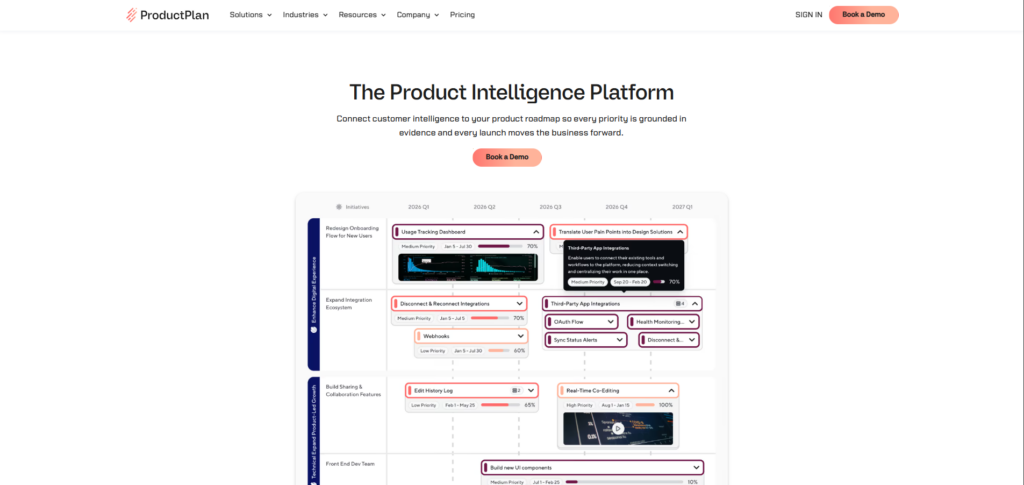
ProductPlan built its reputation on one thing: making roadmaps look good enough to put in front of a board or a room of investors. The drag-and-drop timeline builder produces clean, presentation-ready roadmaps without requiring design skills, and the Strategy Module ties individual roadmap bars back to company objectives.
Here’s the catch. As of 2026, ProductPlan has moved to fully sales-led pricing. Every plan tier now routes to a “Book a Demo” form, and public per-seat rates are gone from the pricing page. Historical pricing (last publicly listed in mid-2024) put the Basic plan around $39 per editor per month and Professional around $69 per editor per month, both billed annually, but you should treat those as reference points, not current quotes.
Viewers remain free on every plan, which matters if you have a lot of stakeholders who only need to see the roadmap, not edit it.
Limitation: the lack of published pricing is a genuine friction point for smaller teams trying to budget before a sales call, and ProductPlan’s feedback and discovery features are noticeably lighter than Productboard’s or Craft.io’s. Choose this one for the presentation layer, not the intake pipeline.
Read More: How to Become a Product Manager
5. airfocus
airfocus, now operating under Lucid Software following its acquisition, built its identity around modularity. Instead of one rigid workflow, you assemble your own combination of prioritization frameworks, roadmap views, and custom fields. Teams can run RICE, weighted scoring, or value-versus-effort side by side and compare results.
The feature that stands out is Priority Poker, a collaborative scoring session where the whole team votes on impact and effort in real time instead of one PM guessing alone. It’s a small feature that solves a real alignment problem.
Pricing centers on a Core plan at $59 per user per month, with Scale and Enterprise tiers moving to custom quotes. There’s no free tier, though a 14-day trial is available.
Limitation: the modularity that makes airfocus flexible also means more setup time than a tool with an opinionated default workflow. Its feedback management module is also less mature than Productboard’s, so teams that need heavy customer-feedback intake typically pair airfocus with a separate tool.
Read More: Product Manager vs Product Owner
6. Craft.io
Craft.io positions itself as an end-to-end system of record, not just a roadmap builder. Strategy, personas, specs, prioritization, and release planning all live in one workspace, and the platform’s “Guru” layer surfaces built-in best practices as you work, backed by an AI assistant called Guru AI that can summarize data and flag risks.
What makes Craft.io worth a look for design-heavy teams is its integration depth with tools like Figma, Adobe XD, and Axure, letting you attach live design files directly to roadmap items instead of static screenshots.
Pricing isn’t fully transparent. Some vendor-adjacent sources put the entry Starter plan around $19 to $39 per editor per month, with custom quotes for Pro and Enterprise tiers, so getting an exact number still requires a sales conversation.
Limitation: the breadth that makes Craft.io a single source of truth also means a heavier onboarding lift than a narrower tool, and a few reviewers note the spec editor and search functionality lag behind the roadmap and prioritization modules.
7. Roadmunk
Roadmunk, now owned by Tempo, solves a specific communication problem: the same roadmap data needs to look different for executives, engineers, and customers, and rebuilding it three times in PowerPoint wastes hours every sprint. Roadmunk lets you generate multiple roadmap views, including timeline and Now-Next-Later swimlanes, from a single underlying dataset.
Pricing starts around $19 per editor per month for the Starter tier, moving to roughly $49 for Business and $99 for Professional, with Enterprise custom-quoted. Jira and Azure DevOps integrations keep the roadmap synced with actual delivery status.
Limitation: Roadmunk’s prioritization scoring is noticeably more basic than what airfocus or Productboard offer, so teams that need rigorous RICE-style scoring often use Roadmunk purely as the presentation layer on top of another tool’s data. Some reviewers also flag pricing as steep for smaller organizations relative to the feature set.
Read More: Product Prioritization Frameworks Every PM Should Know
8. Miro
Miro isn’t a dedicated roadmap tool, and it doesn’t pretend to be one. It’s an infinite visual whiteboard with 3,600-plus diagramming shapes, roadmap templates, and AI-assisted workflows, which makes it the strongest option on this list for the messy, early stage of planning: brainstorming, workshops, and stakeholder alignment sessions before anything is locked down.
Miro’s Free plan is permanently available, capped at three editable boards. Starter costs $8 per member per month billed annually, and Business runs $20 per member per month annually, adding SSO, guest editing, and Jira and Azure sync. Enterprise requires a 30-member minimum and custom pricing.
Limitation: once a roadmap moves from workshop mode into ongoing management, Miro has no native database for tracking feature status, scoring history, or feedback volume over time. Most teams use it for the kickoff, then move the finalized plan into a purpose-built tool.
Read More: How to Write a Product Requirements Document
9. Notion
Notion earns its spot on this list because a huge number of product teams, especially early-stage ones, already run their entire workflow through it. Custom databases let you build a roadmap, a spec library, and an OKR tracker as linked pages, all searchable from one workspace.
The Free plan is genuinely usable for a solo PM or a very small team. Plus costs $10 per user per month billed annually and covers most collaboration needs. Business, at $20 per user per month annually, is the tier that unlocks Notion’s full AI features, including AI Agents and workspace-wide search, along with private teamspaces and SSO.
Limitation: Notion has no native prioritization scoring. You’re building RICE or ICE calculations with formulas and templates yourself, which works fine for a small team but becomes fragile as more people start editing the same database.
Read More: A Day in the Life of a Product Manager
10. ClickUp
ClickUp markets itself as the app that replaces every other work app, and for product teams that want planning and execution in the same place, that pitch mostly holds up. Sprints, Gantt charts, custom fields, goals, and dashboards all live under one roof, so a roadmap item can flow straight into a sprint without switching tools.
The Free Forever plan supports unlimited members with capped storage. Unlimited costs $7 per user per month annually, Business runs $12 per user per month annually, and Business Plus sits at $19 per user per month, with Enterprise custom-quoted. ClickUp Brain, the AI add-on, is billed separately and applies workspace-wide rather than per opted-in user, which is worth knowing before you enable it for “just a few people.”
Limitation: ClickUp’s sheer feature density is a double-edged sword. New users regularly report feeling overwhelmed by the number of views, fields, and settings before the tool starts paying off, and product-specific workflows like RICE scoring require manual setup rather than a built-in template.
Read More: Is Product Management a Good Career
Comparison at a Glance
| Tool | Best For | Starting Price (Annual) | Standout Feature |
|---|---|---|---|
| Productboard | Mid-market SaaS with heavy customer feedback | $19/maker/mo | Feedback-to-roadmap insights repository |
| Aha! | Enterprise strategic planning across product lines | $59/user/mo (Roadmaps) | Goals and initiatives traceability |
| Jira Product Discovery | Teams already deep in Atlassian | $10/creator/mo | Native Jira Software linking |
| ProductPlan | Presentation-ready roadmaps for execs | Custom (sales-led) | Strategy Module + drag-and-drop timelines |
| airfocus | Lean teams wanting framework flexibility | $59/user/mo | Priority Poker collaborative scoring |
| Craft.io | Design-heavy, multi-product portfolios | ~$19-39/editor/mo | Guru AI + Figma/Adobe XD integration |
| Roadmunk | Stakeholder-friendly multi-view roadmaps | ~$19/editor/mo | One dataset, multiple roadmap views |
| Miro | Early-stage brainstorming and workshops | $8/member/mo | Infinite visual whiteboard |
| Notion | Startups wanting an all-in-one workspace | $10/user/mo | Custom linked databases |
| ClickUp | Teams wanting planning and execution combined | $7/user/mo | Sprints, Gantt, and goals in one tool |
How to Choose the Right Fit for Your Team’s Stage
The honest answer is that most teams don’t need the most powerful tool on this list. They need the one that matches how mature their planning process already is.
Early-stage teams, especially pre-product-market-fit startups, are usually better off with Notion, ClickUp, or Miro. The reason isn’t cost alone, though the savings help. It’s that a five-person team doesn’t yet have enough recurring process to justify a dedicated prioritization engine. What you need at that stage is a flexible space to capture ideas and a whiteboard for the messy conversations that happen before anything is locked in.
Scaling teams, roughly 15 to 50 people across product and engineering, hit a different wall. Feedback starts arriving from multiple channels, and a spreadsheet-based prioritization process starts producing visibly wrong decisions. This is where airfocus, Roadmunk, or Jira Product Discovery earn their price tag, particularly if engineering already runs on Jira.
Enterprise and multi-product organizations need the traceability that Productboard, Aha!, or Craft.io provide. When a roadmap decision has to be defensible to a board or tied to a formal OKR structure, the extra structure these tools impose stops being overhead and starts being the point.
Team size and process maturity, not budget alone, should drive the choice between flexible workspace tools like Notion or ClickUp and dedicated platforms like Productboard or Aha!. Teams under 15 people rarely have enough recurring prioritization volume to justify per-maker enterprise pricing, while teams managing multiple products or a formal OKR structure typically outgrow spreadsheet-based workflows within a year.
This may not apply to every setup. A well-run five-person team with a disciplined PM can absolutely run RICE scoring inside a Notion database and make it work for years. And a 40-person team that’s disorganized will make Aha! just as messy as a spreadsheet. The tool amplifies your process. It doesn’t replace it.
Conclusion
There’s no single best answer here, and honestly, that’s a good thing. A five-person startup shouldn’t be paying enterprise per-maker prices for a strategic planning suite it doesn’t need yet, and a 60-person product org shouldn’t still be running roadmap decisions out of a shared spreadsheet.
The pattern that matters most: match the tool to where your feedback volume and stakeholder complexity actually sit today, not where you hope to be in two years. Start with Notion or ClickUp if you’re early. Move to airfocus, Roadmunk, or Jira Product Discovery once feedback starts arriving faster than you can track it manually. Reach for Productboard, Aha!, or Craft.io once a roadmap decision needs to survive a board meeting.
If you’re still figuring out how to structure prioritization before you even pick a tool, that’s the more important skill to build first.
FAQ
What is product planning software?
Product planning software is a category of tools that helps product teams capture ideas, prioritize what to build using a scoring framework, and turn decisions into a shareable roadmap. It typically connects three functions: feedback collection, prioritization scoring, and roadmap visualization, often syncing with delivery tools like Jira to keep the plan aligned with what’s actually shipping.
What’s the difference between a roadmap tool and a project management tool like ClickUp or Asana?
A dedicated roadmap tool, like Productboard or Aha!, is built around prioritization frameworks and feedback intake before work starts. A project management tool is built around tracking tasks after they’re already scoped and assigned. Tools like ClickUp blur the line by supporting both, but you’ll typically build the prioritization layer yourself rather than getting it out of the box.
How do I choose the right roadmapping tool for my team?
Start by mapping your current process gaps: are ideas getting lost, is prioritization inconsistent, or is the roadmap hard to communicate to stakeholders? Match the tool to whichever gap is biggest. A team struggling with feedback intake should look at Productboard or Craft.io first, while a team struggling with stakeholder communication should prioritize ProductPlan or Roadmunk.
Do solo product managers or small teams need a dedicated planning tool?
Not usually. A solo PM or a team under five people can run an effective process in Notion or a well-organized spreadsheet, since the volume of feedback and competing priorities is manageable without automation. Dedicated tools start paying for themselves once you have multiple stakeholders submitting requests and a real backlog to score.
Is a dedicated roadmap tool actually worth it, or can Notion and spreadsheets do the job?
For many teams, Notion genuinely can do the job, and paying for a dedicated platform before you have the feedback volume to justify it is a common mistake. The tipping point is usually when manually reconciling feedback and scores starts eating more than a few hours a week. At that point, automation stops being a nice-to-have.
Why do product roadmaps fall apart even with the right software?
Software fixes process gaps, not missing process. If a team doesn’t have an agreed prioritization framework or a habit of revisiting scores, no tool will manufacture that discipline for them. The most common failure pattern is treating the roadmap tool as a communication artifact instead of a living decision-making system that gets updated as new information arrives.
Productboard vs Aha! — which one should you pick?
Productboard leans toward feedback-driven prioritization, making it a strong fit for consumer and B2B SaaS teams fielding heavy customer input. Aha! leans toward top-down strategic planning, tying every feature back to company goals, which suits larger organizations with formal OKR structures. Teams with a strong bottom-up feedback loop tend to prefer Productboard; teams reporting up to a board tend to prefer Aha!.
How do I run RICE or ICE prioritization inside these tools?
Most dedicated platforms, including Productboard, airfocus, and Jira Product Discovery, offer configurable scoring fields where you input reach, impact, confidence, and effort estimates for each idea, and the tool calculates a composite score automatically. In flexible tools like Notion or ClickUp, you build the same calculation manually using formula fields, which works but requires more setup and maintenance.
Which tool works best for teams already living in Jira?
Jira Product Discovery is the obvious first choice, since ideas link directly to Jira Software issues and status updates sync automatically without a separate integration to maintain. Roadmunk and ProductPlan also offer solid Jira sync if you specifically need more polished, presentation-ready roadmap views than JPD provides natively.
What’s the most common mistake teams make when switching roadmap tools?
Migrating without cleaning up the underlying prioritization process first. Teams frequently move years of inconsistent scoring and half-finished feedback tags into a new tool, then wonder why the new system feels just as messy as the old one within a few months. It’s worth spending a week auditing and re-scoring your active backlog before the migration, not after.