

Most product roadmaps still die in a slide deck. Someone builds it in PowerPoint, presents it once, and by the time engineering ships the third feature on it, nobody remembers where the file lives. Stakeholders ask for updates. The PM opens the deck, edits twenty boxes by hand, and re-sends it. That cycle repeats every sprint, and it’s the single biggest reason product teams switch to dedicated roadmap software.
The right tool doesn’t just make roadmaps look nicer. It connects your roadmap to real customer feedback, keeps engineering and leadership looking at the same live data instead of five outdated exports, and cuts the hours PMs lose rebuilding the same view for different audiences. The wrong tool becomes another subscription nobody opens after month two.
This guide compares 15 of the strongest product roadmap software options on the market, what each one does well, where it falls short, and who it actually fits. Whether you’re a solo PM at a five-person startup or running a portfolio roadmap across twelve squads, there’s a tool on this list built for your situation.
Read More: How to Run Product Discovery
Table of Contents
What to Look For Before You Choose Product Roadmap Software
Product roadmap software solves one core problem: giving a team a single, always-current view of what’s being built, why, and when. Before you commit to a subscription, a handful of criteria separate tools you’ll actually use from ones that end up abandoned.
Roadmap views that match how you communicate. Engineering wants a timeline with dependencies. Executives want a now-next-later view with no dates attached, because dates without buffer become promises. Sales wants a simple list of what’s shipping this quarter. A tool that only offers one view style forces you back into slide decks the moment you need to present to a different audience.
Feedback linking, not just feedback collection. Dozens of tools let you collect customer requests. Fewer let you tie a specific piece of feedback to the roadmap item it influenced, then show the customer when it ships. That link is what turns a roadmap tool into a retention tool, because customers who see their request acknowledged and delivered churn less.
Integrations with your existing stack. If your engineers live in Jira and your roadmap tool doesn’t sync status both ways, someone becomes the manual bridge between the two systems. That person is usually the PM, and it’s the fastest way to make a new tool feel like extra work instead of less.
Pricing model that scales the way your team does. Per-maker or per-editor pricing (used by Productboard, Aha!, and Craft.io) keeps costs down if only a few people build roadmaps and everyone else just views them. Per-user pricing (Asana, Monday.com, ClickUp) makes more sense if most of the team needs edit access. Get this wrong and a tool that looked affordable at 5 seats becomes a budget problem at 40.
The strongest product roadmap software choices combine flexible roadmap views, two-way feedback linking to specific customer requests, native integration with the team’s existing delivery tools like Jira, and a pricing model that matches how many people actually need edit access versus view-only access. Getting the pricing model wrong is the most common reason teams outgrow a tool faster than expected.
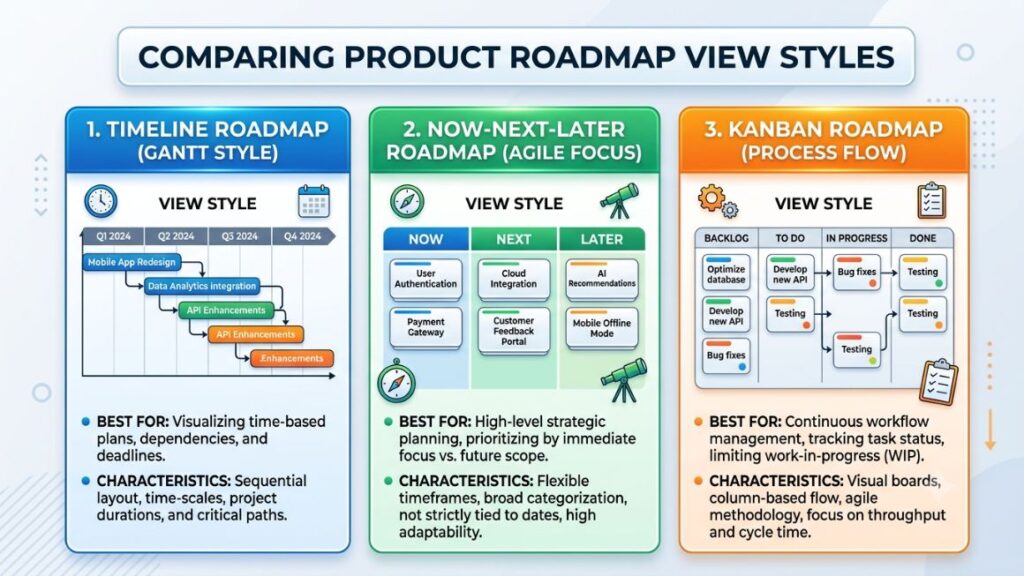
The 15 Best Product Roadmap Software Tools for Product Managers
Below are 15 tools that show up repeatedly in serious product management shortlists in 2026, ranked roughly from purpose-built roadmap platforms toward general work-management tools that teams stretch into roadmapping duty.
1. Productboard
Productboard built its name on one idea: connect customer feedback directly to what gets prioritized. Feedback from support tickets, sales calls, and NPS surveys flows into a centralized insights repository, and PMs link those insights to roadmap items instead of guessing at demand.
Standout features: Productboard’s Spark AI agent, rolled into every plan in 2026, drafts product specs and summarizes feedback using context from your workspace. Customer segments let you weight feedback by account value rather than treating every request equally, and the customer-facing Product Portal shows requesters when their idea ships.
Pricing: Productboard runs a Free plan, a Plus plan at $19 per maker per month billed annually, a Business plan at $59 per maker per month with a two-maker minimum, and custom Enterprise pricing. Only “makers,” the people building roadmaps and prioritizing features, count toward the bill. Contributors who just submit feedback are unlimited on every plan.
Best for: Mid-market and enterprise teams like Zoom, Autodesk, and Cvent that need a heavyweight insights-to-roadmap pipeline.
Limitation: AI features run on a monthly credit system, and once your team burns through its allocation, Spark pauses until the next billing cycle or you buy a top-up.
Read More: Product Manager Interview Questions
2. Aha! Roadmaps
Aha! has spent over a decade as the roadmap software product teams graduate to once they outgrow spreadsheets and slide-based planning. It positions itself as a complete strategy-to-roadmap suite rather than a single-purpose tool.
Standout features: The strategy module forces every roadmap item to tie back to a goal or initiative, which is genuinely useful for teams that struggle to explain why a feature made the cut. Elle, Aha!’s AI assistant, drafts initiatives and scores ideas. Aha! Whiteboards and Aha! Knowledge come bundled in, so brainstorming and documentation live in the same account.
Pricing: The Premium plan starts around $59 per user per month billed annually, Enterprise starts around $99 per user per month, and Enterprise+ starts around $149 per user per month, annual billing only. Read-only reviewers and viewers are free on every plan, which helps if most of your organization only needs to see the roadmap.
Best for: Established product orgs that want strategy, roadmapping, ideas, and documentation under one login rather than stitching four tools together.
Limitation: The sheer number of configuration options (workflows, custom fields, scoring formulas) means new users often need several weeks before the tool feels intuitive rather than overwhelming.
Read More: Technical Product Manager vs Generalist Product Manager
3. ProductPlan
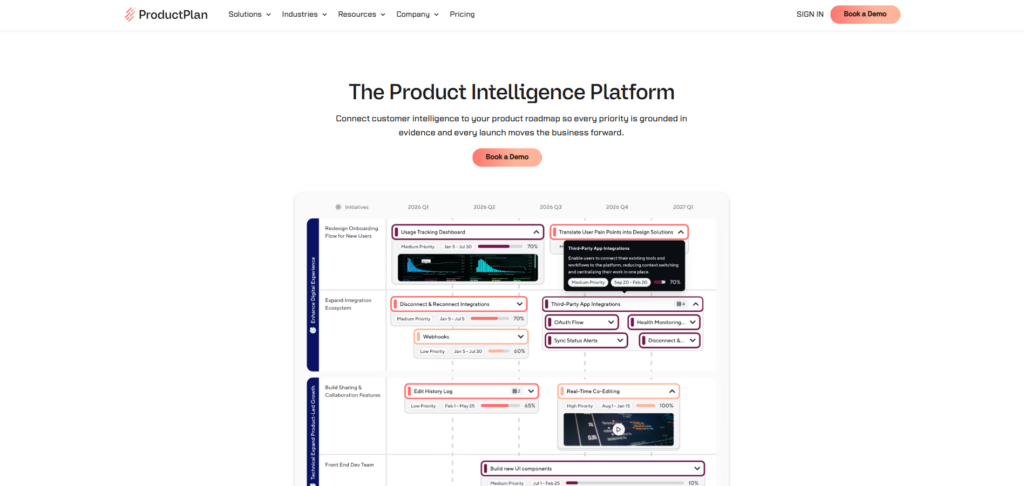
ProductPlan built its reputation on drag-and-drop roadmap building that non-technical stakeholders can understand at a glance, without training. It leans hard into presentation quality over deep prioritization mechanics.
Standout features: The Strategy Module ties team-level objectives to company goals and tracks progress visually. Roadmap “containers” let you group related work into swimlanes without cluttering the timeline, and sharing a live, view-only link means executives always see the current version instead of a stale PDF.
Pricing: ProductPlan moved to sales-led, quote-only pricing in mid-2024, so current plans aren’t published. Historical public pricing put the Basic tier around $39 per editor per month and the Professional tier around $69 per editor per month, both billed annually, which gives a rough sense of where quotes still land. Viewers are free on every plan.
Best for: Product leaders who present to executive audiences often and need roadmaps that look boardroom-ready without extra design work.
Limitation: Hiding pricing behind a sales call adds friction for small teams that just want to compare costs quickly before committing to a demo.
Read More: How to Become a Product Manager Without a Technical Background
4. airfocus
airfocus, now under Lucid Software’s ownership, built its identity around customizable prioritization scoring. Instead of forcing you into one framework like RICE or ICE, it lets you build your own formula from the fields that matter to your team.
Standout features: The modular structure means you turn on only the modules you need: roadmaps, prioritization, and a feedback portal can be mixed and matched. Priority Poker runs live scoring sessions where the whole team votes on an item’s value before it hits the roadmap.
Pricing: The Core plan runs around $59 per user per month, with Scale and Enterprise tiers requiring a custom quote. There’s no free tier, though a 14-day trial is available.
Best for: Teams that have outgrown a generic scoring spreadsheet and want a flexible prioritization engine wrapped around the roadmap, not just a visual timeline.
Limitation: No free plan means you can’t test-drive it with a real team beyond the trial window before paying.
Read More: Product Manager vs Product Owner
5. Jira Product Discovery + Advanced Roadmaps
If your engineering org already runs on Jira, Jira Product Discovery (JPD) is the path of least resistance. It sits alongside Jira Software specifically for the pre-development discovery phase: capturing ideas, scoring them, and building a roadmap that links directly to the issues engineering will eventually work.
Standout features: Ideas link straight to Jira Software issues for delivery tracking, so status updates surface back in JPD automatically once development starts. Custom fields let you score ideas on impact, confidence, and effort using whatever framework your team already runs.
Pricing: JPD offers a free tier for up to three creators, a Standard tier at $10 per creator per month, and a Premium tier at $25 per creator per month. Contributors who only view and comment stay free on every plan. The catch: most teams also need a separate Jira Software subscription, so the real bill is higher than JPD’s sticker price suggests.
Best for: Teams already deep in the Atlassian ecosystem who want discovery and delivery connected without a third-party integration.
Limitation: It’s cloud-only, has no public customer feedback portal, and can’t send automatic notifications when a requested feature ships, so you’ll need a separate tool for customer-facing communication.
Read More: Product Prioritization Frameworks Every PM Should Know
6. Strategic Roadmaps by Tempo (formerly Roadmunk)
Roadmunk built a loyal following for one specific strength: making the same underlying roadmap data look different depending on who’s viewing it. Tempo acquired the product in 2021 and rebranded it as Strategic Roadmaps, but the core “pivot” functionality that made it popular hasn’t changed.
Standout features: Roadmap pivots let you filter and re-visualize a single data set for different stakeholders, so engineering sees a swimlane view while leadership sees a simplified timeline, both pulling from the same source of truth. The two-way Jira integration keeps strategic plans in sync with execution-level tickets.
Pricing: The Starter plan begins around $19 per user per month, with Business and Enterprise tiers moving to custom quotes as feature depth increases.
Best for: Product and leadership teams that need boardroom-quality visuals without spending hours reformatting the same roadmap for every meeting.
Limitation: Some long-time users report the interface can feel slow with larger data sets, particularly when editing while screen-sharing live in a meeting.
Read More: How to Write a Product Requirements Document (PRD) Engineers Actually Use
7. Craft.io
Craft.io markets itself as an end-to-end product management platform rather than a roadmap-only tool, covering everything from personas and OKRs through roadmapping and release planning in one workspace.
Standout features: The “Guru” layer bakes in product management best practices directly into the workflow, which helps newer PMs follow a structured process instead of guessing. Guru AI, added in 2025, summarizes data and automates repetitive planning tasks. Deep design-tool integrations with Figma and Adobe XD let teams attach mockups directly to roadmap items.
Pricing: The Starter plan runs $19 per user per month billed annually, and the Pro plan runs $79 per user per month billed annually, with a 20% discount for annual commitment baked into both figures. Enterprise pricing is custom.
Best for: Multi-product portfolios where teams need design-tool integration built into the roadmap rather than bolted on through a separate embed.
Limitation: Capacity planning and OKR management live behind the Pro tier or higher, so budget-conscious teams starting on Starter won’t get the full strategy-to-execution story until they upgrade.
Read More: A Day in the Life of a Product Manager
8. Dragonboat
Dragonboat targets a specific gap: connecting product roadmaps to OKRs and resource capacity at a portfolio level, across multiple teams and products at once. It’s built for product operations leaders managing several roadmaps simultaneously, not a single-team PM.
Standout features: Capacity planning shows whether a roadmap is realistic given actual engineering bandwidth, not just wishful sequencing. The OKR module ties every roadmap item back to a measurable outcome, and portfolio views roll individual team roadmaps up into one leadership-facing view.
Pricing: Dragonboat sells through custom, quote-based pricing rather than published tiers, which is typical for tools built around multi-team portfolio management. Expect enterprise-style sales conversations rather than self-serve checkout.
Best for: Product operations teams managing roadmaps across multiple squads or business units who need capacity and OKR alignment baked in, not added later.
Limitation: The depth that makes Dragonboat powerful for portfolio management also makes it overkill, and expensive, for a single product team with one roadmap.
Read More: Is Product Management a Good Career in 2026? An Honest Answer
9. Asana
Asana isn’t a dedicated roadmap tool, but its Timeline view and Goals feature get used as a roadmap substitute constantly, especially at companies where product, marketing, and engineering all need to see work in one shared workspace.
Standout features: The Timeline view gives Gantt-style scheduling with dependency tracking. Portfolios roll multiple project timelines into a single executive view, and Goals connects individual tasks back to company-level objectives, which functions similarly to a roadmap’s strategic layer.
Pricing: Asana offers a free Personal plan for up to two users, a Starter plan at $10.99 per user per month billed annually, and an Advanced plan at $24.99 per user per month billed annually, plus custom Enterprise and Enterprise+ tiers.
Best for: Cross-functional teams that need one tool for both day-to-day task execution and a lightweight roadmap view, rather than maintaining two separate systems.
Limitation: Asana lacks purpose-built prioritization scoring and a customer feedback portal, so product-specific workflows like RICE scoring or public feature requests need a workaround or a separate tool.
Read More: AI Product Management: What it is and How to Become an AI Product Manager
10. Monday.com
Monday.com’s visual, color-coded boards make it a favorite with teams that find traditional roadmap tools too rigid. Product teams build custom roadmap boards using its flexible column system, then layer in timeline and Gantt views as needed.
Standout features: The board-based structure means you’re not locked into a single roadmap template. Automations handle status updates and stakeholder notifications without manual work, and dashboards pull data from multiple boards into a single visual summary for leadership.
Pricing: Monday.com’s Standard plan runs around $12 per seat per month billed annually, with Basic, Pro, and Enterprise tiers scaling up from there. Seats are typically sold in blocks rather than individually.
Best for: Marketing-adjacent product teams and agencies that value visual flexibility and fast onboarding over deep prioritization mechanics.
Limitation: Because it’s a general work-management tool, feedback-to-roadmap linking and public customer portals aren’t native, so product teams often pair it with a dedicated feedback tool.
11. ClickUp
ClickUp positions itself as an “everything app,” bundling tasks, docs, goals, whiteboards, and time tracking into one platform. Product teams build roadmaps using its native Gantt and timeline views without paying for a separate roadmap-specific tool.
Standout features: Custom fields and multiple view types (list, board, Gantt, timeline) mean the same data can be reshaped for different audiences without duplicating work. ClickUp Brain, its AI layer, drafts documents and summarizes tasks. Native docs mean specs and roadmaps can live side by side.
Pricing: ClickUp offers a Free Forever plan, an Unlimited plan at $7 per user per month, and a Business plan at $12 per user per month, both billed annually, plus a custom Business Plus tier and Enterprise pricing. AI features run as a separate add-on on top of any paid plan.
Best for: Cost-conscious startups that want project management, documentation, and a lightweight roadmap in a single low-cost subscription.
Limitation: The sheer number of features and settings creates a real learning curve. Teams that just want a clean roadmap view often feel like they’re wading through unrelated functionality to get there.
12. Notion
Notion isn’t built as roadmap software, but its flexible database and page system means thousands of product teams build custom roadmap templates directly inside their existing workspace, avoiding a separate subscription entirely.
Standout features: Linked databases let a roadmap page pull live data from a separate feature-request database, so updating status in one place reflects everywhere. Notion AI, bundled into the Business plan, summarizes meeting notes and drafts specs. The timeline view on databases functions as a lightweight Gantt chart.
Pricing: Notion runs a Free tier, a Plus plan at $10 per user per month, and a Business plan at $20 per user per month, both billed annually, plus custom Enterprise pricing. Full AI access requires the Business tier.
Best for: Small product teams that already live in Notion for documentation and don’t want the overhead of learning a second platform just for roadmapping.
Limitation: Notion’s roadmap is only as good as the database structure you build yourself. There’s no built-in prioritization scoring, dependency management, or customer feedback portal, so you’re assembling a roadmap tool from parts rather than buying one.
13. Miro
Miro is a visual whiteboard platform, but its infinite canvas and roadmap templates make it a popular choice for early-stage roadmap brainstorming and cross-functional workshops before a plan moves into a more structured tool.
Standout features: Hundreds of ready-made roadmap templates cover now-next-later, quarterly, and swimlane formats. Live collaboration during workshops lets a whole team build a roadmap together in real time, with voting and sticky-note prioritization built in. Integrations with Jira and Figma let teams pull execution data or design assets directly onto the board.
Pricing: Miro’s 2026 pricing runs Free at $0, Starter at $8 per member per month, and Business at $20 per member per month, all billed annually, with Enterprise custom-priced from 30 members.
Best for: Early-stage strategy sessions, quarterly planning workshops, and teams that need to visualize roadmap options before committing to a formal tool.
Limitation: Miro isn’t built to maintain a live, ongoing roadmap of record. Once planning is done, most teams export the outcome into a dedicated roadmap or project tool rather than keeping the working roadmap on the whiteboard long-term.
14. Wrike
Wrike sits between Asana and Monday.com in positioning: a work-management platform with deeper workflow customization, approval chains, and resource management, aimed at mid-market teams outgrowing simpler tools.
Standout features: Custom request forms and approval workflows suit product teams that need formal sign-off before a roadmap item moves forward. Resource management shows team capacity against planned work, similar to what Dragonboat offers at the portfolio level. Two-way sync with tools like Klaxoon (also Wrike-owned) supports workshop-to-roadmap handoff.
Pricing: Wrike offers a Free plan, a Team plan starting around $10 per seat per month, and a Business plan around $25 per seat per month for teams of 5 to 200, both billed annually, with custom Pinnacle and Apex tiers above that.
Best for: Mid-market teams that need formal approval chains and resource capacity views alongside their roadmap, not just a visual timeline.
Limitation: The Business tier’s seat-grouping requirements above 100 users can force you to buy more seats than your actual headcount, which inflates cost at scale.
15. Trello
Trello is the simplest tool on this list, and that’s exactly why some small product teams still use it for lightweight roadmapping. Its kanban-first design maps naturally to a “backlog, in progress, shipped” style roadmap view.
Standout features: Power-Ups extend Trello’s core kanban boards with calendar and timeline views, letting a simple board double as a rough roadmap. Trello Planner, added in 2026, adds calendar-style drag-and-drop scheduling synced to Google Calendar. Butler automation handles repetitive card-moving without manual clicks.
Pricing: Trello’s paid plans start from $5 per user per month and go up to $17.50 per user per month, with a free version available for individuals or small teams.
Best for: Very small product teams or solo founders who need a basic visual roadmap and don’t want to pay for features they won’t use yet.
Limitation: No native prioritization scoring, no feedback-to-roadmap linking, and no dedicated timeline view without a paid Power-Up. Trello works until the team or the roadmap complexity outgrows a kanban board, and most do eventually.
How to Pick the Right Tool for Your Team
The honest answer to “which product roadmap software should I use” depends entirely on team size and maturity, not which tool has the longest feature list.
Solo PM or a team of two to five: Start with something you likely already pay for. Notion or Trello covers basic roadmap visualization without adding another line item to a lean budget. Upgrade only when the manual database structure starts breaking down.
Small dedicated product team (5 to 20 people): This is where purpose-built product roadmap software starts paying for itself. ProductPlan or Strategic Roadmaps by Tempo deliver presentation-ready visuals without the steep learning curve of a full suite like Aha!.
Mid-market team with active customer feedback loops: Productboard or Craft.io earn their per-maker pricing here, because the value comes from linking specific customer requests to roadmap decisions at scale, something spreadsheet-adjacent tools can’t replicate.
Multi-team product organization or product operations function: Dragonboat or Aha! Enterprise handle portfolio-level capacity planning and OKR alignment that single-team tools weren’t built for.
Already deep in Atlassian: Jira Product Discovery removes the integration tax entirely, since your engineering data is already there.
From what we’ve seen with YUP learners who’ve made this switch, the biggest mistake isn’t picking the “wrong” tool. It’s picking a tool that matches your team’s current size instead of the size you expect to be in a year, then paying twice: once for the subscription you outgrow, and again for the migration effort six months later.
Comparison at a Glance
| Tool | Starting Price | Best For |
|---|---|---|
| Productboard | Free / $19/maker/mo | Feedback-driven prioritization at scale |
| Aha! Roadmaps | ~$59/user/mo | Strategy-to-roadmap suite |
| ProductPlan | Custom (quote-based) | Executive-ready visuals |
| airfocus | ~$59/user/mo | Custom prioritization scoring |
| Jira Product Discovery | Free / $10/creator/mo | Atlassian-native teams |
| Strategic Roadmaps (Tempo) | ~$19/user/mo | Multi-audience roadmap views |
| Craft.io | $19–$79/user/mo | Design-integrated product suite |
| Dragonboat | Custom (quote-based) | Portfolio capacity + OKRs |
| Asana | Free / $10.99/user/mo | Cross-functional task + roadmap |
| Monday.com | ~$12/seat/mo | Visual, flexible boards |
| ClickUp | Free / $7/user/mo | All-in-one at low cost |
| Notion | Free / $10/user/mo | Docs-first teams building their own roadmap |
| Miro | Free / $8/member/mo | Workshop-stage roadmap planning |
| Wrike | Free / ~$10/seat/mo | Approval-heavy workflows |
| Trello | Free / $5/user/mo | Very small teams, simple kanban roadmaps |
Making the Switch
Every tool on this list solves the same core problem in a different way: turning a static plan into a living, shareable source of truth. The right pick isn’t the one with the longest feature list. It’s the one that matches how big your team is today, how your stakeholders actually want to see the plan, and how much of your budget you’re willing to spend keeping everyone aligned instead of rebuilding slides every sprint.
Start by mapping your must-haves against the criteria in this guide: view flexibility, feedback linking, integrations, and a pricing model that scales the way your team does. Trial two or three tools with a real roadmap, not a demo dataset, before committing to an annual plan.
If you’re building or sharpening the strategic thinking that goes into these roadmap decisions, not just the software that displays them, YUP’s Product Management course walks through prioritization frameworks, stakeholder communication, and roadmap strategy in more depth than any tool’s onboarding flow will.
FAQ
What is product roadmap software?
Product roadmap software is a tool that helps product managers plan, visualize, and communicate what a team is building over time. It typically includes timeline or kanban-style views, prioritization features, and ways to share the plan with stakeholders, engineering, and sometimes customers directly.
Product roadmap software vs. a spreadsheet: what’s actually different?
A spreadsheet stores static data that someone has to manually update and re-share every time it changes. Roadmap software keeps one live version that updates automatically, links to real customer feedback, and often syncs with delivery tools like Jira, so status updates flow through without manual copying.
How do I calculate which roadmap tool fits my budget?
Multiply the per-user or per-maker price by the number of people who need edit access, not your whole team, since most tools offer free viewer seats. Check whether pricing is annual-only, since several tools like Aha! and Craft.io offer meaningful discounts for annual commitment over monthly billing.
Who should use dedicated product management software like Productboard or Aha! instead of Asana or Notion?
Teams with active customer feedback loops that need to trace a roadmap decision back to specific customer requests benefit most from purpose-built tools. If your roadmap is mostly internal planning without heavy customer input, a general work-management tool like Asana or Notion is often enough.
Is paid product roadmap software actually worth it over a free tool?
It depends on team size and how often the roadmap changes. A solo PM at an early-stage startup can run a functional roadmap in Notion or Trello’s free tier. Once feedback volume, stakeholder count, or cross-team dependencies grow, the time saved by a purpose-built tool usually outweighs the subscription cost.
Why isn’t my roadmap tool updating for stakeholders in real time?
This is almost always a sharing or permissions issue rather than a software bug. Check that stakeholders have viewer access to the live board or link, not a static export or screenshot. Several tools, including ProductPlan and Strategic Roadmaps, generate view-only links specifically to avoid this problem.
Can I switch product roadmap software without losing my data?
Most established tools support CSV export and import, and several, like Jira Product Discovery and Productboard, offer direct migration guides or support for moving from a specific competitor. Always export a full backup before canceling a subscription, since some tools restrict data access once your account downgrades.
What’s the difference between a roadmap tool and a project management tool?
Roadmap tools focus on strategic, higher-level planning: what’s being built and why, over quarters or years. Project management tools like Asana and Monday.com focus on task-level execution: who’s doing what, by when. Many teams end up using both, with the roadmap tool feeding priorities into the project tool for day-to-day work.
Do I need a separate customer feedback tool if I use product roadmap software?
Not necessarily. Tools like Productboard, Jira Product Discovery, and Craft.io include native feedback collection and linking. If you choose a general tool like Asana, Notion, or Trello for your roadmap, you’ll likely need a separate feedback or feature-request tool to close that loop.
What do most product managers get wrong when picking roadmap software?
The most common mistake is optimizing for the tool with the most features rather than the one that matches current team size and workflow maturity. A five-person startup buying an enterprise-grade portfolio tool like Dragonboat often ends up paying for capacity planning and OKR modules nobody uses yet.