

A product team spends four months building a reporting dashboard. It ships on time, everyone’s relieved, and then the usage numbers arrive. Almost nobody opens it.
That story is painfully common, and it’s the problem the product management scrum framework is built to catch early. Product teams get pulled in three directions at once. What customers need. What the business wants this quarter. What engineers can realistically deliver by the deadline. Scrum doesn’t make that tension disappear. It gives the team a way to work through it in small steps, checking with real users and real data before another four months go by.
This guide covers who does what in a Scrum team, how a Sprint runs and how to set the whole thing up for a product. You’ll also get a worked example, the mistakes that quietly wreck Scrum teams and the metrics that show whether it’s helping. Everything follows the 2020 Scrum Guide by Ken Schwaber and Jeff Sutherland, the official definition of Scrum, and we’ll point out where popular habits sit outside it.
Table of Contents
What Is the Product Management Scrum Framework?
Scrum is a lightweight framework in which a small team works in fixed-length cycles called Sprints. It delivers something usable in each one, and uses feedback to decide what comes next. In product management, it gives a team a repeatable way to turn a broad goal into work it can finish, release, and learn from.
The idea has been around longer than most people think. Hirotaka Takeuchi and Ikujiro Nonaka described a team-based and rugby-style way of building products in a 1986 Harvard Business Review article, “The New New Product Development Game”. The name Scrum comes from that comparison. Ken Schwaber and Jeff Sutherland later shaped it into a working framework and presented it publicly at the OOPSLA conference in 1995.
Scrum sits under the Agile umbrella. The Agile Manifesto, written in 2001 by 17 software practitioners, favors working software, customer collaboration and responding to change over rigid plans. The Scrum framework is one way to act on those values. Kanban and Extreme Programming are others. That’s why Agile product management and Scrum get mentioned in the same breath, even though they aren’t the same thing.
The real benefit is how Scrum shrinks big goals. “Improve onboarding” is too vague to build. A Product Goal, a ranked backlog, and a Sprint Goal turn that wish into steps a team can finish in a few weeks and then test against real behavior.
One honest limit, though. Scrum is a framework, not a guarantee. It won’t rescue a weak product idea or a team that ignores its customers. What it does is make problems visible sooner, while they’re still cheap to fix.
Here’s an illustrative example. A team improving an online shopping experience releases a simpler checkout flow. It watches where shoppers still drop off and uses what it finds to pick the next improvement.
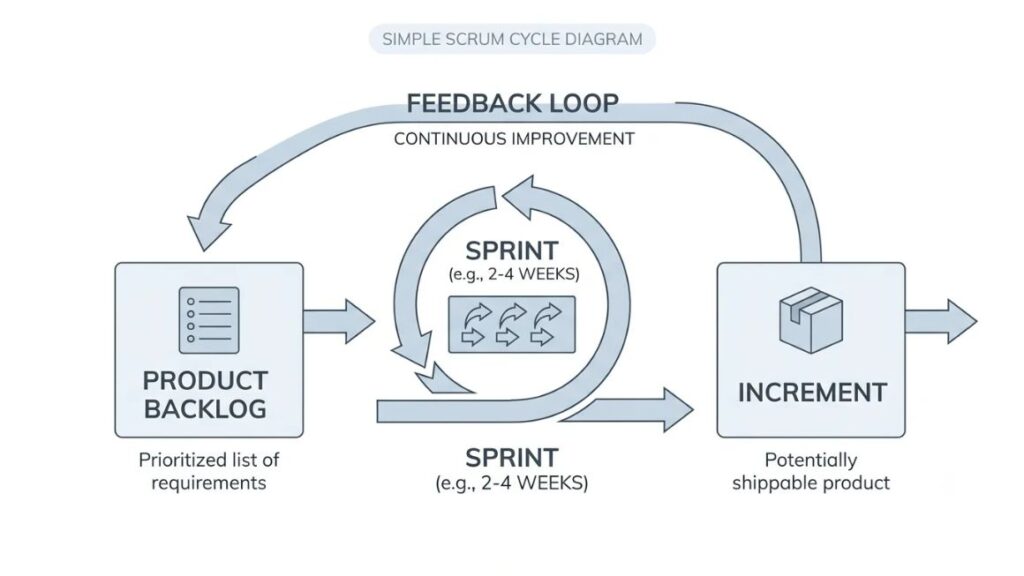
Scrum is a lightweight framework where a small team delivers a usable Increment in fixed-length Sprints and uses stakeholder feedback to decide what to build next. In product management, it turns broad goals into small, testable steps. It structures the work but doesn’t guarantee product success.
Why Product Teams Use Scrum
Teams use Scrum because it ties daily work to a clear product goal. It surfaces problems after weeks instead of months and keeps progress visible to everyone involved. It’s also widely used: Digital.ai’s 17th State of Agile Report (2024) found Scrum was the most widely used Agile method among respondents, at 63%.
Better alignment between business goals and delivery
Every Sprint has a Sprint Goal, and every Sprint Goal should connect back to the Product Goal. So when someone picks up a task, there’s a reason behind it beyond “it was on the list.”
Priorities need to reflect customer needs and business value together. A feature the loudest stakeholder wants, but no customer asked for, shouldn’t jump the queue.
Faster learning and more frequent feedback
Smaller releases reveal problems earlier. If a new search filter confuses people, you find out after one Sprint rather than after a six-month rollout.
But shipping often isn’t the same as delivering value. A team can release every two weeks and still release things nobody wants. The speed only pays off when the team looks at what happened and changes course.
Greater visibility and team collaboration
Work is visible and goals are shared. The Sprint Review puts stakeholders in front of what the team has actually built. Decisions get made on real output, not status slides.
When something shifts, say a competitor launches or a customer complaint lands, the team has a regular moment to adjust instead of waiting for the next quarterly review.
Product teams use Scrum to connect daily work to a Product Goal, learn from small releases, and keep progress visible to stakeholders. Digital.ai’s 17th State of Agile Report (2024) found Scrum was the most widely used Agile method among respondents, at 63%. Frequent delivery only creates value when the team acts on the feedback it gets.
The Three Accountabilities in a Scrum Team
A Scrum Team has three accountabilities. The Product Owner, who maximizes the value of the product. The Scrum Master, who helps the team use Scrum well. The Developers, who build a usable Increment every Sprint. The 2020 Scrum Guide says “accountabilities” instead of “roles” because the whole team shares responsibility for the result.
If you’ve searched for Scrum roles and responsibilities before, you’ve probably seen the older word “roles” everywhere. Same idea, slightly different emphasis.
The team is small, typically 10 or fewer people. The Guide says there are no sub-teams or hierarchies inside it. Everyone works toward one Product Goal at a time.
The Product Owner
The Product Owner is accountable for maximizing the value of the product that comes out of the team’s work. In practice, product owner responsibilities center on the Product Backlog: developing and clearly communicating the Product Goal, creating and communicating backlog items, ordering them, and making sure the backlog is visible and understood.
The Product Owner can delegate parts of that work but stays accountable for it. And it’s one person, not a committee. Stakeholders who want something changed make their case to the Product Owner.
The Scrum Master
The Scrum Master is accountable for establishing Scrum as the Guide defines it, and for the team’s effectiveness. They coach the team in self-management, help remove obstacles, and make sure Scrum events happen and stay within their time limits.
They also serve the Product Owner, for example by helping find good ways to manage the backlog, and they serve the wider organization by explaining how Scrum works. A Scrum Master isn’t a project manager handing out tasks. That’s a common mix-up.
Developers
“Developers” in Scrum doesn’t mean only programmers. It means everyone on the team who creates part of the usable Increment: engineers, designers, analysts, testers, data people, whoever the work needs.
The Guide makes them accountable for four things: planning the Sprint, instilling quality through the Definition of Done, adapting their plan every day toward the Sprint Goal, and holding each other accountable as professionals.
How these responsibilities work together
The Product Owner is accountable for maximizing value, but product success isn’t one person’s job. Picture a Sprint where the Product Owner wants to cut drop-off in sign-up. A designer brings research showing where users hesitate. An engineer flags that a fix would be quicker with a small technical cleanup first. The Scrum Master notices that stakeholder requests keep interrupting the team and raises it. The result comes from all three accountabilities pulling together.
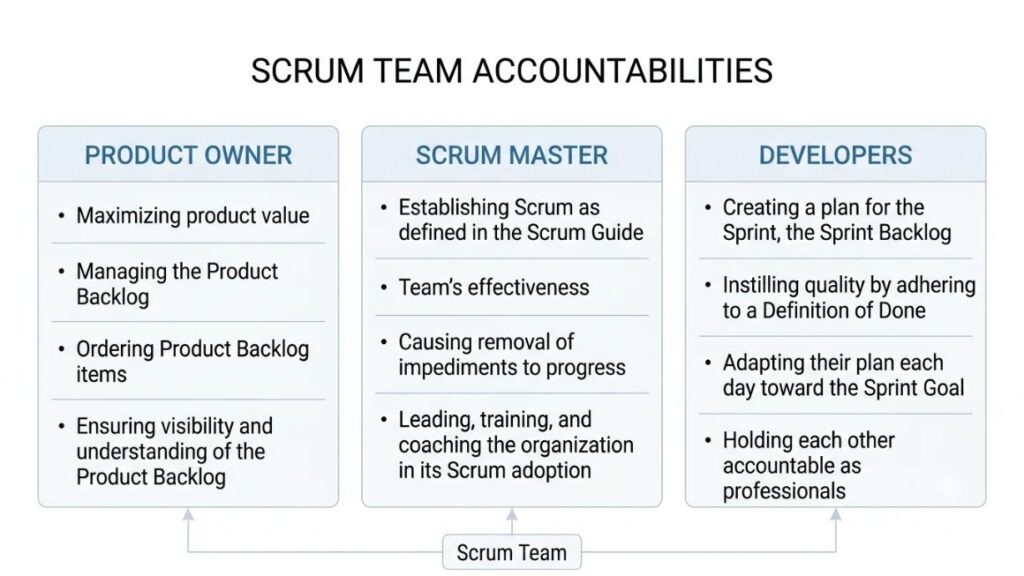
The 2020 Scrum Guide defines three accountabilities in a Scrum Team: the Product Owner (maximizing product value), the Scrum Master (establishing Scrum and improving team effectiveness), and the Developers (creating a usable Increment each Sprint). The whole Scrum Team shares accountability for delivering a valuable, useful Increment.
The Main Events and Work Products
Scrum has five events (the Sprint, Sprint Planning, the Daily Scrum, the Sprint Review, and the Sprint Retrospective) and three work products called artifacts. Each one exists to make the work visible so the team can inspect it and adapt.
The Sprint
A Sprint is a fixed-length cycle of one month or less, and a new one starts as soon as the last one ends. The Guide caps it at one month because a longer horizon can make the Sprint Goal outdated and the risk higher. Shorter Sprints mean more learning cycles.
During a Sprint, nobody makes changes that endanger the Sprint Goal, quality doesn’t drop, and scope can be clarified and renegotiated with the Product Owner as the team learns more. That steady rhythm is the point.
Sprint Planning
Sprint Planning kicks off the Sprint, and the whole Scrum Team does it together. It covers three topics. First, why is this Sprint valuable? That’s where the Sprint Goal comes from. Second, what can be Done this Sprint? Developers select items from the Product Backlog. Third, how will the chosen work get done? Developers plan the work needed to create an Increment that meets the Definition of Done.
For a one-month Sprint, planning is limited to eight hours at most. Shorter Sprints usually mean shorter planning.
Daily Scrum
The Daily Scrum is a 15-minute event for the Developers, held at the same time and place each working day. Its purpose is to inspect progress toward the Sprint Goal and adapt the Sprint Backlog if needed.
It isn’t a status report to a manager. The Developers choose the format, as long as they leave with an actionable plan for the next day. The 2020 Guide dropped the old three fixed questions entirely.
Sprint Review
In the Sprint Review, the Scrum Team and stakeholders inspect the outcome of the Sprint, discuss what has changed in their environment, and decide together what to do next. The Guide calls it a working session, not just a presentation. And it shouldn’t be treated as a gate for releasing value, since an Increment can go out before the Sprint ends.
Sprint Retrospective
The Sprint Retrospective is where the team looks at how the last Sprint went: its people, interactions, processes, tools, and Definition of Done. The goal is to plan ways to improve quality and effectiveness. The most impactful improvements can even be added to the next Sprint Backlog.
The three artifacts and their commitments
Scrum artifacts are the three work products the team creates and inspects, and each has one commitment that keeps it focused.
| Artifact | What it is | Commitment |
| Product Backlog | An ordered, evolving list of what the product needs | Product Goal: a future state of the product the team plans against |
| Sprint Backlog | The Sprint Goal, the items selected for the Sprint, and the plan to deliver them | Sprint Goal: the single objective of the Sprint |
| Increment | A usable stepping stone toward the Product Goal | Definition of Done: a formal description of the quality an Increment must meet |
A quick accuracy check, because this trips people up. Burndown charts, story points, velocity, and specific task-board layouts aren’t part of Scrum as defined in the Guide. The Guide does mention burn-downs, burn-ups, and cumulative flow as forecasting practices that can help, but it says they don’t replace inspecting what has actually happened. Use them if they help your team. Just don’t call them required.
Scrum has five events (the Sprint, Sprint Planning, Daily Scrum, Sprint Review, and Sprint Retrospective) and three artifacts (Product Backlog, Sprint Backlog, and Increment). Each artifact has a commitment: the Product Goal, the Sprint Goal, and the Definition of Done. Practices like story points and burndown charts are optional additions, not part of the official framework.

How to Implement Scrum in Product Management: A Step-by-Step Guide?
Implementing Scrum in product management takes six steps: define a product goal, research customer needs, build and order the backlog, prepare for Sprint Planning, collaborate through the Sprint, and review results to improve. Run one full cycle before you add any extras.
This is how the product management scrum framework looks when you put it into practice with a real team.
Step 1: Define a clear product vision and goal
Start with the customer problem, the outcome you want, and the business context around it. Then write the Product Goal as one sentence the whole team can repeat. “Help new subscribers reach their first useful result in their first session” works. “Improve the product” doesn’t. The Guide says a team should fulfill or abandon one Product Goal before taking on the next, so pick the one that matters most right now.
Step 2: Research customer needs
Don’t commit to a solution yet. Use customer interviews, support tickets, behavioral analytics, and usability tests to understand the problem first. Support tickets are underrated here. They show you what people actually struggle with, in their own words.
Step 3: Build and prioritize the backlog
Product backlog management comes down to ordering. For each item, weigh customer value, urgency, effort, dependencies, and uncertainty. Scoring models such as RICE (reach, impact, confidence, effort) can help, but treat the score as a starting point for discussion, not a verdict.
Items you know little about should often go earlier, because learning is cheaper than guessing.
Step 4: Prepare for Sprint Planning
Make sure the top backlog items are understandable, small enough to finish within a Sprint, and linked to the Product Goal. The Guide calls this ongoing work refinement. The Developers who’ll do the work are responsible for sizing, and the Product Owner helps them weigh trade-offs.
Step 5: Collaborate throughout the Sprint
Keep talking. Hold the Daily Scrum, check quality against the Definition of Done as you go, and bring surprises to the Product Owner early. If the work turns out different from what the team expected, renegotiate scope, but protect the Sprint Goal. Swapping the goal halfway through a Sprint defeats the purpose.
Step 6: Review results and improve
Show the Increment to stakeholders, collect their feedback, and decide what to do next. Then hold the retrospective and pick one or two realistic improvements. Not ten. Two changes you actually make beat ten you forget.
A compact checklist to use with your team
- One Product Goal, written in a single sentence
- Customer evidence behind the top backlog items
- A backlog ordered by the Product Owner
- A Definition of Done the Developers have agreed
- A Sprint length of one month or less, kept consistent
- A Sprint Goal set during Sprint Planning
- A Sprint Review booked with real stakeholders
- One or two retrospective actions added to the next Sprint Backlog
Also Read: 10 Best Product Planning Software Tools for Product Teams in 2026
A Practical Example: Scrum for a Digital Product
This is an illustrative example, not a real company case study, and every number in it is made up to show how the thinking works.
Imagine a meditation app with a 14-day free trial.
The problem
Users sign up for the trial but struggle to understand the app’s main benefit. Suppose only 6 out of every 100 trial users convert to a paid plan (an illustrative figure, not a benchmark). The team doesn’t know why. They have theories, but no evidence.
The proposed Sprint
The Product Owner sets a Product Goal: help new users reach a first meaningful session quickly. In Sprint Planning, the team agrees a Sprint Goal: learn whether a simpler onboarding gets new users to that first session faster.
The designer and a researcher review session recordings and find three friction points: a long permissions screen, confusing category names, and no suggested first session. The Developers build a shorter onboarding with one question and a recommended first session. Their Definition of Done includes event tracking and an accessibility check, so the team can actually read the results.
The review and next decision
At the Sprint Review, the team shows the new flow and shares usability findings from five test users. Most reached a first session without help, though two still misread a category label. First-session completion looks better in early data, but trial-to-paid conversion takes weeks to read because the trial lasts 14 days.
So the team doesn’t claim a win. It decides what to test next: fix the category labels and trial-end reminder in the next Sprint, then check conversion once enough trials have ended. In product development lifecycle terms, a single Sprint covered a small slice of discovery, build, and learning instead of one long phase after another.
Common Mistakes and How to Avoid Them
Most Scrum problems come from using the ceremonies without the thinking behind them. Here are the seven that show up most, each with a fix.
- Treating every Sprint as a feature deadline. Sprints are for learning as much as shipping. Set a Sprint Goal about an outcome, such as reducing drop-off, not a list of features to finish.
- Filling the backlog with unvalidated requests. A request isn’t a problem. Ask what the user is trying to do and check it against research or data before the item earns a spot.
- Letting stakeholders change priorities constantly. Route requests through the Product Owner, who orders the backlog, and save changes for Sprint Planning unless the Sprint Goal itself is obsolete.
- Running meetings that end without decisions. Every event should produce something: a plan, a decision, an improvement. If it doesn’t, shorten it or change the format.
- Measuring the team by activity alone. Tickets closed and hours logged say little about value. Pair delivery numbers with customer outcomes.
- Ignoring technical quality and user feedback. Skipped quality checks come back as bugs later. Put them in the Definition of Done and review feedback every Sprint.
- Following the ceremonies, ignoring the principles. If the Daily Scrum has become a status update, ask what the team really needs from it. Go back to the Sprint Goal as the test.
How to Measure Whether Scrum Is Working?
Scrum is working when the product gets better for customers, the team delivers predictably at good quality, and its way of working keeps improving. No single number captures all three, so look at them together.
Product outcome metrics
Start with what customers do. Depending on your product, that could be activation (new users reaching a first useful result), retention, customer satisfaction, trial-to-paid conversion, or task completion. These answer the question that matters most: did the work help?
Delivery and quality metrics
Cycle time is how long an item takes from start to finish. Delivery predictability is how often the team meets its Sprint Goal. Escaped defects are bugs customers find after release, and reliability covers how stable the product is in use. Fast delivery with a rising bug count isn’t progress.
Team improvement
Check whether the actions from each sprint retrospective actually happen, and whether the team feels its collaboration is getting better. Short, honest qualitative feedback often tells you more than a chart.
A word on velocity. It’s a planning aid, a rough record of how much a team has finished in past Sprints. It isn’t a productivity score, and it’s not a fair way to compare teams, since each team sizes work differently. Ranking teams by velocity mostly teaches them to inflate estimates.
Measuring Scrum means tracking three things together: product outcomes such as activation, retention, and conversion; delivery and quality measures such as cycle time and escaped defects; and whether retrospective actions improve how the team works. Velocity is a planning aid for one team, not a productivity score or a way to compare teams.
Useful Tools and Current Trends
The right tool depends on how your team works, and no tool makes Scrum work by itself. Pick the lightest option that supports a visible backlog, a Sprint board, and easy collaboration, then add AI features only where they save real effort.
Tools for planning and collaboration
The product management tools below cover most teams’ needs.
- Jira (from Atlassian) has dedicated Scrum and Kanban boards, backlog management, and sprint planning features, and it’s widely used in software teams.
- Linear uses “Cycles” in place of sprints and moves unfinished work forward automatically. It suits product and engineering teams who want a fast, minimal setup.
- Trello offers simple Kanban-style boards. It’s great for light workflows, though formal Scrum tracking takes workarounds.
- Azure DevOps (from Microsoft) includes Boards with a Scrum process template, sprint planning, and capacity planning, and it fits teams already working in the Microsoft stack.
AI-assisted product work
AI can help with summarizing customer feedback, drafting backlog items, analyzing research notes, and preparing documentation. It’s a useful first pass. It isn’t a finished answer.
Check every generated finding against the source for accuracy, protect customer data when you paste it into any tool, and watch for bias, such as a summary that overweights the loudest feedback.
Balancing strategy with delivery
Short cycles don’t replace long-term thinking. A product roadmap sets direction over months, while the Product Goal and Sprint Goals handle the near term. Keep customer discovery running alongside delivery so each Sprint is aiming at something worth building.
Also Read: 15 Best Product Roadmap Software Tools for Product Managers
Scrum vs. Other Approaches: Choosing the Right Fit
Scrum suits work where you need a regular rhythm of planning, delivery, and review. Kanban suits work that arrives continuously, and continuous delivery is a release approach that can sit inside either.
In the Scrum vs. Kanban comparison, the main difference is cadence. Scrum works in fixed Sprints with a Sprint Goal. Kanban has no fixed iterations. Teams visualize work on a board, limit work in progress, and manage the flow of items. If your team handles a steady stream of small requests, like support fixes or operations tasks, Kanban often fits better.
Continuous delivery means releasing small changes frequently through automated pipelines. A Scrum team can do this too. The Guide itself says an Increment can be released before the Sprint ends.
Discovery and delivery can also coexist. Teams can research customer needs while delivering the current Sprint’s work. Choose your approach based on the work and your constraints, not on what’s popular this year.
Conclusion
Clear goals, shared planning, small releases, and regular feedback are what make the product management scrum framework useful. Each Sprint gives the team a chance to check an assumption against reality and adjust before the cost grows.
You don’t need to roll out everything at once. Pick one customer problem, define the outcome you want to improve, and agree on a Sprint length. Then review progress with real stakeholders at the end of the cycle and decide what to change.
Want a structured way to build these skills? YUP’s Product Management course walks through how product teams plan, prioritize, and work with delivery teams, with practical exercises you can apply to your own product.
Frequently Asked Questions
What is the role of a product manager in Scrum?
The Scrum Guide doesn’t define a “product manager” role. In practice, a product manager often acts as the Product Owner or works closely with one, handling customer research, strategy, and the product roadmap. Either way, the Scrum Team collaborates on the result.
Is Scrum suitable for every product team?
No. Scrum fits complex work where customer needs and solutions are uncertain, and where small releases create useful feedback. For mostly interrupt-driven work such as support or operations, Kanban’s continuous flow is often a better match.
What is the difference between a Product Owner and a product manager?
Product Owner is a Scrum accountability focused on maximizing the value of the product from the team’s work and managing the Product Backlog. Product manager is a job title that usually covers broader ground, such as market, strategy, and roadmap. One person can do both jobs.
How long should a Sprint last?
A Sprint lasts one month or less, and the length stays fixed. Many teams pick one or two weeks. Shorter Sprints give more feedback cycles and limit risk, so choose the shortest length in which the team can still finish something usable.
Can a product team use Scrum without a dedicated Scrum Master?
The accountability still needs an owner, because someone has to help the team follow Scrum and remove obstacles. The Guide doesn’t require it to be a full-time job, so small teams sometimes share it with other work. Without anyone owning it, events slip and problems pile up.
How do you measure success in Scrum?
Look at product outcomes first, such as activation, retention, and conversion. Then check delivery and quality, including cycle time and escaped defects, and whether retrospective improvements are happening. Don’t use velocity as a score.
Which tools are useful for managing Scrum work?
Jira, Linear, Azure DevOps, and Trello are common choices. Jira and Azure DevOps offer deeper Scrum features, Linear keeps things light, and Trello suits simple Kanban-style boards. Start with the simplest tool that gives you a visible backlog and Sprint board.
Is Scrum worth it for a small team?
Often, yes, if the team is working on a product with real uncertainty. The cost is a few events per Sprint, and the payoff is regular feedback and a shared goal. If your work is mostly a steady queue of small tasks, a lighter flow-based approach may serve you better.
Why isn’t Scrum working for my team?
Check the basics. Is there a clear Product Goal? Is the backlog ordered by one Product Owner? Are stakeholders changing priorities mid-Sprint? Do retrospectives produce real actions? Most struggling teams are missing one of these, and fixing it usually helps more than adding new process.