

Feature requests land in Slack. Bug reports pile up in a support inbox. Somebody senior sends an email that suddenly makes a random task “urgent.” Then planning day arrives and nobody can say, with a straight face, what the team should build next.
That’s the mess product backlog management tools are meant to clean up. A good one gives you a single, ordered list of everything the team might build or fix, with enough detail to plan a sprint from it and enough structure to say no without a fight.
This guide compares ten tools on features, pricing, strengths and limits: Jira, Linear, Productboard, Aha!, ClickUp, monday dev, Azure DevOps, GitHub Projects, Trello and Shortcut. Product managers, product owners, engineering leads and founders will find a quick shortlist first and the practical background after it.
Table of Contents
Quick Comparison of the Best Product Backlog Management Tools
No single tool wins for everyone. Jira suits complex engineering workflows. Linear suits fast-moving development teams. Productboard suits customer-feedback-driven prioritization. ClickUp and monday dev suit cross-functional work. Aha! suits strategy and roadmap alignment. The table shows how all ten compare side by side.
Prices are list prices per user per month on annual billing. These are taken from vendor pages and 2026 pricing trackers. They move often. So check the official pricing page before you buy.
| Tool | Ideal for | Key strength | Main drawback | Starting price (2026) |
| Jira | Complex engineering workflows | Deep configuration, Scrum and Kanban | Heavy admin and setup | Free up to 10 users; paid from about $8 |
| Linear | Fast-moving software teams | Speed, Triage inbox, Cycles | Narrow focus on engineering | Free (2 teams, 250 issues); paid from $10 |
| Productboard | Feedback-driven prioritization | Links customer feedback to features | Not a sprint tool; per-maker pricing | From about $19 per maker |
| Aha! Roadmaps and Develop | Strategy-to-delivery alignment | Roadmaps plus a prioritized backlog | Cost and weight for small teams | Roadmaps from $59; Develop from $9 |
| ClickUp | Flexible, cross-functional work | Backlogs, docs and sprints in one place | Setup choices; free plan limits | Free; paid from $7 |
| monday dev | Visual, collaborative planning | Customizable boards and sprint views | No free plan; seat buckets | From $9 per seat (3-seat minimum) |
| Azure DevOps | Microsoft-centered teams | Boards tied to repos and pipelines | Heavier than lighter tools | First 5 users free, then $6 |
| GitHub Projects | Teams working close to code | Issues and pull requests in one view | Little beyond engineering needs | Included with GitHub; Team plan $4 |
| Trello | Simple, visual task tracking | Easy boards and cards | Light on sprint reporting | Free; paid from $5 |
| Shortcut | Structured planning for software teams | Stories, Epics, Iterations, metrics | Smaller community than Jira | Free up to 10 users; Team $8.50 |
Which Tool Should You Choose?
Start with the problem you’re actually trying to fix. Then match it to one of these.
- Complex engineering workflows: Jira, or Azure DevOps if the company already runs on Microsoft tools.
- Fast-moving development teams: Linear or Shortcut, both built around a tight, quick workflow.
- Customer-feedback-driven prioritization: Productboard, usually paired with Jira or another engineering tool.
- Flexible, cross-functional work: ClickUp or monday dev, where product, design and operations can share a workspace.
- Strategy and roadmap alignment: Aha!, ideally with Aha! Develop on the engineering side.
Trello and GitHub Projects sit outside those buckets. Trello is for lightweight work. GitHub Projects is for teams that never want to leave their code.
The 10 Best Product Backlog Management Tools Reviewed
Every review below follows the same order: what the tool does, where it’s strongest, its main limitation, how it connects to other software, and what to verify on pricing. Treat these product backlog management tools as a 2026 snapshot, because plan names and limits change often.
Jira
Best for teams that need detailed issue tracking, configurable workflows and established Scrum or Kanban processes.
Jira does almost everything a backlog needs. You get a draggable backlog view, Scrum and Kanban boards, custom fields and workflow rules you can bend around nearly any process. Atlassian’s Free plan covers up to 10 users and includes backlog management. One naming note: Atlassian now calls issues “work items”. So don’t be thrown by the label.
It’s also the market default. Ramp’s vendor data for June 2026 shows 50% of organizations with a project management vendor use Jira, down two percentage points from a year earlier.
The trade-off is admin weight. Workflows, permissions and fields take real setup time. Jira backlogs balloon quickly without a clean-up habit. It pairs with Confluence and Bitbucket. Both Productboard and Aha! sync with it. Atlassian’s Rovo AI can suggest ways to split a large work item, though the full Rovo feature set needs Premium or Enterprise.
Pricing: 2026 trackers list Standard near $8 and Premium near $14.50 per user per month on annual billing, falling as seat counts rise. Verdict: the safest pick for complex engineering work, and overkill for a five-person team.
Linear
Best for software teams that value a focused development workflow, issue tracking and cycle planning.
Linear is quick, opinionated and tidy. Work lives in issues, projects and Cycles, its version of sprints. New requests from integrations such as Slack land in a Triage inbox. That is where someone accepts, declines or merges duplicates before they reach the backlog. Triage Intelligence goes a step further and suggests properties and likely duplicates. Pull request activity from GitHub and GitLab can update issue status automatically.
The limits show up outside engineering. Linear isn’t trying to be an all-purpose workspace. The Free plan stops at two teams and 250 issues. The product is cloud-only.
Pricing: Basic is $10 and Business is $16 per user per month billed yearly, as of mid-2026. Confirm which plan includes Triage Intelligence.
Verdict: a great fit for product-minded engineering teams that want less clutter, not more configuration.
Productboard
Best for connecting customer feedback, feature ideas and product priorities.
Productboard sits upstream of engineering. Feedback from support tickets, sales calls and surveys flows into one place, gets tied to feature ideas. It shows how much demand sits behind each one. That’s the thing most backlog tools can’t do. It integrates with Jira and Azure DevOps. So prioritized features can become epics in the tool your engineers already use.
But sprints don’t happen here. Treat it as the decision layer, not the delivery layer. Pricing is per “maker,” meaning each person who edits, and reviewers regularly complain that this makes it hard to involve the whole team.
Pricing: trackers list Essentials near $19 and Pro near $59 per maker per month on annual billing, plus an AI add-on around $20 per maker. Essentials caps feedback notes at 250. Verdict: worth it when customer evidence drives your roadmap, wasteful when it doesn’t.
Aha! Roadmaps and Aha! Develop
Best for linking product strategy and roadmaps with engineering execution.
Aha! splits the job in two. Roadmaps handles goals, initiatives, releases and features. Develop is the agile side: a prioritized backlog, sprints you fill by dragging items out of it, and agile reports. Use both and product and engineering share the same work items, so nobody maps fields between systems. Engineers who prefer Jira aren’t stuck, since Aha! has a two-way Jira integration that sends features across and syncs progress back.
The downside is cost and weight. Capterra lists Roadmaps from $59 per user per month and Develop from $9. GetApp reviewers say per-user pricing and annual commitments limit flexibility.
Verdict: strong when strategy alignment is the real problem, expensive for small teams that just need a ranked list.
ClickUp
Best for teams that want configurable backlogs, documentation, roadmaps and sprint workflows in one workspace.
ClickUp’s Sprints feature puts a backlog List beside your sprint Lists inside a Sprint Folder, with Sprint Points, burndown and velocity widgets, and automatic rollover of unfinished tasks. Docs, whiteboards and forms live in the same workspace. It links natively to GitHub, GitLab and Bitbucket.
Flexibility cuts both ways. Somebody has to decide how everything is structured, or the workspace sprawls. The Free Forever plan allows unlimited users. But trackers report only 100 MB of storage and 100 automation runs a month.
Pricing: Unlimited is $7 and Business is $12 per user per month billed annually, with ClickUp AI sold as a paid add-on. Verdict: the best all-in-one option here if you’re willing to invest a few hours in setup.
monday dev
Best for teams that prefer visual planning and customizable collaborative workflows.
monday dev is the development product from monday.com. Backlogs carry custom fields for story points and acceptance criteria. You also get sprint management, a roadmap view and a burndown chart. It supports scrum, kanban or hybrid workflows and connects to GitHub and GitLab. Its newer AI features suggest sprint scope from backlog priority and past velocity.
The friction is in the buying. Per monday’s support documentation, paid plans start at three seats and are sold in buckets. The Free plan exists only on monday work management, not monday dev.
Pricing: trackers list Basic at $9, Standard at $12 and Pro at $20 per seat per month on annual billing. Verify before purchase. Verdict: a friendly choice for mixed teams that care about visual boards, as long as seat buckets don’t surprise your budget.
Azure DevOps
Best for teams already using Microsoft’s development and delivery tools.
Azure Boards gives you work item tracking, Kanban boards, backlogs and sprint planning, living alongside Azure Repos and Azure Pipelines. Microsoft’s pricing page says the first five users on the Basic plan are free. Then it’s $6 per user per month. Stakeholders can view the backlog and boards at no cost, which is handy for managers who just want visibility. Visual Studio subscribers also get access without extra charge.
Honestly, it feels heavier than Linear or Shortcut. It makes the most sense when your repos, builds and identity already sit in Microsoft’s stack. Productboard integrates with it, and Aha! Develop can import work from it.
Pricing: confirm current rates and any test-plan add-ons on Microsoft’s page. Verdict: a sensible default for Microsoft-centered engineering organizations.
GitHub Projects
Best for development teams that want to coordinate issues and work close to their code repositories.
According to GitHub’s documentation, a project is an adaptable table, board and roadmap that connects to your issues and pull requests. You can add custom fields, build several views, plan iterations and automate routine updates. Change an item in the project and the underlying issue updates too.
It’s an excellent fit when engineers already live in GitHub. It’s a weaker fit for non-technical stakeholders, and it isn’t built around gathering customer feedback the way Productboard is.
Pricing: Projects comes with GitHub itself. GitHub Free covers organizations with private repositories and unlimited collaborators, and the Team plan is $4 per user per month. Verdict: the lowest-friction option for code-centered teams.
Trello
Best for simple, visual task organization and lightweight workflows.
Trello is boards, lists and cards, and that simplicity is the point. A backlog can be one list, with sprint lists beside it. Standard adds custom fields, and Premium adds Timeline, Calendar, Table and Dashboard views.
The cost of that simplicity is structure. Trello doesn’t ship the sprint and velocity reporting you’d get from Jira or Linear, so you’re building your own conventions. Reports put the Free plan at 10 collaborators and 10 boards per workspace.
Pricing: Standard is $5 and Premium is $10 per user per month billed annually, per 2026 trackers. Verdict: ideal for small teams and early-stage products, and something you’ll probably outgrow.
Shortcut
Best for software teams seeking structured planning and streamlined issue tracking.
Shortcut organizes work as Stories, Epics and Iterations, with Kanban views, saved filters and a roadmap view of epics. Its pricing page lists velocity, cycle time, lead time and cumulative flow reporting. Listings on GetApp show a free plan for up to 10 users, with Team at $8.50 and Business at $12 per user per month billed annually.
It has a smaller community than Jira, so fewer templates and fewer people who’ve solved your exact problem. Reviewers also note that epics can’t be linked by dependencies for bigger roadmap planning, and that some reporting is paywalled.
Verdict: a clean middle path for small and mid-sized software teams that find Jira excessive.
What Is a Product Backlog and Why Does It Matter?
A product backlog is an ordered list of everything a team might build or fix to improve a product. The Scrum Guide describes it as a list that keeps changing as the team learns more, with the Product Owner accountable for it.
What goes in? Feature requests, defects, improvements, technical work and research tasks. All of it, in one place. Without that list, priorities get set by whoever speaks last or loudest, which is rarely the person who understands the customer best.
Agile backlog management is simply the habit of keeping that list ordered, current and understood by everyone who builds from it.
A product backlog is an ordered list of everything a team might build or fix to improve a product. According to the 2020 Scrum Guide, it changes as the team learns, and the Product Owner is accountable for it.
Product Backlog vs. Sprint Backlog vs. Product Roadmap
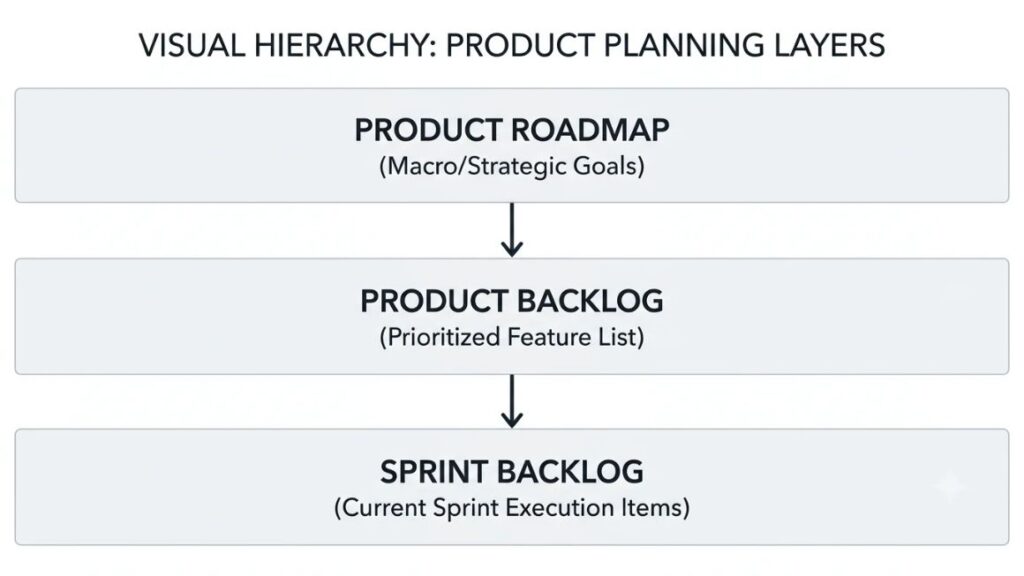
Think of three layers. The roadmap communicates strategic direction, the product backlog organizes potential work, and the sprint backlog holds the work chosen for one sprint.
Say a store wants to improve checkout this quarter. That’s the roadmap. A dozen checkout ideas sit in the backlog. Three of them, plus a plan for delivering them, make up this sprint’s backlog, which the Scrum Guide describes as a sprint goal plus selected items plus a delivery plan.
Product roadmap software typically draws the first layer, and delivery tools draw the other two. Some tools, Aha! being the obvious one, cover more than one layer.
Who Owns and Maintains the Backlog?
The Product Owner. In Scrum, that person is accountable for the backlog’s content, ordering and clarity. They can hand work to others, but the accountability stays put.
The wider team still does plenty. Developers help break items down, ask the awkward questions and estimate effort. Designers, support and sales feed in raw requests. A backlog nobody except the owner understands tends to rot.
Essential Features to Look for Before Choosing a Tool
Look for ranking and custom fields, user stories with acceptance criteria and dependencies, sprint and Kanban boards with reporting, integrations and permissions, and AI that saves admin time without making decisions for you. Here’s what each of those means in practice.
Prioritization and Custom Fields
Drag-to-rank is fine, but it isn’t a system. Good product backlog prioritization starts with fields you can score and sort by, such as value, effort, risk and customer segment. Check whether the tool lets you build a score field or whether you’ll be doing math in a spreadsheet.
User Stories, Acceptance Criteria, and Dependencies
Items should hold a description, acceptance criteria and links to related work. Epics and labels matter too. If your team plans around user journeys, look for a way to do user story mapping, a technique Jeff Patton popularized in which stories hang beneath the user activities they support. A map view helps, but epics and labels can stand in.
Sprint Planning, Kanban Boards, and Reporting
Open the sprint planning tools inside each product and ask three questions. Can you set sprint goals and capacity? Does unfinished work roll over cleanly? Can you see velocity and burndown without exporting data? Teams running Kanban should look for work-in-progress limits and cycle time instead.
Integrations, Permissions, and Collaboration
Your backlog should talk to your code host, chat tool and support desk. Also check who can see what. Some tools offer free viewer seats, such as Azure DevOps stakeholders and Productboard contributors, which keeps managers informed without paying for them.
AI, Automation, and Backlog Maintenance
Nearly every vendor in product management software now sells an AI layer. Useful jobs include summarizing feedback, drafting item descriptions, suggesting work breakdowns and flagging duplicates. Linear’s Triage Intelligence and Jira’s Rovo are examples.
But AI doesn’t know your strategy. Teams still need to validate requirements, priorities and estimates themselves. Treat AI output as a first draft from a quick junior colleague.
The best product backlog management tools let teams rank work using custom score fields, attach acceptance criteria, plan sprints, and connect to code and support tools. AI can summarize feedback and flag duplicates, but people must still validate requirements, priorities and estimates.
Also Read: How to Write a Product Requirements Document (PRD) Engineers Actually Use
How to Choose the Right Tool for Your Team?
Pick the tool that matches how your team already works, not the one with the longest feature list. Small software teams usually do well with Linear, Shortcut, ClickUp or a free plan, while larger or more process-heavy organizations lean toward Jira or Azure DevOps.
Start With Your Team Size and Workflow
Which tool is best for small teams? One that costs nothing until you’re sure. Free backlog management software is a real option at this size: Jira’s Free plan covers 10 users, Linear and ClickUp have free plans, Trello’s free tier fits 10 collaborators, and Azure DevOps includes five free users. At 40 people with several squads, permissions and reporting start to matter more than price.
Match Features to Your Development Process
Scrum teams need sprints, estimates and velocity. Kanban teams need flow metrics and limits. Hybrid teams need both without fighting the software. Pick the process first, then check the tool supports it natively rather than through workarounds.
Compare Total Cost, Not Just Subscription Price
Most agile project management tools charge per user, but the bill rarely stops there. Watch for AI add-ons, automation caps, minimum seat counts, paid guests and marketplace apps. Productboard charges by maker, monday dev sells seat buckets, and Linear and ClickUp both price AI separately from seats.
Test With a Real Project Before Committing
The best product backlog software is the one your team opens daily without being nagged. You only learn that by using it. Load one real project into two or three finalists and compare:
- Ease of use for people who don’t live in the tool
- Reporting you actually need
- Permissions and stakeholder access
- Integrations with your code and support tools
- Migration effort, including imports from your current tool
- Quality of support and documentation
- Features likely to force an upgrade within a year
How to Set Up and Maintain a Healthy Backlog?
A healthy backlog has one home for requests, clearly written items, a visible reason for the ordering, detail added shortly before work starts, and regular pruning. Follow these five steps in your chosen tool.
Step 1: Collect Requests in One Place
Pick one intake route, such as a form, Slack channel or triage inbox, and send everything there. Scattered requests are how good ideas get lost and duplicates multiply.
Step 2: Write Clear, Actionable Items
Each item should say who wants what and why, and how you’ll know it’s done. For example: “As a returning shopper, I want to save my delivery address so I can check out in fewer steps.” Acceptance criteria might be: the address saves after the first order, it appears pre-filled next time, and the shopper can edit or delete it.
Step 3: Prioritize by Value, Effort, and Risk
Common backlog prioritization techniques include RICE, MoSCoW and simple value-versus-effort scoring. RICE comes from Sean McBride, a former Intercom product manager, and works out as (Reach x Impact x Confidence) divided by Effort. Pick one method and use it consistently.
Step 4: Refine Items Before Sprint Planning
Backlog refinement is the act of breaking items down into smaller, more precise ones. Do it a sprint or two ahead, so the top of the list is ready when planning starts. Don’t polish items that sit at the bottom.
Step 5: Review Outcomes and Remove Outdated Work
Look back at what shipped and whether it moved the metric you cared about. Then delete or archive items nobody has touched in months. If an idea matters, it’ll come back.
Here’s a minimal product backlog template you can copy into any tool above, or a spreadsheet:
| ID | Title | Type | Description | Score | Effort | Status | Owner |
| 101 | Save delivery address | Feature | Returning shoppers skip retyping their address | 2.0 | Medium | Ready | Product owner |
Practical Example of Backlog Prioritization
Here’s an illustrative example, not a real company case study. A fictional online home-goods store has three requests on the table: improve checkout, add wish lists, and redesign the profile page. Which comes first?
Apply a Simple Value-versus-Effort Score
Score each request from 1 to 5 on customer impact, business value, effort and dependencies. Add customer impact and business value for total value, add effort and dependencies for total cost, then divide value by cost.
| Request | Customer impact | Business value | Effort | Dependencies | Score |
| Improve checkout | 5 | 5 | 3 | 2 | 10 / 5 = 2.0 |
| Add wish lists | 3 | 3 | 3 | 2 | 6 / 5 = 1.2 |
| Redesign profile page | 2 | 2 | 4 | 3 | 4 / 7 = 0.6 |
Checkout wins. But the score is a decision aid, not an automatic decision. If a legal change forces the profile page update by a fixed date, that deadline beats the number. And if the checkout work depends on a vendor who can’t deliver this quarter, the team might reasonably start somewhere else.
Common Backlog Management Mistakes to Avoid
Most backlog problems come from habits, not software. These six show up again and again.
- Keeping every idea indefinitely, until the list is too long for anyone to trust.
- Treating stakeholder urgency as the same thing as customer value.
- Writing vague tasks with no acceptance criteria, then arguing about what “done” meant.
- Overplanning work that’s unlikely to ship soon, since details go stale fast.
- Adding automations without clear ownership, so nobody knows who fixes them when they break.
- Measuring success by tickets closed alone, instead of outcomes for customers.
Conclusion
Match the tool to the team, not the other way round. Engineering-heavy teams with detailed processes will be at home in Jira or Azure DevOps. Small, fast software teams usually prefer Linear or Shortcut. Feedback-led product teams should look at Productboard, strategy-led organizations at Aha!, and cross-functional groups at ClickUp or monday dev. GitHub Projects and Trello cover the code-adjacent and lightweight ends.
Don’t migrate a whole backlog on a hunch. Shortlist two or three platforms, load a real project into each, and plan one sprint. The right product backlog management tools usually reveal themselves within a couple of weeks.
Choosing software is the easy part. Deciding what deserves the top spot in the backlog is the skill that separates good product people from busy ones. If you want to sharpen that skill, YUP’s Product Management course is the natural next step.
Frequently Asked Questions (FAQ)
What is the best tool for managing a product backlog?
There’s no single best tool. Jira suits complex engineering workflows, Linear suits fast software teams, Productboard suits feedback-driven prioritization, and ClickUp suits flexible cross-functional work. Choose by team size, process and budget, then test two or three on real work.
Are there free tools for product backlog management?
Yes. Jira’s Free plan covers up to 10 users, Linear and ClickUp offer free plans, Trello’s free tier supports 10 collaborators per workspace, and Azure DevOps includes five free Basic users. GitHub Projects comes with GitHub. Free plans cap things like users, issues, storage or automation, so check limits before relying on them.
What is the difference between a product backlog and a sprint backlog?
The product backlog is the ordered list of everything the team might build. The sprint backlog is the smaller set of items chosen for one sprint, along with a sprint goal and a plan for delivering them. Items move from the first to the second during sprint planning.
Which features are essential in a backlog tool?
You need ranking with custom fields, clear item descriptions with acceptance criteria, sprint or Kanban boards, basic reporting, integrations with your code and support tools, and sensible permissions. AI features are useful but optional. Dependencies and roadmap views matter more as your team grows.
How often should a product backlog be reviewed?
The Scrum Guide treats refinement as ongoing work, not a fixed meeting. In practice, many teams hold a short weekly session to prepare upcoming items and a deeper monthly or quarterly prune. Review more often when priorities shift quickly.
Can AI help prioritize product backlog items?
It can help, within limits. AI can group feedback, flag duplicates, draft descriptions and suggest scores. It can’t judge strategy, so people should check requirements, priorities and estimates before anything is committed.
Can a small startup use a spreadsheet instead of dedicated software?
For a handful of people working on one product, yes. A spreadsheet with ranking, status and owner columns works fine at first. Once you need sprints, integrations with code, or permissions for outside stakeholders, a dedicated tool pays for itself.