

You’re not working from one office network anymore. You’re on your home Wi-Fi on Monday, a coworking space on Wednesday, and whatever password the café hands you on Friday. Each of those networks handles your data differently, and most of them weren’t built with your company’s client files in mind.
That’s the real reason the search for the best VPNs for remote workers has gotten so much more specific over the last two years. It’s not about hiding your location to watch a show anymore. It’s about knowing which provider actually protects a work laptop moving between five different networks a week, without turning every Zoom call into a buffering wheel.
This comparison looks at five consumer VPNs remote workers actually use, plus where business VPNs and Zero Trust options fit in, based on published audits, protocol details, and pricing as of September 2026. One thing worth saying upfront: a VPN is one layer of your security setup, not the whole thing.
Table of Contents
Why Remote Workers Need a VPN in 2026
Remote Work Has Changed the Network Perimeter
There used to be one network to secure: the office one, with IT sitting a floor away. That’s gone for most of us. Your home Wi-Fi, a coworking space’s shared network, hotel Wi-Fi on a work trip, and open networks at airports and cafés now all carry sensitive traffic.
Public Wi-Fi security is the part that catches people off guard. An open network at a café doesn’t ask who you are before letting your device connect, which means anyone else on that network with the right tools can potentially see what you’re sending, unencrypted.
What a VPN Protects on an Untrusted Network
A VPN, or virtual private network, encrypts the connection between your device and a remote server. So anyone watching the network you’re on sees scrambled traffic instead of your actual data. It also masks your real IP address. That can reveal your rough location and tie traffic back to your device.
On public Wi-Fi, this reduces risks such as other users snooping on traffic. Encrypted tunnels don’t stop the network operator from seeing that you connected. But they limit visibility into what you did after connecting.
What a VPN Does Not Protect You From
A VPN encrypts your connection. It does nothing for the message that tricks you into typing your password into a fake login page. Phishing, malware already sitting on your device, weak or reused passwords, stolen credentials and social engineering all work whether your VPN is on or off.
Verizon’s 2025 Data Breach Investigations Report found that 60% of breaches involved a human element, including credential abuse, social engineering, errors and malware interaction.
How We Compared the Best VPNs for Remote Workers
Picking the best VPNs for remote workers isn’t the same exercise as picking a VPN for streaming a show on vacation. Remote work adds requirements that typical VPN roundups may not weigh properly: stable connections during client calls, features that let you route only some traffic through the tunnel, and pricing that doesn’t quietly triple after year one.
Performance claims below come from provider documentation, third-party audits and independent testing.
Security and Privacy
This covers encryption strength, protocol choice, kill switch reliability, DNS and IP leak protection, and whether a provider’s no-logs claim has actually been checked by an outside firm.
Speed and Connection Stability
Download and upload performance matter less for remote work than many reviews assume. Latency and reconnection reliability matter more. A VPN that drops and silently reconnects mid-call is worse for your job than one that’s slightly slower but stable.
Remote-Work Features
Split tunneling, device limits, dedicated IP availability, router-level setup, and business tiers can separate a household VPN from one that works well for professional use.
Streaming and Geo-Access
Streaming is included because many remote workers travel and still want access to services from home. It is a factor, but not the deciding one for this comparison.
What to Look for in the Best VPNs for Remote Workers?
VPN Encryption and Modern Protocols
VPN encryption turns readable traffic into scrambled data that’s useless to anyone intercepting it. AES-256 remains a common standard across major providers.
The bigger differentiator is protocol. The WireGuard protocol is a newer and leaner VPN protocol that’s faster and easier to audit than older options such as OpenVPN because of its smaller codebase. Most providers here don’t use stock WireGuard, though. NordVPN wraps it as NordLynx, while others build their own implementations around similar technology.
Kill Switch and Leak Protection
A kill switch cuts your device’s internet access if the VPN connection drops. That prevents your real IP and unencrypted traffic from leaking during the gap.
DNS and IP leak protection close a related gap by making sure DNS requests and traffic actually route through the encrypted tunnel instead of the regular network.
Split Tunneling
Split tunneling lets you choose which apps or sites route through the VPN and which use your normal connection. For remote work, you might tunnel work Slack and internal tools while allowing a local printer or personal app to connect normally.
Server Network and Location Coverage
More servers generally means more options for connecting to a nearby location, which can help reduce latency. NordVPN currently lists over 8,300 servers across more than 118 countries, while Proton VPN’s paid tier spans over 17,200 servers, according to each provider’s own network pages.
Speed and Stability for Video Calls
Video calls on Zoom, Microsoft Teams and Google Meet are more sensitive to latency spikes than raw download speed. A connection that’s slightly slower but stable can perform better than a faster connection that jitters every few minutes.
Device Limits and Multi-Device Support
Most remote workers use a laptop, phone and sometimes a tablet, often across work and personal devices. Surfshark allows unlimited simultaneous connections on every tier. NordVPN and ExpressVPN cap connections depending on the plan.
Dedicated IP Options
A dedicated IP gives you the same IP address every time you connect instead of a shared one that rotates. It’s useful for IP allowlisting on company systems. But most remote workers don’t need one unless a specific work tool requires it.
VPN Security Deep Dive: No-Logs Policies, Audits, and Privacy
What VPN Encryption Actually Does
Encryption scrambles your data using a key held by your device and the VPN server. So anyone intercepting traffic sees unreadable data. The trust question is separate: encrypted traffic still passes through the provider’s servers. That makes the provider’s data practices important.
Why No-Logs Claims Need Verification
Every VPN provider claims a no-logs policy. That claim is marketing copy until someone outside the company checks it. Verified audits provide stronger evidence that a provider’s stated practices have been examined.
Why Independent Security Audits Matter
The providers differ most in their published audit histories. So it’s worth looking at those records rather than relying only on privacy-policy claims.
NordVPN has completed six independent no-logs assessments to the ISAE 3000 standard, which includes PwC auditing in 2018 and 2020 and Deloitte auditing annually from 2022 through 2025.
Proton VPN has passed five consecutive annual no-logs audits from Securitum. The most recent was completed in May 2026.
Mullvad has published four infrastructure audits from Cure53. The most recent was in June 2024 which covered its OpenVPN and WireGuard server infrastructure.
ExpressVPN’s Trust Center lists 23 published audits. That includes a no-logs audit from KPMG in 2025 and reviews of its Lightway protocol.
Kill Switches, DNS Leaks, and IP Leaks
All five providers in this comparison include a kill switch and DNS leak protection as standard. They differ in default behavior, however, with some enabling the kill switch automatically and others requiring users to turn it on.
VPN Jurisdiction and Data Retention
Jurisdiction affects what a government can legally compel a provider to hand over. Proton VPN operates under Swiss law. Mullvad is based in Sweden and does not require an email address to sign up.
VPN Speed and Performance for Remote Work
What Causes VPN Speed Loss?
Every VPN adds some overhead because traffic is encrypted and may travel farther. Server distance, load, encryption, and protocol affect the result; WireGuard-based protocols generally reduce the performance penalty compared with older OpenVPN connections.
Why Latency Matters for Video Calls
Latency matters more than headline download speed for live calls. A modest but stable connection can perform better than a faster connection with frequent latency spikes.
WireGuard vs Other VPN Protocols
WireGuard has a smaller and more modern codebase than OpenVPN. That helps it establish connections efficiently and makes it easier to audit. NordLynx, Lightway and several providers’ WireGuard implementations build on this approach.
How to Interpret VPN Speed-Test Results?
Any VPN speed test reflects a particular tester, server, ISP, time and location. Use published rankings as rough comparisons, not guarantees for your own connection.
Best VPNs for Remote Workers Compared
We looked at each provider’s published feature set, audit history, and pricing as of September 2026 rather than running first-party benchmarks. Here’s how the five leading consumer options compare for remote work.
NordVPN
NordVPN runs NordLynx, which is its own implementation of the WireGuard protocol, alongside a kill switch. It offers split tunneling on desktop and mobile and a network of over 8,300 servers in more than 118 countries. It’s completed six independent no-logs audits to the ISAE 3000 standard, most recently by Deloitte in 2025.
Its Basic 2-year plan runs around $3.49 a month as a promotional rate. Monthly pricing is closer to $12.99 to $14.99. A dedicated IP is available as an add-on on select plans. Device limits run up to 10 depending on tier. Renewal pricing rises after the introductory term, so check it before committing.
NordVPN suits individual remote workers who prioritize audit history and broad server coverage.
ExpressVPN
ExpressVPN’s Lightway protocol, which was rewritten in Rust and independently reviewed by Cure53 and Praetorian in 2024. That includes a post-quantum encryption designed to address future decryption threats. Split tunneling is available on Windows, macOS and supported routers. The company’s Trust Center lists 23 published audits.
Pricing starts around $3.49 to $6.67 a month on longer-term Basic plans, with higher tiers costing more. Device limits run higher than NordVPN’s depending on tier. Its subscription also includes Keys, a built-in password manager.
For remote work, ExpressVPN emphasizes ease of use through a deliberately simple interface.
Surfshark
Surfshark’s standout feature for remote work is unlimited simultaneous device connections on every tier. It runs WireGuard, includes a kill switch and split tunneling, and its CleanWeb tool blocks ads and trackers at the network level.
Pricing is among the lowest on this list, with the Starter 2-year plan running as low as $1.99 to $2.49 a month. A dedicated IP is available as a $3.75-a-month add-on. There is no free tier, and renewal pricing rises after the promotional period.
For households or small teams covering many devices, the unlimited connection allowance is its main differentiator.
Proton VPN
Proton VPN is the one provider here with a genuinely usable free tier: one device, a limited selection of server locations, and no data cap, though speeds are capped. Its paid Plus tier adds access to over 17,200 servers, Secure Core multi-hop routing, and its Stealth protocol.
It’s passed five consecutive annual no-logs audits from Securitum as of May 2026 and publishes its client apps as open source on GitHub. That said, it operates under Swiss privacy law through Proton AG. Paid pricing runs roughly $2.99 to $9.99 a month depending on term and tier.
Proton VPN does not offer a dedicated business tier in the same way some providers do. That makes it more suited to individual workers and freelancers.
Mullvad
Mullvad charges a single flat rate of 5 EUR a month regardless of commitment length. That price has remained unchanged since 2009. You don’t need to provide an email address to sign up, only a randomly generated account number.
It runs WireGuard and OpenVPN and has published four infrastructure audits from Cure53. The most recent one was in June 2024. It supports five simultaneous devices. There’s no free tier and no built-in streaming optimization.
Mullvad suits privacy-focused remote workers who want a straightforward VPN without many bundled extras.
Business VPN Options for Remote Teams
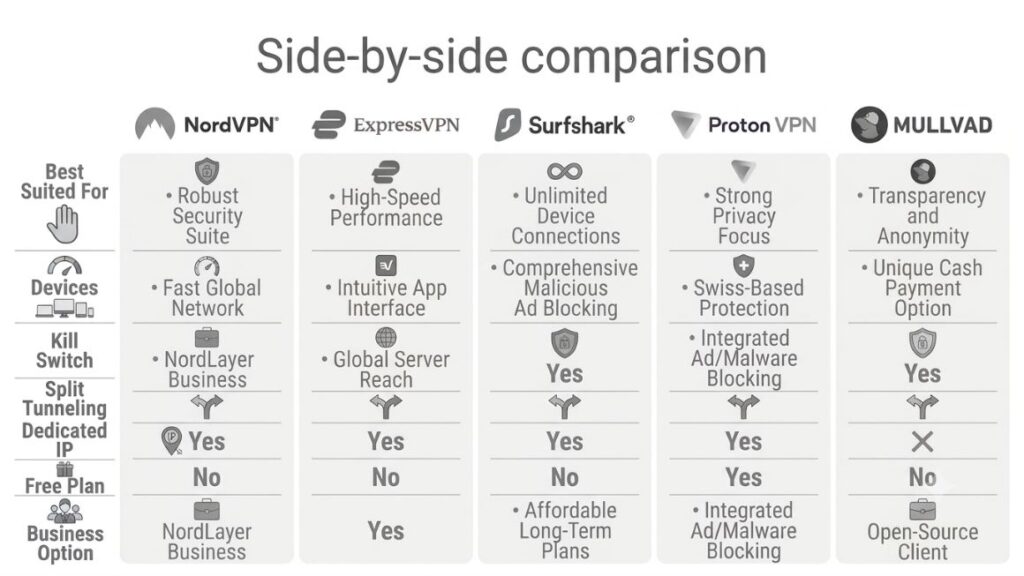
If you’re choosing for a team, the requirements change. Managed business VPNs add centralized administration, SSO integration, device and access policies, and business billing.
NordLayer, NordVPN’s business arm, starts around $7 per user per month. Consumer VPNs and Zero Trust platforms solve different problems. So they should not be treated as interchangeable products.
| VPN | Best Suited For | Devices | Kill Switch | Split Tunneling | Dedicated IP | Free Plan | Business Option |
|---|---|---|---|---|---|---|---|
| NordVPN | Remote workers who want security, speed and broad server coverage | 10 | Yes | Yes | Yes | No | Yes, NordLayer |
| ExpressVPN | Remote workers who prioritise ease of use and stable connections | Up to 14* | Yes | Yes | Yes | No | Yes |
| Surfshark | Remote workers who need protection across many devices | Unlimited | Yes | Yes | Yes | No | Yes |
| Proton VPN | Privacy-focused remote workers | 10 | Yes | Yes | Yes | Yes | Yes |
| Mullvad | Privacy-focused users who want simple pricing and minimal account data | 5 | Yes | Yes | No | No | No dedicated business tier |
VPN for Video Calls, SaaS, and Everyday Remote Work
Using a VPN With Zoom, Teams, and Google Meet
A stable and low-latency connection matters more than headline speed numbers. VPN for video calls performance depends on how the protocol handles constant small data packets. WireGuard-based protocols generally have lower overhead than older OpenVPN connections.
VPNs and Cloud/SaaS Applications
Most remote work happens in browser-based tools such as Google Workspace, Notion and CRMs. A VPN usually adds little noticeable overhead. But routing through another country can trigger extra login verification when a SaaS service uses IP location.
When Split Tunneling Can Improve Performance
Routing only work traffic through the VPN while personal or local-device traffic uses the normal connection can reduce unnecessary overhead. This is one of the more practical uses of split tunneling for remote workers.
Also Read: Performance Marketing Automation: Scaling Campaigns Efficiently
Do Remote Workers Need a Dedicated IP?
When a Dedicated IP Is Useful
If your company’s internal systems restrict access to approved IP addresses, a dedicated IP VPN is useful because it gives you a consistent address instead of a shared one that changes.
IP Allowlisting for Work Systems
This is most relevant for finance, operations, engineering or other roles where admin panels, databases or internal tools restrict access by IP.
When You Don’t Need a Dedicated IP
For most remote workers, a shared IP works fine. A dedicated IP does not make your connection more anonymous. Treat it as a convenience feature for specific allowlisting requirements.
Also Read: Review of Proxy-Seller for Efficient Sales Operations
Consumer VPN vs Business VPN vs Zero Trust Network Access
Consumer VPNs for Freelancers and Individual Workers
For a freelancer or solo remote employee managing their own work from home VPN, a consumer VPN is generally sufficient because it protects a personal connection and devices.
Business VPNs for Remote Teams
Company billing becomes more important for a VPN for remote teams, centralized user management and consistent policies. Secure remote access at this scale is about managing access consistently instead of just encrypting traffic.
Zero Trust Network Access for Distributed Organizations
Zero trust network access, or ZTNA, replaces broad network access with identity- and device-verified access to individual applications. Providers such as Twingate, Cloudflare Access and Tailscale offer this model. Pricing varies by product and scale.
Gartner projected that at least 70% of new remote-access deployments would use Zero Trust Network Access rather than legacy VPNs by the end of 2025. This is a projection instead of a measurement of every deployment.
When Should a Company Move Beyond a Consumer VPN?
The trigger is usually team size and compliance requirements, not a fixed headcount. A small startup may manage with individual subscriptions. A company handling client data or operating in a regulated industry may benefit from centralized controls much earlier.
Also Read: Building a Secure Digital Marketing Workflow for Distributed Teams
What Remote Teams Should Check Before Choosing a Business VPN
Centralized User Management
Look for a single dashboard to add, remove, and manage team access instead of separate personal accounts.
SSO and Identity Integration
SSO through Google Workspace, Microsoft Entra or Okta ties access to company identities and simplifies offboarding.
Device and Access Policies
Check whether the platform can enforce device requirements like an updated operating system or active security software.
Dedicated IPs and Gateways
Check whether dedicated IPs or private gateways are included or priced separately.
Audit and Compliance Documentation
Ask for current SOC 2 or ISO 27001 documentation rather than relying on a general compliance claim.
Can You Use a Free VPN for Remote Work?
What Free VPN Plans Usually Limit
Free tiers commonly limit data, locations, speed, or devices. Proton VPN is the notable exception, offering unlimited data but one device and a smaller server pool.
When a Free VPN May Be Enough
A reputable free tier may be enough for occasional public Wi-Fi use. Daily work traffic calls for closer scrutiny of audits, limits, and logging practices.
What to Check Before Using a Free VPN
Before using a free VPN, check its audit history, data and speed limits and device support. See whether it has a credible path to business use.
Streaming and Geo-Access While Working Remotely
Streaming While Traveling
For work travel, major VPNs can help access services from home. But reliability changes as streaming platforms update their VPN blocking.
Accessing Region-Specific Services
The same issue can arise with region-specific banking or work services. But changing your IP does not guarantee access.
Why VPN Geo-Unblocking Is Not Guaranteed
Streaming platforms actively block known VPN IP ranges. So geo-unblocking can change over time. It should not be the main factor when choosing a work VPN.
How Much Does a VPN for Remote Work Cost?
Consumer VPN Pricing
Across the five providers, long-term consumer pricing ranges from Mullvad’s flat 5 EUR a month to promotional rates around $1.99 to $2.99 a month on two-year plans.
Business VPN Pricing
Business and Zero Trust products generally cost more per user because they add administration and access controls. Examples in this comparison include NordLayer, Twingate and Zscaler Private Access.
Promotional vs Renewal Pricing
Prices were checked in September 2026. But promotional and renewal rates can change. Check the renewal price before committing, especially on two-year plans.
Extra Costs for Dedicated IPs
Where offered, a dedicated IP typically adds about $2 to $5 a month to the base plan.
How to Set Up a VPN for Remote Work?
- Choose and install your VPN. Pick a provider from the comparison above, sign up and install the desktop and mobile apps for every device you use for work.
- Select a VPN protocol. Most apps default to WireGuard or the provider’s own WireGuard-based protocol. Only switch to OpenVPN if a specific network blocks WireGuard traffic.
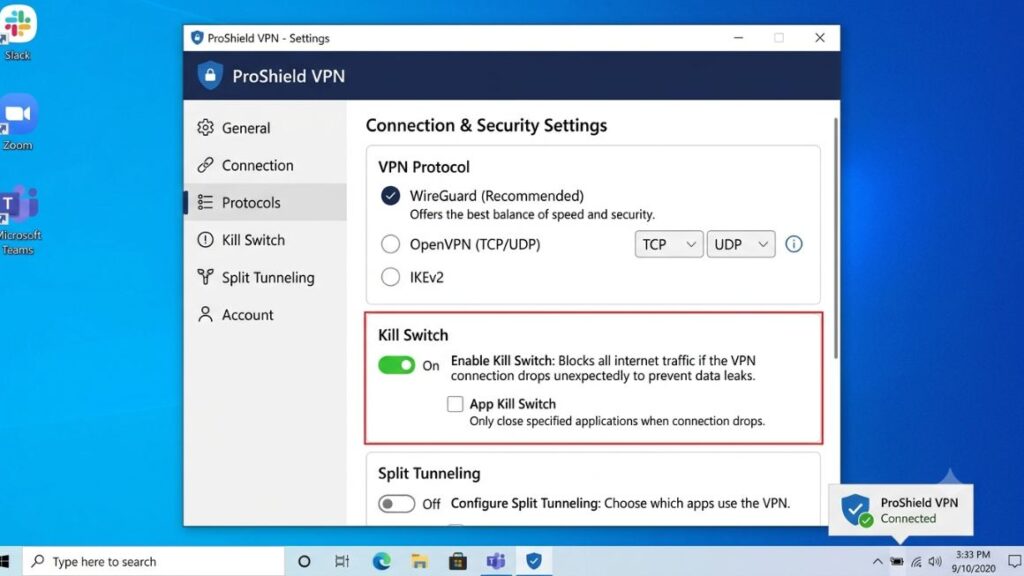
- Enable the kill switch and auto-connect. Turn on the kill switch so traffic doesn’t leak if the connection drops. Enable auto-connect on untrusted networks such as public Wi-Fi.
- Configure split tunneling. If your provider offers it, choose which apps route through the VPN and which don’t, keeping work tools tunneled and other traffic on your normal connection.
- Test your connection. Check your IP address before and after connecting and run a quick speed check to make sure the connection is stable enough for calls.
Should You Use a Personal VPN on a Company Device?
Personal VPN vs Employer VPN
If your company laptop already uses an employer VPN or ZTNA client, a second personal VPN can conflict with security tools or violate device policy.
Company-Owned Devices and IT Policies
Managed devices often restrict software to maintain a consistent security and compliance setup, so an unapproved personal VPN can interfere with IT controls.
When to Ask Your IT Team First
Before installing a personal VPN on a company laptop, ask IT first.
Common VPN Mistakes Remote Workers Make
- Choosing only based on price. The cheapest plan can have a weaker audit history or a large renewal increase.
- Leaving the kill switch off. Skipping it removes an important protection against traffic leaks.
- Ignoring privacy policies and audits. A no-logs claim without independent verification is only a provider statement.
- Assuming a VPN provides complete security. It does not cover phishing, malware, or weak passwords.
- Installing a personal VPN without checking company policy. It can conflict with employer security tools or policies.
Conclusion
The best VPNs for remote workers aren’t one-size-fits-all. The right option depends on how you work. An individual remote worker who wants broad server coverage and a long audit trail can consider NordVPN. Someone managing many devices can consider Surfshark’s unlimited connections. A privacy-focused freelancer who wants a free tier can consider Proton VPN. Mullvad offers a flat and predictable price with a privacy-focused setup.
Freelancers managing client data on their own gear should prioritize audit history alongside price. Remote teams should consider moving from individual consumer subscriptions to a managed business VPN or Zero Trust platform when centralized control and compliance requirements make them necessary.
Whichever setup fits your needs, a VPN works best as one piece of a broader security habit: strong unique passwords, two-factor authentication wherever available and caution around suspicious links and login requests.
Want more breakdowns like this one, built for people actually doing the work rather than reading about it? Subscribe to the Crystal Clear Newsletter for practical marketing and tech comparisons delivered straight to your inbox.
Frequently Asked Questions About VPNs for Remote Workers
Do remote workers really need a VPN?
Especially when using coworking spaces or public networks. A VPN encrypts traffic on networks you don’t control. But it does not replace strong passwords or two-factor authentication.
What is the best VPN for working from home?
There’s no single option for everyone. NordVPN emphasizes audit history and server coverage. Surfshark offers unlimited device connections. Proton VPN has a genuine free tier.
Is a VPN safe for remote work?
A VPN with a verified no-logs audit and kill switch can add useful protection on untrusted networks. But provider practices and your wider security setup still matter.
Does a VPN slow down video calls?
It can add latency, but modern protocols such as WireGuard often keep the impact small. Server distance and load also matter.
Should I use a VPN on public Wi-Fi?
Yes. A VPN encrypts traffic on networks you don’t control. That reduces the risk of local network snooping.
What is split tunneling?
Split tunneling routes selected apps through the VPN while other traffic uses the normal connection. It can reduce unnecessary overhead.
Do remote workers need a dedicated IP?
Only when a work system requires an approved and consistent IP address. It does not make you more anonymous.
Is a free VPN safe for remote work?
Some can be suitable, but check the provider’s audit history, logging practices, limits and device support before using a free plan for work traffic.
Is a business VPN different from a personal VPN?
Yes. Business VPNs add centralized management, SSO, policy controls and team billing for organizations.
Is a VPN better than Zero Trust Network Access?
They solve different access models. A VPN can provide network-level access after connection, while ZTNA verifies identity and device context for individual resources.