
Open your bank statement and add up every SaaS subscription you paid for last month. Most freelancers do this exercise once a year, usually after a slow month. The number is almost always bigger than they expected. A freelancer tools stack has a way of growing quietly. You add a tool to solve one problem, forget to cancel the last one and six months later you’re paying for three apps that do the same job.
India’s freelance workforce is part of why this matters now more than ever. The country’s gig and freelance workforce is projected to touch 12 million or more platform-registered professionals in 2026, and India’s freelance market is on track to reach roughly $25 billion by 2026. More people are going independent, and most of them are copying whatever tools stack a YouTube video or a well-meaning friend recommended, without asking whether it actually fits a one or two person operation.
This guide is not a list of every tool that exists. It’s a filter. For each job a freelancer’s business actually has, from invoicing to project management to AI, you’ll see what a lean setup looks like, when it’s genuinely time to upgrade, and where freelancers routinely waste money on tools built for teams they don’t have.
Table of Contents
Why Most Freelancers Get Their Tools Stack Wrong
Most freelancers build their tools stack by accident. They inherit a workflow from a past job, panic-buy a tool after one bad client experience, or copy whatever an agency uses because it looks professional. The result falls into one of two failure patterns, and almost every freelancer we’ve spoken with at YUP has lived through at least one of them.
The Overbuilt Stack – Copying an Agency’s Tech Stack
This is the freelancer who signs up for ClickUp’s Business plan, a CRM built for a sales team of five, and a project management suite designed for cross-functional departments, then uses about 15% of what any of it does. The instinct makes sense. If an agency with 40 employees uses these tools to run smoothly, surely they’ll help a solo operation too.
They don’t, not the same way. An agency’s tools stack exists to coordinate people who don’t talk to each other daily. A freelancer working with three to six clients doesn’t have that coordination problem. What they have instead is a monthly bill for enterprise features nobody on a one-person team will ever touch, like approval workflows, custom roles, or resource allocation dashboards designed for a 20-person bench.
The Underbuilt Stack – Running the Business on WhatsApp and Excel
The opposite failure looks cheaper on paper and often costs more in the long run. This freelancer invoices through a WhatsApp message with a bank account number typed out, tracks project status in their head, and finds out a payment is late only when they run out of cash. It works, until a client disputes a GST-inclusive rate they never agreed to in writing, or a foreign client’s payment sits unaccounted for because there’s no invoice trail to match it against.
The underbuilt stack isn’t really cheaper. It just moves the cost from a subscription bill to unbilled hours, missed follow-ups, and the kind of compliance mess that surfaces exactly when you can least afford to deal with it, at tax filing time.
The Six Jobs Every Freelancer Tools Stack Must Cover
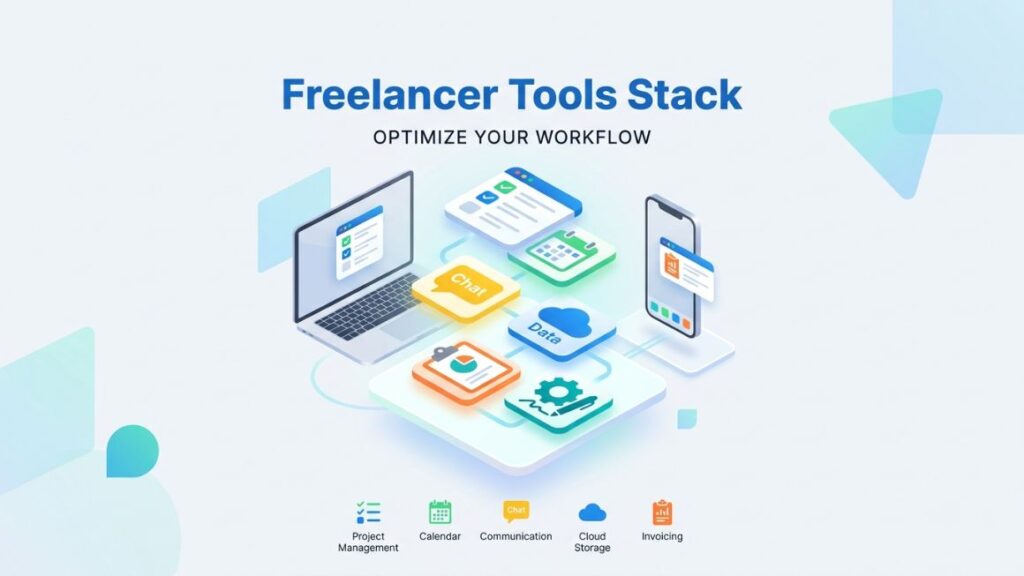
A freelancer tools stack needs to handle six jobs at minimum: proposals and contracts, invoicing and payments, time tracking, project management, client communication and file storage or accounting. Everything else is optional. Most of the “must-have” tools freelancers get talked into fall outside this list entirely.
The trick is matching each job to the smallest tool that does it reliably, not the most feature-rich one available. A freelancer billing four clients a month needs a working invoice template far more than they need automated recurring billing across multiple currencies with custom approval chains. Build the stack in this order: get paid reliably first, track time only if you bill hourly, manage projects only once WhatsApp genuinely breaks down, and keep client communication to channels you actually check.
Freelance Invoicing Software – What You Actually Need
Direct answer: most solo freelancers in India need one GST-compliant invoicing tool that handles domestic billing cleanly, and a separate payment gateway or receiving account for foreign clients. You rarely need both problems solved by the same product, and trying to force one tool to do both is where a lot of freelancers overspend.
GST and Compliance-First Picks (Zoho Invoice, Refrens, GimBooks)
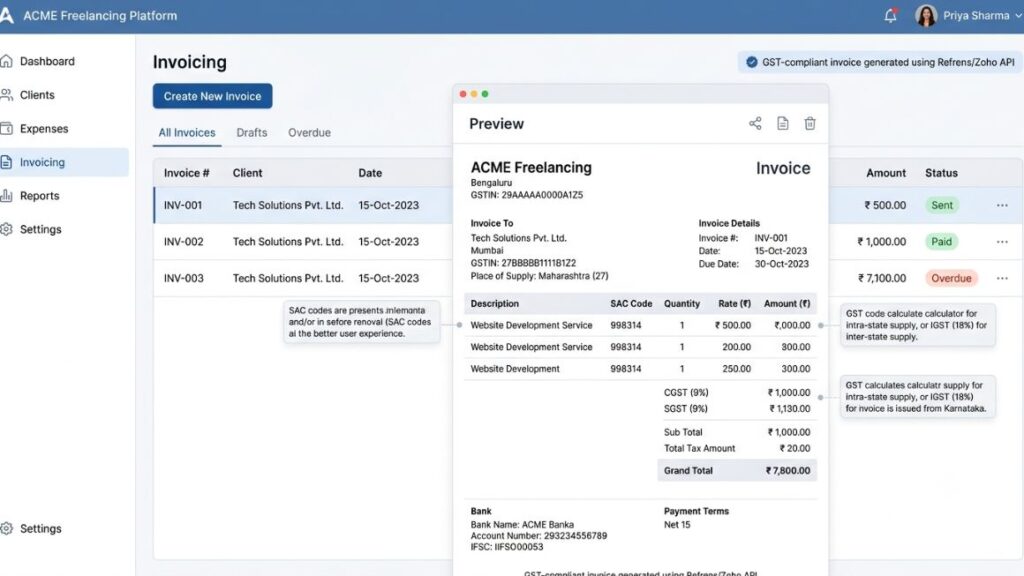
If you’re below the GST registration threshold of ₹20 lakh in aggregate turnover a year, or ₹10 lakh in special category states, you don’t need GST fields at all. A simple invoice with your name, PAN, and bank details is legally fine. Past that threshold, or if you register voluntarily to work with GST-registered clients who want input tax credit, you need a tool that gets the CGST, SGST, and IGST splits right.
Zoho Invoice remains the default free option, and for good reason. It handles CGST/SGST auto-calculation and e-invoicing at zero cost, which covers most solo freelancers without a rupee spent. The tradeoff is setup time. Zoho’s interface carries the weight of its wider product ecosystem, so expect to spend a real afternoon configuring templates and tax rates before your first invoice goes out.
Refrens is the sharper and India-first alternative. Its GST handling includes CGST/SGST/IGST splits, HSN/SAC codes and place-of-supply logic. It comes with a noticeably cleaner interface than Zoho’s. The catch is the free plan’s ceiling. You get 15 documents total, not per month, and a freelancer billing regularly will hit that wall by month two, at which point you’re paying for what Zoho gives away.
GimBooks fits a different freelancer: someone who wants invoicing bundled with light expense tracking and inventory support, and who prefers working from a phone. It combines billing, expense tracking, and financial reporting in one mobile-first interface, which matters if your work involves picking up jobs between client sites rather than sitting at a laptop all day.
GST invoicing for freelancers isn’t optional past the threshold. Getting the SAC codes and place-of-supply logic wrong is what triggers the notices nobody wants at renewal time. Pick whichever of these three matches how you actually invoice. It is not the one with the longest feature list.
| Tool | Best for | GST handling | Free tier limit |
| Zoho Invoice | Freelancers who want zero cost | CGST/SGST auto-calc, e-invoicing | Generous and more setup time |
| Refrens | India-first billing with clean UI | CGST/SGST/IGST, HSN/SAC and place of supply | 15 documents lifetime |
| GimBooks | Mobile-first and expense tracking | GST-compliant templates | Free plan with basic accounting |
International Payment Picks for Dollar/Euro Clients (Wise, Karbon and Payoneer)
Invoicing software only creates the document. Getting the money into your account without losing a chunk of it to hidden FX markup is a separate job, and this is where most Indian freelancers with international clients quietly bleed money without noticing.
Choosing a freelance payment gateway for India comes down to volume and speed. Wise offers transparent mid-market rates and works best for occasional direct client transfers under $10,000. Payoneer suits freelancers relying on marketplace payouts from Upwork or Fiverr, where free receiving offsets its higher conversion markup. Karbon Business and similar India-first platforms combine a flat 1% fee, zero FX markup, and automated e-FIRA generation, which usually wins on total cost for freelancers who invoice international clients directly and often.
Read More: Making a Digital Marketing Proposal – Step-by-Step Guide
Getting Paid Without Losing Money to FX Markups
How do Indian freelancers get paid by foreign clients without high fees?
Compare total cost, not just the headline fee. A platform with a low receiving charge and a wide FX spread can cost more than one with a slightly higher flat fee and a mid-market rate. The gap widens as the invoice size grows.
Take a $5,000 invoice, a common size for a mid-project milestone. With Payoneer’s roughly 1% receiving fee plus a 2 to 3% conversion markup, you could lose somewhere between $150 and $200, or close to ₹13,000 to ₹17,000, in fees alone. That’s real money for a single invoice, gone before it ever hits your bank account.
Wise generally wins on the conversion math itself. Wise usually offers a cheaper exchange rate than Payoneer, which is the largest cost component for most Indian freelancers. Where Wise falls short is compliance paperwork. Wise charges a separate fee, typically around $2, for a FIRA certificate on a specific transaction, and it isn’t generated automatically by default. If your accountant needs that document every time to close the books cleanly, the friction adds up even if the fee doesn’t.
India-first platforms built specifically for this problem, such as Karbon Business, close that compliance gap. Karbon combines a flat 1% fee, zero FX markup at mid-market rates, 24 to 48 hour INR settlement, and automatic e-FIRA generation. For a freelancer who bills international clients monthly and doesn’t want to chase paperwork every quarter, that automation is worth more than shaving another fraction of a percent off the FX rate.
There’s a compliance layer underneath all of this that’s easy to skip until it isn’t. Freelancers earning from international clients should export under a Letter of Undertaking, register for GST, file the LUT application on the GST portal before the financial year starts, and then issue invoices to foreign clients without GST while keeping the FIRC as proof of export payment. Miss this and you either pay IGST upfront and wait on a refund, or worse, get flagged at review because your invoice terms don’t match your bank receipts.
The realistic default for most freelancers with a mix of domestic and international clients: Wise or Karbon for receiving, GST registration and an LUT once you’re above ₹20 lakh or working steadily with foreign clients, and a folder (physical or digital) where every FIRC, LUT acknowledgment, and export invoice lives together. That folder saves more stress at tax time than any single tool on this list.
Read More: How to use Zapier to automate marketing workflows?

Freelance Project Management Tools – Where Freelancers Overspend
Project management is the category where the overbuilt stack shows up most often, because it’s the easiest one to justify buying up front. A freelancer sees a client with three deliverables and reasons that a “real” project management tool will keep them organized. Often, it just adds a tab they check less often than the WhatsApp thread the client actually messages them on.
When a Free Trello/Notion Board Is Genuinely Enough
If you’re working with two to five clients and each project has under a dozen distinct steps, a free Trello board or a Notion page does the job completely. Trello’s free Workspace supports up to 10 collaborators with unlimited cards, which covers most solo freelancers indefinitely, and Notion’s free plan works well for individual use, blurring the line between a project tracker and the brief, meeting notes, and SOP sitting right next to it.
The honest test: if you can describe your current project status in one sentence per client without opening a tool, you don’t need more structure than a board gives you. Most freelance writers, designers and single-service consultants fall into this category. Paying for anything more just adds a login you’ll forget the password to.
When You Actually Need ClickUp, Asana, or a Client Portal
The signal to upgrade isn’t the number of clients. It’s the number of moving parts per project. If you’re managing recurring deliverables across six or more active clients, coordinating with subcontractors, or clients keep asking “where are we on this” because your update process is inconsistent, that’s when a heavier tool earns its subscription.
ClickUp’s paid tiers make sense for freelancers who’d otherwise pay separately for a Kanban board, a docs tool and an automation platform. It consolidates all three into one subscription. Asana works better if you want a cleaner and more opinionated interface and don’t mind a steeper jump in per-seat pricing once you outgrow its free tier. Neither replaces judgment. A client portal matters more for client-facing polish than the internal tool you pick, whether built inside ClickUp or as a simple shared Notion page.
Most solo freelancers only need to upgrade from a free Trello or Notion board once they’re juggling recurring deliverables across six or more active clients, not simply because their client count grew. ClickUp works best for freelancers who’d otherwise pay for three separate tools. Asana suits those who want a cleaner interface and are willing to pay more per seat for it.
Time Tracking – Skip It, Unless You Bill Hourly
Direct answer: if you charge fixed project rates, you don’t need a freelance time tracking app at all. Time tracking exists to justify an hourly invoice, and if there’s no hourly invoice, tracking every minute just adds admin work with no output attached to it.
Fixed-price freelancers, the majority of Indian freelance writers, designers, and consultants working project-based, don’t benefit from logging hours. It doesn’t change what the client pays, and obsessively watching a timer can slow down the actual work more than it helps. If this describes you, skip the entire category.
Hourly billers are the exception, and here a lightweight tracker earns its place. Clockify’s free plan supports unlimited time tracking, which is enough for most solo consultants who bill by the hour and need a clean log for invoicing and client transparency. There’s rarely a reason to pay for a premium time tracker as a solo freelancer. The paid tiers add team reporting and workload dashboards built for agencies managing multiple billable staff, not a single person tracking their own hours.
Client Communication Tools That Don’t Turn Into a Second Job
The mistake here isn’t picking the wrong tool. It’s picking too many. Every new communication channel a client can reach you on is another inbox you have to check. Freelancers who spread themselves across email, WhatsApp, Slack, Instagram DMs and a project tool’s comment section end up managing communication as a full second job.
Keep it to email for anything contractual (scope changes, invoices and approvals) and exactly one real-time chat channel per client relationship, whichever the client already prefers. Adding a second channel “just in case” doesn’t add reliability. It adds a place where a message can get lost.
A short screen-recorded walkthrough beats a long written status update almost every time for async updates. That is especially the case with clients across time zones. It shows the work instead of describing it. A client watching a two minute video absorbs more than they would from ten bullet points. A booking link removes the back-and-forth of “does Tuesday work” entirely for scheduling. Calendly’s free tier covers a single event type. That is all most solo freelancers actually need for client calls.
AI Tools Freelancers Are Actually Using in 2026
India leads the world on this front, for whatever it’s worth to your own adoption decision. India’s generative AI usage rate stands at 73%, ahead of Australia at 49%, the US at 45%, and the UK at 29%. Freelancers here aren’t behind the curve. If anything, the risk is the opposite: subscribing to five AI tools that each do a slightly different flavor of the same thing.
The freelancers getting real value from AI tools tend to organize their stack around specific jobs instead of general hype. Claude or a similar assistant for proposals and long-form writing, a meeting-notes tool like Granola or Fathom for turning client calls into usable summaries, and an email triage tool for cutting down inbox time cover the bulk of what a solo operator actually needs day to day.
For design-heavy freelancers, Canva paired with a research or writing assistant covers most client presentation and content production needs without adding a specialist tool for every format. For automation, Make’s Core plan at roughly $9 a month handles most freelance workflows with a generous free tier to start on, while n8n suits freelancers comfortable self-hosting for more complex branching logic.
The most effective AI tools for freelancers in 2026 are organized by job, not by hype. A writing assistant for proposals, a meeting-notes tool for client calls and a lightweight automation platform for repetitive admin cover most of a solo freelancer’s workload. India’s 73% generative AI usage rate is the highest of any major market. That suggests most freelancers here are already reaching for at least one of these.
Where freelancers overspend on AI specifically: subscribing to a dedicated tool for every single task category (one for writing, one for image generation, one for transcription and one for scheduling). But a single strong general assistant plus one or two specialist tools can cover 80% of the work. Add a new AI subscription only when a specific and recurring bottleneck justifies it, not because a tool looked impressive in a demo.
Read More: AI Agents for Content Marketing: How Autonomous Workflows Are Replacing Manual Content Ops in 2026
The Overkill List – Tools Freelancers Buy and Barely Use
Some purchases show up again and again in freelancer subscription audits, and they share a pattern: each one solves a real problem, just not the freelancer’s actual problem.
- Enterprise-tier project management suites bought for features like custom approval chains, resource allocation dashboards, or portfolio-level reporting, none of which apply when you’re the only “resource” being allocated.
- Two or three overlapping subscriptions doing the same job. A Notion workspace, a Trello board, and a ClickUp account all running at once because nobody got around to fully migrating off the old ones and canceling them.
- A full CRM built for a sales team pipeline, bought to manage a client roster of three to five people you could track just as easily in a spreadsheet or a Notion database.
- Multiple AI writing tools with near-identical output, subscribed to in parallel instead of picking one and learning its prompting quirks well enough to get consistent results.
- A premium time tracker with team reporting features, purchased by a solo fixed-price freelancer who was never going to bill by the hour in the first place.
How to Budget Your Freelance Tools Stack?
The Percentage-of-Revenue Rule
A workable rule of thumb: cap your tools stack spend at 3 to 5% of monthly freelance revenue. Below that, you’re likely underbuilt and losing time to manual work. Above 8 to 10%, you’re almost certainly paying for features you don’t touch. It’s worth an honest audit of what’s actually earning its subscription.
This scales naturally as you grow. A freelancer billing ₹40,000 a month has a very different ceiling than one billing ₹2 lakh a month. The tools should scale with revenue, not the other way around. Don’t upgrade your stack in anticipation of growth that hasn’t happened yet.
A Sample Lean Stack for Under ₹2,000/Month
| Job | Tool | Monthly cost |
| Invoicing (GST) | Zoho Invoice (free tier) | ₹0 |
| International payments | Wise or Karbon (pay per transaction, no subscription) | ₹0 base |
| Project tracking | Trello or Notion (free tier) | ₹0 |
| Time tracking (if hourly) | Clockify (free tier) | ₹0 |
| Client scheduling | Calendly (free tier) | ₹0 |
| AI writing/research assistant | Claude Pro or equivalent | ~₹1,700 |
| Total | Under ₹2,000 |
Every tool on that list has a paid tier waiting for you the moment you outgrow the free plan, and that’s the point. Start free, and pay only for the one or two jobs where the free tier genuinely starts costing you time or client trust.
Conclusion
A freelancer tools stack isn’t a status symbol, and it isn’t a one-time decision either. The freelancers who get the most value from theirs review it every three to six months. Cut what’s gone unused and add only what a specific and recurring bottleneck justifies. Start with the six jobs every stack needs to cover and lean on free tiers until they genuinely break. Let your revenue, not your ambition, decide when it’s time to upgrade.
FAQ
What is a freelancer tools stack?
A freelancer tools stack is the combination of software an independent professional uses to run their business, typically covering invoicing, payments, project tracking, time tracking, client communication, and file storage or accounting. It’s the operational layer underneath the actual client work.
Do I need paid invoicing software if I only have 2 to 3 clients?
Not usually. Zoho Invoice’s free tier handles GST-compliant billing for most freelancers at this scale, and paid invoicing tools only make sense once you exceed a free plan’s document limit or need automated recurring billing across multiple currencies.
Zoho Invoice vs Refrens – which is better for GST compliance?
Both handle CGST, SGST, and IGST correctly. Zoho Invoice’s free tier is more generous for document volume, while Refrens has a cleaner interface and stronger place-of-supply logic, but caps free accounts at 15 documents total, not per month.
How do I get paid faster from international clients?
Use a platform with mid-market FX rates and automated compliance documents rather than a general remittance service. Wise offers strong conversion rates for occasional transfers, while India-first platforms like Karbon Business add automatic e-FIRA generation, which speeds up your own accounting even if the transfer time is similar.
Is Notion enough for freelance project management?
Yes, for most solo freelancers managing two to six clients with straightforward deliverables. Notion’s free plan supports unlimited blocks for individual use. It doubles as a place to keep briefs and notes next to the task list itself. Upgrade only once you’re coordinating recurring work across many active clients at once.
Do freelancers really need time tracking software?
Only if you bill by the hour. Fixed-price freelancers gain nothing from logging time since it doesn’t change the invoice amount, and the habit of tracking every minute can slow down the actual work.
What’s the most overrated freelance tool right now?
Enterprise project management suites bought for features solo freelancers never use, like resource allocation dashboards or multi-level approval chains. These tools are built to coordinate teams. A freelancer working alone doesn’t have a coordination problem to solve.
Why do my invoices keep getting paid late even with reminders?
Late payment is usually a process problem, not a reminder-frequency problem. Check whether your invoice terms are clear about due dates upfront, whether you’re invoicing immediately on delivery instead of days later, and whether the client actually received a GST-compliant invoice they can process on their end without going back to you for corrections.