

Freelancers don’t usually go broke because of one bad client. They go broke in the gaps: the two hours spent writing a proposal that never gets read. The follow-up emails that eat a Tuesday morning. The invoice that goes out four days late because it slipped your mind. The best AI tools for freelancers in 2026 exist to close exactly those gaps, and the ones that matter most aren’t always the flashy ones you see in a LinkedIn post.
Most of the noise around AI tools for freelancers is about content generation. Write faster, design faster and code faster. That’s real, but it’s only half the story. The other half is the unbillable admin that never shows up on an invoice: proposals, contracts, meeting notes and the fifteen small follow-ups that keep a client relationship alive.
This guide covers both halves. You’ll find the tools worth paying for, the ones you can skip and a full stack you can run for under ₹4,000 a month if you’re freelancing out of India.
Table of Contents
Why AI Tools Matter More for Solo Freelancers Than Agencies
For a solo freelancer, every hour an AI tool saves you is an hour you can put back on a client’s invoice. At an agency, that same hour usually just gets absorbed into someone’s salaried day. That’s the real reason AI tools for freelancers matter here in a way they don’t for a 40-person shop.
Think about the margin math. If you charge ₹2,000 an hour and an AI tool saves you six hours a week on drafts, research and admin, that’s ₹12,000 a week you either bill elsewhere or get back as time. A ₹500 tool that buys back six hours isn’t an expense. It’s the highest-return line item most freelancers have.
Agencies don’t feel that math the same way. A designer on salary who saves four hours in a week still gets paid the same amount that week, and the saved time often just gets reallocated to the next internal task in the queue. A freelancer’s saved hour is either billed or it’s genuinely free time. There’s no in-between, which is exactly why the incentive to adopt AI tools well is so much sharper when you’re the one who eats or keeps every hour.
The India context makes this sharper still. According to the Freelance Economy Report 2026 by Ruul, 74% of independent workers were using generative AI by 2025. That is up from 65% the year before and ahead of the 69% adoption rate among traditionally employed workers. AI-enabled freelancers in that same report commanded a 40% hourly premium over freelancers who skipped AI entirely. Content creation was the single biggest use case, followed by coding and client communication.
India’s freelance workforce is growing into this shift, not away from it. The India Skills Report 2026 projects the country’s gig and freelance workforce may reach 23.5 million people by 2030. Project-based hiring is rising 38% year-on-year. That’s a lot more freelancers competing for the same clients. The ones running an AI stack are the ones pricing themselves out of the race to the bottom.
AI-enabled freelancers commanded a 40% hourly premium over non-AI freelancers in 2025. Adoption reached 74% of independent workers that year. That is ahead of the 69% adoption rate among traditional employees. For solo freelancers, hours saved by AI convert directly into billable capacity. This isn’t true at agencies, where saved time is usually absorbed into overhead instead.
How to Build an AI Stack Instead of Collecting Random Tools?
The freelancers who get the most out of AI aren’t the ones with the most subscriptions. They’re the ones who picked one tool for each stage of their work and stopped there.
Map Your Work to the Freelance Cycle
Every freelance business runs through the same five stages: find clients, propose, deliver, communicate and bill. Most people buy tools stage by stage, reactively, whenever a specific pain point gets bad enough. That’s how you end up with three subscriptions doing almost the same job.
Instead, walk through the cycle once and ask where AI actually removes work. Don’t just ask where it looks impressive. Finding clients might not need an AI tool at all; that’s still mostly relationships and referrals. Delivery probably needs two or three tools, depending on what you deliver. Billing usually needs exactly one.
Write this down once, properly, and revisit it every quarter rather than every time a new tool launches. The freelance cycle doesn’t change much month to month. Your tools shouldn’t either.
Why “One Tool Per Stage” Beats Five Overlapping Subscriptions
Here’s the problem with collecting tools: most of them do 80% of the same thing. ChatGPT, Claude, and Perplexity can all draft an email. Otter.ai and Fireflies.ai can both transcribe a call. Paying for two of anything in the same category is money spent on redundancy, not capability.
Pick the tool that’s best at the thing you do most, not the tool with the most features. A content writer who occasionally checks a fact doesn’t need Perplexity’s full research stack. A developer who writes very little client-facing copy doesn’t need a dedicated proposal generator. Match the spend to the actual workload, and cut anything that’s there because it seemed useful rather than because it removed a task you do every week.
Comparing The Best AI Tools For Freelancers
AI Tools for Writing, Research, and Content
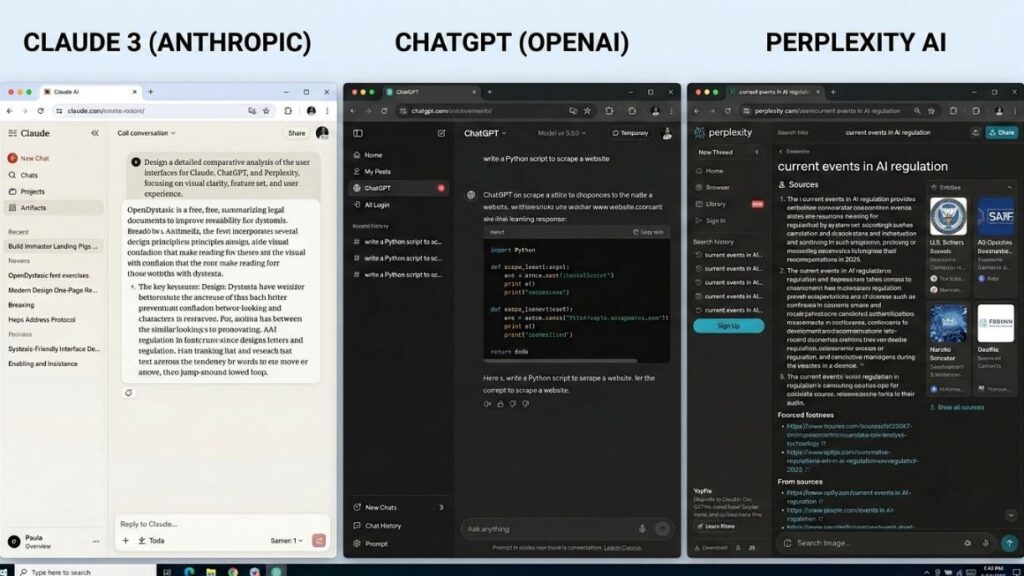
Choosing AI tools for freelancers who write for a living comes down to matching the tool to the job. It’s not about picking a single winner. Claude, ChatGPT and Perplexity each win at something different. Most serious freelance writers end up using at least two.
Claude tends to hold up best on long-form drafting and multi-document reasoning. If you’re writing a 3,000-word report from five source PDFs, Claude’s ability to work across long context without losing the thread is its biggest advantage, and its Projects feature lets you keep a client’s brand voice and past work loaded in one place instead of re-explaining it in every new chat. Anthropic’s Claude Pro plan runs about $20 a month, or roughly $17 a month if you pay annually.
ChatGPT is the stronger general purpose creator. It’s faster for quick drafts, social captions and brainstorming. It comes with native image generation and voice mode built into the same $20-a-month Plus plan. Custom GPTs also let you save a repeatable prompt setup for something you do often, like turning a client call transcript into a blog outline. If your day involves ten small writing tasks rather than one big one, ChatGPT usually gets you there faster.
Perplexity solves a different problem: it answers with sources attached. That matters the moment you’re writing anything with a stat, a claim, or a competitor comparison in it, because a cited answer skips the second step of going and verifying it yourself. Perplexity Pro is also priced around $20 a month and bundles access to GPT, Claude, and Gemini under that single subscription. That is worth knowing if budget matters more to you than having one dedicated tool per model.
Real example: picture a freelance content writer producing four B2B blog posts a week for SaaS clients. Before AI, that’s roughly two full days per post: research, outline, draft and edit. After building a stack around Perplexity for sourced research and Claude for the long-form draft, the same writer gets a post from brief to editable draft in under three hours, spending the time saved on client strategy calls instead of typing.
This is also the category where fact-checking discipline matters most. Any stat an AI tool hands you needs a real source before it goes in front of a client. That’s not optional. It’s the difference between content that builds authority and content that gets quietly ignored by an editor who caught the error.
Read More: Best AI Tools for Content Creation in 2026: A Detailed Guide

AI Tools for Design and Visual Content
Canva’s AI features do most of the daily heavy lifting for design-adjacent freelancers. Midjourney covers the small slice of work that needs something genuinely original.
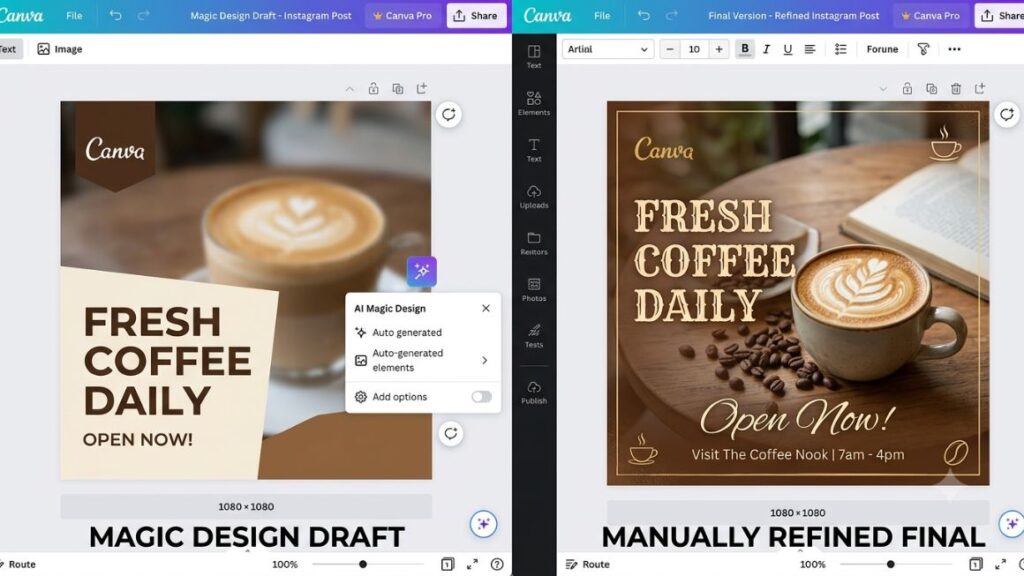
Canva’s Magic Studio bundles Magic Design, which turns a rough brief into a full layout. Magic Write drafts on-brand copy inside the same canvas. For freelancers building carousels, pitch decks and social templates, this is the tool that removes the blank-page problem entirely. Canva Pro costs ₹499 a month in India on the regular plan. It works out to roughly ₹333 a month if you pay annually. That is one of the few AI tools on this list priced natively for the Indian market instead of converted from dollars.
Midjourney sits at the other end. It’s built for image generation that needs to look distinctive rather than templated, which matters for freelancers building brand mood boards, book covers, or hero images for a client’s landing page. It’s not a Canva replacement. It’s a tool for the handful of projects each month where a template genuinely won’t do, and it usually gets paired with Canva rather than used instead of it, since the generated image still needs to be dropped into a real layout.
Here’s where the client-perception angle comes in. AI-generated visuals are now common enough that clients notice when something looks unmistakably AI-made, in a way they didn’t two years ago. A carousel that is built entirely from a Magic Design template can start to look like every other brand’s carousel on the same feed. The freelancers who stand out are the ones who use AI to get to a first draft fast. Then they spend their saved time on the 20% that makes a design actually belong to one brand: a custom illustration, a specific color story and a layout choice a template wouldn’t generate on its own.
That last 20% is also usually what the client is paying you for in the first place. Templates are free or nearly free. Judgment about what fits one specific brand isn’t, and that’s the part AI still can’t fully replace.
Read More: How to Create a Content Calendar That Converts
AI Coding Assistants for Freelance Developers
GitHub Copilot and Cursor solve the same problem from two different directions. Copilot lives inside the editor you already use. Cursor is a full editor built around the AI layer.
GitHub Copilot Pro costs $10 a month which is the cheapest entry point on this list. It works across VS Code, JetBrains, Neovim and most editors freelance developers already have set up. It’s genuinely just autocomplete and chat with an agent mode layered on top. So it won’t restructure a codebase for you on its own, but for day-to-day feature work and boilerplate, it pays for itself inside the first week.
Cursor costs $20 a month and takes a bigger swing. Its agent mode can work across multiple files at once, which matters more for freelancers taking on larger builds or full-stack contracts where a single feature touches five files, not one. The trade-off is a steeper learning curve and a usage pool that can run into extra charges if you lean hard on agent mode across a heavy project.
Who actually needs this, and who’s using it as a crutch? A freelance developer who understands the architecture they’re building and uses Copilot or Cursor to skip typing boilerplate is using the tool correctly. A junior freelancer who accepts every suggestion without reading the diff is building a portfolio of code they can’t explain in a client call. That catches up fast once a bug needs debugging under a deadline. It also shows up badly in code review. A client’s in-house team can usually tell the difference between code that was understood and code that was pasted.
Read More: 13 Best Vibe Coding Tools for Faster Development (2026)
GitHub Copilot Pro starts at $10 a month and works inside existing editors like VS Code and JetBrains. Cursor starts at $20 a month as a standalone AI-native editor built for larger multi-file agent work. The right choice depends on whether most of your work is incremental feature additions or larger builds that touch many files at once.
AI Tools for Client Communication and Meetings
Otter.ai and Fireflies.ai both turn a client call into a transcript, a summary and a list of action items without you touching a notepad. The choice between them mostly comes down to how you use the output afterward.
Otter.ai’s Pro plan runs about $16.99 a month and meters usage by minutes, which suits freelancers who take a handful of calls a week rather than back-to-back meetings all day. Fireflies.ai’s Pro plan costs $18 a month billed monthly or around $10 a month billed annually. Instead of metering minutes, it meters storage and AI credits. It also syncs directly into CRM tools if you’re running a sales pipeline alongside client work.
Fathom and Granola take a slightly different angle. Both focus on turning a live call directly into a clean, shareable summary with minimal setup. That works well if your main goal is a fast recap rather than a searchable transcript archive. Granola in particular is built for people who still like taking a few notes themselves during the call. This lets AI expand those notes into a full summary afterward, which some freelancers prefer over a fully hands-off transcript.
The actual value here isn’t the transcript. It’s what happens after the call. A freelance consultant who used to spend twenty minutes after every discovery call typing up notes and next steps can now get a drafted follow-up email and a task list the moment the call ends, and just needs to review it before sending. Over a week of five client calls, that’s close to two hours back, and it’s the kind of admin time that never shows up as billable but quietly eats your evenings.
AI Tools for Proposals, Contracts, and Getting Paid
Purpose-built proposal and invoicing tools beat a general chatbot for one simple reason. They know what a proposal or contract is actually supposed to contain, and a general chatbot has to be told every single time.
Tools like Bonsai, HoneyBook and Proposify are built around templates that already include scope, payment terms and legal language that’s been reviewed for freelance contracts specifically. Ask ChatGPT to write a proposal from scratch. You’ll get something that reads well but is missing the clauses that actually protect you if a client disappears mid-project or scope creeps past what you quoted.
That difference matters more once money and legal exposure are involved. A well-worded paragraph from a general chatbot can look convincing while still leaving out a kill fee clause, a late-payment penalty or a clear definition of what counts as a revision round. Template-based tools built specifically for freelance contracts have already had those gaps closed by people who’ve been burned by them. This is exactly the kind of institutional experience a general AI model doesn’t carry by default.
That doesn’t mean general AI tools are useless here. Claude or ChatGPT are still the fastest way to draft the client-facing language inside a proposal. The part that sells the scope rather than the part that protects you legally. Picture a freelance designer quoting a website redesign. The AI-drafted opening paragraph explains the client’s problem and the approach in language that reads like it was written specifically for them. The actual scope, timeline and payment schedule come from a tested template that already accounts for what happens if the client goes quiet for three weeks.
The strongest workflow most freelancers land on is drafting persuasive copy in a general AI tool, then dropping it into a purpose-built proposal or contract template that handles the structural and legal parts correctly by default.
Read More: 12 Agentic AI Tools Changing Work in 2026
Best AI Automation Tools to Cut Down Admin Work
Automation tools like Zapier, n8n and Make don’t do any single task particularly well on their own. What they do is move information between the tools you’re already using. So you’re not the one copying it by hand.
Zapier is the easiest to start with. Its free plan covers 100 tasks a month, which is enough to test a couple of simple automations, and its paid Professional plan sits somewhere between $20 and $30 a month depending on the billing cycle and current promotions, covering multi-step workflows and full access to its app library. If a new client fills out an intake form and that should automatically create a folder, send a welcome email and add a row to your tracker, Zapier is built for exactly that chain.
n8n and Make cost less at the entry level. They offer more flexibility for freelancers comfortable building slightly more technical workflows. But they come with a steeper setup curve than Zapier’s plain-English builder. Freelancers who already think in terms of “if this happens, then do that” tend to prefer them once they’ve outgrown Zapier’s simpler flows.
Here’s a concrete version of the chain worth automating first: a new client signs a contract, which triggers a welcome email, creates a project folder in Google Drive, adds a row to your client tracker and schedules a reminder three days before the first deliverable is due. Built once, that sequence runs identically every time, whether it’s your third client this month or your thirtieth.
The freelancers who benefit most from automation aren’t the ones automating something exotic. They’re the ones automating the boring five-step chain above, the one that happens the same way every single time a client signs on. None of that needs a human doing it manually, and every automated version of it is one fewer thing you have to remember on a busy week.
Read More: 10 Best AI Task Manager Tools for Smart Scheduling, Automation & AI Planning
Building a Working AI Stack for Under ₹4,000 a Month
You don’t need every tool on this list and you don’t need to spend anywhere close to ₹10,000 a month to run a solid AI stack. Here’s a realistic starter stack for an Indian freelancer. That is mostly on free tiers plus two or three paid tools that actually earn their subscription.
Start with one general AI assistant. ChatGPT Plus or Claude Pro both run close to $20 a month, which works out to roughly ₹1,750 at current exchange rates. Pick whichever one matches your work: Claude if you write long documents or work across a lot of source material, ChatGPT if your day is faster and more varied.
Add Canva Pro next, since it’s one of the few tools priced natively for India at ₹499 a month, or ₹333 a month if you pay annually. That covers design, carousels, and Magic Write for social copy in one subscription.
For everything else, lean on free tiers first. Otter.ai’s free plan covers 300 minutes a month, which is plenty for a freelancer taking fewer than ten client calls a month. Zapier’s free plan covers 100 tasks, enough for one or two simple onboarding automations. Neither needs an upgrade until your call volume or automation needs genuinely outgrow the free limit.
That stack lands around ₹2,250 to ₹2,500 a month. It leaves headroom under the ₹4,000 mark for whichever third tool actually matches what you do. Developers should put that remaining budget toward GitHub Copilot Pro at roughly ₹875 a month. That covers autocomplete and chat inside an editor they already use. Writers and researchers might add Perplexity Pro instead, for the sourced research the general assistant can’t do as reliably on its own.
The point isn’t to max out the budget. It’s to spend it only where a tool replaces a task you were doing manually every week, and to leave the rest for the month you actually need it.
Common Mistakes Freelancers Make When Adopting AI Tools
The freelancers who get the least value out of AI aren’t the ones who use it too little. They’re the ones who use it carelessly, in one of three specific ways.
Tool-hopping is the first. Chasing the newest AI tool every time a viral post claims it can change how you work leaves you paying for four overlapping subscriptions while never learning any one tool well enough to get its full value. Pick a stack, commit to it for a quarter and only switch when something genuinely stops working for you.
Trusting AI-generated stats without verification is the second and the most dangerous for anyone doing client-facing content. An AI model will state a statistic with total confidence whether or not it’s accurate. Every number that goes into a client deliverable needs a real, checkable source behind it, full stop.
Treating AI output as a finished product instead of a first draft is the third. The freelancers who get burned by AI aren’t the ones who use it. They’re the ones who ship what it produced without reading it closely first, whether that’s a design that misses the brief, code that works but doesn’t match the codebase’s conventions, or copy that reads just a little bit off for the client’s actual voice.
Honestly, most of these mistakes come from treating AI like a replacement for judgment instead of a multiplier on it. The freelancers earning that 40% AI premium mentioned earlier aren’t the ones typing the least. They’re the ones reviewing the most, just faster than they used to.
Conclusion
The best AI tools for freelancers in 2026 aren’t the ones with the biggest feature list. They’re the ones that quietly remove an hour of admin every single day, whether that’s a proposal draft, a meeting summary, or a design that used to start from a blank page.
Start small. Pick one tool for the task eating the most of your week right now, not five tools for five hypothetical problems. Add the next one only once the first has earned its place in your workflow.
If you want to go deeper on using AI specifically for marketing and content work rather than general productivity, YUP’s AI Marketing course walks through the exact prompting and workflow techniques freelancers are using to land that 40% AI premium. You can also try Hotskill, YUP’s AI-powered practice app, if you’d rather build the muscle memory through hands-on exercises first.
FAQ
What are AI tools for freelancers?
AI tools for freelancers are software applications that use generative AI to handle writing, design, coding, client communication or admin work a solo freelancer would otherwise do by hand. They range from general assistants like ChatGPT and Claude to purpose-built tools for proposals, meeting notes and invoicing.
Is ChatGPT or Claude better for freelance writing?
Claude tends to hold up better for long documents and multi-source research. ChatGPT is faster for quick drafts and varied daily tasks. Many freelance writers keep both, using Claude for the big deliverable and ChatGPT for everything smaller in between.
How do I set up an AI stack as a freelancer?
Start by mapping your work to the five stages of the freelance cycle. Find clients, proposing, delivering, communicating and billing. Pick one tool per stage where AI genuinely removes work, test it for a full month and only add a second tool in that category if the first one is clearly falling short.
Who should use AI tools as a freelancer?
Any freelancer doing repeatable writing, design, coding or client communication work benefits. But the size of the benefit scales with volume. A freelancer taking on one project a month will see far less return than one running five client relationships at once.
Are AI tools for freelancers actually worth paying for?
For most freelancers, yes, but only the tools that replace a task you do every week. A ₹500 tool that saves six hours a month pays for itself many times over. A ₹2,000 tool used twice and forgotten is money wasted.
Why does my AI-written content get flagged or feel generic?
Generic AI output usually comes from generic prompts. Feeding a model your own past work, your client’s actual brand voice, and specific examples rather than a one-line instruction closes most of that gap, and the remaining polish should come from your own edit pass, not another prompt.
Can I run a full AI stack for free?
Mostly, at low volume. Free tiers on ChatGPT, Otter.ai, Canva and Zapier cover a freelancer taking on a handful of clients a month. The moment your call volume, design output or automation needs grow past those free limits, upgrading one tool at a time is usually cheaper than starting on paid plans across the board.
What do most people get wrong about AI tools for freelancers?
Most people either chase every new tool that goes viral or trust AI output as if it were already finished. Both habits cost more time than they save. This works well for most freelance work. But anyone handling regulated or legally sensitive deliverables should still have a human expert review anything AI-assisted before it goes out.
Do AI tools cost the same for Indian freelancers as everywhere else?
Not always. Canva prices its Pro plan natively for India at ₹499 a month. That is well below its dollar-converted rate elsewhere. Tools like ChatGPT, Claude and GitHub Copilot are billed in dollars and convert to whatever the exchange rate happens to be that month.