
Every content calendar starts the same way. Someone opens ten browser tabs, skims five competitor articles, checks what’s trending, and pieces together a brief by hand. It takes half a day for one topic. Multiply that across a monthly calendar and research alone eats the hours you meant to spend on actual writing.
A Grok bot changes where that time goes, and it’s worth thinking about it less like a script and more like hiring an AI employee whose entire job is research. You give it a role, a process, and boundaries, the same way you’d onboard a junior analyst. Then it runs the work on its own cloud computer, pulls from live web and X data, and hands you a structured brief you can verify in twenty minutes instead of build from scratch in four hours.
This guide walks through what Grok Bot actually is, why it’s different from just asking Grok a question, and how to build, test, and automate a content research employee step by step. By the end, you’ll have a working setup you can run on a schedule and hand off to a second Bot when the research needs a specialist’s pass.
Table of Contents
What Is Grok Bot? Not the Same as the Grok Chatbot
Grok Bot is xAI’s persistent agent product: named AI teammates that can work on a shared persistent cloud computer with a browser, filesystem, terminal and connected tools. Each Bot has its own role and context, while Bots on the same account share the cloud computer, including its files and browser sessions. It’s the closest thing xAI offers to an actual AI employee rather than a tool you operate by hand. If you’ve used regular Grok on X or grok.com and assumed Grok Bot is the same thing with a bigger context window, it isn’t.
Grok Bot vs a regular Grok conversation
A normal Grok chat answers a question and stops. It has context and tools, but no machine of its own, and no memory of the role you gave it last week. Grok Bot gives an agent profile a persistent computer instead, with files, browser sessions, and running state that survive between conversations, according to xAI’s Grok Bot documentation.
What “persistent” means
The computer doesn’t reset when you close the tab. Files stay where you left them. Login sessions to sites you’ve authorized stay signed in. Because the work runs on a cloud computer, closing your laptop does not automatically stop a background task or routine. The Bot can continue working while you’re away, although a task may still pause if a website requires a login, CAPTCHA, human approval or blocks automated access.
What Grok Bot can do on its cloud computer
Bots on the same account share the persistent cloud computer, while each Bot can have its own role, instructions, context, and conversations. This makes it possible to create separate Bots for research, strategy, reporting, or other jobs without treating each Bot as a completely separate computer.
It opens tabs, reads pages, edits files, runs commands, and calls connected services the same way a human researcher would, including on websites that don’t offer a clean API. The catch: it’s xAI-managed. There’s no self-hosting option. Because the Bot retains role context and prior-work summaries, important decisions should still be checked against the current source rather than relying on memory.
Why Content Teams Are Using Grok Bot for Research
Content teams can use Grok Bot for research because recurring competitor checks, trend monitoring, source gathering, and content-gap analysis can take significant time while still requiring human review before publication.
The manual research bottleneck
A single content brief usually needs competitor analysis, a keyword check, a scan of recent news, and a sense of what’s trending in the niche right now. Doing all four by hand for every topic on a monthly calendar can become a significant time cost, and it rarely gets faster with experience.
What changes when research runs on a cloud computer
Instead of you opening tabs, your AI employee’s browser does it. You hand it a topic, and it works through search, competitor pages, and X conversations while you do something else. Since its computer persists, a long research pass doesn’t block your own machine or die when you close a laptop lid.
Where human review still matters
Automation gets you a draft brief, not a publishable one. Every claim, stat, and competitor summary the Bot returns still needs a human check before it lands in a content calendar. Treat it as a fast first-pass employee, not a replacement for editorial judgment.
Read More: 50+ Ways to Use Grok Bots
Grok Bot runs on a persistent, xAI-managed cloud computer with its own browser and filesystem, which lets it work like a dedicated research employee completing multi-step tasks, like scanning competitor articles and X conversations, without a human driving each step. It differs from a standard Grok chat in that the work continues even after you close the conversation, though a human still needs to verify every claim before publishing.
Grok Bot vs Other Research Tools: Where It Fits
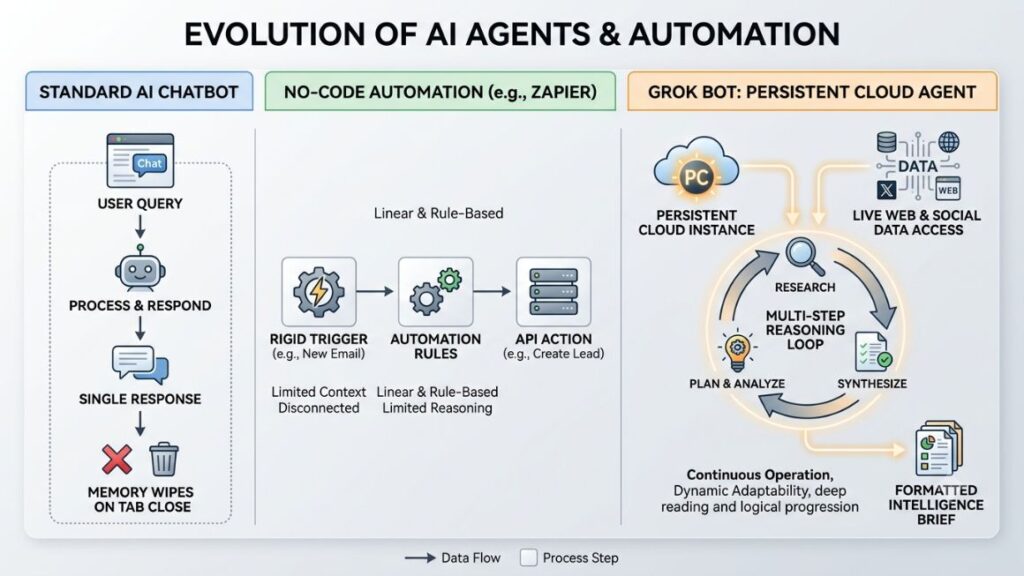
Grok Bot fits between a standard AI chatbot and a no-code automation platform: it can browse and reason like a chatbot, but it can also persist, schedule, and act like an employee with standing responsibilities, without the rigid workflow-building most no-code platforms require.
Grok Bot vs a standard chatbot
A chatbot like a plain Grok or ChatGPT session answers what’s in front of it. It won’t remember to check back on a competitor’s blog next Monday, and it won’t keep working once you leave the tab. Grok Bot does both, because the work lives on a cloud computer instead of inside a single conversation.
Grok Bot vs no-code automation tools
Tools like Zapier and Make are strongest when a workflow can be defined as a series of triggers and actions. Grok Bot is better suited to research tasks where the agent needs to read information, interpret it, make decisions between steps, and work across different websites or tools. A no-code tool can pull a list of URLs on schedule; it can’t read those pages, judge whether a stat is current, or decide a competitor angle is stale. Grok Bot can, because it’s still a language model doing the judgment, just with a persistent environment wrapped around it.
When a dedicated research Bot makes sense
If your research task is genuinely repeatable, takes several hours each week, and requires some judgment rather than simple copy-and-paste work, a dedicated research Bot can be worth testing. For one-off or purely mechanical tasks, a simpler automation may be enough.
Read More: Agentic Marketing Platforms: The Complete Guide to AI Agents That Plan, Execute & Optimize Marketing
Before You Build Your Content Research Bot
Before opening Grok Bot, define the employee’s single job, the exact research it should run, the output format you need, and the source rules it must follow, since a vague Bot produces vague research.
Define the Bot’s one job
Give it one clear role, the way you’d write a job description: “You research competitor content and build SEO briefs.” Not “help with content.” An employee with a narrow job stays focused and is easier to manage when something goes wrong.
Decide what research it should perform
Spell out exactly what counts as research for this role: competitor articles, keyword volume checks, current X conversation, recent news coverage. If you don’t specify, it will guess, and its guesses won’t match what your editorial process actually needs.
Define the output
Decide the shape of the final deliverable before you write a single instruction. A content brief, a competitor gap table, a ranked list of angles. The clearer the target shape, the less editing you’ll do afterward.
Set your source and evidence rules
Tell it which sources count as credible, how old a stat can be before it’s stale, and what to do when it can’t verify a claim. Without this, it will treat a random blog post and a named industry report as equally trustworthy.

How to Build Your First Content Research Employee Using Grok Bot?
Building your first content research employee takes five steps: create the Bot and define its job, connect only the tools it needs, write the research instructions, define the output format, and set approval boundaries before it touches anything outside your workspace.
Step 1: Create the Bot and define its job
Open Grok Bot and create a new named Bot. Give it a role description that states its one job in a sentence, plus any rules that should hold every single time it runs, not just for this week’s topic.
Step 2: Connect the tools it actually needs
Connect only what the research requires: web search, and a connector for wherever your content calendar lives, such as Google Drive or Notion. xAI recommends using a built-in connector over raw browser sign-in whenever one exists, since it’s a more reliable integration path than a Bot navigating a login screen.
Step 3: Write the research instructions
Give it the actual research process: what to search for first, how many competitor pieces to pull, when to check X for current conversation, and what counts as “done.” Vague instructions like “do good research” produce inconsistent results from any employee, human or AI.
Read More: How to generate AI prompts for SEO content
Step 4: Define the output format
Specify the brief’s exact sections: primary keyword, competing angles, content gaps, suggested outline. A Bot given a template to fill produces something usable on the first try far more often than one asked to “summarize findings.”
Step 5: Set approval boundaries
Require approval before it publishes, sends, or deletes anything. Research and drafting can run unsupervised; anything that leaves your workspace or touches another system shouldn’t.
The Content Research Prompt You Can Copy
A working content research prompt needs five parts: the Bot’s role, the research process it follows in order, source and verification rules, instructions for competitor and trend research, and the exact shape of the final brief.
Define the Bot’s role
“You are a content research employee for [your brand]. Your job is to research a given topic and produce a verified content brief. You do not write the article. You do not publish anything.”
Set the research process
“For every topic: first identify search intent, then pull the top 5-8 ranking articles, then check X for current conversation on the topic, then list content gaps those articles miss.”
Add source and verification rules
“Only cite stats with a named source and a publication year within the last two years. If you can’t verify a number, describe the pattern instead of stating a figure. Flag anything you can’t confirm.”
Add competitor and trend research
“Summarize what the top-ranking articles cover and what they miss. Note any recent X conversation, launches, or news relevant to the topic from the last 30 days.”
Define the final research brief
“Return: primary keyword, search intent, 3-5 competitor summaries, content gaps, 2-3 suggested angles, and any sources needing human verification before publish.”
Read More: How to write AI prompts for growth hacking ideas
How to Run Your First Content Research Task?
Running your first task means giving the Bot a topic, letting it establish intent, research sources, check X, analyze competitors, and build a brief, in that order, so each step has something concrete to work from.
Start with a topic
Give it a single, specific topic. Something as narrow as “MER vs ROAS for D2C brands” works far better than a broad category like “marketing metrics.”
Establish search intent
Have it state, before it researches anything, whether the query is informational, comparison, or how-to. This decides what a good competing article even looks like, and skipping it is how research employees end up on the wrong angle entirely.
Research current sources
It pulls the top-ranking pages for the topic and reads them, not just their titles. This is where a persistent browser earns its keep, since it can open and read multiple pages in sequence without you doing it.
Search X for emerging conversations
Grok Bot can connect to X and use the integration to search posts, check timelines and mentions, and analyse what’s happening around a topic. That gives your research workflow a direct way to include current X conversations alongside traditional web research. Ask it to check whether anything’s shifted in the conversation in the last two to four weeks that competing articles haven’t caught up to yet.
Analyse competing content
It compares what each top-ranking article covers, how deep it goes, and where it’s thin. This is the step that turns “here are five links” into something actually useful for a brief.
Identify content gaps
Ask directly: what does a reader searching this topic still not have an answer to after reading the top five results? That gap is usually your angle.
Build the content brief
It assembles everything into the format you defined earlier. This is the deliverable you’ll hand to a writer, or to yourself, for the actual draft.
How to Fact-Check Grok Bot’s Research?
Never publish a Grok Bot brief without checking the original source, the date and context of every claim, every statistic, and separating evidence from opinion, because an AI employee can misread a source just as easily as a junior human researcher can.
Verify the original source
Open the source it cited, not just its summary of it. Summaries occasionally smooth over a caveat or nuance that changes the meaning of the claim.
Check dates and context
A statistic from three years ago presented as current is a common failure mode for any AI research tool. Confirm the publication date and whether the underlying situation has changed since.
Verify statistics
Cross-check any number against the original source directly. If it can’t produce a link to where a stat came from, treat it as unverified until you find one yourself.
Separate evidence from opinions
It may present a competitor’s marketing claim or an opinionated X post as fact. Read closely for the difference between “X reported this number” and “someone on X said this.”
Flag anything that needs human review
Build a habit of keeping a running “needs verification” list from every research pass. Over time this tells you where the employee’s instructions need tightening.
Practical Content Research Use Cases
The most reliable content research use cases for Grok Bot are competitor and SEO gap tracking, trend and news monitoring, topic ideation, and turning finished research directly into a content calendar entry.
Competitor content and SEO gap tracking
Point it at a set of competitor domains and ask it to flag new articles as they publish, along with what topics they cover that you haven’t. This is one of the clearest wins for an always-on research employee over a manual weekly check.
Trend and news monitoring
X can provide an additional source of current conversation that may not yet be reflected in established articles or search results. Use those conversations as trend signals, then verify important claims against reliable sources before putting them into a content brief. A skincare brand like Mamaearth’s team, for example, could ask it to flag any new ingredient trend gaining traction on X before writing a seasonal content piece around it.
Topic and content ideation
Ask it to cross-reference what’s ranking, what’s trending on X, and what your own calendar hasn’t covered yet. The overlap is usually a strong next topic.
Turning research into a content calendar
Once a brief is verified, have it (or a connected workflow) drop it directly into your content calendar tool with the suggested publish date and target keyword pre-filled.
Read More: AI Agents for Content Marketing: How Autonomous Workflows Are Replacing Manual Content Ops in 2026
Improve the Bot After the First Run
Improving a research employee after its first run means fixing weak research, tightening vague instructions, refining the output format, and testing the revised version on a second, different topic before trusting it on autopilot.
Fix weak research
If the first brief missed an obvious competitor or leaned on a thin source, that’s not a one-off mistake. It’s a sign the instructions didn’t specify enough about what counts as thorough.
Tighten the instructions
Add the specific rule that would have prevented the miss: “always check the top 8 results, not 5” or “always include at least one source published this year.” Specificity beats general encouragement every time.
Improve the output
If the brief’s format wasn’t quite usable, adjust the template directly rather than rewriting the whole prompt. Small structural fixes compound faster than starting over.
Test it on another topic
Run the revised Bot on a topic in a different subcategory before you schedule it. An employee tuned only on one narrow topic can quietly fail on anything slightly outside that pattern.
Turn the Workflow Into a Reusable Skill
Once a research process works reliably twice, save it as a skill: a documented set of steps, decision rules, and approval boundaries the Bot can run again without you re-explaining the process each time.
What a skill does
A skill packages the process, not just a single prompt. It includes the steps in order, what counts as a correct result, and where the employee needs to stop and ask before continuing.
When to save your workflow
Save it as a skill once you’ve run the process at least twice with good results and made the fixes from the previous section. Saving too early locks in mistakes you haven’t caught yet.
What to include in the skill
Include the research steps, the source rules, the output template, and the exact conditions under which it should flag something for human review instead of proceeding.
Schedule Recurring Research With a Routine
A routine tells one Bot when to run a saved skill, either on a schedule or after a supported event, which turns a one-off research task into a standing weekly or monthly responsibility without you re-triggering it manually.
Skill vs routine
A skill is what to do. A routine is when to do it. You need both: a routine with no skill behind it has nothing reliable to run, and a skill with no routine still needs you to trigger it by hand.
Build a weekly content research routine
Attach your saved research skill to a weekly schedule, for example every Monday morning, so a fresh competitor and trend scan is waiting before your team’s content planning meeting.
Define what happens when research fails
Decide in advance what it should do if a source site is down or a connector fails mid-run: retry once, skip and flag, or hold the whole brief for manual review. Routines that don’t specify this tend to fail silently.
Keep external actions behind approval
Grok Bot currently caps routines at 50 per Bot and keeps the 20 most recent runs of each, according to xAI’s skills and routines documentation, so a stale one-shot monitoring routine that keeps running after its purpose has passed just burns usage for nothing. Delete it once it’s done its job, and keep any action that publishes or sends something behind an approval step regardless of schedule.
A Grok Bot routine runs a saved skill on a schedule or after a supported event, which is what turns a research employee’s one-time task into a recurring weekly responsibility. xAI caps each Bot at 50 routines and retains only its 20 most recent runs, so unused or one-shot routines should be deleted rather than left running indefinitely.
Multi-Bot Workflows: When One Bot Isn’t Enough
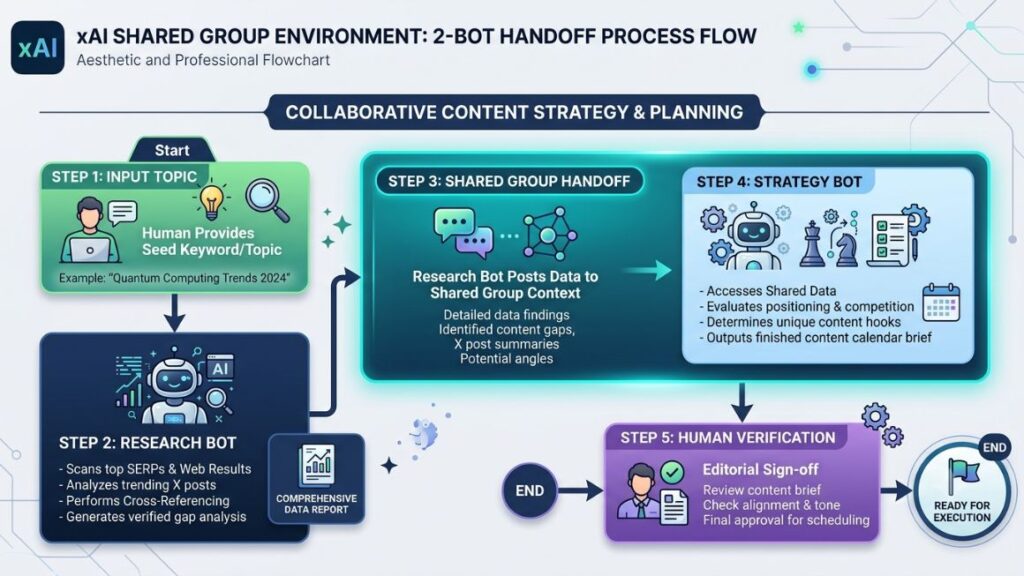
When a single research employee starts doing too much, split the work across two or more named Bots, each with one job, and let them hand off through a shared group chat instead of one employee juggling research and strategy at once.
Research Bot
Keep this employee narrowly focused on gathering and verifying: competitor scans, X trend checks, source validation. Nothing about angle selection or calendar placement belongs here.
Content Strategy Bot
A second employee takes the verified research and decides what to actually build from it: which angle fits your calendar, what CTA makes sense, where it slots against existing content.
Research → strategy → brief workflow
Grok Bot supports putting multiple Bots into a shared group chat, so the Research Bot can hand its verified findings directly to the Strategy Bot, which then produces the final brief without you manually copying anything between them.
Common Mistakes to Avoid
The most common Grok Bot mistakes are giving the employee too broad a job, trusting unsupported claims, treating social posts as proof, automating before the process is proven, granting unnecessary access, and never defining what happens when research fails.
Making the Bot too broad
An employee asked to “help with content” instead of one narrow job will drift, and drift is much harder to debug than a single wrong step in a focused process.
Trusting unsupported claims
Any claim it returns without a checkable source needs to be treated as a hypothesis, not a fact, until you’ve verified it yourself.
Treating social posts as proof
An opinion trending on X is a signal worth noting, not evidence of anything. Keep that distinction explicit in its instructions.
Automating too early
Don’t attach a routine to a workflow you’ve only run once manually. Run it enough times to know where it breaks first.
Giving unnecessary access
Connect only the tools the specific task needs. A research employee doesn’t need publishing access, and giving it that access anyway is an unforced risk.
Failing to define what happens when research fails
An employee with no instructions for a dead link or a failed connector will either stall silently or fill the gap with a guess. Neither is acceptable in a brief you’re about to trust.
How Much Does It Cost to Run a Grok Bot?
Grok Bot access is bundled into xAI’s SuperGrok subscription, which runs around $30 a month and includes Grok Bot along with connectors and higher usage limits, though the real cost of running an AI employee includes the time your team spends reviewing its output, not just the subscription fee.
Access and subscription costs
SuperGrok, priced at roughly $30 a month, includes Grok Bot access, connectors, and higher usage limits, according to xAI’s published pricing as of 2026. Heavier usage tiers exist at a higher monthly cost for teams running multiple Bots intensively across several workflows.
Additional tools and services
If your workflow needs connectors beyond what’s built in, such as a project management tool with an MCP integration, factor in whatever that service charges separately. Most core content research needs, web search and a document connector, are covered without extra cost.
The human review cost
The line item most teams underestimate is verification time. An employee that saves four hours of manual research but needs forty-five minutes of fact-checking every time is still a net win, but it’s not free, and budgeting for that review time upfront avoids a nasty surprise later.
What to consider before automating
Weigh the subscription cost and review time against what the manual process currently costs your team in hours. If a topic genuinely recurs every week, the math tends to favor hiring the AI employee quickly. If it’s occasional, a manual pass might still be cheaper overall.
Conclusion
An AI employee built on Grok Bot doesn’t replace the judgment that goes into a good content brief. What it removes is the four hours of tab-switching that used to come before that judgment ever got applied. Start narrow: one Bot, one job, one topic tested twice before you trust it.
Once the process holds up, save it as a skill, put it on a routine, and let it run while your team works on the writing that actually needs a human. If you want to go deeper on building AI-powered workflows like this one, YUP’s AI Marketing course walks through connectors, prompting, and automation setups you can apply well beyond a single research employee.
Frequently Asked Questions About Grok Bot
What is Grok Bot?
Grok Bot is xAI’s persistent AI agent product. It gives a named Bot its own cloud computer with a browser, filesystem, and terminal, so it can complete multi-step tasks like content research without you driving every step.
How is Grok Bot different from regular Grok?
Regular Grok is a chat session that answers and stops. Grok Bot runs on a persistent computer that keeps files, browser sessions, and progress between conversations, so work can continue even after you close the app.
Is Grok Bot the same thing as an AI employee?
Not officially, xAI calls it a Bot, but functionally it behaves like one. You give it a job description, a process, and boundaries, and it works independently within them the way a research employee would, minus a salary or a desk.
Can Grok Bot do content research?
Yes. Grok Bot can search the web, read competitor articles, check X for current conversation, and assemble the findings into a structured brief, provided you give it clear instructions and an output format to follow.
Can Grok Bot search the web?
Yes, Grok Bot browses the web directly through its own browser and can also use connectors for structured tools. xAI recommends a built-in connector over raw browsing wherever one is available for reliability.
Can Grok Bot search X?
Yes. Grok’s underlying models have a real-time pipeline into X’s post data, which lets a Grok Bot surface trending conversation and sentiment that a standard web-only search tool would miss.
Can I create a custom research Bot?
Yes. You create a named Bot, give it a role and job description, connect the tools it needs, and write out the research process and output format you want it to follow every time.
What is the difference between a Grok Bot skill and routine?
A skill is the documented process, the steps, decision rules, and output format. A routine is the schedule that runs a skill automatically, either on a set cadence or after a supported event.
Can Grok Bot automate recurring research?
Yes, by attaching a saved skill to a routine. A weekly competitor scan or trend check can run automatically without you manually triggering it each time, up to a cap of 50 routines per Bot.
Can Grok Bot analyse competitor content?
Yes. It can read competitor pages directly, summarize what each one covers, and flag content gaps those articles leave unanswered, which is one of the strongest use cases for a dedicated research employee.