

A messy Monday for a product manager looks like this: a pile of support tickets, a Slack thread about a feature nobody asked for, three interview recordings nobody has watched and a PRD due Thursday.
That’s why AI tools for product managers have gone from “interesting experiment” to “open in a tab all day.” A 2026 survey of 157 product professionals by UXCam found that 99% use AI at work. The typical person runs 2.6 tools at once. Almost nobody is on the fence anymore.
But using AI and using it well are two different things. Plenty of teams pay for overlapping subscriptions, feed them messy product data and then wonder why the summaries feel off. This guide covers 15 tools across research, documentation, meetings, design, prototyping and automation. You’ll get current pricing, honest limits, a scorecard for choosing and a 30-day pilot that doesn’t need a big budget.
Table of Contents
What Are AI Tools, and How Do They Help Product Managers?
An AI tool is software that uses machine learning, usually a large language model, to read, write, summarise or predict from the data you give it. For a product manager, that means faster research synthesis, quicker first drafts and fewer hours lost to admin.
Three flavours matter. Generative AI writes and builds: it drafts a PRD, rewrites a release note, even spins up a rough app. Predictive analytics looks the other way. It uses past behaviour to estimate who’s likely to churn. And an AI agent takes a goal, plans a few steps, then acts across connected tools with limited supervision. A chat-based AI assistant answers when you ask. An agent goes and does the thing.
So where does it earn its keep? Reading hundreds of interview notes for market research. Drafting product requirement documents. Producing AI summaries of long calls. Taking over repetitive tasks like tagging tickets. Most AI capabilities here boil down to summarise, draft or classify, and AI tools help product managers speed up product development without adding headcount.
What they don’t do is replace judgment. They can tell you what customers said. They can’t tell you what’s worth building, and they won’t be accountable when a launch flops. That part stays with you.
AI tools for product managers use machine learning to summarise research, draft documents, analyse product data and automate routine work. They assist product decisions but don’t replace product judgment or customer understanding.
Types of AI Tools Across the Product Lifecycle
Across the product lifecycle, AI tools for product managers fall into six groups: research, strategy, documentation, analytics, prototyping and automation. Most teams need two or three, not all six.
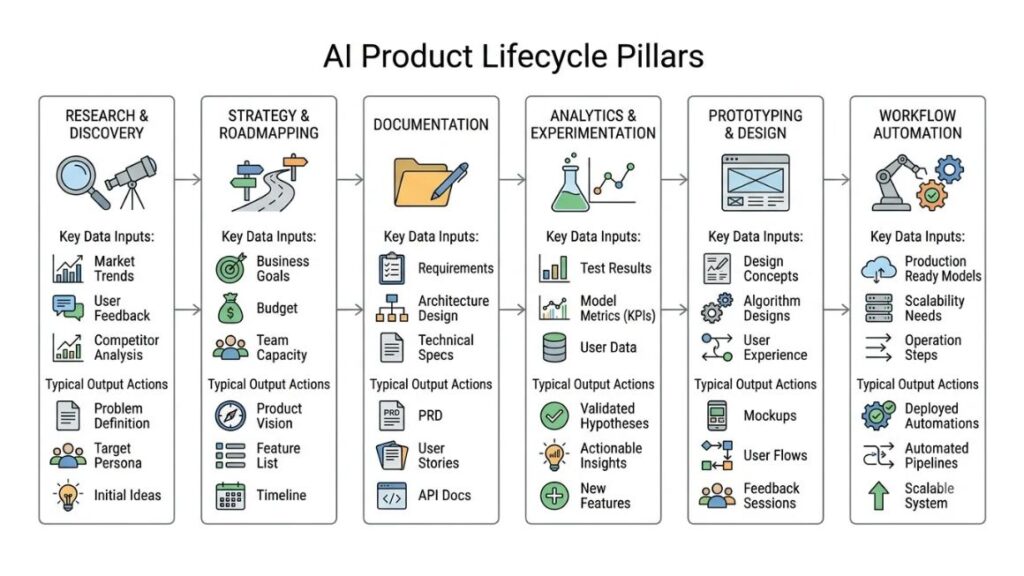
Customer Research and Product Discovery
Interviews, surveys, tickets, app reviews. A tool like Dovetail reads them all and shows which problems keep coming back, so your time goes into the why instead of the tagging.
Product Strategy and Roadmapping
Here the AI layer sits on top of your backlog. It clusters requests, scores ideas against goals you set, and helps shape product strategies and a roadmap you can defend in a room full of opinions. The scoring is a suggestion, not a verdict.
Product Documentation and Knowledge Management
PRDs, user stories, meeting summaries. Drafting is the obvious win. The sleeper feature is search: ask a plain question and get an answer pulled from your own docs.
Product Analytics and Experimentation
Product analytics platforms now explain why a metric moved, not just that it did. That’s how teams shape better product experiences. It needs clean event data underneath, though, and more on that shortly.
Prototyping and Product Design
Describe a screen, get something clickable. You can test an idea with five customers before engineering spends a sprint on it.
Workflow Automation and Team Collaboration
Moving data between apps, routing requests, kicking off handoffs. It’s dull work, which is exactly why you should automate it.
The Best AI Tools for Product Managers at a Glance
Here are all 15 picks side by side. Prices are in US dollars and move often, so use the table to shortlist, then confirm on each vendor’s page. Watch for monthly versus annual billing, per-user versus usage-based charges, and free plans with hard caps.
| Tool | Best for | Key capability | Free option | Entry price (verify) |
| Dovetail | Research synthesis | Themes from interviews and feedback | Yes, 1 project | Sales-led enterprise |
| Productboard | Feedback and prioritization | Organises insights, ranks opportunities | Yes, Starter | From $19 per maker/month, annual |
| Amplitude | Product analytics | Behavioural insights, AI agents | Yes, 2M events/month | Usage-based |
| ChatGPT | General assistance | Research synthesis, drafting | Yes | Plus $20/month |
| Notion AI | Documentation | Workspace Q&A, agents | Limited trial | $20 per user/month (Business), annual |
| Linear | Product and engineering work | Issue triage, projects | Yes, 250 issues | From $10 per user/month, annual |
| Otter | Meeting transcription | Live notes, action items | Yes, 300 minutes | Pro $8.33/month, annual |
| Fireflies.ai | Searchable meetings | Transcripts, search | Yes | From $10 per seat/month, annual |
| Miro | Visual collaboration | AI on boards and workshops | Yes, 3 boards | From $8 per member/month, annual |
| Uizard | Early-stage UI design | Screens from prompts or sketches | Yes, limited | Pro $12/month |
| Lovable | Prompt-based prototypes | App generation by chat | Yes, daily credits | From $25/month |
| Bolt.new | Web app prototypes | Prompt-driven builds | Yes, 1M tokens/month | From $25/month |
| Gamma | Presentations | Decks from prompts | Yes, 400 one-time credits | Roughly $10 to $12/month |
| NotebookLM | Source-based research | Grounded answers with citations | Yes | Google AI Pro $19.99/month |
| Zapier | Automation | App-to-app workflows | Yes, 100 tasks/month | From $19.99/month, annual |
The 15 Best AI Tools for Product Managers in 2026
These are the top AI picks for product work, grouped by the job they do. Treat the list as a shortlist, not a lab-tested ranking. Most “10 best AI” roundups recycle the same five names, so we’ve mixed in tools for prototyping, meetings and automation that a product team genuinely reaches for.
1. Research, Customer Insights, and Feedback
Dovetail: Best for Qualitative Research Synthesis
Dovetail is a research repository with AI built in. Drop in interviews, calls and surveys, and it transcribes, tags and surfaces themes you can trace back to the original quote. That matters the moment a stakeholder asks, “says who?”
Pricing got murkier this year. The public page now lists only a free plan (one project, one channel, basic AI chat and summaries) and a custom enterprise tier, and third-party data from Vendr puts the median contract near $21,600 a year. It’s also an analysis tool, not a feedback board: there’s no public voting or roadmap. Pick it if research is a weekly habit.
Productboard: Best for Customer Feedback and Prioritization
Productboard pulls customer feedback from support, sales and surveys into one place, links each note to a feature, and ranks opportunities against your objectives. Its AI layer, Spark, summarises feedback and helps draft product requirements.
The free Starter plan caps you at 50 feedback notes, Essentials runs $19 per maker per month on annual billing, and Pro runs $59. Spark costs extra, listed at $15 per maker per month on annual billing during its beta, which adds up across a big team. Best fit: teams where feedback arrives from everywhere and priorities start fights.
Amplitude: Best for Product Analytics and Behavioral Insights
Amplitude shows what users actually do: journeys, funnels, retention, feature adoption. Its AI agents answer questions in plain language and flag shifts, which helps you improve product adoption without digging through dashboards.
The free plan covers 2 million events a month and includes AI agents. Paid tiers scale with event volume, so costs follow your traffic. The catch is data quality. Sloppy event tracking means every AI answer inherits the mess.
2. Writing, Planning, and Daily Product Work
ChatGPT: Best for General Product Management Assistance
ChatGPT is the generalist, the AI tool for product managers who want one place for brainstorming, research synthesis, PRD outlines and arguments against their own roadmap.
Plus costs $20 a month, and Business seats run $25 per user monthly or $20 on annual billing. The limit is memory. It knows nothing about your product unless you paste data in, and it’ll confidently invent details when it doesn’t know.
Notion AI: Best for Documentation and Knowledge Management
Notion AI lives inside the workspace where your specs already sit. It drafts pages, answers questions across your docs, handles light task management and runs agents on schedules. Tools like Notion pay off when your documentation is already tidy.
Here’s the catch. Full AI sits on the Business plan at $20 per user per month on annual billing, while Free and Plus get only a limited trial. Custom Agents bill separately, at $10 per 1,000 credits.
Linear: Best for Product and Engineering Collaboration
Linear is a project management tool built for speed and for software teams. Issues, cycles, projects and roadmaps sit in one place, and its AI helps triage bugs and summarise threads.
The free plan allows unlimited members but only two teams and 250 issues. Basic is $10 and Business is $16 per user per month on annual billing. The advanced AI features sit on Business. It’s opinionated on purpose, so marketing and ops colleagues may bounce off it.
3. Meetings and Team Communication
Otter: Best for Meeting Transcription
Otter joins your Zoom, Google Meet or Teams calls, transcribes live and sends summaries with action items. Handy for customer calls you’d otherwise half-remember.
The free Basic plan gives you 300 minutes a month. Pro is $8.33 a month on annual billing, and Business is $19.99 per user. Minute caps are the usual sting, and a recording bot can make customers uneasy, so ask for consent first.
Fireflies.ai: Best for Searchable Meeting Records
Fireflies records and transcribes too, but its real value is search. Ask, “What did customers say about onboarding last month?” and it digs through the archive.
There’s a free plan with unlimited transcription and AI summaries, though storage is capped. Pro is $10 and Business is $19 per seat per month on annual billing. AI runs on a credit system, which can add cost beyond the base price.
4. Visual Collaboration and Product Design
Miro: Best for Visual Collaboration
Miro is the shared canvas for workshops, journey maps and brainstorming. Its AI clusters sticky notes and summarises a crowded board. Its prototyping feature, which traces back to the Uizard acquisition, is now bundled into the Business plan.
The free plan gives you three editable boards. Starter is $8 and Business is $20 per member per month on annual billing, with AI credits capped at 25 and 50 per member. Boards get cluttered fast.
Uizard: Best for Early-Stage UI Design
Uizard turns text prompts, screenshots or hand-drawn sketches into editable app screens. Miro acquired it in 2024. It’s handy when you need a believable mockup and no designer is free.
The free plan allows 3 generations a month, and paid plans run $12 (Pro) and $39 (Business) per month. One review, from a rival tool’s blog, reports no meaningful updates since 2024. With Miro now putting prototyping into its own Business plan, check Uizard’s direction before committing.
5. Rapid Prototyping and MVP Development
Lovable: Best for Prompt-Based Application Prototyping
Describe an app in plain English and Lovable builds a working web app you can click through, then you refine it by chatting. A quick way to put a prototype in front of customers.
Free gives 5 daily credits, capped at 30 a month. Pro starts at $25 a month for 100 credits. Credits burn at different rates depending on how complicated the request is, so budgets wobble. And a prototype isn’t production code, so get engineering to review before anything ships.
Bolt.new: Best for Building Web App Prototypes
Bolt.new covers similar ground. Type what you want, get a running web app, keep refining by prompt. It suits hands-on PMs testing a concept for an existing product.
The free plan gives 1 million tokens a month with a 300,000 daily cap. Pro is $25 a month for 10 million tokens. Tokens vanish when the AI fixes its own mistakes, because failed fixes and whole-file rewrites both burn tokens.
6. Presentations, Research, and Workflow Automation
Gamma: Best for Product Presentations
Gamma generates decks and documents from a prompt or pasted notes. For stakeholder updates and strategy decks, it takes the slide-formatting misery out of your afternoon.
The free plan includes 400 one-time AI credits and Gamma branding, and individual plans start around $12 for Plus and $25 for Pro on monthly billing. Some trackers list $10 and $20 instead, so check the live page. Reviewers flag thin brand controls and inconsistent PowerPoint exports.
NotebookLM (Now Gemini Notebook): Best for Research Based on Source Documents
Upload your sources, ask questions, get answers grounded in them, with citations. It’s great for long competitor reports and messy interview folders. Google renamed NotebookLM to Gemini Notebook on July 16, 2026, so you’ll see both names around.
The free plan allows 100 notebooks with 50 sources each, and Google AI Pro at $19.99 a month raises that to 500 notebooks and 300 sources. Files are processed on Google’s servers, so confidential material needs approval first. And answers are inferences from your sources, not perfect transcriptions, so spot-check them.
Zapier: Best for Connecting Apps and Automating Workflows
Zapier connects thousands of apps. A customer submits a form, and a ticket, a Slack ping and a spreadsheet row appear without you touching a thing. That helps product teams stop copying data between tabs, which is what automation is for.
The free plan gives you 100 tasks a month. The Professional plan starts at $19.99 per month, according to Zapier’s official pricing page. Pricing depends on your task allowance and billing option, so check theofficial Zapier pricing page before subscribing. Every successful action counts as a task, and AI steps also contribute to task usage.

How Do You Choose Between General AI Assistants and Dedicated Product Tools?
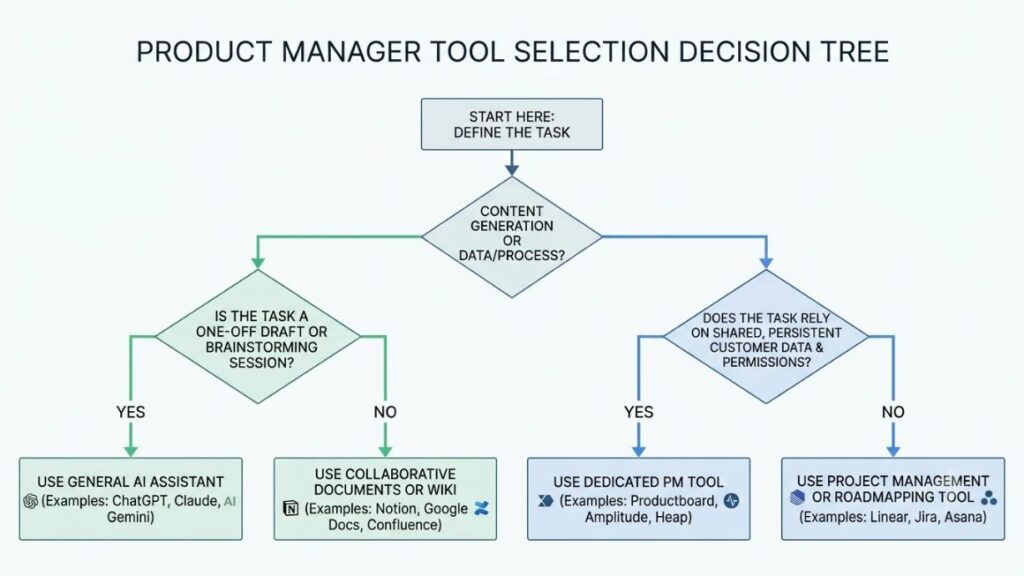
AI tools for product management split into two camps. Use a general AI assistant for drafts, brainstorming and one-off analysis. Switch to dedicated product management software once you need shared data, permissions and a workflow that survives past one chat window.
When a General AI Assistant Is Enough
Brainstorming. First drafts. A quick summary of ten interview notes. If the job doesn’t need live product data or a team’s permissions, a general assistant is plenty, and it’s cheaper than another seat.
When Dedicated Product Management Software Makes More Sense
Persistent data changes the maths. A feedback tool remembers every request from every customer, and an analytics platform connects to real events. Once the work depends on that shared memory, a dedicated product management tool beats a clever prompt, and deeper AI integration with your stack starts to matter.
When to Combine Multiple Tools
One tool for research, one for documentation, one for analytics: that works when each earns its keep. It stops working when two subscriptions do the same job. Before you add multiple tools that assist product managers in overlapping ways, write down which task each owns. If you can’t, drop one.
A general AI assistant suits drafting, brainstorming and one-off analysis. Dedicated product management software suits work that depends on shared data, permissions and history, such as feedback management and analytics. Most teams end up combining both, but each tool should own a clearly defined task.
How Do You Evaluate AI Tools? A Practical Scorecard
Score every one of the AI tools for product managers you shortlist on six criteria, weight them by what your team cares about, and test them on the same real tasks. Popularity isn’t a criterion.
The Six Criteria Every Product Manager Should Check
- Output quality and factual accuracy: does it stay faithful to your source material?
- Workflow fit: will people actually open it on a Tuesday?
- Integrations with the stack you already use.
- Data privacy, security and access controls.
- Total cost of ownership, including seats, credits and overage.
- Measurable business value: hours saved, faster decisions, fewer revisions.
How to Score and Compare Tools
Give each criterion a weight. A regulated fintech might put privacy at 30%, while a three-person startup might care more about price. Then compare quality, time saved, revision effort and usability. Skip the one everyone on LinkedIn keeps posting about unless it wins on your numbers.
What Does a 30-Day Pilot for an AI Tool Look Like?
A 30-day pilot tests one tool on one repetitive task and measures it against a baseline. Any of the AI tools for PMs in this guide can run through it. If you can’t show time saved or better quality by day 30, don’t expand.
Week 1: Identify the Problem and Establish a Baseline
Pick one task, say, summarising customer calls. Record how long it takes now, how good the output is and how often it needs fixing.
Week 2: Test the Tool on Realistic Tasks
Use approved data and the same prompts every time. Review each output by hand.
Week 3: Measure Quality and Gather Feedback
Check accuracy and how much editing the output needs. Ask teammates whether they’d miss it. Log any security or integration snags.
Week 4: Decide Whether to Adopt, Improve, or Reject It
Compare against your baseline and add up the full cost. Expand only if the evidence supports it. “It felt faster” doesn’t count.
A 30-day AI tool pilot measures one tool on one repetitive task against a baseline of time, quality and error rate. Teams should expand adoption only when results show clear gains after total cost is counted.
What Does a Practical Workflow From Customer Feedback to Prototype Look Like?
A practical AI-assisted workflow runs six steps: gather feedback, validate the problem, draft requirements, build a prototype, prioritise with engineering and design, then measure outcomes after launch. AI speeds up the first, third and fourth steps. People own the rest.
Hypothetical example (illustrative only, not a real company or result): picture a made-up bill-splitting app whose support inbox keeps filling with complaints about group payments.
Step 1: Gather and Organize Customer Feedback
Pipe tickets, reviews and call transcripts into a feedback tool like Productboard or Dovetail and let it cluster them. In our made-up app, group payments turns out to be the loudest cluster.
Step 2: Validate the Problem
Open the source quotes. Separate what customers said from what the summary assumed. Book a few calls if the evidence is thin.
Step 3: Draft Product Requirements
Ask an AI assistant for a first-pass PRD covering the new product features, user stories, constraints and success metrics. Then rewrite the parts that sound generic.
Step 4: Build a Prototype
Feed the draft into Lovable or Bolt.new, or sketch screens in Uizard. Show the result to customers this week, not next quarter.
Step 5: Prioritize and Collaborate
Walk engineering and design through feasibility, risk and dependencies. AI can’t weigh those trade-offs for you.
Step 6: Measure Outcomes After Launch
Track adoption, engagement, retention and the one metric the feature was meant to move. An analytics tool like Amplitude can flag changes, but you decide what they mean.
Which AI Prompts Help With Everyday Product Management Tasks?
A good prompt gives four things: context, constraints, the output you want and a rule against inventing missing facts. Then a human reviews what comes back. Every time. These best practices work in any assistant, even the best AI tools for product managers.
Prompt 1: Turn Customer Interview Notes Into Themes
“Here are notes from eight customer interviews. Group them into recurring pain points. For each theme, add the supporting evidence and list unresolved questions. Don’t invent anything that isn’t in the notes.”
Prompt 2: Draft a Product Requirements Document
“Draft a PRD for [feature]. User problem: [problem]. Audience: [segment]. Constraints: [constraints]. Expected outcome: [metric]. Mark every assumption.”
Prompt 3: Challenge a Feature Prioritization Decision
“Compare options A, B and C on reach, effort and revenue impact. List the evidence that’s missing before a decision gets made.”
Prompt 4: Summarize an Experiment
“Summarise this A/B test: hypothesis, result, limitations and recommended next steps. Use only the data below.”
Where Does AI Go Wrong, and How Do You Use It Responsibly?
AI goes wrong by sounding sure when it isn’t: wrong summaries, unsupported conclusions, made-up details. Even powerful AI tools for product teams need a human checking the output before it touches a roadmap.
Where AI Can Go Wrong
Summaries can drop the one quote that mattered. Research interpretations can lean biased or incomplete, especially with small samples. Generated code, prototypes and specs can contain errors that look perfectly polished. That polish is the danger.
Protecting Customer and Company Data
Before using AI tools on customer data, check how a vendor handles retention, model training, permissions and security. Some plans lock this down: Notion’s Enterprise tier, for example, offers zero data retention with its AI providers. Don’t paste confidential material into unapproved tools, and follow your organisation’s rules on consent for recorded meetings.
What Product Managers Should Not Delegate to AI
Final product strategy and accountability for it. Sensitive customer decisions without proper oversight. Prioritisation calls or release approvals nobody has verified. Ethical judgments that need context and a person who can answer for them.
Also Read: What is CIRCLES Framework? A Must-Know Method for Product Managers
What Is Changing in Product Management AI in 2026?
Four shifts stand out in AI product management: AI moving inside tools teams already use, agents taking on narrow tasks, faster prototyping, and sharper demands for governance and proof of value. Together they shape the future of product management.
AI Assistants Embedded in Existing Workflows
Vendors keep folding AI into platforms you already pay for. Notion bundled its AI into the Business plan, and Amplitude includes AI agents on its free tier. Less switching, more AI-powered tools hiding inside familiar screens.
AI Agents and Bounded Task Automation
Agents handle defined jobs across connected tools, within the permissions you set. The hype is running ahead of results, though. Gartner predicted in June 2025 that over 40% of agentic AI projects will be canceled by the end of 2027 because of rising costs, unclear value or weak risk controls. Start narrow.
Faster Prototyping and Natural-Language Analysis
Lovable, Bolt.new and Miro’s prototyping make rough concepts cheap, and analytics tools now answer plain-language questions. Cheaper building doesn’t fix the harder problem. Atlassian’s State of Product survey of 1,000+ teams argues that as code gets cheaper, deciding what’s worth building is still the hard part.
Greater Focus on Governance and Measurable Value
UXCam’s 2026 survey found 70% of leaders grew AI budgets while only 6% set AI OKRs. And Atlassian’s first State of Product report described teams adopting AI faster than ever while feeling more disconnected from strategy. AI-driven product decisions need proof, not vibes.
Also Read: Is Product Management a Good Career in 2026? An Honest Answer
In 2026, AI in product management is shifting from standalone chat tools to AI built into existing platforms, with agents handling narrow tasks. UXCam’s 2026 survey found 99% of product professionals use AI, yet only 6% of teams had set AI OKRs, which makes measuring value the next hurdle.
Conclusion
A product manager in 2026 doesn’t need more tools. They need the right one for the task, the team, the budget and the workflow already in place. So don’t buy six things at once. Pick one use case, run the 30-day pilot and measure before you expand. AI tools for product managers earn their place by saving hours, not by looking clever.
Most of these tools are cheap to test and annoying to unwind, which is a good reason to be picky. Start with the task that eats your week.
If you’d like structured help building AI into your product work, explore Young Urban Project’s Product Management course.
Frequently Asked Questions
What Are the Best AI Tools for Product Managers?
It depends on the job. The top AI tools for product managers by task: ChatGPT for drafting, Dovetail and Productboard for research and feedback, Amplitude for analytics, Lovable and Bolt.new for prototypes, Zapier for automation. The best tool is the one that fixes your slowest task.
How Can AI Tools Help With Product Management Tasks and Workflows?
They summarise research, draft documents, explain analytics, transcribe meetings and automate handoffs. AI for product managers pays off most on tasks you repeat weekly, like summarising calls or tagging feedback.
Which AI Tools Are Best for Product Research and Customer Feedback Analysis?
Three categories, three jobs. Qualitative platforms like Dovetail analyse interviews. Feedback tools like Productboard organise requests. Analytics tools like Amplitude show what users do. Most teams eventually want two of the three.
Which AI Tools Can Help Write PRDs and Product Documentation?
General assistants like ChatGPT draft quickly from your inputs. Workspace tools like Notion AI draft inside your docs and search them. Either way, feed in real context and edit the result.
Which AI Tools Are Best for Prototyping and Product Design?
Visual tools like Uizard and Miro help you sketch screens and flows. Prompt-based builders like Lovable and Bolt.new generate working web apps. Use the first for early ideas and the second when you need something clickable.
Which AI Tools Help With Product Analytics and Data-Driven Decisions?
Amplitude is the main pick here, with AI agents and plain-language questions. But no AI fixes unreliable event data. If your tracking is broken, fix that first.
Which AI Tools Help With Roadmapping and Feature Prioritization?
Productboard organises feedback and ranks opportunities, and Linear connects planning to engineering work. Both can suggest priorities. Frameworks and human validation still decide.
Are There Free AI Tools for Product Managers?
Yes. ChatGPT, Amplitude, Otter, Miro, Lovable, Bolt.new, Gamma, NotebookLM and Zapier all have free plans, though usage caps are tight and upgrades can climb through seats, credits or tokens.
Can AI Replace Product Managers?
No. AI can assist with research, drafts and analysis, and agents can automate defined tasks. But strategy, trade-offs, stakeholder trust and accountability need human judgment.
How Can Someone Become an AI Product Manager?
Start with product fundamentals: discovery, prioritisation, metrics. Add AI literacy, hands-on experiments, basic data skills and responsible AI practices. Building a small AI-powered product yourself teaches more than any course.