
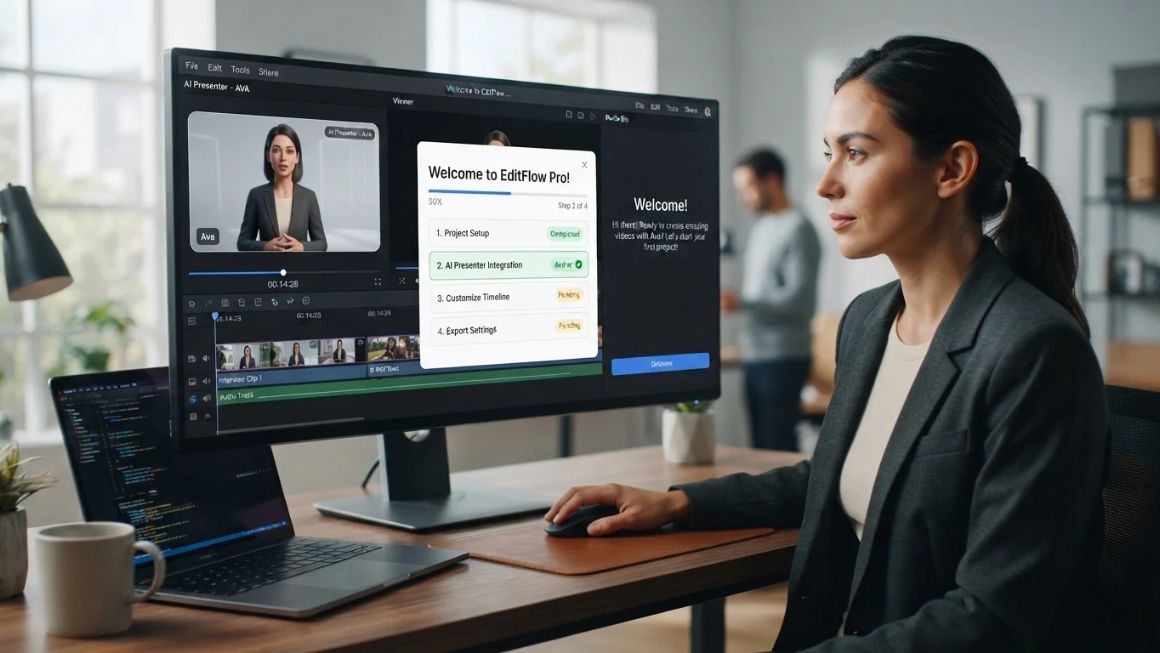
A new hire’s first week looks the same almost everywhere. A 40-page PDF, three login emails, a calendar packed with sessions, and one tired manager giving the same walkthrough for the fifth time this quarter. Brandon Hall Group’s research for Glassdoor linked strong onboarding to 82% better new-hire retention, yet plenty of teams still run it on documents and goodwill.
That’s why more companies are looking at AI onboarding video makers. Paste in a script, pick a presenter, and a finished video shows up in minutes rather than after a week of production. Policy changed next month? Edit one line and regenerate.
This guide compares ten tools, explains how they work, and walks through building your first video. It also covers what makes a tool good: an editor that doesn’t fight you, languages your people speak, and an export your LMS can read.
Table of Contents
What Are AI Onboarding Video Makers?
AI onboarding video makers are software tools that turn scripts, slides or screen recordings into welcome and training videos without a camera, studio or editor. AI handles the presenter, the voice and often the translation, so someone in HR can publish a polished video in an afternoon.
Think of it as a word processor that outputs video.
How AI-Powered Video Creation Works
Most of these tools follow the same basic path. On a typical AI video creation platform, you start with text-to-video generation: paste a script, a PDF or a web page, and the software splits it into scenes. An AI avatar video generator then lip-syncs a digital presenter to your words, while automated voiceovers read the script aloud and automatic subtitles appear underneath.
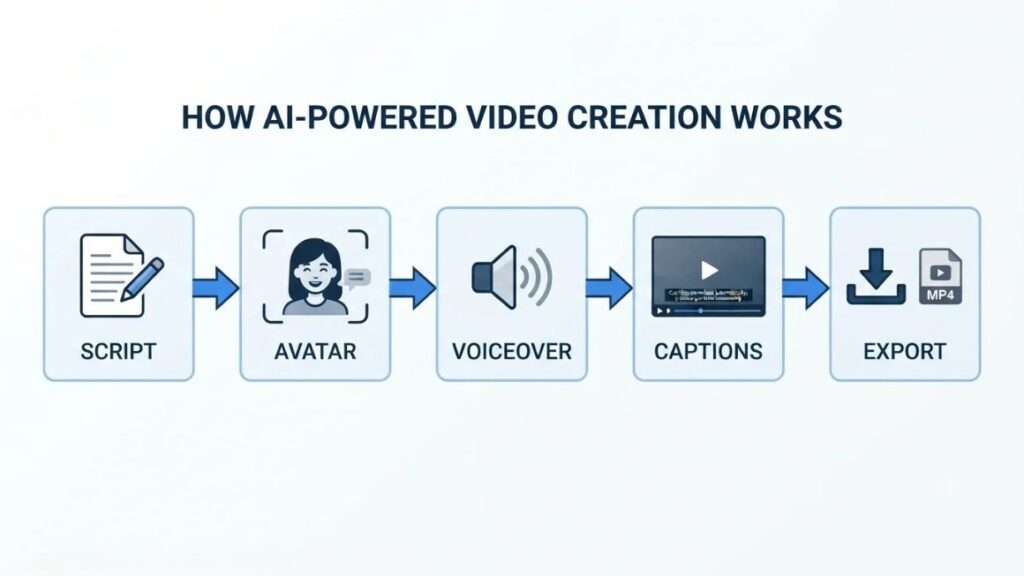
Translation sits on top. The same script can be dubbed into other languages, with some platforms adjusting the lip movements to match. Screen-based tools work a little differently, since they start from a recording and use AI to tidy the narration and write the steps.
Why Businesses Are Using AI for Onboarding
Employee onboarding videos used to mean booking a studio, a presenter and an editor, then hoping nothing changed before the video went live. Something always changed.
AI flips that. Production is faster because the script is the video. Automated onboarding videos also say the same thing every time, so the Pune office and the Chandigarh office hear identical explanations. Updates become a text edit instead of a reshoot, and the team depends far less on traditional video production.
Also Read: Use AI in Digital Marketing: AI Marketing Tools & Applications
AI onboarding video makers turn a script, slides or screen recording into a finished training video using AI presenters, voices and captions. The business case is speed and easy updates: changing a policy means editing text, not reshooting.
10 Best Tools to Create Onboarding Videos in 2026
Synthesia, HeyGen and Colossyan lead for presenter-led training, while Guidde, Loom and Clueso suit screen-based walkthroughs. The others fill narrower gaps.
The ten onboarding video creation tools below each solve a slightly different problem, so there’s no single winner. Pricing for AI onboarding video software also changes often. Check the official pricing page right before you decide, and don’t assume a feature seen on an enterprise plan comes with a basic subscription.
| Tool | Best for | Key feature | Pricing |
| Synthesia | Enterprise learning | AI presenters | Verify current plan |
| HeyGen | Localization | Realistic avatars | Verify current plan |
| Colossyan | Interactive learning | Quizzes and branching | Verify current plan |
| Vyond | Visual storytelling | Animation | Verify current plan |
| Guidde | Software tutorials | Screen capture | Verify current plan |
| Elai.io | Presentation training | Script-to-video | Verify current plan |
| Loom | Quick walkthroughs | Screen and camera recording | Verify current plan |
| Descript | Video editing | Transcript editing | Verify current plan |
| Pictory | Content repurposing | Script-to-video | Verify current plan |
| Clueso | Product education | Video and documentation | Verify current plan |
1. Synthesia
Synthesia is the AI training video generator most L&D teams name first, and for good reason. You paste a script, choose from a big library of presenters, and get a lip-synced video in well over a hundred languages, Hindi included. There’s a free tier for testing, but extras such as SCORM export and brand kits have tended to sit on higher plans, so read the plan page closely.
Cost is the main trade-off, and presenters can look slightly stiff on emotional topics. Best suited for enterprise training and structured onboarding.
2. HeyGen
HeyGen’s avatars are among the more natural-looking ones around. Its video translation matches voice and lip movement, so one welcome message can become multilingual training videos for every regional office. Editing is friendly, and custom avatars can come from your own footage.
The limits show up on the learning side. Credits can drain quickly if you regenerate a lot, and quizzes or LMS packaging aren’t its strength. Best suited for multilingual onboarding, especially message-led videos.
3. Colossyan
Colossyan was built with learning teams in mind, and it shows. Drop in a policy document, generate scenes, then add in-video quizzes and branching scenarios so learners make choices instead of just watching. Export covers SCORM and xAPI, which matters if your LMS tracks completion. Interactive training videos are where this one earns its place.
The downside? It feels more like a course builder than a video studio, so cinematic polish takes extra effort. Best suited for structured learning programmes with compliance or assessment needs.
4. Vyond
Not every topic works with a talking head. Vyond swaps presenters for animated characters, which suits scenario-based learning: handling an angry client, spotting a phishing email, that sort of thing. You control characters, props and backgrounds.
It’s slower than the avatar tools because you build scenes rather than paste a script, and cartoon styling can feel wrong for heavy subjects like harassment policy. Best suited for engaging visual explanations and storytelling.
5. Guidde
Software onboarding is where Guidde shines. Install the browser extension, click through a process, and it turns those clicks into a step-by-step video guide with an AI voiceover and written instructions alongside. Fixing a step later takes seconds, and translation options are built in.
What it won’t do is culture, values or founder messages, since there’s no presenter at the centre. Check free and paid limits before a company-wide rollout. Best suited for software demonstrations.
6. Elai.io
Elai.io leans towards presentation-led training. Paste a script, import slides or a web page, and it builds an avatar-narrated video with a decent spread of languages.
Reviewers often say the editor feels more basic than Synthesia’s or HeyGen’s, and because pricing follows video minutes, long courses can add up. Best suited for presentation-led training.
7. Loom
Sometimes a real face beats a synthetic one. Loom records your screen and camera together, and adds AI touches such as automatic titles, summaries and chapters, plus filler-word removal on some plans. A manager’s two-minute “welcome to the team” in Loom often lands better than a polished avatar. But nothing is automated.
Change a process and somebody has to record it again, and there’s no avatar or narration translation. Best suited for personal welcome messages and quick walkthroughs.
8. Descript
Descript treats video like a document. Record or upload, get a transcript, delete a sentence and it disappears from the video. It also records screens, cleans up audio, strips filler words and adds captions.
The learning curve is steeper than Loom’s, and it won’t generate presenters for you, so you still need raw footage. Best suited for teams editing their own recordings.
Also Read: 14 Best AI Background Remover Tools
9. Pictory
Already have a handbook, a blog post or a long script? Pictory handles script-to-video conversion by matching scenes from a stock media library and adding AI voiceovers and captions. The weak spot is specificity. Stock footage rarely shows your office, your product or your people, so company-specific topics can feel generic. Best suited for converting written material into visual content.
10. Clueso
Clueso is a newer name in product education. Record a screen walkthrough and it cleans up your narration, adds zooms and highlights, and produces a matching step-by-step article from the same recording. Translation and AI voices are part of the package. That makes it useful when one recording has to become both a video and a help document. It’s narrower than the avatar platforms, so a founder’s welcome message isn’t its job. Best suited for product walkthroughs and process explanations.
Presenter-led platforms such as Synthesia, HeyGen and Colossyan suit welcome and policy content, while Guidde, Loom and Clueso suit software walkthroughs. Plans and pricing change often, so confirm them on each vendor’s official page.

Key Features to Look for Before Choosing a Tool
The features that matter most in AI onboarding video makers are an editor your team can use, believable avatars and voices, translation, branding, LMS support and analytics. Good video onboarding software gets those right before it adds anything flashy. Privacy sounds boring, but it belongs on the list too.
Easy-to-Use Video Editor
If only one person can operate the tool, it dies the day they go on leave. Look for scene-based editing, text changes without re-recording, and templates your HR team can reuse.
Realistic AI Avatars and Voiceovers
Play a sample before you commit. Pacing, pauses and how the voice says your product names tell you more than any feature list. Voice cloning can help if a founder wants a familiar voice, with their consent.
Language and Translation Support
Counting languages isn’t enough. Get a native speaker to listen to Hindi, Tamil or Marathi samples, because quality varies between languages. Also check whether both subtitles and dubbing exist.
Custom Branding and Templates
Store logos, fonts and colours once and apply them everywhere. Otherwise every video looks like it came from a different company.
LMS Compatibility and SCORM Support
If your LMS tracks completions, you’ll need SCORM export, which packages a video so the LMS can record who finished it. It’s often reserved for higher plans, so ask early.
Analytics and Performance Tracking
View counts won’t tell you whether anyone learned anything. Look for watch time, drop-off points and quiz results, then compare them against how new hires actually perform.
Privacy, Security and Content Ownership
Onboarding material often includes internal policies. Ask where data is stored, whether uploads train the vendor’s models, who owns the output, and how avatars of real employees are consented to and deleted.
How to Create an Effective Onboarding Video Using AI?
Creating an onboarding video with AI takes seven steps: set a goal, know your audience, write the script, pick a tool, choose the presenter, edit and review, then publish and track results.
Step 1: Identify Your Onboarding Goals
Pick one outcome per video. “New hires can book leave and log expenses by Friday” beats “learn about the company”.
Step 2: Understand Your Audience
A sales intern in Gurugram and a senior engineer in Bengaluru need different depth. Note their roles, their languages and how comfortable they are with your tools.
Step 3: Write a Clear and Engaging Script
Write the way people talk. Aim for roughly 130 words per minute, short sentences, one idea per scene. Read it aloud once, because awkward lines sound worse in a synthetic voice.
Also Read: How To Become A Content Writer: A Simple, No-BS Guide
Step 4: Choose an Appropriate AI Video Tool
Match the AI onboarding video maker to the job. Software walkthrough? Guidde or Clueso. Presenter-led welcome? Synthesia or HeyGen. Quizzes and SCORM? Colossyan.
Step 5: Select an Avatar, Voice and Visual Style
Choose a presenter who fits your culture, a voice your audience understands, and one visual style you’ll keep consistent across every video.
Step 6: Generate, Edit and Review the Video
Generate a first draft, then watch it all the way through with sound on. Fix pronunciations, add subtitles, and have a subject expert check every fact.
Step 7: Publish and Track Results
Upload to your LMS, intranet or Day 1 checklist. Then watch completion rates and drop-off points, and fix the weakest video first.
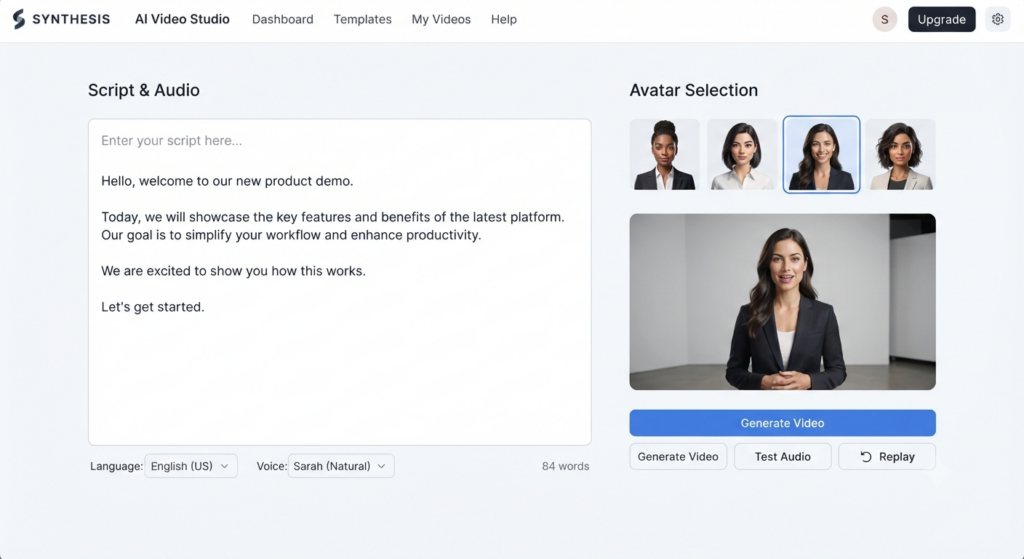
A quick example. Picture Asha, an HR lead at an imaginary 60-person SaaS company in Pune. Her goal is a three-minute welcome video. She writes a 400-word script covering the team, the first week and who to ask for what, then builds English and Hindi versions in HeyGen. After checking how the avatar pronounces the product name, she adds captions and drops the link into the Day 1 email. Two weeks later a leave policy changes. She edits two sentences instead of reshooting anything.
Employee Onboarding vs Customer Onboarding: What’s the Difference?
Employee onboarding builds belonging, skills and compliance over weeks. Customer onboarding gets someone to their first win with a product in minutes or days. AI onboarding video makers serve both, but the videos shouldn’t match.
Creating Videos for New Employees
Employees will watch longer, warmer videos if each piece is relevant and easy to find again. Think welcome message, team introductions, policies, tool setup. A familiar face matters here, and so does a human voice from their own manager.
Creating Videos for New Customers
Customer onboarding videos need to be short, specific and tied to an action. Someone who just signed up wants to see the first setup step, not your company history. Screen-based formats from Guidde, Clueso or Loom usually beat avatars here.
Choosing the Right Format for Each Audience
Match length to motivation. Employees have to watch, so a five-minute module is fine. Customers can leave any time, so aim for 60 to 120 seconds with one clear next step. A video that charms a new joiner can bore a trial user.
Benefits of Using AI for Onboarding Videos
AI onboarding video makers cut the effort of making and updating videos and keep the message identical across locations. The gains are practical rather than magical.
Save Time and Production Resources
Booking a studio, a presenter and an editor for a policy video means days of coordination. With AI, the person who wrote the script can produce a draft in an afternoon. Teams that batched employee training videos once a year can now make one whenever something changes.
Maintain Consistent Communication
The Mumbai team and the Chandigarh team hear the same leave policy in the same words.
Update Training Content Easily
When the expense limit changes, edit the sentence and regenerate. No reshoot.
Reach Teams Across Different Locations
One script can become several language versions, so remote hires and regional teams get the same quality instead of a rushed translation of a PDF.
Improve Learning Accessibility
Captions help people in noisy offices, non-native speakers and employees with hearing loss. Transcripts and pause controls let people revisit what they missed.
Also Read: AI Agent for Video Marketing: Automate Video Creation, Publishing & Analytics
Common Mistakes to Avoid When Creating Onboarding Videos
Most weak onboarding videos fail for one of six reasons.
Making Videos Too Long
Ten minutes of everything is how people end up skipping to the end. Split by topic and keep each piece short enough to finish between meetings.
Using Robotic or Unnatural Voiceovers
Flat delivery makes a friendly message feel cold. Test the voice, adjust pauses, and spell out product names phonetically if the tool allows it.
Overloading Videos With Information
Nobody remembers thirty facts from one video. Pick the three that matter on day one and save the rest for later modules.
Ignoring Accessibility and Captions
Plenty of people watch on mute. Without captions, they get nothing. Add them every time.
Publishing Videos Without Reviewing Accuracy
AI will read out a wrong leave policy with total confidence. Have HR or the process owner approve the script and the final video.
Forgetting to Update Outdated Information
An old video showing last year’s tools or a former manager’s name erodes trust fast. Put review dates in a calendar.
Best Practices for Creating Engaging Onboarding Videos
A few habits get you most of the way.
Keep Each Video Focused on One Topic
One video, one job. Give it a clear title so a new hire can find it again in week six.
Use Real Examples and Demonstrations
Show the actual dashboard, the real expense form, the real Slack channel. Generic stock visuals don’t help anyone finish a task.
Include Captions and Clear Narration
Calm, plain narration does half the work. Skip jargon unless the video defines it, and let captions carry the rest.
Add Knowledge Checks Where Appropriate
A two-question quiz after a compliance module shows whether people understood it. Colossyan builds these in, while other tools may need your LMS to do it.
Review Videos Regularly
Set a quarterly review. Ask recent joiners what confused them and fix those scenes first.
Future Trends in AI-Powered Onboarding Videos
Some of what gets called “the future” already ships today, and some is still a promise. Here’s which is which.
More Personalized Learning Experiences
Available now, in limited form: you can create role-specific versions from one script. Fully adaptive paths that change for each learner are still emerging.
Real-Time Video Translation
Dubbing finished videos with lip-sync exists today, including in Synthesia and HeyGen. Real-time translation during live sessions is still uneven.
Interactive AI Presenters
Several vendors, Synthesia and Colossyan among them, are building avatars and agents that respond to learner questions. How well they answer company-specific questions is worth testing yourself.
Automated Content Updates
Tools that flag outdated scenes when a source document changes are starting to appear. Expect to review every change anyway.
Integration With Learning Platforms
SCORM and xAPI exports exist now. Deeper two-way links with HR systems are still patchy.
Conclusion
The best tool isn’t the one with the flashiest demo. It’s the one that fits what your new hires actually need to learn, in the languages they speak, in the place they already work. Pick one painful, repetitive task, and test two tools on it using free plans or demos. Check plan limits on official pricing pages before any budget gets committed.
If you want to get sharper at choosing and prompting AI tools for real marketing and content work, the YUP AI Marketing course walks through practical workflows step by step.
Frequently Asked Questions About AI Onboarding Video Makers
What are AI onboarding video makers?
They’re tools that turn a script, slides or a screen recording into a finished onboarding video using AI presenters, voices and automatic captions. No studio or editor is needed.
Which is better for onboarding, Synthesia or HeyGen?
Synthesia leans towards structured corporate training, with templates and enterprise controls. HeyGen is stronger on natural avatars and translation. Test both free plans with your own script.
How do I make an onboarding video with AI?
Write a short script around one goal, pick a tool and avatar, generate the draft, review it with the process owner, add captions, then publish and track completion.
Who should use AI onboarding video makers?
Growing teams, remote or multi-city companies, and anyone repeating the same walkthrough often. A team hiring twice a year may find a Loom recording enough.
Are AI avatars actually good enough for employee onboarding?
For policy and process videos, usually yes. For emotional moments like a founder’s welcome, a real recording often lands better. Many teams mix both.
Why does my AI video sound so robotic?
Usually the script is the problem. Write shorter sentences, add punctuation for pauses, try another voice, and check how names are pronounced before regenerating.
How much do these tools cost?
Pricing ranges from limited free tiers to enterprise contracts. Features like SCORM and brand kits can sit on higher plans, so check each official pricing page.
Do I need SCORM for onboarding videos?
Only if your LMS has to record completions and quiz scores. If new hires just watch a linked video, a shareable link is enough.