

Product managers don’t lack information. They lack time to read it. Interview notes, support tickets, sales calls, dashboards and a backlog nobody fully trusts all land on one desk, and somebody has to turn that pile into a decision. That’s why AI tools for product management have gone from curiosity to routine so quickly.
The numbers back it up. Product Focus’s 2026 Survey of the Product Management Profession covered 677 product managers across 40 countries. It found that 69% now use AI frequently. That’s up from 49% a year earlier. There’s a catch, though. 97% said AI improved their personal productivity. Only 64% said it improved product outcomes.
So the task matters more than the tool’s popularity. This guide maps 12 AI tools for product management. See what each does well and where it falls short. Learn how to assemble a small set of AI tools for product managers that fits your work.
Table of Contents
What Can AI Do for Product Managers?
AI can take over the repetitive parts of product work: drafting documents, summarizing calls, sorting feedback and keeping trackers tidy. It can’t decide what’s worth building or why. The best AI tools for product management are designed around that split.
It helps to separate three modes. Assistance means you ask and the AI answers. This is like a chat assistant summarizing a transcript. Automation means something runs without you asking. This is like suggested labels on every new ticket. Agents go a step further. They plan several steps, use your data and take actions, usually with your approval. Each mode needs checking, in different amounts.
Reduce repetitive documentation and coordination work
Status updates, meeting notes, release notes and first drafts of specs eat hours every week. AI is good at turning rough input into a clean first pass. You still do the correcting.
Make customer feedback easier to analyze
Reading 300 support tickets isn’t anyone’s idea of strategy. AI can cluster them into themes in minutes. Reading those themes against the raw quotes is still your job.
Support faster decisions without replacing product judgment
AI for product prioritization can line options up against criteria you define. It can point out gaps in your reasoning. It can’t know your strategy, your engineering constraints or what a client was promised last week. Treat every output like a fast intern’s draft. It’s useful, quick and occasionally wrong with total confidence.
The 12 Best AI Tools for Product Management to Consider in 2026
Here’s how these were picked. Each tool has a clear job in product work, a documented AI feature and a transparent way to try it. The criteria were task fit, how the AI uses your own data, the pricing model and data handling.
These are candidates for AI tools for product management. This isn’t a ranking. The order isn’t a verdict. If you’re hunting for the best AI tools for product managers, the honest answer is whichever one matches your task. Features and plans move fast. So verify each on the linked page.
| Tool | Best use case | Key AI capability | Pricing model | Main limitation |
| ChatGPT | Brainstorming, research, drafts | Chat, Projects, deep research | Free tier; paid plans | Needs your context |
| Claude | Long documents, analysis | Long-context analysis, Projects | Free tier; paid plans | Rolling usage limits |
| Perplexity | Web research | Cited answers, Deep Research | Free tier; Pro, Enterprise | No paywalled pages |
| Dovetail | Qualitative research | AI tagging, theme clustering | Free plan; quoted tiers | Opaque pricing at scale |
| Productboard | Customer insights, planning | Spark agent | Per-maker plans, AI credits | Credits cap usage |
| Jira Product Discovery | Idea prioritization | Rovo AI in ideas | Free for 3 creators; paid per creator | Helps writing, not ranking |
| Linear | Issue tracking | Triage Intelligence, Agent | Free and per-user plans | Engineering-centric |
| Notion AI | Docs, knowledge | Agent, meeting notes, search | Full AI on Business and up | Custom Agents cost credits |
| Amplitude | Product analytics | Global Agent, specialized agents | Free plan; paid tiers | Needs clean tracking |
| Miro | Workshops, diagrams | Sidekicks, Flows, Prototypes | Credits per plan | Credit caps |
| Replit | Working prototypes | Agent builds apps | Free plan; paid credits | Variable cost; not production code |
| ClickUp | Task coordination | Brain, Super Agents | Per-user AI add-on | Extra cost; ClickUp data only |
1. ChatGPT, for brainstorming, research synthesis, and first drafts
ChatGPT is often the first of the AI tools for product management a PM tries. Projects keep files and instructions together. Deep research builds multi-step reports with sources. Connectors can pull in files from tools like Google Drive. It suits solo PMs and anyone starting out. Paste in 30 interview summaries. Ask for the five most repeated complaints with a quote each. Then check every quote against the original.
The limitation is context. It knows nothing about your product unless you supply it. It can sound certain when it’s wrong. OpenAI says business-plan content isn’t used for training by default; confirm that for your plan.
2. Claude, for long documents and structured analysis
Claude is the one to reach for when the input is long. Paid plans include Projects for keeping documents together and context windows big enough to hold a stack of long files. Size depends on the model and plan. Upload a 60-page market report and two competitor pricing pages. Then ask for a table comparing positioning and gaps. It suits PMs who write many specs and strategy documents. The trade-offs: usage limits apply in rolling windows, and Claude doesn’t track work, so you’ll still want a tracker beside it.
3. Perplexity, for web research and source discovery
Perplexity attaches citations to its answers. That makes it the fastest way to find where a claim came from. Deep Research mode runs many searches and writes a sourced report. Spaces keep a project’s research together. Ask what three rival apps changed in their pricing this quarter, then open every cited page.
The limitation is reach. Deep Research can’t see paywalled content. So a gap in the report may just be a locked page. Free-tier limits are tight. Treat citations as leads, not proof.
4. Dovetail, for organizing and analyzing qualitative research
Dovetail is built for the messy middle of research. Interviews. Calls. Surveys scattered across folders. Its AI summarizes and tags that material. It clusters similar feedback and surfaces recurring themes, and it can also work across support tickets, NPS and app reviews. Among AI tools for user research, it suits teams that run studies regularly. Tag ten onboarding interviews. Then check the themes against the transcripts before any slide gets made.
The catch is price clarity. By mid-2026, its public pricing page reportedly listed a free plan and a quote-based Enterprise plan, so ask early.
5. Productboard, for customer insights and product planning
Productboard collects feedback from sales, support and users. It then ties it to the features and goals you’re planning. Its Spark agent is built for product work, from customer discovery and competitive analysis to writing specs. It fits teams where feedback arrives from five directions and nobody sees the whole picture. Link a cluster of support requests to one feature idea, then ask Spark for a first-draft spec grounded in them. AI runs on monthly credits that scale with the number of makers, and Productboard says Spark stops until credits reset or you buy a top-up.
6. Jira Product Discovery, for idea prioritization and discovery workflows
If your engineers already live in Jira, Jira Product Discovery gives product a connected place to collect ideas, score them and share roadmaps. Atlassian’s Rovo AI works inside idea descriptions and comments. It can brainstorm, summarize long notes, pull out action items and tidy the writing. Stakeholders join free as contributors. The free plan covers up to three creators. Turn a rambling sales-call note into a short idea description, then score it. The AI helps you write about ideas; it doesn’t rank them. Check which plan includes AI.
7. Linear, for issue tracking and product development coordination
Linear is a fast issue tracker favored by software teams. Its AI sits where the tedious work is. Triage Intelligence suggests team, labels and assignee for new issues and flags likely duplicates using your history. Linear Agent, launched in public beta in March 2026, can answer questions across your roadmap and issues and run saved workflows. Picture a bug arriving with a duplicate already linked, waiting for you to accept it. It’s built for product and engineering, so it’s light on customer research. Some automations need the Business or Enterprise plan.
8. Notion AI, for documentation and knowledge management
Notion AI makes sense when your specs, meeting notes and decisions already live in Notion. Business and Enterprise plans include Notion Agent for workspace tasks, AI Meeting Notes that transcribe and summarize calls, and Enterprise Search, still labeled beta, which looks across connected apps such as Slack, Google Drive and Jira. It’s also a natural place to draft an AI product requirements document from your own meeting notes.
The catch is packaging: Free and Plus plans only offer a limited trial. Custom Agents use credits on top of the plan.
9. Amplitude, for product analytics and behavioral insights
Amplitude is the pick when your question is “what are users actually doing?” Its Global Agent works like an analyst you can talk to. Ask in plain language and it builds charts, reviews experiments and searches replays and feedback, with specialized agents for dashboards, sessions, experiments and feedback. That makes it a strong example of AI-powered product analytics for teams without a data analyst on call. Ask where new users drop off in onboarding, then open the chart behind the answer. Amplitude says AI agents and MCP come with every plan. Those include a free one with event limits. But output is only as good as your event tracking.
10. Miro, for workshops, diagrams, and collaborative planning
Miro is where product workshops happen. Its AI works on what’s already on the board. Sidekicks act as specialized AI collaborators, Flows chain AI steps into visual workflows, and AI can summarize boards, cluster sticky notes and draft diagrams. After a discovery workshop with 80 stickies, let AI group them into themes. Then argue with the groupings as a team. Miro Prototypes can turn board content into interactive prototypes. Every AI action spends credits. Miro’s own AI page lists a small monthly allowance per plan, with 10 shared on Free.
11. Replit, for building and testing functional prototypes
Sometimes a mockup isn’t enough. Replit’s Agent builds and deploys working apps from plain-language descriptions. That makes it one of the more practical AI prototyping tools for PMs who want something users can click. Try a refund-request flow with fake data. Then put it in front of five customers. Never use real customer records. Pricing is effort-based, so the more work the Agent does, the more credits it uses and the harder costs are to predict. And a prototype isn’t production code.
12. ClickUp, for task management and cross-functional coordination
ClickUp suits teams that want product, design, marketing and support in one workspace. ClickUp Brain is its AI layer, covering writing, summaries, task generation and AI fields, and Super Agents arrived in February 2026. Say a launch task has 60 comment. Ask Brain for a summary and open actions. Then confirm nothing was missed. The pricing catch is the big one. AI is sold as a per-user add-on on top of your plan. The free plan doesn’t include Brain. Brain also only sees what’s inside ClickUp.
No single pick wins across AI tools for product management. General assistants cover research and drafting. Dovetail, Productboard, Jira Product Discovery, Linear, Amplitude, Miro, Replit and ClickUp each own one slice of the workflow. Credits, add-ons and plan limits shape the real cost.
How to Choose the Right Tool for Your Workflow?
Pick AI tools for product management by the task that costs you the most time. Then test them on your own real material. Features matter less than fit. Most AI product management software looks impressive in a demo. The differences only show when it meets your messy data.
Start with the task that takes the most time
Track one week. Where do the hours go: transcribing calls, writing specs, chasing status? Match the biggest time sink to one tool: Dovetail or Productboard for feedback analysis, Notion AI or a general assistant for documentation. Buying for a feature you’ll use twice a quarter is how subscriptions pile up.
Check integrations with your existing software
A tool that can’t reach your data is just a chat box. Notion’s Enterprise Search connects to apps like Slack, Google Drive and Jira, and Amplitude offers an MCP (Model Context Protocol, an open standard for connecting AI assistants to other tools) connection so assistants like Claude or ChatGPT can query its data. Confirm the connection exists before you commit.
Compare total cost, access controls, and data policies
Sticker prices hide the real bill. Productboard meters AI by credits per maker, Replit by effort, ClickUp by add-on seat and Notion’s Custom Agents by credits. Ask who can see what, whether your data trains models, and whether admins can switch AI off. Read the vendor’s trust or security page, not just the sales deck.
Test output quality using the same real-world task
Give every shortlisted tool the same job, such as the same 20 support tickets, and compare results side by side. Mark the errors. The tool that needs the least correcting wins, not the one with the best demo.
- Does it fix the one task that costs you the most time?
- Does it connect to where your data already lives?
- Is the full cost clear, including credits and add-ons?
- Can admins control data access and switch AI features off?
- Did it pass a test on your own material?
The right AI tool fixes your most time-consuming task, connects to your data and passes a test on your own material. Compare total cost, including credits and add-ons, and confirm data policies before buying.
Resist stacking overlapping subscriptions. Three tools that each summarize meetings means three bills, three data policies and no clear source of truth. Choosing AI tools for product management is mostly an exercise in restraint.
How to Use AI Across the Product Lifecycle?
AI tools for product development help most when they’re chained, so one stage’s output feeds the next. Below is one connected example, from a customer request to post-launch measurement, showing how AI tools for product management fit together. It’s illustrative, not a real company case study.
Imagine a hypothetical bill-payment app whose users keep asking to split a utility bill with flatmates.
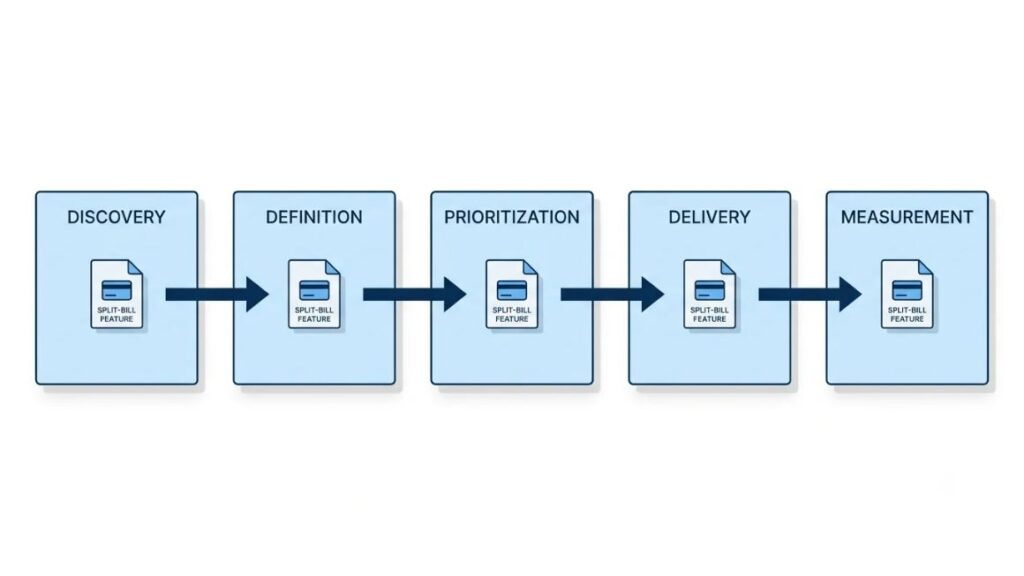
Discovery: Turn customer conversations into themes
The team has 40 support tickets and eight interview notes mentioning shared bills. They load them into Dovetail, or paste them into ChatGPT or Claude, and ask for themes with supporting quotes. Three emerge: splitting the amount, reminding flatmates, and tracking who has paid. The PM reads the quotes behind each theme before believing any of it.
Definition: Draft a product requirements document
Next comes a first-pass product requirements document (PRD): problem, users, goals, non-goals and open questions. Claude or Notion AI can draft it from the themes and notes. The PM then rewrites the goals and deletes anything invented, because first drafts always contain confident guesses.
Prioritization: Compare ideas using explicit criteria
The team scores the idea against others on criteria set in advance: reach, impact, confidence and effort, the logic behind the RICE framework. AI can draft the rationale, but most AI tools for product roadmaps stop at suggestions. The scores, and the trade-offs, stay human.
Also Read: Product Prioritization Frameworks Every PM Should Know

Delivery: Prepare tickets, summaries, and release notes
Once the idea is approved, the PM turns the PRD into tickets in Linear, Jira or ClickUp, using AI to draft descriptions and acceptance criteria. The same tool can later draft release notes from what shipped, and someone who knows the product reads them before anything goes public.
Measurement: Investigate product usage and outcomes
Before launch, the team writes down the success metric. After launch, they ask Amplitude’s agent how users who tried the feature behave compared with those who didn’t, then open the chart underneath. Correlation isn’t proof, so they test with an experiment where they can.
A Practical Starter Stack for Different Teams
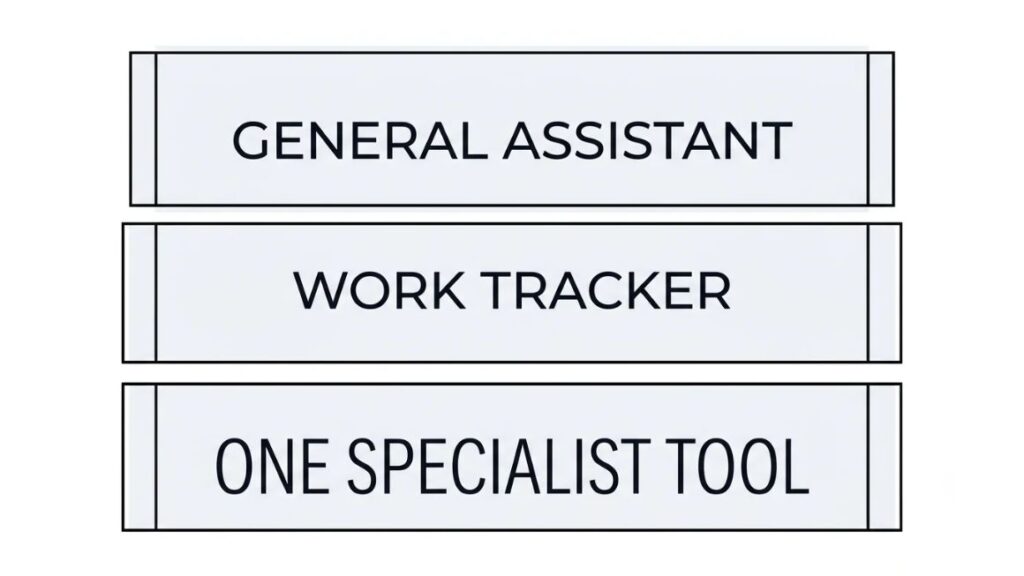
Start with one general AI assistant, the work tracker your team already uses, and at most one specialist tool. That’s enough for most teams, and it keeps your AI product management workflow simple enough to actually follow. Whatever the team size, AI tools for product management should earn their place one task at a time.
For beginners and individual product managers
Your first pick from the AI tools for product management on this list should be one assistant, such as ChatGPT or Claude. Add Perplexity only if you do heavy market research. Keep your notes where they already live. A free tier is enough while you’re learning, and its limits will tell you when paying makes sense.
For small startups with limited budgets
Pair a free assistant with a tracker like Linear or Jira Product Discovery, which has a free plan for up to three creators. Add Amplitude’s free plan once your event tracking is solid. Free plans hold up until you hit usage limits or need admin controls. Don’t buy a specialist tool until one task keeps blocking you.
For established teams with complex workflows
Larger teams need access controls, shared workspaces and audit trails, so a paid plan is easier to justify. Standardize on one assistant plan, keep the tracker, and add one specialist: Dovetail for research volume, Productboard for feedback, or Amplitude for analytics. Have security review the choice first.
Common Mistakes and Risks to Avoid
Most mistakes with AI tools for product management come from trust rather than technology: trusting unchecked output, pasting private data, automating too early, or counting volume instead of value.
Trusting unverified research or fabricated claims
AI can produce statistics and sources that look real. Remember the gap in the Product Focus survey, where far fewer PMs saw better outcomes than saw better personal productivity. Respondents described plausible-sounding analysis that nobody checked against reality. Open every source. If you can’t find it, don’t use it.
Uploading confidential information without approval
Roadmaps, customer data and unreleased pricing don’t belong in a personal free account. Use company-approved plans and read the vendor’s data policy. OpenAI says content from its business plans isn’t used for training by default, and Linear says it doesn’t use customer data to train its own AI models. Terms differ by plan, so read the ones that apply to you.
Automating decisions before testing their quality
Start with suggestions a human approves. Linear’s Triage Intelligence lets each team choose whether suggestions are shown, hidden or auto-applied. Begin on “show,” measure how often it’s right, and only then consider auto-apply.
Measuring output volume instead of business value
Twenty AI-drafted PRDs isn’t progress. Track outcomes: time to decision, features that hit their target metric, research hours saved without a drop in quality. Set the measure before you start.
The most common AI mistakes in product work are unchecked output, unapproved data sharing, premature automation and measuring volume over outcomes. Human review and measurable success criteria prevent most of them.
AI Trends Product Teams Should Watch
The clearest trend in AI tools for product management is AI moving out of chat windows and into the tools teams already use. Some of that is available today. Some is still a promise.
AI agents integrated into existing workflows
Available now: Linear Agent (public beta since March 2026), Amplitude’s agents, Notion’s Custom Agents and Productboard Spark all work inside the tools themselves. Today’s agents do best on narrow, reviewable tasks, and several of these products let you approve actions first. An agent that manages a whole product lifecycle without supervision is not something you should assume exists.
Faster prototyping and earlier product validation
Replit and Miro Prototypes make it cheaper to put an idea in front of users before engineering time is spent. A working prototype shows whether people can use an idea. It doesn’t prove they’d pay for it.
Better connections between customer signals and product decisions
Dovetail pulls support tickets, NPS and app reviews into one analysis, and Amplitude’s feedback agent maps survey and ticket themes onto behavior data. A single line from complaint to metric is closer than it was. It still depends on clean data and people who read the output critically.
Also Read: How to Build AI Agents (Step-by-Step Guide)
Conclusion
Twelve tools don’t mean twelve subscriptions. The pattern across this list is simple: pick tools around real workflow problems, test them on representative tasks, and keep product decisions with people. A tool that saves 30 minutes on something you do daily beats the impressive one you open twice a quarter. That’s the whole point of AI tools for product management.
Your next step: pick the task that drained the most time this week, run it through two of these AI tools for product management using identical material, and keep whichever needs less correcting.
If you’d like to build the judgment that makes any of these tools useful, YUP’s Product Management course covers the discovery, prioritization and metrics skills AI can speed up but can’t replace.
FYQ: Frequently Asked Questions
What are the best tools for product managers?
It depends on the job. For research and drafting, the best AI tools for product management are general assistants like ChatGPT or Claude, while Dovetail, Linear and Amplitude each suit one task. See the comparison table above.
Can AI create a product requirements document?
Yes, it can draft one from your notes in minutes. The first version contains guesses, so check every claim and rewrite the goals yourself.
Are there free tools for product management?
Yes. Many AI tools for product management have free plans or tiers, including Jira Product Discovery, Amplitude, Linear, ChatGPT, Claude, Perplexity and Miro, each with limits.
Can AI replace a product manager?
No. AI tools for product management speed up drafting, analysis and coordination, but they can’t own strategy, trade-offs or accountability for outcomes.
How should teams protect confidential product data?
Use company-approved plans, read each vendor’s data policy, restrict access with admin controls, and keep customer records and unreleased plans out of personal accounts.
How can product managers measure the ROI of AI tools?
Pick one task, record how long it takes and how often it needs rework, then compare after a month. Count outcomes, not volume.
Are AI tools suitable for non-technical product managers?
Yes. Most use plain-language prompts, so no coding is needed. Start with an assistant and your tracker (see the starter stack section), then add specialists.