

You’ve seen both kinds. One landing page lets you read the offer, spot the button and decide in a few seconds. Another carries the same information, but it’s packed with badges, four fonts and a gradient fighting the headline. You close the tab without quite knowing why.
The gap rarely comes down to talent or budget. It comes down to a few habits. The 5 Rules Of Clean Design cover most of them. Space. Hierarchy. Typography. Color. Alignment.
Speed matters here. Gitte Lindgaard and her team at Carleton University reported in 2006 that people can judge a website’s visual appeal in about 50 milliseconds. A cluttered layout can lose before anyone reads a word.
Clean design isn’t about stripping everything out. It’s about making sure every element helps someone understand, find, decide or act. That applies to many a social post, website, ad, presentation or product screen. This guide covers each of the 5 rules of clean design. It ends with a ten-minute audit you can run on your own work today.
Table of Contents
What Does Clean Design Actually Mean?
Clean design is a way of arranging visuals so people understand them fast. Clear structure. Readable text. Consistent styling. Nothing on the page that hasn’t earned its spot. You judge it by how easily someone can understand, decide or act. You don’t just judge it by how empty the layout looks.
That leans on six qualities: Clarity. Simplicity. Structure. Readability. Consistency and purpose. A design isn’t there to show off the designer’s taste. It serves whoever’s looking at it. The 5 rules of clean design all exist to protect that.
Clean Design vs. Minimalism
Minimalism is a style where you use as little as possible. Clean design is a goal to make things easy to understand. They overlap often, but mixing them up causes real problems.
Apple’s Liquid Glass redesign in iOS 26 is a handy example. It looks light and uncluttered. Yet beta testers quoted by DEV Community said text and icons could get lost on busy backgrounds. Apple offers Reduce Transparency and Increase Contrast settings. But critics asked a fair question: should people need an accessibility setting just to read their own screen?
That’s the trap. Strip out the labels, the context or the contrast, and you get something that looks calm and works badly.
The Real Test of a Clean Design
Does every element help the viewer understand, decide, find their way, or act?
If an element fails, cut it, shrink it or move it. If you can’t say what it does, that’s your answer.
The 5 Rules Of Clean Design
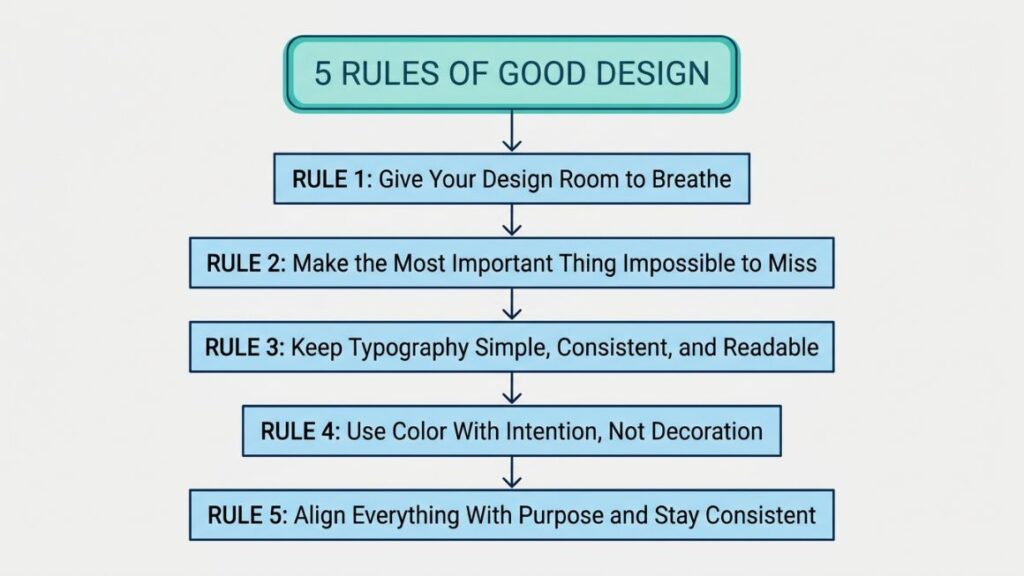
The five rules are space, hierarchy, typography, color and alignment. Each one fixes a specific problem: crowding, confusion, poor readability, visual competition and disconnected layouts.
| Rule | What it solves |
| Space | Crowding and visual noise |
| Hierarchy | Confusion |
| Typography | Poor readability |
| Color | Visual competition |
| Alignment | Disconnected layouts |
Notice that none of these ask you to add anything. Each of the 5 rules of clean design works by taking something away or tightening something up.
Rule 1: Give Your Design Room to Breathe
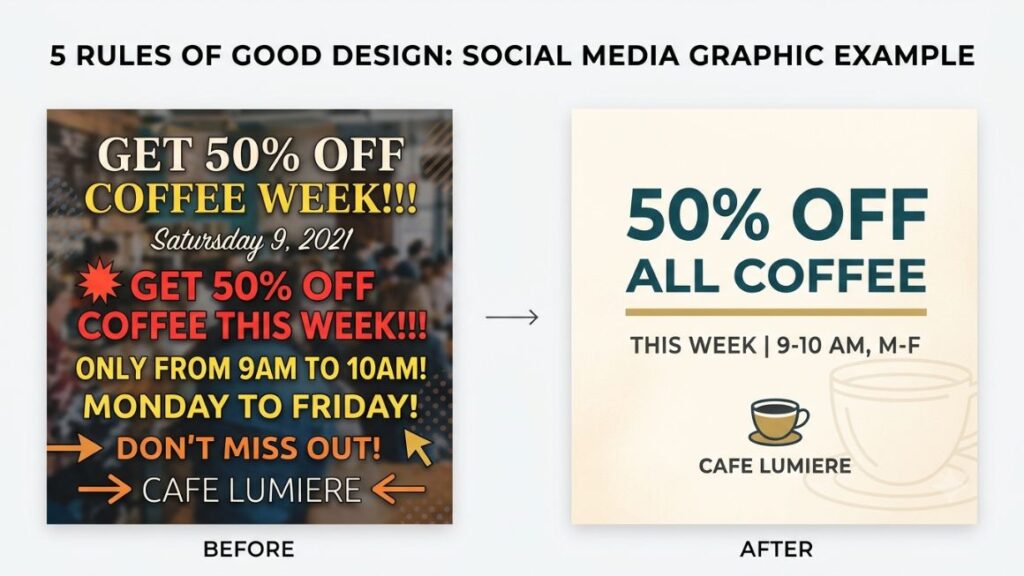
Whitespace gives elements room so people can separate, scan and focus. It also shows what belongs together. Items placed close read as a group, and items with gaps between them read as separate ideas.
Why Space Makes a Design Feel Cleaner
Think of Google’s search homepage. A logo, a box, two buttons. Everything else is air. So nobody wonders where to start.
Space separates elements. It focuses attention, makes pages easier to scan, sets a rhythm as sections repeat and cuts clutter without deleting a single word.
Proximity is the quiet workhorse. A heading sitting closer to its own paragraph than to the section above tells readers what belongs where. No lines or boxes needed for that.
Micro and Macro Spacing
Micro spacing covers the small gaps: padding inside buttons, the space between an icon and its label, line spacing. Macro spacing covers the big ones: page margins, gaps between sections, outer padding.
Pick a simple scale (say 8, 16, 24 and 32 pixels). Stick to it. A layout feels deliberate when the same relationships repeat, even if viewers couldn’t tell you why.
Don’t Fill Empty Space Just Because It Exists
Blank areas make people nervous. So they get filled with swirls, extra copy, borders, stock photos and patterns. Resist that.
Empty space should support hierarchy and grouping. But empty alone isn’t the goal. Any page that’s merely sparse with no grouping logic looks unfinished.
Quick Practice: Remove Before You Add
- Remove one decorative element.
- Delete any copy that repeats itself.
- Increase the space around the main message.
- Put the old and new versions side by side.
- Ask which one communicates faster.
Usually version two wins. When it doesn’t, the removed piece was doing real work.
Rule 2: Make the Most Important Thing Impossible to Miss
Hierarchy controls the order in which people notice things. It’s the one that decides whether viewers see the primary message first, supporting information second and the action or details third.
What Is Visual Hierarchy?
Visual hierarchy is the arrangement of elements so the most important one is noticed first, the next most important second, and so on. You’re designing for the audience and the task they came to finish, not for what you personally find interesting.
Five Simple Ways to Create Hierarchy
- Size: bigger reads as more important.
- Weight: bold type pulls the eye against regular text.
- Contrast: a dark word on a light field beats a mid-grey one.
- Position: top and left get seen first in left-to-right languages.
- Space: an element with room around it feels more important than a crowded one.
Keep the jump between levels obvious. Small differences look like mistakes.
Use the One-Second Test
Show your design to someone for one second, then hide it. Ask what they noticed first. Your hierarchy is weak if the answer is “nothing in particular” or the wrong thing.
The F-pattern is a handy reference for text-heavy digital layouts. Nielsen Norman Group’s 2006 eye-tracking study of 232 users went into this. They found that people tend to read across the top, then partway across a lower line, then down the left side. NN/g has since noted that scanning doesn’t always take the shape of an F. Treat it as a consideration for information-heavy screens. But it’s not a template for every design.
Use Three Levels of Information
Primary, secondary, tertiary. On a social post, the hook is primary. The supporting line is secondary and the handle is tertiary. On a landing page, it’s the headline, the subhead and proof, and then the fine detail. On an ad, it’s the offer, the product and then the small print. A fourth level starts to feel like noise.
Don’t Make Everything Important
Bold headline, bold subhead, bold keywords, red highlights, a giant badge. Nothing gets heard when everything shouts. Pick the one or two things that matter. Let the rest stay quiet.
Rule 3: Keep Typography Simple, Consistent, and Readable
Clean typography means one typeface, two or three weights and a clear gap between headings and body text. In the 5 rules of clean design, readability comes first and style comes second.
Avoid Font Overload
Start with one typeface. Add two or three weights. Make the heading-versus-body difference obvious. Bring in a second typeface only when it has a job. It could be a display font for headlines against a plain one for body copy. Three fonts on one page rarely look rich. They look undecided.
Build a Simple Type Hierarchy
Define four levels: main heading, section heading, body text and supporting text such as captions. Set the size and weight for each. Then reuse them everywhere.
Don’t Sacrifice Readability for Style
Six habits quietly kill readability: thin type, tiny text, tight line spacing, wide letter spacing, decorative fonts and poor contrast. Light grey hairline text looks elegant in a mockup. On a phone in afternoon sunlight, it’s painful.
Make Typography Accessible
Think about accessibility when you choose type, not as a final check. Under WCAG 2.2, text should resize up to 200 percent without losing content or function (Success Criterion 1.4.4). Layouts should also survive user text-spacing changes. Line height of at least 1.5 times the font size. Paragraph spacing of 2 times. Letter spacing of 0.12. Word spacing of 0.16 (SC 1.4.12). That rules out fixed-height boxes that clip text when it grows.
If you serve customers in Europe, the European Accessibility Act came into force on 28 June 2025. So this isn’t only good practice anymore.
Quick Typography Check
- Can you read the headline from across a desk?
- Is the body text comfortable at normal reading distance?
- Are weights consistent from page to page?
- Does everything still read on a phone?
Also Read: Product Design Skills: What You Actually Need to Learn
Rule 4: Use Color With Intention, Not Decoration
Good color use gives each color one job and keeps contrast high enough to read. It’s the rule where the 5 rules of clean design meet accessibility head-on.
Give Every Color a Job
Assign roles: background, primary text, secondary text, brand or accent, and status colors. Then keep the meanings consistent. If blue means “click me” on one page, it shouldn’t mean “disabled” on the next.
Restrained Does Not Mean Boring
Clean doesn’t mean beige. A bright accent on a quiet base, warm off-whites, one gradient on the hero, a bold brand color on a single button: all of that carries personality. The trick is control.
Contrast Is Functional
WCAG 2.2 asks for a contrast ratio of at least 4.5:1 for normal text and 3:1 for large text, meaning 18 point or bigger, or 14 point bold or bigger. Logos, purely decorative text and text in inactive controls are exempt. Icons, form borders and other interface components need 3:1 against neighboring colors under SC 1.4.11.
Teams still miss this. WebAIM’s 2026 analysis of the top one million home pages found low-contrast text on 83.9% of them. That is up from 79.1% in 2025, averaging 34 instances per page. Pale grey on white is the usual culprit.
WebAIM’s 2026 study of one million home pages found low-contrast text on 83.9% of them. That makes it the most common accessibility failure for another year. WCAG 2.2 requires 4.5:1 for normal text and 3:1 for large text.
Don’t Let Color Do All the Work
Errors, warnings, success messages, chart categories and selected states all need a second signal besides color: an icon, a label, a pattern. A red border alone fails anyone with color vision deficiency. Add an error icon and the words “Enter a valid email” and it works for everybody.
Common Color Mistakes
- Too many accent colors
- A different color for every call to action
- Low contrast between text and background
- Random gradients with no purpose
- Colors whose meaning changes from screen to screen
Rule 5: Align Everything With Purpose and Stay Consistent
Alignment means elements share edges, margins and spacing. So the layout reads as organized. Consistency, the last of the 5 rules of clean design, extends that logic to buttons, icons and components. So people learn your design once and trust it everywhere.
Why Alignment Makes a Design Feel Organized
Shared edges create invisible lines the eye follows. The page feels calm when titles, images and buttons snap to the same left edge. Misalign them by a few pixels and viewers can’t say what’s wrong, only that something is off.
Use a Grid Without Overcomplicating It
A grid is columns, margins, gutters and containers. That’s it. It gives you a reliable structure that makes alignment easier. But it’s a framework, not a cage. So break it on purpose when something deserves attention.
Everything Doesn’t Have to Be Centered
Left alignment is easiest to read in long blocks. Center alignment suits short headlines and invitations. Right alignment works for numbers in tables. Intentional asymmetry can look more confident than a centered stack. Let content and purpose choose the alignment, not habit.
Consistency Builds a Visual System
Buttons, spacing, typography, icons, colors, components and corner treatments should repeat. Rounded corners on one card and sharp ones on the next signal carelessness. Consistency reduces cognitive load. People don’t have to relearn how things behave on every screen.
When a Design Gets Larger, Use a System
Write the decisions down once a project passes a few screens. Design tokens store them as named values for color, type and spacing. So one change updates everything. The Design Tokens Community Group, a W3C community group, announced the first stable version of its specification (2025.10) on 28 October 2025. So design tools and code can exchange tokens in one format.
Apple’s Human Interface Guidelines and Google’s Material Design apply the same thinking at platform scale. In India, fintech brand CRED open-sourced NeoPOP, its design system, for Android, iOS, Flutter and the web. You don’t need anything that big yet. A page of tokens and five reusable components is a good start.
Also Read: 13 Brand Guidelines Examples for Startups and Businesses
How to Apply These Five Rules Across Different Projects?
The same five rules work everywhere, but each format leans on them differently. Here’s how the 5 rules of clean design adjust from a social graphic to a product screen.
Social Media Graphics
One graphic, one message. Make the hook the biggest thing. Keep supporting text short, hold to two or three colors. Check the design at thumbnail size before you post. If a carousel slide needs a paragraph, it’s probably two slides.
Websites and Landing Pages
Group related content. Give each section room. Put one primary call to action where people expect it. Design for habits users already have: logo top left, buttons that look like buttons.
Advertisements
An ad gets a moment, not a minute. The offer should land instantly. The call to action should be unmistakable. Anything decorative that competes with the offer should go.
Presentations
One core message per slide. Use large type, keep titles in the same spot and skip the clip-art. If people have to read the slide while you’re talking, it’s a document wearing a costume.
Branding and UI
Consistency does the heavy lifting here: a reusable visual language across web, app and print. Treat graphic design and usability as one job, not two. A beautiful button nobody can find isn’t beautiful.
Also Read: How to Make a Hero Section of a Website
Clean Design on Mobile: What Changes?
Mobile forces you to decide what matters most, because there’s less room. Text has to stay readable and controls need to be big enough to tap. In India that’s the main case, not a side one. StatCounter put mobile at 67.05% of web traffic there in June 2026. Every one of the 5 rules of clean design gets tested on a small screen first.
Desktop Space Is Not Mobile Space
Shrinking a desktop layout doesn’t make a mobile layout. Decide which three things a person on a small screen must see. Let the rest drop lower or collapse.
Check Reflow and Scaling
WCAG 2.2’s reflow criterion (SC 1.4.10) says content should work at a width equivalent to 320 CSS pixels without scrolling in two directions. W3C notes that’s the same as a 1280-pixel window at 400% zoom. Large data tables and complex diagrams may scroll sideways. A normal article or landing page shouldn’t.
Check Interactive Elements
WCAG 2.2 added SC 2.5.8, a Level AA criterion: targets should be at least 24 by 24 CSS pixels. Five exceptions apply: spacing, an equivalent control elsewhere, inline links, browser-controlled elements and essential presentation. Treat 24 pixels as the floor. Apple’s Human Interface Guidelines recommend 44 points and Material Design recommends 48 dp.
WCAG 2.2 requires pointer targets of at least 24 by 24 CSS pixels (SC 2.5.8) and content that reflows at a 320 CSS pixel width (SC 1.4.10). Apple recommends 44 points and Material Design recommends 48 dp, so treat the WCAG figure as a minimum.
A Simple Mobile Test
Open the design on a real phone and check:
- Headings
- Buttons
- Navigation
- Images
- Text scaling
- Spacing
- Horizontal scrolling
If anything makes you pinch, squint or scroll sideways, fix that first.
Common Mistakes That Make a “Clean” Design Look Bad
Most designs miss the mark for one of five reasons. Empty gets mistaken for clean. Everything gets emphasized. Fonts and colors multiply. Trends get copied blindly. Or the user gets forgotten. Each one breaks at least one of the 5 rules of clean design.
Mistake 1: Confusing Empty With Clean
Empty space alone doesn’t create good design. Space has to create relationships, focus or breathing room. A big blank area between unrelated items is just a gap.
Mistake 2: Making Everything Important
No clear starting point, no hierarchy. Excessive emphasis destroys emphasis.
Mistake 3: Overusing Fonts and Colors
Each extra font or color adds noise. It weakens the system.
Mistake 4: Copying Trends Without Context
Oversized type, glass effects, heavy gradients and extreme whitespace can all work, and can all clash with your brand and audience. A trend should support what users need, not replace design thinking.
Mistake 5: Forgetting the User
Beauty versus usability is a false choice. Accessibility is part of usability. Test whether the design works for the person using it, not whether it impresses your team.
A 10-Minute Clean Design Audit
You can audit most designs in ten minutes with seven quick tests. Together they check every one of the 5 rules of clean design, in this order.
Minute 1: Squint Test
Squint until the details blur. What stands out first? If the hierarchy falls apart, it was relying on the details.
Minutes 2-3: Remove Test
Ask what can go. Remove one element at a time. Check whether the design gets clearer. If it does, leave it out.
Minutes 4-5: Alignment Test
Look at edges, margins, spacing and relationships. Check whether elements follow a grid or just sit where they landed.
Minutes 6-7: Typography Test
Check hierarchy, readability and consistency. Could you describe the type system in one sentence?
Minute 8: Grayscale Test
Switch to grayscale. Does the hierarchy still work? If everything depends on color, revisit contrast and hierarchy.
Minute 9: Mobile Test
Check the layout at phone size. Look for reflow problems, cramped elements and needless scrolling.
Minute 10: User Test
Show it to someone who hasn’t seen it and ask:
“What do you think this design is trying to tell you?”
Their answer shows the gap between what you meant and what they understood.
Current Clean Design Trends to Watch
In 2026, clean design is moving toward purposeful minimalism, warmer palettes, stronger systems and accessibility. That comes with personality that’s controlled rather than piled on. The 5 rules of clean design hold up through all of it.
Purposeful Minimalism
Reduction with a reason. Minimalism should remove friction, not just remove elements. The Liquid Glass debate shows why.
Warmer and More Expressive Minimalism
Warmer neutrals, richer accents, stronger photography and more personality are replacing sterile white. Google’s Material 3 Expressive, announced at Google I/O 2025, leans into bold color and shape. It and Liquid Glass have both drawn legibility criticism. So expressive still has to pass the contrast check.
Design Systems and Accessibility
Reusable systems and consistent components are becoming the default, partly because the alternative is getting worse. WebAIM found 95.9% of top home pages had detectable WCAG 2 failures in 2026, up from 94.8% a year earlier.
Personality Without Clutter
Bold typography, illustration, photography, motion and a distinctive color can all give a brand character. CRED’s design head has said the app needs a personality. NeoPOP keeps it consistent. Pick one or two expressive tools and keep the rest quiet.
Conclusion
A clean design isn’t the one with the fewest elements. It’s the one where every element earns its place. Give things room, make the main message obvious, keep type simple, use color with purpose and line everything up. That’s the 5 Rules Of Clean Design in one breath.
Next time you’re about to add something, remove something first. Then check whether the design got easier to read and use. It usually does.
Before adding another element, ask whether removing one would make the design clearer.
Clean visuals are a skill you can practice, and one of the fastest ways to make social posts, landing pages and ads perform better. If you want to build it alongside content strategy, YUP’s Content Marketing course covers it step by step.
FAQ: Frequently Asked Questions About Clean Design
What are the five rules of clean design?
The 5 Rules Of Clean Design are whitespace, visual hierarchy, typography, color and alignment with consistency. Space prevents crowding. Hierarchy removes confusion. Typography keeps text readable. Color stops visual competition. Alignment holds the layout together.
Is clean design the same as minimalist design?
No. Minimalism is a style that uses as little as possible. Clean design is a goal. Every element helps people understand, decide or act. A minimalist design can still be unclear if it removes labels, context or contrast.
How many fonts should a clean design use?
Start with one typeface in two or three weights. Add a second only when it has a clear purpose, such as separating display headlines from body text.
How many colors should a clean design have?
There’s no universal number. Give each color a job (background, text, accent, status). Keep the meanings consistent and let brand needs and contrast ratios shape the palette.
Why is whitespace important in design?
Whitespace groups related items, supports hierarchy, improves readability and gives a layout visual pacing. It tells viewers what belongs together and what to look at first.
How do I know if my design is too minimal?
Check whether people still have the context they need. If viewers can’t tell what something is, what to do next or whose brand it is, you’ve cut too much. Test it on someone new and see what they miss.