
Most beginners start in the wrong place. They open Figma, copy a trending app screen and call it a portfolio piece. Nobody hires a product designer for pretty screens alone.
The job is creating products that solve real user problems inside real business limits. That’s why product design skills fall into a few clear groups. Understanding users. Shaping flows and interfaces. Testing ideas. Making calls that hold up in a room full of engineers and product managers. Creativity gets you noticed. The process behind it gets you hired.
It pays to get this right. Glassdoor India data puts the average salary for a product designer near ₹10 lakh a year. That is as reported by Fueler in August 2026. That said, the base pay ranges from roughly ₹7 lakh to ₹16 lakh.
AI is now part of the workflow too. In Figma’s State of the Designer 2026 survey of 906 designers, 91% said AI tools improve their designs. That makes judgment more valuable, not less.
This guide covers the seven foundational product design skills, the supporting ones, the tools question, practice projects and a roadmap for building a career in design.
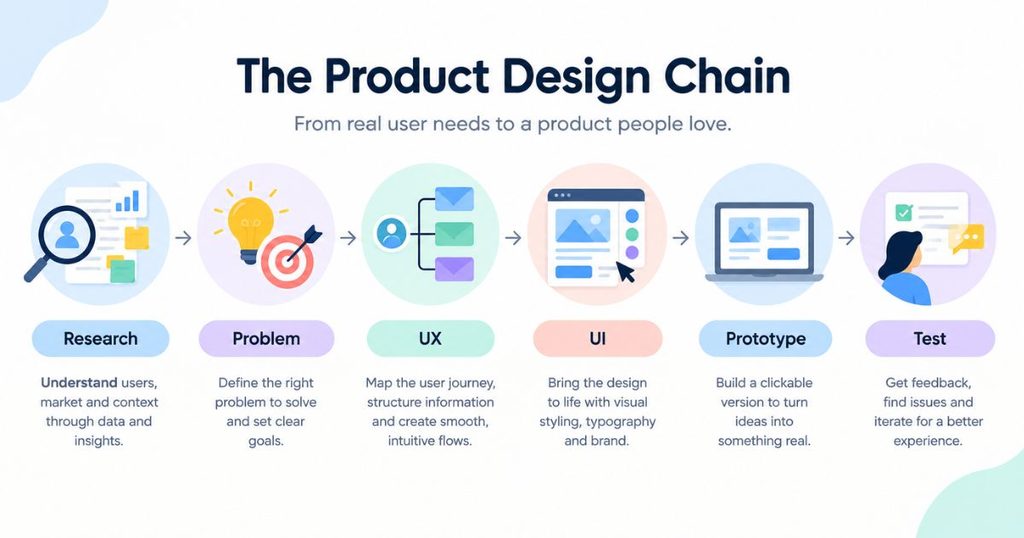
Table of Contents
What Does a Product Designer Actually Do?
A product designer takes a user problem and turns it into a tested and working product experience. The job runs from research through interface design to iteration. Business goals and technical limits shape every choice.
From user problem to product experience
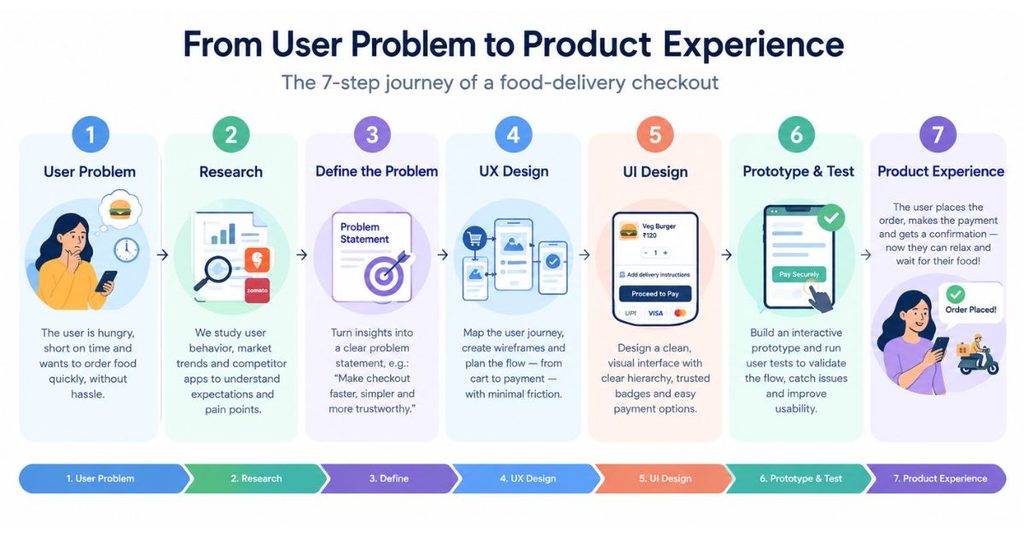
Say people keep abandoning checkout on a Swiggy-style food delivery app. A product designer doesn’t start by redrawing the pay button. They start by asking why people leave. Maybe delivery fees show up too late. Maybe the address step is clumsy. That finding becomes a clear problem statement, and only then does the design work begin:
Research → Problem Definition → UX → UI → Prototype → Testing → Iteration
Product Designer vs UX Designer vs UI Designer
A UX designer focuses on how the experience works. Research. Flows. Structure. Usability. A UI designer focuses on how it looks. Layout. Type. Components. A product designer overlaps with both, then adds ownership of the outcome. That includes business goals and engineering limits. Titles blur across the design industry. At smaller companies, one person often does all three.
One distinction worth making: physical product design is a different trade. Teams in automotive manufacturing use SolidWorks and worry about manufacturability and manufacturing processes. This guide is about digital products.
7 Foundational Product Design Skills You Need to Build
The skills needed to become a product designer start with user research. Problem framing, UX, UI, prototyping, testing and business judgment come next. These are the core product design skills. It helps to build them roughly in that order. Each one feeds the next.
1. User Research
User research is the practice of learning what real people need, do and struggle with before you design anything. It’s the base of user centered design. Strong user research skills come from a handful of methods used together.
Interviews tell you why people behave the way they do. Observation shows user behavior as it happens. It doesn’t show it as people remember it. Surveys help you size a pattern across more people. Existing data (support tickets, app reviews and analytics) shows where the pain already lives.
The hard part is synthesis. Raw notes aren’t insight. Group what you heard into themes. Write down what surprised you.
Beginner practice: interview five people who order food online. Ask about their last order, not their opinions. Note what slowed them down. Cluster the answers on a board.
2. Problem Solving and Problem Framing
Problem framing means defining the right problem before chasing a solution. A request like “add a coupon box” is rarely ever the real problem.
Questioning assumptions is the habit that matters most. Keep asking why until the request turns into a problem. Then look for evidence that it’s real. Constraints like time, budget and technology shape what’s possible. So write them down early. Prioritisation comes last. You can’t fix everything. So pick the problem with the biggest effect on users and the business.
Use this chain:
Request → Why? → Problem → Evidence → Opportunity
A manager asks for a bigger “Order now” button. Why? Sales are falling at checkout. The problem: people don’t trust the final price. The evidence: session recordings show them leaving when delivery fees appear. The opportunity: show the full price earlier.
3. UX Design, User Flows and Interaction Design
UX design is the work of shaping the user experience, meaning how a product functions and flows. So people reach their goal without confusion. Solid UX design skills start with a user flow. That is the path someone takes from opening the app to finishing a task.
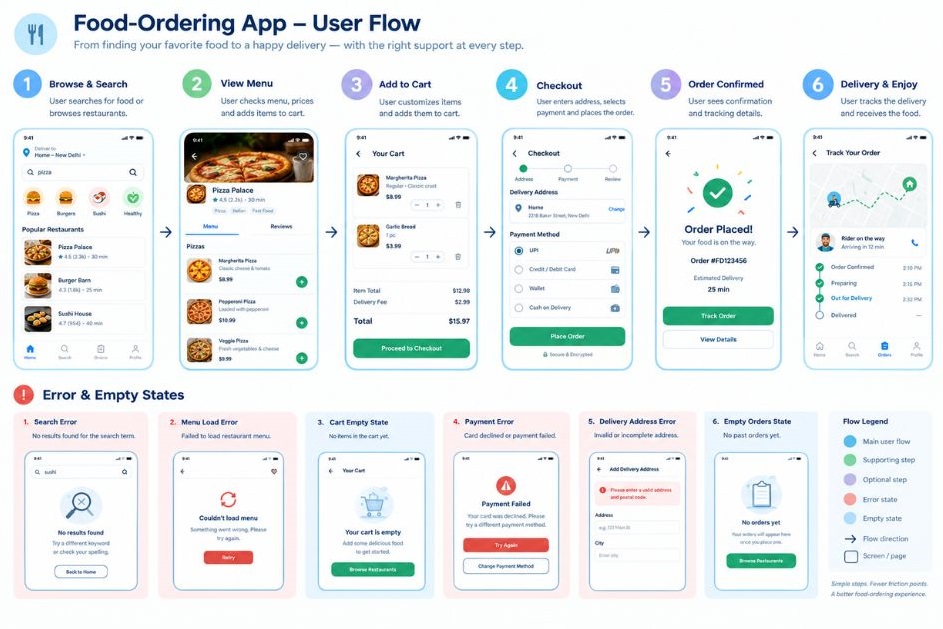
In a food-ordering app, that path might be: open app → search → pick a restaurant → choose items → review cart → pay → track delivery. Information architecture decides where each of those things lives. Navigation decides how people move between them. Wireframes are rough and low-detail layouts. They let you test structure and functionality before colour and style distract anyone. You can also explore AI wireframing tools to speed up early-stage exploration.
Then comes interaction design: how buttons, gestures and feedback behave. Interaction design skills show up in small moments, like what happens the second someone taps “Pay”.
Don’t stop at the happy path, where everything works. Design the states too: loading, empty, error, success. What if the restaurant closes mid-order? What if the card fails? Edge cases like these decide whether a design holds up.
4. UI and Visual Design
UI design is short for user interface design. It is the visual layer of a product: layout, typography, colour, spacing and the components that make a user interface clear. Strong UI design skills have less to do with aesthetics than with hierarchy. That is the order in which the eye reads a screen.
Layout puts things where people expect them. Typography sets tone and readability. Colour signals meaning, like red for errors. Contrast keeps text readable. Spacing groups related items and gives the screen room to breathe. Components like buttons, cards and inputs keep everything consistent and user-friendly.
A well-designed interface also feels intuitive and carries the brand identity without shouting. The look and feel should match what the company stands for. Learn design concepts like hierarchy and balance, and the tools become easy.
Figma is the tool. Knowing what to design is the skill.
5. Prototyping
A prototype is a clickable model of a product. It lets you test how it feels before anyone writes code. Good prototyping skills include knowing when a rough version is enough. It’s also knowing when a detailed one is worth the time.
Low-fidelity prototypes are paper sketches or grey boxes. They’re fast, cheap and great for testing structure. High-fidelity prototypes look and behave like the final product. This makes them better for judging detail and interaction.
Take a “reorder your last meal” feature:
Tap → Open → Choose → Confirm → Complete
Build just those five steps as an interactive flow. Add the states that matter (loading, error, success). Put it in front of someone. If they hesitate on step three, you’ve learned something no spec would have told you. Catching that now costs far less than catching it after development.
6. Usability Testing
Usability testing means watching real people try to complete tasks with your design so you can see where it fails. It’s the fastest way to find out whether the design works for anyone besides you.
Give each participant a task, not a tour. For example: “Order dinner for two under ₹800 and have it delivered by 8 pm.” Then stay quiet and watch. Where do they pause, tap the wrong thing or say “hmm”?
Avoid leading questions. “Was the checkout easy?” nudges people toward yes. Ask “What were you expecting to happen there?” instead.
Look for patterns, not single complaints. If three of five people miss the same button, that’s a finding. According to Nielsen Norman Group, five participants typically surface about 85% of the usability problems in a flow. Products with very different user groups need more people. Fix what you found, refine the design and test again.
7. Product Thinking
The product thinking skill sits where three things overlap: user needs, what the business is trying to achieve and what technology can realistically deliver. Designers who work in that overlap make decisions that actually ship.
A screen can delight users and still fail if it ignores business goals or can’t be built in time. So you learn to ask different questions. Which metric is this meant to move: activation, conversion, retention or customer satisfaction? What does the data say about where people drop off? What can engineering build this quarter? What would a simpler version cost?
Trade-offs are the daily reality. Every feature competes with another for attention, effort and screen space. Prioritisation means choosing the most impactful problem and saying no to the rest, at least for now.
Onboarding makes this concrete. Suppose a new fintech app loses half its sign-ups at KYC, the identity verification step. Users want speed. The business needs compliance. The tech team can integrate only one verification provider this quarter. A designer who sees all three might split the form into short steps, show progress and move optional fields until after the first transaction. That’s an analytical answer, not just a pretty one.
Product design skills come down to seven foundations: user research, problem framing, UX, UI, prototyping, testing and business judgment. Together they let a designer move from a user problem to a tested solution. Tools change, but that chain of product design skills stays the same.
Other Product Design Skills That Matter
Beyond those seven core skills, four supporting product designer skills separate decent designers from hireable ones: communication, collaboration, design systems and accessibility.
Communication and Presentation
Design decisions need defending. Effective communication means explaining a layout in terms a PM or founder cares about: user impact, business goal, trade-off. Practise presenting your work in five minutes. Show the problem first. Then the options you rejected. Then the one you chose. Written clarity matters too. Most design feedback arrives in comment threads, not meetings.
Collaboration With Product Managers and Developers
Product designers work in a triangle with product managers and engineers. Bring developers in early, before screens are final. Ask what’s cheap and what’s costly to build. Share states and specs clearly, and expect to adjust. Your designer-developer collaboration becomes smoother with product requirements. A design engineering can’t ship isn’t finished. Good collaboration also means taking feedback without defending every pixel.
Design Systems
A design system is a shared library of components, styles and rules that keeps a product consistent as teams grow. Design system skills mean building reusable components with variants and clear naming. So designers and developers work from the same parts. Apple’s Human Interface Guidelines are a public example: after the iOS 26 release in 2025, they now guide designers on Liquid Glass.
Accessibility
Accessibility in product design means making sure people with different abilities can use what you build. The reference standard is the Web Content Accessibility Guidelines (WCAG) 2.2. The W3C published it as a Recommendation in October 2023 with nine new success criteria. Practical fundamentals: text contrast of at least 4.5:1, touch targets of at least 24 by 24 CSS pixels, visible focus states and labels on every input. WebAIM’s 2026 analysis found low-contrast text on 83.9% of the top million home pages.
Product Design Skills vs Tools: What Should You Learn First?
Learn the skill first and the tool second. Product design skills transfer from one app to the next, and tools don’t. A tool is only the place where your thinking becomes visible. So pick one that fits each skill and move on.
| Skill | What to Learn | Example Tool |
| User research | Interviews, observation, synthesis | Research tools |
| UX | Flows, IA, wireframes | Figma |
| UI | Typography, layout, hierarchy | Figma |
| Prototyping | Interaction and states | Figma |
| Testing | Tasks, observation, synthesis | Testing platforms |
| Design systems | Components, variants | Figma |
| Product thinking | Goals, metrics, trade-offs | Analytics tools |
Tools change. Design fundamentals remain useful.
Do You Need to Learn Figma to Become a Product Designer?
Practically, yes. Figma is the workspace most product teams use for wireframes, UI, components, prototypes, design systems and collaboration. Many junior job descriptions list it. Sketch or the Adobe Creative Suite (now Creative Cloud) can work. But Figma is the safer bet.
Basic Figma skills get you through the door. They don’t get you hired on their own. A file full of tidy frames says nothing about whether you understood the user. Learn the tool well enough to work fast. Then spend the rest of your time on the product design skills no tool can teach you.
Figma proficiency ≠ Product Design ability.
Do Product Designers Need to Know How to Code?
Usually, no. But technical literacy helps. Think of it as one of the supporting product design skills, not a prerequisite.
You won’t be asked to ship production code. Still, basic HTML and CSS help you see how layouts reflow on smartphones. An idea of responsive behaviour explains why one screen takes a day to build and another takes a week. Knowing how front-end components work tells you which constraints are real. A basic grasp of APIs shows what data a screen can actually display. The goal isn’t becoming a developer. It’s having better conversations and proposing designs engineering can build. Designers who grasp feasibility ask “can we ship this?” before engineers have to.
What Product Designers Need to Know About AI in 2026
AI speeds up parts of design work. But it doesn’t replace judgment. Learn product design first. Learn AI as part of your workflow.
What AI Can Help With
AI handles the slow and repetitive parts well: summarising interview notes, drafting copy options, generating early layout ideas and producing first-pass prototypes. In Figma’s State of the Designer 2026 report, built on a survey of 906 designers, 91% said AI tools improve their designs. Treat that as faster exploration, not a shortcut around decisions.
What AI Does Not Replace
AI can’t sit in a user interview and notice the hesitation. It doesn’t know your business constraints, your brand’s voice or your engineering limits. It can’t decide which problem deserves attention first, and it can’t reliably judge its own output. Someone has to own the decision, and that someone is you.
What Aspiring Designers Should Learn
AI skills for designers come down to briefing, checking and editing. Brief AI the way you’d brief a junior teammate, then check its output against user research and accessibility rules. Keep a note of where it helped and where it misled you, because that log doubles as portfolio evidence. Market trends will keep shifting, so build the habit rather than memorising a tool list.
Also Read: 12 Best AI UI/UX Design Tools: Features, Use Cases & Comparison
AI now sits inside most design workflows, and 91% of designers in Figma’s 2026 survey say it improves their work. It speeds up exploration but can’t replace research, judgment or accountability for the final decision. Learn product design skills first, then add AI as part of your workflow.
How to Practise Product Design Skills as a Beginner
Run one familiar product through the full design process, from problem to tested prototype. Product design skills for beginners grow fastest through small, complete projects, not through scattered tutorials. Treat this section as a mini project brief for building real product design skills with your own hands.
Choose One Familiar Product
Pick an app you already use, like Swiggy, Zomato or Zepto. Familiarity helps because you can spot friction from experience, and you can find real users (friends, family, classmates) to talk to. Keep the scope small. One flow, such as checkout or reordering, is plenty.
Follow the Complete Design Process
Here’s a hands-on, step-by-step guide you can repeat on any product:
- Problem: Pick one friction point, such as abandoned checkout.
- Research: Interview five users and read app reviews.
- Define: Write one problem statement backed by evidence.
- Map: Sketch the current user flow and your proposed one.
- Explore: Draw at least three rough solutions.
- Wireframe: Build low-fidelity layouts of the strongest idea.
- UI: Apply type, colour, spacing and components.
- Prototype: Link the screens into a clickable flow.
- Test: Watch five people attempt one task.
- Improve: Fix what you found and document the change.
Don’t Jump Straight to High-Fidelity Screens
High-fidelity screens feel productive. They’re also the easiest place to hide weak thinking. Start with sketches and grey boxes, because they’re quick to throw away and nobody falls in love with them. Polish only after the structure has survived a test. Many beginners never get that far because they spent three days on one pretty screen.
How to Build a Product Design Portfolio While Learning
A beginner portfolio proves how you think, not just what you can draw, and that’s what opens up career opportunities. Two or three complete case studies do that better than a dozen unfinished redesigns.
What a Beginner Portfolio Should Demonstrate
A strong product designer portfolio reads like a short story with evidence. Each case study starts with the problem and the users you designed for, then shows the research and what you found. It explains the decisions you made and the alternatives you rejected, followed by the prototype, the testing and the iterations that came after. It ends with what you learned. When you’re building a portfolio, that structure matters more than polish.
Build Fewer, Stronger Projects
Hiring teams look for evidence of how you decide, not a gallery of screens. 2-3 strong case studies > 8 unfinished redesigns, because each complete project shows research, alternatives, testing and iteration.
Pick projects with a real problem and a real test.
Show Your Thinking, Not Just Final Screens
Compare two ways to describe the same checkout project.
Weak: “Redesigned the checkout screen.”
Strong: “Interviewed five regular app users, found that late delivery fees caused drop-off, tested two layouts, and moved the fee summary to the cart. In round two, four of five finished the task unaided.”
The second version shows a problem, a method and a result. That’s what gets a reply.
Beginner’s Product Design Learning Roadmap
Learn in this order: users and problems, UX, UI, prototyping and testing, business judgment, a portfolio, then modern skills. The sequence builds a strong foundation before the flashier parts.
Stage 1: Users and Problems
Learn interviewing, observation and problem framing. Interview five people and write one clear problem statement. Don’t open a design tool yet.
Stage 2: UX
Study user flows, information architecture and wireframes. Map a flow for an app you use and sketch the key screens on paper.
Stage 3: UI
Learn typography, spacing, colour and components. Rebuild one screen in Figma from a reference, then design one from scratch.
Stage 4: Prototype and Test
Link your screens into a clickable flow. Put it in front of five people, note where they struggle, then revise.
Stage 5: Product Thinking
Connect design to goals and metrics. Learn what activation, conversion and retention mean, and practise explaining trade-offs in plain language.
Stage 6: Portfolio
Turn two or three projects into case studies. Show the problem, research, alternatives, tests and what changed. Ask a working designer for feedback.
Stage 7: Modern Skills
Add accessibility basics (WCAG 2.2), a little HTML and CSS, and AI-assisted workflows. A structured design course or free online courses can guide you, but keep building. Revisit each stage as you improve, because product design skills compound along any career path, including a career in UX design.
Common Product Design Mistakes Beginners Make
Most beginners make a few of these.
Learning Figma Before Learning Design
A tutorial teaches clicks, not decisions. Learn research, flows and hierarchy first, then pick up the tool along the way.
Copying Popular Interfaces
Copying a famous app copies its context, not its logic. Ask why that layout works for those users before borrowing anything.
Designing Without Research
Skipping research means designing for yourself. Even five short conversations will change your assumptions.
Showing Only Final Screens
Final screens hide your reasoning. Add the problem, alternatives and test results so reviewers can follow your thinking.
Skipping Usability Testing
A design nobody has tested is a guess. One quick session with three friends will expose confusing labels and dead ends.
Adding Unnecessary Features
More features rarely fix a weak core flow. Solve the main task cleanly first, then ask what’s genuinely missing.
Ignoring Accessibility
Poor contrast and tiny tap targets exclude real users. Check colours and sizes early instead of fixing them at the end.
Treating AI Output as the Final Answer
AI drafts are starting points. Check them against research, brand rules and accessibility before they reach your portfolio.
How to Know If You’re Improving Your Product Design Skills
Ask yourself these every few months. A “no” tells you what to practise next.
- Can I explain the problem in one sentence?
- Can I run a basic round of user research?
- Can I map a user flow?
- Can I create wireframes?
- Can I build a prototype?
- Can I test it with real people?
- Can I explain my design decisions?
- Can I connect decisions to business goals?
- Can I collaborate with developers?
- Can I show my thinking in a portfolio?
Final Takeaway: Learn to Think Like a Product Designer
Product design skills aren’t a tool list. They’re a chain: understand users → find problems → design solutions → prototype → test → improve → explain → build. Break any link and the end product suffers.
The designers who grow fastest don’t learn every tool. They master the chain one project at a time and keep a record of their thinking.
Start with one problem, one product and one project. Then take it all the way from research to tested solution.
Skills like these compound when you keep learning in small, regular steps. If you want more career guidance written for early-career professionals, YUP’s Crystal Clear Newsletter is a good next step. Subscribe to get practical reads like this one in your inbox.
Frequently Asked Questions About Product Design Skills
What Skills Do You Need to Become a Product Designer?
You need research, problem framing, UX flows, UI basics, prototyping, testing and business judgment, plus communication and teamwork. Tools like Figma help, but the thinking behind them matters more.
What Is the Difference Between UX Design and Product Design?
UX design focuses on how a product works and feels for users. Product design includes that, plus visual design, business goals and ownership of the final outcome. At many companies the titles overlap.
Is Figma Enough to Become a Product Designer?
No. Figma helps you produce work, but employers hire for research, problem-solving and decision-making. A designer who knows the tool but can’t explain the problem will struggle to get hired.
Do Product Designers Need to Know How to Code?
Usually not. Knowing basic HTML, CSS and how APIs work helps you collaborate with developers and design things they can actually build.
Can I Become a Product Designer Without a Design Degree?
Yes. Employers mostly want proof you can solve problems, and a strong portfolio shows that better than a certificate. Learn through online courses, practise on real products and document everything.
How Long Does It Take to Learn Product Design?
Google’s UX Design Professional Certificate on Coursera is built for about six months at 10 hours a week. Real fluency takes longer, because you also need projects, feedback and repetition.
How Many Portfolio Projects Should a Beginner Have?
Two or three complete case studies are enough to start. Each should show research, decisions, testing and results, not only final screens.
Will AI Replace Product Designers?
Unlikely in the near term. In Figma’s 2026 survey, 91% of designers said AI improves their work, which points to a changing workflow, not a disappearing role. Designers who can judge, test and explain decisions stay valuable.