

Every team has a version of this problem. The meeting ends. Everyone nods. Three people take away three different sets of action items. A week later, nothing moved. Not because the meeting was bad, but because nothing captured it properly.
That’s the gap AI meeting intelligence platforms exist to fill. Not just recording what was said but actually making sense of it: who committed to what, what decisions were made, what sentiment shifted mid-call, and what needs to happen next.
This isn’t a niche tool for enterprise sales teams anymore. In 2026, AI meeting intelligence platforms are being adopted across marketing, HR, product, consulting, and even executive leadership. The AI Meeting Assistants Market is projected to grow from $3.50 billion in 2025 to $27.29 billion by 2034, according to Market Research Future, at a CAGR of 25.62%. That kind of growth doesn’t happen without real adoption driving it.
This guide covers everything you need to know: what these platforms are, how they work, what features actually matter, a side-by-side look at the best tools in 2026, and how to choose one that fits your team’s workflow.
Table of Contents
What Is an AI Meeting Intelligence Platform?
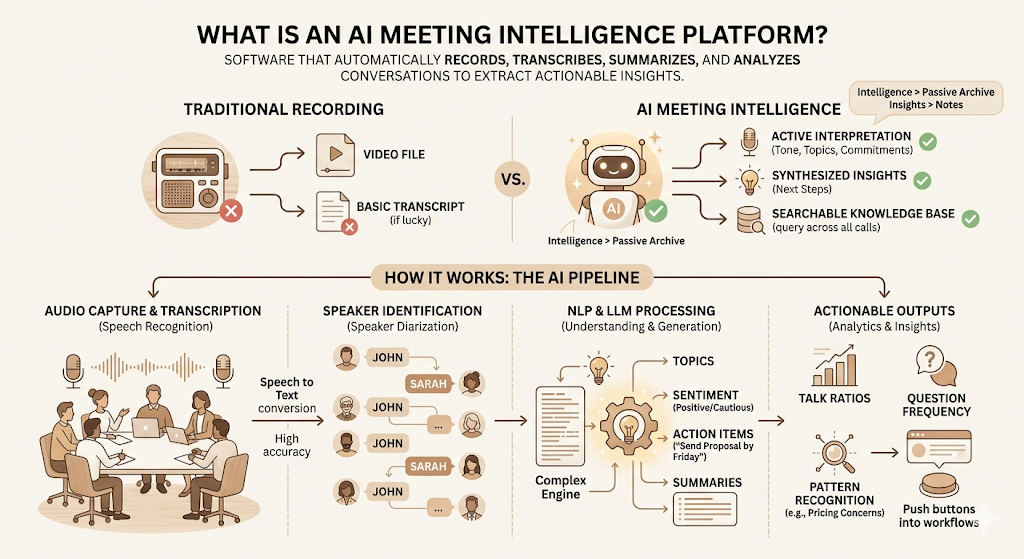
An AI meeting intelligence platform is software that automatically records, transcribes, summarises, and analyses conversations from meetings to extract actionable insights for teams and individuals.
That one sentence matters because it separates the category from basic recorders. The word “intelligence” is doing work here. These tools don’t just store what was said. They process it, tag it, surface the parts that matter, and push those outputs into your workflows.
How It Differs from Traditional Meeting Recording Tools
Traditional meeting recording tools gave you a video file. Maybe a transcript if you paid for the upgrade. You still had to watch the recording or skim 40 pages of text to find what you needed.
AI meeting intelligence platforms operate differently across three dimensions.
Recording vs Intelligence. A recording is a passive archive. An AI meeting intelligence platform actively interprets what was said: who made a commitment, which topics came up most, and whether the buyer’s tone shifted from cautious to excited.
Notes vs Insights. Notes are a reproduction of the meeting. Insights are a synthesis of it. The difference is whether you leave knowing the same things you said, or knowing what to do next.
Storage vs Searchable Knowledge Base. A stored recording requires you to remember roughly when something was said and scrub to that point. Searchable archives let you query “when did the client mention pricing concerns” and surface every instance across every call.
How AI Meeting Intelligence Works
Under the hood, these platforms combine several technologies working in sequence.
Speech recognition converts audio to text. The accuracy of this step determines everything downstream, which is why transcription quality is the most hotly contested spec in the category.
Speaker identification (also called speaker diarization) labels each transcript segment with who said it. This is what makes “John said he’d send the proposal by Friday” actually attributable rather than anonymous.
Natural Language Processing (NLP) parses the transcript to identify topics, named entities, sentiment, and context. It’s how the platform knows “send the proposal by Friday” is an action item, not small talk.
Large Language Models (LLMs) generate human-readable summaries and pull out structured outputs from messy, unscripted speech. This is the layer where the quality of summaries lives or dies.
Conversation analytics goes a layer deeper: talk time ratios, question frequency, sentiment curves, and topic distribution across calls. This is the layer that makes the platform useful for coaching and pattern recognition, not just note-taking.
An AI meeting intelligence platform combines speech recognition, speaker identification, NLP, and LLMs to convert raw meeting audio into searchable transcripts, AI summaries, action items, and conversation analytics. The goal is to replace manual note-taking with structured, actionable outputs that plug directly into team workflows.
Why Businesses Are Adopting AI Meeting Intelligence Platforms
The practical reason is time. According to Microsoft’s 2025 Work Trend Index, 80% of employees and leaders say they don’t have enough time or energy to get their work done. Meetings are a major contributor to that pressure. One industry survey cited in an AssemblyAI analysis found that 71% of managers call meetings inefficient, and executives can spend up to 23 hours a week in them.
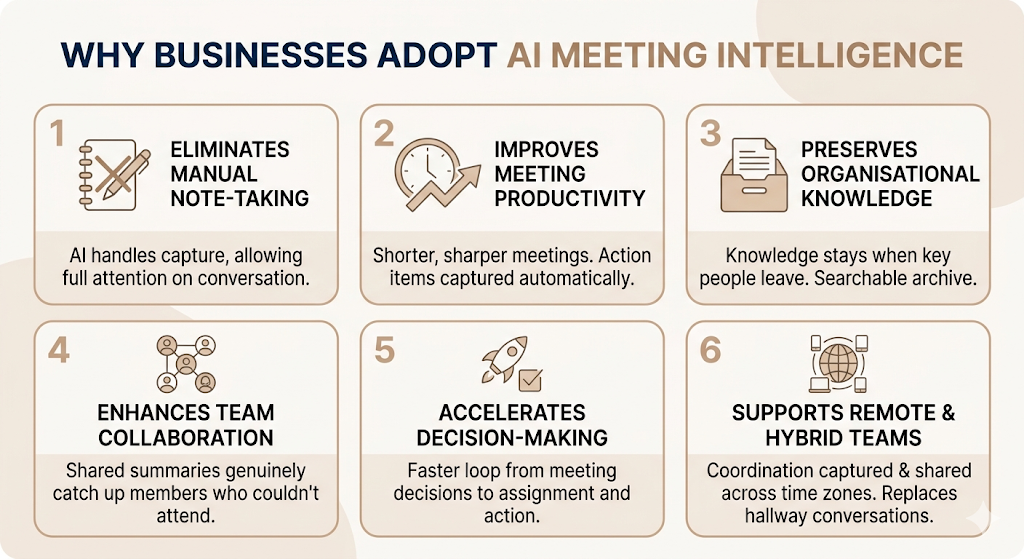
So why are AI meeting intelligence platforms being adopted so widely? It’s not one reason. It’s six.
Eliminates Manual Note-Taking
Taking notes during a meeting is cognitively expensive. You’re trying to listen, contribute, and capture simultaneously. Most people can only do two of those three things at once. AI meeting intelligence platforms handle the capture entirely, which means your full attention goes to the conversation.
Improves Meeting Productivity
Teams that use these tools report shorter, sharper meetings because participants know action items will be captured automatically. The pressure to re-state things three times for the benefit of whoever is taking notes goes away.
Preserves Organisational Knowledge
This is one that gets overlooked. When a key person leaves a company, everything they discussed in 18 months of client calls, onboarding sessions, and project meetings leaves with them. AI meeting intelligence platforms archive that knowledge in a searchable form. It stays.
Enhances Team Collaboration
Shared meeting summaries mean that team members who couldn’t attend are genuinely caught up, not just forwarded a 90-minute recording with a vague comment that “you might want to watch this.”
Accelerates Decision-Making
When action items are extracted, assigned, and pushed into project management tools automatically, the loop between “we decided this in the meeting” and “someone is doing this” closes faster.
Supports Remote and Hybrid Teams
Remote teams lose the hallway conversations and quick check-ins. Every meeting becomes more important as a coordination mechanism. AI meeting intelligence platforms ensure that coordination is captured and shared across time zones without anyone needing to be on the call in real time.
Read More: Marketing Automation Software (2026 Guide)
Key Features of AI Meeting Intelligence Platforms
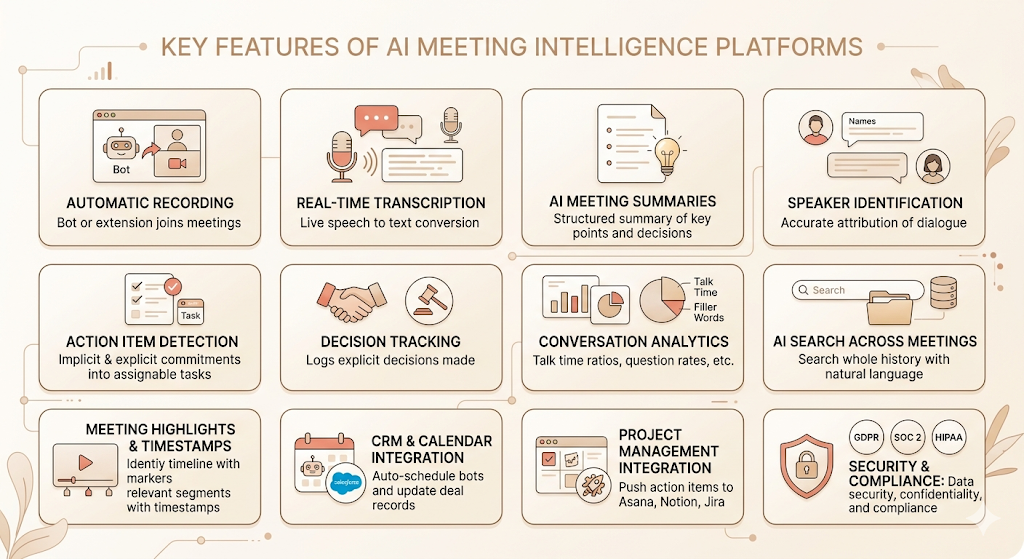
This is where tools separate themselves from each other. Most platforms in this category cover the basics. The differences show up in depth, accuracy, and integrations.
Automatic Meeting Recording
Every major platform now supports automatic recording via a bot or a browser extension that joins your meeting when it starts. Some platforms, like Granola, operate without a visible bot, which matters in contexts where a notification like “Otter is recording” changes the dynamic.
Real-Time Transcription
Live transcription converts speech to text as the meeting happens. Otter.ai built its early reputation on this feature: you can read the transcript in real time, search it while the meeting is still running, and add inline comments as things come up. Transcription accuracy varies meaningfully across platforms and accent types, which is worth testing before committing.
AI Meeting Summaries
After the meeting ends, the platform generates a structured summary: key points covered, decisions made, and action items identified. The quality of these summaries varies more than people expect. A good AI summary reads like a sharp meeting recap written by someone who paid attention. A poor one reads like a list of every sentence someone said.
Speaker Identification
Accurate speaker identification is what turns a transcript from a wall of text into a dialogue. Each line is attributed to a named participant, which is how you pull out “Riya said she’d handle the social calendar” rather than just “someone said they’d handle the social calendar.”
Action Item Detection
This is the feature with the highest business value. Action item detection identifies commitments, tasks, and follow-ups mentioned during the conversation and compiles them into an assignable list. The difference between tools shows up in how precisely they catch implicit commitments, not just explicit ones.
Decision Tracking
Beyond action items, some platforms track decisions explicitly: “We agreed to move the launch date to Q3.” Decision logs are particularly useful for legal, compliance, and project management contexts where disputes about “what was agreed” arise later.
Conversation Analytics
Platforms like Gong and Avoma offer analytics that go significantly beyond summaries. Talk time ratios (how much did the rep talk vs the prospect?), question rates, filler word frequency, and topic coverage by meeting type. These metrics matter enormously for sales coaching and performance management.
AI Search Across Meeting History
The ability to query your entire meeting archive is one of the most underrated features in this category. Fireflies.ai’s AskFred feature lets you search across all past transcripts with natural language queries. Read AI connects meeting content to emails, Slack messages, and cloud documents in a single searchable knowledge graph.
Meeting Highlights & Timestamps
Auto-generated highlights identify the most relevant segments of a recording and timestamp them. Instead of watching an hour-long call, you jump to the three moments that mattered. Grain is particularly strong on this feature, allowing users to clip, annotate, and share video highlights.
CRM Integration
For sales and customer success teams, CRM integration is non-negotiable. Fireflies.ai, Fathom, and Avoma all offer native integrations with Salesforce and HubSpot that automatically update deal records, contact notes, and next steps after a call ends. This eliminates the manual CRM update that most reps dread and often skip.
Calendar Integration
Platforms connect to Google Calendar and Outlook to automatically schedule recording bots for upcoming meetings. No manual setup per meeting. The bot joins, the transcript is generated, and the summary lands in your inbox.
Project Management Integrations
Beyond CRM, the best platforms push action items directly into Asana, Notion, Jira, and Linear. The meeting ends, the task appears in your project board, assigned to the right person, with the relevant context.
Custom AI Prompts & Meeting Templates
Some platforms let you define custom prompts that run on every meeting: “Summarise the key objections raised,” “List all pricing discussions,” “Identify any commitments made by the client.” This is where enterprise customisation starts, and where general-purpose tools begin to feel purpose-built.
Multi-Language Support
For global teams, transcription and summarisation in multiple languages is a baseline requirement. Most major platforms support English at the highest accuracy. tl;dv specifically focuses on multilingual support and is a popular choice for international teams.
Security & Compliance
This one tends to get pushed to the bottom of evaluation lists and it shouldn’t. If you’re recording client conversations, vendor negotiations, or internal HR discussions, the compliance requirements are real.
GDPR. For teams operating in the EU or handling EU resident data, GDPR compliance governs how meeting recordings and transcripts are stored and processed.
SOC 2. SOC 2 Type II certification is the standard security audit for SaaS platforms. It verifies that the vendor has controls in place around data security, availability, and confidentiality.
HIPAA. For healthcare conversations specifically, HIPAA compliance is required for any platform that may capture protected health information.
Fireflies.ai, Otter.ai, and Fathom all carry SOC 2 Type II certifications. Gong and Avoma have enterprise-grade compliance features. Always confirm current certifications before signing an enterprise agreement.
AI meeting intelligence platforms require rigorous security evaluation before adoption. Key compliance frameworks include GDPR for EU data handling, SOC 2 Type II for platform security standards, and HIPAA for healthcare contexts. SOC 2 Type II certification is the minimum standard for business use; verify with the vendor directly before deployment on sensitive internal or client conversations.
Benefits of Using AI Meeting Intelligence Platforms
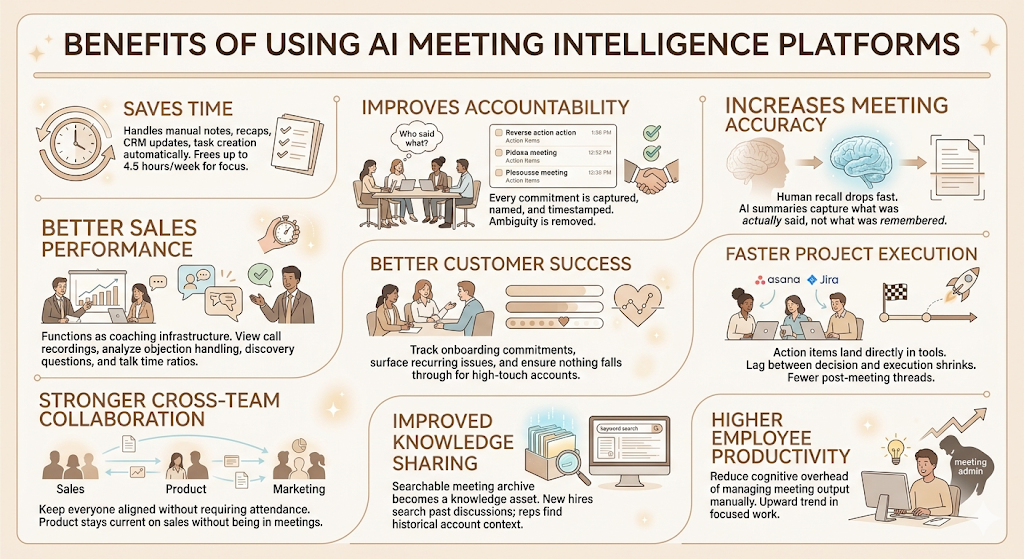
The features are the mechanism. The benefits are the outcome. Here’s what actually changes when teams adopt these tools consistently.
Saves Time
The most direct benefit. Manual note-taking, meeting recap emails, CRM updates, task creation from meeting notes: all of these take time that AI meeting intelligence platforms handle automatically. The average knowledge worker spends 4.5 hours per week on meeting-related admin tasks, according to productivity research by Reclaim.ai.
Improves Accountability
When every commitment is captured, named, and timestamped, follow-through improves. Not because people are less trustworthy, but because ambiguity about who said what goes away. “I didn’t realise that was assigned to me” becomes hard to say when the transcript says it clearly.
Increases Meeting Accuracy
Human memory degrades fast. Studies in cognitive psychology consistently show that recall of meeting content drops by more than 50% within 24 hours. AI summaries capture what was said, not what participants remember was said.
Better Sales Performance
For sales teams, AI meeting intelligence platforms function as a coaching infrastructure. Managers can review call recordings without sitting through every call. Patterns in what high performers do differently become visible. Objection handling, discovery question depth, talk time ratios: all of it is measurable.
Better Customer Success
Customer success teams use these platforms to track what clients committed to in onboarding calls, surface recurring issues across accounts, and ensure nothing falls through in high-touch account management.
Faster Project Execution
When action items land automatically in Asana or Jira after a project status meeting, the lag between decision and execution shrinks. Teams spend less time on post-meeting email threads trying to confirm who does what.
Stronger Cross-Team Collaboration
Meeting summaries shared across teams keep everyone aligned without requiring attendance. A product team can stay current on what the sales team is hearing from prospects without sitting in on sales calls.
Improved Knowledge Sharing
The searchable meeting archive becomes a knowledge asset over time. New hires can search past product discussions. Sales reps can find what was discussed with an account six months ago before jumping on a renewal call.
Higher Employee Productivity
Microsoft’s 2025 Work Trend Index found that 53% of leaders say productivity must increase. AI meeting intelligence platforms reduce one of the biggest drains on knowledge worker productivity: the cognitive overhead of managing meeting output manually.
Who Should Use AI Meeting Intelligence Platforms?
Honest answer: any team that meets regularly and where meetings produce decisions, commitments, or client-facing outputs. But let’s be specific.
Sales Teams
The obvious one. Sales teams benefit from CRM auto-fill, call coaching analytics, objection tracking, and searchable call libraries. Gong and Avoma are built almost entirely for this use case.
Customer Success Teams
Onboarding calls, QBRs, escalation calls: all high-stakes conversations where what was said matters weeks later. AI meeting intelligence platforms give CS teams a record they can refer back to without relying on whoever took notes.
HR & Recruitment
Interview recordings and hiring committee discussions benefit from transcription and structured summaries. For compliance purposes, having a record of what was discussed in a hiring decision is increasingly valuable.
Product Teams
Product teams spend a lot of time in customer discovery calls, user interviews, and sprint planning sessions. Searchable archives of customer feedback calls are pure gold for product managers trying to pattern-match across a quarter of conversations.
Marketing Teams
Campaign briefs, agency calls, content planning meetings: marketing teams produce a lot of meeting output. AI summaries reduce the time spent circulating recap emails and improve alignment across creative, performance, and brand functions.
Executive Leadership
Executives benefit from shorter, sharper summaries of meetings they chair or attend. The ability to search past leadership discussions is useful for board prep, strategy reviews, and onboarding new leadership team members. That is why leveraging an AI enabled board portal becomes specially helpful to streamline leadership operations.
Consulting Firms
Client engagement calls, discovery workshops, project kickoffs: consulting firms manage enormous volumes of client conversations. AI meeting intelligence platforms reduce note-taking overhead and ensure deliverables are grounded in what clients actually said.
Agencies
Account calls, briefings, campaign reviews, and creative presentations all benefit from accurate transcription and auto-generated summaries that can be shared with clients or filed internally.
Common Use Cases
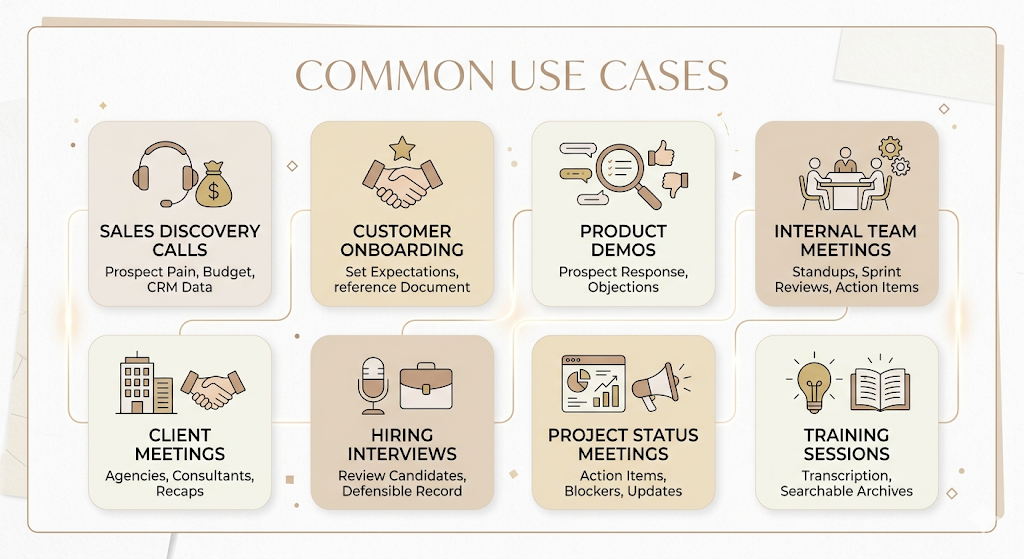
Sales Discovery Calls
Discovery calls are high-signal conversations. What the prospect said about their current pain, budget, timeline, and internal stakeholders: every piece of that determines how the deal is worked. AI meeting intelligence platforms capture it in structured form, tag it by topic, and push key details into the CRM record.
Customer Onboarding
Onboarding calls establish expectations. AI summaries of these calls become the reference document for both sides. Customer success teams can pull up exactly what was promised during onboarding when a scope dispute arises six months later.
Product Demos
Demo calls reveal what features prospects respond to and which objections they raise. Analysing these patterns across many demos gives product and sales teams data they’d otherwise have to manually extract from call notes.
Internal Team Meetings
Weekly standups, sprint reviews, strategy sessions: the output from internal meetings often shapes what gets done for the next two weeks. Auto-generated action items and decision logs remove the ambiguity about what was agreed.
Client Meetings
Agencies and consultants use AI meeting intelligence platforms to generate client-facing summaries after important calls. This improves client confidence, reduces the “just to recap what we discussed” email, and creates a paper trail.
Hiring Interviews
Recording and transcribing interviews helps hiring teams review candidates more accurately and more consistently. It also creates a defensible record of what was asked and answered for compliance purposes.
Project Status Meetings
Status meetings produce action items and blockers. AI platforms capture both automatically, push them into project boards, and generate summaries that keep stakeholders who missed the meeting informed.
Training Sessions
Internal training sessions benefit from transcription and searchable archives. New employees can access onboarding call recordings. Training content becomes reusable without anyone needing to rebuild it from memory.
AI meeting intelligence platforms are most valuable in recurring, high-stakes conversations: sales discovery calls where buyer intent must be captured accurately, customer onboarding calls where expectations are set, hiring interviews where consistency matters, and project status meetings where action items determine what gets done next.
Best AI Meeting Intelligence Platforms in 2026
The tools below are consistently highlighted across comparison sources and cover a range from generous free tiers to enterprise sales intelligence. Pricing is based on publicly available information as of mid-2026.
Otter.ai
Best for: Real-time transcription and live collaboration.
Otter.ai built its reputation on live transcription: the transcript runs in real time, you can highlight and comment during the meeting, and it syncs across your team instantly. It integrates with Zoom, Google Meet, and Microsoft Teams, and its mobile app is the most refined in this category.
Key features: Real-time live captions, collaborative notes, AI summaries, Salesforce and HubSpot sync, and meeting series tracking.
Pros: Best real-time in-meeting experience, strong mobile app, solid free tier.
Cons: The “Otter is recording” bot announcement can be disruptive on external calls. Free tier limits at 300 minutes per month.
Pricing: Free (300 minutes/month); Pro at $16.99/month; Business at $30/user/month.
Ideal users: Teams who want real-time note collaboration and a polished mobile experience.
Fireflies.ai
Best for: Automation-heavy teams needing broad integration coverage.
Fireflies.ai has the widest integration stack in this category. It connects to Salesforce, HubSpot, Slack, Notion, Asana, Zapier, and dozens of other tools. Its AskFred feature lets you query your entire meeting archive with natural language. A 2026 comparison by Growthnow found that Fireflies.ai Pro at approximately $10/seat/month is the most cost-effective starting point for most teams needing CRM and automation integrations.
Key features: AskFred AI search, CRM integrations, Slack routing, custom summary templates, topic tracking.
Pros: Best integration depth in the category, strong free plan for basic use, intuitive interface.
Cons: AI summaries occasionally over-compress; free plan has limited storage.
Pricing: Free plan available; Pro at approximately $10/user/month; Business at $19/user/month.
Ideal users: Sales and marketing teams that need meeting data to flow automatically into their existing tools.
Avoma
Best for: Revenue teams needing deep sales coaching and deal analytics.
Avoma is a conversation intelligence platform first, a transcription tool second. Its deal health scoring, rep coaching modules, and pipeline analytics go well beyond what most tools in this category offer. The tradeoff is price: Avoma’s plans cost roughly 2.5x the equivalent Fireflies.ai plan, according to 2026 comparisons.
Key features: Deal health scoring, rep coaching dashboards, talk time analytics, CRM sync, pipeline visibility.
Pros: Most powerful analytics layer in the mid-market segment, strong support quality.
Cons: Overkill for teams that just need summaries; higher price point.
Pricing: Startup plan from $19/user/month; Business and Enterprise tiers above that.
Ideal users: Sales-led SaaS companies and revenue operations teams managing pipeline at scale.
Gong
Best for: Enterprise sales teams and revenue intelligence.
Gong is the market leader in revenue intelligence and has been since 2019. It goes far beyond transcription: it analyses patterns across thousands of sales calls to surface what’s working, what isn’t, and what’s at risk in your pipeline. The tradeoff is price: Gong starts at $18+ per user per month, and enterprise pricing can reach $1,600+ per user per year.
Key features: Revenue intelligence, pipeline risk scoring, deal coaching, competitive intelligence from calls, and full CRM sync.
Pros: Unmatched analytics depth for enterprise sales teams, category-defining for revenue intelligence.
Cons: Significant feature bloat for teams outside sales; enterprise pricing puts it out of range for small teams.
Pricing: From $18+/user/month; enterprise contracts typically $1,200+/user/year.
Ideal users: Mid-market and enterprise sales organisations with dedicated revenue operations.
Fathom
Best for: Individuals and small teams who want the most generous free tier available.
Fathom has one of the highest G2 ratings in this category (5.0/5 from over 6,000 reviews as of mid-2026) and its free tier is exceptional: unlimited recordings, unlimited storage, and AI summaries with no session cap. It claims 95% transcription accuracy and generates summaries in about 30 seconds after a call ends. Native HubSpot and Salesforce integration is available on paid plans.
Key features: Unlimited free recording, AI summaries, HubSpot and Salesforce sync (paid), Zoom and Google Meet support.
Pros: Best free tier in the category, fast post-call processing, very high user satisfaction ratings.
Cons: Free tier is limited to Zoom and Google Meet; Microsoft Teams not supported.
Pricing: Free (unlimited for individuals); Premium at $16/month; Team plans available.
Ideal users: Freelancers, consultants, small teams on a tight budget, and individuals testing the category.
Fellow
Best for: Structured meeting management and team collaboration.
Fellow approaches meetings differently. It’s as much a meeting management tool as a transcription platform: it helps teams build agendas before meetings, assigns action items during them, and generates summaries after. It integrates with Google Meet, Zoom, Microsoft Teams, Slack, Asana, and Jira.
Key features: Collaborative agenda builder, AI meeting summaries, action item tracking, integrations with PM tools, and one-on-one frameworks.
Pros: Strong collaboration features, good for structured recurring meetings, well-designed interface.
Cons: Less powerful on the analytics side compared to Gong or Avoma.
Pricing: Free plan available; Pro plans from $7/user/month.
Ideal users: Teams that want to improve meeting structure and follow-through, not just transcription.
Read AI
Best for: Teams that want AI to connect meeting content with emails, documents, and messages.
Read AI goes beyond meeting transcription into cross-channel intelligence. It connects your meetings to emails, Slack messages, cloud documents, and calendar data, creating a searchable knowledge graph that gives you context before a meeting and searchable history after it.
Key features: Cross-channel knowledge graph, meeting preparation summaries, email and Slack search, meeting analytics.
Pros: Unique cross-channel approach, strong pre-meeting context, excellent for people with high meeting volume.
Cons: The breadth of data access may raise privacy concerns for some teams.
Pricing: Free tier available; paid plans from $8.33/user/month.
Ideal users: Executives, account managers, and anyone managing complex stakeholder relationships across many channels.
Grain
Best for: Teams that want to clip, annotate, and share specific meeting moments.
Grain is built around the idea that the most valuable output from a meeting is often a two-minute clip, not a full summary. It lets you highlight, clip, and share video moments with context, and its team library makes meeting content collaborative and searchable. It’s particularly popular with product teams sharing customer interview insights and with sales teams building coaching clip libraries.
Key features: Video highlights and clipping, annotation tools, collaborative clip library, transcription and search.
Pros: Best clip and share functionality in the category, strong team library features, free forever plan.
Cons: Less powerful on the analytics and CRM integration side than Fireflies or Gong.
Pricing: Free forever plan for teams; paid plans available.
Ideal users: Product teams, customer success teams, and sales coaches who need shareable video moments.
tl;dv
Best for: International teams needing strong multilingual support.
tl;dv (Too Long Didn’t View) is built for teams who want fast, shareable meeting summaries with strong multilingual support. It supports transcription in over 30 languages and is particularly popular with globally distributed teams. It integrates with Zoom, Google Meet, and Microsoft Teams.
Key features: Multilingual transcription, shareable clip highlights, GPT-powered summaries, and CRM integrations on paid plans.
Pros: Best multilingual support in this list, easy to share specific moments, solid free tier.
Cons: Analytics capabilities are less developed than Gong or Avoma.
Pricing: Free plan available; Pro from $20/user/month.
Ideal users: International teams, startups with global customers, and teams that share meeting clips frequently.
MeetGeek
Best for: Teams wanting an automated meeting workflow with strong template customisation.
MeetGeek combines automatic meeting recording and transcription with customisable AI templates. You can define what the platform looks for in each meeting type: client calls, onboarding sessions, interviews, and product demos. Each gets a different summary structure. It supports integrations with over 2,000 apps via Zapier.
Key features: Custom AI templates by meeting type, automated summaries, meeting score tracking, and Zapier integrations.
Pros: Highly customisable summary templates, strong Zapier connectivity, accessible pricing.
Cons: Analytics depth is lighter than Gong or Avoma.
Pricing: Free plan available; Pro from $15/user/month.
Ideal users: Agencies, consultants, and teams managing many different meeting types with different summary requirements.
AI Meeting Intelligence Platforms vs AI Note-Taking Apps
This distinction trips people up because marketing language has blurred the two categories.
| Feature | AI Note-Taking Apps | AI Meeting Intelligence Platforms |
| Transcription | Basic | Advanced with speaker ID |
| Meeting summaries | Yes | Yes, with greater depth |
| Conversation analytics | No | Yes (talk time, sentiment, topics) |
| Action item detection | Sometimes | Yes, with assignment and tracking |
| CRM integration | Rarely | Yes, typically native |
| Search across meetings | Limited | Full archive search |
| Coaching features | No | Yes (Gong, Avoma) |
| Cross-channel intelligence | No | Yes (Read AI) |
| Target user | Individual productivity | Team collaboration and operations |
The practical test: if you need a record of what was said, an AI note-taking app works. If you need to act on patterns across many meetings, analyse team performance, or push meeting output into your business workflows, you need an AI meeting intelligence platform.
How to Choose the Right AI Meeting Intelligence Platform
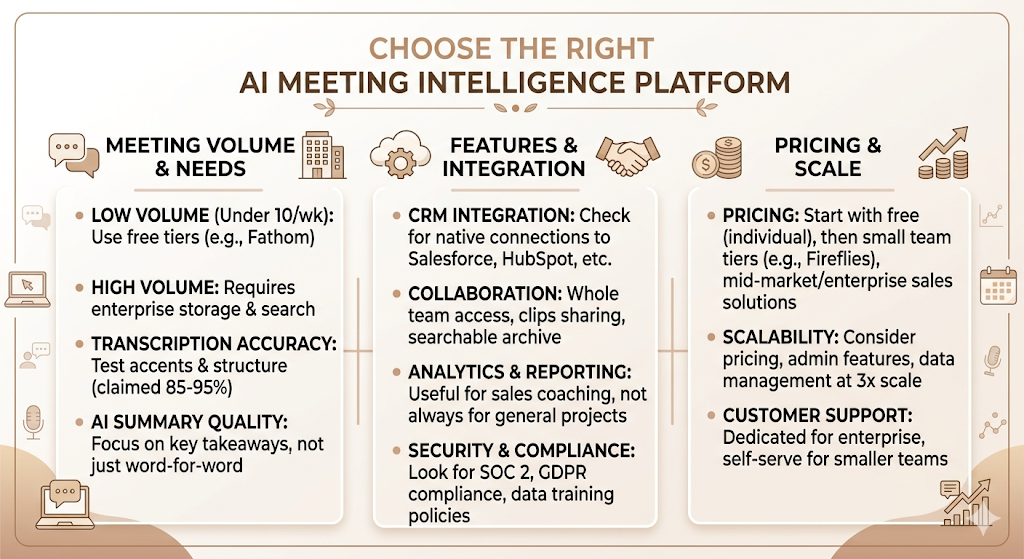
There’s no universal answer here. The right platform depends on what you need the meeting output to actually do.
Meeting Volume
Low volume (under 10 meetings per week)? A generous free tier like Fathom covers most teams. High volume with multiple participants across many accounts? You need enterprise-grade search and storage.
Transcription Accuracy
Test this yourself, with your team’s accents, your meeting environment, and your typical meeting structure. Claimed accuracy rates from vendors range from 85% to 95%. Real-world accuracy varies more than the marketing copy suggests.
AI Summary Quality
Read five sample summaries before committing to a platform. Ask: does this tell me what mattered, or does it just list what was said?
CRM Integration
If your team uses Salesforce or HubSpot, verify that the integration is native (not just Zapier-based) and that it pushes the right fields to the right records without manual mapping. Fireflies.ai and Fathom both have strong native CRM integrations.
Collaboration Features
Can the whole team access meeting summaries? Can multiple people search the archive? Can you share specific clips with stakeholders? These questions matter more for larger teams.
Analytics & Reporting
If you’re using this for sales coaching, you need analytics. If you’re using it for project management, you may not. Don’t pay for analytics capabilities you won’t use.
Security & Compliance
Confirm SOC 2 certification, GDPR compliance if relevant, and data retention policies. Check whether recordings are used to train the vendor’s AI models, which some platforms do by default unless you opt out.
Pricing
Individual use: start with Fathom’s free tier. Small teams: Fireflies.ai Pro at $10/seat. Mid-market sales teams: Avoma or Gong. Enterprise: Gong’s revenue intelligence platform with a formal procurement process.
Scalability
Start with your current team size, but think about what the tool looks like at 3x scale. Pricing, admin features, and data management all change significantly when you move from 5 users to 50.
Customer Support
Enterprise deals require dedicated support. Avoma consistently receives strong marks for support quality in G2 reviews. Fathom and Fireflies are self-serve with standard support channels.
Challenges and Limitations
These tools are genuinely useful. But they’re not perfect, and some of the limitations matter more than people expect.
Privacy Concerns
Recording meetings without informed consent from all participants is a legal liability in many jurisdictions. In some US states (California, for example), two-party consent for recording is required. In the EU, GDPR governs meeting recording consent. This isn’t a platform problem; it’s a policy and process problem. But the platform doesn’t solve it for you.
Recording Consent
Beyond legal requirements, there’s a practical dynamic: people behave differently when they know they’re being recorded. External clients and candidates in hiring interviews may be less candid. Teams need to think about when to use these tools and when not to.
AI Hallucinations
LLMs occasionally generate summaries that include claims not made in the meeting. This happens more often when the audio quality is poor or when multiple speakers talk over each other. Treating AI summaries as a starting point to verify, not a final record, is the right operating model.
Accent Recognition
Speech recognition accuracy drops with strong regional accents. Teams with members from South Asia, Africa, or parts of Europe and the Americas may find that transcription errors cluster around specific speakers. Testing with your actual team’s voice profiles before committing to a platform is worth the 20 minutes.
Background Noise
Poor audio environments (open offices, café calls, team members on mobile networks with packet loss) reduce transcription quality meaningfully. A good headset or directional microphone is still the cheapest accuracy upgrade available.
Integration Limitations
Not every tool integrates natively with every platform. Fathom, for example, focuses on Zoom and Google Meet and doesn’t currently support Microsoft Teams. If Teams is your primary conferencing platform, Fathom is off the table for automatic recording.
Cost Considerations
Free tiers are genuinely useful for testing, but team-wide deployment adds up. A 10-person sales team on Avoma’s mid-tier plan spends approximately $2,400 per year. That’s not expensive in context, but it’s a budget line that needs justification.
Best Practices for Using AI Meeting Intelligence Platforms
Getting value from these tools consistently requires a few deliberate habits.
Create Structured Meeting Agendas
AI summaries are only as good as the meeting content they process. Meetings with clear agendas produce cleaner summaries with more useful action items. Tools like Fellow combine agenda building with AI summarisation, which reinforces this habit structurally.
Review AI Summaries
Treat the AI summary as a first draft, not a final document. Spend 2-3 minutes after a call reviewing what the platform captured and correcting any action items that are wrong or missing. This habit catches the edge cases before they become accountability gaps.
Verify Action Items
Action item detection is good but not perfect. Implicit commitments (“I’ll think about it and get back to you”) are harder to capture than explicit ones (“I’ll send you the contract by Thursday”). A quick review of the action item list is faster than chasing unclear follow-ups a week later.
Connect with CRM & Project Management Tools
The full value of these platforms comes from integration. If meeting summaries live only inside the meeting tool and don’t flow into Salesforce, HubSpot, Asana, or Jira, you’ve automated note-taking but not workflows. Set up integrations before you deploy to the team.
Organise Meeting Libraries
As your archive grows, searchability depends on organisation. Use consistent meeting naming conventions, tag meetings by type (client call, sales demo, onboarding, internal), and set up folder structures early. Retroactively organising a 500-meeting archive is a painful weekend project.
Train Employees on AI Workflows
The biggest point of failure with these tools is adoption. If half the team uses the platform and half doesn’t, the shared archive has gaps. Run a 30-minute onboarding session, set expectations about when recording is and isn’t appropriate, and make the workflow feel natural rather than mandatory.
Future Trends in AI Meeting Intelligence (2026 and Beyond)
The category is moving fast. Transcription was the first wave. AI summaries were the second. The third wave is already underway.
AI Meeting Agents
The shift from AI assistants that observe meetings to AI agents that participate in them is underway. Vendors are building features that let AI ask clarifying questions during a meeting, surface relevant documents in real time, or flag when the conversation is drifting off-agenda. According to Gartner, 40% of enterprise applications will embed task-specific AI agents within two years.
Live Meeting Coaching
Real-time coaching is already in Gong’s roadmap: prompts to the rep mid-call suggesting they ask a discovery question, or flagging that the prospect mentioned budget for the first time. This is the logical extension of the analytics that platforms like Avoma already offer post-call.
Autonomous Follow-Ups
Some platforms are beginning to auto-draft follow-up emails after client calls: pulling in the summary, personalising it to the conversation, and routing it for human approval before send. Alfred is one of the newer tools built explicitly around this capability.
Predictive Conversation Analytics
The next layer of analytics goes from descriptive (what happened in this meeting) to predictive (based on how this meeting went, what’s the probability of this deal closing?). Gong already hints at this with pipeline risk scoring. Expect it to deepen.
Cross-Meeting Organisational Memory
Read AI’s cross-channel knowledge graph points toward where the category is going: a system that knows not just what was said in today’s meeting but how it connects to the email from last week, the Slack thread from last month, and the deal notes from six months ago. Organisational memory that accumulates and is searchable is a genuinely different kind of tool.
Agentic AI for Meetings
The most advanced direction is fully agentic AI that can not just summarise and route meeting outputs, but act on them autonomously: create the Jira ticket, update the CRM record, draft the proposal, and send the follow-up. The human reviews and approves. But the loop closes without manual work at each step. This is the trajectory leading vendors are building toward.
The future of AI meeting intelligence is moving from passive capture toward active participation. AI agents are expected to join meetings, provide real-time coaching to participants, autonomously draft follow-ups, and connect meeting content to cross-channel organisational memory. According to Gartner, 40% of enterprise apps will embed task-specific AI agents within two years, a shift that will fundamentally change how meetings translate into business action.
Choosing the Platform That Actually Gets Used
The best AI meeting intelligence platform is the one your team actually uses consistently.
That sounds obvious, but it’s where most evaluations go wrong. Teams run a two-week trial, pick the platform with the best feature list, deploy it, and six weeks later discover that half the team disabled the recording bot because it felt intrusive on client calls, or that the CRM integration never got set up because IT was involved and it stalled.
The three things that matter most in practice: transcription accuracy with your team’s actual voices, integration with the tools your team already uses daily, and a free or low-cost entry point that lets you build habits before locking into an annual contract.
Start with Fathom if you want the best free tier. Move to Fireflies.ai if integration depth is the priority. Consider Avoma or Gong if sales coaching analytics are the point. And test everything with real meetings before you decide.
Frequently Asked Questions
What is an AI meeting intelligence platform?
An AI meeting intelligence platform is software that records, transcribes, summarises, and analyses meeting conversations using AI. It captures action items, tracks decisions, and pushes meeting outputs into tools like CRM systems and project management platforms so teams can act on what was discussed without manual follow-up.
How does an AI meeting intelligence platform work?
These platforms use speech recognition to convert audio to text, speaker identification to attribute dialogue, Natural Language Processing to detect topics and sentiment, and Large Language Models to generate summaries. Most join your meeting as a bot or run via a browser extension, processing the audio and delivering a structured summary shortly after the meeting ends.
What features should I look for in an AI meeting intelligence platform?
The most important features are transcription accuracy, AI summary quality, action item detection, CRM and project management integrations, and searchable meeting archives. For sales teams, add conversation analytics and coaching features. For global teams, multilingual support matters. Security certifications like SOC 2 Type II are non-negotiable for enterprise use.
Which industries benefit the most from AI meeting intelligence?
Sales, customer success, product management, HR and recruitment, consulting, and marketing teams see the most consistent value. Any team with high meeting volume and where meeting outputs drive business decisions is a strong candidate.
Are AI meeting intelligence platforms secure?
The major platforms (Otter.ai, Fireflies.ai, Fathom, Gong, Avoma) carry SOC 2 Type II certification. GDPR compliance is standard for platforms operating in the EU. HIPAA compliance is available on some enterprise plans. Always verify current certifications with the vendor and review their data retention and model training policies before deploying on sensitive conversations.
What’s the difference between AI meeting assistants and conversation intelligence software?
AI meeting assistants focus on individual productivity: capturing notes, generating summaries, and sending action items. Conversation intelligence software (like Gong and Avoma) focuses on team performance: analysing patterns across many conversations, coaching reps on technique, and connecting meeting data to pipeline and revenue outcomes. Many platforms now sit somewhere between the two.
Can AI meeting intelligence platforms integrate with CRM systems?
Yes. Fireflies.ai, Fathom, Avoma, and Gong all offer native integrations with Salesforce and HubSpot. These integrations automatically update contact records, deal notes, and next steps after a call ends. Verify whether the integration is native or Zapier-based before relying on it for critical sales workflows.
Which is the best AI meeting intelligence platform in 2026?
It depends on the use case. Fathom is the best free option for individuals and small teams. Fireflies.ai is the best value for teams needing CRM and integration coverage. Gong is the leader for enterprise revenue intelligence. Avoma sits between the two for mid-market sales teams. Read AI is the best choice for cross-channel knowledge management.
Do AI meeting intelligence platforms support multiple languages?
Most major platforms support English at the highest accuracy level. tl;dv leads the category on multilingual support, covering 30+ languages. Otter.ai, Fireflies.ai, and MeetGeek also offer multilingual transcription, though accuracy varies by language. If multilingual support is critical to your team, test with your specific languages before committing.
How much do AI meeting intelligence platforms cost?
Pricing ranges from free (Fathom’s unlimited individual tier) to enterprise contracts at $1,200+ per user per year (Gong). Most mid-market tools fall between $10 and $30 per user per month. According to a 2026 pricing analysis by summarizemeeting.com, the best value for most teams is in the $10-$18/user/month range, where integration depth and summary quality are both strong without the enterprise pricing of platforms built for large sales organisations.
Is it legal to record meetings without consent?
It depends on your jurisdiction. In the United States, federal law requires one-party consent, but several states, including California, require all parties to consent. In the EU, GDPR requires a lawful basis for recording and processing meeting data. Always inform participants that a meeting is being recorded, and check applicable laws before deploying these tools in client or customer-facing contexts.