

Most marketing teams aren’t short on AI tools. They’re short on AI tools that remember anything. One person’s ChatGPT thread has the brand voice guide pasted somewhere near the top. Another’s Claude tab has last quarter’s campaign brief buried under fifty other messages. By the time a new hire joins the team, none of that context exists anywhere they can actually find it, and they start from zero.
Claude Cowork for marketing teams solves a different problem than “which AI model writes better copy.” It’s built to hold context, connected tools, and recurring work in one place, so the team isn’t rebuilding the same prompt every Monday morning. This piece covers how to set it up, which connectors and skills actually matter for marketing work, how to put repetitive tasks on a schedule, and seven workflows you can copy this week.
Table of Contents
What Is Claude Cowork, and How Is It Different From Claude.ai?
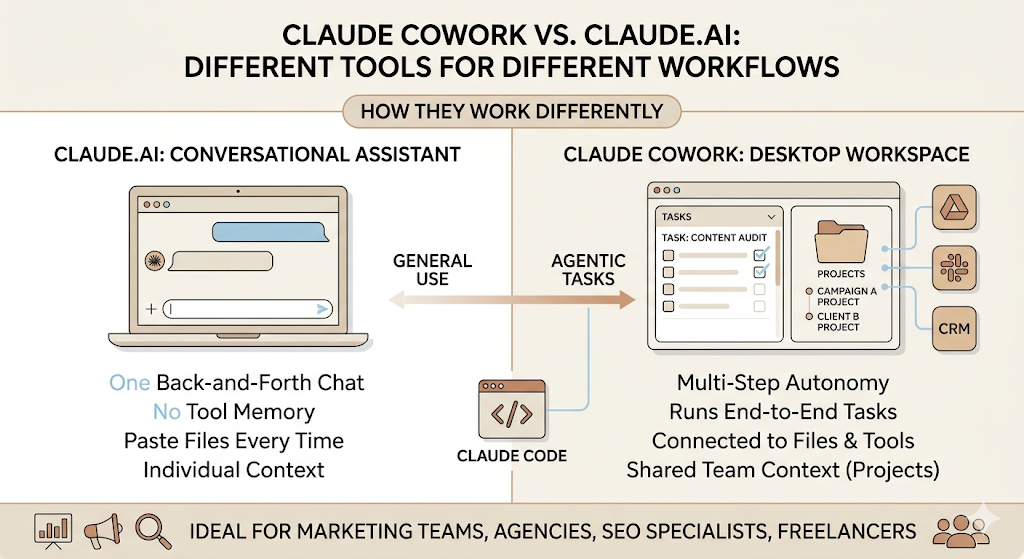
Claude Cowork is Anthropic’s desktop workspace for running multi-step tasks across your files, connected tools, and team context, instead of a single back-and-forth chat. You open a task, tell it what you want done, and it works through the steps on its own, pulling from whatever you’ve connected: your Drive folder, your Slack channel, your CRM.
That’s a genuinely different shape of tool than what most marketers have been using.
Cowork vs Claude.ai vs Claude Code: Where Each One Fits
Claude.ai is the conversational version: one thread, one question or draft at a time, no memory of your tools or your files unless you paste them in each time. Claude Code is built for developers working in a terminal or an IDE, writing and shipping actual code. Cowork sits in between, built for people who aren’t writing code but still need an agent that can touch real files, real tools, and run a task end-to-end without hand-holding every step.
Think of it less as “a chatbot with extra buttons” and more as a colleague who already has your folder structure, your brand guide, and your Slack open before you ask them anything.
Why a Marketing Team Outgrows a Single AI Chat
Here’s the problem with running a content team on individual chat threads: nothing carries over. The SEO specialist’s prompt for a content brief lives in their tab. The social media manager’s caption format lives in theirs. When either person is out, the work doesn’t just slow down; it has to be reverse-engineered.
Cowork’s answer to this is Projects, which groups related tasks into their own workspace with shared files, instructions, and memory. A campaign gets its own Project. A client gets their own Project. Everyone working inside it inherits the same context instead of rebuilding it.
Who Gets the Most Out of Claude Cowork
Agencies are juggling five client accounts with five different brand voices and five different reporting cadences. In-house content teams publishing on a schedule that doesn’t pause for someone to be on leave. SEO specialists run the same audit structure on every new client site. Product marketers are coordinating a launch across more departments than they have hours in the day. And freelancers who are, functionally, doing all of the above alone.
Claude Cowork is Anthropic’s desktop workspace for running agentic, multi-step tasks across connected files and tools, distinct from Claude.ai’s single-chat format. For marketing teams, the practical difference is that brand voice, campaign context, and recurring workflows live in a shared Project instead of scattered across individual chat threads.
Setting Up Claude Cowork for a Marketing Team
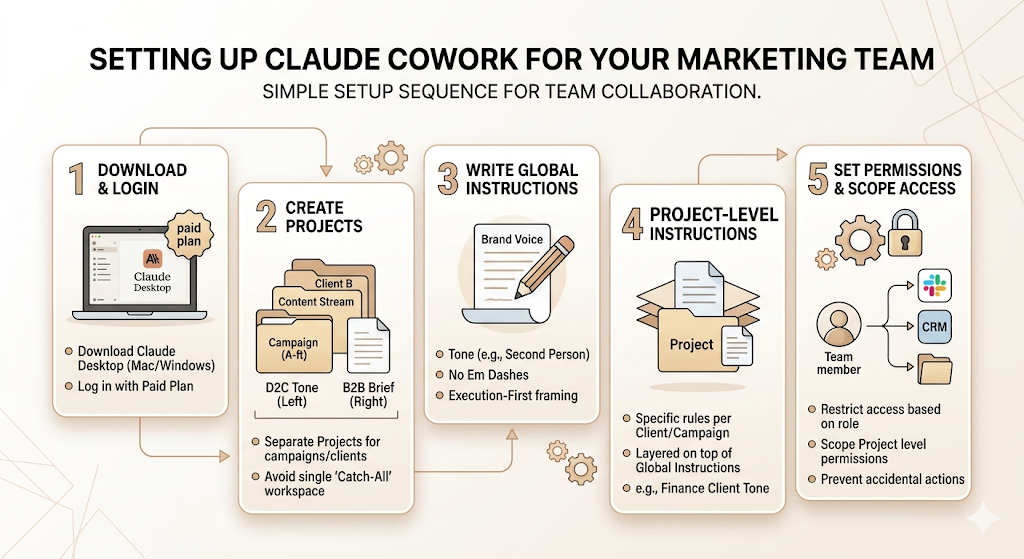
Getting this right the first week saves you months of re-explaining yourself later. Here’s the setup sequence that actually works for a marketing team, not just a solo user.
Step 1: Download the Claude Desktop app for Mac or Windows and log in with a paid plan, since Cowork runs through the desktop app rather than the browser.
Step 2: Create a Project for each campaign, client, or content stream you run, rather than one giant catch-all workspace.
Step 3: Write your global instructions once, covering tone, formatting defaults, and which sources Claude should check first.
Step 4: Add Project-level instructions on top of that for anything specific to one client or campaign.
Step 5: Set permissions so each team member only has access to the Projects and connectors relevant to their work.
Creating Your Workspace and Adding Team Members
Start narrow. One Project per active campaign or client beats one Project for “all of marketing,” because a single sprawling workspace mixes context that doesn’t belong together. Your D2C client’s tone of voice has no business bleeding into your B2B client’s content brief.
Add team members to the specific Projects they work on, not to everything by default. It keeps the workspace clean and avoids the situation where someone accidentally edits a live campaign Project meant for someone else.
Organising Projects by Campaign, Channel, or Client
There isn’t one correct folder structure, but there is a wrong one: organising by AI tool feature (“Skills,” “Connectors,” “Tasks”) instead of by the actual work. Structure Projects the way your team already thinks: by client, by campaign, or by content pillar if you’re running an in-house calendar across verticals.
Writing Global Instructions That Actually Reflect Your Brand Voice
Instructions are standing rules you write once that apply to every Cowork session, set at Settings → Cowork → Global instructions in the desktop app. This is where you put the things you’re tired of repeating: no em dashes, no salary figures in carousel copy, execution-first framing over theory, whatever your team’s specific non-negotiables are.
Vague instructions produce vague output. “Write in our brand voice” tells Claude nothing. “Use second person, contractions throughout, no corporate jargon, and always name a real example over a hypothetical one” tells it exactly what to check against.
Folder-Level Instructions vs Global Instructions
Global instructions apply everywhere. Project instructions apply only inside that Project, layered on top of the global ones, and you edit them in the Project’s right panel. Use global instructions for your house style. Use Project instructions for anything client-specific: a different tone for a finance client than for a D2C skincare brand, for instance, without having to rewrite your whole house style every time.
Setting Permissions So Nobody Touches What They Shouldn’t
This matters more once you’ve connected real tools. A connector with write access can update a CRM record or post to a Slack channel, which is exactly the kind of action you don’t want a freelancer with limited context accidentally triggering on a live client account. Scope access at the Project level, and review who has write access to what every few months, not just at setup.
Connecting the Tools Your Team Already Runs On
Connectors plug Cowork into the systems where your work already lives, giving it both the context to understand a task and the ability to act on it. Without connectors, Cowork is just a very capable assistant with no hands. With them, it can actually read your data and write back into it.
Connectors Every Marketing Team Should Set Up First
Start with whatever holds your actual content and conversations: Google Drive for documents and assets, Slack for team communication and approvals, and Notion if that’s where your content calendar or brief templates live. These three alone cover the majority of a content team’s day-to-day friction, since most repetitive work is really just “go find the thing, then act on it.”
CRM and Connectors for Reporting
If your team touches paid performance or lifecycle marketing, a CRM connector like HubSpot lets Claude pull campaign performance directly instead of you exporting a CSV every Friday. Be more careful here than with Drive or Slack. Analytics and CRM data often include customer information, so check what a connector can read and write before you turn it on for the whole team, not after.
Claude in Chrome for Research and Competitor Tracking
Claude in Chrome is a browser extension that lets Claude act directly inside the pages you’re already looking at, which is genuinely useful for competitor research: pull pricing pages, scan a competitor’s recent blog output, or summarise a long industry report without copying and pasting half of it into a chat window.
Prioritising Connectors When You Can’t Set Up Everything at Once
Don’t connect everything in week one. Pick the two or three tools that eat the most manual hours right now, get those running well, and add more once the team has actually built habits around using them. A connector nobody uses is just an open door you forgot about.
Connectors give Claude Cowork both context and the ability to act, reading from and writing back into tools like Google Drive, Slack, Notion, and HubSpot. For most marketing teams, the highest-leverage starting point is the handful of tools that already hold the bulk of daily manual work, not a full connector rollout on day one.
Plugins and Skills: Teaching Claude Your Team’s Specific Workflow
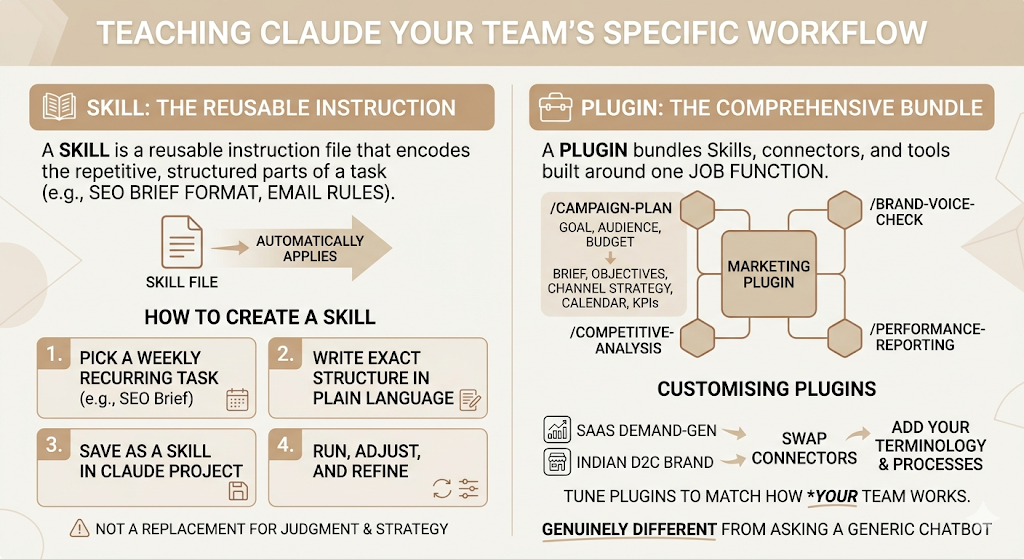
A Skill is a reusable instruction file that tells Claude how your team wants a specific task done, so it draws on that knowledge automatically instead of you re-explaining it in every new chat. A Plugin is a step up from that: it bundles Skills, connectors, slash commands, and sub-agents into a single package built around one job function.
Anthropic open-sourced eleven of these role-based plugins in its knowledge-work-plugins repository, and one of them is built specifically for marketing.
What the Marketing Plugin Actually Covers
The Marketing plugin handles content creation, campaign planning, brand voice management, competitive analysis, and performance reporting, with slash commands built around each. Run /campaign-plan with a goal, audience, timeline, and budget, and it produces a brief covering objectives, audience segmentation, key messages, channel strategy, a week-by-week content calendar, and KPIs to track. There’s a brand voice check that compares new content against your configured style guide for tone, terminology, and messaging pillars, flagging where a draft drifts.
This is genuinely different from asking a generic chatbot to “write me a campaign plan.” The plugin already knows the structure that good marketing planning is supposed to follow. You’re not writing that structure from scratch every time.
What a Skill Does and Doesn’t Do
A Skill isn’t magic, and it isn’t a replacement for actually knowing your audience. What it does is encode the parts of a task that shouldn’t change between attempts: your SEO brief format, your email subject line rules, your PPC reporting template. What it doesn’t do is replace judgment on strategy, positioning, or anything that depends on reading the room for a specific client or campaign.
Build Skills for the tasks you do the same way every single time. Don’t bother building one for work that’s genuinely different each time you do it.
How to Create Your First Skill
- Pick a recurring task your team repeats at least weekly, like writing an SEO content brief.
- Write out the exact structure and rules you currently follow by hand, in plain language.
- Save that as a Skill inside the relevant Project, so Claude applies it automatically.
- Run it on a real task and compare the output against what a human would have produced.
- Adjust the instructions based on where it missed the mark, then run it again.
Customising Plugins for Your Actual Tool Stack
The official plugins are generic starting points, not finished products. Anthropic’s own guidance is to swap connectors to point at your specific tools, add your company’s terminology and processes into the Skill files, and adjust the workflow instructions to match how your team actually works, not how a generic template assumes everyone works. A marketing plugin tuned for a SaaS company’s demand-gen funnel needs real edits before it’s useful for an Indian D2C brand running performance campaigns on Meta and Google.
Putting Recurring Marketing Work on a Schedule
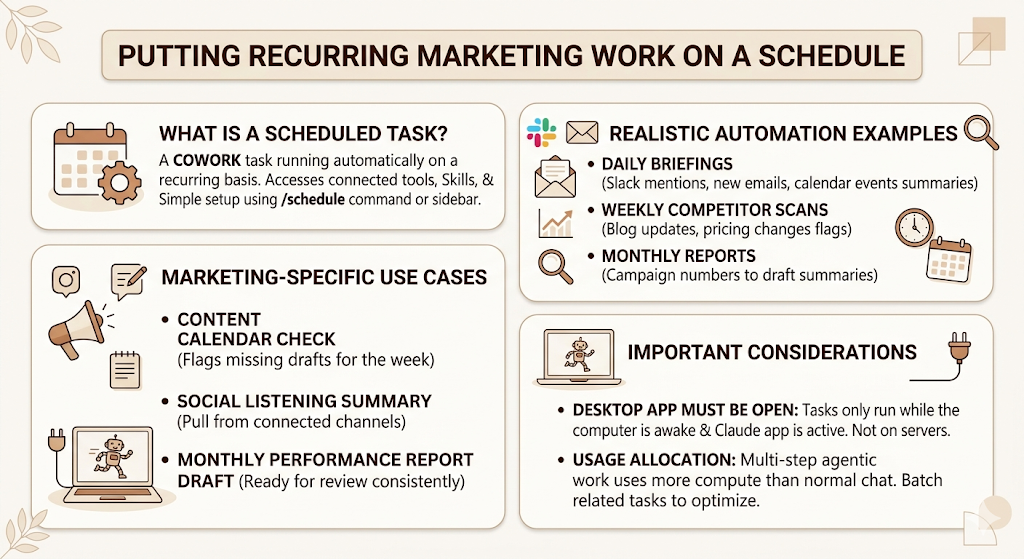
A scheduled task is a Cowork task set to run automatically on a recurring basis, with access to the same connected tools, Skills, and Plugins as a task you’d run manually. Type /schedule inside any task, or click “Scheduled” in the sidebar to create one from scratch, and Claude walks you through the cadence and the details with multiple-choice prompts rather than requiring you to write anything technical.
What Scheduled Tasks Can Realistically Automate
Daily briefings that summarise Slack mentions, new emails, or calendar events from the last 24 hours. Weekly competitor scans that check a handful of competitor blogs or pricing pages and flag what changed. Monthly reports that pull campaign numbers from a connected CRM and turn them into a draft summary before a human reviews it. None of these needs a person to remember to start them, which is exactly the point.
Marketing-Specific Scheduled Tasks Worth Setting Up
A Monday morning content calendar check that flags anything due to publish that week without a final draft yet. A weekly social listening summary pulled from connected channels. A monthly performance report draft that’s ready for review the same day every month, instead of whenever someone gets around to building it manually.
Why Scheduled Tasks Only Run While Your Desktop App Is Open
Worth knowing before you build a dependency on this: scheduled tasks only run while your computer is awake, and the Claude Desktop app is open. They’re not running on Anthropic’s servers in the background while your laptop is shut. If a daily briefing absolutely has to run every morning regardless of whether anyone’s machine is on, plan around that limitation rather than discovering it the morning a report doesn’t show up. Also worth flagging to the team: Cowork tasks use more of your usage allocation than a normal chat, since multi-step agentic work is more compute-intensive, so batch related scheduled tasks rather than running ten micro-tasks where two combined ones would do.
Scheduled tasks let Cowork run recurring marketing work, like weekly competitor scans or monthly report drafts, automatically and with the same connected tools and Skills as a manual task. The practical limitation is that they only execute while the Claude Desktop app is open and the computer is awake, which matters for any task a team treats as time-critical.
Real Marketing Workflows You Can Build This Week
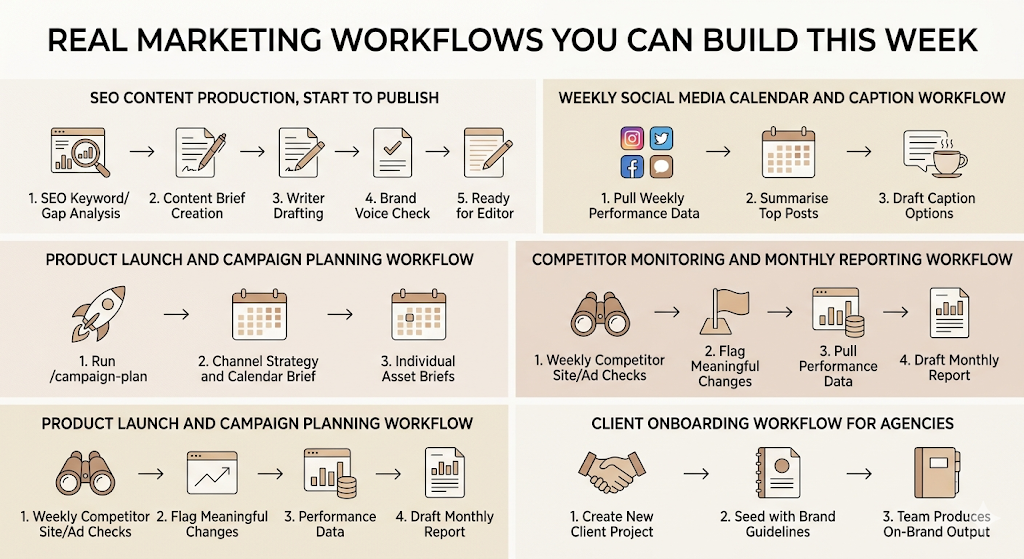
Theory is easy. Here’s what these pieces actually look like stitched together into workflows a real team can run.
SEO Content Production, Start to Publish
A keyword and competitor gap analysis runs through the Marketing plugin’s SEO Skill, surfacing what’s missing from your current coverage. That feeds into a content brief built around your existing brief Skill, including target structure, internal linking opportunities, and word count. A writer drafts from that brief, and a brand voice check runs before it goes to an editor. The whole chain, from gap analysis to a brief ready for a writer, used to take a content lead half a day. Inside a connected Project, it’s closer to twenty minutes of actual hands-on time.
Weekly Social Media Calendar and Caption Workflow
A scheduled task pulls last week’s top-performing posts from a connected social tool every Monday, summarises what worked, and drafts caption options for the week ahead using your existing Skill for hook and CTA structure. A team running a D2C brand’s Instagram, the kind of fast-moving content calendar that boAt or Mamaearth’s social teams manage daily, gets a week’s worth of caption drafts waiting before the first coffee.
Product Launch and Campaign Planning Workflow
Run /campaign-plan with the launch goal, audience, timeline, and budget, and you get a brief covering channel strategy and a week-by-week calendar in minutes instead of a half-day planning meeting. From there, individual asset briefs for each channel get generated against the same campaign brief, so the paid social copy and the email sequence are working from one consistent set of messages instead of drifting apart, which is the exact failure mode that happens when three different people draft three different channels off three different verbal briefings.
Competitor Monitoring and Monthly Reporting Workflow
A scheduled task checks a defined list of competitor sites and ad libraries weekly and flags meaningful changes: a new pricing tier, a new campaign angle, a new product line. At the end of the month, a separate scheduled task pulls performance data through your connected CRM or analytics tool and drafts the monthly report structure your team already uses, so the analyst’s job becomes reviewing and adding interpretation rather than building the deck from a blank slate.
Client Onboarding Workflow for Agencies
A new client Project gets created with a Skill seeded from their brand guidelines, tone documents, and past campaign history, all pulled in during onboarding rather than re-explained every time a new task starts. By the second week, anyone on the account team can open a task in that Project and get output that already sounds like the client, not like a generic AI draft someone has to heavily edit before sending.
Ready-to-Use Prompts for Marketing Teams
These work better once you’ve got Skills and connectors in place, but they’re useful even in a plain Cowork task without any setup at all.
Content Creation and Repurposing Prompts
Content Repurposing Engine: “Take this webinar transcript (attach or link) and produce a 1200-word blog post, five LinkedIn post variations, and three short-form video scripts, matching our brand voice Skill.”
Blog Post From a Transcript: “Turn this podcast transcript into a structured blog post with an H1, four H2 sections, and a clear takeaway in each, following our blog structure Skill.”
Social Content Calendar Builder: “Build a two-week Instagram content calendar for (vertical), covering one Skill Stack post, one Career Moves post, and one Opinion post, with hooks for each cover slide.”
Reporting and Research Prompts
Monthly Performance Report Builder: “Pull last month’s campaign data from (connected CRM) and draft a performance report covering top channels, what underperformed, and three recommendations for next month.”
Competitor Analysis Deep Dive: “Using Claude in Chrome, review (competitor)’s last ten blog posts and pricing page, and summarise their current positioning, content gaps, and anything that changed in the last quarter.”
SEO Content Brief Generator: “Build a content brief for the keyword (keyword), including search intent, competitor coverage gaps, recommended structure, and internal linking opportunities.”
Planning and Client-Facing Prompts
Campaign Planning Brief: “Run a campaign plan for (goal), targeting (audience), over (timeline), with a budget of (range), covering channel strategy and a week-by-week calendar.”
Email Nurture Sequence Builder: “Draft a five-email nurture sequence for (audience segment) moving from awareness to consideration, following our email Skill for subject line and CTA structure.”
Client Proposal Generator: “Build a proposal for (client) covering scope, timeline, deliverables, and pricing tiers, based on the discovery notes in (connected Notion page).”
Weekly Marketing Brief, as a Scheduled Task: “Every Monday at 9 am, summarise last week’s campaign performance, flag anything due to publish this week without a final draft, and list three priorities for the team.”
Best Practices, Data Privacy, and Mistakes That Slow Teams Down
Build a Shared Prompt Library Before You Scale Up
The teams that get the most out of this don’t reinvent prompts every week. They keep a running document of what’s worked, turn the best ones into Skills, and treat the prompt library itself as a piece of brand infrastructure worth maintaining. Skip this step, and you end up with five people solving the same problem five slightly different ways.
What Not to Upload
Don’t connect tools or upload documents containing data you wouldn’t want visible to everyone with access to that Project. Client contracts with sensitive financial terms, unreleased product specs, anything under an NDA with a third party: keep these out of shared Projects, or set up a restricted Project with tightly scoped permissions if the team genuinely needs Claude’s help with them.
Mistakes That Slow Teams Down
Vague global instructions produce vague output, every time. Skipping Project structure in favour of one giant workspace makes context bleed between clients who should never share it. Over-automating before the team trusts the output means scheduled tasks pile up that nobody’s actually reading the results of. And the most common one: publishing AI-drafted content without a human review pass, which is how brand voice drift and the occasional fabricated stat slip through.
Is Claude Cowork Actually Worth It? The Honest Limitations
According to HubSpot’s State of Marketing 2026 report, 78% of marketers now use AI tools as part of their daily workflow. That’s not a reason to assume any AI tool is automatically worth adopting for your specific team. It’s a reason to be clear-eyed about what this one does well and where it still needs a human in the loop.
AI Hallucinations and Why Human Review Stays Non-Negotiable
Claude can still get facts wrong, especially specific numbers, dates, or claims about a competitor it hasn’t directly verified. Treat every stat or factual claim in AI-drafted content as a placeholder until a human checks it against a real source, not as finished work.
What It Can’t Know Without a Live Connection
Anything outside what you’ve connected or what’s genuinely current at the moment of the request is a gap, not a guess Claude should be making confidently. If a workflow depends on real-time information, make sure the right connector or search capability is actually wired in, rather than assuming the model already knows.
It Won’t Replace Strategic Thinking
This handles execution. It doesn’t decide whether your positioning is right, whether a campaign idea is actually good, or whether a client relationship needs a hard conversation instead of another deliverable. That part’s still entirely on your team, and probably always will be.
The Bottom Line
The teams getting real value out of this aren’t the ones with the cleverest prompts. They’re the ones who put in the unglamorous setup work: a Project structure that matches how the team actually thinks, global instructions specific enough to be useful, two or three connectors that cover real daily friction, and a handful of Skills built around tasks that genuinely repeat every week. Scheduled tasks are the multiplier on top of that, not the starting point.
Start smaller than feels ambitious. Get one workflow, like the SEO content production chain or the weekly social calendar, running well enough that the team trusts it without double-checking every line. Then build outward from there.
FAQ
What is Claude Cowork?
Claude Cowork is Anthropic’s desktop workspace that lets Claude run multi-step tasks across your files and connected tools, rather than working through a single chat conversation. It’s built for non-developers who want an AI agent that can act on real work, not just answer questions about it.
How is Cowork different from using Claude.ai or ChatGPT directly?
Claude.ai is a single conversational thread with no persistent connection to your tools or team context. Cowork runs inside Projects that hold shared instructions, files, and memory, and it can read from and act on connected tools like Slack, Drive, or a CRM rather than relying on whatever you paste into the chat.
Is Cowork the same thing as Claude Code?
No. Claude Code is built for developers working with actual codebases in a terminal or IDE. Cowork is built for knowledge workers who don’t write code but still need an agent that can handle multi-step tasks across files and connected apps.
How do I set up Cowork for a marketing team from scratch?
Download the Claude Desktop app, create a Project for each client or campaign, write global instructions covering your brand voice and formatting rules, then add Project-specific instructions and connect the two or three tools your team relies on most. Build out Skills and connectors gradually rather than trying to set up everything in the first week.
Can it actually automate recurring work like weekly reports?
Yes, through scheduled tasks, which run automatically on whatever cadence you set and have access to the same connected tools and Skills as a manual task. The one limitation worth knowing: they only run while the Claude Desktop app is open and your computer is awake.
Which connectors should a small marketing team set up first?
Start with whatever holds the bulk of daily manual work, usually Google Drive, Slack, and a content tool like Notion. Add a CRM or analytics connector once those three are running smoothly and the team has built real habits around using them.
Is Cowork worth it for a solo freelancer, or only for bigger teams?
It’s genuinely useful for freelancers managing multiple clients, since each client can get its own Project with its own brand voice Skill, instead of you manually re-explaining context every time you switch between accounts.
Can agencies use it across multiple client accounts without mixing up data?
Yes, as long as each client gets a separate Project with its own connectors and permissions. Mixing multiple clients into one shared workspace is the most common way agencies accidentally bleed one client’s tone or data into another’s.
Does it replace tools like Notion, Slack, or Asana?
No. It connects to those tools rather than replacing them. The value is in Claude being able to read from and act on the tools you already use, not in asking your team to abandon them for something new.
Is it actually worth the switch, or is it just a chatbot with extra steps?
It’s a fair question to ask before investing in setup time. The honest answer is that it’s worth it specifically for teams drowning in repetitive, multi-step work across several tools. If your team’s bottleneck is strategy and creative judgment rather than execution volume, the upside is smaller.
Why does my Skill keep producing inconsistent output?
Usually, because the instructions inside it are too vague or because the Skill is being asked to handle a task that genuinely varies too much between attempts to be standardised. Tighten the instructions with specific examples of what good output looks like, and reserve Skills for tasks that really do follow the same structure every time.
What do most marketing teams get wrong when they start?
Trying to connect and automate everything in the first week, before anyone trusts the output enough to act on it without checking. Start with one or two high-friction tasks, get those working well, and expand from there.