

Most AI projects don’t fail because the model is weak. They fail because the model never had a fair shot at the task. It got a vague prompt, no memory of what happened three steps ago, and a pile of irrelevant documents dumped into its context window. What Is Context Engineering, then? It’s the fix for exactly that problem: the discipline of deciding what an AI model sees, in what order, before it generates a single token.
Andrej Karpathy and Shopify CEO Tobi Lütke popularized the term within days of each other in June 2025, and it stuck because it named something practitioners were already doing badly. If you build with LLMs, this is the skill that separates a demo from a product people actually trust.
This guide covers the definition, why it matters, the frameworks and tools teams use to do it well, real examples, and the mistakes that quietly wreck otherwise good AI products. Answering What Is Context Engineering properly means going past the one-line definition and into how it actually works once real users and messy data show up.
Table of Contents
What Does Context Engineering Actually Mean?
Karpathy defined it as the delicate art and science of filling the context window with just the right information for the next step. That’s a precise way of saying: an LLM only knows what’s in front of it at that moment, and your job is to control what that is.
The context engineering meaning gets clearer once you list what actually goes into that window. It’s not just the user’s question. It includes system instructions, retrieved documents, tool definitions, conversation history, memory from past sessions, and the output format you expect back. Karpathy’s own mental model helps here: think of the LLM as a CPU and its context window as RAM, a small, fast, expensive workspace that has to hold exactly what’s needed and nothing more.
Here’s the part most teams get wrong early on. More context isn’t better context. A 2025 Chroma Research study tested 18 frontier models and found every one of them degraded in accuracy as context length grew, some dropping from 95% to 60% well before hitting the model’s stated window limit. Stuffing a prompt with everything you have doesn’t help the model. It buries the signal.
Context engineering is the practice of deliberately constructing everything an LLM sees before it responds, including instructions, retrieved data, tools, and memory. Chroma Research’s 2025 testing of 18 frontier models found accuracy dropped as context length increased, even within the model’s supported window. The goal isn’t maximum context, it’s the right context, positioned where the model actually attends to it.
How Is It Different From Prompt Engineering?
Prompt engineering asks: what’s the best way to word this instruction? Context engineering asks a bigger question: what does the model need to know to succeed, and how do I get it there reliably, every single time, across a hundred different user inputs?
Prompt engineering is about phrasing. You’re tweaking a single static instruction, trying different verbs, testing whether “explain step by step” beats “think carefully.” It’s real, and it still matters, but it tops out fast. You can only reword a sentence so many times before you hit diminishing returns.
Context engineering explained simply is what happens after you accept that phrasing alone can’t fix a model that’s missing the facts it needs. It’s systems work. You’re building the retrieval pipeline that pulls the right documents, the memory layer that remembers what the user said last week, and the tool definitions that let the model take real actions. None of that is a prompt. It’s infrastructure.
Gartner captured this shift directly in mid-2025, declaring that context engineering was in and prompt engineering was out, and predicting the discipline would be embedded in roughly 80% of AI development tools by 2028. That’s not a small trend. It’s a rewrite of what “AI engineering” means as a job.
Why Context Engineering Matters: The Real Benefits
Honestly, this is where a lot of AI pilots quietly die: the model works fine in a demo, then falls apart the moment real, messy inputs hit it. Good context design is what closes that gap.
Fewer hallucinations. When a model has the actual, current facts in front of it instead of relying on what it memorized during training, it has far less reason to guess. Retrieval-based context grounds answers in your real data instead of the model’s outdated internal knowledge.
Consistent behavior at scale. A well-built context pipeline behaves the same way on user input 1 and user input 10,000. A cleverly worded prompt does not; it drifts the moment the input looks slightly different from what you tested.
Lower token costs. Compression and selective retrieval mean you’re not paying to process 50,000 tokens of noise on every single call. Teams that get this right often cut inference costs meaningfully just by trimming what doesn’t need to be there.
Agents that actually finish tasks. Multi-step AI agents fail most often because they lose track of state, forget earlier tool outputs, or run out of relevant context mid-task. Structured memory and context isolation are what let an agent complete a 15-step workflow instead of drifting off course by step four.
Faster iteration for engineering teams. Once context is treated as a system with defined inputs and outputs, you can test it, version it, and debug it like any other piece of software. That’s a very different world from debugging a prompt by vibes.
The Building Blocks of a Reliable Context Pipeline
Think of a context engineering framework less like a single tool and more like a stack, where each layer feeds the next.
System instructions. The stable, rarely-changing rules that define the model’s role, tone, and boundaries. This layer sets the floor for everything else.
Retrieved knowledge. Documents, database rows, or search results pulled in dynamically based on the current query, usually through retrieval-augmented generation, known as RAG.
Tool and function definitions. Descriptions of the actions the model can take, from calling an API to querying a database. Loading all 50 available tools when only 5 are relevant wastes tokens and confuses the model’s choice.
Memory. Short-term memory covers the current conversation. Long-term memory persists facts about a user or task across sessions, so the model doesn’t ask you the same question twice.
State and history. For agents, this is the record of what’s already happened: which steps ran, what they returned, what’s left to do.
Output format. The structure you expect back, whether that’s a JSON schema, a specific tone, or a length constraint, all part of setting the model up to succeed rather than guess.
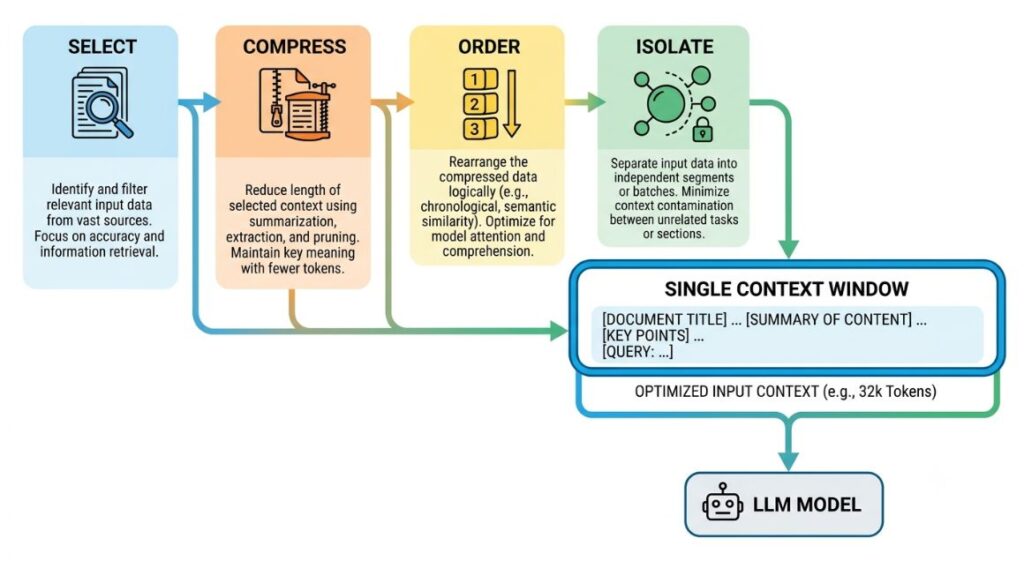
Lance Martin at LangChain formalized how these pieces get managed into a taxonomy that most production teams now build around: write, select, compress, and isolate. That framework is worth knowing by name, because you’ll see it referenced across nearly every serious engineering write-up on the topic.
Four Core Techniques Every AI Team Should Apply
These context engineering techniques map closely to the LangChain taxonomy above, and each one solves a distinct failure mode.
Selection is choosing what belongs in the window at all. RAG retrieves the handful of relevant documents instead of the entire knowledge base. Dynamic tool loading exposes only the 5 to 8 tools relevant to the current step instead of every tool the agent could theoretically use. LangChain has reported tool-selection accuracy improving roughly threefold when teams move from static tool lists to dynamic, query-relevant loading.
Compression squeezes more signal into fewer tokens. This means summarizing long conversation history instead of replaying it verbatim, chunking documents at natural semantic boundaries with 10 to 15% overlap so context isn’t cut mid-idea, and stripping metadata that adds noise without adding meaning.
Ordering deals with a real weakness in how models process long inputs, often called the “lost in the middle” problem, first documented by Liu et al. in 2024. Models pay closer attention to information at the start and end of a context window than to what’s buried in the middle. Practically, that means your most important instructions and most recent state should sit at the edges of the window, not in the middle of a wall of retrieved text.
Isolation keeps unrelated context from bleeding into a task where it doesn’t belong. In a multi-agent system, this might mean giving each sub-agent its own scoped context window instead of one shared, ever-growing pile that every agent has to wade through.
Tools That Power Context Pipelines
Knowing the theory only gets you halfway. Here’s what teams actually reach for when they build context engineering in AI systems today.
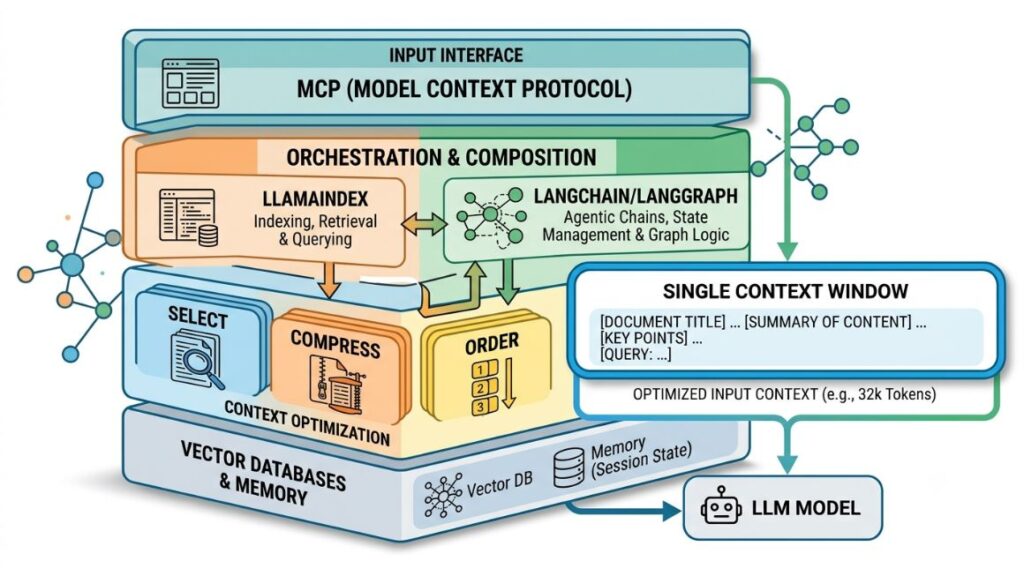
Model Context Protocol (MCP)
Anthropic open-sourced the Model Context Protocol in November 2024 as a standard way for AI applications to connect to external tools and data sources. Before MCP, connecting 10 AI applications to 100 different tools meant building up to 1,000 separate custom integrations. MCP collapses that into a single protocol: build one MCP server for a data source, and any MCP-compatible AI application can use it.
MCP works on a client-server model. An MCP host, like Claude Desktop or an IDE such as Cursor, runs an MCP client that connects to MCP servers exposing tools, resources, and prompts. OpenAI adopted the protocol across its Agents SDK by March 2025, and Google DeepMind and Microsoft followed within months, which is a rare case of direct competitors converging on the same standard. Anthropic donated MCP to the Linux Foundation’s Agentic AI Foundation in December 2025, making it vendor-neutral infrastructure rather than a single company’s product.
For context engineering specifically, MCP matters because it standardizes the “tool and data” layer of the context stack. Instead of writing custom glue code every time you want a model to reach a Postgres database or a GitHub repo, you connect an MCP server once.
LangChain and LangGraph
LangChain is an open-source framework for building LLM applications, and it’s become one of the reference implementations for context engineering as a discipline, largely through the write-select-compress-isolate taxonomy its team published. LangGraph, built on top of it, is designed specifically for stateful, multi-step agents, giving developers explicit control over how state and memory persist across a long-running task rather than leaving it implicit inside a single prompt.
LlamaIndex
LlamaIndex focuses on the data side of the equation: connecting LLMs to your documents, databases, and APIs through structured indexing and retrieval. Where LangChain leans toward orchestration and agent logic, LlamaIndex leans toward building the retrieval layer well, chunking documents intelligently, building indexes over them, and returning the most relevant pieces at query time.
Vector Databases: Pinecone and Weaviate
Retrieval-augmented generation needs somewhere to store and search embeddings, and that’s what vector databases do. Pinecone is a managed vector database built for production RAG at scale, handling similarity search across millions of embeddings with low latency. Weaviate offers similar functionality as an open-source option teams can self-host, with built-in support for hybrid search that combines keyword and vector matching. Either one sits underneath the “selection” step in a context pipeline, deciding which documents are relevant enough to make it into the window.
Haystack
Haystack, built by deepset, is an open-source framework aimed squarely at production RAG and search pipelines. It’s a solid fit for teams that want a more opinionated, batteries-included path to retrieval than assembling LangChain and a vector database from scratch.
Memory Layers: Zep and Mem0
Zep and Mem0 are purpose-built memory layers that sit between your application and the LLM, tracking facts about users and conversations across sessions so the model doesn’t start from zero every time. This is the piece that turns a stateless chatbot into something that remembers a user’s preferences from last week, which is a meaningfully different product experience.
Microsoft Semantic Kernel
Semantic Kernel is Microsoft’s open-source SDK for orchestrating context, memory, and plugins around LLMs inside enterprise applications, particularly for teams already working inside the Azure and .NET ecosystem. It handles a lot of the same write-select-compress work as LangChain, just with tighter enterprise integration.
Modern context pipelines typically combine four tool categories: a protocol layer like MCP for connecting to external systems, an orchestration framework like LangChain or LangGraph for managing agent logic, a retrieval layer built on LlamaIndex plus a vector database like Pinecone or Weaviate, and a memory layer such as Zep for persistence across sessions. No single tool covers the whole stack.]
Real-World Examples in Action
GitHub Copilot and similar AI coding assistants are a clean example. The model doesn’t just see your prompt, it sees the open file, related files in the repo, recent edits, and the project’s existing code style, all assembled automatically before a single suggestion is generated. That assembled context is why suggestions feel like they belong in your codebase instead of generic boilerplate.
Perplexity builds its entire product around context engineering: every answer is grounded in freshly retrieved web sources rather than the model’s static training data, with citations attached so the retrieval step is visible to the user.
Klarna’s customer service AI, which the company has said handles a large share of its support chats, relies on retrieving the specific customer’s order history and policy details at the moment of the query rather than trying to bake every possible policy into a single giant prompt.
Notion AI pulls context from the specific workspace, page, and linked documents a user is working in, so a summary request produces something grounded in that user’s actual content instead of a generic response.
Indian fintech and D2C teams are increasingly building similar patterns internally: support bots that retrieve a customer’s live order status from internal systems rather than a static FAQ, and internal copilots that pull from a company’s own documentation instead of the model’s general training knowledge. The pattern is the same everywhere: ground the model in specific, current, relevant data instead of hoping it remembers correctly.
Best Practices for Getting Context Engineering Right
Start with the failure, not the framework. Look at where your model actually gives wrong or generic answers before picking a tool. Half the time the fix is better retrieval, not a bigger model.
Test context pipelines like code. Version your prompts and retrieval logic, write evaluation sets, and track accuracy as you change the pipeline. Treat it as software, because that’s what it is.
Keep tool lists small and dynamic. Don’t hand an agent 40 tools “just in case.” Load only what’s relevant to the current step, and watch selection accuracy improve.
Put the important stuff at the edges. Given the lost-in-the-middle problem, place critical instructions and the most recent, most relevant information at the start or end of the context window, not buried in the middle of retrieved text.
Compress before you retrieve more. If a pipeline is underperforming, the instinct is often to add more context. More often, the real fix is summarizing what’s already there so the model can actually use it.
Separate memory types deliberately. Don’t conflate a user’s long-term preferences with the current conversation’s short-term state. Mixing them makes both harder to manage and easier to get wrong.
This may not apply to every team the same way. A small internal tool with five users can get away with a simpler setup than a customer-facing agent handling thousands of daily conversations. But the underlying principles hold regardless of scale.
Common Mistakes Teams Make
The most common one: treating context as a dumping ground. Teams assume that because a model has a large context window, filling it with everything available is the safe move. It isn’t. It’s the single biggest reason otherwise capable models produce vague, unfocused answers.
A close second is skipping evaluation entirely. Teams ship a context pipeline that works on the five examples they tested and never build a proper evaluation set, so regressions show up in production instead of in testing.
Static tool lists are another quiet killer for agent performance. Handing an agent every tool it might ever need, all the time, doesn’t just waste tokens, it measurably hurts the model’s ability to pick the right one for the step it’s on.
And a lot of teams still treat memory as an afterthought, bolting on session persistence after launch instead of designing what should and shouldn’t carry across conversations from day one.
Where This Leaves You
The model isn’t your bottleneck anymore. What you feed it is. Teams that treat context as a designed system, versioned, tested, and deliberately structured, consistently ship AI products that hold up under real, messy user input. Teams that keep tweaking prompts and hoping for the best don’t.
Start small: pick the one place your AI product gives the weakest answers, and rebuild the context feeding that specific step before you touch anything else.
If you want to go deeper on the tools and frameworks covered here, from MCP to LangChain to building retrieval pipelines that actually hold up in production, YUP’s AI Marketing course and the Hotskill app both walk through hands-on builds you can apply directly to your own AI projects.
FAQs
What does context engineering mean in simple terms?
It’s the practice of deliberately deciding what information, tools, and instructions an AI model sees before it responds, rather than relying on a single cleverly worded prompt. It covers retrieved documents, memory, tool definitions, and conversation history, all assembled to give the model what it needs for that specific step.
Context engineering vs prompt engineering, what’s the real difference?
Prompt engineering is about wording a single instruction well. Context engineering is the broader systems work of building the pipelines that retrieve, structure, and deliver everything the model needs, across thousands of different inputs, reliably. Prompting is one small piece inside the larger discipline.
Who actually needs to care about this?
Anyone building an AI product beyond a simple demo. If your model needs to answer questions using your company’s specific data, remember past interactions, or take multi-step actions through tools, you need this discipline, not just better prompts.
How do I get started if my team has never done this before?
Start by identifying where your current model gives wrong or generic answers. Add retrieval for the specific gap you find, using a framework like LangChain or LlamaIndex, then measure whether accuracy actually improved before adding more complexity.
Is context engineering just RAG with a new name?
No. RAG, retrieval-augmented generation, is one technique inside context engineering, specifically the retrieval and selection piece. The discipline also covers memory, tool definitions, compression, ordering, and isolation, all things RAG alone doesn’t address.
Do I really need a framework like LangChain, or can I build this myself?
You can build a simple version yourself for a narrow use case. But once you’re managing retrieval, memory, and tool orchestration together, a framework saves real engineering time and avoids reinventing patterns that are already well solved.
Why does my AI agent lose track of what it’s doing halfway through a task?
Usually because state and memory aren’t being carried forward properly between steps, or because the context window is so cluttered with irrelevant history that the model loses the thread. Isolating context per step and summarizing completed steps both help.
What is MCP and do I need it?
The Model Context Protocol is Anthropic’s open standard for connecting AI applications to external tools and data sources without building a custom integration for every pairing. You need it if you’re connecting AI to multiple external systems and want to avoid maintaining separate integrations for each one.
Does more context always mean better answers?
No, and this is one of the most common misconceptions. Research from Chroma in 2025 found model accuracy actually drops as context length grows, even within the supported window. The goal is relevant, well-ordered context, not maximum volume.
Is this just a trend, or is it here to stay?
Gartner has projected the discipline will be embedded in the majority of AI development tools by 2028, and the major frameworks, protocols, and vector databases built around it are already standard infrastructure for production AI teams. It’s better understood as a permanent shift in how AI systems get built than a passing trend.