
Most “LinkedIn growth hacks” lists are the same 20 tips copy-pasted into a longer post, padded out with advice that stopped working around 2021. Post consistently. Engage before you post. Use hashtags. You’ve read it before, and it hasn’t moved your follower count.
LinkedIn now has over 1.3 billion members worldwide, according to DemandSage’s 2026 LinkedIn Statistics report, but only a fraction of them post regularly. That gap is the opportunity. This isn’t another generic list. It’s over 100 LinkedIn growth hacks organized by what you’re actually trying to fix, whether that’s a profile nobody visits, posts that get three likes, or a network that never turns into clients.
Skip to the section that matches your problem, or read straight through if you’re starting from zero.
Table of Contents
LinkedIn Profile Optimization Hacks
Your profile is the landing page every piece of content sends people to. If it doesn’t convert a visitor into a follow or a connection request, everything upstream is wasted effort. Get this right before you touch content strategy.
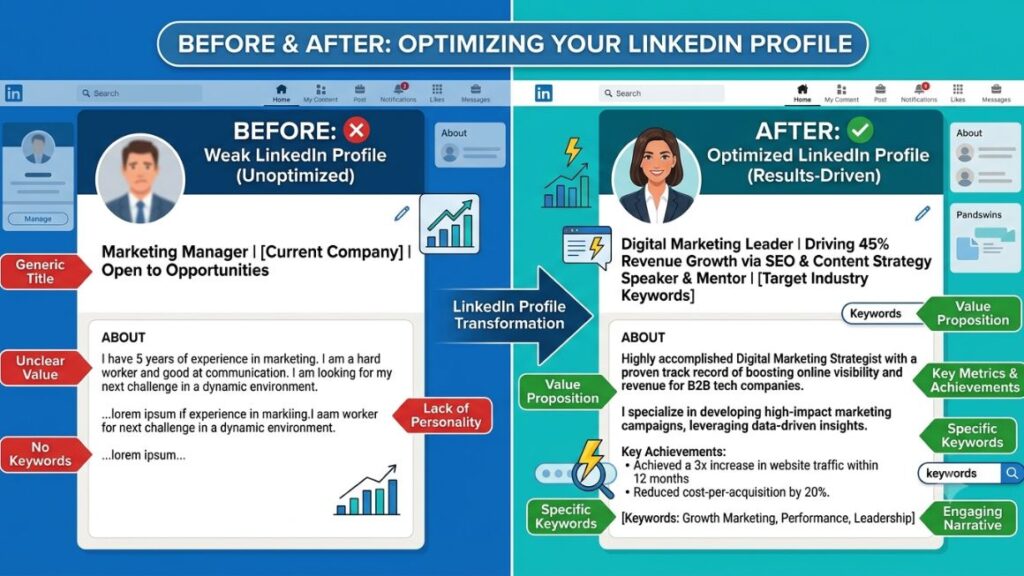
- Write your headline as a value statement, not a job title. “Marketing Director at X” tells people nothing. “I help D2C brands cut CAC by 30% through performance marketing” tells them why to care.
- Use all 220 characters in your headline. LinkedIn search weighs headline keywords heavily. A half-empty headline is a missed keyword opportunity.
- Add a custom banner image, not the default blue. A banner with your value proposition, a course link, or your newsletter name gives visitors a reason to act.
- Turn on “Open to Work” or “Providing Services” only when relevant. These badges wrap your profile photo in a green ring that draws the eye, but the wrong one at the wrong time signals the wrong thing to clients or employers.
- Write your About section for skimmers. Short paragraphs, one clear ask at the end, no wall of text. Most people read the first two lines and decide whether to continue.
- Put a call to action at the end of your About section. “DM me the word GROWTH for my content calendar template” converts better than nothing.
- Use the Featured section actively. Pin your best-performing post, a lead magnet, or a case study. It’s prime real estate that most profiles leave empty.
- List skills that match what you want to be found for, not everything you’ve ever touched. LinkedIn search and recruiter search both weight the Skills section.
- Get your top 3 skills endorsed by people who actually know your work. Endorsements from strangers add nothing. Endorsements from credible peers add trust signals.
- Add a custom LinkedIn URL (linkedin.com/in/yourname instead of a string of numbers). It’s a small detail that makes your profile look intentional when shared.
- Fill out the Experience section like a portfolio, not a resume. Add media, results, and specifics under each role instead of a bullet list of duties.
- Turn on Creator Mode if you post content regularly. It moves your content higher on your profile and adds a follow button instead of just connect, which matters once your network exceeds people you actually know.
- Pick 3-5 topic tags under Creator Mode that match what you actually post about. This is how LinkedIn categorizes you for topic-based discovery.
- Add your newsletter if you run one. Newsletter subscribers show up as a separate audience from followers, and LinkedIn surfaces new issues to them directly.
- Request recommendations from 3-5 people who can speak to specific results, not generic praise. “Great to work with” helps nobody. “Grew our organic traffic 40% in six months” does.
Content Strategy and Creation Hacks
The algorithm rewards content that keeps people on the platform. That means dwell time, comments, and shares matter more than reach alone. Here’s how to actually build content that does that, not just content that looks busy.
- Write your first line to stop the scroll, not to summarize the post. The first 1-2 lines show before “see more.” If they’re generic, nobody clicks to expand.
- Use short paragraphs and line breaks aggressively. LinkedIn’s feed is mobile-first. A wall of text loses readers within three lines.
- Post frameworks, not just opinions. “3 steps to X” or “the framework I use for Y” performs better than a loose take because it’s actionable and saveable.
- Share specific numbers instead of vague claims. “This grew our pipeline 22% in Q1” beats “this really helped our sales” every time.
- Tell one story per post. Posts that try to cover three ideas dilute engagement on all three. Pick one.
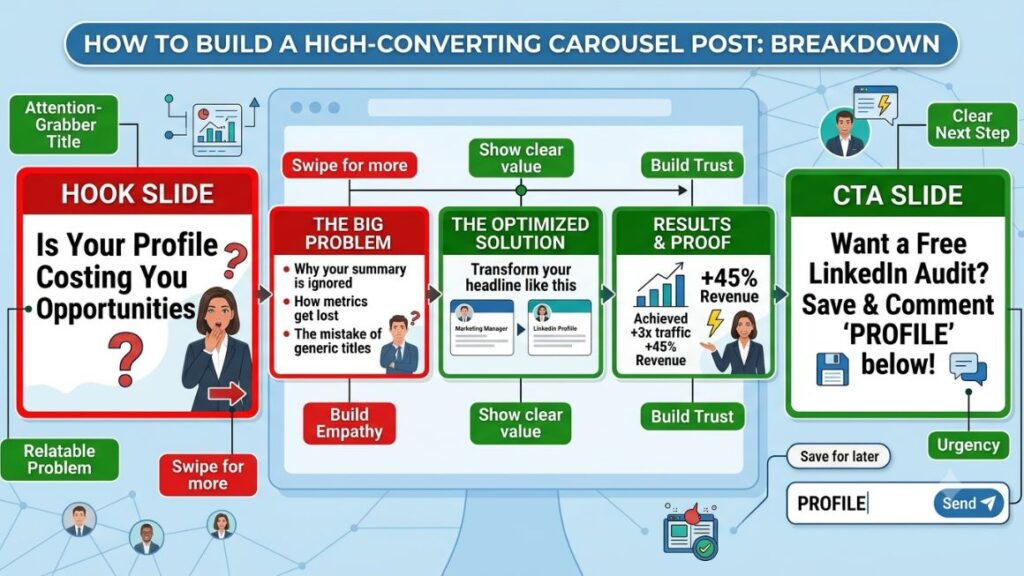
- Use carousels (PDF documents) for step-by-step or list content. According to ConnectSafely’s 2026 LinkedIn Statistics report, carousel posts see a 6.60% engagement rate, well above the platform average for text or link posts.
- Post native video instead of linking to YouTube. DemandSage’s 2026 data shows video content on LinkedIn gets roughly 5 times more engagement than other formats, and off-platform links get suppressed by the algorithm regardless.
- Repurpose one core idea across five formats: a text post, a carousel, a video, a poll, and a comment on someone else’s related post. Same idea, different entry points.
- Write posts around a documented content pillar system, not whatever comes to mind that day. Three to five recurring themes make you recognizable and make writing faster.
- Use the “problem, agitation, solution” structure for how-to posts. State the problem, why it’s worse than people think, then the fix. It mirrors how people actually search for answers.
- Comment your own post within the first 10 minutes with a related resource, a follow-up thought, or a question. Early activity on a post signals relevance to the algorithm.
- Ask a genuine question at the end of posts you want comments on. Rhetorical questions get skipped. Specific, answerable ones get replies.
- Batch-write a week of content in one sitting. Consistency beats sporadic bursts, and batching removes the daily “what do I post” friction that kills consistency.
- Use polls sparingly, for genuine audience research, not for easy engagement farming. Overused polls read as lazy content to a network that’s seen the trick before.
- Write a documented hook swipe file. Save 20-30 hooks that stopped your own scroll and adapt the structure, not the words, for your own posts.
- Turn client questions and comments into post topics. If three people asked you the same thing this month, that’s a signal, not a coincidence.
- Post text-only updates occasionally, without an image. Text-only posts sometimes outperform image posts because they load faster and don’t compete visually with the reader’s attention.
- Use bold text sparingly inside posts to highlight the one sentence you want skimmers to catch, using LinkedIn’s built-in formatting or a Unicode bold generator.
- Write longer posts (1,300+ characters) for depth topics, shorter posts for hot takes. Match the format to the idea instead of forcing every post into the same length.
- Document your process, not just your results. “How I built this” content earns more saves and shares than “look what I built” content because it’s usable by the reader.
Hacks to Work With the LinkedIn Algorithm
LinkedIn’s feed ranking is not a mystery it wants to keep. It has published, repeatedly, what it optimizes for: content that generates meaningful engagement between real people, not just reach. Working with that instead of against it is the actual hack.
- Post when your specific audience is active, not at generic “best times to post” hours pulled from a blog. Check your own analytics tab for when your followers are online.
- Avoid editing a post within the first hour of publishing. LinkedIn’s algorithm has historically deprioritized recently-edited posts while it re-evaluates them for spam signals.
- Don’t post more than once every 18-24 hours. Multiple posts in a day compete with each other for the same audience and can suppress both.
- Prioritize comments over likes as your success metric. A comment weighs more heavily in distribution than a like because it signals a real interaction, not a passive tap.
- Reply to every comment on your post within the first few hours. Each reply is another interaction event the algorithm registers, and it keeps the post active in more feeds.
- Avoid links in the body of your post. LinkedIn’s algorithm suppresses posts that send people off-platform. Put the link in the first comment instead.
- Tag people only when it’s genuinely relevant to them, not as a distribution hack. Irrelevant tags get reported or ignored, and both hurt your standing.
- Use 3-5 hashtags, not 15. LinkedIn’s own guidance suggests a handful of specific, relevant hashtags outperforms a wall of broad ones.
- Engage with 5-10 other posts before you publish your own. Being active on the platform before you post signals to the algorithm that your account is a real, engaged user, not a broadcast-only account.
- Watch for “dwell time” and write posts that reward re-reading. A dense, useful post that people read twice sends a stronger signal than a shallow one they skim once.
- Don’t delete and repost content that underperformed. It can flag your account for spam-like behavior. Let a low performer go and move to the next post.
- Use LinkedIn’s native document (carousel) and video tools instead of third-party embeds. Native formats are consistently favored because they keep users inside the app.
- Avoid engagement pods and automated comment groups entirely. LinkedIn has actively worked to detect and suppress pod-driven engagement, and getting flagged costs more reach than pods ever generate. (More on this in the section below.)
- Post consistently over months, not in a two-week sprint. The algorithm appears to reward accounts with a sustained posting history over accounts that spike and go quiet.
- Treat your first 60 minutes as the post’s most important hour. Early engagement velocity is one of the strongest predictors of whether a post gets pushed to a second wave of feeds.
LinkedIn’s algorithm favors content that generates real interaction over content that generates reach. Comments carry more ranking weight than likes, links in the post body get suppressed in favor of off-platform retention, and the first hour of engagement largely determines whether a post gets a second wave of distribution. Engagement pods and automated comment groups work against this system rather than with it, and LinkedIn has built detection specifically to catch them.
Engagement and Community-Building Hacks
Growth on LinkedIn is not just about your own posts. A huge share of visibility comes from how you show up in other people’s comment sections and how you build a community around your content over time.
- Comment before you post, every single day, even on days you’re not publishing. This is the single most underrated growth lever on the platform.
- Write comments that add a new point, not just agreement. “Great post!” gets ignored by the algorithm and the poster. A comment with a specific counterpoint or addition gets replies.
- Find 10-15 accounts in your niche with an active, engaged audience and comment on their posts consistently. Their audience becomes your audience over time.
- Reply to comments on your posts with a question, not just a thank you. It extends the conversation and often turns into a second wave of engagement.
- Build a “first responder” habit with 5-10 peers who comment on each other’s posts early. This is different from a pod. It’s genuine mutual support between people who’d engage anyway.
- Host or join LinkedIn Live sessions or audio events in your niche. Live formats currently get outsized visibility because LinkedIn is pushing adoption.
- Start conversations in the comments of industry news, not just personal posts. Being an early, thoughtful commenter on a trending industry story puts you in front of a much bigger audience.
- Create a recurring content series (“Marketing Monday”, a weekly roundup, a Q&A thread) that gives your audience a reason to check back on a schedule.
- DM people who leave a substantive comment on your post to thank them specifically. It turns a one-time commenter into a repeat one.
- Share other people’s posts with your own added perspective, not just a repost with no commentary. It signals you’re a curator, not just a broadcaster.
- Join and participate in LinkedIn Groups relevant to your niche. They’re less active than they were five years ago, but the ones that are still alive have low competition for visibility.
- Celebrate other people’s wins publicly. Congratulating a peer’s launch, promotion, or milestone, genuinely, builds goodwill that compounds over months.
- Ask your existing network directly to follow your Page or newsletter when you launch one. Passive hope rarely converts as well as a direct, specific ask.
- Run a short engagement campaign around a milestone (100th post, 10K followers) that invites people to share their own related story or experience.
- Show up in the comments of people above your current level, not just peers. It’s a slower path to visibility, but it puts you in front of larger audiences than your own.
Networking and DM Hacks
Connections and comments are the top of the funnel. What happens in DMs is where relationships and, eventually, clients or opportunities actually form.
- Personalize every connection request. A one-line note referencing a shared interest or their recent post gets accepted far more often than a blank request.
- Never pitch in the first message. The fastest way to get ignored or blocked is leading with a sales pitch to someone who just accepted your connection request.
- Follow up on genuine comment exchanges with a DM, not a cold pitch. “Loved your take in the comments, curious how you’re approaching X” opens a real conversation.
- Set a weekly quota for outbound, personalized connection requests (20-30 is reasonable) rather than mass-connecting with everyone in a given search.
- Use Sales Navigator’s saved search and lead alerts if you’re networking or prospecting with intent. It surfaces relevant new posts and job changes you’d otherwise miss.
- Reconnect with dormant contacts through a genuine reason, like congratulating a job change, not a generic “it’s been a while” message.
- Introduce two people in your network to each other when there’s a real reason to. Being a connector, not just a networker, builds outsized goodwill.
- Send a short voice note instead of a text DM for warmer relationships. It stands out from the flood of templated text messages most people get.
- Keep a simple CRM (even a spreadsheet) of who you’ve talked to and what was discussed. Relationship-building falls apart at scale without some system to track it.
- Attend LinkedIn Local or industry meetups tied to your online activity. Turning an online connection into an in-person one accelerates trust far faster than DMs alone.
Lead Generation and Personal Branding Hacks
Growth for its own sake doesn’t pay the bills. These hacks are about converting an audience into actual business outcomes, whether that’s clients, job offers, or brand deals.
- Build a simple lead magnet (a template, checklist, or short guide) and gate it behind a comment-to-DM funnel: “comment TEMPLATE and I’ll send it over.”
- Use your Featured section to pin a case study with a specific, named result. Specificity builds more trust than a generic portfolio link.
- Launch a LinkedIn newsletter around your core topic. Newsletters get pushed to subscribers directly via notification, giving you a distribution channel outside the main feed.
- Write a “start here” pinned post that orients new followers to who you are and what you post about, especially after a viral spike brings in unfamiliar followers.
- Turn your best-performing post into a lead magnet topic. If a post about a specific problem got strong engagement, that’s evidence people want more depth on it.
- Share client or customer results with permission, using real names and numbers where possible. Named case studies outperform anonymized ones on trust.
- Set up your LinkedIn Company Page to mirror your personal brand’s content pillars, not as an afterthought. Company Pages with regular content get more reach than dormant ones.
- Use the “Creator” analytics to identify your highest-intent content, then build a lead magnet or offer specifically around that topic.
- Add a booking link or contact CTA to your profile’s Contact Info section, not just your About section, since some visitors check that first.
- Position yourself around one clear problem you solve, not a broad list of skills. “I help SaaS founders fix churn” is more memorable and more referable than “marketing, growth, and strategy consultant.”
Analytics and Growth Tracking Hacks
You can’t fix what you don’t measure. These hacks are about knowing what’s actually working instead of guessing based on which posts felt good to write.
- Check your post analytics 48 hours after publishing, not just in the first hour. Some posts have a slow build that early metrics miss entirely.
- Track follower demographics in your Creator analytics, not just follower count. A growing count of the wrong audience doesn’t help your goals.
- Compare engagement rate, not raw likes, across posts of different reach. A post with 50 likes on 500 views often outperforms one with 200 likes on 10,000 views.
- Identify your top 3 performing post formats over a 90-day window and double down on them instead of spreading effort evenly across every format.
- Track profile views alongside post performance. A spike in profile views without a matching spike in a specific post usually means you were mentioned or shared somewhere you can’t see.
- Monitor which posts drive DMs, not just comments. Comment count and business-relevant engagement are not always the same metric.
- Set a monthly review cadence, not just a daily glance at notifications, to catch trends that only show up over weeks.
- A/B test hooks on similar topics by tracking which opening lines correlate with higher click-through on “see more.”
- Watch for follower churn, not just follower growth. A high-churn audience signals a mismatch between what attracts people and what keeps them.
- Benchmark your engagement rate against your own historical average, not against viral outliers from bigger accounts in a different niche.
LinkedIn Growth Hacks You Should Stop Using
Some tactics that used to work are now actively risky. LinkedIn has invested heavily in detecting manipulated engagement, and getting caught costs more than the tactic ever gained.
- Engagement pods and comment-exchange groups. These were common a few years ago. LinkedIn’s spam detection has specifically targeted coordinated engagement, and accounts flagged for it see reach drop, sometimes permanently.
- Bots and automation tools for auto-commenting or auto-connecting. Beyond the risk of account restriction, automated comments are almost always generic, and readers spot them instantly.
- Buying followers or engagement. It inflates a vanity number while tanking your actual engagement rate, which is the metric that determines reach going forward.
- Posting the exact same content across every platform without adapting it. LinkedIn’s audience reads differently than Twitter’s or Instagram’s, and cross-posted content usually reads as lazy on all three.
- Mass, unpersonalized connection requests. Low acceptance rates and high report rates from this tactic can quietly damage your account’s standing over time.
- Keyword-stuffing your headline or About section. It reads poorly to humans, and LinkedIn’s search has gotten better at weighting relevance over repetition.
- Fake urgency or manufactured outrage bait for engagement. It can spike reach short-term but damages trust and brand perception long-term, especially for anyone building toward business outcomes rather than pure reach.
- Editing a post repeatedly right after publishing to “fix” the hook based on early performance. As covered above, this can suppress the post rather than save it.
- Following and unfollowing large numbers of accounts to game the algorithm. This behavior pattern is exactly what spam detection systems are built to catch.
- Ignoring comments on your own posts. It’s not a hack in the traditional sense, but it’s one of the most common reasons otherwise good content stalls after a strong start.
The LinkedIn growth tactics that carry the most risk in 2026 all share one trait: they simulate engagement instead of earning it. Pods, bots, bought followers, and mass unpersonalized outreach all trigger the same spam detection systems, and the cost of getting flagged is a sustained drop in reach that far outweighs any short-term gain.
Getting Started Without Getting Overwhelmed
The point of this list was never to run all 105 hacks at once. It’s to give you a map, so when your profile isn’t converting, your content isn’t landing, or your network isn’t turning into anything, you know exactly which section to go back to.
Start with the profile section if you haven’t touched it in a year. Move to content and algorithm if your profile is solid but posts aren’t landing. And if you’re already getting reach but it’s not turning into anything, the lead generation and networking sections are where the real work is.
LinkedIn growth is not a hack in the singular sense. It’s a handful of unglamorous habits, done consistently, while everyone else is looking for a shortcut.
If you want a structured way to build all of this into an actual content system instead of trying to remember 100 tips, YUP’s Social Media Marketing course walks through content pillars, algorithm strategy, and personal branding from the ground up.
FAQ
How many LinkedIn hacks should I actually try at once?
Pick 3-5 from a single category and give them 60-90 days before adding more. Trying all 100+ at once makes it impossible to tell which changes actually moved your numbers.
Is posting every day necessary for LinkedIn growth?
No. Consistency matters more than frequency. Three well-made posts a week, sustained for months, will outperform daily posting that burns out after three weeks.
Do LinkedIn engagement pods still work in 2026?
Not reliably, and they carry real risk. LinkedIn has built detection specifically for coordinated engagement, and flagged accounts see reduced reach that can outlast the pod’s short-term benefit.
LinkedIn hashtags vs. no hashtags, does it matter?
It matters less than it used to, but 3-5 specific, relevant hashtags still help with topic-based discovery. Fifteen generic hashtags read as spam to both readers and the algorithm.
Who should focus on personal branding hacks vs. company page hacks?
Individuals building an audience, consultants, and job seekers should prioritize personal profile growth. Established companies with a marketing team should run both in parallel, since personal profiles typically outperform Company Pages in organic reach.
Is it worth paying for LinkedIn Premium or Sales Navigator just for growth?
It depends on your goal. Sales Navigator is built for prospecting and outbound, not organic growth, so it’s worth it for lead generation but won’t move your follower count on its own.
Why isn’t my LinkedIn content getting any engagement even though I’m posting consistently?
The most common causes are a weak hook that doesn’t earn a “see more” click, no clear call to comment, or a lack of pre-post engagement with other accounts that would signal your profile as active. Check the algorithm section above before assuming the content itself is the problem.
What’s the fastest way to grow LinkedIn followers?
There’s no reliable shortcut that doesn’t carry risk. The fastest sustainable path combines a strong profile, a consistent content pillar system, and daily engagement in other people’s comment sections, not any single trick.
Do LinkedIn carousels really perform better than regular posts?
Current data supports it. ConnectSafely’s 2026 LinkedIn Statistics report puts carousel engagement at 6.60%, notably above standard text and link post benchmarks, largely because the swipe format increases dwell time.