
Over 5,000 digital accessibility lawsuits were filed in the United States in 2025 alone. That’s not a typo. And according to Seyfarth Shaw’s latest litigation analysis, the 3,117 federal web accessibility cases in 2025 represent a 27% jump over 2024 -with state-level filings pushing the total well past 5,000. The European Accessibility Act came into force in June 2025. And the WebAIM Million Report for 2026 found that the top one million home pages now contain over 56 million distinct accessibility errors, averaging 56.1 issues per page -a 10.1% increase from the previous year.
The problem isn’t that teams don’t care about accessibility. It’s that most don’t have a systematic way to catch, track, and fix issues before they compound. That’s where website accessibility tools come in -and picking the right one can be the difference between a site that protects the business and one that doesn’t.
This guide covers what these tools do, the standards they test against, how to choose the right one for your situation, and an honest look at the best options available in 2026.
Table of Contents
What Are Website Accessibility Tools?
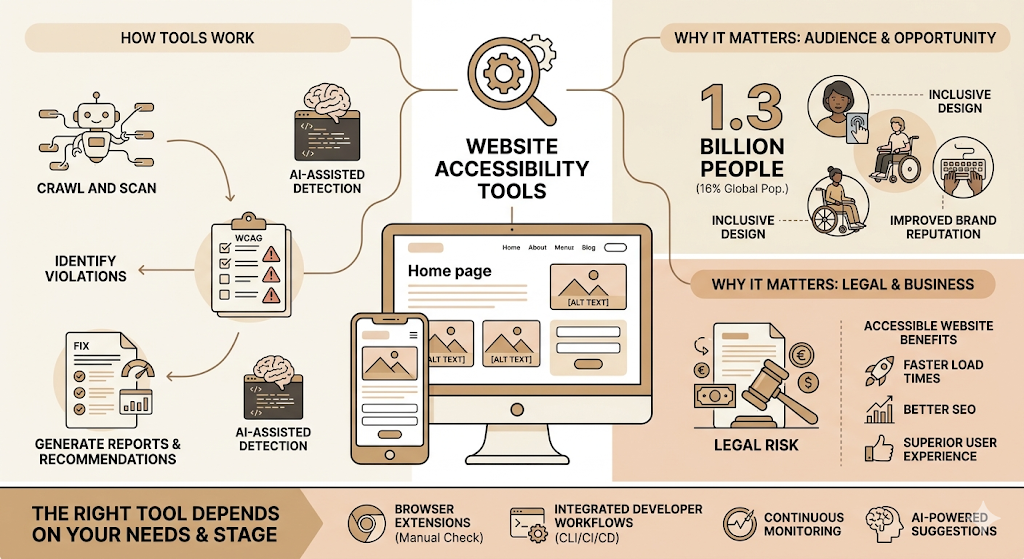
Website accessibility tools are software platforms, browser extensions, and testing frameworks that help teams find, report, and fix barriers preventing people with disabilities from using a website.
The category is broader than most people realise. Some tools scan a URL and return a list of WCAG violations. Others integrate directly into developer workflows via CLI or CI/CD pipelines. Some monitor your site continuously after launch. A few offer AI-powered suggestions and even attempt automated fixes. The right tool depends entirely on what stage you’re at and what problem you’re actually solving.
Why Website Accessibility Matters
About 1.3 billion people -16% of the global population -live with a disability that affects how they access the internet (World Health Organization, 2023). That’s not a niche audience. That’s the size of the entire population of India.
For businesses, the consequences of ignoring this have become concrete and financial. The average lawsuit settlement plus defence costs for an ADA web accessibility case now runs between $60,000 and $200,000+, according to WCAGsafe’s 2026 ADA compliance cost data. A basic accessibility audit, by contrast, costs $2,500 to $10,000. The math isn’t complicated.
But legal risk isn’t the only reason. Accessible websites load faster, have cleaner semantic structure, and are easier for search engines to crawl. Better user experience. Inclusive design. Improved brand reputation. These aren’t soft benefits -they’re measurable outcomes.
How Website Accessibility Tools Work
Most tools operate across a few core functions: they crawl your site, analyse the code and rendered output, flag violations against known accessibility rules, and generate a report. More advanced platforms layer on top of that with real-time monitoring, integrations into design and development tools, and remediation guidance at the code level.
AI-assisted detection is now common in most paid tools. These systems can flag issues that purely rule-based engines miss -such as contextually insufficient alt text or ambiguous link labels -though they still require human judgment to validate.
Understanding Website Accessibility Standards
If you’re going to use website accessibility tools effectively, you need to know what they’re testing against. The legal and compliance framework is messier than most guides admit.
What Is WCAG?
WCAG stands for Web Content Accessibility Guidelines, published by the World Wide Web Consortium (W3C). It’s the technical standard that nearly all accessibility laws worldwide reference. WCAG 2.1, finalised in 2018, is currently the most widely enforced version. WCAG 2.2, released in October 2023, adds new success criteria focused on cognitive accessibility, touch targets, focus visibility, and accessible authentication.
WCAG Conformance Levels (A, AA, AAA)
WCAG has three conformance levels. Level A covers the most basic requirements -things like providing text alternatives for images. Level AA is what most laws require and what courts treat as the compliance benchmark. Level AAA is the most stringent, covering things like sign language alternatives for video content. Most organisations target Level AA as the minimum. Aiming for WCAG 2.2 AA specifically is now considered best practice.
ADA Compliance
The Americans with Disabilities Act (ADA) doesn’t specify a technical standard for websites -courts have historically referenced WCAG 2.1 AA as the benchmark in litigation. The landmark Robles v. Domino’s Pizza ruling in the 9th Circuit established that the ADA applies to websites and mobile apps, and that precedent now shapes most enforcement.
Section 508 Compliance
Section 508 of the Rehabilitation Act applies specifically to federal agencies and organisations receiving federal funding. It requires that electronic and information technology be accessible to people with disabilities. The current 508 standard directly incorporates WCAG 2.0 AA requirements.
EN 301 549 and Other Global Standards
EN 301 549 is the European standard for public sector digital accessibility, also built on WCAG. The European Accessibility Act (EAA), which came into force in June 2025, extends accessibility requirements to private sector products and services across the EU. India’s Securities and Exchange Board of India (SEBI) has also mandated accessible digital services for financial entities -accessibility is becoming a global compliance issue, not just a US one.
Common Accessibility Issues These Standards Address
The most common issues that WCAG targets -and that website accessibility tools are built to catch -include missing alt text on images, low colour contrast between text and backgrounds, broken or absent keyboard navigation, missing form labels, improper heading hierarchy that confuses screen readers, and focus indicators that aren’t visible. These six issue types account for the overwhelming majority of violations found in automated scans.
WCAG 2.2 AA is currently the most widely enforced web accessibility standard globally. Most ADA litigation in the US references WCAG 2.1 AA as the technical benchmark, and compliance with WCAG 2.2 AA is now considered best practice. The European Accessibility Act, in force since June 2025, extends these requirements to private sector digital products across the EU.
Types of Website Accessibility Tools
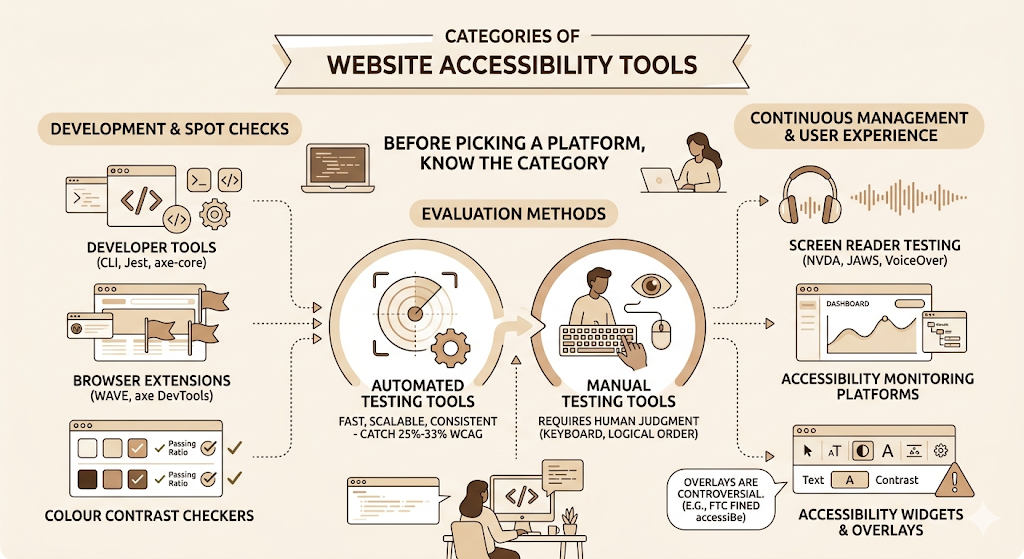
Not all tools in this category do the same thing. Before picking a platform, it helps to know which category of tool actually fits the problem.
Automated Accessibility Testing Tools
These scan websites programmatically and flag violations against known WCAG rules. They’re fast, scalable, and consistent -and they catch a specific subset of issues. According to accessibility expert Karl Groves’ widely-cited research, automated tools can reliably detect only 25% to 33% of WCAG guidelines. That’s not a reason to skip them -it’s a reason to understand their limits.
Manual Accessibility Testing Tools
Manual tools guide a tester through accessibility checks that require human judgment. Keyboard-only navigation testing, logical reading order, context-appropriate link labels -these can’t be verified by a script alone.
Browser Extensions
Extensions like WAVE and axe DevTools (the free version) plug directly into Chrome or Firefox and test the page you’re currently viewing. They’re ideal for quick spot checks and developer-level debugging during build.
Screen Reader Testing Tools
NVDA (Windows, free), JAWS (Windows, enterprise), and VoiceOver (built into macOS and iOS) are the primary screen readers used to test real assistive technology compatibility. Screen reader testing is different from automated ARIA label checking -it shows you what the actual user experience sounds like.
Colour Contrast Checkers
Standalone colour contrast checkers -including WebAIM’s Contrast Checker and the built-in colour tools inside axe DevTools -verify that foreground and background colour combinations meet the WCAG ratio requirements of 4.5:1 for normal text and 3:1 for large text.
Accessibility Monitoring Platforms
Enterprise platforms like Siteimprove and AudioEye provide continuous monitoring across entire domains, not just page-by-page snapshots. They alert teams when new content introduces new violations and track remediation progress over time.
Accessibility Widgets and Overlays
Overlays are JavaScript widgets that sit on top of a website and offer user-facing controls like font size adjustment, colour contrast toggle, and keyboard navigation assistance. They’re controversial -and for good reason. The FTC fined accessiBe $1 million in April 2025 for deceptively claiming its overlay could make any website WCAG-compliant. More on this in a later section.
Developer Accessibility Testing Tools
Testing frameworks like axe-core (the open-source engine behind axe DevTools), Deque’s CLI tools, and integrations with Jest, Playwright, and Cypress bring accessibility checks into the development pipeline itself -catching issues before they’re ever deployed.
Key Features of Website Accessibility Tools
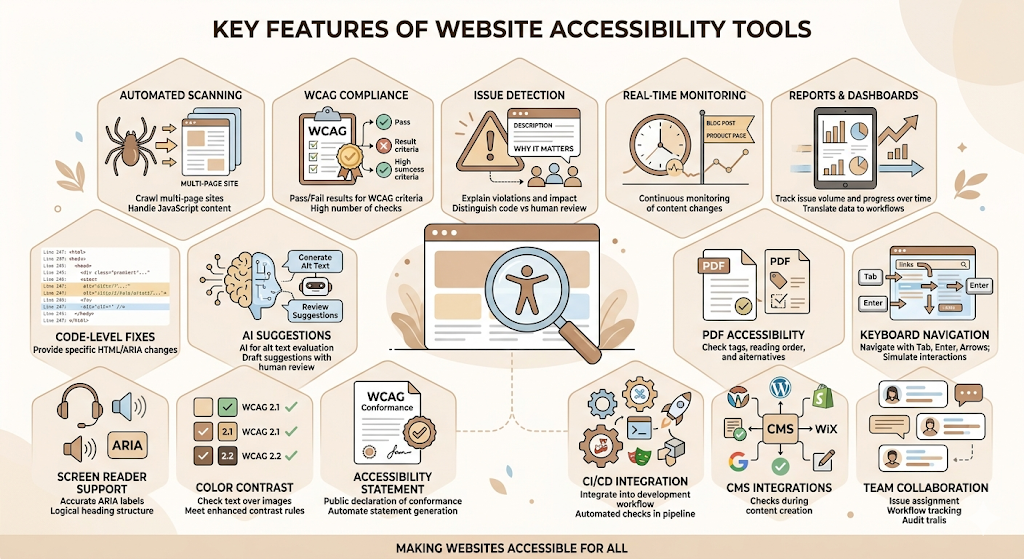
This is where the real differentiation between platforms happens. Two tools can both claim “WCAG testing” and work completely differently. Here’s what to evaluate.
Automated Website Scanning
The baseline feature. Any serious tool should be able to crawl a multi-page site -not just a single URL -and return structured results mapped to specific WCAG success criteria. Look for how many pages the tool can scan in a single run and whether it handles JavaScript-rendered content correctly (many older tools can’t).
WCAG Compliance Testing
The quality of WCAG testing varies significantly between tools. The best platforms map every flagged issue to a specific WCAG success criterion with a clear pass/fail result. Silktide, for example, runs over 200 automated accessibility checks against the latest WCAG standards -that’s a meaningful difference from tools running 50 checks.
Accessibility Issue Detection
Beyond finding violations, good tools explain what the violation means and why it matters. Issue detection quality includes whether the tool can distinguish between definitive failures (provable by code alone) and issues that need human review. False positives waste engineering time. axe DevTools’ zero-false-positive guarantee for flagged issues is one reason developers tend to prefer it.
Real-Time Monitoring
Post-launch, websites change constantly. New blog posts, product pages, and CMS updates introduce new accessibility issues. Continuous monitoring catches these before they accumulate into a compliance backlog. Siteimprove and AudioEye both run continuous site-wide monitoring rather than point-in-time snapshots.
Accessibility Reports and Dashboards
Good reporting is the difference between knowing you have a problem and knowing what to do about it. Enterprise-grade dashboards track issue volume by page, section, WCAG level, and type -and show progress over time. Siteimprove’s dashboard is widely praised for translating raw scan data into manageable workflows.
Code-Level Recommendations
Surface-level alerts are not useful to developers. The best tools provide the specific HTML or ARIA attribute change needed to fix each issue -not just “this image is missing an alt attribute” but “add alt='[description]’ to this img tag on line 247.”
AI-Powered Accessibility Suggestions
Several platforms now use AI to go beyond rule-based detection. AI can evaluate whether existing alt text is actually descriptive, flag potentially ambiguous link labels, and in some cases generate draft fix suggestions. This is genuinely useful -with caveats. AI suggestions still need human review before implementation.
PDF Accessibility Testing
PDFs are a separate compliance problem. Many organisations publish downloadable PDFs that are completely inaccessible to screen readers. PDF accessibility testing checks whether PDFs have proper tagging, reading order, and text alternatives. Siteimprove includes PDF testing in its platform; UserWay offers standalone PDF remediation services.
Keyboard Navigation Testing
A fully keyboard-accessible website lets users navigate every interactive element -links, forms, dropdowns, modals -using only the Tab, Enter, Arrow, and Escape keys. Tools that test keyboard navigation simulate these interactions programmatically to verify that no functionality is mouse-only.
Screen Reader Compatibility Testing
This goes deeper than keyboard testing. Screen reader compatibility testing verifies that ARIA labels are accurate, heading structure is logical, dynamic content changes are announced, and live regions work correctly. Most platforms combine automated ARIA validation with manual testing guidance.
Colour Contrast Analysis
Every serious accessibility tool includes colour contrast analysis. What distinguishes better tools is precision -are they checking all text elements, including text overlaid on images? Are they testing against both WCAG 2.1 and WCAG 2.2 enhanced contrast requirements?
Accessibility Statement Generation
An accessibility statement is a public declaration of your site’s conformance level, known barriers, and how users can report issues. Some platforms automate statement generation based on your scan results. This is increasingly required by law in the EU under the European Accessibility Act.
CI/CD Integration
For development teams, the ability to run accessibility checks automatically as part of a continuous integration and continuous deployment (CI/CD) pipeline is valuable. AudioEye’s Accessibility Testing SDK integrates with Jest, Playwright, and Cypress. axe DevTools supports similar integrations. This brings accessibility checks into the same workflow as unit testing and security scans.
CMS Integrations
Most websites run on a content management system. Native CMS integrations mean accessibility checks happen at the content creation level, not only after deployment. AudioEye integrates with WordPress, Shopify, Squarespace, Wix, Webflow, BigCommerce, Drupal, HubSpot, Joomla, and more.
Team Collaboration Features
Enterprise teams need more than scan results -they need issue assignment, workflow tracking, and audit trails. Siteimprove and Level Access both include team-level features for assigning issues to developers, tracking remediation progress, and maintaining documentation for compliance audits.
Website accessibility tools vary significantly in what they actually test. Automated scanning can reliably detect 25% to 33% of WCAG guidelines, according to accessibility researcher Karl Groves. The most comprehensive platforms combine automated scanning, code-level recommendations, continuous monitoring, PDF testing, and CI/CD integration -covering a much broader range of the WCAG success criteria than scan-only tools.
Benefits of Using Website Accessibility Tools
Improve User Experience
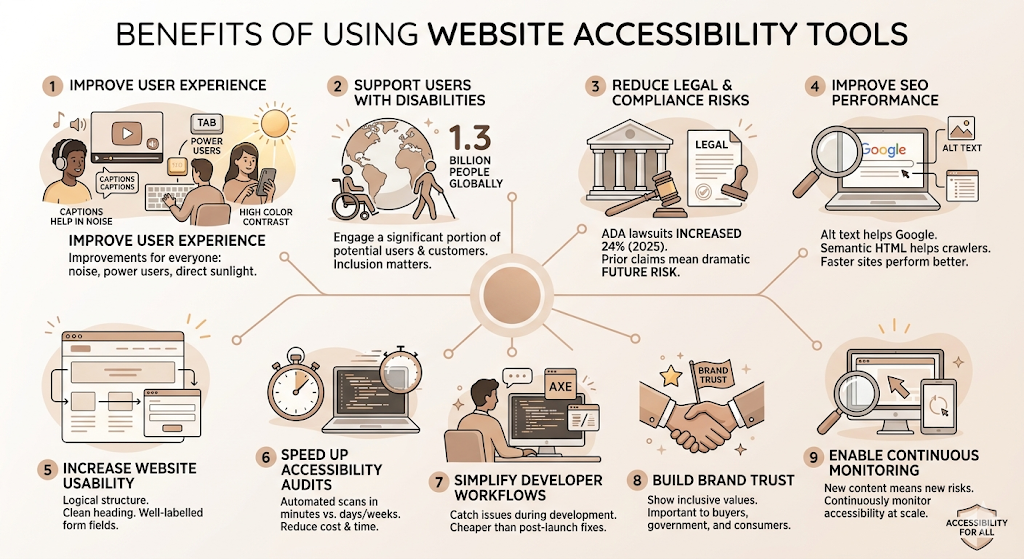
Accessibility improvements aren’t only for users with disabilities. Captions help people watching videos in noisy environments. Keyboard navigation helps power users. High colour contrast helps anyone using a screen in direct sunlight. The side effects of accessible design tend to improve the experience for everyone.
Support Users with Disabilities
1.3 billion people globally live with a disability. Designing them out of your digital experience isn’t a neutral business decision -it’s leaving a significant portion of potential users and customers unable to engage with your product.
Reduce Legal and Compliance Risks
The numbers are clear. ADA web accessibility lawsuits increased nearly 24% in 2025 year-over-year, according to EcomBack’s annual litigation report. Of the more than 5,000 digital accessibility cases filed in 2025, 1,427 targeted companies that had already faced a prior claim -meaning not fixing the underlying issues after a lawsuit dramatically increases future risk.
Improve SEO Performance
Accessibility and SEO overlap more than most teams realise. Alt text helps Google understand images. Semantic HTML structure helps crawlers parse content correctly. Descriptive link text improves anchor text quality. Fast-loading, well-structured accessible sites tend to perform better in search.
Increase Website Usability
Clean heading structure, logical tab order, and well-labelled form fields improve usability for all users -not just those using assistive technology.
Speed Up Accessibility Audits
Manual accessibility audits take days or weeks and cost thousands of dollars. Automated tools run initial scans in minutes and give remediation teams a prioritised starting point, dramatically reducing the time and cost of maintaining compliance.
Simplify Developer Workflows
Catching accessibility issues in the browser extension or CI/CD pipeline during development is dramatically cheaper than fixing them post-launch. Tools like axe DevTools are specifically designed to fit into the developer workflow without adding friction.
Build Brand Trust
Publicly demonstrating accessibility commitment -through an accessibility statement, VPAT (Voluntary Product Accessibility Template), or visible compliance work -signals that an organisation takes inclusion seriously. That matters to institutional buyers, government clients, and increasingly, consumer audiences.
Enable Continuous Accessibility Monitoring
New content means new risks. Continuous monitoring platforms make it possible to stay on top of accessibility compliance at scale, without requiring a manual audit every time a page is updated.
Who Should Use Website Accessibility Tools?
The honest answer is: anyone responsible for a website that people actually use. But the use cases differ meaningfully.
Web Developers
Developers benefit most from tools that integrate directly into their coding environment -browser extensions, CLI tools, Jest integrations, and CI/CD pipeline hooks. The goal is catching issues at the source, before they’re deployed.
UX/UI Designers
Design-stage accessibility tools -colour contrast checkers, Figma plugins, and prototype testing tools -help designers make accessible choices before a single line of code is written. Catching a contrast issue in a Figma file takes seconds. Catching it after the component is live in production takes significantly longer.
QA Teams
QA teams need tools that can run automated accessibility tests alongside functional tests, flag regressions, and integrate with existing issue-tracking systems like Jira.
Digital Agencies
Agencies managing accessibility for multiple clients need platforms that support multi-site monitoring, white-label reporting, and scalable scanning. DubBot is specifically designed for this use case.
Enterprise Organizations
Large organisations with complex digital footprints need governance-level platforms with team collaboration, progress tracking, compliance documentation, and integration with existing tech stacks. Siteimprove and Level Access are built for this.
Government Organizations
Government entities face specific legal requirements under ADA Title II and Section 508. Level Access is the only FedRAMP-authorised solution in this space -a meaningful distinction for federal government use.
Educational Institutions
Universities and schools manage large websites with diverse content types: course materials, PDFs, video content, and more. Continuous monitoring platforms that include PDF testing and multimedia accessibility checks are particularly relevant.
Healthcare Providers
Healthcare organisations receiving HHS funding must conform their web content and mobile apps to WCAG 2.1 AA by May 11, 2026, under the HHS Section 504 rule that came into force in 2026. The deadline is immediate for this sector.
E-commerce Businesses
E-commerce sites are disproportionately targeted in ADA accessibility litigation -online retail consistently tops the list of affected industries in annual lawsuit reports. The financial case for proactive compliance is especially clear here.
Best Website Accessibility Tools in 2026
These are the platforms worth evaluating based on real-world use, developer community trust, and current pricing data.
WAVE (Web Accessibility Evaluation Tool)
Overview: Built by WebAIM, WAVE is one of the most recognised free browser-based accessibility evaluation tools available. It provides visual feedback by injecting icons and indicators directly into your page, showing you exactly where issues exist in context.
Best for: Quick visual accessibility audits, developers wanting immediate on-page feedback, and teams doing manual spot-checking.
Key Features: Visual overlay of accessibility errors directly on the page, structural analysis of headings and landmarks, colour contrast checker, ARIA attribute review, and detailed documentation for each issue.
Pros: Free. Highly visual and easy to interpret. Respected in the accessibility community. No installation required for the web version.
Cons: Page-by-page only -no site-wide scanning or bulk reporting. No ongoing monitoring. Not designed for enterprise-scale compliance tracking.
Pricing: Free. Browser extensions are available for Chrome and Firefox at no cost.
Ideal Users: Individual developers, small business owners doing initial audits, accessibility students and beginners.
axe DevTools
Overview: Built by Deque Systems, axe DevTools is the professional version of the open-source axe-core engine that powers dozens of other tools in this category. It’s the de facto standard for automated accessibility testing in development workflows.
Best for: Development teams wanting accessibility testing integrated directly into their coding and testing workflows.
Key Features: Zero-false-positive guarantee for flagged issues, intelligent guided testing for issues that require human judgment, CI/CD pipeline integration with Jest, Playwright, and Cypress, enterprise reporting via axe Monitor, and deep WCAG 2.2 coverage.
Pros: Developer-trusted. Zero false positives is a meaningful time-saver. Excellent IDE and CI/CD integration. Free browser extension available.
Cons: The paid tiers get expensive at scale. Enterprise monitoring requires a separate AXE Monitor purchase. The free extension doesn’t include guided testing workflows.
Pricing: Browser extension is free. axe DevTools Pro starts at $40/month per user. Enterprise plans with Axe Monitor require custom quotes.
Ideal Users: Development teams, QA engineers, organisations building accessibility into their CI/CD pipeline.
Accessibility Insights
Overview: Built by Microsoft, Accessibility Insights is a free tool with two main products: Accessibility Insights for Web (a browser extension) and Accessibility Insights for Windows (a desktop application). It’s widely used in developer and QA contexts.
Best for: Developer-led manual and semi-automated testing, teams already in the Microsoft ecosystem.
Key Features: FastPass automated checks covering around 50 issue types, full assessment guided workflows, tab stops testing for keyboard navigation, and colour contrast analysis.
Pros: Free and open-source. Strong keyboard navigation testing. Clear guided assessment workflows for manual testing. Active development from a credible engineering team.
Cons: No continuous monitoring. No enterprise reporting or team collaboration features. Limited site-wide scanning.
Pricing: Free.
Ideal Users: Developers and QA teams wanting a free, thorough manual testing framework.
Siteimprove Accessibility
Overview: Siteimprove is an enterprise-grade platform designed for organisations managing large, complex digital footprints. It provides continuous site-wide monitoring and translates raw scan data into manageable team workflows.
Best for: Enterprise organisations, large government entities, teams needing governance-level accessibility management.
Key Features: Continuous site-wide scanning, PDF accessibility testing, issue prioritisation by severity and WCAG level, team assignment and progress tracking dashboards, CMS integrations, and accessibility statement generation.
Pros: Best-in-class enterprise reporting. Excellent at managing compliance at scale. Includes PDF testing. Strong team workflow features.
Cons: Pricing is enterprise-tier -not accessible for small teams. It can feel heavy for simple use cases. Requires onboarding investment.
Pricing: Custom pricing. Typically, enterprise contracts start in the thousands per year.
Ideal Users: Enterprise organisations, government agencies, universities, and large digital agencies.
Monsido
Overview: Monsido is a web governance platform that includes accessibility as one of its core pillars alongside quality assurance and SEO. It offers continuous monitoring and is aimed at marketing and content teams as much as technical ones.
Best for: Organisations wanting a combined web governance platform rather than a standalone accessibility tool.
Key Features: Automated accessibility scanning, policy management, content quality checking, SEO monitoring, and detailed compliance dashboards.
Pros: Broader than just accessibility -useful for content and quality governance too. Good for non-technical stakeholders. Clear issue prioritisation.
Cons: Not as developer-focused as axe DevTools. Pricing is enterprise. Some users report the scanner misses dynamic content issues.
Pricing: Custom pricing on request.
Ideal Users: Marketing teams, content managers, organisations wanting web governance beyond accessibility alone.
EqualWeb
Overview: EqualWeb combines an AI-powered accessibility widget with optional expert manual auditing at higher service tiers. It’s positioned as a hybrid solution -automation plus human review -for organisations that want compliance support without building an internal team.
Best for: Small to mid-market businesses wanting managed compliance support, organisations in regulated sectors needing VPATs.
Key Features: AI-powered widget with automated remediation, manual expert audit services, VPAT generation, continuous monitoring, and multi-language support.
Pros: Accessible pricing for smaller organisations. Expert human review available. Strong multi-language and international market coverage.
Cons: Like all overlays, the widget layer cannot fix underlying code-level issues. Expert audit services add cost. Less developer-friendly than axe DevTools.
Pricing: Widget starts at approximately $490/year. Expert audit pricing available on request.
Ideal Users: SMBs, international organisations, businesses needing VPATs without a large internal accessibility team.
UserWay
Overview: UserWay is best known for its AI-powered accessibility widget, but the platform has expanded significantly -particularly following its acquisition by Level Access. It now offers scanning services, professional audits, VPAT creation, and PDF remediation alongside the widget.
Best for: Small businesses starting their accessibility journey, organisations wanting an all-in-one widget plus scanning package.
Key Features: AI-powered accessibility widget, site scanning across 100 to 1,500+ pages, VPAT services, PDF remediation, and CMS integrations including WordPress, Shopify, and Wix.
Pros: Easy to install. Broad CMS support. Post-acquisition access to Level Access professional services. The scanning service provides documented compliance evidence.
Cons: The widget can’t substitute for code-level remediation. In 2025, lawsuits explicitly referencing inaccessible widget users increased. Scanning pricing escalates quickly at larger page volumes.
Pricing: Widget starts at $49/month. Scanning service: $990/year for 100 pages, $4,490/year for 500 pages, $10,990/year for 1,500 pages.
Ideal Users: Small businesses, e-commerce sites on popular CMSs, teams wanting documented scanning evidence alongside a widget.
AudioEye
Overview: AudioEye combines automated scanning, real-time monitoring, AI-powered remediation, and access to certified human accessibility experts. It offers ADA legal defence coverage in its managed service tiers -a feature that distinguishes it in the market.
Best for: Mid-market companies and enterprises wanting a hybrid automated-plus-expert approach with built-in legal protection.
Key Features: Continuous monitoring, AI-powered automated fixes for common issues, certified expert review, ADA legal defence coverage for managed plans, CI/CD integration (Jest, Playwright, Cypress), and CMS integrations for WordPress, Shopify, Squarespace, Wix, Webflow, and more.
Pros: Hybrid model provides automation efficiency plus human oversight. ADA defence coverage is a unique risk mitigation feature. Strong CMS integration list. Developer-friendly SDK.
Cons: Higher pricing than widget-only competitors. Some users report that the automated fix layer can introduce new issues. ADA defence coverage terms should be reviewed carefully.
Pricing: Plans from approximately $45/month. Enterprise managed services start at $15,000+/year.
Ideal Users: Mid-market e-commerce, healthcare, and financial services businesses; organisations that want legal protection alongside compliance tooling.
Level Access
Overview: Level Access is the most comprehensive enterprise accessibility platform in this guide -combining automated scanning, manual expert testing by certified professionals (many of whom have disabilities themselves), real assistive technology testing, and FedRAMP-authorised government compliance support. UserWay is now under the Level Access umbrella.
Best for: Enterprise organisations, federal government contractors, heavily regulated industries requiring documented compliance evidence.
Key Features: Automated and manual testing combined, expert team with certified accessibility specialists, assistive technology testing, comprehensive reporting and audit trails, governance workflows, and FedRAMP authorisation for government use.
Pros: The most thorough testing model available. Government-grade compliance documentation. Deep coverage of WCAG, Section 508, and EN 301 549. Credibility in legal defence contexts.
Cons: Pricing is significantly higher than most platforms. Requires onboarding and partnership engagement rather than self-serve. Overkill for small or mid-market websites.
Pricing: Paid annual plans starting from approximately $25,000 for entry-level tiers.
Ideal Users: Enterprise organisations, federal agencies and contractors, highly regulated industries, and organisations facing active litigation.
DubBot
Overview: DubBot is a web governance platform built specifically with digital agencies and higher education in mind. It combines accessibility testing with SEO, quality assurance, and content management across multiple sites -making it a natural fit for agencies managing accessibility for client portfolios.
Best for: Digital agencies, higher education institutions, multi-site web teams.
Key Features: Multi-site management, automated WCAG scanning, SEO and content quality monitoring, PDF testing, customisable reports, and white-label reporting options.
Pros: Strong multi-site management. Good fit for agencies and universities. Combines accessibility with broader web quality checks. Competitively priced for the feature set.
Cons: Less well-known than enterprise platforms. Developer-focused CI/CD integration is limited compared to axe DevTools.
Pricing: Available on request. Generally, more affordable than Siteimprove for comparable multi-site use cases.
Ideal Users: Digital agencies, universities, government entities managing multiple web properties.
Website Accessibility Tools Comparison Table
| Tool | Best For | WCAG Testing | Continuous Monitoring | Browser Extension | Enterprise Features |
| WAVE | Quick audits | 2.1 AA | No | Yes (free) | No |
| axe DevTools | Developers / CI-CD | 2.2 AA | Via axe Monitor | Yes (free + pro) | Yes |
| Accessibility Insights | Manual / developer | 2.1 AA | No | Yes (free) | No |
| Siteimprove | Enterprise governance | 2.2 AA | Yes | No | Yes |
| Monsido | Web governance | 2.1 AA | Yes | No | Yes |
| EqualWeb | SMB managed | 2.1/2.2 AA | Yes | No | Partial |
| UserWay | Widget + scanning | 2.1/2.2 AA | Yes (paid) | No | Partial |
| AudioEye | Hybrid + legal cover | 2.2 AA | Yes | No | Yes |
| Level Access | Enterprise + govt | 2.2 AA + 508 | Yes | No | Yes |
| DubBot | Agencies + higher ed | 2.1 AA | Yes | No | Partial |
Website Accessibility Tools vs Accessibility Overlays
This is a topic the industry has largely settled on, even if the marketing claims from overlay vendors haven’t caught up.
What Are Accessibility Overlays?
Accessibility overlays are JavaScript widgets -a snippet of code added to a website -that provide user-facing controls for adjusting visual presentation (font size, contrast, cursor size) and attempt automated detection and remediation of certain code-level issues. They’re sold as a fast, low-effort path to compliance.
Key Differences
Website accessibility tools -scanners, audit platforms, developer testing tools -identify issues in the underlying code and help teams fix them at the source. Overlays sit on top of existing code and attempt to patch problems client-side. The key difference: one fixes the house, the other hangs curtains.
Pros and Cons
Overlays are fast to install and inexpensive at entry level. For non-technical teams, the widget gives some users immediate control over their experience. That’s real value for certain user groups.
But overlays can’t fix inaccessible code they don’t control. They can’t make a form label exist where the developer didn’t include one. They can interfere with screen readers. And in 2025, ADA lawsuits explicitly referencing accessibility widget users increased -with courts finding that widgets don’t substitute for substantive remediation, according to UsableNet’s 2026 ADA lawsuit trend analysis.
The FTC’s $1 million fine against accessiBe in April 2025 for deceptively claiming its overlay could make any website WCAG-compliant was a regulatory signal the industry won’t be forgetting quickly.
Which Approach Is Better?
Code-level remediation with proper testing tools is the only reliable path to genuine compliance. Overlays can be a supplementary user-experience tool for certain accessibility preferences. They should not be the primary compliance strategy, and they don’t provide the governance documentation -audit reports, remediation logs, monitoring records -that ADA enforcement increasingly requires.
Accessibility overlays cannot substitute for code-level accessibility remediation. The FTC fined accessiBe $1 million in April 2025 for deceptively claiming its overlay could achieve full WCAG compliance. In 2025, ADA lawsuits explicitly naming overlay-using defendants continued to increase, with courts expecting substantive code-level fixes rather than widget-based patches.
How to Choose the Right Website Accessibility Tool
Compliance Requirements
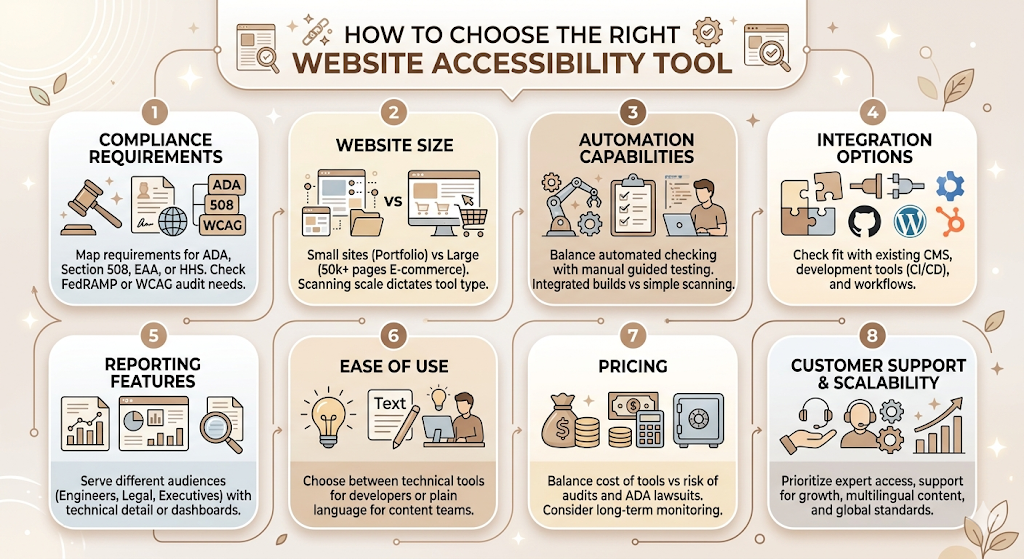
Start here. Are you subject to Section 508? ADA Title III? The European Accessibility Act? The HHS Section 504 rule for healthcare? Each has different documentation requirements. If you’re a federal contractor or government entity, Level Access’s FedRAMP authorisation matters. If you’re a healthcare provider with HHS funding, you need a tool that can document WCAG 2.1 AA conformance with audit trails -compliance was due May 2026.
Website Size
A 10-page portfolio site and a 50,000-page e-commerce platform have completely different scanning needs. Free tools like WAVE work fine for manual, page-level audits. Enterprise monitoring platforms become necessary once the site scale makes manual checking impractical.
Automation Capabilities
How much of the accessibility checking do you want automated vs. guided manually? Developer teams usually want automation integrated into their build tools. Marketing and content teams usually want a platform that surfaces issues without requiring technical interpretation.
Integration Options
What tools does your team already use? If you’re using GitHub and Cypress for testing, axe DevTools’ CI/CD integration matters. If you’re running a WordPress site with HubSpot, AudioEye’s native CMS integrations reduce friction. Integration fit is underrated as a selection criterion.
Reporting Features
Who will be reading the reports? Engineers want code-level detail. Legal teams want WCAG success criterion references and documentation. Executives want dashboards showing the overall compliance posture and trend over time. Make sure the reporting output actually serves the people responsible for acting on it.
Ease of Use
Some tools are built for developers and assume you know what ARIA attributes are. Others translate WCAG requirements into plain language for content teams. Silktide’s approach of making accessibility understandable to non-technical marketing teams is genuinely different from the raw output of axe DevTools.
Pricing
Free tools are a reasonable starting point for small sites. The cost of a basic accessibility audit ($2,500 to $10,000) is significantly lower than the average ADA lawsuit settlement ($60,000 to $200,000+). Continuous monitoring platforms cost more but reduce the risk of compliance drift over time.
Customer Support
Enterprise accessibility is not a set-and-forget activity. If something breaks -a CMS update introduces new violations, a legal challenge arises -having responsive support and access to certified accessibility specialists matters. Level Access and AudioEye both offer expert access as part of their service model.
Scalability
Your website today is not your website in two years. Choose a platform that can scale with your site’s growth in pages, content types, and markets -including support for multilingual content and global standards like EN 301 549.
Read More: Top 10 Rank Tracking Tools in 2026
Common Accessibility Issues: Website Accessibility Tools Detect
Missing Alternative Text
When an image has no alt attribute, or has an empty or meaningless one (like “image001.jpg”), screen readers either skip it or read the filename. Alt text needs to describe the function or content of the image -not just confirm that an image is there. Alt text for decorative images should be empty (alt=””) to tell screen readers to skip them entirely.
Poor Colour Contrast
WCAG 2.1 requires a contrast ratio of at least 4.5:1 for normal text and 3:1 for large text against the background. Low contrast affects users with low vision, colour blindness, and anyone reading in difficult lighting conditions. Colour contrast is one of the most consistently failed criteria in large-scale scans.
Missing Form Labels
Every form input -text fields, dropdowns, checkboxes -needs a programmatic label that tells the user what information is expected. “Enter your email” as visible placeholder text doesn’t count as a label in most cases. Screen readers need the label element explicitly associated with the input via id and for attributes.
Keyboard Navigation Problems
Keyboard-only users should be able to reach every interactive element on a page using Tab, navigate within components using Arrow keys, and close modals with Escape. Common failures include focus getting “trapped” inside a component, interactive elements that don’t receive focus at all, or custom widgets that only respond to mouse clicks.
Empty Links
Links with no text -typically icon links or image links without alt text -leave screen reader users with no context about where the link goes. “Click here” and “Read more” as link text are also failures, since they’re meaningless without visual context.
Improper Heading Structure
Headings (H1 through H6) should form a logical outline of page content. Skipping from an H2 to an H4, or using heading tags for visual styling rather than structure, confuses screen reader users who navigate by heading. Every page should have exactly one H1.
Missing ARIA Labels
ARIA (Accessible Rich Internet Applications) attributes allow developers to communicate the role, state, and properties of custom UI components to assistive technology. Incorrect or missing ARIA labels -an unlabelled icon button, a slider with no value range communicated -leave screen readers with no way to describe the component to users.
Multimedia Accessibility Issues
Video content needs captions and audio descriptions. Audio content needs transcripts. Autoplay video or audio without user control violates WCAG. These are among the issues that purely automated scans can flag partially, but testing the quality and accuracy of captions requires human review.
Focus Indicator Problems
WCAG 2.2 introduced enhanced focus visibility requirements (Success Criterion 2.4.11). The focus indicator -the visible outline that shows which element is currently focused during keyboard navigation -must meet specific contrast and size requirements. Many sites suppress the default browser focus ring via CSS for aesthetic reasons, leaving keyboard users with no visual guide.
Best Practices for Improving Website Accessibility
Combine Automated and Manual Testing
This is not optional. Automated tools catch 25% to 33% of WCAG issues at best, according to accessibility researcher Karl Groves’ analysis. The remaining 67% to 75% require human judgment -contextual alt text review, logical reading order, the actual experience of navigating with a screen reader. Build both into your process.
Test with Real Users
Testing with users who have disabilities provides insights that no automated tool or expert evaluator can fully replicate. Organisations like Fable and UserTesting’s accessibility panel offer user research with disabled participants. Even a small number of sessions surfaces usability patterns that tests miss entirely.
Follow WCAG 2.2 Guidelines
WCAG 2.2, released in October 2023, adds important new success criteria beyond WCAG 2.1. These include focus appearance (2.4.11), dragging movements alternatives (2.5.7), target size minimums for interactive elements (2.5.8), and accessible authentication (3.3.7 and 3.3.8). Courts and regulators are moving toward 2.2 AA as the expected benchmark, and your tooling should reflect that.
Perform Regular Accessibility Audits
Accessibility is not a one-time project. New content, new components, and CMS updates introduce new barriers constantly. The WebAIM Million Report showed a 10.1% increase in errors from the previous year across the top one million home pages -on sites that have presumably been “accessible” for some time. Regular audits, scheduled quarterly at a minimum for active sites, are standard practice.
Train Development Teams
Most accessibility issues are introduced during development, not deliberately -they’re the result of teams not knowing the requirements. Training developers on semantic HTML, ARIA patterns, and WCAG success criteria dramatically reduces the volume of issues that need to be remediated post-launch. Deque University offers WCAG and accessibility training specifically aimed at developers.
Integrate Accessibility into CI/CD
The earlier in the development cycle an accessibility issue is caught, the cheaper it is to fix. A missing label caught in a browser extension during development takes 30 seconds to fix. The same issue found in a legal complaint after launch costs significantly more to resolve. CI/CD integration accessibility testing -using axe DevTools, axe-core, or AudioEye’s SDK -makes accessibility checks automatic rather than optional.
Monitor Accessibility Continuously
Post-launch monitoring is the only way to maintain compliance as content changes. Set up automated monitoring with a platform like Siteimprove, AudioEye, or DubBot, and configure alerts for new violations above a threshold. This keeps compliance drift manageable rather than letting it accumulate into a remediation backlog.
Challenges and Limitations of Website Accessibility Tools
Automated Testing Cannot Detect Every Issue
This bears repeating because the misconception that running a scan equals being compliant is the source of most accessibility legal risk. Automated tools are excellent at catching specific, rule-based issues. They cannot evaluate whether alt text is meaningful, whether a reading order makes logical sense, or whether a custom dropdown is actually usable with a screen reader.
Manual Testing Is Still Essential
Given the above, any accessibility programme that relies exclusively on automated tools is, at best, partially compliant. Manual expert testing, and ideally testing with disabled users, is required for meaningful compliance -not just legal defensibility.
False Positives
Automated scanners flag issues that require human interpretation. Some are genuine violations. Some depend on context. Some are false positives -the scanner flags something as a failure that is actually correct in that specific situation. False positives waste developer time and erode trust in the tool. axe DevTools’s zero-false-positive guarantee for flagged issues addresses this directly.
Accessibility Requires Ongoing Maintenance
Compliance isn’t a state you achieve and then maintain passively. It’s a continuous practice. New features, new content, third-party scripts, and CMS updates all introduce new barriers. Teams that approach accessibility as a one-time remediation project consistently find themselves back in violation within months of completing the work.
Compliance Standards Continue to Evolve
WCAG 3.0 is in development. EN 301 549 updates in line with WCAG revisions. New laws -the EAA, India’s SEBI mandate, state-level legislation in California, New York, and Colorado -continue to expand the scope of what’s required. A tool that meets the current standard today may require updates as requirements shift.
Future Trends in Website Accessibility Tools
AI-Powered Accessibility Testing
AI is already being used in production accessibility tools to evaluate alt text quality, flag ambiguous link labels, and assess the contextual appropriateness of ARIA labels -things that purely rule-based engines can’t do. This is the most significant shift in accessibility tooling in years and it’s still maturing.
Continuous Accessibility Monitoring
The market has moved decisively away from point-in-time audits as the primary compliance mechanism. Continuous monitoring is now the expected baseline for enterprise sites. Tools that provide real-time alerts for new violations are replacing the annual audit model.
Accessibility Testing in DevSecOps
Just as security testing has moved into the development pipeline (DevSecOps), accessibility testing is following the same pattern. The goal is to make accessibility checks as routine as unit tests and security scans -automated, non-blocking during development, and blocking on critical failures before deployment.
Real-Time Accessibility Remediation
Some platforms are beginning to move beyond detection into real-time fix application. TestParty, for example, scans source code and delivers fixes directly as code changes integrated with GitHub. This direction raises questions about oversight and regression risk, but the capability is clearly where a segment of the market is heading.
AI-Assisted Code Fixes
Several platforms now generate draft remediation code alongside flagged issues -not just explaining what’s wrong, but suggesting the HTML or ARIA attribute change needed to fix it. As AI coding tools become more accurate, this capability will reduce the time between detection and remediation significantly.
Predictive Accessibility Analysis
Emerging tools are starting to analyse design files and component libraries for accessibility issues before code is written -predicting which design choices will create WCAG violations at the build stage. This is the logical endpoint of “shift left” accessibility testing.
Accessibility tooling is shifting from point-in-time scanning toward continuous monitoring, CI/CD integration, and AI-powered detection and remediation. The most forward-looking platforms now combine automated scanning, real-time alerts, AI-assisted fix suggestions, and integration into design and development tools -making accessibility compliance a continuous process rather than a periodic audit event.
Wrapping Up
If the litigation trend data from 2025 isn’t enough to move accessibility up the priority list, consider the practical reality: 94.8% of websites fail basic accessibility standards. That’s not a compliance gap -it’s a near-universal design failure affecting a massive portion of every site’s actual users.
The right website accessibility tool won’t make compliance automatic. No tool does. But the right platform will help your team find issues faster, fix them more efficiently, and keep the site compliant as it grows. For most development teams, that means combining Axe DevTools or Accessibility Insights for developer-stage testing with a continuous monitoring platform like AudioEye or Siteimprove for post-launch coverage. For enterprises with government contracts or Section 508 requirements, Level Access is the standard.
What doesn’t work -and the FTC and 5,000+ lawsuits in 2025 are both pointing at the same conclusion -is an overlay widget as your primary compliance strategy. Fix the code. Use tools that help you do that systematically. Then monitor continuously so you don’t drift.
Frequently Asked Questions
What are website accessibility tools?
Website accessibility tools are software platforms, browser extensions, and testing frameworks that help teams identify and fix barriers preventing people with disabilities from using a website. They test against standards like WCAG 2.1 AA and 2.2 AA and range from free browser extensions like WAVE to enterprise monitoring platforms like Siteimprove and Level Access.
Why are website accessibility tools important?
Inaccessible websites exclude users with disabilities, create significant legal risk under ADA, Section 508, and the European Accessibility Act, and undermine SEO and overall usability. Over 5,000 digital accessibility lawsuits were filed in the US in 2025, with settlements averaging $60,000 to $200,000+. Website accessibility tools make it possible to identify and fix issues systematically rather than discovering them in a legal complaint.
Can accessibility tools make a website fully WCAG compliant?
No. Automated tools reliably catch 25% to 33% of WCAG guidelines, according to researcher Karl Groves. The remaining issues require human judgment -manual expert testing, and ideally testing with disabled users. Full WCAG compliance requires a combination of automated scanning, manual testing, and ongoing monitoring.
What’s the difference between automated and manual accessibility testing?
Automated accessibility testing uses tools to scan code and rendered pages for violations that can be programmatically detected -missing alt text, colour contrast failures, and missing form labels. Manual testing involves a human evaluating issues that require judgment -whether alt text is actually meaningful, whether reading order makes logical sense, and whether custom components are genuinely usable with assistive technology. Both are required for meaningful compliance.
Which website accessibility tool is best for developers?
axe DevTools is the most widely trusted developer accessibility tool. It integrates directly into CI/CD pipelines via Jest, Playwright, and Cypress, offers a zero-false-positive guarantee for flagged issues, and has both a free browser extension and paid professional tiers. Accessibility Insights from Microsoft is also a strong free option for manual and semi-automated developer testing.
Are free accessibility tools enough for enterprise websites?
For initial scanning and developer-level debugging, free tools like WAVE and the axe DevTools browser extension are genuinely useful. But enterprise sites -with hundreds or thousands of pages, regular content updates, multiple team members, and legal compliance requirements -need continuous monitoring, audit trails, team collaboration features, and governance documentation. Free tools don’t provide any of that.
How often should accessibility testing be performed?
At a minimum, a full accessibility audit should be conducted annually. For active websites with regular content updates, continuous automated monitoring should run at all times, with manual testing reviews quarterly. Any significant site redesign or major feature addition should trigger a dedicated accessibility review before launch.
Do accessibility tools improve SEO?
Yes, with caveats. Accessibility and SEO overlap significantly: alt text helps Google understand images, semantic heading structure helps crawlers parse content hierarchy, descriptive link text improves anchor text quality, and well-structured accessible HTML tends to produce cleaner, faster-loading pages. Accessibility improvements don’t directly boost rankings, but they contribute to the technical and content quality factors that do.
What accessibility standards should websites follow?
Most websites should target WCAG 2.2 Level AA as the minimum standard. This satisfies ADA requirements in the US (which courts benchmark against WCAG 2.1 AA), Section 508 for federal and federally-funded organisations, the European Accessibility Act requirements, and EN 301 549. Healthcare organisations with HHS funding should note that the HHS Section 504 rule enforcing WCAG 2.1 AA compliance came into effect in May 2026.
How do I choose the best website accessibility tool for my needs?
Start with your compliance requirements -what laws apply to your organisation? Then consider your site size, your team’s technical level, and your existing development and CMS infrastructure. Developers building accessibility into their workflow should look at axe DevTools. Small businesses doing initial audits can start with WAVE for free. Enterprises managing large sites need a continuous monitoring platform like Siteimprove, AudioEye, or Level Access. The most common mistake is picking a tool before understanding which compliance requirements actually apply to you.